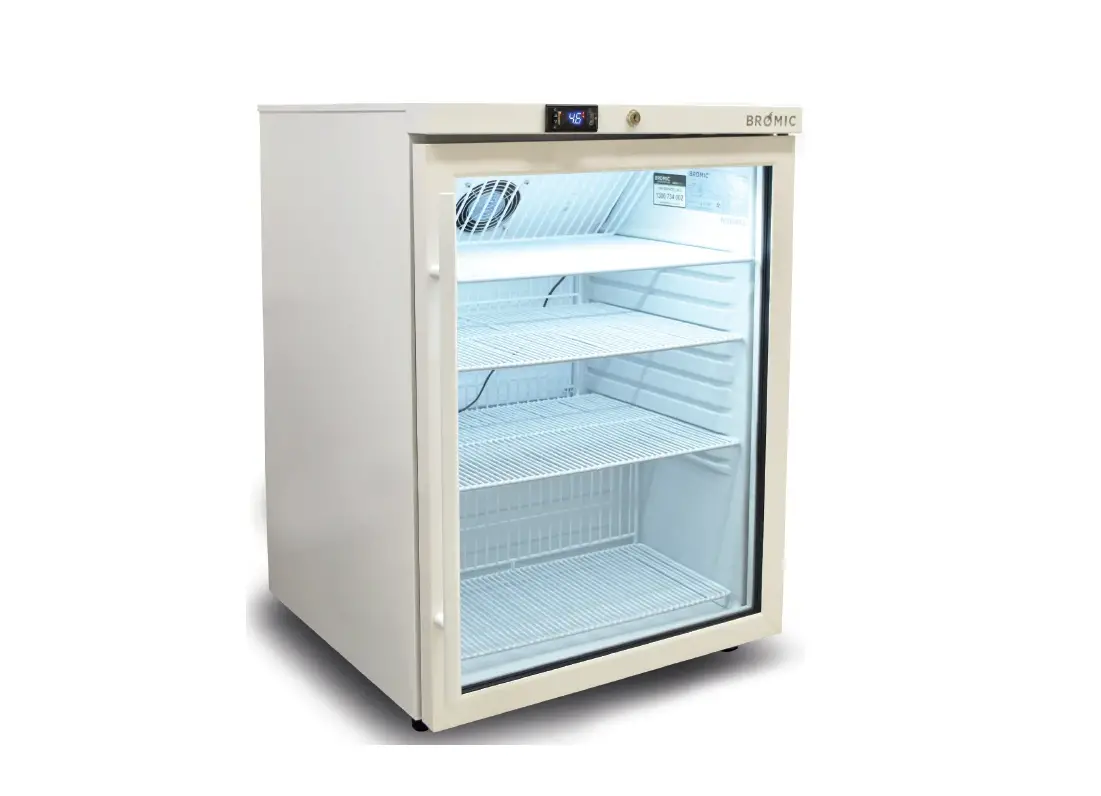

INSTRUCTION MANUAL
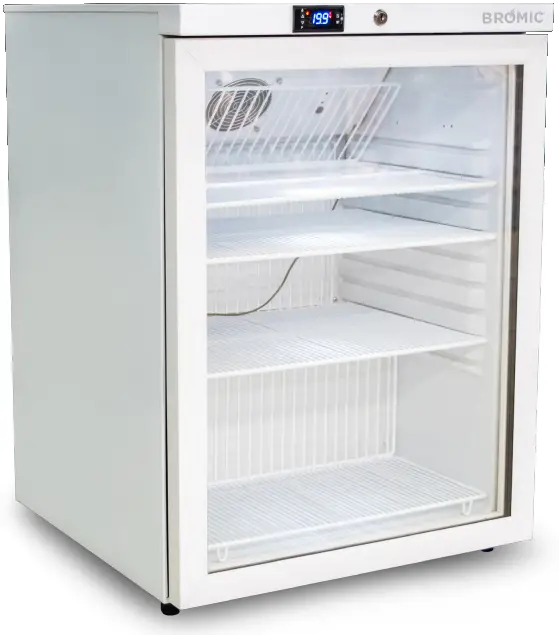
MEDIFRIDGE ™
DISPLAY CHILLER
MED0140GD-NR
QUALITY MATTERS
22/03/2022
Note: Bromic Refrigeration reserves the right to make changes to specifications, parts, components and equipment without prior notification. This Installation, operation and service manual may not be reproduced in any form with prior written consent from Bromic Refrigeration.
1. PREFIX
This manual contains important information about the installation, operation, and maintenance of Bromic MediFridge™. Please pay close attention to the important safety information shown throughout this instruction manual. Any safety information will be accompanied by the following safety alert symbols:
 DANGER, WARNING, IMPORTANT
- READ THIS MANUAL CAREFULLY before installing or servicing this product.
- Improper installation, operation, or maintenance can result in death, severe injury, or property damage.
- This appliance is intended for 230-240 Volt power supply.
- Installation MUST be carried out by a licensed and authorised technician in accordance with local electrical codes.
2. IMPORTANT NOTES AND WARNINGS
- Read all instructions before installing or using this appliance
- Retain this manual for future reference
- Use this appliance only as described in this manual. Any other use not recommended by the manufacturer may cause fire, electric shock or injury to persons.
- Improper installation, adjustment or alteration and failure to follow the warnings and instructions in this manual could result in severe personal injury, death or property damage
- The manufacturer is not responsible for any damage that could happen from improper use. The manufacturer emphasises that this appliance should be used in a responsible manner and that all procedures, warnings, and safety instructions contained in this booklet be followed strictly.
- Check the appliance for damage. Do not operate a damaged unit.
- Check for damage to the appliance regularly. If damage to the appliance is suspected, discontinue use immediately and contact the supplier or qualified person to repair.
- This appliance is not intended for use by persons (including children) with reduced physical, sensory or mental capabilities, or lack of experience and knowledge, unless they have been given supervision or instruction concerning use of the appliance by a person responsible of their safety.
- Keep packaging material out reach of children
- Children should be carefully supervised to ensure that they do not play with the appliance
- Do not attempt to alter the appliance in any manner.
- Please pay attention to the maximum load limit when filling the shelves.
- All work on electrical equipment must be carried out by a qualified and licenced technician only.
- Do not perform maintenance until the appliance has been turned off and power disconnected.
- Never detach any cover except where specifically instructed in this manual. Doing so might expose live electrical parts.
- Do not operate the appliance with panels, covers or guards removed.
- Keep the air intake and outlets free of obstructions.
- Do not use the appliance outdoors.
- If the supply cord becomes damaged, it must be replaced by an authorised service agent or similarly qualified person in order to avoid a hazard.
- If the appliance has not been used, or will not be used for a long period of time, disconnect power supply.
- Ensure the appliance has adequate ventilation.
- The top of the cabinet should not be used for the storage of any objects and must be clean and dry at all times.
3. PRODUCT OVERVIEW
| Part Number | 3736213 | External (mm) | Internal (mm) | |
| Capacity | 145L | Height | 820 | 687 |
| Weight | 40kg | Width | 595 | 491 |
| Air Circulation | Fan-Forced | Depth | 595 | 510 |
| Temperature | Range | 2°C to 8°C | ||
| Min/Max Temp Recorder | Yes | |||
| Display | Digital | |||
| Exterior Finish | Mild Steel | |||
| Door | Solid or Glass | Low-E Glass + Argon Gas | ||
| Shape | Flat | |||
| Self-Closing | Yes | |||
| Door Lock | Yes | |||
| Door Style | Right hand hinged | |||
| Door opening (W x H) | 595mm x 687mm | |||
| Reversible | No | |||
| Shelves | No. of Shelves | 4 | ||
| Style of Shelves | PVC Coated Wire open rung 7mm apart | |||
| Depth of Shelf | 3 Shelves at 365 mm 1 Shelf at 235 mm | |||
| Adjustable | Yes (middle 2 shelves only) | |||
| Power Supply | Voltage | 240V | ||
| Frequency | 50Hz | |||
| Input Power | 100W | |||
| Refrigeration System | Refrigerant Type | R600a | ||
| Electronic Controller (digital / analogue) | Digital | |||
| Australian Standard Plug | Type | Yes, 10A | ||
| Alarms | Temperature | Yes | ||
| Door | Yes | |||
| Power Failure | No | |||
| Audible | Yes | |||
| Lighting | Internal Light | Yes | ||
| Defrost | Automatic / Manual | Automatic | ||
| Type of Defrost System | OFF Cycle | |||
| Insulation Type | Cyclopentane | |||
| Footing | 30mm Feet at Front. Rollers at back | |||
| Approvals | Quality Care Pharmacy Program Compliance – Cold Chain Testing | |||
4. INSTALLATION
 NOTE: The maximum ambient temperature for the refrigerator is 30°C. Conditions outside this temperature will result in cabinet temperatures outside the required 2 to 8°C range. Bromic recommends that the refrigerator is installed at an ambient temperature of 20 to 25°C.
Locating the Cabinet
Ensure the following instructions are observed as this is vital for proper and trouble-free operation.
- Do not install the cabinet outdoors.
- Locate the appliance in a dry and well ventilated place.
- The unit must be positioned on a level surface.
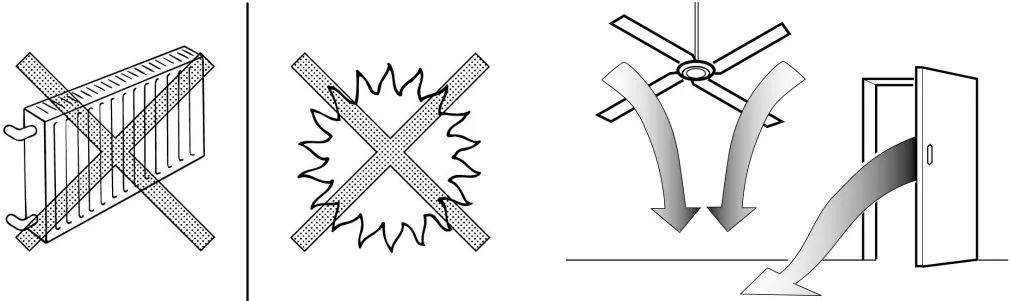
- Do not install in the vicinity of heating radiators or other heat sources.
- Do not install the appliance where it is exposed to direct sunlight.
- Do not install the appliance where it is exposed to warm draughts or open doors.
- Keep the air intake and outlets free of obstructions.
- Adequate allowance should be made for door openings.
Ventilation
Ensure the following instructions are observed as this is vital for proper and trouble-free operation.
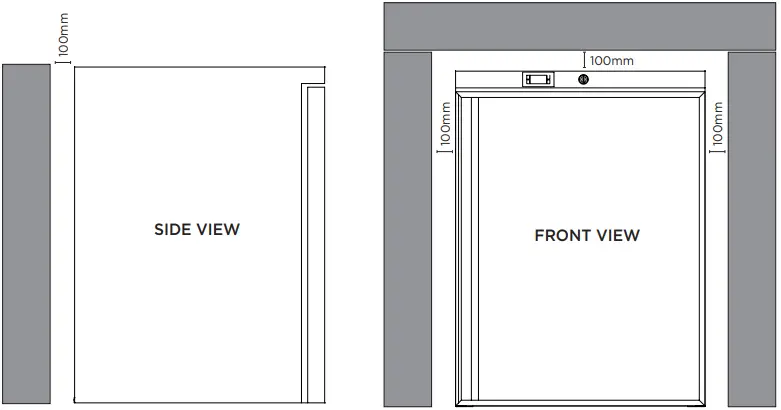
- Allow 100mm clearance between walls and the appliance.
- Ensure that the condenser fan is free to take in ambient air from the room.
- Adherence to minimum clearances is necessary
Power Supply
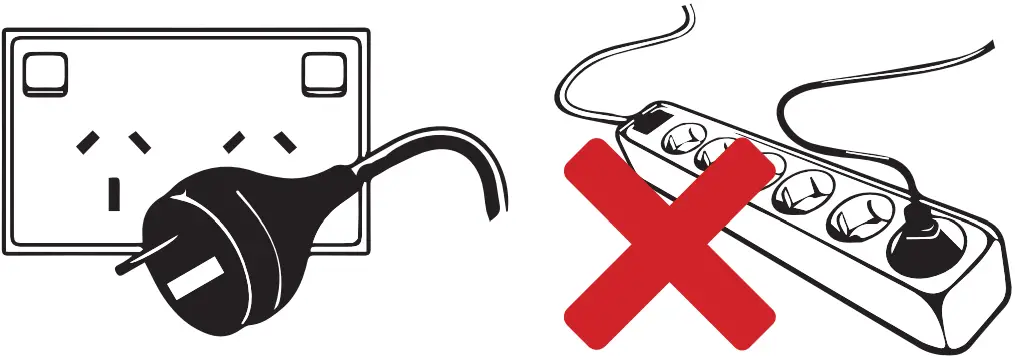
- The appliance must not be plugged into a multiple outlet power board.
- The appliance is supplied with a flexible power cord fitted with a 3-pin plug.
- The socket used must be properly earthed and fuse protected.
- See the rating label inside the cabinet for supply voltage, frequency and current draw.
- Power cable is rated 70°C. It is recommended that the cable should not come into contact with parts over 50°C.
- Do not turn off power before consulting the person responsible.
- Mark the power source clearly, so the refrigerator is not unplugged or turned off accidentally.
Before Operating
- If the appliance has been sharply tilted or transported in the horizontal position, it must be left to stand in the upright position and not plugged in for 1 hour.
- Remove all the packaging material before using the appliance.
- Start the appliance only if it has been installed as described.
5. OPERATION
Start-up
- Connect the appliance to the mains power supply and check that the compressor, electronic controller, lighting and all fans are functioning correctly.
- The compressor and condenser fan should operate should operate 3 minutes after the unit has been connected to the power supply.
- The evaporator fan should operate after the unit has been plugged in.
- The electronic controller will display the current cabinet temperature after the unit has been connected to the power supply.
- The
 LED indicates that refrigeration circuit is operating.
 - During the start-up delay (3 minutes), the LED is flashing
- The
 LED indicates that the refrigeration circuit is defrosting
 LED indicates that refrigeration circuit is operating.
 LED indicates that the refrigeration circuit is defrosting
Setting the temperature
NOTE: The controller is factory set at 4°C. The controller is programmed to control cabinet temperatures between 2 to 8°C.
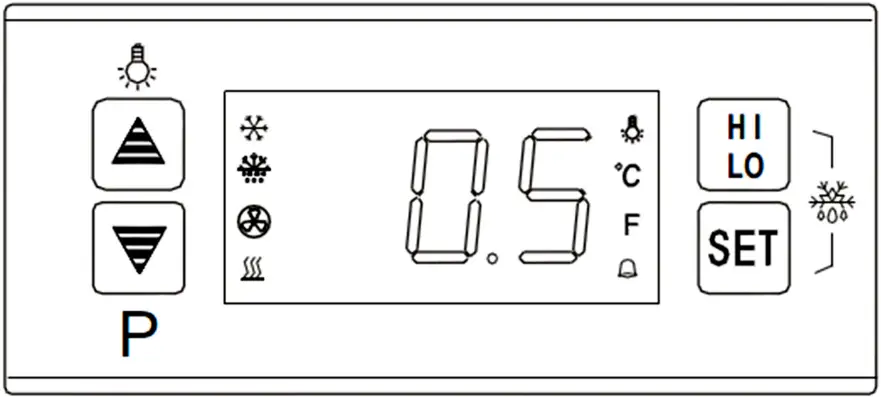
i. Press the  button.
ii. The set temperature will be displayed.
iii. Press  or
or  to adjust the temperature.
iv. Press the button to exit. If no further buttons are pressed within 6 seconds, the cabinet temperature will be displayed.
Display the Product Sensor Temperature
i. Press the button.
ii. The product temperature will flash and display.
iii. After 6 seconds, the cabinet temperature will be displayed.
Operating the Light
i. Press the button to turn internal LED lights ON or OFF
MAX / MIN Temperature Recording
IMPORTANT: Record the maximum and minimum temperatures two (2) times a day. Recordings should be taken before the first door opening of the day.
i. Press the  button once
ii. The highest temperature recording will be displayed.
iii. Press the button again while the highest temperature recording is displayed.
iv. The lowest temperature recording will be displayed.
v. To clear the MAX/MIN recording - Hold the button for 6 seconds
vi. The display will flash for 3 seconds and the buzzer will sound this will clear the previous highest and lowest temperature recording.
vii. The current cabinet temperature will be recorded.
Controller Alarms
If alarms persist, contact the manufacturer or an approved service agent.
| Code | Alarm Type | Corrective Action |
| HI | Cabinet high temperature alarm |
|
| LO | Cabinet low temperature alarm | |
| 1H | Cabinet temperature sensor short circuit |
|
| 1L | Cabinet temperature sensor open circuit | |
| 2H | Product temperature sensor short circuit | |
| 2L | Product temperature open circuit | |
| H2 | Product high temperature alarm |
|
| dR | Door open alarm |
|
6. PRODUCT LOADING AND STORAGE
WARNING: Failure to follow the guidelines below will result in cabinet temperatures above 8°C
IMPORTANT: Run the refrigerator for at least 2 hours before loading.
Start-up
- Clean the interior surface with a soft cloth and warm water before loading.
- Ensure there is free circulation of air between the products.
- Do not block the evaporator fan.
- Do not overstock the refrigerator.
- Use cold mass (i.e. water bottle) on unused shelves.
- Keep refrigerator door openings to a minimum.
- Ensure products are between 2 and 8°C before loading - if there is a breach in the cold-chain, isolate the affected products. Do not use or discard until advise is given.
- Some products are sensitive to ultraviolet (UV) light, please see storage guidelines from the manufacturer before removing from packaging.
- Do not store food and other goods in the refrigerator.
- Maximum recommended shelf load is 20kg.
NOTE: Bromic cannot be responsible for loss of stock or damage to stock. Please refer to the `National Vaccine Storage Guidelines: Strive for 5′ for more information on vaccine storage and handling or contact your local state or territory health department. (http://www.health.gov.au/internet/immunise/publishing.nsf/content/IMM77-cnt)
7. MAINTENANCE
WARNING: Disconnect the appliance from the power supply before performing any maintenance. Never unplug the appliance by pulling on the cord. Always grasp the plug firmly and pull straight out of the outlet.
WARNING: Exposure to significant water ingress will void warranty and cause potential safety issues. If the unit should be exposed to water, please contact the manufacturer immediately.
IMPORTANT: Warranty may be void if there is no evidence of preventative maintenance is performed on the appliance.
Cleaning the Cabinet
- Remove the products and transfer to a suitable location prior to cleaning the inside of the cabinet.
- Do not use any aggressive or abrasive cleaning agents.
- Never use a water hose or a high-pressure jet to clean.
- Do not use sharp or pointed objects for cleaning.
- Clean the inside and outside of the appliance with a clean damp cloth or with a neutral cleanser.
- Dry all surfaces with a dry cloth.
Condenser Coil
IMPORTANT: The condenser coil must be cleaned with a vacuum or brush once a month. The condenser coil must be cleaned regularly to maintain the performance and minimise power consumption. A poorly maintained condenser coil can lead to failure of the unit and cabinet temperatures above 8°C.
Extended Defrosting
The evaporator (cooling) coil of the refrigerator may build up a layer of ice over time. This will reduce the performance of the unit - inspect the evaporator coil for ice build-up regularly. For extended defrosting, turn off the unit with the door opened for a period of 24 hours.
8. TROUBLESHOOTING
IMPORTANT: Repairs on the unit must be carried out by an authorised and licenced person only. Contact the manufacturer or an approved service agent for any repairs needed.
| Symptom | Possible Cause(s) | |
| Unit does not work | A. No power supply | A. Check power supply |
| Cabinet Temperature Too High | A. Ambient temperature too high B. Inadequate ventilation C. Wall clearances below minimum distance D. Dirty condenser coil E. Ice build-up on evaporator coil | A. Relocate unit B. Keep ventilation slots free C. Adjust to minimum clearance D. Clean E. Perform extended defrosting |
| Cabinet Temperature Too Low | A. Set temperature too low | A. Adjust set temperature |
| Cabinet lights not working | A. Light not switched on B. Light is faulty | A. Switch on B. Replace light |
| Drip tray overflowing | A. Extreme operating condition | A. Relocate unit |
| Odour inside cabinet | A. Cabinet dirty | A. Clean |
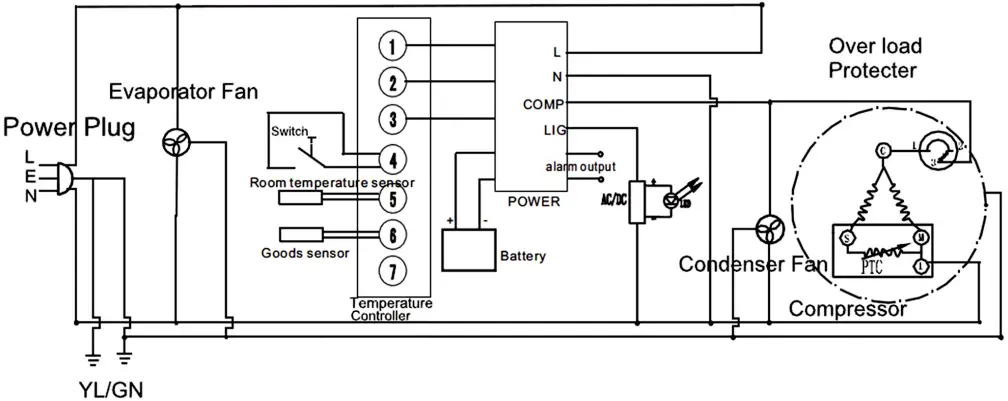
9. SCHEMATIC DIAGRAM
10. ENVIRONMENTAL AND DISPOSAL NOTES
These refrigerated cabinets are designed to high standards of environmental protection and recycling convenience. Cyclopentane, an environmentally friendly foaming agent, has been used. Cyclopentane is distinguished by zero ozone depletion potential (ODP) and zero global warming potential (GWP). The refrigerant used and contained within a hermetically tight circuit is environmentally friendly and does not contain chlorine and zero ODP.
The device must be disposed of in accordance with applicable regulations. The WEEE regulations must be observed.
In the interest of preventing environmental nuisance and promoting re-use of the high quality materials employed, used commercial refrigeration equipment must be collected for expert disposal and recycling. Therefore, observe the following disposal regulations:
- The cabinet must not be discarded with regular waste.
- The refrigeration circuit must not be damaged.
- Before disposal, make it unserviceable by disconnecting the power plug and cutting off the power cable.
- Consult your local authorities or authorised dealers for details of collection and disposal facilities.
- Children are often unable to recognise the dangers associated with commercial refrigeration equipment. Proper supervision must be maintained and children must be prevented from playing with discarded refrigerated cabinets.
11. WARRANTY
Please visit our webpage for warranty details (https://bromicgroup.com/warrantyinformation/)
Read all relevant documentations before operating the refrigerator and storage of any stock. Failure to follow instructions may result in loss of or damage to stock.
BROMIC CANNOT BE RESPONSIBLE FOR THE LOSS OF OR DAMAGE TO STOCK
Please refer to the `National Vaccine Storage Guidelines: Strive for 5′ for more information on vaccine storage and handling or contact your local state or territory health department.
(http://www.health.gov.au/internet/immunise/publishing.nsf/content/IMM77-cnt)


SYDNEY HEAD OFFICE & SHOWROOM
10 Phiney Place, Ingleburn
NSW 2565 Australia
T: AU 1300 276 642
F: (+61) 1300 735 115
E: [email protected]



NSW VIC QLD TAS WA SA NT ACT
BROMICGROUP.COM
 Bromic Group | Official Site
 Department of Health and Aged Care | Sorry, we cannot find that page...