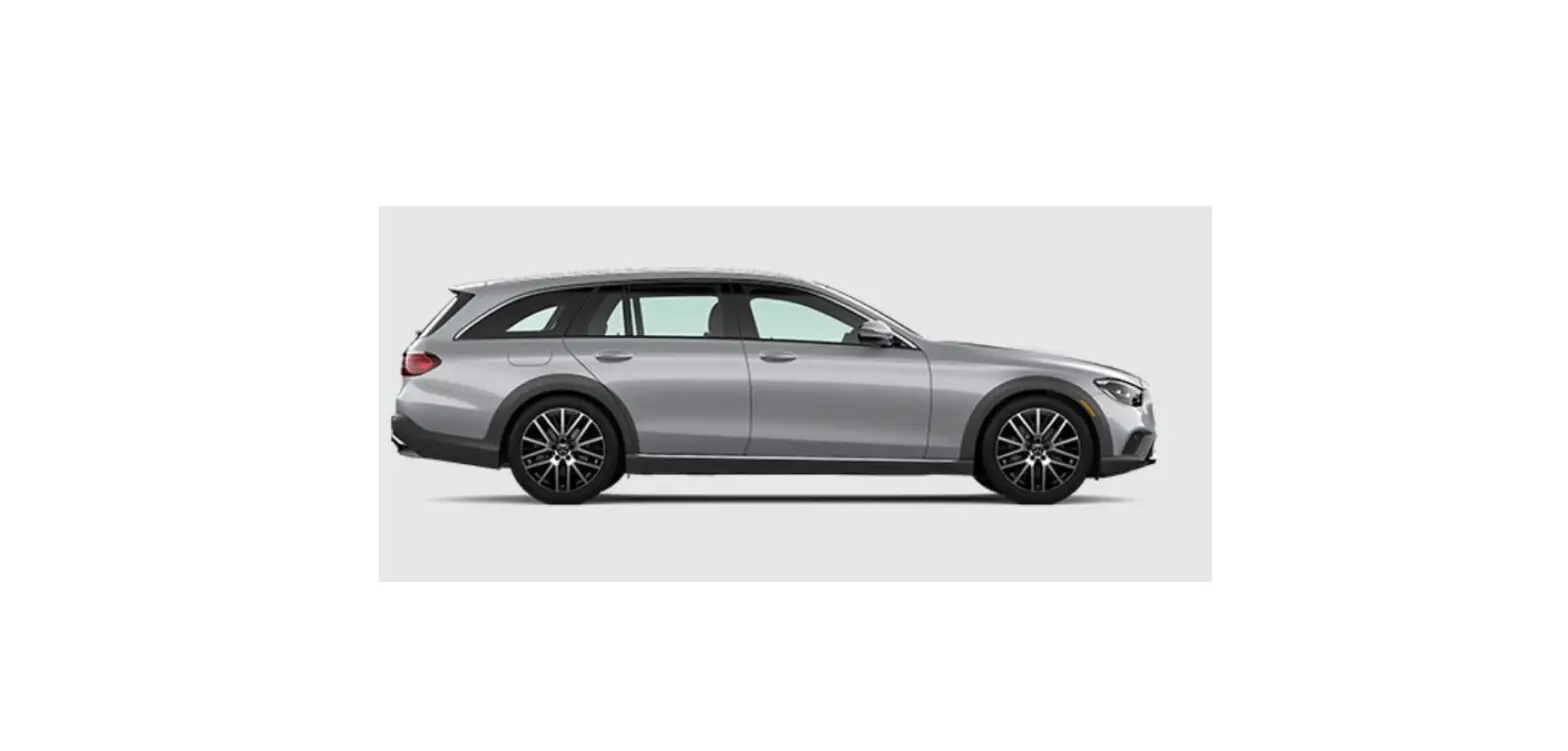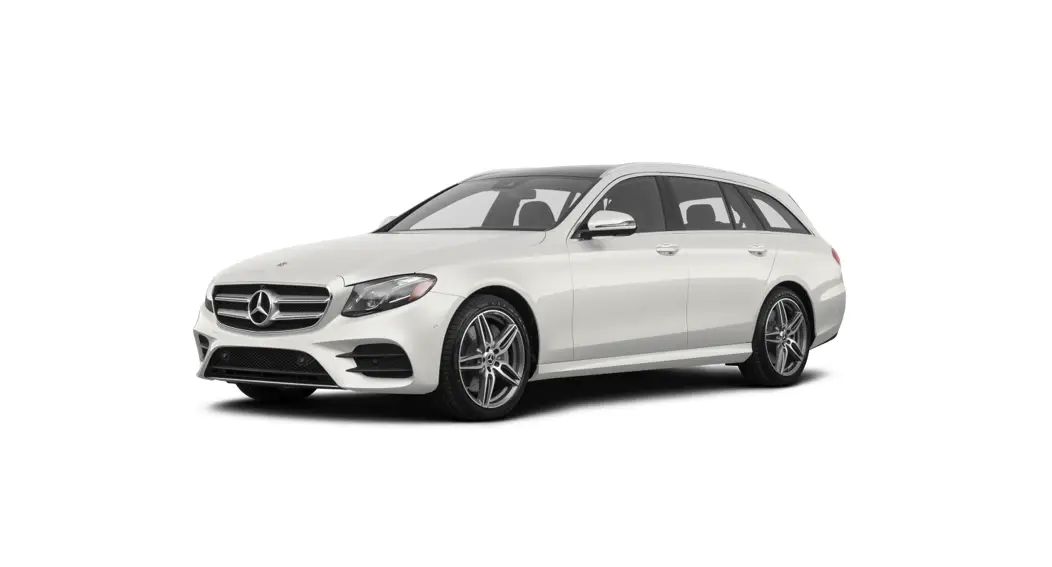

E-Class Wagon Brief Instructions
Mercedes-Benz
Cockpit–overview
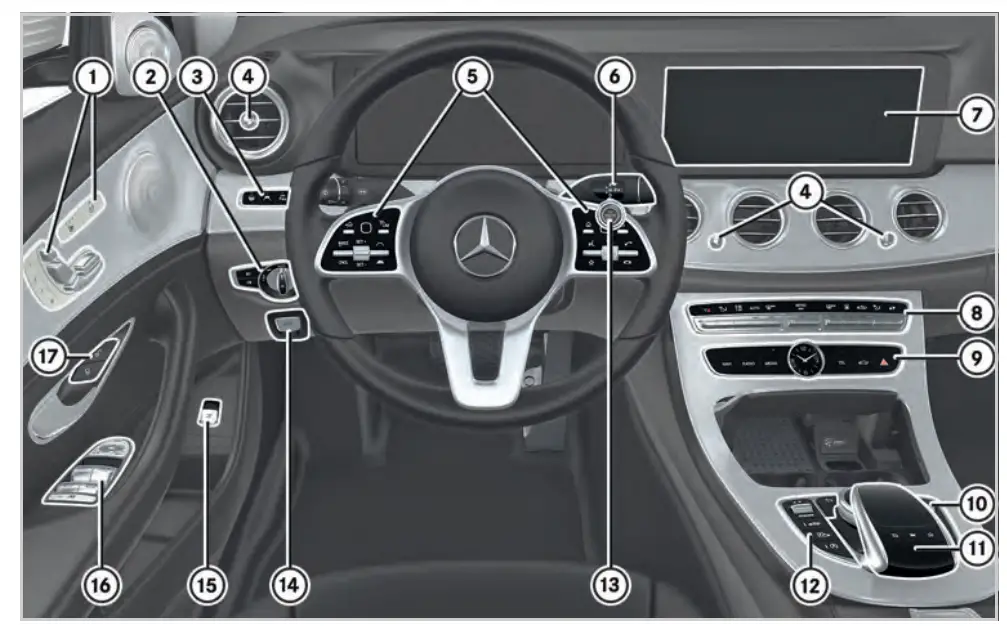
- Seat functions
Adjusts the seat electrically Seat heating
 Seat ventilation
 Adjusts the front passenger seat
 Memory function and memory presets
- Light switch
- Driver assistance systems
 Active Steering Assist
 Active Lane Keeping Assist
 Switches off Parking Assist PARKTRONIC
Depending on the vehicle’s equipment, the button may also be at position 12. Head-up Display
 - Adjusts the air vents
- Multifunction steering wheel control panels
 WARNING Make sure that you read the entire Operator’s Manual. Otherwise, you may not recognize dangers.
 - DIRECT SELECT lever
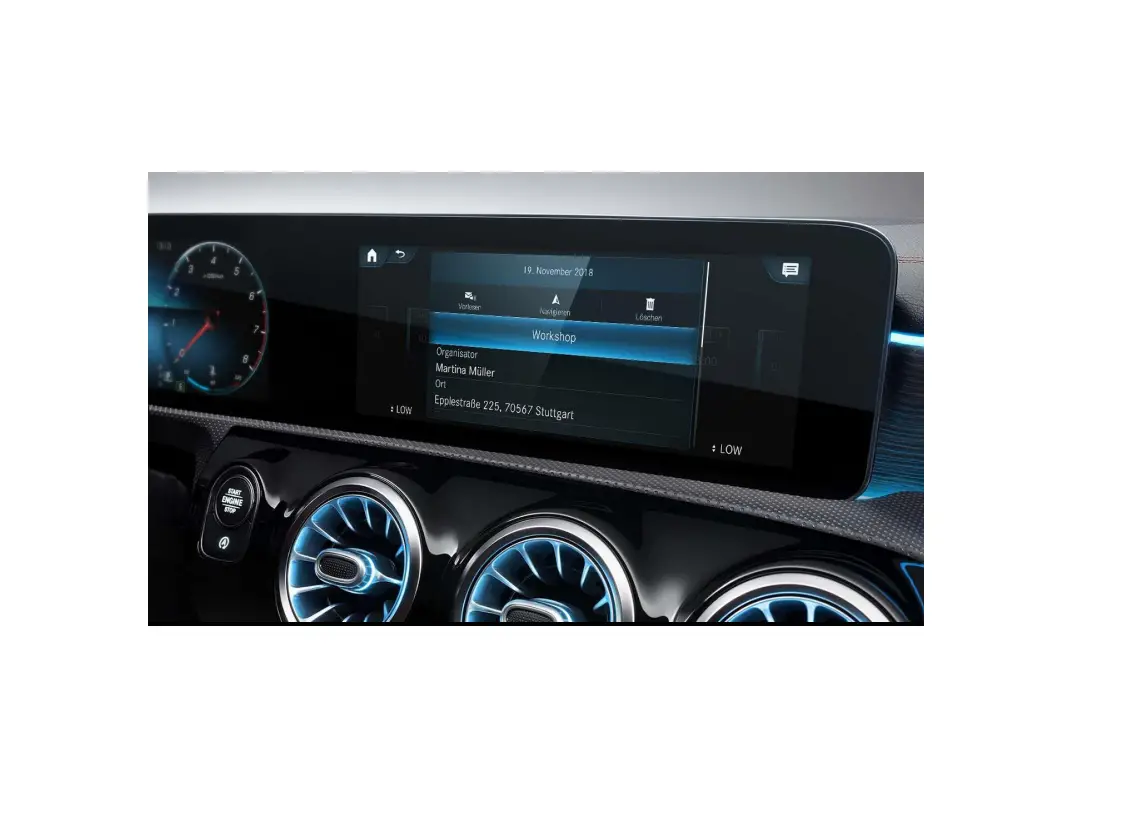
- Multimedia system display
- Buttons for automatic climate control
- Direct buttons for main functions of the multimedia system
 Navigation menu
 Radio menu
 Media menu
 Telephone menu Vehicle menu
 Hazard warning lights
 - Multimedia system controller
Adjusts the volume
Press: Mute function Switches the multimedia system on/off
 Lowers the head restraints in the rear passenger compartment
 Multimedia system main menu
 Back button
 - Multimedia system touchpad
- Driving functions
 DYNAMIC SELECT
 Vehicle level
 Active Parking
 ECO Assist start/stop function
 - Start/Stop button
 Electric parking brake
-
 Opens or closes the trunk lid
 - Door control panel with controls for power windows, exterior mirror adjustment and the override feature for the rear side windows
- Door handle
 Locks the vehicle centrally
 Unlocks the vehicle centrally
 Seat heating
 Seat ventilation
 Adjusts the front passenger seat
 Memory function and memory presets
 Active Steering Assist
 Active Lane Keeping Assist
 Switches off Parking Assist PARKTRONIC
 Head-up Display
 Navigation menu
 Radio menu
 Media menu
 Vehicle menu
 Hazard warning lights
 Switches the multimedia system on/off
 Lowers the head restraints in the rear passenger compartment
 Multimedia system main menu
 Back button
 DYNAMIC SELECT
 Vehicle level
 Active Parking
 ECO Assist start/stop function
 Electric parking brake
 Opens or closes the trunk lid
 Locks the vehicle centrally
 Unlocks the vehicle centrally
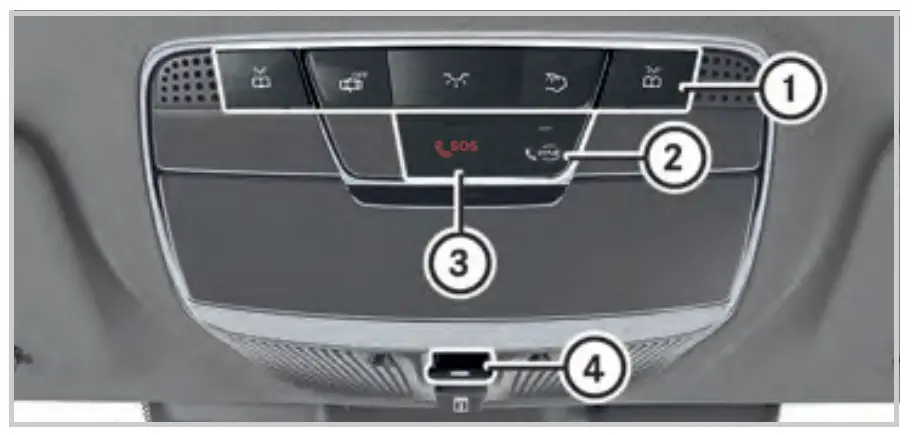 Overhead control panel
- Buttons for interior lighting and reading light
 Button for Mercedes me connect*
 SOS button*
(Mercedes-Benz emergency call system) Panoramic roof Roller sunblind
*Not available in all countries
 Button for Mercedes me connect*
 SOS button*
 Panoramic roof Roller sunblind
Note that your vehicle may not be equipped with all of the features described.
Lever on steering wheel
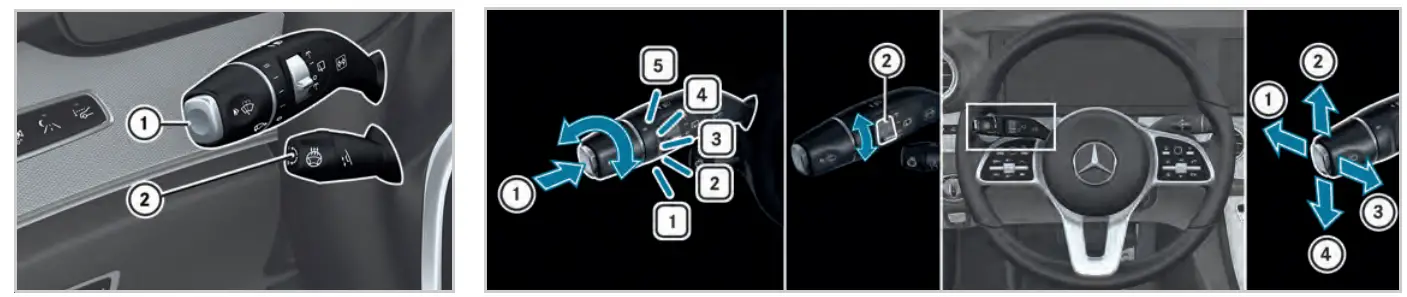
Overview
- Combination switch for turn signal lights, high beam and windshield wipers
- Lever for electrical steering column adjustment and steering wheel heater
Combination switch –windshield wiper functions
 Single wipe Wipes with washer fluid
 Windshield wipers off
 Intermittent wiping, normal
- Intermittent wiping, frequent
 Continuous wiping, slow
- Continuous wiping, fast
- Operates the rear window wiper
 Single wipe Wipes with washer fluid
 Windshield wipers off
 Intermittent wiping, normal
 Continuous wiping, slow
 Continuous wiping, fast
Combination switch–lighting functions
- High beam or
Adaptive High beam Assist Plus - Turn signal light, right
- Headlamp flasher
- Turn signal light, left
Active Distance Assist DISTRONIC
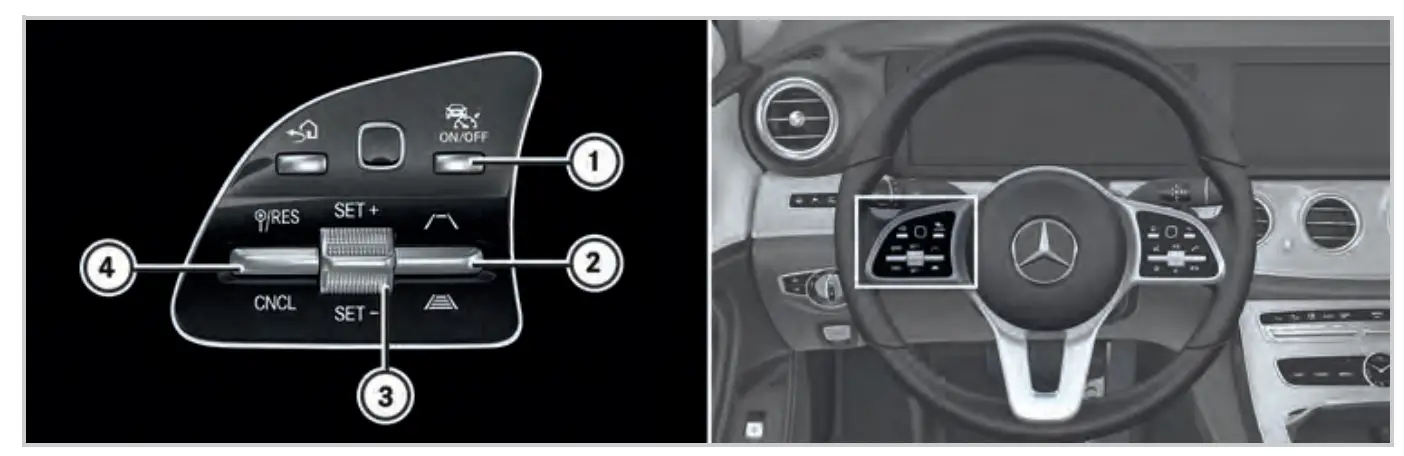 Activating/deactivating
1.  Switches on or off Active Distance Assist DISTRONIC
3  Activates Active Distance Assist DISTRONIC with the current speed
4  Activates with the stored speed/pulls away with Active Distance Assist DISTRONIC
 Deactivates Active Distance Assist DISTRONIC
Changing the speed
2.  Increases the specified distance Reduces the specified distance
3. Increases the speed Decreases the speed
Active Distance Assist DISTRONIC maintains a constant speed which has been stored.
The lowest speed that can be set is 12 mph (20 km/h).
You can change the set speed:
► 1 mph step (1 km/h): Briefly press rocker switch (3) up or down.
► 5 mph step (10 km/h): Press rocker switch (3) up or down beyond the pressure point.
Using rocker switch (2), you can change the specified distance to the vehicle in front. The specified distance depends on the currently driven speed.
If rocker switch (4) is pressed upwards twice, Distance Assist DISTRONIC is activated with the speed restriction displayed in the instrument cluster.
Note that your vehicle may not be equipped with all of the features described.
Climate control
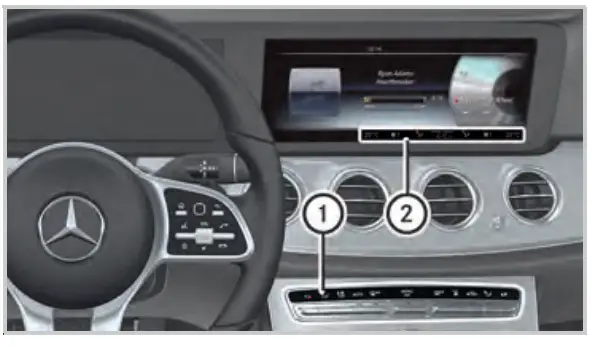
Operating possibilities for climate control
You can set automatic climate control using:
- The buttons on control panel (1) of the center console
- The air conditioning menu of the multimedia system
Air-conditioning function bar (2) shows the most important settings and the status of the automatic climate control system.
Automatic climate control panel A
 Sets the temperature
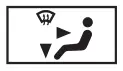 Sets the air distribution
 Sets the air flow, switches automatic climate control off completely
 Sets climate control to automatic mode
 Defrosts the windshield
 Calls up the air conditioning menu If you press and hold the
  button for approximately 4 seconds, automatic climate control will be reset to the basic settings.
Residual heat with the engine off Defrosts the rear window
 Synchronized operation
 Air-recirculation mode The air in the interior is recirculated; the windows may fog up more quickly.
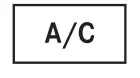 Cooling with air dehumidification
Air conditioning menu of the multimedia system
► To call up the air conditioning menu: Press the button on the control panel up or down.
- A/C – Deactivates the cooling function of automatic climate control
- Climate Mode – Changes the air flow
- Rear – Operates the automatic climate control in the rear
- SYNC – Changes settings for all climate zones in the vehicle simultaneously
- Air Freshener – Sets the intensity of the fragrancing system
- lonization – Freshens the air in the interior using ionization
Order no. P213 1428 13 Part no. 213 584 95 15 EditionB-2020
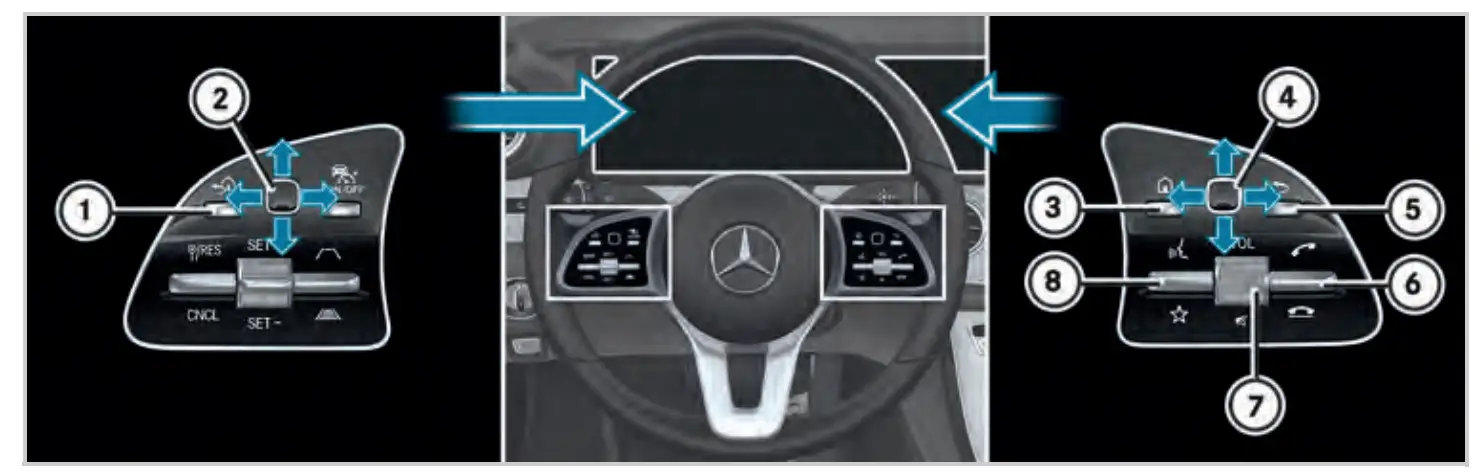
Operating the on-board computer
①  Back button for the on-board computer
Press and hold: shows the standard display in the on-board computer
② Touch Control for the on-board computer Press: confirms the selection
Telephone/media functions
③  Main menu of the multimedia system
④  Touch Control for the multimedia system Press: confirms the selection
⑤ Back button for the multimedia system
⑥ Accepts a telephone call
 Rejects a telephone call Ends a call
Operating the Voice Control System
⑦  Adjusts the volume
Press: switches the sound on or off
⑧  Starts a dialog with the Voice Control System or cancels the current Voice Control System voice command
 Displays favorites
Voice Control System
Starting a dialog
The Voice Control System allows you to comfortably operate the majority of the multimedia system’s functions.
► To say a voice command: Press the button and say a voice command after the acoustic signal. If a mobile phone is connected to the multimedia system of the vehicle via Bluetooth® and you press and hold the button, the mobile phone’s voice control feature is activated.
Voice Control System help functions
- General notes:
Say the “Help Voice Contro/ System” voice command. - Help for the current function:
Say the “Help” voice command. - Help for a specific system:
Say the voice command for the desired system, e.g. “Help telephone”.
Examples
Voice commands for navigation
- “Navigate to Woodward Avenue, Detroit” Starts route guidance to the named address.
- “Navigate to contact John Doe” Starts route guidance to a contact in the address book.
- “Nearest gas station” Further categories are also available: restaurant, parking lot and rest area.
Voice commands for telephone
- “Call Jane Doe” Calls the number of a contact in the address book.
- “Latest calls” Shows the latest calls.
Voice commands for audio mode
- “Station Z100”
Calls up stations which are in range or stored stations. - “Play Moonlight Sonata”
Plays the named media file. All tracks available in the system can be used.
Overview of the multimedia system
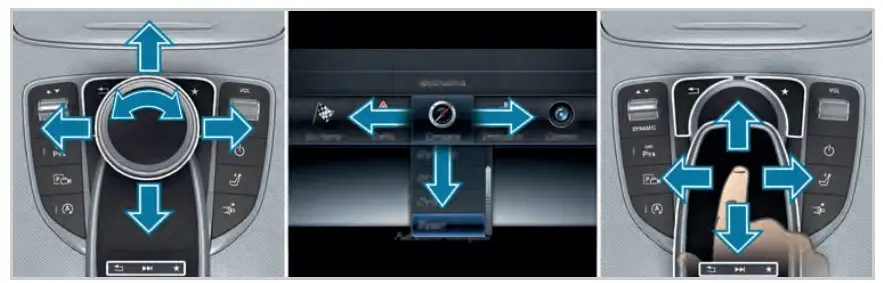
You can operate the menus of the multimedia system using the controller, touchpad or Touch Control.
► Controller: Turn or slide in the direction of the desired entry.
► Slide to the left or right in order to open a menu.
► Confirm your choice by pressing the controller.
► Touchpad: Swipe in the direction of the desired entry.
► Swipe to the left or right in order to open a menu.
► Confirm your selection by pressing. Leaves a menu or switches to the basic menu Calls up or changes favorites
 Quick-access to audio sources
Favorites
Favorites allow you to quickly call up applications which you use regularly.
► To call up the menu: Press the button. The main functions are displayed.
► Navigate downwards. The favorites bar is shown.
► To create your own favorite: Select the desired function in the multimedia system.
► Press and hold the button until the favorites are displayed.
► Add your own favorite at the desired position.
Personalization
You can store your own personal settings for the multimedia system in a user profile.
► To call up the menu: Press the button.
► Select  System
  Personalization.
Operating the multimedia system
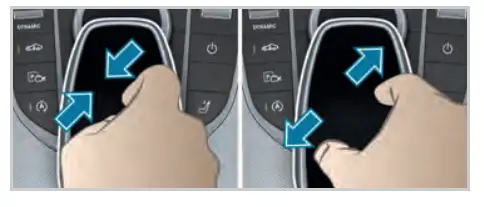
Zoom map
► Touchpad: Move two fingers apart or together.
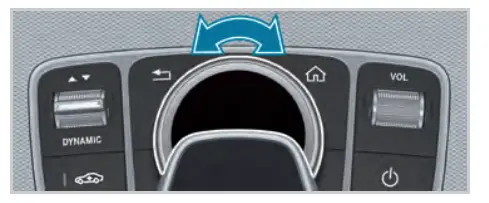
► Controller: Turn left or right.
Quick-access to audio sources
Depending on the audio source to which you are currently listening, you can move to the next radio station or music track.
► To open the access bar: Swipe up with two fingers.
or
► Press the button on the touch pad.
► To select the previous or next station/ music track: Using a single finger, swipe up or down.
► To close the access bar: Swipe down with two fingers.
Handwriting recognition
You can enter individual letters.
► To delete : Swipe to the left.
► To insert aspace  :Swipe to the right.
Quickly storing radio stations
If you are listening to the radio and the Radio menu is shown in the multimedia system:
► Press and hold the controller/touchpad/right hand Touch Control of the multifunction steering wheel.
An acoustic signal confirms the save.
Connecting a mobile phone
Requirement
- Bluetooth® is switched on on the mobile phone and is visible for other devices (see the manufacturer’s operating instructions).
- Bluetooth® is switched on on the multimedia system.
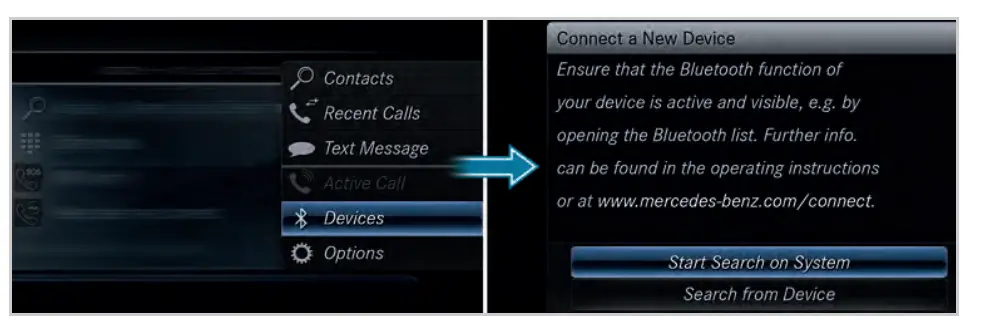
Searching for a mobile phone
► Press the  button on the center console.
► Select Devices  Connect New Device.
or
► Select Start Search on System.
The available devices are shown in the display.
If your mobile phone is not found, select Search from Device.
Connecting a mobile phone
► Select the desired mobile phone. A code is displayed in the multimedia system and on the mobile phone.
► If the codes match: Confirm with Yes on the multimedia system.
► Confirm the code on the mobile phone. You can simultaneously connect two telephones with your system.
Further information
Detailed information on Bluetooth® connections with your mobile phone can be found at: www.mercedes-benz.com/connect

Further information on your vehicle
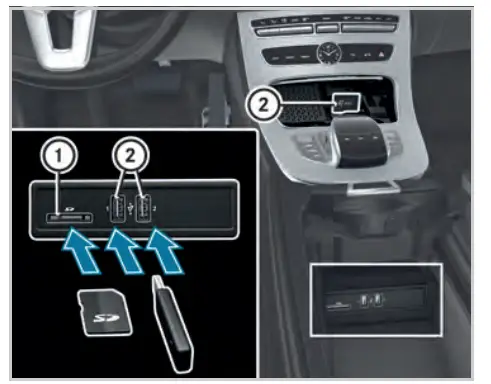
Connecting exterior media sources
- SD card slot
- USB ports
The USB port for Apple Car Play™ and Android
Auto™ is marked with the  symbol.
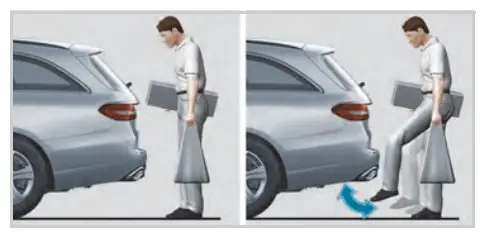
HANDS-FREE ACCESS
If you carry the KEYLESS-GO key on your person, you will be detected by a sensor.
Do not touch the bumper and maintain a distance of around 12 in (30 cm).
► To open or close: Kick into the sensor detection area below the bumper.
Further information on your vehicle
Further information about Mercedes-Benz vehicles and about Daimler AG can be found at the following web site: http://www.mbusa.com
 How-to videos How-to videos |  Operator’s Manuals Operator’s Manuals |
| https://www.mbusa.com/mercedes/owners/videos | https://www.mbusa.com/mercedes/service_and_parts/owners_manuals |
Note that your vehicle may not be equipped with all of the features described. WARNING Make sure that you read the entire Operator’s Manual. Otherwise, you may not recognize dangers.
 Luxury Cars - Sedans, SUVs, Coupes & Wagons | Mercedes-Benz USA