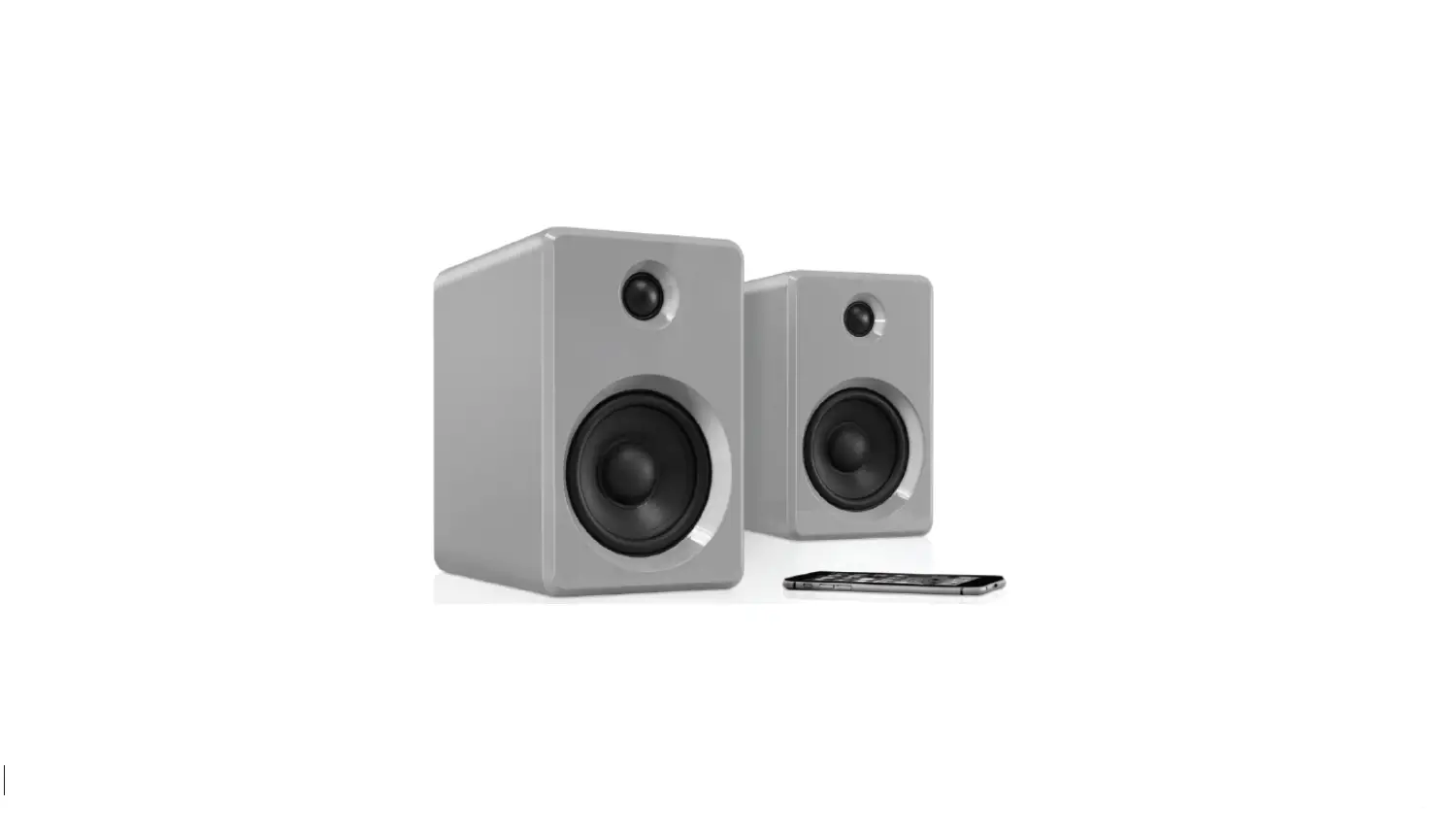

innovative technology ITSB-421-WHT Bookshelf Home Speaker
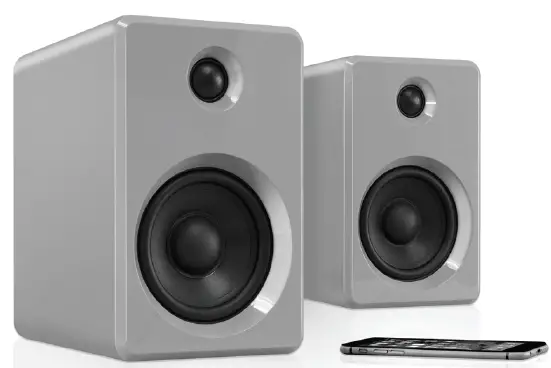
What’s In the Box
Make sure to remove ALL items before discarding the package. This includes:
- Speakers (2)
- Power Adapters (2)
- Instruction Manual
- 3.5mm AUX-IN Cable
Overview
Very Important The Speakers MUST be allowed to automatically pair together BEFORE being synced to a Bluetooth-enabled device.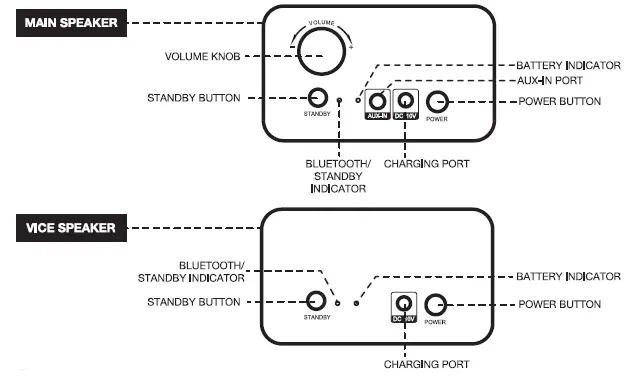
Turning the unit ON
- Press the POWER button on the main speaker, and then press & hold the STANDBY button to wake up the unit, the Bluetooth/Standby indicator will flash blue.
- Press the POWER button on the vice speaker, and then press & hold the STANDBY button to wake up the unit, the Bluetooth/Standby indicator will flash blue.
- The speakers will automatically pair together.
NOTE Please allow 5-10 seconds for the speakers to pair. - After 5-10 seconds, an audible tone will play on both speakers indicating that they are synced. (The Bluetooth/Standy indicator will remain lit).
Connecting your smartphone, tablet, or other audio devices via Bluetooth.
- Press the STANDBY button on the main speaker to pair it with your external device. The Bluetooth/Standby indicator will flash blue, indicating the speakers are searching for a device (this is required for the first-time pairing of any external Bluetooth device).
- Activate the Bluetooth function on your external device.
- Select “ITSB-421” on your device to begin pairing. You will hear an audible beep, signifying your device is paired and the Bluetooth/Standby indicator will remain lit.
- Begin playing music from your device.
Product Specification
Bluetooth range 33′ (10m)
Battery Capacity 8800mAh Li-ion (65.12Wh) Total
Charging Input DC 10V, 1.8A
Charging Time 5-6 hours
Pay Time Full Volume: 12 hours, 50% Volume: 28 hours
Max Power Consumption 5-6 hours
Power Output 7W (with internal battery) 12W (with power adaptor/charging)
Product Size 125 x 165 x 195mm //4.9 x 6.5 x 7.7 in
Included Speakers (2), Power Adaptor (2), 3.5mm AUX-IN Cable, User Manual
As a result of continual improvements, the design and specifications of this product are subject to change without notice. Bluetooth is a registered trademark of Bluetooth SIG, Inc. Other trademarks and trade names are those of their respective owners. Apple and iPhone are trademarks of Apple Inc., registered in the U.S. and other countries. iPhone is not included. Made in China.
SAFETY INSTRUCTIONS
Danger The lightning flash with an arrowhead within an equilateral triangle is intended to alert the user to the presence of uninsulated “dangerous voltage” within the product’s enclosure that may be of sufficient magnitude to constitute a risk of electric shock.
CAUTION TO PREVENT RISK OF ELECTRIC SHOCK, DO NOT REMOVE COVER (OR BACK). NO USER-SERVICEABLE PARTS INSIDE. REFER SERVICING TO QUALIFIED SERVICE PROFESSIONAL.
Note The exclamation point within an equilateral triangle is intended to alert the user to the presence of important operating and maintenance (servicing) instructions in the literature accompanying the appliance.
Before using the unit, be sure to read all operating instructions carefully, please note that these are general precautions and may not pertain to your unit. For example, this unit may not have the capability to be connected to an outdoor antenna.
- Read these instructions All safety and operating instructions should be read before the product is operated.
- Keep these instructions The safety and operating instructions should be retained for future reference.
- Heed all warnings All warnings on the product and in the operating instruction manual should be adhered to.
- Follow these instructions – All operating and use instructions should be followed.
- Do not use this apparatus near water. Do not use the product near water and moisture, for example: near a bathtub, washbowl, kitchen sink, or laundry tub; in a wet basement; or near a swimming pool.
- The product must not be exposed to dripping or splashing, and no object filled with liquid should be placed on top of the product.
- Clean only with a slightly moist, lint-free cloth. Unplug this product from the wall outlet before cleaning. Do not use liquid cleaners or aerosol cleaners.
- Do not block any ventilation openings. Install in accordance with the manufacturer’s instructions. Slots and openings in the cabinet and in the back or bottom are provided for ventilation, to ensure reliable operation of the product and to protect it from overheating. These openings must not be blocked or covered. The openings should never be blocked by placing the product on a bed, sofa, rug, or other similar surfaces. This product should never be placed near or over a radiator or heat source. This product should not be placed in a built-in an installation such as a bookcase or rack unless proper ventilation is provided or the manufacturer’s instructions have been adhered to.
- Do not install near any heat sources such as radiators, heat registers, stoves, or other apparatus (including amplifiers) that produce heat.
- Do not defeat the safety purpose of the polarized or grounding-type plug. A polarized plug has two blades and a third grounding prong. The wide blade or the third prong are provided for your safety. If the provided plug does not fit into your outlet, consult an electrician for the replacement of the obsolete outlet.
- Protect the power cord from being walked on or pinched particularly at plugs, convenience receptacles, and the point where they exit from the apparatus.
- Only use attachments/accessories specified by the manufacturer.
- Use only with the cart, stand, tripod, bracket or table specified by the manufacturer, or sold with the apparatus. When a cart is used, use caution when moving the cart/apparatus combination to avoid injury from tip-over.
- Unplug this apparatus during lightning storms or when unused for long periods of time.
- Refer all servicing to qualified service personnel. Servicing is required when the apparatus has been damaged in any way, such as power-supPply cord or plug is damaged, liquid has been spilled or objects have fallen into the apparatus, the apparatus has been exposed to rain or moisture does not operate normally, or has been dropped.
- Power source The product should be operated only from the type of power source indicated on the marking label. If you are not sure of the type of power supply to your home, consult your appliance dealer or local power company. For products intended to operate from battery power, or other sources, refer to the operating instructions.
- Power lines An outside antenna system should not be located in the vicinity of overhead power lines or other electric light or power circuits, or where it can fall into such power lines or circuits. When installing an outside antenna system, extreme care should be taken to keep from touching such power lines or circuits as contact with them might be fatal.
- Overloading Do not overload wall outlets and extension cords as this can result in the risk of fire or electric shock. Object and liquid entry – Never push objects of any kind into the product as they may touch dangerous voltage points or short out parts that could result in fire or electric shock.
- Never spill or spray any type of liquid on the product.
- Service Do not attempt to service this product yourself as opening or removing covers may expose you to dangerous voltage or other hazards. Refer all servicing to qualified servicing personnel.
- Replacement parts – When replacement parts are required, be sure the service technician uses replacement parts specified by the manufacturer or those that have the same characteristics as the original part. Unauthorized substitutions may result in fire or electric shock or other hazards.
- Safety check – Upon completion of any service or repairs to this product ask the service technician to perform safety checks to determine that the product is in proper operating condition.
- Damage requiring service Unplug the product from the wall outlet and refer servicing to qualified service personnel under the following conditions:
- A: when the power-supply cord or plug is damaged.
- B: if the liquid has been spilled or objects have fallen into the product.
- C: if the product has been exposed to rain or water.
- D: if the product does not operate normally by following the operating instructions. Adjust only those controls that are covered by the operating instructions as improper adjustment may result in damage and will often require extensive work by a qualified technician to restore the product to its normal operation.
- E: if the product has been dropped or the cabinet damaged in any way.
- F: When the product exhibits a distinct change in performance this indicates a need for service.
- G: A warning that batteries (battery pack or batteries installed) shall not be exposed to excessive heat such as sunshine fire or the like.
- The marking information is located at the bottom of the apparatus.
- RF warning statement: The device has been evaluated to meet the general RF exposure requirements. The device can be used in portable exposure conditions without restriction.
Warning
Please refer to the information on the exterior bottom enclosure for electrical and safety information before installing or operating the apparatus.
Caution
Use of control and adjustments or performance of procedures other than those specified here may result in hazardous radiation exposure. f this product develops a trouble, contact qualified service centers, and do not use the product in a defective state.
Usage
- Before use, choose the unit installation location carefully. Avoid placing in direct sunlight or close to a source of heat. Also avoid locations subject to vibrations and excessive dust, cold or moisture. Keep away from sources that hums, such as transformers or motors.
- Do not open the cabinet as this might result in damage to the circuitry or electrical shock. If a foreign object should get into the set, contact your dealer.
- When removing the power plug from the wall outlet, always pull directly on the plug, never pull the cord.
- Do not attempt to clean the unit with chemical solvents as this might damage the finish. Use a clean, dry cloth.
- In order to shut off the power to this product completely, unplug the power cord from the wall outlet. Be sure to unplug the unit if you do not intend to use it for an extended period of time, such as while on vacation.
- Keep this manual in a safe place for future reference.
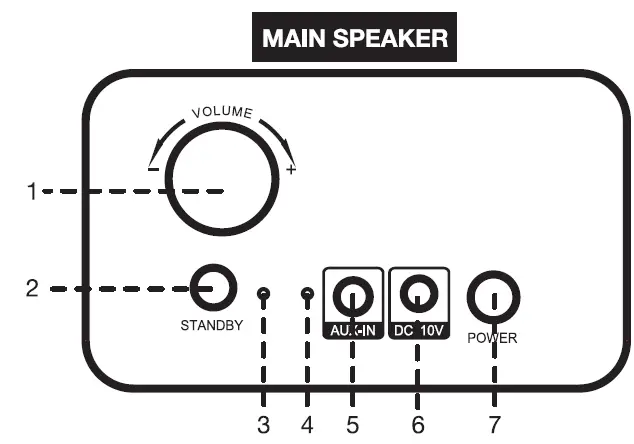
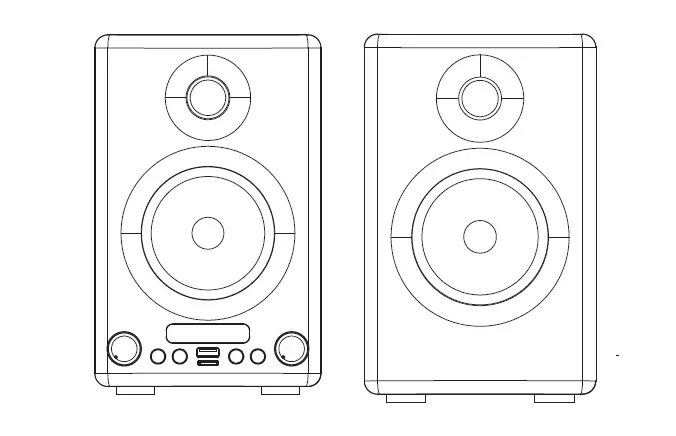
- Volume Knob
- Standby Button
- Bluetooth/Standby Indicator
- Battery Indicator
- AUX-IN Port
- Charging Port
- Power Button
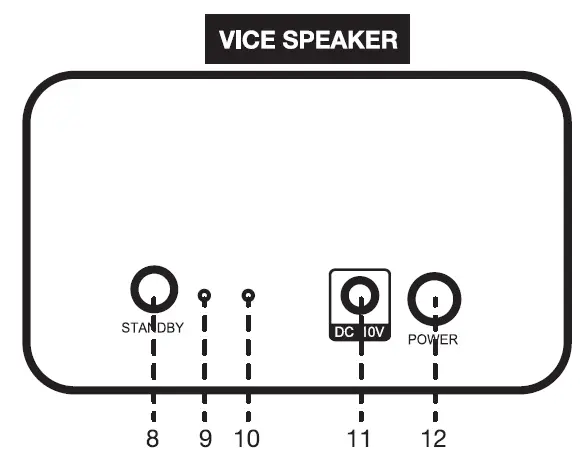
- Standby Button
- Bluetooth/Standby Indicator
- Battery Indicator
- Charging Port
- Power Button
Model ITSB-421 (MAIN & VICE)
LED INDICATOR OPERATION
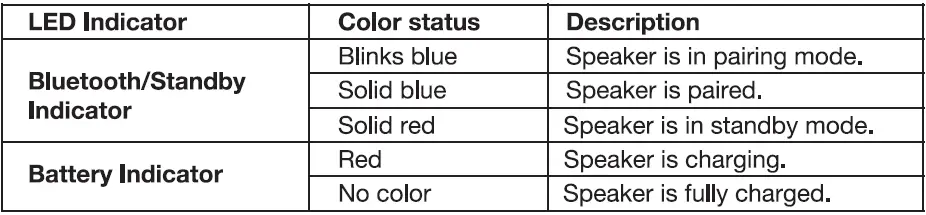
GENERAL OPERATION
Overview
- Before first use, it is recommended to charge the Speakers via the supplied Power Adaptors (see Battery Charging on page 5). Each Speaker will take approximately 5-6 hours to charge from 0-100%.
- Very Important The Speakers MUST be allowed to automatically pair together BEFORE being synced to a Bluetooth-enabled device.
Turning the unit ON
- Press the POWER button of the main speaker, and then press and hold the STANDBY button to wake up the unit, the Bluetooth/Standby indicator will flash blue.
- Press the POWER button of the vice speaker, and then press and hold the STANDBY button to wake up the unit, the Bluetooth/Standby indicator will flash blue.
- Next, the Speakers will automatically pair together.
NOTE Please allow 5-10 seconds for the speakers to pair. - After 5-10 seconds, an audible tone will play on both speakers indicating that they are synced. (The Bluetooth/Standy indicator will remain lit).
Adjusting the volume
Rotate the VOLUME KNOB or adjust the volume on your Bluetooth device to a comfortable level. Listening to music ata high volume level may destroy hearing. Avoid listening at a high volume level for an extended period of time.
BLUETOOTH OPERATION
Connecting an External Device via Bluetooth
- Press the STANDBY button on the main speaker to pair it with your external device. The Bluetooth/Standby indicator will flash blue, indicating the speakers are searching for a device (this is required for the first-time pairing of any external Bluetooth device).
- Activate the Bluetooth function on your external device.
- Select “ITSB-421” on your device to begin pairing. You will hear an audible beep, signifying your device is paired and the Bluetooth/Standby indicator will remain lit.
- Begin playing music from your device.
NOTE
- Before you connect a Bluetooth device to this unit, familiarize yourself with the Bluetooth capabilities of your device.
- Any obstacle between this unit and a Bluetooth device can reduce the operational range.
- Keep this unit away from any other electronic device that may cause interference.
- If your device asks for a password or PIN number, please enter “0000”.
AUX-IN OPERATION
- Use the 3.5mm AUX-IN cable to connect the speaker to the audio device such as an MP3/MP4 player or tablet.
- Your Audio device (MP3/MP4 player or tablet) controls the music playback.
- Adjust the volume on your device or by rotating the VOLUME KNOB.
BATTERY CHARGING
Recharge the internal batteries by inserting the supplied Power Adaptors with 10V, 1.8A output into the charging ports. The Battery indicator will remain red while charging. The Battery indicator will turn off when the battery charging process is completed. Charging will take approximately 5-6 hours.
NOTE
To initialize the battery, it is recommended to charge for longer than 6 hours but does NOT exceed 24 hours. Battery life will vary depending on the operation. Loud music with heavy bass will drain the battery faster than spoken word audio.
CAUTION
The built-in rechargeable battery is not replaceable. Do not remove or replace it, do not throw in the trash or in a fire. Do not dispose of device at standard garbage disposal sites. Dispose of the device at available Battery Recycling Sites after fully discharging the battery. Not doing so may violate local disposal laws and regulations. Please refer to local regulations for proper battery disposal.
TROUBLESHOOTING
If you’re experiencing a problem with your apparatus, there are some quick and easy checks that you can do to help to solve problems.
The unit does not work.
Fully charge the speakers. Make sure the speakers are powered on.
No sound from speakers.
Is the volume control set at a minimum? Turn up the volume of the connected device and speaker.
Bluetooth is not connected.
Check if the Bluetooth device is in search mode. Disconnect the paired device and connect again. If the device is out of the Bluetooth range (33 ft, 10m), please put the device within the Bluetooth range and manually make a connection again if the devices are disconnected.
For any static disturbance
lf sound quality issues occur, such as distortion, or the overall sound is not clear, the speakers may be out of range. All Bluetooth devices MUST BE within a 33-foot range of each other. To resolve this, move the Speakers and Bluetooth device closer so they are within the required range.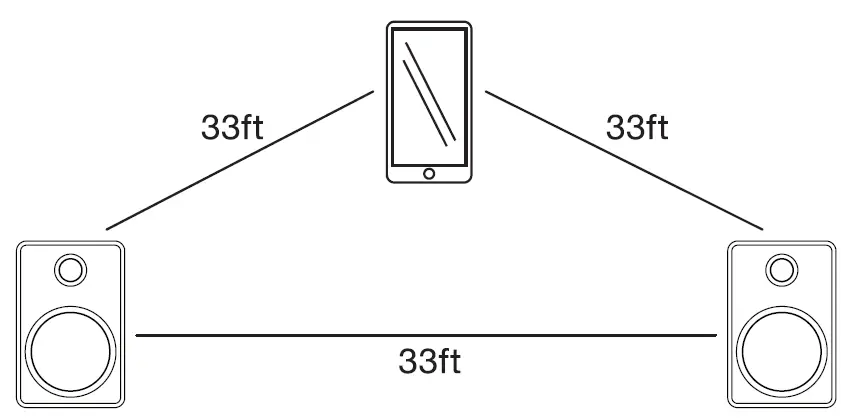
FCC Statement
This device complies with Part 15 of the FCC Rules. Operation is subject to the following two conditions:
- This device may not cause harmful interference, and
- this device must accept any interference received, including interference that may cause undesired operation.
NOTE This equipment has been tested and found to comply with the limits for Class B digital device, pursuant to part 15 of the FCC Rules. These limits are designed to provide reasonable protection against harmful interference in a residential installation. This equipment generates, uses and can radiate radio frequency energy and, if not installed and used in accordance with the instructions, may cause harmful interference to radio or television reception, which can be determined by turning the equipment off and on, the user is encouraged to try to correct thee interference by one or more of the following measures:
- Reorient or relocate the receiving antenna.
- Increase the separation between the equipment and the receiver.
- Connect the equipment into an outlet on a circuit different from that to which the receiver is connected.
- Consult the dealer or an experienced radio/TV technician for help.
RF warning statement
The device has been evaluated to meet the general RF exposure requirements. The device can be used in portable exposure conditions without restriction.
WARNING Any changes or modifications not expressly approved by the party responsible for compliance could void the user’s authority to operate this equipment.
California Prop 65 Warning
“WARNING” This product contains chemicals known to the State of California to cause birth defects or other reproductive harm. For more information on these regulations and a list of chemicals, log on the following website address: http://www.oehha.ca.gov/prop65.html
NOTE This user manual has provided proper instructions to the users of the device, as well as usage restrictions, including the limits of exposure durations. The device is designed for reliable performance and the user manual states detailed installations, proper operations, as well as special usage conditions, which comply with SAR and RF eld strength limits. Users of this product should carefully study the user manual before using this device.
INDUSTRY CANADA
This device complies with Industry Canada license-exempt RSS standard(s). Operation is subject to the following two conditions:
- this device may not cause interference, and
- this device must accept any interference, including interference that may cause undesired operation of the device.
WARRANTY
Innovative Technology Electronics LLC.
Limited Warranty: 90 Days Labor, One Year Parts
Innovative Technology Electronics LLC. ((T) warrants the product to be free from “Defects” in materials under normal use for a period of “One Year” from the date of the original purchase. The Warranty is “Not” transferable. IT agrees, within the initial “90 Day” period, to repair or replace the product if it is determined to be defective at “No Charge”. It is further agreed that IT will cover the cost to repair or replace damaged “Parts” only for a total period of “One Year” from the date of the original purchase. The warranty does not cover cosmetic damage, antennas, AC cords, cabinets, headbands, ear-pads, or damage due to line power surges, connection to improper voltage supply or settings, misuse, mishandling, accident, acts of God or attempted repair by an unauthorized service agent, To obtain service, the purchaser MUST present an original sales receipt/ proof of purchase.
Please contact us at www.ithomeproducts.com to request an RMA (Return Material Authorization) number to return products for service or replacement. Returns without an RMA number on the package will be refused and returned to the sender. Upon receipt of the returning item and our full inspection (IT) may issue a replacement to the customer for the same item or for one that has equivalent value and features. To return an item, supply full name, return address, phone number, item purchased, receipt of purchase, and reason for return to obtain RMA number. All returns must be in the original packaging or a reasonable substitute to prevent damage. Customer “Must” include full name, shipping address, and telephone number inside of the package. No return will be shipped back to a PO Box or APO address.
FAQs
They should be hidden with artistic wall coverings. Making them less noticeable. Utilize the Space in Your Cabinets and Shelves. Get Creative and Handy; Use What You Have.
Bookshelf speakers should not be placed on the ground; instead, they should be placed on a shelf, table, or other elevated surfaces. They are made with the intention of enhancing sound in tiny to medium-sized settings.
If you’re wondering if the speakers and television are connected wirelessly. Unfortunately, I don’t believe they can, but you can connect them using the included wire or a 3.5 to 3.5 audio cable.
Quickly hit the power button once on one speaker. Press the power button twice fast on the second speaker. The Speakers will then automatically pair. Please give the speakers 5 to 10 seconds to pair.
Bookshelf speakers can be used for more than simply music. For watching movies and TV shows, a pair of superb bookshelf speakers may produce vocal clarity and dynamics that are far superior to any TV’s built-in speakers. Many of our speaker suggestions also include a center speaker that is specifically made to reproduce dialogue.
You must first plug in and turn on your external amplifier before ensuring that the output is the amplifier and not your computer’s built-in speaker under the audio settings of your computer. That’s all, then!
In a typical home theatre surround sound system, which already has a powerful subwoofer, bookshelf speakers are added. They can be utilized as fronts in addition to rears or surrounds for smaller systems (instead of floor-standing speakers).
Although it’s not ideal, bookshelf speakers can be positioned on their side. It’s probable that this will have a detrimental effect on sound quality. While not ideal, horizontal positioning might be acceptable if your goal is casual listening.
A DVD player, MP3 player, smartphone, tablet, computer, or other audio devices can all be connected to the unit using an audio cable. 1. Join the 3.5mm, RCA end of the audio cable to the line-out jack of your audio device. The other end should be connected to one of the audio input sockets on the unit’s back panel.
The response to these queries depends on the features, the caliber of the construction, and the components of the speakers. If you take care of them, speakers typically last 10 to 20 years before needing to be replaced.
Additionally, utilizing an average ear height of between 91 and 96.5 centimeters (36 and 38 inches) is frequently just as acceptable as measuring the distance from your ears to the floor if more than one person will be listening to the speakers or if you frequently have guests around.
roughly 4 feet For bookshelf speakers, aim for a distance of 4 feet, while for floor-standing speakers, aim for 8 feet. Too close speakers will cause sounds to muddle and merge together. The stereo image will have a gap between the two halves if they are too far away (more on this later).
Cut the supports, shelves, and legs. Kolin Smith took the image. Legs must be attached to the Supports. Put the box together. The bookcase on level ground. Grab the Bookcase. Put the Kick Board in place. the Trim to Fit in Scribe. Nosing is used on the shelf faces.
Since powered speakers already have an amplifier inside of them, all you need to do is connect them to an electrical outlet to use them. You can directly plug all of your home theatre components into them because they are made with a broad variety of inputs (ports).
The materials used in bookshelves will be of higher grade, and the bass they produce should sound clearer. Therefore, in general, bookshelf speakers produce bass with greater clarity than computer speakers, despite the latter’s potential for deeper bass.