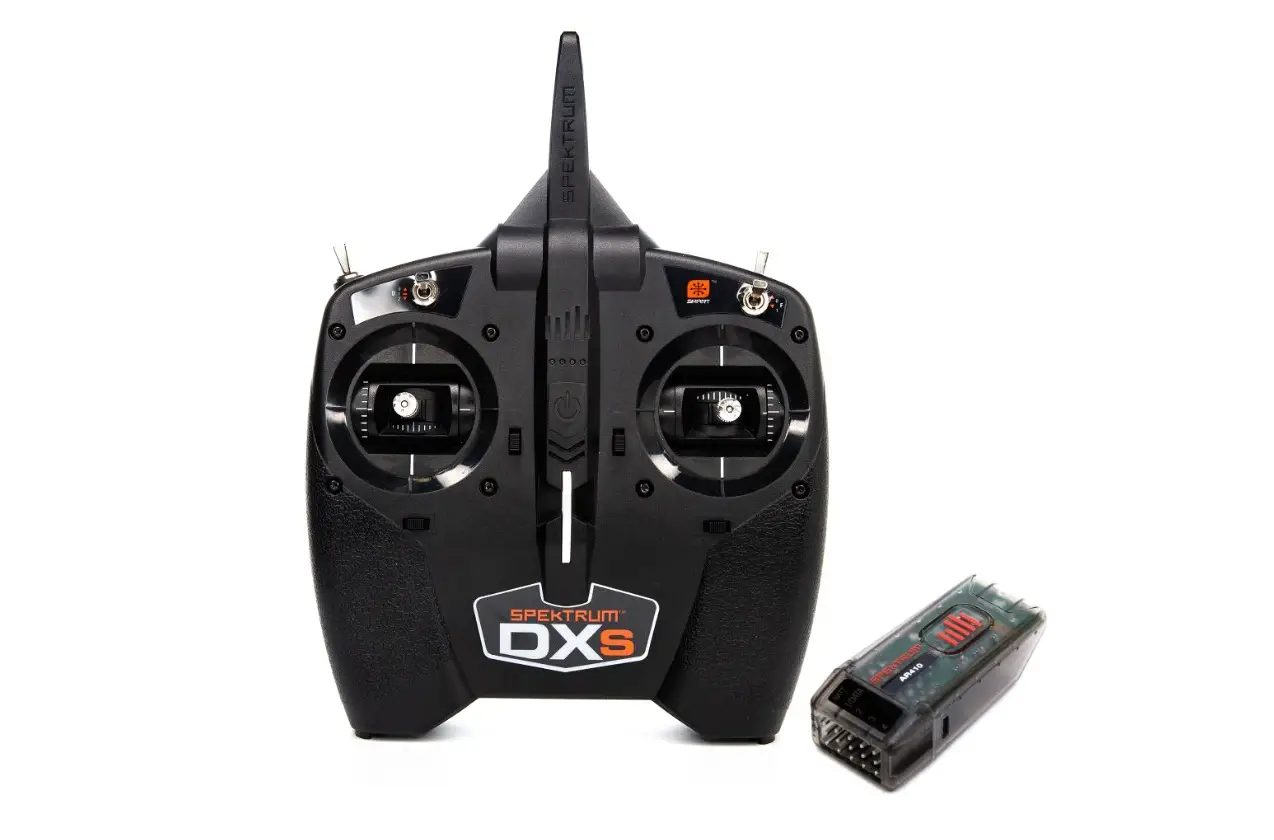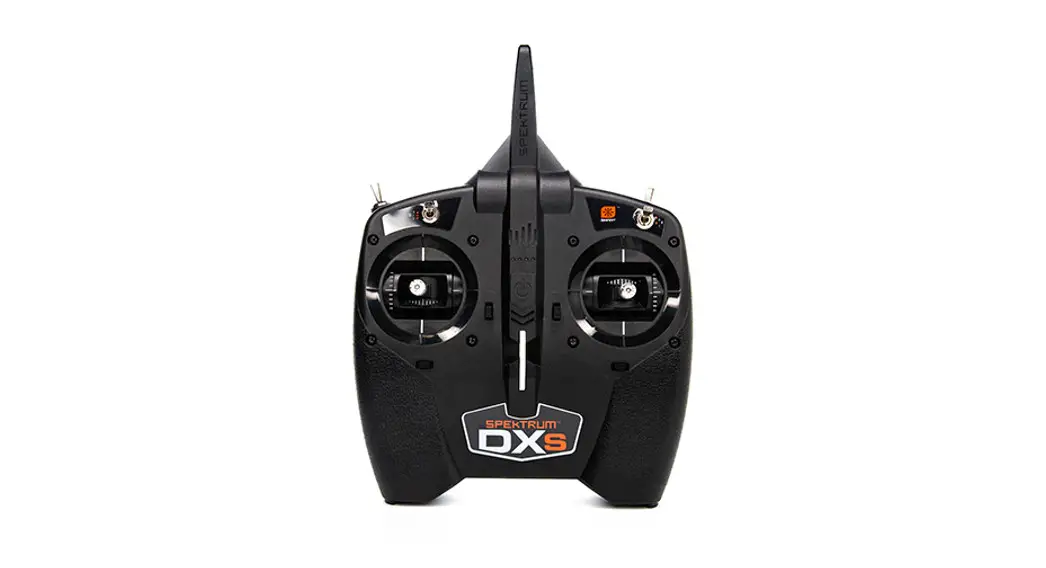

Spektrum DXS Transmitter
Preset Model Profiles
The Spektrum DXS transmitter has the ability to change between 4 different Airplane Profiles and a Heli Profile using trim inputs. See the profile options, compatible models, and notes for each listed below.
– Preset Profiles Description – See DXS Profile Switch and Channel Designations Chart for more info
STANDARD AIRPLANE PROFILE – For models with up to 4 control surfaces, such as trainer, sport, and gliders models. Use with models with Retracts, Flaps, and other auxiliary functions may be limited in this profile.
EXTRA FUNCTIONS PROFILE – For models with Flaps and Retracts, and auxiliary functions like Throttle Reverse. SAFE select flight modes can be limited in this profile when CH5 and CH6 are already in use. Also please note when using this profile with models with Flaps, there is no Elevator Compensation. Dropping flaps on most high wing models will cause “ballooning” and the nose will pitch up.
ELEVON A/B PROFILES –This preset is intended for Delta wing and Flying wing models that require Elevon Mixing. This mode mixes the Aileron and Elevator channels to produce pitch and roll movements with 2 control surfaces. When using an Elevon Profile, it is likely you will need to Reverse either Aileron/Elevator or both. (see DXS manual for channel reversing instructions)
Possible Elevon Reversing Options
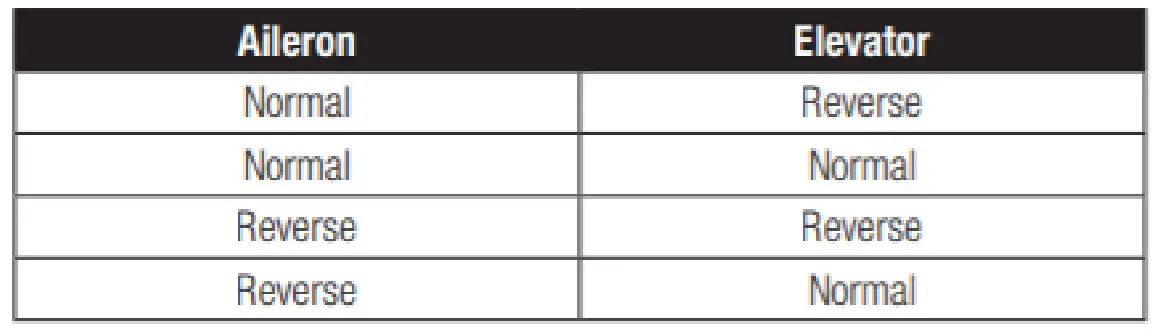
Tip: If you test all servo reversing options and the control surfaces do not move in the correct direction, change the Elevon wing from Elevon-A to Elevon-B.
STANDARD HELI PROFILE – The Standard Heli profile has preset throttle and pitch curves that are specifically chosen to fly many popular Blade Heli Models. These curves are set to the B switch for Normal, Stunt 1, and Stunt 2. Please see the compatibility chart for a list of compatible Blade Helis
DXS Profiles Switch and Channel Designations | |||||
| Button A | Switch B | Switch D | Switch F | Switch H | |
| Standard Airplane Profile 1 | Panic / CH6 | Flight Modes / CH5 | Aux / CH 7 | High/Low Rate | Throttle Hold |
| Extra Functions Profile 2 | Reverse / SAFE / CH7 | Gear / Aux / CH5 | Flap / CH6 | High/Low Rate | Throttle Hold |
| Elevon A Profile 3 | Panic / CH6 | Flight Modes / CH5 | 3 -Pos / CH 7 | High/Low Rate | Throttle Hold |
| Elevon B Profile 4 | Panic / CH6 | Flight Modes / CH5 | 3 -Pos / CH 7 | High/Low Rate | Throttle Hold |
| Standard Heli Profile 1 | Panic / CH5 | Flight Modes / CH5 | 3 -Pos / CH 7 | High/Low Rate | Throttle Hold |
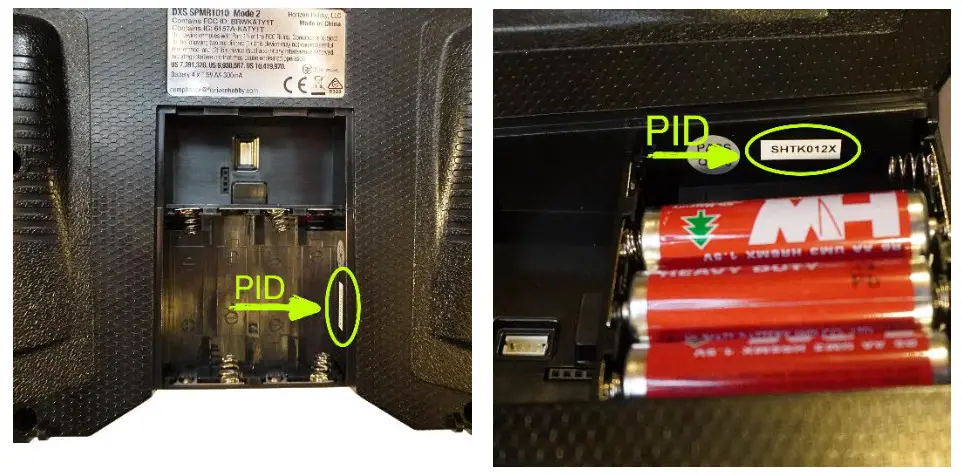
Please note that your DXS transmitter may need an update to perform this function. Make sure that it is on version 1.30 or higher. Some DXS Transmitters will already come with this function, to confirm, check the PID number located in the battery compartment. If the PID starts with “SHTK” then an update is required to access the Preset Model Profiles.
Update Instructions
***Required Equipment***
– Windows-based PC or Laptop with USB Port
– Spektrum USB Programmer (SPMA3065)
– SPMA3068 Adapter (not included with models that came equipped with DXS)
- Download the Spektrum PC programmer Application and Install – Link here
- Plugin Spektrum USB programmer cable into open USB Port.
- Open Spektrum PC Programmer Application on your PC.
- In the top left corner of the App there is a Login button, use this to log in to your Spektrum Account or to create a new account.
- Plug the servo lead end of the USB programmer into the adapter and then plug the adapter into the port on your DXS and power on.
- At this time, you should be presented with the Software Update Screen Menu a. Here you are presented with the Serial Number and you can register the device to your account by clicking Check for Update.
- Click Check for Update and choose the most recent update at the top of the list. a. Click Update and the transmitter will update. Please wait until the process is complete before powering down and unplugging cables.
Need help? Go to these links for a hands-on video walkthrough to update transmitters via USB Cable – Click here
Model Preset Mode Change Instructions via Trim Programming
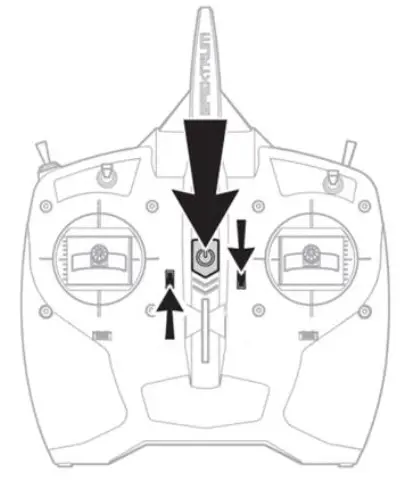
- To enter preset change mode, push and hold the Inner Left Trimmer UP and Inner Right Trimmer Down while you power ON the DXS transmitter.


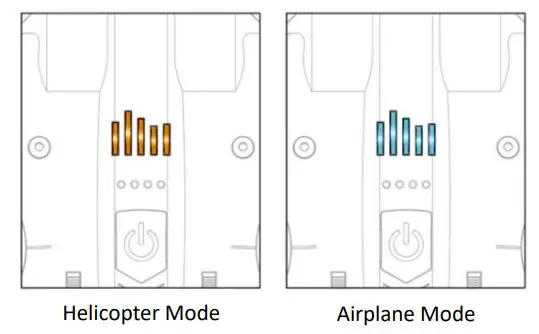
- 1 of the 4 Battery level indicator LEDs will light up Green. This indicates the current selected Preset Mode


- Whenever a mode change is performed, RE-BIND the Transmitter and Receiver to reset Failsafe
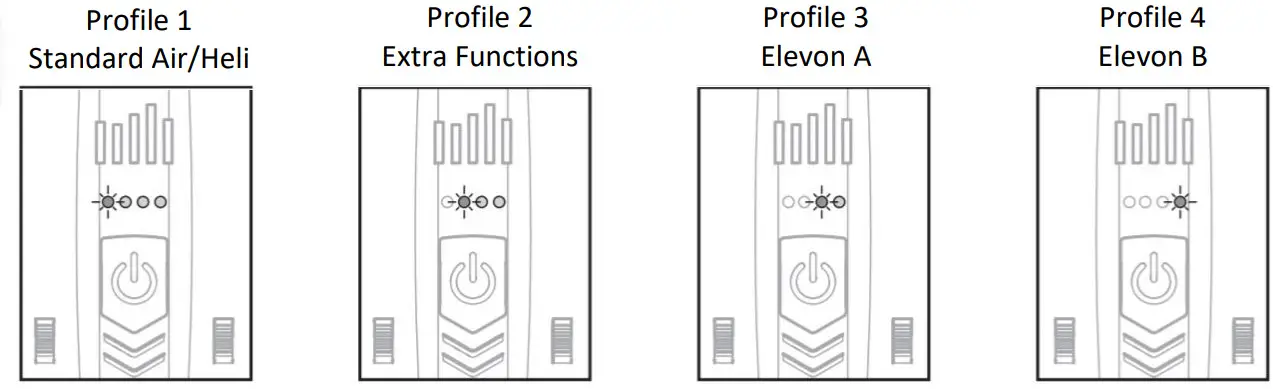
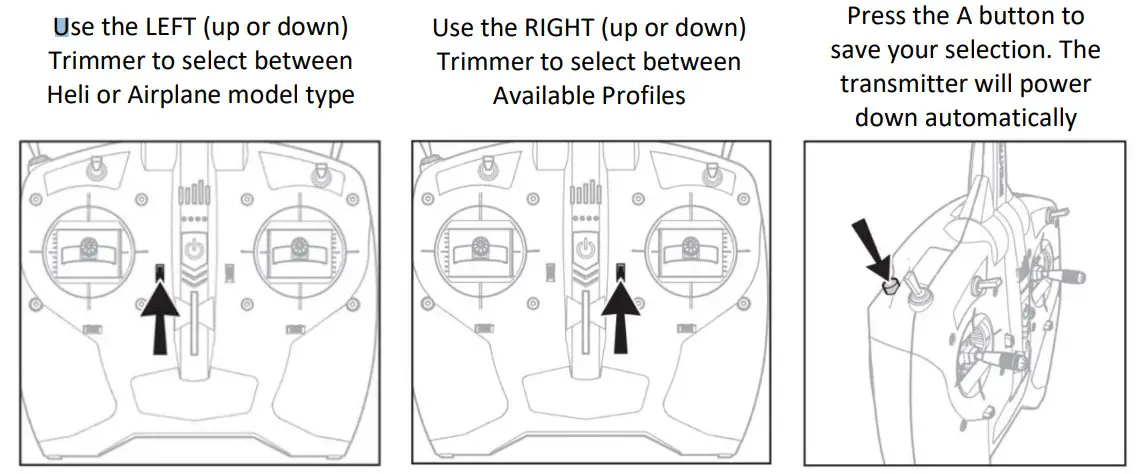
MODEL PROFILES BNF COMPATIBILITY LIST
Please reference this chart for switch layouts and important notes when using your DXS with these popular E-flite, Hobbyzone, and Blade Heli Bind-n-Fly Models
| Model | DXS Profile | Button A | Switch B | Switch D | Switch F | Switch H |
| E-Flite EC-1500 (EFL5750) | Airplane Profile 2 | SAFE Select | Cargo Door | 3 Pos Flaps | High/Low Rate | Throttle Hold |
NOTES
The DXS does not support Flap to Elevator compensation – Be prepared to apply down elevator when deploying flaps to level out the model – SAFE Select is only available as a momentary button with this model using this profile, hold the button for SAFE on and release for AS3X mode. For the best experience, we recommend flying with a NX6 transmitter (or higher) with this model
| Apprentice STS (EFL3750) | Airplane Profile 1 | Panic Recovery | Flight Modes | N/A | High/Low Rate | Throttle Hold |
| Night Timber X (EFL13850) | Airplane Profile 2 | Throttle Reverse | SAFE Select | 3 Pos Flaps | High/Low Rate | Throttle Hold |
NOTES
The DXS does not support Flap to Elevator compensation – Be prepared to apply down elevator when deploying flaps to level out the model – Throttle Reverse is only available as a momentary button with this model using this profile, hold the button for SAFE on and release for AS3X mode. For the best experience, we recommend at least flying with a NX6 transmitter with this model
| F-16 70mm EDF (EFL7850/EFL78500) | Airplane Profile 1 | N/A | Retract Gear | SAFE Select | High/Low Rate | Throttle Hold |
| Maule 1.5M (EFL5350/EFL53500) | Airplane Profile 2 | Throttle Reverse | SAFE Select | 3 Pos Flaps | High/Low Rate | Throttle Hold |
| Ultimate 3D 950mm SMART (EFL16550) | Airplane Profile 2 | Throttle Reverse | SAFE Select | N/A | High/Low Rate | Throttle Hold |
Throttle Reverse is only available as a Momentary button in this Mode, hold the button for Reverse on and release for Forward Flight
| Extra 300 1.3M (EFL11550/EFL115500) | Airplane Profile 1 | N/A | SAFE Select | N/A | High/Low Rate | Throttle Hold |
NOTES
The pre-programmed High and Low Rate on the DXS, when flying 3D models, even at a low rate, is very reactive. It is highly recommended to use a programmable Transmitter to program the recommended rates and expo for this model. For the best experience, we recommend at least flying with a DX6e transmitter with this model
| P-39 1.2m (EFL9150) | Airplane Profile 2 | SAFE Select | Retract Gear | 3 Pos Flaps | High/Low Rate | Throttle Hold |
NOTES
The DXS does not support Flap to Elevator compensation – Be prepared to apply down elevator when deploying flaps to level out the model – SAFE Select is only available as a momentary button with this model using this profile, hold the button for SAFE on and release for AS3X mode. For the best experience, we recommend flying with an NX6 transmitter (or higher) with this model
| P-51D 1.2M (EFL8950/EFL89500) | Airplane Profile 2 | SAFE Select | Retract Gear | 3 Pos Flaps | High/Low Rate | Throttle Hold |
NOTES
The DXS does not support Flap to Elevator compensation – Be prepared to apply down elevator when deploying flaps to level out the model – SAFE Select is only available as a momentary button with this model using this profile, hold the button for SAFE on and release for AS3X mode. For the best experience, we recommend flying with a NX6 transmitter (or higher) with this model
| Viper 70mm EDF (EFL7750/EFL77500) | Airplane Profile 2 | SAFE Select | Retract Gear | 3 Pos Flaps | High/Low Rate | Throttle Hold |
NOTES
The DXS does not support Flap to Elevator compensation – Be prepared to apply down elevator when deploying flaps to level out the model – SAFE Select is only available as a momentary button with this model using this profile, hold the button for SAFE on and release for AS3X mode. For the best experience, we recommend flying with an NX6 transmitter (or higher) with this model
| Air Tractor 1.5m (EFL16450) | Airplane Profile 2 | SAFE Select | N/A | 3 Pos Flaps | High/Low Rate | Throttle Hold |
NOTES
The DXS does not support Flap to Elevator compensation – Be prepared to apply down elevator when deploying flaps to level out the model – SAFE Select is only available as a momentary button with this model using this profile, hold the button for SAFE on and release for AS3X mode. For the best experience, we recommend flying with a DX6e transmitter (or higher) with this model
| Turbo Timber 1.5m (EFL15250) | Airplane Profile 2 | SAFE Select | N/A | 3 Pos Flaps | High/Low Rate | Throttle Hold |
NOTES
The DXS does not support Flap to Elevator compensation – Be prepared to apply down elevator when deploying flaps to level out the model – SAFE Select is only available as a momentary button with this model using this profile, hold the button for SAFE on and release for AS3X mode. For the best experience, we recommend flying with a DX6e transmitter (or higher) with this model
| Timber X 1.2M (EFL3850/EFL38500) | Airplane Profile 2 | SAFE Select | N/A | 3 Pos Flaps | High/Low Rate | Throttle Hold |
NOTES
The DXS does not support Flap to Elevator compensation – Be prepared to apply down elevator when deploying flaps to level out the model – SAFE Select is only available as a momentary button with this model using this profile, hold the button for SAFE on and release for AS3X mode. For the best experience, we recommend flying with a DX6e transmitter (or higher) with this model
| Twin Otter 1.2m (EFL300500/EFL30050) | Airplane Profile 2 | SAFE Select | N/A | 3 Pos Flaps | High/Low Rate | Throttle Hold |
NOTES
The DXS does not support Flap to Elevator compensation – Be prepared to apply down elevator when deploying flaps to level out the model – SAFE Select is only available as a momentary button with this model using this profile, hold the button for SAFE on and release for AS3X mode. For the best experience, we recommend flying with a DX6e transmitter (or higher) with this model
| Carbon Cub S2 1.3M (HBZ3250/HBZ32500) | Airplane Profile 1 | Panic Recovery | Flight Modes | N/A | High/Low Rate | Throttle Hold |
| Cherokee 1.3M (EFL54500/EFL5450) | Airplane Profile 2 | SAFE Select | N/A | 3 Pos Flaps | High/Low Rate | Throttle Hold |
NOTES
The DXS does not support Flap to Elevator compensation – Be prepared to apply down elevator when deploying flaps to level out the model – SAFE Select is only available as a momentary button with this model using this profile, hold the button for SAFE on and release for AS3X mode. For the best experience, we recommend flying with a DX6e transmitter (or higher) with this model
| Opterra 2M Wing (EFL11150/EFL111500) | Airplane Profile 1 | N/A | SAFE Select | N/A | High/Low Rate | Throttle Hold |
| Conscendo Evolution 1.5m (EFL01650) | Airplane Profile 1 | N/A | SAFE Select | N/A | High/Low Rate | Throttle Hold |
| T-28 Trojan 1.1m (EFL08250) | Airplane Profile 1 | N/A | SAFE Select | N/A | High/Low Rate | Throttle Hold |
| F-15 64mm (EFL9750/EFL97500) | Airplane Profile 1 | N/A | SAFE Select | N/A | High/Low Rate | Throttle Hold |
| V-900 (EFL74500/EFL7450) | Airplane Profile 1 | N/A | SAFE Select | N/A | High/Low Rate | Throttle Hold |
| Valiant 1.3M (EFL4950/EFL49500) | Airplane Profile 2 | SAFE Select | N/A | 3 Pos Flaps | High/Low Rate | Throttle Hold |
NOTES
The DXS does not support Flap to Elevator compensation – Be prepared to apply down elevator when deploying flaps to level out the model – SAFE Select is only available as a momentary button with this model using this profile, hold the button for SAFE on and release for AS3X mode. For the best experience, we recommend flying with a DX6e transmitter (or higher) with this model
| Pitts 850mm (EFL3550/EFL35500) | Airplane Profile 1 | N/A | SAFE Select | N/A | High/Low Rate | Throttle Hold |
| UMX A-10 Thunderbolt II 30mm EDF (EFLU6550) | Airplane Profile 1 | N/A | SAFE Select | N/A | High/Low Rate | Throttle Hold |
| Citation Longitude (EFLU6350) | Airplane Profile 1 | N/A | SAFE Select | N/A | High/Low Rate | Throttle Hold |
| AeroScout S 1.1m (HBZ3850/HBZ38500) | Airplane Profile 1 | Panic Recovery | SAFE Select | N/A | High/Low Rate | Throttle Hold |
| UMX Turbo Timber (EFLU6950) | Airplane Profile 2 | SAFE Select | N/A | 3 Pos Flaps | High/Low Rate | Throttle Hold |
NOTES
The DXS does not support Flap to Elevator compensation – Be prepared to apply down elevator when deploying flaps to level out the model – SAFE Select is only available as a momentary button with this model using this profile, hold the button for SAFE on and release for AS3X mode. For the best experience, we recommend flying with a DX6e transmitter (or higher) with this model
| UMX Ultrix (EFLU6450) | Airplane Profile 1 | N/A | SAFE Select | N/A | High/Low Rate | Throttle Hold |
| Sport Cub S v2 (HBZ4450/HBZ44500) | Airplane Profile 1 | N/A | SAFE Select | N/A | High/Low Rate | Throttle Hold |
| UMX PT-17 (EFLU3080) | Airplane Profile 1 | N/A | SAFE Select | N/A | High/Low Rate | Throttle Hold |
| UMX Radian (EFLU2980) | Airplane Profile 1 | N/A | SAFE Select | N/A | High/Low Rate | Throttle Hold |
| UMX Night Vapor (EFLU1350) | Airplane Profile 1 | N/A | SAFE Select | N/A | High/Low Rate | Throttle Hold |
| UMX Yak 54 3D (EFLU3550) | Airplane Profile 1 | N/A | Flight Modes | N/A | High/Low Rate | Throttle Hold |
| Blade Fusion 360 SMART 3S (BLH6150) | Heli Profile 1 | Panic Recovery | Flight Modes | N/A | High/Low Rate | Throttle Hold |
| Blade 330 S (BLH59550/BLH595500) | Heli Profile 1 | Panic Recovery | Flight Modes | N/A | High/Low Rate | Throttle Hold |
| Blade 230 S Smart (BLH1250) | Heli Profile 1 | Panic Recovery | Flight Modes | N/A | High/Low Rate | Throttle Hold |
| Blade 150 S (BLH5450) | Heli Profile 1 | Panic Recovery | Flight Modes | N/A | High/Low Rate | Throttle Hold |
| Blade 120 S2 (BLH1180) | Airplane Profile 1 | Panic Recovery | Flight Modes | N/A | High/Low Rate | Throttle Hold |
 spektrumrc.cachefly.net/apps/spektrum_programmer.html
 How to Register and Update your Spektrum Transmitter with the Spektrum USB Programming Cable - YouTube