
Radioddity FS-T3 Long Range Walkie Talkies Bundle
Introduction
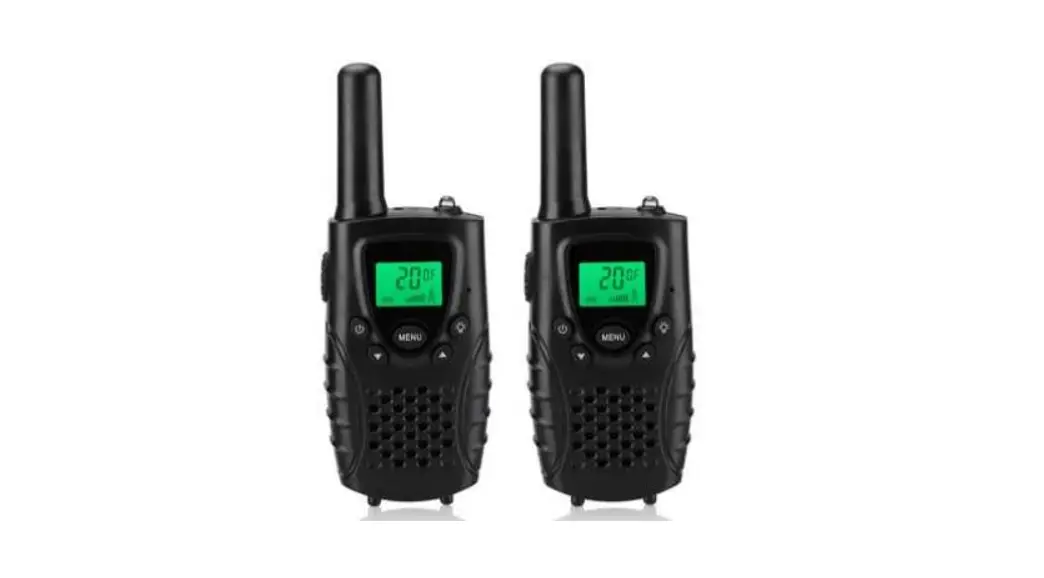
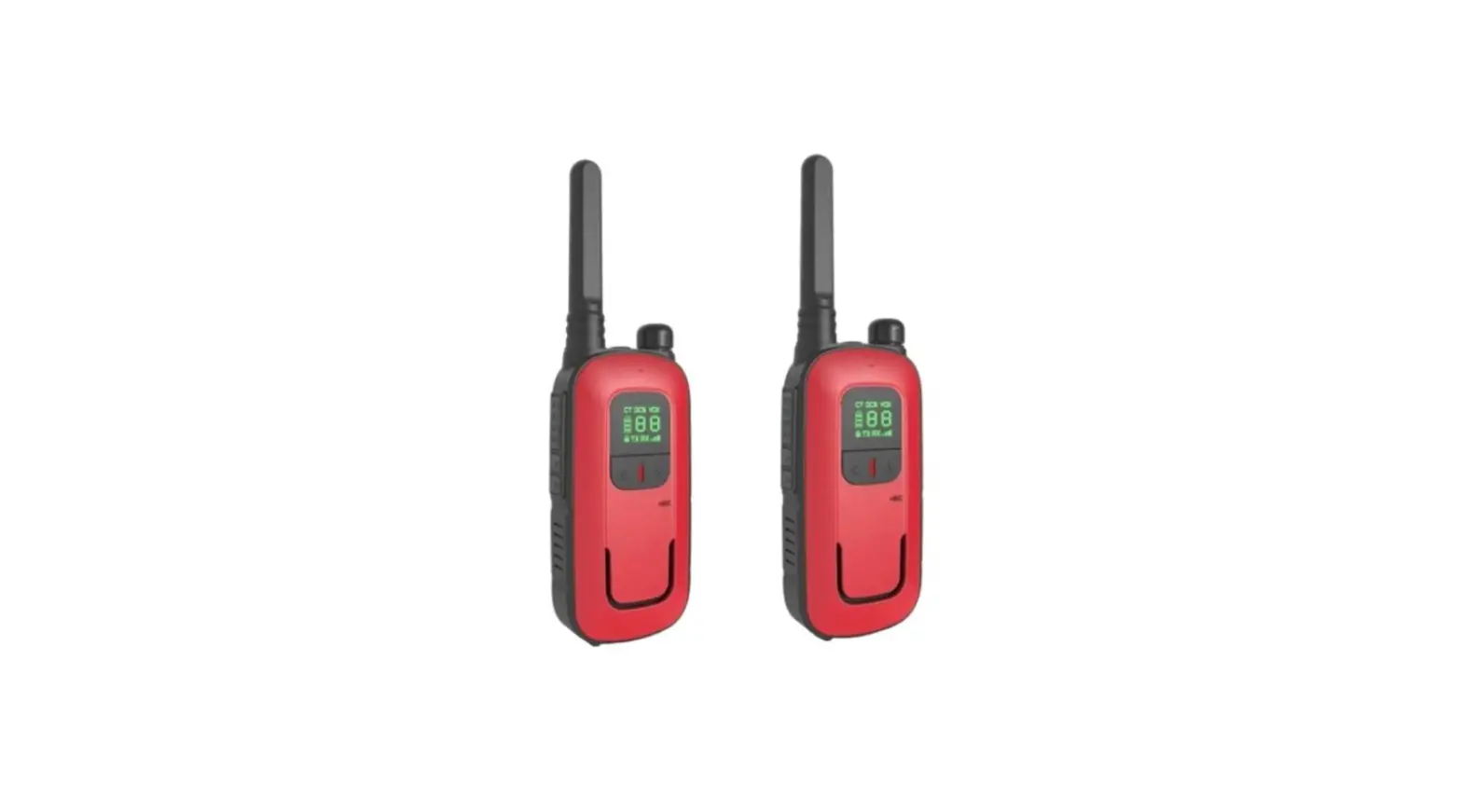
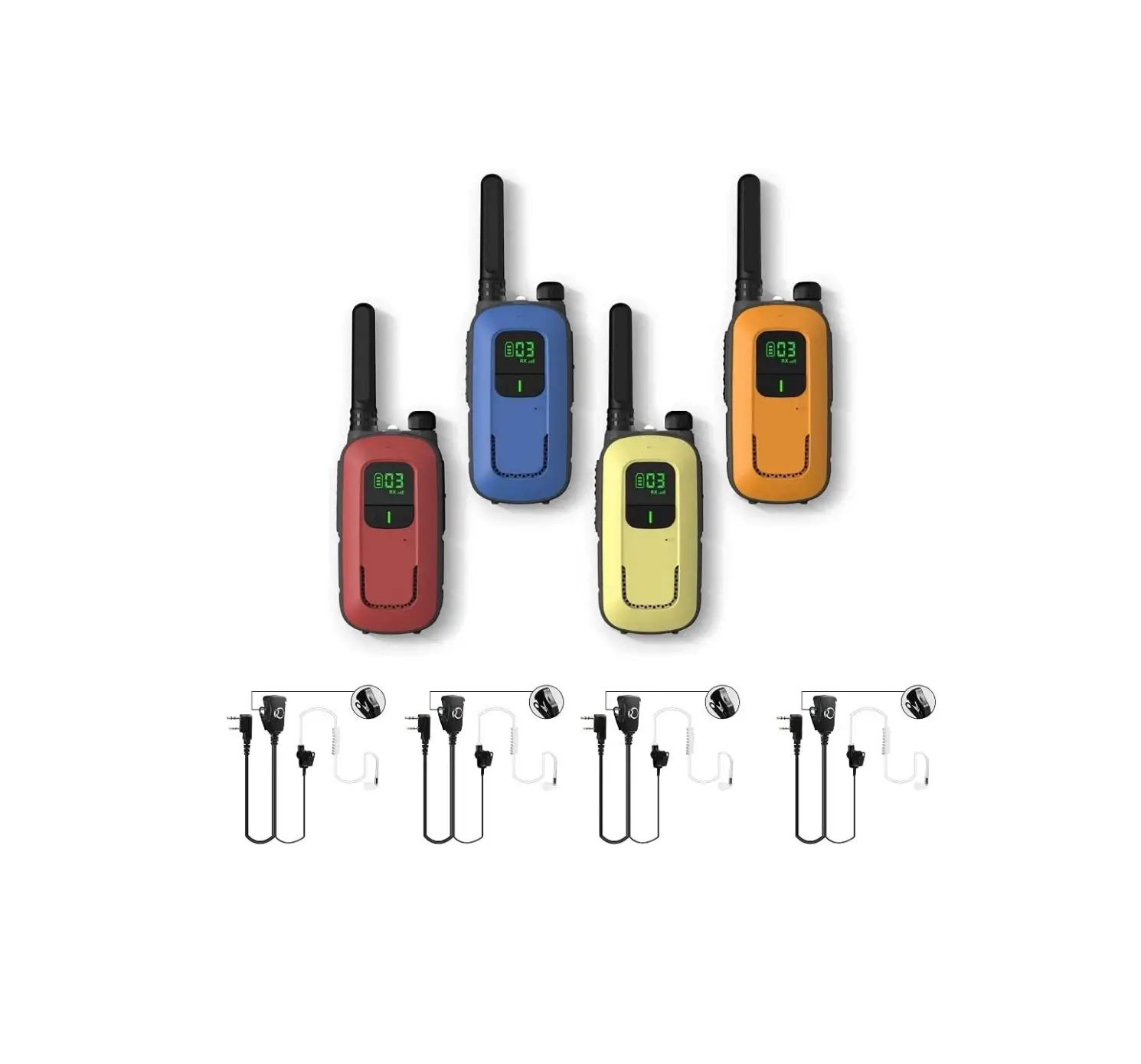
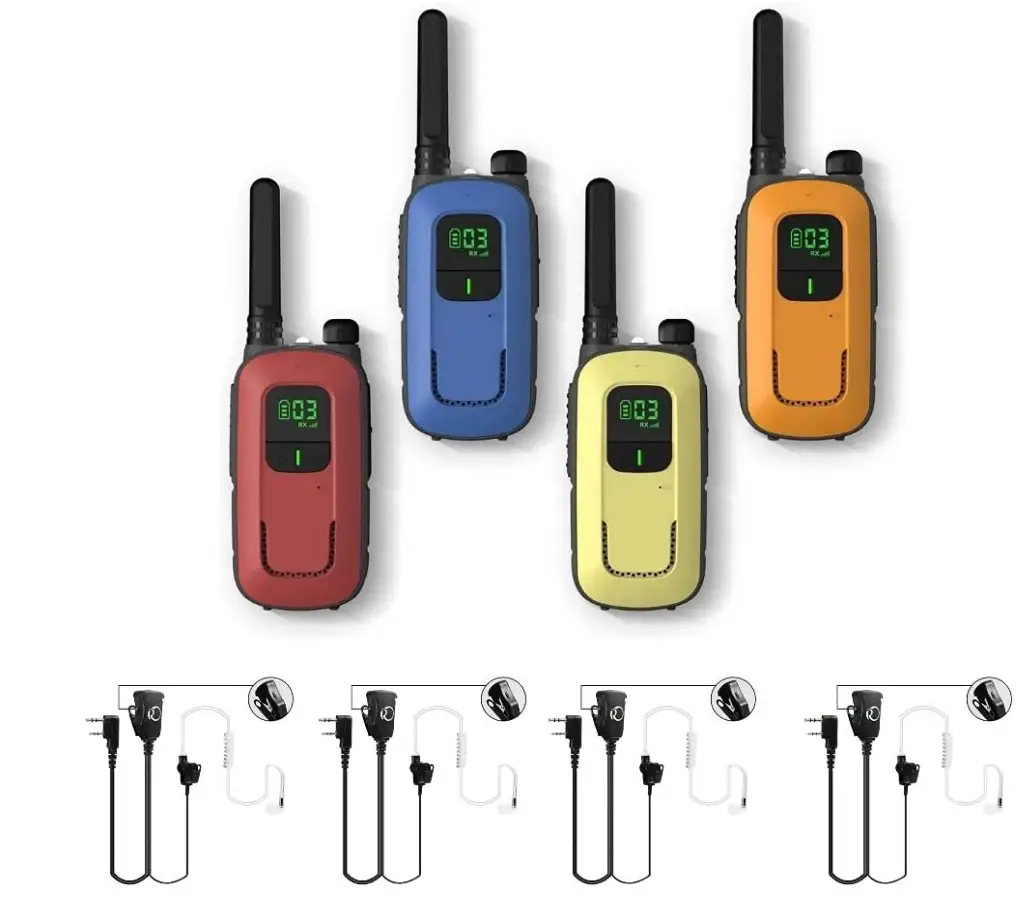
With 22 FRS license-free channels pre-programmed, the T3 is ready to communicate with other T3 radios and all Radioddity FRS radios right out of the box. Even children and elders will find it very simple to use. One set includes four distinct, beautiful hues that give you a better sense of ownership over your own T3 than the color alone. The T3 has a 1500mAh detachable Li-ion battery and has a 24-hour standby time. Using a micro-USB cord to charge like a phone is quite convenient. There is no need to purchase more batteries. Cleaner air and more vitality. Despite the limited number of frequencies on the FRS band, you can have your own family or team channels with 204 CTCSS/DCS privacy tones without worrying that your children will be affected.
Additionally, you can examine the channel before selecting it by using the monitor function. Imagine how convenient the T3 is—lightweight, it’s 0.25 lbs., and small enough for children to carry in their hands. Your hands will feel secure and comfortable thanks to the anti-slip matte case; your children won’t drop them easily. Comfortable silicone in-ear earpieces are compact and tightly fit in the ear, making them ideal for all-day usage and allowing noise cancellation in noisy environments. You can easily change the radio’s volume by turning the volume knobs up or down without having to hold the walkie-talkie.
SAFETY INFORMATION
Please read the following brief instructions, non-compliance with these rules may cause danger or violate the law.
- Refer to local government regulations before using this radio, improper use may violate the law.
- Turn off the radio before getting close to flammable or explosive areas.
- Turn off the radio before you get near explosive or ignition zones.
- Do not use radio whose antenna is damaged, touching damaged antenna will cause heat injury.
- Do not attempt to open the radio; the maintenance work should be done by technical expert only.
- To avoid troubles caused by electromagnetic interference or electromagnetic compatibility, please turn off the radio in places where have the banner “Do not use wireless equipment”, such as hospital and other healthcare facilities. In the car with an airbag, do following the brief instructions, non-compliance with these rules may cause danger or violate the law.
- The radio within the scope of the airbag deployment.
- Do not store the radio under the direct sunshine or in hot areas. When you transmit with the radio, do keep away from its antenna for 5cm at least.
- If the radio appears smelly or smoky, please shut off its power immediately and contact your local dealer.
- Do not transmit too long due to possible heat build-up.
When transmitting with a portable radio, hold the radio in a vertical position with the microphone 3 to 4 centimeters away from your lips; also make sure the antenna stays at least 2.5 centimeters away from your body when transmitting.
WHAT’S IN THE BOX
We recommend you to check the items listed in the following table before discarding the package box.
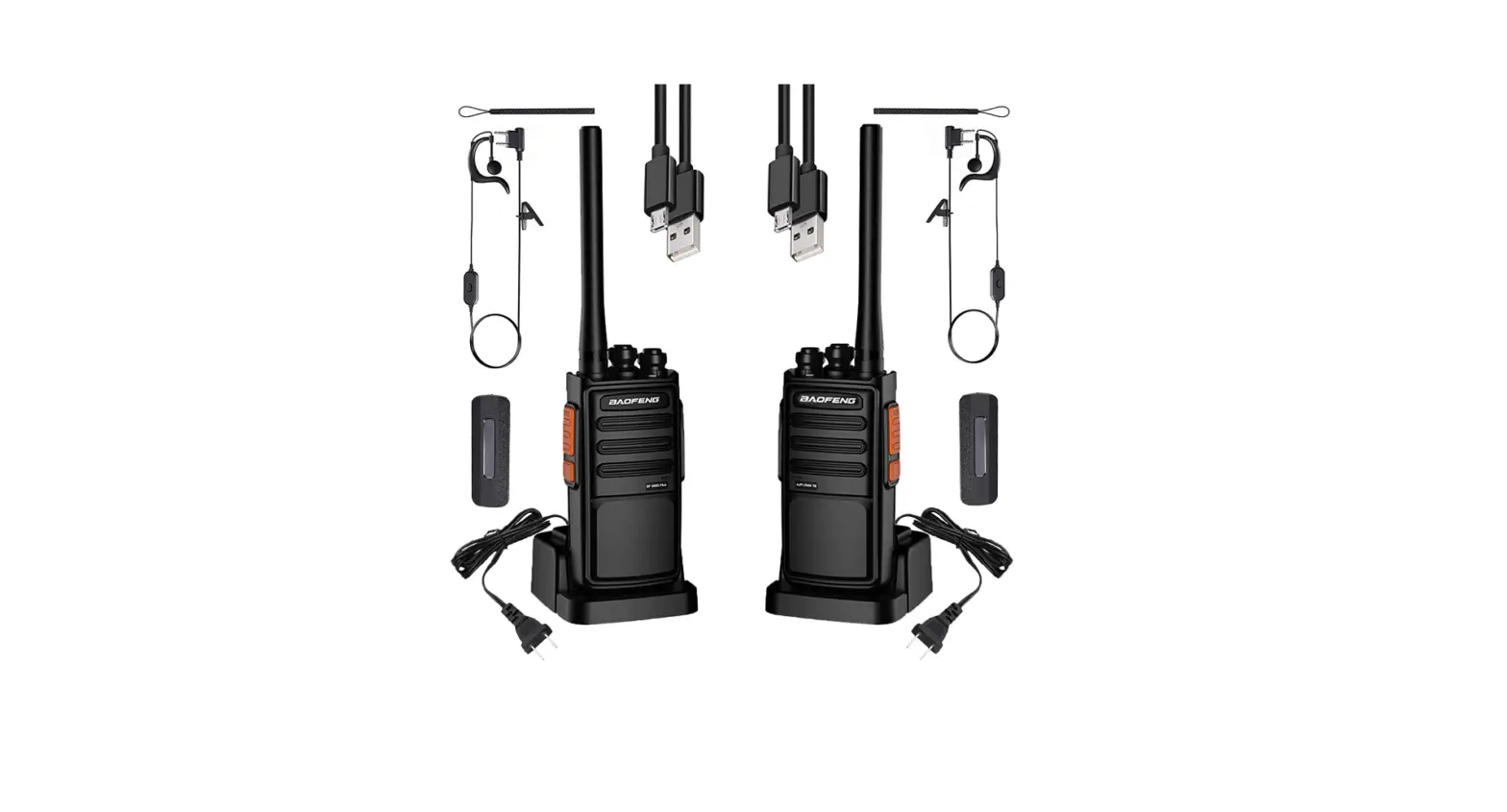
- 2 PCS FS-T3/PR-T3 Radio Body 2 PCS 1500mAh Battery Pack
- 2 PCS Belt Clip 2 PCS Earpiece
- 1 PCS USB Charging Cable 2 PCS Lanyard
- 1 PCS English & German Manual
NOTE
The Radio is compatible with other accessories which are available on: www.radioddity.com/
GETTING TO KNOW YOUR RADIO
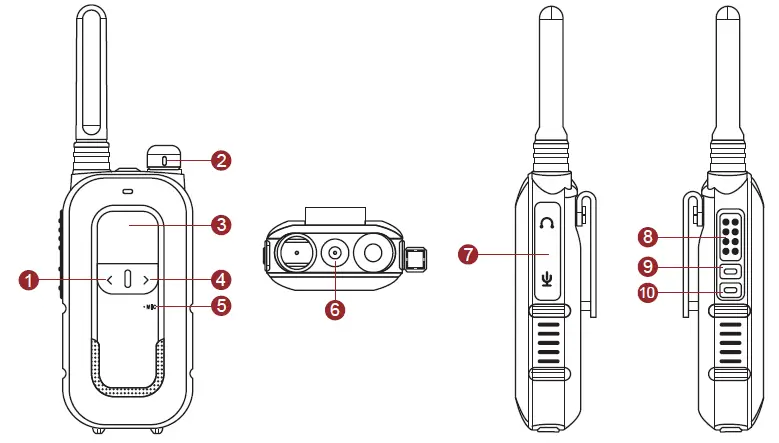
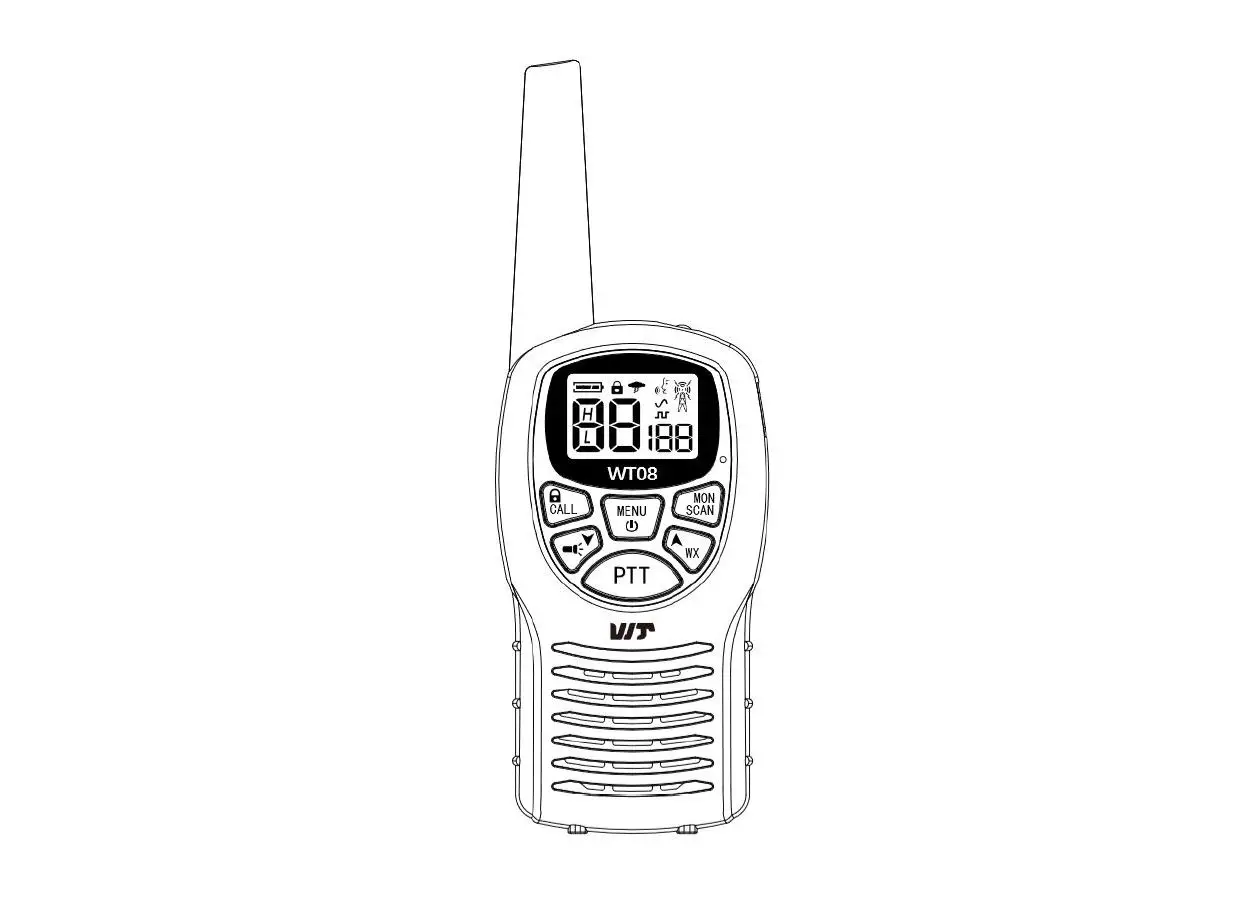
| 1. Down/Quicky Backward | 3. LCD Screen | 5. Microphone | 7. Earphone/Mic Jack | 9. Side Key 1 |
| 2. Power and Volume Knob | 4. UP/Quickly Forward | 6. LED Indicator | 8. PTT Button | 10. Side Key 2 |
Side key 1 (long press: monitor)
Side key 2 (short press: flashlight, long press: keypad lock)
THE MAIN DISPLAY
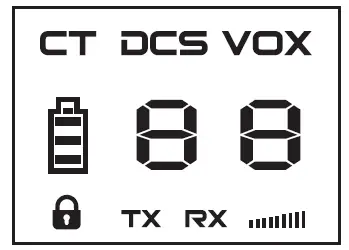
| Icon | Description | Icon | Description |
| TX |
Transmit indicator |
Keypad lock | |
|
RX |
Receive indicator |
Battery power indicator | |
|
CT |
CTCSS enabled |
|
Channel number indicator |
| DCS | DCS enabled | Signal strength indicator | |
| VOX | VOX enabled |
BASIC OPERATION
NOTE: Battery should be fully charged before initial use. Optimum battery efficiency will be achieved after the three full battery charge and discharge cycles.
T3 can communicate with any other brand of FRS radio when they are adjusted at the same channels and frequencies, it can be simply programmed by using the software, which is available on radioddity.com.
QUICK START GUIDE
- Install the battery at the top slot in place, then push the battery to lock it out.
- Turn the power on/off knob clockwise to turn on the radio.
- Select your desired channel, press the PTT and talk!
CHANNEL SWITCH
Press [<] or [>] button to choose your desired channel.
SQUELCH
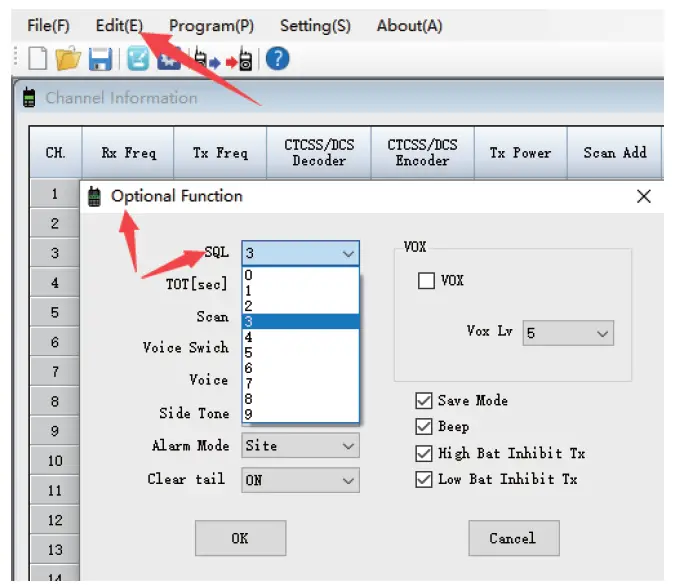
Mutes the speaker of the transceiver in the absence of a strong signal. Squelch is either OFF (0) or 1-9 levels. The higher the level, the stronger the signal must be to un-mute the speaker.
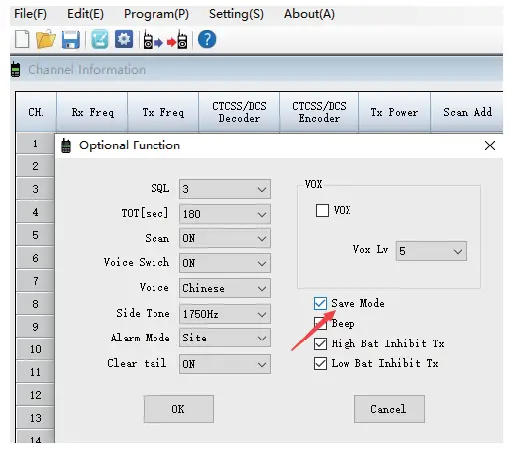
The default setting of the squelch level is 3. You can adjust it through programming via computer. Edit > Optional Function > SQL
NOTE: The reference screenshot is for reference only. If the programming software is upgraded, please refer to the official website.
BATTERY SAVE FUNCTION
In order to prevent running out of battery quickly, turn on the battery save function to keep lasting the standby time much longer.
- ON: When turn on the Save Mode, the Battery Save function will automatically be activated when no operation on the radio for 10 seconds.
- OFF: When turn off the Save Mode, Battery Save is off.

BUSY CHANNEL LOCKOUT
Disables the [PTT] button on a channel that is already in use. The radio will sound a beep tone and will not transmit if the [PTT] button is pressed when a channel is already in use.
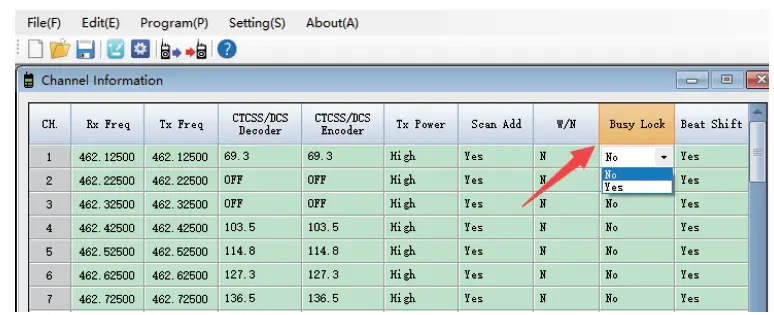
Busy channel lockout prevents transmission on a frequency that is or appears to be, already in use.
- If the CTCSS or DCS is not in use, it will prevent the radio from transmitting as long as there’s some signal without CTCSS or DCS on the same frequency.
- If the CTCSS or DCS is not in use, it allows the radio transmitting when the channel is free, even though there is a signal with CTCSS or DCS on the same frequency.
VOICE BROADCAST
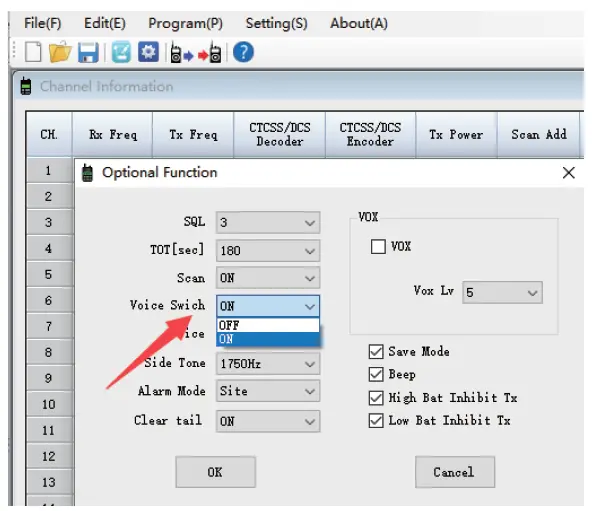
- ON: When the voice switch is on, allows audible confirmation of a key press.
- OFF: When the voice switch is off, the key tone is off.
LOW BATTERY INDICATION
When the battery capacity reaches the low level (3.3V ) and voice switch is enabled, a “Please charge the battery” announcement will be heard, indicating that you need to change your battery or put your radio in the charger.
TOT
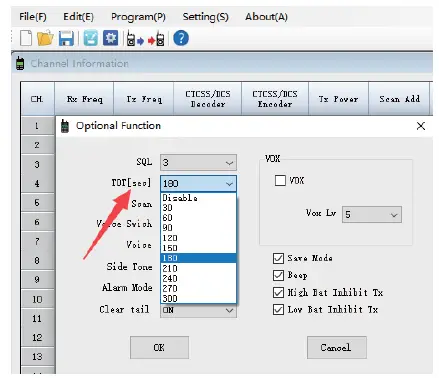
This feature provides a safety switch, which limits transmission time to the programmed value. This will promote battery conservation by not allowing you to make excessively long transmissions, and in the event of a stuck PTT switch, it can prevent interference to other users as well as battery depletion.
VOX
When enabled it is not necessary to push the [PTT] button on the transceiver.
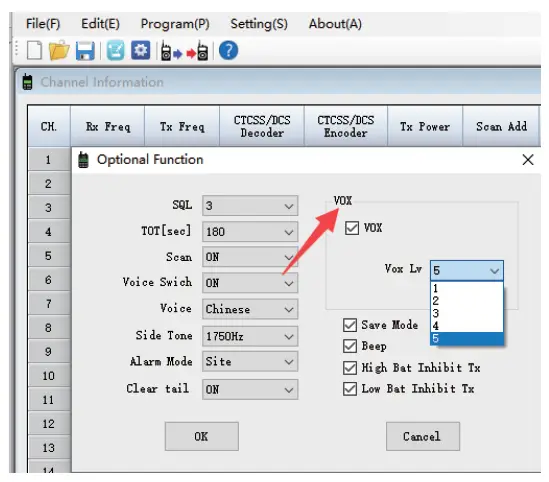
- When VOX is on in your working channel: Speak to the microphone directly, it will transmit automatically. The radio stops transmitting when there is no sound, and waits for receiving.
- When a headset with a microphone is used: When VOX is on, you should VOX again for the radio to identify voice volume. If the microphone is sensitive enough, the radio will start transmitting. If the microphone is not sensitive enough, the radio cannot collect your voice. Please adjust your voice volume to guarantee smooth communications.
- VOX gain level: When the sound level is higher than the level of VOX, VOX automatically transmits. The VOX gain level can adjust from 1 to 5 levels. When a signal is received, VOX will not transmit even if the sound level is higher than the set VOX gain level.
MONITOR
Turn on the radio, then press and hold the side key 1 to open the receiver and listen to whether there is any voice on the current channel.
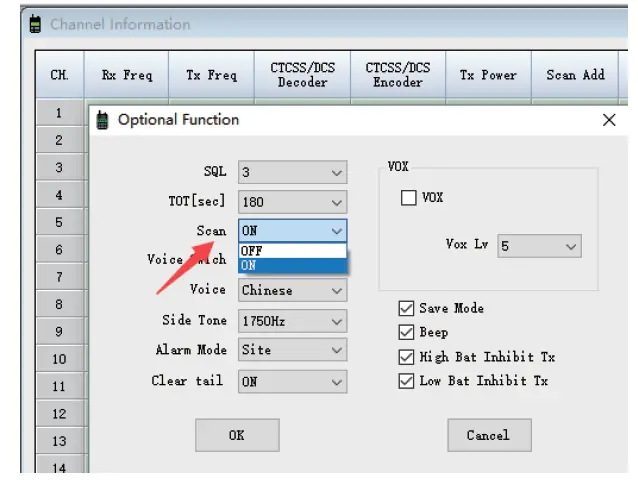
SCAN
In standby mode, press and hold the [<] and [>] key for 2 second to start scanning, then press and hold them to stop scanning.
DTMF Transmit
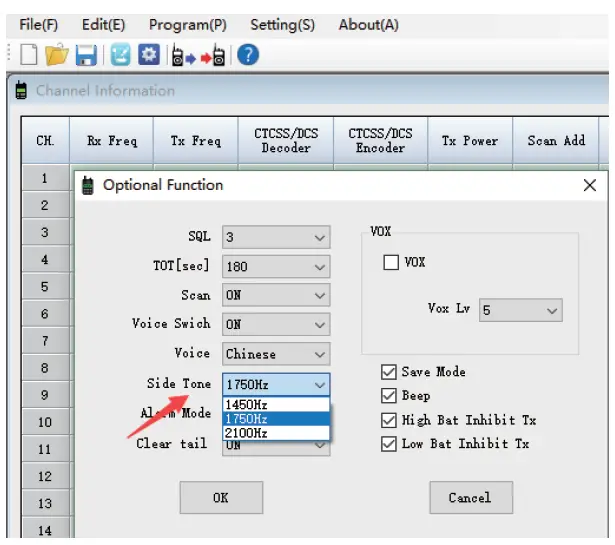
DTMF is most commonly used for automation systems and remote control. A common example would be in amateur radio repeaters where some repeaters are activated by sending out a DTMF number (1450Hz/1750Hz/2100Hz).
Press and hold [PTT] and [>] key to send the DTMF number you have programmed on the software, and the “BEEP” sound can be heard.
QT/DQT (CTCSS/DCS)
QT/DQT (CTCSS/ DCS) is the sub- audible signal, blocking out unwanted transmissions on your frequency have developed. When CTCSS/DCS is set, then within the communication range, you can only receive signals from the same frequency with the same QT/DQT setting. When the QT/DQT is off, you will get all the signals from the same frequency within the communication range.
CTCSS
| 69.3 | 71.9 | 74.4 | 77.0 | 79.7 | 82.5 | 85.4 | 88.5 | 91.5 | |
| 94.8 | 97.4 | 100.0 | 103.5 | 107.2 | 110.9 | 114.8 | 118.8 | 123.0 | 127.3 |
| 131.8 | 136.5 | 141.3 | 146.2 | 151.4 | 156.7 | 162.2 | 167.9 | 173.8 | 179.9 |
| 186.2 | 192.8 | 203.5 | 210.7 | 218.1 | 225.7 | 233.6 | 241.8 | 250.3 |
DCS
| D023N | D025N | D026N | D031N | D032N | D043N | D047N | D051N | D054N | D065N |
| D071N | D072N | D073N | D074N | D114N | D115N | D116N | D125N | D131N | D132N |
| D134N | D143N | D152N | D155N | D156N | D162N | D165N | D172N | D174N | D205N |
| D223N | D226N | D243N | D244N | D245N | D251N | D261N | D263N | D265N | D271N |
| D306N | D311N | D315N | D331N | D343N | D346N | D351N | D364N | D365N | D371N |
| D411N | D412N | D413N | D423N | D431N | D432N | D445N | D464N | D465N | D466N |
| D503N | D506N | D516N | D532N | D546N | D565N | D606N | D612N | D624N | D627N |
| D631N | D632N | D654N | D662N | D664N | D703N | D712N | D723N | D731N | D732N |
| D734N | D743N | D754N |
| D023I | D025I | D026I | D031I | D032I | D043I | D047I | D051I | D054I | D065I |
| D071I | D072I | D073I | D074I | D114I | D115I | D116I | D125I | D131I | D132I |
| D134I | D143I | D152I | D155I | D156I | D162I | D165I | D172I | D174I | D205I |
| D223I | D226I | D243I | D244I | D245I | D251I | D261I | D263I | D265I | D271I |
| D306I | D311I | D315I | D331I | D343I | D346I | D351I | D364I | D365I | D371I |
| D411I | D412I | D413I | D423I | D431I | D432I | D445I | D464I | D465I | D466I |
| D503I | D506I | D516I | D532I | D546I | D565I | D606I | D612I | D624I | D627I |
| D631I | D632I | D654I | D662I | D664I | D703I | D712I | D723I | D731I | D732I |
| D734I | D743I | D754I |
If you need to program the radio via computer, download programming software at https://www.radioddity.com/support/.
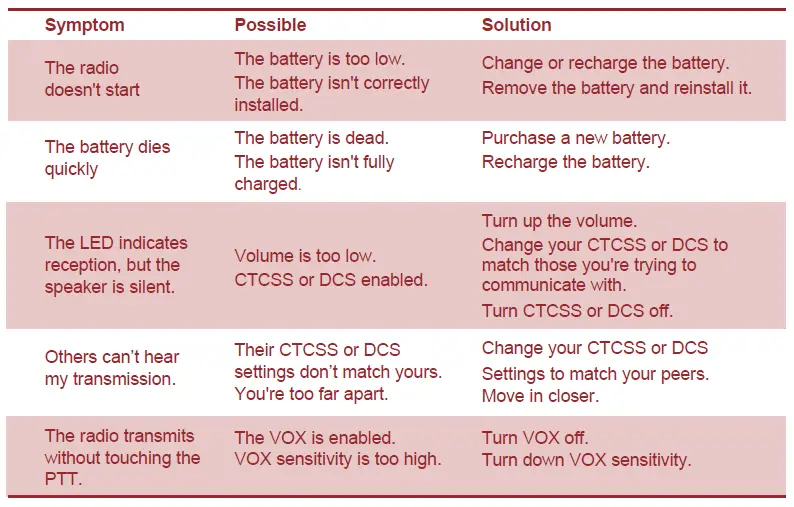
APPENDIX A- TROUBLESHOOTING
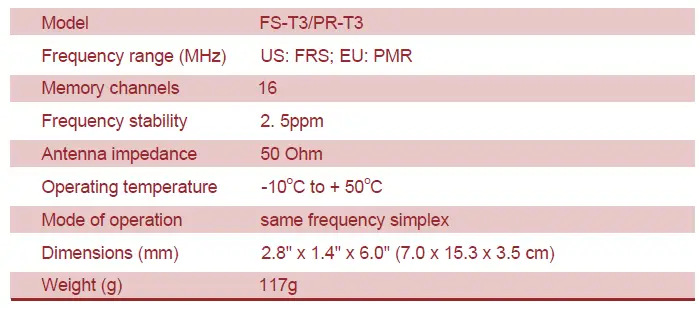
APPENDIX B- TECHNICAL SPECIFICATIONS
GENERAL SPECIFICATIONS
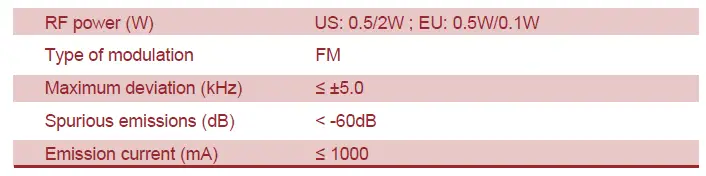
TRANSMITTER
TRANSMITTER SPECIFICATIONS
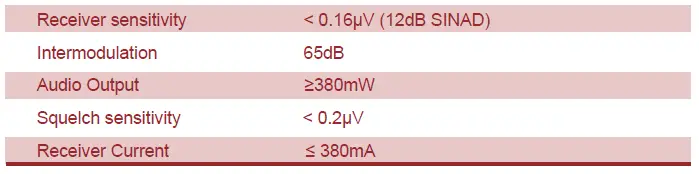
RECEIVER
RECEIVER SPECIFICATIONS
APPENDIX C- PMR/FRS FREQUENCY TABLE
| FRS | |||||
| Channel No. | Frequency | Channel No. | Frequency | Channel No. | Frequency |
| 1 | 462.5625 | 9 | 467.5875 | 17 | 462.6000 |
| 2 | 462.5875 | 10 | 467.6125 | 18 | 462.6250 |
| 3 | 462.6125 | 11 | 467.6375 | 19 | 462.6500 |
| 4 | 462.6375 | 12 | 467.6625 | 20 | 462.6750 |
| 5 | 462.6625 | 13 | 467.6875 | 21 | 462.7000 |
| 6 | 462.6875 | 14 | 467.7125 | 22 | 462.7250 |
| 7 | 462.7125 | 15 | 462.5500 | ||
| 8 | 467.5625 | 16 | 462.5750 | ||
| PMR | |||
| Channel No. | Frequency (MHz) | Channel No. | Frequency (MHz) |
| 1 | 446.00625 | 9 | 446.10625 |
| 2 | 446.01875 | 10 | 446.11875 |
| 3 | 446.03125 | 11 | 446.13125 |
| 4 | 446.04375 | 12 | 446.14375 |
| 5 | 446.05625 | 13 | 446.15625 |
| 6 | 446.06875 | 14 | 446.16875 |
| 7 | 446.08125 | 15 | 446.18125 |
| 8 | 446.09375 | 16 | 446.19375 |
Frequently Asked Questions
One of the top long-range walkie-talkie two-way radios of 2022 is without a doubt the rechargeable Midland 50 Channel GMRS, and for good reason. This set offers a significant advantage for persons in open locations who need to communicate efficiently because it can send and receive transmissions up to 36 miles away in open spaces.
A reasonable general rule of thumb is to estimate the coverage range of a commercial walkie-talkie operating in simplex operation to be between 1 and 2 KM (1-1.5 Miles). It’s crucial to mention the usual distance rather than the ideal distance even though some of our customers do travel larger distances.
Until they collide with or are absorbed by things, these radio waves move in a straight line. As a result, UHF walkie talkies are typically referred to as “line-of-sight” devices.
Which Is Best When Comparing VHF and UHF Radios? In general, VHF (136-174MHz) transmissions perform better outside since they have a somewhat longer range for the same power output than UHF signals (400 – 470MHz).
The quickest response is that they do! Before selecting the best walkie talkie for your needs and your road trip, there are a lot of factors to take into account.
Let me start by saying that ANY radio WILL WORK ANYWHERE in the world.
HF radio can be affected by thunderstorm-related atmospheric noise. There might be more than just rain to worry about given that many HF radio users—for military communications or humanitarian needs, for example—operate in harsh conditions.
Simply put, choose channels 1-7 or 15-22 for greatest power. Numerous power modes are supported by the majority of consumer radios. Make sure you are utilizing high power mode on the channels that let it to achieve the most range. Reduced range is caused by lower power modes, which do not utilize all of your radio’s potential output power.
The majority of handheld two-way radios on the market today emit a signal at a power level of 0.5 to 5 watts. Depending on the type, certain business radios can operate with 1 to 5 watts extra power.
The term “private channel” is a misnomer. Similar to the assertion that these radios are useful up to 16 miles, it is a bunch of marketing nonsense.
Prior to setting both walkie-talkies to the same channel, make sure that the private code numbers on the radios are set to the same number to synchronize them. Radios often have 22 channels. You check the display and then save the channel to find out what channel your radio is on.
A mountain cannot be penetrated by radio waves, especially those produced by low power handheld devices. It doesn’t matter what brand or model you purchase. With a few watts of radiated power, your handheld radio won’t be able to penetrate a pile of dirt and rock that is more than a mile high, thick, and wide.
In places where mobile phones and other communication devices cannot, like vast open stretches in the middle of nowhere, two-way radios can provide exceptional coverage. Two-way radios, on the other hand, have trouble communicating well in particular areas, such as some elevator kinds, tunnels, and basements.
In 26 states, walkie-talkies are permitted for usage while driving.
The 5 watt radio has a range of at least 12 miles. Some handheld radios have 6 watts of power, which, under the appropriate circumstances, can go up to 20 kilometers.