 COPYRIGHT © Hangzhou EZVIZ Software Co., Ltd. ALL RIGHTS RESERVED.
Any and all information, including, among others, wordings, pictures, graphs are the properties of Hangzhou EZVIZ Software Co., Ltd. (hereinafter referred to as “EZVIZ”).
This user manual (hereinafter referred to as “the Manual”) cannot be reproduced, changed, translated, or distributed, partially or wholly, by any means, without the prior written permission of EZVIZ. Unless otherwise stipulated, EZVIZ does not make any warranties, guarantees, or representations, express or implied, regarding the Manual.
About this Manual
The Manual includes instructions for using and managing the product. Pictures, charts, images, and all other information hereinafter are for description and explanation only. The information contained in the Manual is subject to change, without notice, due to firmware updates or other reasons. Please find the latest version on the EZVIZ™ website (http://www.ezvizlife.com).
Revision Record
New release – January 2019
Trademarks Acknowledgement
EZVIZ™, ™, and other EZVIZ’s trademarks and logos are the properties of EZVIZ in various jurisdictions. Other trademarks and logos mentioned below are the properties of their respective owners.
Legal Disclaimer
TO THE MAXIMUM EXTENT PERMITTED BY APPLICABLE LAW, THE PRODUCT DESCRIBED, WITH ITS HARDWARE, SOFTWARE, AND FIRMWARE, IS PROVIDED “AS IS”, WITH ALL FAULTS AND ERRORS, AND EZVIZ MAKES NO WARRANTIES, EXPRESS OR IMPLIED, INCLUDING WITHOUT LIMITATION, MERCHANTABILITY, SATISFACTORY QUALITY, FITNESS FOR A PARTICULAR PURPOSE, AND NONINFRINGEMENT OF THIRD PARTY. IN NO EVENT WILL EZVIZ, ITS DIRECTORS, OFFICERS, EMPLOYEES, OR AGENTS BE LIABLE TO YOU FOR ANY SPECIAL, CONSEQUENTIAL, INCIDENTAL, OR INDIRECT DAMAGES, INCLUDING, AMONG OTHERS, DAMAGES FOR LOSS OF BUSINESS PROFITS, BUSINESS INTERRUPTION, OR LOSS OF DATA OR DOCUMENTATION, IN CONNECTION WITH THE USE OF THIS PRODUCT, EVEN IF EZVIZ HAS BEEN ADVISED OF THE POSSIBILITY OF SUCH DAMAGES.
TO THE MAXIMUM EXTENT PERMITTED BY APPLICABLE LAW, IN NO EVENT SHALL EZVIZ’S TOTAL LIABILITY FOR ALL DAMAGES EXCEED THE ORIGINAL PURCHASE PRICE OF THE PRODUCT. EZVIZ DOES NOT UNDERTAKE ANY LIABILITY FOR PERSONAL INJURY OR PROPERTY DAMAGE AS THE RESULT OF PRODUCT INTERRUPTION OR SERVICE TERMINATION CAUSED BY: A) IMPROPER INSTALLATION OR USAGE OTHER THAN
AS REQUESTED; B) THE PROTECTION OF NATIONAL OR PUBLIC INTERESTS; C) FORCE MAJEURE; D) YOURSELF OR THE THIRD PARTY, INCLUDING WITHOUT LIMITATION, USING ANY THIRD PARTY’S PRODUCTS, SOFTWARE, APPLICATIONS, AND AMONG OTHERS.
REGARDING THE PRODUCT WITH INTERNET ACCESS, THE USE OF THE PRODUCT SHALL BE WHOLLY AT YOUR OWN RISK. EZVIZ SHALL NOT TAKE ANY RESPONSIBILITY FOR ABNORMAL OPERATION, PRIVACY LEAKAGE, OR OTHER DAMAGES RESULTING FROM CYBER ATTACKS, HACKER ATTACKS, VIRUS INSPECTIONS, OR OTHER INTERNET SECURITY RISKS; HOWEVER, EZVIZ WILL PROVIDE TIMELY TECHNICAL SUPPORT IF REQUIRED. SURVEILLANCE LAWS AND DATA PROTECTION LAWS VARY BY JURISDICTION. PLEASE CHECK ALL RELEVANT LAWS IN YOUR JURISDICTION BEFORE USING THIS PRODUCT IN ORDER TO ENSURE THAT YOUR USE CONFORMS TO THE APPLICABLE LAW. EZVIZ SHALL NOT BE LIABLE IN THE EVENT THAT THIS PRODUCT IS USED FOR ILLEGITIMATE PURPOSES. IN THE EVENT OF ANY CONFLICTS BETWEEN THE ABOVE AND THE APPLICABLE LAW, THE LATTER PREVAILS.
Box Contents
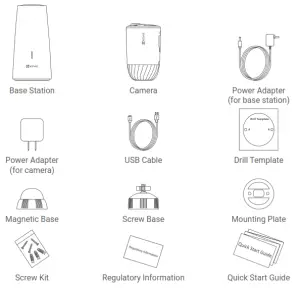
 You can also purchase a camera separately as needed.
Basics Camera
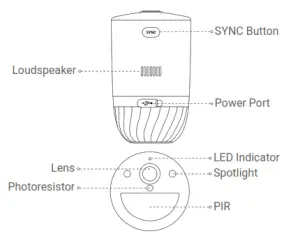
| Name | Description |
| SYNC Button |
|
| Power Port | For charging the camera. |
| LED Indicator |
|
Base Station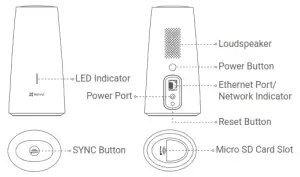
| Name | Description |
| LED Indicator |
|
| SYNC Button |
|
| Power Button | Press to connect or cut off power. |
| Network Indicator | Solid Green: The Ethernet cable is connected. |
| Reset Button | Hold for 5 seconds to restart and reset all parameters to default. |
Setup
Charge the Camera (Optional)
Connect the camera to the power outlet with the power adapter (5V 2A). If the camera is powered off, short press the SYNC button to power on.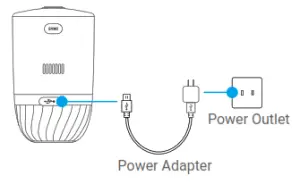
- Please do not charge the camera when the temperature exceeds 45 degrees or below 0 degrees.
- It is not allowed to charge the camera with a power adapter outdoors.
Power on the Base Station
Connect the base station to the power outlet with the power adapter (12V 1A).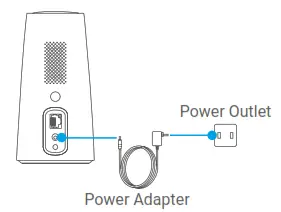 Connect the Base Station to the Internet
Connect the base station to an open LAN port on your router with an Ethernet cable.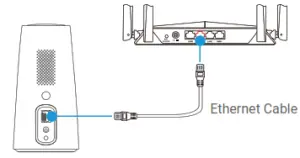 Please make sure the router can access the Internet.
Get the EZVIZ app
- Connect your mobile phone to the Internet.
- Search for EZVIZ in the App Store or Google Play
- Download and install the EZVIZ app.
- Launch the app and register an EZVIZ user account
Add the Base Station to Your EZVIZ Account
- log in to the EZVIZ App.
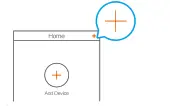
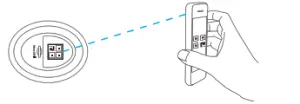
- On the Home screen, tap “+” on the upper-right corner to go to the scan QR code interface.

- Scan the QR code at the bottom of the base station or manually enter the serial number to add the base station.

- Follow the EZVIZ app wizard to finish the network configuration of the base station.
- When the base station is added to your EZVIZ account successfully, tap the “Next” button to link camera(s) to your base station.
Pair Base Station with Camera(s)
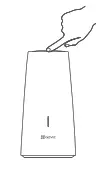
- Press and hold the SYNC button on the base station for 2 seconds. The LED indicator will
flash blue.
- Place the camera 1 to 3 ft (30 to100 cm) from the base station. Press and hold the SYNC
button on the camera for 2 seconds. The LED indicator will fast flash blue.
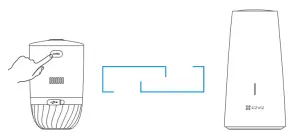
Wait for about 120 seconds, and tap  to refresh the current page.• The camera LED indicator slow-flashing red indicates the pairing has failed, and you can repeat the above steps to try again.
• You can pair up to 4 cameras with each base station at the same time. Camera
Installation
Installation Location
Choose a location with a clear, unblocked field of view and with a good wireless signal to the base station. Please keep the following tips in mind:
- Make sure the wall is strong enough to withstand three times the weight of the camera.
- The camera cannot be installed in front of an air conditioner or facing direct sunlight.
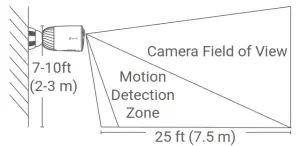
- Recommended installation height: 7-10 ft (2-3 m) above the ground.

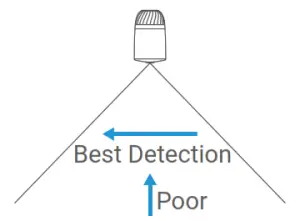
- Make sure that side-to-side traffic crosses the camera’s field of view. The camera’s motion sensor is much more sensitive to side-to-side movement across its field of view than to movement directly toward or away from the camera.

- It is recommended to set detection sensitivity on the EZVIZ app when selecting a location. Thus you can verify if motion can be detected in the camera’s placement and adjust the sensitivity based on the size and distance of the detected object.
Installation Steps
Step 1 Place the drill template onto a clean and flat surface.
Step 2 (For the cement wall only) Drill screw holes according to the template and insert anchors.
Step 3 Use screws to fix the mounting plate according to the template.
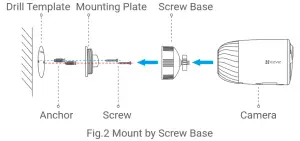
Step 4 Rotate the magnetic base (Fig.1) or screw base (Fig.2) to the mounting plate.
Step 5 Mount the camera to the base.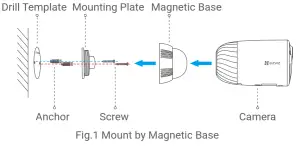
For detailed information, please refer to www.ezvizlife.com.
Regulatory Information
 This product and – if applicable – the supplied accessories too are marked with “CE” and comply therefore with the applicable harmonized European standards listed under the Radio Equipment Directive 2014/53/EU, the EMC Directive 2014/30/EU, the RoHS Directive 2011/65/EU.
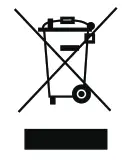 2012/19/EU (WEEE directive): Products marked with this symbol cannot be disposed of as unsorted municipal waste in the European Union. For proper recycling, return this product to your local supplier upon the purchase of equivalent new equipment, or dispose of it at designated collection points. For more information see: www.recyclethis.info
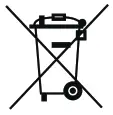 2006/66/EC and its amendment 2013/56/EU (battery directive): This product contains a battery that cannot be disposed of as unsorted municipal waste in the European Union. See the product documentation for specific battery information. The battery is marked with this symbol, which may include lettering to indicate cadmium (Cd), lead (Pb), or mercury (Hg). For proper recycling, return the battery to your supplier or to a designated collection point. For more information see: www.recyclethis.info
EC DECLARATION OF CONFORMITY
Hereby, Hangzhou EZVIZ Software Co., Ltd. declares that the radio equipment type [CS-C1C, CS-C1HC, CS-C1T, CS-C2C, CS-CV206, CS-CV310, CS-C3N, CS-C3W, CS-C3WN, CS-C3X, CS-C6N, CS-CV246, CS-CV248, CS-C6CN, CS-C6C, CS-C6W, CS-TY1, CS-TY2, CS-TY3, CS-CV336, CS-DP1, CS-DP1C, CS-DP2C, CS-DB2C, CS-C4W, CS-C4C, CS-CV228, CS-C5W, CS-C5C, CS-C5HC, CS-C5X, CS-C5HX, CS-C8W, CS-C8C, CS-C3A, CS-BC1, CS-BC1-B1, CS-BC1-B2, CS-BC1-B3, CS-BC1-B4, CS-W2H,
CS-X5S-4W, CS-X5S-8W, CS-A1-32W, CS-T9-A, CS-T4-A] is in compliance with Directive 2014/53/EU. The full text of the EC DECLARATION OF CONFORMITY is available at the following web link: http://www.ezvizlife.com/declaration-of-conformity.
Use only power supplies listed in the Table.
| Equipment model | Adapter manufacture | Adapter model |
| CS-C1C/ CS-C1HC/ CS-C1T/ CS-C2C/ CS-CV206/ CS-CV246/CS-C6N/ CS-C6CN/ CS-C6C/ CS-TY1/ CS-TY2/ CS-TY3/ CS-W2D/ CS-A1-32W/ CS-T9-A | Shenzhen Honor Electronics Co Ltd | ADS-5RE-06 05050EPCU/EPC(US), ADS-5RH-06 05050EPB(UK), ADS-5RH-06 05050EPG(EU), ADS-5RH-06 05050EPSA(AU), ADS-5RH-06 05050EPBR(BR), ADS-5RH-06 05050EPI(IN), ADS-5MA-06A 05050GPK(KR) |
| Sichuan Jiuzhou Electronic Technology Co., Ltd | DYS05100CP-U, DYS05100CP-E | |
| CS-C1C/ CS-C1HC/ CS-C1T/ CS-C2C/ CS-CV206/ CS-CV246/CS-C6N/ CS-C6CN/ CS-C6C/ CS-TY1/ CS-TY2/ CS-TY3/ CS-W2D/ CS-A1-32W/ CS-T9-A | Shenzhen Honor Electronics Co Ltd | ADS-10LA-06 05010EPCU/EPC(US), ADS-10RH-06 05010EPB (UK), ADS-10RH-06 05010EPG(EU), ADS-10RH-06 05010EPSA(SA), ADS-10RH-06 05010EPBR(BR), ADS-10RH-06 05010EPI(IN), ADS-12CG-06 05010EPC(JP) |
| Sichuan Jiuzhou Electronic Technology Co., Ltd | DYS05200CQ-U, DYS05200CQ-E | |
| CS-C1C/ CS-C1HC/ CS-C1T/ CS-C2C/ CS-CV206/ CS-CV246/CS-C6N/ CS-C6CN/ CS-C6C/ CS-TY1/ CS-TY2/ CS-TY3/ CS-W2D/ CS-A1-32W/ CS-T9-A | Shenzhen Honor Electronics Co Ltd | ADS-12FG-12N 12012EPCU(US), ADS-12FG-12N 12012EPB(UK), ADS-12FG-12N 12012EPG(EU), ADS-12FB-12 12012EPSA(AU), ADS-12FG-12N 12012EPBR(BR), ADS-12FG-12N 12012EPI(IN) |
| CS-X5S-4W/ CS-X5S-8W/ CS-X5S-16H | Moso Power Supply Technology Co. Ltd | MSA-C1500IC12.0-18P-GB(UK), MSA-C1500IC12.0-18P-DE, MSA-C1500IC12.0-18P-AU(AU), MSA-C1500IC12.0-18P-BR(BR), ADS-25FSG-12 12018GPI(IN) |
Important Safety Information
 Note: Please read the manual before using the device.
 This symbol on the device indicates that the safety compatibility manual and/or installation manual must be read, which contains information related to the safe operation of the device. Caution: Be sure to read these instructions before operating the equipment.
 This symbol on the device indicates that the surface or component is overheating. If you touch this surface, you may cause personal injury. Warning: To reduce the risk of personal injury due to overheating of the components, wait until the surface cools down before touching it.
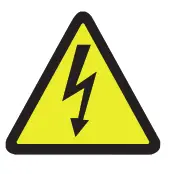 Warning: The separate earthing terminal must be permanently connected to the earth.
Warning: For SELV DC input: the DC power source shall comply with the Safety Extra-Low Voltage (SELV) requirements of IEC 60950-1. Caution: Do not block ventilation openings while the system is on, and keep at least 2 cm distance from ventilation openings and walls or other things which may block the openings.
Warning: Disposal of a battery into fire or a hot oven, or mechanically crushing or cutting of a battery that can result in an explosion.
Warning: Leaving a battery in an extremely high temperature surrounding environment can result in an explosion or the leakage of flammable liquid or gas.
Warning: A battery subjected to extremely low air pressure may result in an explosion or the leakage of flammable liquid or gas.
Warning: Dispose of used batteries according to the instructions.
Warning: Replace only with the same or equivalent type recommended by the manufacturer.
Caution: THE PRODUCT IS BUILT IN A REPLACEABLE BATTERY.
Warning: Do not ingest battery, Chemical Burn Hazard.
Caution: This product contains a coin/button cell battery. If the coin/button cell battery is swallowed, it can cause severe internal burns in just 2 hours and can lead to death.
Caution: Keep new and used batteries away from children.
Caution: If the battery compartment does not close securely, stop using the product and keep it away from children.
Caution: If you think batteries might have been swallowed or placed inside any part of the body, seek immediate medical attention.
Caution: Risk of fire or explosion if the battery is replaced by an incorrect type.
FCC Information
Please take attention that changes or modifications not expressly approved by the party responsible for compliance could void the user’s authority to operate the equipment.
FCC compliance
This equipment has been tested and found to comply with the limits for a Class B digital device, pursuant to part 15 of the FCC Rules. These limits are designed to provide reasonable protection against harmful interference in a residential installation. This equipment generates, uses and can radiate radio frequency energy and, if not installed and used in accordance with the instructions, may cause harmful interference to radio communications. However, there is no guarantee that interference will not occur in a particular installation. If this equipment does cause harmful interference to radio or television reception, which can be determined by turning the equipment off and on, the user is encouraged to try to correct the interference by one or more of the following measures:
- Reorient or relocate the receiving antenna.
- Increase the separation between the equipment and receiver.
- Connect the equipment into an outlet on a circuit different from that to which the receiver is connected.
- Consult the dealer or an experienced radio/TV technician for help.
- This equipment should be installed and operated with a minimum distance of 20cm between the radiator and your body.
FCC Conditions
This device complies with part 15 of the FCC Rules. Operation is subject to the following two conditions:
- This device may not cause harmful interference.
- This device must accept any interference received, including interference that may cause undesired operation.
Industry Canada ICES-003 Compliance
This device meets the CAN ICES-3 (B)/NMB-3(B) standards requirements. This device complies with Industry Canada licence-exempt RSS standard(s). Operation is subject to the following two conditions:
- this device may not cause interference, and
- this device must accept any interference, including interference that may cause undesired operation of the device. Under Industry Canada regulations, this radio transmitter may only operate using an antenna of a type and maximum (or lesser) gain approved for the transmitter by Industry Canada. To reduce potential radio interference to other users, the antenna type and its gain should be so chosen that the equivalent isotropically radiated power (e.i.r.p.) is not more than that necessary for successful communication. This equipment should be installed and operated with a minimum distance 20cm between the radiator and your body.