
Instruction Manual
Wuxi Weida Intelligent Electronics Co., Ltd.
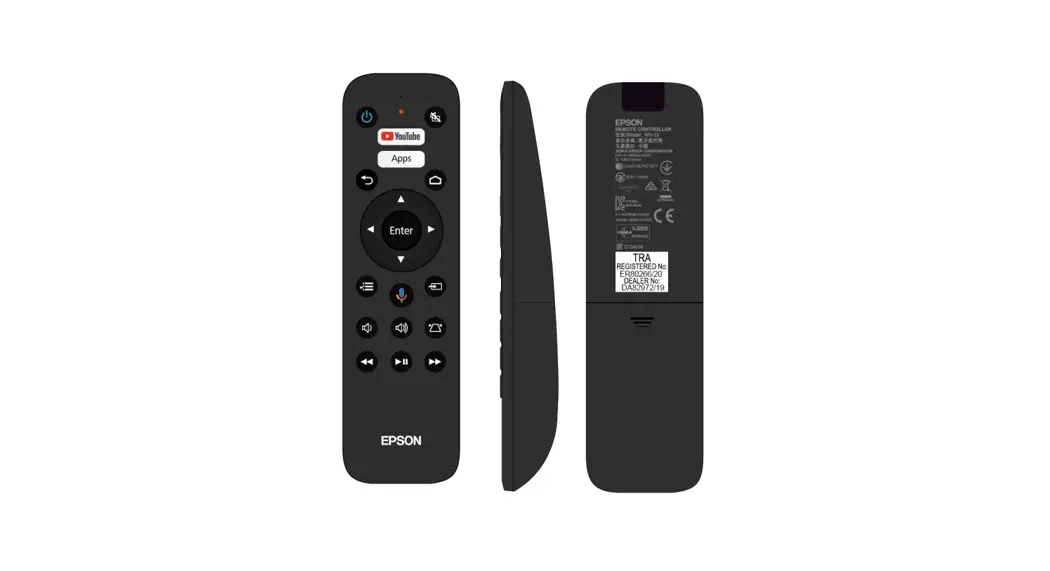
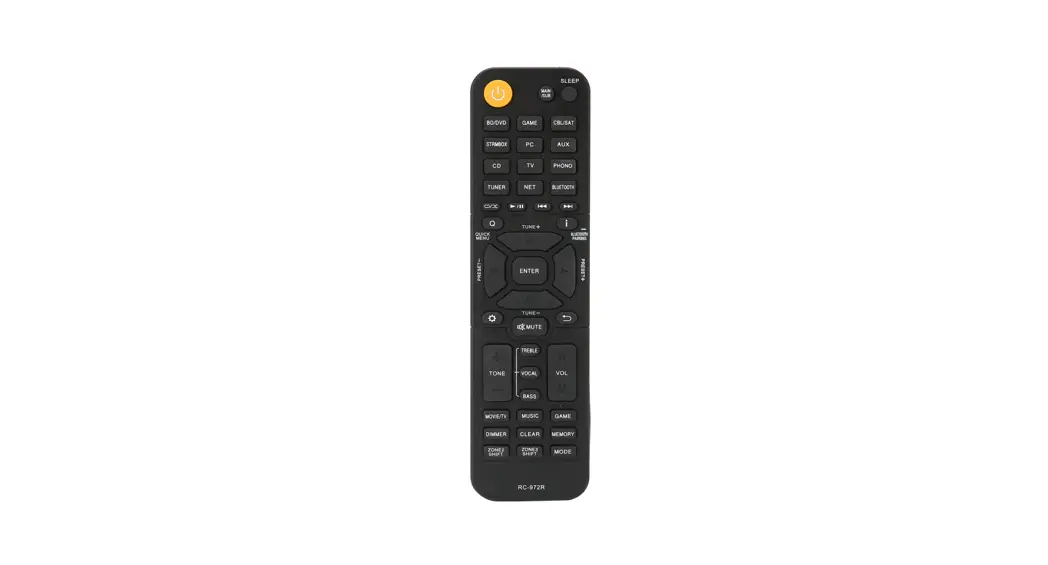
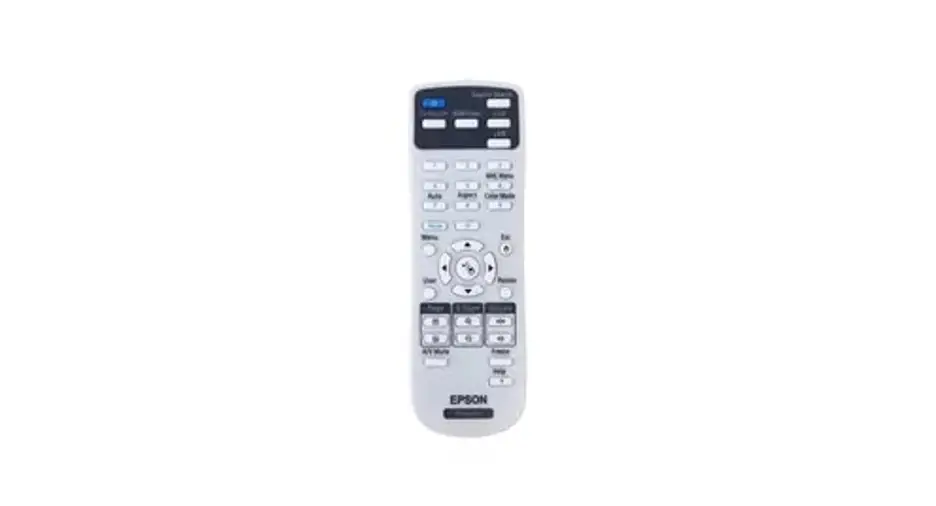
Remote control renderings
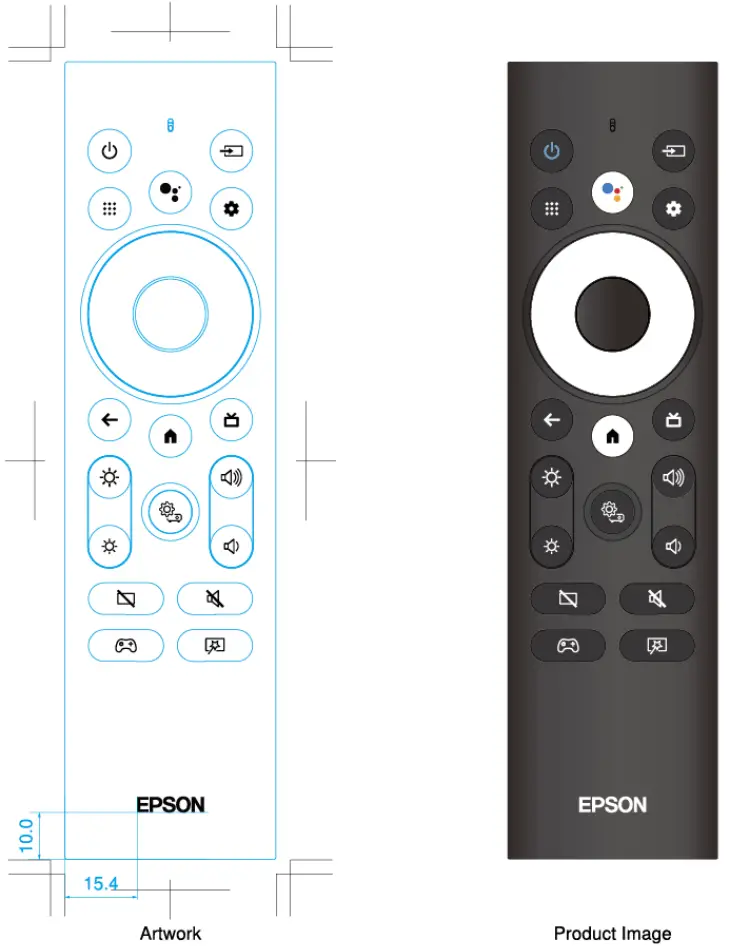
Color
 Power icon : Pantone 7459C
 Voice Assistant : Button Color : White
: Print Color
: Pantone 1795C
: Pantone 2173C Pantone 7549C
: Pantone 2257C
Highelight Keys : Button Color : White
: Print Color : Black
Other Keys : Button Color : Black
: Print Color : White
Confidential Scope of disclosure :
VP Division, Askey Computer and Weida Only
| EPSON EXCEED YOUR VISION | M Work Data | Scale 1 /1 ‘Unn:mm | Confidential | ||
| M Work Making Section | Modal | HA90 | |||
| VP Design DeCannent | |||||
| Approval | Check | Charge | Pad Name | Remote Controller(SMF2-4KXW.W) | |
| Art Wark No. | |||||
| %MAW DOCUM0f4 | |||||
| Data: 2021.10,15 | Data FM Name | Remote Controller(SMF2-4KM.M.cs2 ai | |||
Description of remote control function requirements
| Serial number | Button | Function description | |
| 1 |  | Power | Sleep/wake up the box |
| 2 |  | Input | |
| 3 | Up | Move focus/volume up+ | |
| 4 | Down | Move focus/volume down- | |
| 5 | Left | Move focus left/rewind/switch to the previous channel | |
| 6 | Right | Move focus right / fast forward / switch to the next channel | |
| 7 | Enter | Enter the currently selected focus page/pause playback/execute the command prompted by the button | |
| 8 |  | Apps | |
| 9 |  | Voice | (It only works after Bluetooth pairing and connection) |
| 10 |  | Settings | Set up shortcut keys |
| 11 |  | Esc | Return to the previous level or page |
| 12 |  | Home | Return to the system-level homepage in any interface |
| 13 |  | Guide | Guide shortcut keys |
| 14 |  | Bright+ | Increase brightness |
| 15 | | Bright- | Reduce brightness |
| 16 |  | PJ menu | |
| 17 |  | Vol+ | Increase volume (applicable globally, this button has only one operation) |
| 18 |  | Vol- | Decrease the volume (applicable globally, this button has only one operation) |
| 19 |  | V mute | |
| 20 |  | A mute | |
| 21 |  | Game | |
| 22 |  | V Effect |
Remote control key value
| System code: | 0X8103 |
| Code format: | NEC |
| No. | Funtion | IR | Usage Page | Usage ID |
| 1 | Home | 60 | OXOC | 223 |
| 2 | ESC | 61 | OXOC | 224 |
| 3 | Enter | 62 | OXOC | 41 |
| 4 | Up | 63 | OXOC | 42 |
| 5 | Right | 64 | OXOC | 45 |
| 6 | Down | 65 | OXOC | 43 |
| 7 | Left | 66 | OXOC | 44 |
| 8 | Voice | 73 | OXOC | 221 |
| 9 | Settings | 67 | OXOC | 19 F |
| 10 | PJ Menu | 70 | OXOC | 022D |
| 11 | Apps | 75 | OXOC | 01A2 |
| 12 | Guide | 76 | OXOC | 008D |
| 13 | Power | 82 | OXOC | 30 |
| 14 | Vol+ | 84 | OXOC | 00E9 |
| 15 | Vol- | 85 | OXOC | 00EA |
| 16 | V Mute | 86 | OXOC | 22 F |
| 17 | Input | 9E | OXOC | 230 |
| 18 | Brightness+ | 20 | OXOC | 232 |
| 19 | Brightness- | 21 | OXOC | 233 |
| 20 | Video Effect | 8A | OXOC | 188 |
| 21 | A Mute | 88 | OXOC | 00E2 |
| 22 | Game | 8B | OXOC | 8 F |
Remote control instructions
- When Bluetooth is connected, the remote control sends the Bluetooth key value; when Bluetooth is not connected, the infrared key value is sent.
- Indicator light: infrared: red, each time you press the button, the indicator light flashes once.
- Low voltage reminder: When the battery is lower than 2.4V, the indicator light flashes quickly, as long as it is still in operation, it will keep flashing. When the remote control is no longer operated, it flashes 5 times or flashes for 3 seconds and then stops And goes out.
- Pairing method:
a. Simultaneously press “ENTER ”+ “HUME” on the remote control for three seconds to send the code matching message;
b. If the pairing is not successful, if you still press the“ENTER ”+ “HUME”keys, you must keep sending the pairing broadcast so that the user can pair.
c. Press“ENTER ”+ “HUME”key once to successfully pair. Don’t clear the pairing and pair again. After a key pairing is successful, the pairing broadcast can no longer be sent until the next time the key is pressed again. Connection interval<12ms - Key timeout: If one or more keys are continuously pressed for more than 30 seconds, the remote control will stop transmission to protect the battery from discharging.
- Remote control distance: ≥10m
- Bluetooth device name: EPSON PJ REMOT
- Bug Report: Press【D-PAD CENTER】+【BACK】key for more than 1 second to get STB error report; in IR mode, the code data sent is 0X96.
- Pairing function requirements: there must be no problems that the Bluetooth device cannot be scanned or paired (including continuous pressing of the pairing key within a short period of time), please verify 50 times to ensure that there is no problem;
- Reconnection function requirements: there must be no problems with the connection failure, including the box power failure and the connection, the remote control power failure and the connection, stand for 2 hours to reconnect, etc., please verify 50 times to ensure that there is no problem;
- Anti-interference function requirements: there must be no problems that greatly affect the host’s WIFI throughput, please ensure that the host’s WIFI throughput is normal when connecting the remote control;
- Performance requirements: It is required to support ≥10m, and there must be no voice call jams,loss, and remote control button jams, missing codes, or continuous keys;
- Power consumption requirements: the remote control can be used continuously for at least 6 months
- Voice: 16Khz voice sample with 16-bit sampling, short press the voice button (color button) to start recording, and the remote control will stop recording after receiving the stop recording command from the voice engine. The voice timeout is protected for 30s, and the recording is forced to exit.
- The box software can control the opening and closing of the MIC.
- Support the remote control MIC and other MIC (such as the recording key on the phone apk) to alternate and switch voice input.
FCC STATEMENT :
This device complies with Part 15 of the FCC Rules. Operation is subject to the following two conditions:
- This device may not cause harmful interference, and
- This device must accept any interference received, including interference that may cause undesired operation.
Warning: Changes or modifications not expressly approved by the party responsible for compliance could void the user’s authority to operate the equipment.
NOTE: This equipment has been tested and found to comply with the limits for a Class B digital device, pursuant to Part 15 of the FCC Rules. These limits are designed to provide reasonable protection against harmful interference in a residential installation. This equipment generates uses and can radiate radio frequency energy and, if not installed and used in accordance with the instructions, may cause harmful interference to radio communications. However, there is no guarantee that interference will not occur in a particular installation. If this equipment does cause harmful interference to radio or television reception, which can be determined by turning the equipment off and on, the user is encouraged to try to correct the interference by one or more of the following measures:
- Reorient or relocate the receiving antenna.
- Increase the separation between the equipment and receiver.
- Connect the equipment into an outlet on a circuit different from that to which the receiver is connected.
- Consult the dealer or an experienced radio/TV technician for help.
RF warning statement:
The device has been evaluated to meet general RF exposure requirement. The device can be used in portable exposure condition without restriction.
This device complies with Industry Canada licence-exempt RSS standard(s). Operation is subject to the following two conditions:
- this device may not cause interference, and
- this device must accept any interference, including interference that may cause undesired operation of the device.”
Warning: Changes or modifications not expressly approved by the party responsible for compliance could void the user’s authority to operate the equipment.
NOTE: This equipment has been tested and found to comply with the limits for a Class B digital device, pursuant to IC Rules. These limits are designed to provide reasonable protection against harmful interference in a residential installation. This equipment generates uses and can radiate radio frequency energy and, if not installed and used in accordance with the instructions, may cause harmful interference to radio communications. However, there is no guarantee that interference will not occur in a particular installation. If this equipment does cause harmful interference to radio or television reception, which can be determined by turning the equipment off and on, the user is encouraged to try to correct the interference by one or more of the following measures:
- Reorient or relocate the receiving antenna.
- Increase the separation between the equipment and receiver.
- Connect the equipment into an outlet on a circuit different from that to which the receiver iconnected.
- Consult the dealer or an experienced radio/TV technician for help.
IC Radiation Exposure Statement:
This equipment complies with IC radiation exposure limits set forth for an uncontrolled environment. The device can be used in portable exposure condition without restriction.