Lenovo ThinkSystem NVIDIA A40 48GB PCIe Gen4 Passive GPU
Product Guide
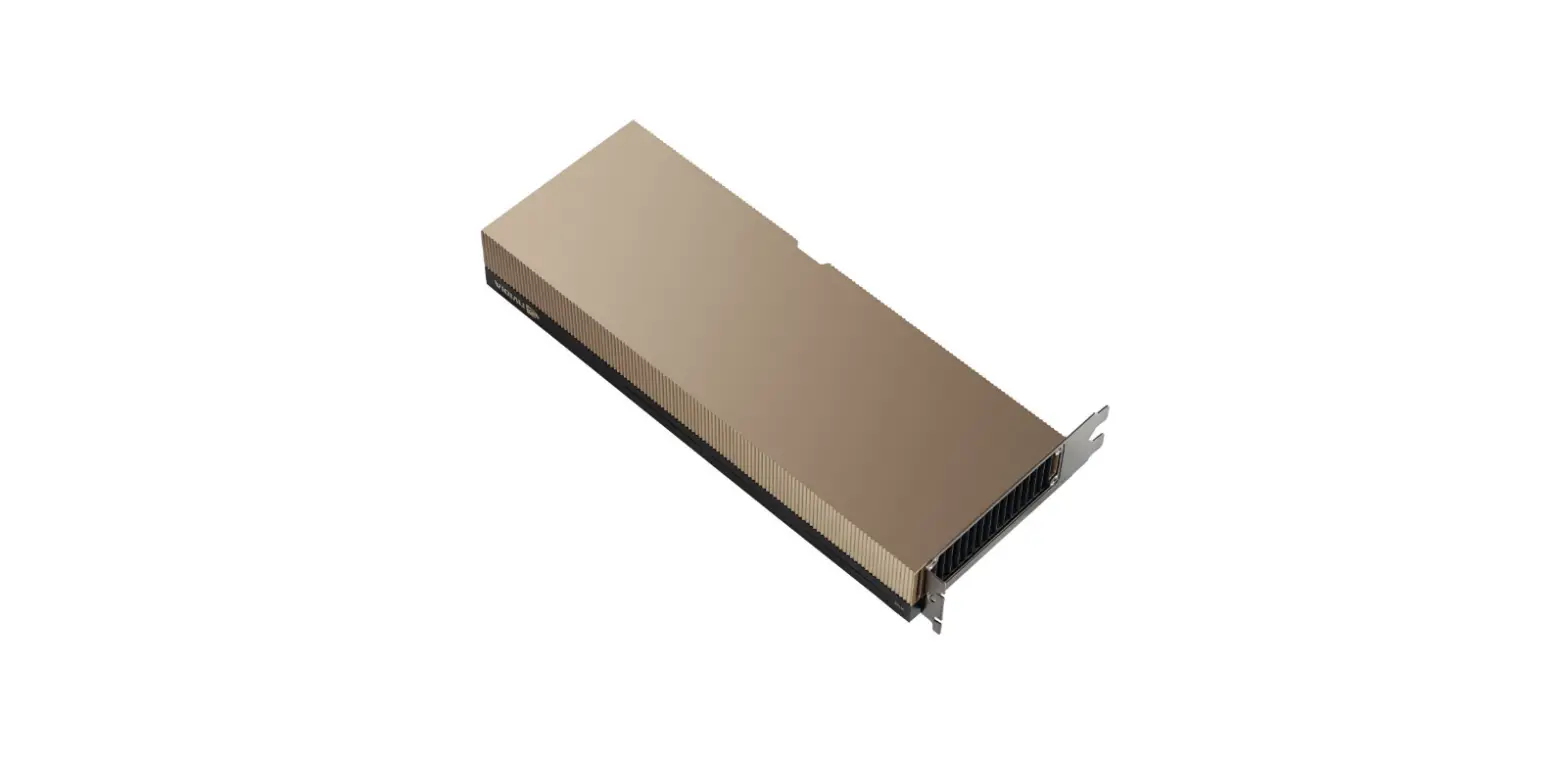
The NVIDIA A40 is a powerful data center GPU for visual computing, delivering high performance and capabilities to professionals for graphics-based workloads such as ray traced rendering, high-performance virtual workstations, simulation, 3D design, VR, and virtual production. The A40 GPU is a graphics-based virtualization solution for designers, engineers, scientists, and creatives that need this performance from anywhere in the world.
The third-generation Tensor Core technology supports a broad range of math precisions providing a unified workload accelerator for data analytics, AI training, AI inference, and HPC. Accelerating both scale-up and scale-out workloads on one platform enables elastic data centers that can dynamically adjust to shifting application workload demands. This simultaneously boosts throughput and drives down the cost of data centers
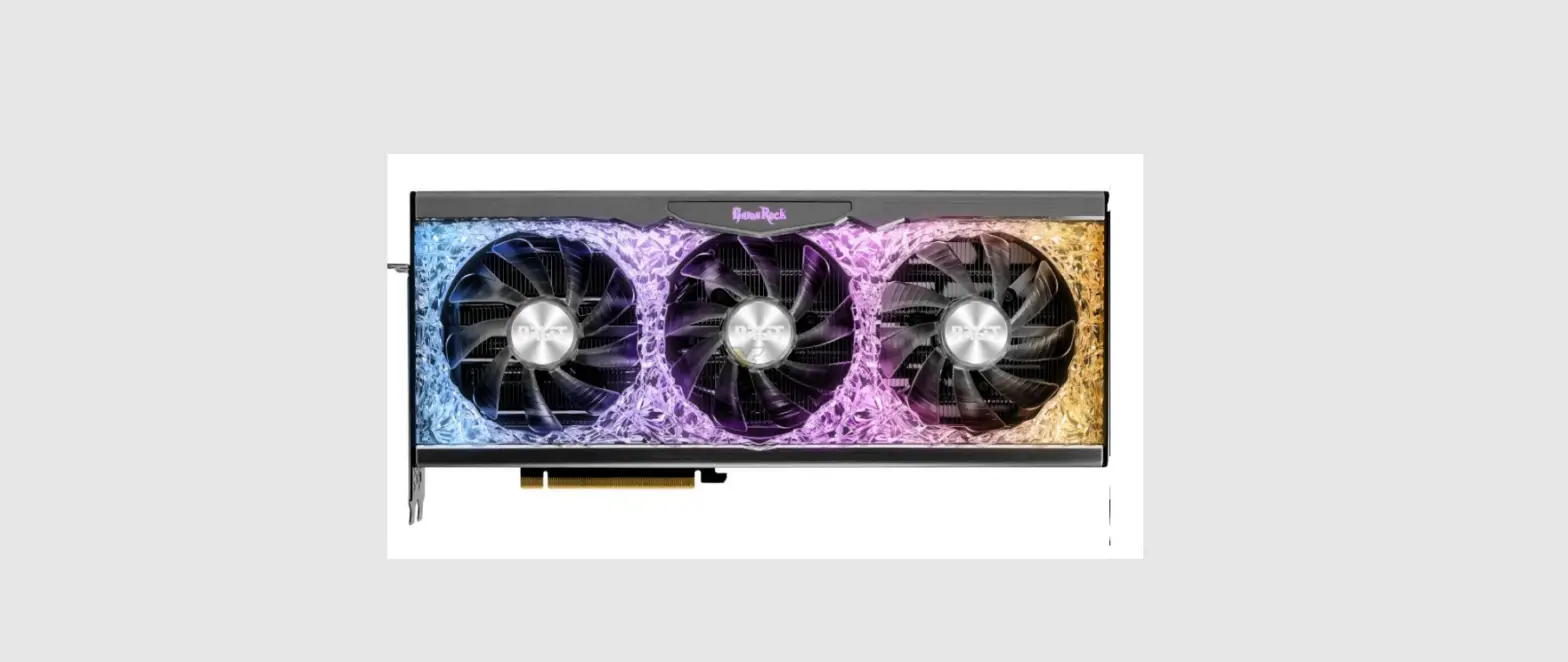
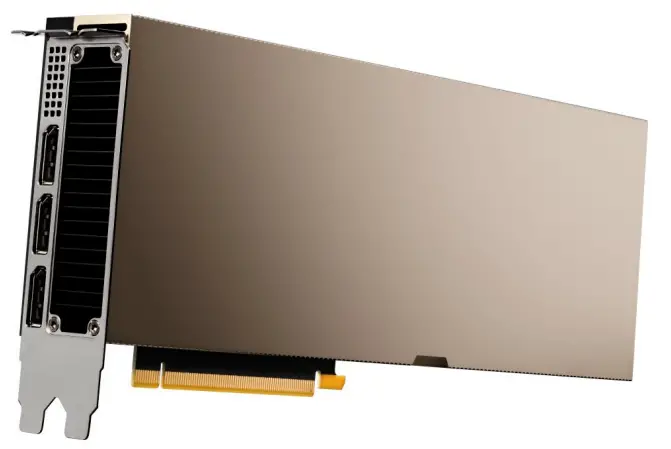
Figure 1. ThinkSystem NVIDIA A40 48GB PCIe Gen4 Passive GPU
Did you know?
The NVIDIA A40 GPU is a high-performance GPU that offers local DisplayPort video. It supports up to four 5K monitors at 60Hz, or dual 8K displays at 60Hz per card, using Display Stream Compression (DSC). The NVIDIA A40 supports HDR color for 4K at 60Hz for 10/12b HEVC decode and up to 4K at 60Hz for 10b HEVC encode. Each DisplayPort connector can drive ultra-high resolutions of 4096×2160 at 120 Hz with 30-bit color.
Click here to check for updates
Part number information
The following table shows the paTable 1. Ordering information rt numbers for the NVIDIA A40 GPU.
Table 1. Ordering information
| Part number | Feature code | Description |
| 4X67A72593 | BQZQ | ThinkSystem NVIDIA A40 48GB PCIe Gen4 Passive GPU w/o CEC |
| 4X67A71309 | BG3F | ThinkSystem NVIDIA Ampere NVLink 2-Slot Bridge |
The PCIe option part numbers includes the following:
- One NVIDIA A40 GPU with full-height (3U) adapter bracket attached
- Documentation
GPUs without a CEC chip: The NVIDIA A40 GPU is offered without a CEC chip (look for “w/o CEC” in the name). The CEC is a secondary Hardware Root of Trust (RoT) module that provides an additional layer of security, which can be used by customers who have high regulatory requirements or high security standards. NVIDIA uses a multi-layered security model and hence the protection offered by the primary Root of Trust embedded in the GPU is expected to be sufficient for most customers. The CEC defeatured products still offer Secure Boot, Secure Firmware Update, Firmware Rollback Protection, and In-Band Firmware Update Disable. Specifically, without the CEC chip, the GPU does not support Key Revocation or Firmware Attestation. CEC and non-CEC GPUs of the same type of GPU can be mixed in field upgrades.
Features
The ThinkSystem NVIDIA A40 48GB PCIe Gen4 Passive GPU offers the following features:
- NVIDIA Ampere Architecture
NVIDIA A40 is the world’s most powerful data center GPU for visual computing, offering high performance real-time ray tracing, AI-accelerated compute, and professional graphics rendering. Building upon the major enhancements from the Turing GPU, the NVIDIA Ampere architecture enhances ray tracing operations, tensor matrix operations, and concurrent executions of FP32 and INT32 operations. - CUDA Cores
The NVIDIA Ampere architecture’s CUDA cores bring up to 2X the single-precision floating point (FP32) throughput compared to the previous generation, providing significant performance improvements for graphics workflows such as 3D model development and compute for workloads such as desktop simulation for computer-aided engineering (CAE). - 2nd Generation RT Cores
Incorporating 2nd generation ray tracing engines, the NVIDIA Ampere architecture provides incredible ray traced rendering performance. A single NVIDIA A40 board can render complex professional models with physically accurate shadows, reflections, and refractions to empower users with instant insight.
Working in concert with applications leveraging APIs such as NVIDIA OptiX, Microsoft DXR and Vulkan ray tracing, servers based on NVIDIA A40 will power truly interactive design workflows to provide immediate feedback for unprecedented levels of productivity. NVIDIA A40 is up to 2x faster in ray tracing compared to the previous generation. This technology also speeds up the rendering of ray-traced motion blur for faster results with greater visual accuracy. - 3rd Generation Tensor Cores
Purpose-built for deep learning matrix arithmetic at the heart of neural network training and inferencing functions, the NVIDIA A40 includes enhanced Tensor Cores that accelerate more datatypes (TF32 and BF16) and includes a new Fine-Grained Structured Sparsity feature that delivers up to 2X throughput for tensor matrix operations compared to the previous generation. - High Speed GDDR6 Memory
Built with 48GB GDDR6 memory, the NVIDIA A40 provides the industry’s largest graphics memory footprint to address the largest datasets and models in latency-sensitive professional applications. Error Correcting Code (ECC) on Graphics Memory Meet strict data integrity requirements for mission critical applications with uncompromised computing accuracy and reliability. - 5th Generation NVDEC Engine
NVDEC, implemented in concert with software applications, is well suited for transcoding and video playback applications for real-time decoding. The following video codecs are supported for hardware-accelerated decoding: MPEG-2, VC-1, H.264 (AVCHD), H.265 (HEVC), VP8, VP9, and AV1. Pairing this technology with NVIDIA Ampere architecture- based Tensor Cores, the A40 can quickly apply AI and inferencing to real-time video. - 7th Generation NVENC Engine
NVENC can take on the most demanding 4K or 8K video encoding tasks to free up the graphics engine and the CPU for other operations. NVENC also enables virtual workstations to stream up to 8K content for high fidelity design and rendering workloads. In addition, the NVIDIA A40 provides better encoding quality than software-based x264 encoders. - Preemption
Preemption at the instruction-level provides finer grain control over compute and graphics tasks to prevent longer-running applications from either monopolizing system resources or timing out. Multi-GPU technology – 3rd Generation NVIDIA NVLink Connect two NVIDIA A40 cards with NVLink to double the effective memory footprint and scale application performance by enabling GPU-to-GPU data transfers at rates up to 112.5 GB/s (total bandwidth). - DisplayPort 1.4a
Supports up to four 5K monitors at 60Hz, or dual 8K displays at 60Hz per card. The NVIDIA A40 supports HDR color for 4K at 60Hz for 10/12b HEVC decode and up to 4K at 60Hz for 10b HEVC encode. Each DisplayPort connector can drive ultra-high resolutions of 4096×2160 at 120 Hz with 30-bit color.
A40 is configured for virtualization by default with physical display connectors disabled. The display outputs can be enabled via management software tools. See Lenovo support tip HT512536 for details: https://datacentersupport.lenovo.com/us/en/solution/ht512536
DisplayPort 1.4a supports 8K at 60Hz over a single cable using Display Stream Compression (DSC). The A40 has 3 DisplayPort 1.4a connectors, DSC capable 8K displays are required for the A40 to drive two 8K displays. - NVIDIA Quadro® Mosaic Technology
Transparently scale the desktop and applications across up to 12 displays from 4 GPUs while
delivering full performance and image quality. - NVIDIA Quadro Sync II
Synchronize the display and image output of up to 24 displays from 8 GPUs (connected through two Sync II boards) in a single system, reducing the number of machines needed to create an advanced video visualization environment. For more information, see the NVIDIA Quadro Sync page,
https://www.nvidia.com/en-us/design-visualization/solutions/quadro-sync/ - Frame Lock Connector Latch
Each frame lock connector is designed with a self-locking retention mechanism to secure its connection with the frame lock cable to provide robust connectivity and maximum productivity
Technical specifications
The following table lists the NVIDIA A40 GPU specifications.
Table 2. A40 specifications
| Feature | Specification |
| GPU Architecture | NVIDIA Ampere |
| NVIDIA CUDA Parallel Processing Cores | 10,752 |
| NVIDIA Tensor Cores (3rd gen) | 336 |
| NVIDIA RT Cores (2nd Gen) | 84 |
| Peak FP32 performance (non-Tensor) | 37.4 TFLOPS |
| Peak FP16 Tensor performance with FP16 Accumulate | 149.7 TFLOPS, 299.4 TFLOPS* |
| Peak Tensor Float 32 (TF32) performance | 74.8 TFLOPS, 149.6 TFLOPS* |
| Peak Bfloat16 (BF16) performance with FP32 Accumulate | 149.7 TFLOPS, 299.4 TFLOPS* |
| Peak Integer Performance | INT8: 299.3 TOPS, 598.6 TOPS* INT4: 598.7 TOPS, 1197.4 TOPS* |
| RT Core performance | 73.1 TFLOPS |
| GPU Memory | 48 GB GDDR6 |
| Memory Bandwidth | 696 GB/s |
| ECC | Yes |
| Interconnect Bandwidth | NVIDIA NVLink 112.5 GB/s (bidirectional) PCIe Gen4 x16 31.5 GB/s (bidirectional) |
| System Interface | PCIe Gen 4, x16 lanes |
| Form Factor | PCIe full height/length, double width (10.5″ x 4.4″) |
| Multi-Instance GPU (MIG) | No support |
| Max Power Consumption | 300 W |
| Thermal Solution | Passive |
| vGPU Software Support | NVIDIA GRID®, NVIDIA Quadro® Virtual Data Center Workstation, NVIDIA Virtual Compute Server |
| vGPU Profiles Supported | 1 GB, 2 GB, 3 GB, 4 GB, 6 GB, 8 GB, 12 GB, 16 GB, 24 GB, 48 GB |
| Display connectors | 3x DisplayPort 1.4a (disabled by default**) |
| Max Simultaneous Displays | 4x 5K monitors @ 60Hz, or 2x 8K displays @ 60Hz |
| Max DP 1.4 Resolution | 4096×2160 @ 120 Hz with 30-bit color |
| Graphics APIs | DirectX 12.07, Shader Model 5.17, OpenGL 4.68, Vulkan 1.18 |
| Compute APIs | CUDA, DirectCompute, OpenCL, OpenACC |
* With structural sparsity enabled
** To enable the DisplayPort ports, see https://datacentersupport.lenovo.com/us/en/solution/ht512536
Server support
The following tables list the ThinkSystem servers that are compatible.
Table 3. Server support (Part 1 of 3)
Table 4. Server support (Part 2 of 3)
Table 5. Server support (Part 3 of 3)
- Only available via Lenovo Scalable Infrastructure (LeSI). Select “AI & HPC – LeSI Solutions” in the DCSC configurator. See the LeSI product guide for details.
- DisplayPort ports not supported and are disabled.
Operating system support
The following table lists the supported operating systems:
Tip: These tables are automatically generated based on data from Lenovo ServerProven.
Table 6. Operating system support for ThinkSystem NVIDIA A40 48GB PCIe 4.0 Passive GPU w/o CEC, 4X67A72593
| Operating systems | SE450 | SR650 V3 | SR655 V3 | SR665 V3 | SR675 V3 | SR650 V2 | SR670 V2 | SR655 | SR665 | SR670 (Gen 2) | SR670 (Gen 1) |
| Microsoft Windows 10 | N | Y | Y | N | N | N | N | Y 1 | N | N | N |
| Microsoft Windows 11 | N | Y | Y | Y | N | N | N | Y | N | N | N |
| Microsoft Windows Server 2016 | N | N | N | N | N | Y | Y | Y | Y | N | N |
| Microsoft Windows Server 2019 | Y | Y | Y | Y | Y | Y | Y | Y | Y | N | N |
| Microsoft Windows Server 2022 | Y | Y | Y | Y | Y | Y | Y | Y | Y | Y | Y |
| Red Hat Enterprise Linux 7.7 | N | N | N | N | N | N | N | Y 2 | Y 2 | Y | Y |
| Red Hat Enterprise Linux 7.8 | N | N | N | N | N | N | N | Y 2 | Y 2 | Y | Y |
| Red Hat Enterprise Linux 7.9 | Y | N | N | N | N | Y | Y | Y 2 | Y 2 | Y | Y |
| Red Hat Enterprise Linux 8.0 | N | N | N | N | N | N | N | Y 2 | N | Y | Y |
| Red Hat Enterprise Linux 8.1 | N | N | N | N | N | N | N | Y 2 | Y 2 | Y | Y |
| Red Hat Enterprise Linux 8.2 | N | N | N | N | N | Y | Y | Y 2 | Y 2 | Y | Y |
| Red Hat Enterprise Linux 8.3 | N | N | N | N | N | Y | Y | Y | Y | Y | Y |
| Red Hat Enterprise Linux 8.4 | Y | N | N | N | N | Y | Y | Y | Y | Y | Y |
| Red Hat Enterprise Linux 8.5 | Y | N | N | N | N | Y | Y | Y | Y | Y | Y |
| Red Hat Enterprise Linux 8.6 | Y | Y | Y | Y | Y | Y | Y | Y | Y | Y | Y |
| Red Hat Enterprise Linux 8.7 | Y | Y | Y | Y | N | Y | Y | Y | Y | Y | Y |
| Red Hat Enterprise Linux 9.0 | Y | Y | Y | Y | Y | Y | Y | Y | Y | Y | Y |
| Red Hat Enterprise Linux 9.1 | Y | Y | Y | Y | N | Y | Y | Y | Y | Y | Y |
| SUSE Linux Enterprise Server 15 SP1 | N | N | N | N | N | N | N | Y 2 | Y 2 | Y | Y |
| SUSE Linux Enterprise Server 15 SP2 | N | N | N | N | N | Y | Y | Y | Y | Y | Y |
| SUSE Linux Enterprise Server 15 SP3 | N | N | N | N | N | Y | Y | Y | Y | Y | Y |
| SUSE Linux Enterprise Server 15 SP4 | Y | Y | Y | Y | Y | Y | Y | Y | Y | Y | Y |
| Ubuntu 18.04.5 LTS | N | N | N | N | N | Y | Y | N | N | N | N |
| Ubuntu 18.04.6 LTS | Y | N | N | N | N | N | N | N | N | N | N |
| Ubuntu 20.04 LTS | N | N | N | N | N | Y | N | N | N | N | N |
| Ubuntu 20.04.5 LTS | Y | N | Y | Y | Y | N | N | N | N | N | N |
| Ubuntu 22.04 LTS | Y | Y | Y | Y | Y | Y | Y | Y | Y | Y | Y |
| VMware vSphere Hypervisor (ESXi) 6.5 U3 | N | N | N | N | N | N | N | Y 2 | N | N | N |
| VMware vSphere Hypervisor (ESXi) 6.7 U3 | N | N | N | N | N | Y | Y | Y | Y | Y | Y |
| VMware vSphere Hypervisor (ESXi) 7.0 | N | N | N | N | N | N | N | Y 2 | Y 2 | Y | Y |
| VMware vSphere Hypervisor (ESXi) 7.0 U1 | N | N | N | N | N | N | N | Y 2 | Y | Y | Y |
| VMware vSphere Hypervisor (ESXi) 7.0 U2 | N | N | N | N | N | Y | Y | Y | Y | Y | Y |
| VMware vSphere Hypervisor (ESXi) 7.0 U3 | Y | Y | Y | Y | Y | Y | Y | Y | Y | Y | Y |
| VMware vSphere Hypervisor (ESXi) 8.0 | Y | Y | Y | Y | N | Y | Y | Y | Y | Y | Y |
1 ISG will not sell/preload this OS, but compatibility and cert only.
2 The OS is not supported with EPYC 7003 processors.
NVIDIA GPU software
This section lists the NVIDIA software that is available from Lenovo.
- NVIDIA vGPU Software (vApps, vPC, RTX vWS, and vCS)
- NVIDIA Omniverse Software (OVE)
- NVIDIA AI Enterprise Software (NVAIE)
- NVIDIA HPC Compiler Software
NVIDIA vGPU Software (vApps, vPC, RTX vWS, and vCS)
Lenovo offers the following virtualization software for NVIDIA GPUs:
- Virtual Applications (vApps)
For organizations deploying Citrix XenApp, VMware Horizon RDSH or other RDSH solutions. Designed to deliver PC Windows applications at full performance. NVIDIA Virtual Applications allows users to access any Windows application at full performance on any device, anywhere. This edition is suited for users who would like to virtualize applications using XenApp or other RDSH solutions. Windows Server hosted RDSH desktops are also supported by vApps. - Virtual PC (vPC)
This product is ideal for users who want a virtual desktop but need great user experience leveraging PC Windows® applications, browsers and high-definition video. NVIDIA Virtual PC delivers a native experience to users in a virtual environment, allowing them to run all their PC applications at full performance. - NVIDIA RTX Virtual Workstation (RTX vWS)
NVIDIA RTX vWS is the only virtual workstation that supports NVIDIA RTX technology, bringing advanced features like ray tracing, AI-denoising, and Deep Learning Super Sampling (DLSS) to a virtual environment. Supporting the latest generation of NVIDIA GPUs unlocks the best performance possible, so designers and engineers can create their best work faster. IT can virtualize any application from the data center with an experience that is indistinguishable from a physical workstation — enabling workstation performance from any device. - Virtual Compute Server (vCS)
NVIDIA Virtual Compute Server (vCS) enables data centers running on Red Hat Enterprise Linux, Red Hat Virtualization, and other supported KVM-based hypervisors to accelerate server virtualization with the latest NVIDIA data center GPUs, so that the most compute-intensive workloads, such as artificial intelligence, deep learning, and data science, can be run in a virtual machine (VM) powered by NVIDIA vGPU technology.
The following license types are offered:
- Perpetual license
A non-expiring, permanent software license that can be used on a perpetual basis without the need to renew. Each Lenovo part number includes a fixed number of years of Support, Upgrade and Maintenance (SUMS). - Annual subscription
A software license that is active for a fixed period as defined by the terms of the subscription license, typically yearly. The subscription includes Support, Upgrade and Maintenance (SUMS) for the duration of the license term. - Concurrent User (CCU)
A method of counting licenses based on active user VMs. If the VM is active and the NVIDIA GRID vGPU software is running, then this counts as one CCU. A vGPU CCU is independent of the connection to the VM.
The following table lists the ordering part numbers and feature codes.
Table 7. NVIDIA vGPU Software
| Part number | Feature code | Description |
| NVIDIA vApps | ||
| 7S020003WW | B1MP | NVIDIA vApps Perpetual License and SUMS 5Yr, 1 CCU |
| 7S020004WW | B1MQ | NVIDIA vApps Subscription License 1 Year, 1 CCU |
| 7S020005WW | B1MR | NVIDIA vApps Subscription License 3 Years, 1 CCU |
| 7S02003DWW | S832 | NVIDIA vApps Subscription License 4 Years, 1 CCU |
| 7S02003EWW | S833 | NVIDIA vApps Subscription License 5 Years, 1 CCU |
| NVIDIA vPC | ||
| 7S020009WW | B1MV | NVIDIA vPC Perpetual License and SUMS 5Yr, 1 CCU |
| 7S02000AWW | B1MW | NVIDIA vPC Subscription License 1 Year, 1 CCU |
| 7S02000BWW | B1MX | NVIDIA vPC Subscription License 3 Years, 1 CCU |
| 7S02003FWW | S834 | NVIDIA vPC Subscription License 4 Years, 1 CCU |
| 7S02003GWW | S835 | NVIDIA vPC Subscription License 5 Years, 1 CCU |
| NVIDIA RTX vWS | ||
| 7S02000FWW | B1N1 | NVIDIA RTX vWS Perpetual License and SUMS 5Yr, 1 CCU |
| 7S02000GWW | B1N2 | NVIDIA RTX vWS Subscription License 1 Year, 1 CCU |
| 7S02000HWW | B1N3 | NVIDIA RTX vWS Subscription License 3 Years, 1 CCU |
| 7S02000LWW | B1N6 | NVIDIA RTX vWS EDU Perpetual License and SUMS 5Yr, 1 CCU |
| 7S02000MWW | B1N7 | NVIDIA RTX vWS EDU Subscription License 1 Year, 1 CCU |
| 7S02000NWW | B1N8 | NVIDIA RTX vWS EDU Subscription License 3 Years, 1 CCU |
| 7S02003BWW | S830 | NVIDIA RTX vWS EDU Subscription License 4 Years, 1 CCU |
| 7S02003CWW | S831 | NVIDIA RTX vWS EDU Subscription License 5 Years, 1 CCU |
| 7S02000XWW | S6YJ | NVIDIA RTX vWS Subscription License 4 Years, 1 CCU |
| 7S02000YWW | S6YK | NVIDIA RTX vWS Subscription License 5 Years, 1 CCU |
| NVIDIA vCS | ||
| 7S02000ZWW | S6YL | NVIDIA Virtual Compute Server Subscription, 1 GPU (Max 10 CC VMs), 1 Year |
| 7S020010WW | S6YM | NVIDIA Virtual Compute Server Subscription, 1 GPU (Max 10 CC VMs), 3 Years |
| 7S020011WW | S6YN | NVIDIA Virtual Compute Server Subscription, 1 GPU (Max 10 CC VMs), 5 Years |
| 7S020012WW | S6YP | NVIDIA Virtual Compute Server Subscription, 1 GPU (Max 10 CC VMs), EDU, 1 Year |
| 7S020013WW | S6YQ | NVIDIA Virtual Compute Server Subscription, 1 GPU (Max 10 CC VMs), EDU, 3 Years |
| 7S020014WW | S6YR | NVIDIA Virtual Compute Server Subscription, 1 GPU (Max 10 CC VMs), EDU, 5 Years |
NVIDIA Omniverse Software (OVE)
Lenovo offers the following NVIDIA Omniverse Software software. 3D workflows are now an essential component of every industry. Efficient design collaboration between teams is crucial. NVIDIA Omniverse™ Enterprise is an end-to-end collaboration and simulation platform that fundamentally transforms complex design workflows, creating a more harmonious environment for creative teams.
- NVIDIA Omniverse Enterprise Nucleus
Collaboration service which enables a variety of Omniverse Enterprise-enabled client applications (Apps, Connectors, and others) to share and modify authoritative representations of virtual worlds in USD. Omniverse Nucleus is built for collaboration across multiple users. Omniverse Nucleus is the database and collaboration engine of Omniverse.
Includes:- Collaboration and scalable core microservices deployed on servers and/or workstations.
- Nucleus Workstation
- Enterprise Nucleus Server
- NVIDIA Enterprise Support
Note: The Omniverse Enterprise Nucleus Subscription is priced and licensed per named user.
- NVIDIA Omniverse Enterprise Creator
App for accelerated advanced scene composition and world building. Creator enables scene composition, simulation, and rendering on workstations and virtual workstations.
Includes:- Omniverse Create
- Omniverse Kit
- Omniverse Extensions
- Batch microservices (on up to 64 GPUs)
- NVIDIA Enterprise Support
Note: Collaboration via Nucleus requires a Nucleus subscription.
- NVIDIA Omniverse Enterprise Reviewer
Simple app designed to visualize projects in stunning, physically accurate photorealism and enable minor editing and comment permissions. Reviewer enables review and approval for workstations and virtual workstations.
Includes:- Omniverse View
- NVIDIA Enterprise Support
Note: Editing and commenting via Nucleus requires a Nucleus subscription.
The following license types are offered:
- Concurrent User (CCU) License
A method of allocating licenses based on the number of users that are concurrently using the software. As an example, one CCU license allows only one concurrent user to use the software. - Floating User License
For licensing, same as Concurrent User License. - Named User License
A method of licensing based on the number of named authorized users who may not re-assign or share the license with any other person. - Subscription
A software license that is active for a fixed period as defined by the terms of the subscription. An annual subscription includes SUMS for the duration of the license term.
The following table lists the ordering part numbers and feature codes.
Table 8. NVIDIA Omniverse Software (OVE)
| Part number | Feature code | Description |
| Omniverse Enterprise Nucleus | ||
| 7S02002MWW | S82A | NVIDIA Omniverse Enterprise Nucleus Subscription per Named User, 1 Year |
| 7S02002NWW | S82B | NVIDIA Omniverse Enterprise Nucleus Subscription per Named User, 3 Years |
| 7S02002PWW | S82C | NVIDIA Omniverse Enterprise Nucleus Subscription per Named User, 4 Years |
| 7S02002QWW | S82D | NVIDIA Omniverse Enterprise Nucleus Subscription per Named User, 5 Years |
| 7S02002RWW | S82E | NVIDIA Omniverse Enterprise Nucleus Subscription per Named User, EDU, 1 Year |
| 7S02002SWW | S82F | NVIDIA Omniverse Enterprise Nucleus Subscription per Named User, EDU, 3 Years |
| 7S02002TWW | S82G | NVIDIA Omniverse Enterprise Nucleus Subscription per Named User, EDU, 4 Years |
| 7S02002UWW | S82H | NVIDIA Omniverse Enterprise Nucleus Subscription per Named User, EDU, 5 Years |
| Omniverse Enterprise Creator | ||
| 7S02002VWW | S82J | NVIDIA Omniverse Enterprise Creator Subscription per CCU, 1 Year |
| 7S02002WWW | S82K | NVIDIA Omniverse Enterprise Creator Subscription per CCU, 3 Years |
| 7S02002XWW | S82L | NVIDIA Omniverse Enterprise Creator Subscription per CCU, 4 Years |
| 7S02002YWW | S82M | NVIDIA Omniverse Enterprise Creator Subscription per CCU, 5 Years |
| 7S02002ZWW | S82N | NVIDIA Omniverse Enterprise Creator Subscription per CCU, EDU, 1 Year |
| 7S020030WW | S82P | NVIDIA Omniverse Enterprise Creator Subscription per CCU, EDU, 3 Years |
| 7S020031WW | S82Q | NVIDIA Omniverse Enterprise Creator Subscription per CCU, EDU, 4 Years |
| 7S020032WW | S82R | NVIDIA Omniverse Enterprise Creator Subscription per CCU, EDU, 5 Years |
| Omniverse Enterprise Reviewer | ||
| 7S020033WW | S82S | NVIDIA Omniverse Enterprise Reviewer Subscription per CCU, 1 Year |
| 7S020034WW | S82T | NVIDIA Omniverse Enterprise Reviewer Subscription per CCU, 3 Years |
| 7S020035WW | S82U | NVIDIA Omniverse Enterprise Reviewer Subscription per CCU, 4 Years |
| 7S020036WW | S82V | NVIDIA Omniverse Enterprise Reviewer Subscription per CCU, 5 Years |
| 7S020037WW | S82W | NVIDIA Omniverse Enterprise Reviewer Subscription per CCU, EDU, 1 Year |
| 7S020038WW | S82X | NVIDIA Omniverse Enterprise Reviewer Subscription per CCU, EDU, 3 Years |
| 7S020039WW | S82Y | NVIDIA Omniverse Enterprise Reviewer Subscription per CCU, EDU, 4 Years |
| 7S02003AWW | S82Z | NVIDIA Omniverse Enterprise Reviewer Subscription per CCU, EDU, 5 Years |
NVIDIA AI Enterprise Software (NVAIE)
Lenovo offers the NVIDIA AI Enterprise cloud-native enterprise software. NVIDIA AI Enterprise is an end-to end, cloud-native suite of AI and data analytics software, optimized, certified, and supported by NVIDIA to run on VMware vSphere and bare-metal withNVIDIA-Certified Systems™. It includes key enabling technologies from NVIDIA for rapid deployment, management, and scaling of AI workloads in the modern hybrid cloud.
NVIDIA AI Enterprise is licensed on a per-CPU Socket basis. NVIDIA AI Enterprise products can be purchased as either a perpetual license with support services, or as an annual or multi-year subscription.
- The perpetual license provides the right to use the NVIDIA AI Enterprise software indefinitely, with no expiration. NVIDIA AI Enterprise with perpetual licenses must be purchased in conjunction with one-year, three-year, or five-year support services. A one-year support service is also available for renewals.
- The subscription offerings are an affordable option to allow IT departments to better manage the flexibility of license volumes. NVIDIA AI Enterprise software products with subscription includes support services for the duration of the software’s subscription license
The features of NVIDIA AI Enterprise Software are listed in the following table.
Table 9. Features of NVIDIA AI Enterprise Software (NVAIE)
| Features | Supported in NVIDIA AI Enterprise |
| Per CPU Socket Licensing | Yes |
| Compute Virtualization | Supported |
| Windows Guest OS Support | No support |
| Linux Guest OS Support | Supported |
| Maximum Displays | 1 |
| Maximum Resolution | 4096 x 2160 (4K) |
| OpenGL and Vulkan | In-situ Graphics only |
| CUDA and OpenCL Support | Supported |
| ECC and Page Retirement | Supported |
| MIG GPU Support | Supported |
| Multi-vGPU | Supported |
| NVIDIA GPUDirect | Supported |
| Peer-to-Peer over NVLink | Supported |
| GPU Pass Through Support | Supported |
| Baremetal Support | Supported |
| AI and Data Science applications and Frameworks | Supported |
| Cloud Native ready | Supported |
Note: Maximum 10 concurrent VMs per product license
The following table lists the ordering part numbers and feature codes.
Table 10. NVIDIA AI Enterprise Software (NVAIE)
| Part number | Feature code | Description |
| AI Enterprise Perpetual License | ||
| 7S020019WW | S6YW | NVIDIA AI Enterprise Perpetual License and Support per CPU Socket, 1 Year |
| 7S02001AWW | S6YX | NVIDIA AI Enterprise Perpetual License and Support per CPU Socket, 3 Years |
| 7S02001BWW | S6YY | NVIDIA AI Enterprise Perpetual License and Support per CPU Socket, 5 Years |
| 7S02001CWW | S6YZ | NVIDIA AI Enterprise Perpetual License and Support per CPU Socket, EDU, 1 Year |
| 7S02001DWW | S6Z0 | NVIDIA AI Enterprise Perpetual License and Support per CPU Socket, EDU, 3 Years |
| 7S02001EWW | S6Z1 | NVIDIA AI Enterprise Perpetual License and Support per CPU Socket, EDU, 5 Years |
| AI Enterprise Subscription License | ||
| 7S02001FWW | S6Z2 | NVIDIA AI Enterprise Subscription License and Support per CPU Socket, 1 Year |
| 7S02001GWW | S6Z3 | NVIDIA AI Enterprise Subscription License and Support per CPU Socket, 3 Years |
| 7S02001HWW | S6Z4 | NVIDIA AI Enterprise Subscription License and Support per CPU Socket, 5 Years |
| 7S02001JWW | S6Z5 | NVIDIA AI Enterprise Subscription License and Support per CPU Socket, EDU, 1 Year |
| 7S02001KWW | S6Z6 | NVIDIA AI Enterprise Subscription License and Support per CPU Socket, EDU, 3 Years |
| 7S02001LWW | S6Z7 | NVIDIA AI Enterprise Subscription License and Support per CPU Socket, EDU, 5 Years |
Find more information in the NVIDIA AI Enterprise Sizing Guide.
NVIDIA HPC Compiler Software
Table 11. NVIDIA HPC Compiler
| Part number | Feature code | Description |
| HPC Compiler Support Services | ||
| 7S090014WW | S924 | NVIDIA HPC Compiler Support Services, 1 Year |
| 7S090015WW | S925 | NVIDIA HPC Compiler Support Services, 3 Years |
| 7S09002GWW | S9UQ | NVIDIA HPC Compiler Support Services, 5 Years |
| 7S090016WW | S926 | NVIDIA HPC Compiler Support Services, EDU, 1 Year |
| 7S090017WW | S927 | NVIDIA HPC Compiler Support Services, EDU, 3 Years |
| 7S09002HWW | S9UR | NVIDIA HPC Compiler Support Services, EDU, 5 Years |
| 7S090018WW | S928 | NVIDIA HPC Compiler Support Services – Additional Contact, 1 Year |
| 7S09002JWW | S9US | NVIDIA HPC Compiler Support Services – Additional Contact, 3 Years |
| 7S09002KWW | S9UT | NVIDIA HPC Compiler Support Services – Additional Contact, 5 Years |
| 7S090019WW | S929 | NVIDIA HPC Compiler Support Services – Additional Contact, EDU, 1 Year |
| 7S09002LWW | S9UU | NVIDIA HPC Compiler Support Services – Additional Contact, EDU, 3 Years |
| 7S09002MWW | S9UV | NVIDIA HPC Compiler Support Services – Additional Contact, EDU, 5 Years |
| HPC Compiler Premier Support Services | ||
| 7S09001AWW | S92A | NVIDIA HPC Compiler Premier Support Services, 1 Year |
| 7S09002NWW | S9UW | NVIDIA HPC Compiler Premier Support Services, 3 Years |
| 7S09002PWW | S9UX | NVIDIA HPC Compiler Premier Support Services, 5 Years |
| 7S09001BWW | S92B | NVIDIA HPC Compiler Premier Support Services, EDU, 1 Year |
| 7S09002QWW | S9UY | NVIDIA HPC Compiler Premier Support Services, EDU, 3 Years |
| 7S09002RWW | S9UZ | NVIDIA HPC Compiler Premier Support Services, EDU, 5 Years |
| 7S09001CWW | S92C | NVIDIA HPC Compiler Premier Support Services – Additional Contact, 1 Year |
| 7S09002SWW | S9V0 | NVIDIA HPC Compiler Premier Support Services – Additional Contact, 3 Years |
| 7S09002TWW | S9V1 | NVIDIA HPC Compiler Premier Support Services – Additional Contact, 5 Years |
| 7S09001DWW | S92D | NVIDIA HPC Compiler Premier Support Services – Additional Contact, EDU, 1 Year |
| 7S09002UWW | S9V2 | NVIDIA HPC Compiler Premier Support Services – Additional Contact, EDU, 3 Years |
| 7S09002VWW | S9V3 | NVIDIA HPC Compiler Premier Support Services – Additional Contact, EDU, 5 Years |
Auxiliary power cables
The A40 option part number does not ship with auxiliary power cables. Cables are server-specific due to length requirements. For CTO orders, auxiliary power cables are derived by the configurator. For field upgrades, cables will need to be ordered separately as listed in the table below.
Table 12. Auxiliary power cables for A40 (click images to show larger versions)
| Auxiliary power cables needed with the SR665, SR650 V2, SR650 V3, SR655 V3, SR665 V3 |
| 360mm 8pin (2×4) cable Option*: SR665: 4M17A80478 or 4M17A11759
Feature: BAD8 * The option part numbers are for thermal kits and include other components needed to install the GPU. See the server product guide for details. |
| Auxiliary power cable needed with the SR675 V3 |
| 235mm 8pin (2×4) cable Option: 4X97A84509, ThinkSystem SR675 V3 GPU Power Cable Kit
SBB: SBB7A65297 |
| Auxiliary power cable needed with the SE450 |
| 350mm 8pin (2×4) cable Option: 4X97A81810, ThinkEdge SE450 GPU Power Cable Feature: BMHY SBB: SBB7A50523 Base: SC17B03366 FRU: 02YF808 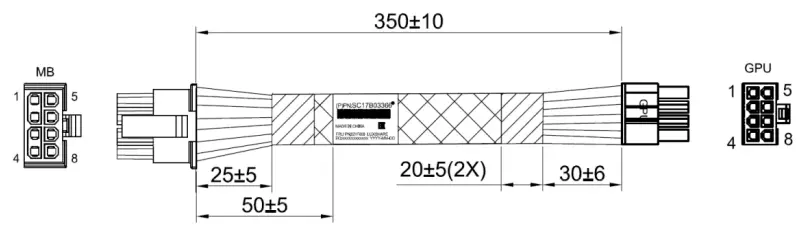 |
| Auxiliary power cable needed with the SR670 V2 |
| 215mm 8pin (2×4) cable Option: 4X97A69627, ThinkSystem SR670 V2 GPU Option Power Cable Feature: BFNL SBB: SBB7A40281 Base: SC17A10990 FRU: 02YE945  |
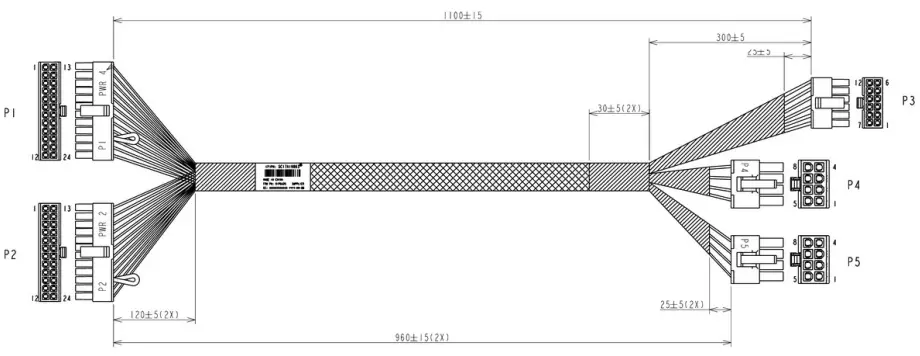
| Auxiliary power cables supplied with the SR670 (configure-to-order) |
| 900mm SR670 Cage 1 power cable Feature: B3Y3 SBB: SBB7A10375 Base: SC17A10876 FRU: 01PG448 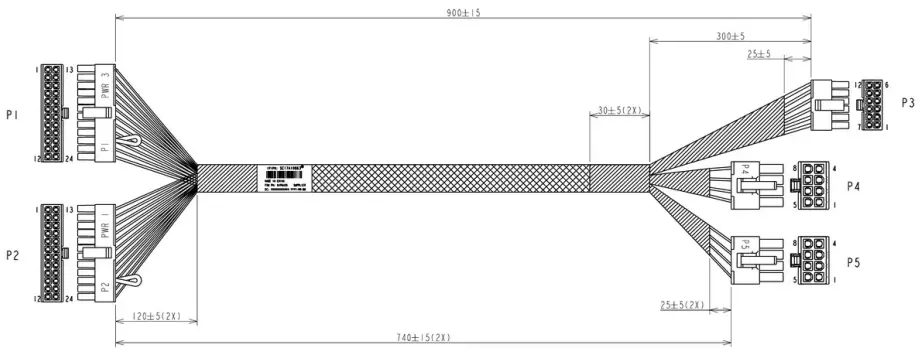 Notes:
|
| 1100mm SR670 Cage 2 power cable Feature: B3Y2 SBB: SBB7A10374
Notes:
|


Regulatory approvals
The NVIDIA A40 GPU has the following regulatory approvals:
- RCM
- BSMI
- CE
- FCC
- ICES
- KCC
- cUL, UL
- VCCI
Operating environment
The NVIDIA A40 GPU has the following operating characteristics:
- Ambient temperature
- Operational: 0°C to 50°C (-5°C to 55°C for short term*)
- Storage: -40°C to 75°C
- Relative humidity:
- Operational: 5-85% (5-93% short term*)
- Storage: 5-95%
* A period not more than 96 hours consecutive, not to exceed 15 days per year
Warranty
One year limited warranty. When installed in a Lenovo server, the GPU assumes the server’s base warranty and any warranty upgrades.
For more information, refer to these documents:
- ThinkSystem and ThinkAgile GPU Summary:
https://lenovopress.lenovo.com/lp0768-thinksystem-thinkagile-gpu-summary - ServerProven compatibility:
https://serverproven.lenovo.com/ - NVIDIA A40 product page:
https://www.nvidia.com/en-us/data-center/a40/ - NVIDIA Ampere Architecture page
https://www.nvidia.com/en-us/data-center/ampere-architecture/
Product families related to this document are the following:
Notices
Lenovo may not offer the products, services, or features discussed in this document in all countries. Consult your local Lenovo representative for information on the products and services currently available in your area. Any reference to a Lenovo product, program, or service is not intended to state or imply that only that Lenovo product, program, or service may be used. Any functionally equivalent product, program, or service that does not infringe any Lenovo intellectual property right may be used instead. However, it is the user’s responsibility to evaluate and verify the operation of any other product, program, or service. Lenovo may have patents or pending patent applications covering subject matter described in this document. The furnishing of this document does not give you any license to these patents. You can send license inquiries, in writing, to:
Lenovo (United States), Inc.
8001 Development Drive
Morrisville, NC 27560
U.S.A.
Attention: Lenovo Director of Licensing
LENOVO PROVIDES THIS PUBLICATION ”AS IS” WITHOUT WARRANTY OF ANY KIND, EITHER EXPRESS OR IMPLIED, INCLUDING, BUT NOT LIMITED TO, THE IMPLIED WARRANTIES OF NON-INFRINGEMENT, MERCHANTABILITY OR FITNESS FOR A PARTICULAR PURPOSE. Some jurisdictions do not allow disclaimer of express or implied warranties in certain transactions, therefore, this statement may not apply to you.
This information could include technical inaccuracies or typographical errors. Changes are periodically made to the information herein; these changes will be incorporated in new editions of the publication. Lenovo may make improvements and/or changes in the product(s) and/or the program(s) described in this publication at any time without notice.
The products described in this document are not intended for use in implantation or other life support applications where malfunction may result in injury or death to persons. The information contained in this document does not affect or change Lenovo product specifications or warranties. Nothing in this document shall operate as an express or implied license or indemnity under the intellectual property rights of Lenovo or third parties. All information contained in this document was obtained in specific environments and is presented as an illustration. The result obtained in other operating environments may vary. Lenovo may use or distribute any of the information you supply in any way it believes appropriate without incurring any obligation to you.
Any references in this publication to non-Lenovo Web sites are provided for convenience only and do not in any
manner serve as an endorsement of those Web sites. The materials at those Web sites are not part of the materials for this Lenovo product, and use of those Web sites is at your own risk. Any performance data contained herein was determined in a controlled environment. Therefore, the result obtained in other operating environments may vary significantly. Some measurements may have been made on development-level systems and there is no guarantee that these measurements will be the same on generally available systems. Furthermore, some measurements may have been estimated through extrapolation. Actual results may vary. Users of this document should verify the applicable data for their specific environment.
© Copyright Lenovo 2023. All rights reserved.
This document, LP1773, was created or updated on July 9, 2023.
Send us your comments in one of the following ways:
- Use the online Contact us review form found at: https://lenovopress.lenovo.com/LP1773
- Send your comments in an e-mail to: [email protected]
This document is available online at https://lenovopress.lenovo.com/LP1773.
Trademarks
Lenovo and the Lenovo logo are trademarks or registered trademarks of Lenovo in the United States, other countries, or both. A current list of Lenovo trademarks is available on the Web at
https://www.lenovo.com/us/en/legal/copytrade/.
The following terms are trademarks of Lenovo in the United States, other countries, or both:
Lenovo®
ServerProven®
ThinkAgile®
ThinkSystem®
The following terms are trademarks of other companies:
Intel® is a trademark of Intel Corporation or its subsidiaries.
Linux® is the trademark of Linus Torvalds in the U.S. and other countries.
DirectX®, Microsoft®, Windows Server®, and Windows® are trademarks of Microsoft Corporation in the United States, other countries, or both.
Other company, product, or service names may be trademarks or service marks of others.
References
 Page Not Found - Lenovo Support US
 Lenovo EveryScale (formerly Lenovo Scalable Infrastructure or LeSI) Product Guide > Lenovo Press
-
ThinkSystem and ThinkAgile GPU Summary > Lenovo Press
-
ThinkSystem NVIDIA A40 48GB PCIe Gen4 Passive GPU Product Guide > Lenovo Press
-
GPU adapters > Lenovo Press
-
ThinkSystem NVIDIA A40 48GB PCIe Gen4 Passive GPU > Lenovo Press
 NVIDIA AI Enterprise Sizing Guide
-
Welcome | ServerProven
-
Copyright and Trademark Information | Lenovo US | Lenovo US
-
Welcome | ServerProven
 NVIDIA A40 Data Center GPU for Visual Computing | NVIDIA
-
NVIDIA Ampere Architecture | NVIDIA
-
Quadro sync solutions for ultra high resolution display | NVIDIA
 Page Not Found - Lenovo Support US
 Lenovo EveryScale (formerly Lenovo Scalable Infrastructure or LeSI) Product Guide > Lenovo Press
 ThinkSystem and ThinkAgile GPU Summary > Lenovo Press
 NVIDIA AI Enterprise Sizing Guide
 Welcome | ServerProven
 Copyright and Trademark Information | Lenovo US | Lenovo US
 NVIDIA A40 Data Center GPU for Visual Computing | NVIDIA