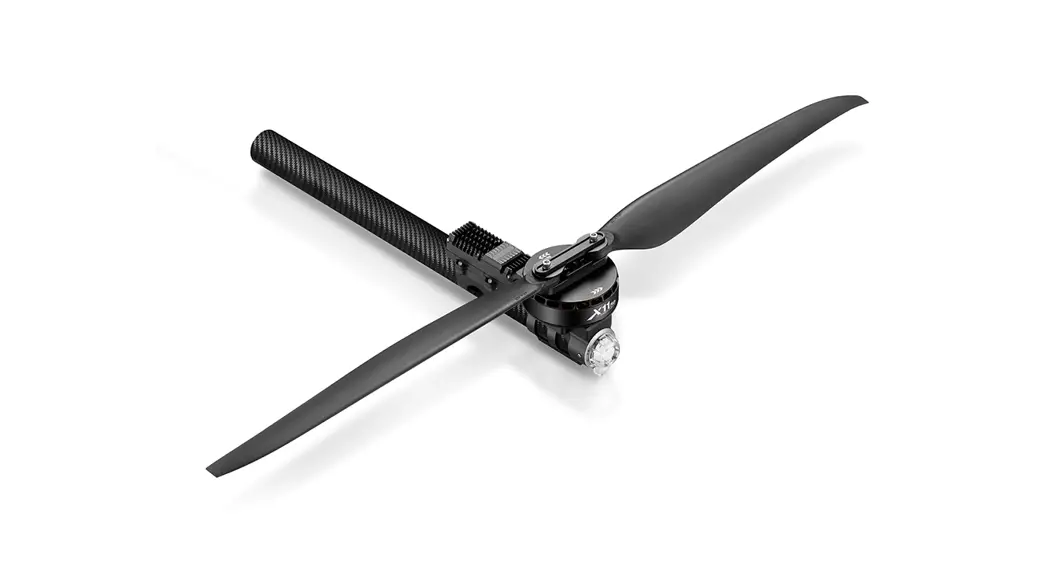
X11 Plus 11118-85KV Dual Brushless Power System
Product Information
Introduction
The 91MVT,7 is a power system designed for use in aircraft. It
includes a motor, ESC, propeller, screw top adapter, screw bottom
adapter, teflon gasket, motor mount, fastening screws, and LED set.
The product is subject to design and performance updates without
notice.
Safety Precautions
Read the manual instructions carefully during installation to
prevent personal injury or product damage. Modification is not
recommended.
Components of the Power System
- Motor x 1pcs
- ESC x 1pcs
- Propeller x 1pcs
- Screw top adapter
- Screw bottom adapter
- Teflon gasket
- Motor mount x 1pcs
- A number of fastening screws
- LED set x 1pcs
Specifications
- Motor Stator Size: 11118 KV: 85 Motor dimension: 120*49mm
- Propeller Diameter Pitch: 43*14 inch Single propeller weight:
146g Weight (INC. adapter): 455g
Protective Function
The product has a protective function that produces warning
tones when there are issues such as over-voltage, under-voltage, or
over-current. Refer to the manual for possible causes and
solutions.
Daily Usage
The LED light color can be adjusted using the dial code on/off
feature. Refer to the manual for the dial code settings and the
corresponding LED colors and meanings.
Product Usage Instructions
Installation
Follow the manual instructions carefully during installation. Do
not modify the product.
Replacing the Propeller
Refer to the manual for instructions on replacing the
propeller.
Firmware Upgrade
Refer to the manual for instructions on firmware upgrade.
91MVT,7 USER MANUAL
ATTENTION CAUTIONS
Thank you for your purchase. Please read the following statement carefully before use. Once used, it is considered to be an acceptance of all the contents. Please follow the manual instructions carefully during the installation. Modification may result in personal injury and product damage. We reserve the rights to update the design and performance of the product without notice.
20230426
01 Introduction
The COMBO-XRotor-X11-PLUS brushless power system is a plant protection power system that adapts to a single-rotor load of 15-18kg/rotor. The maximum thrust of a single-rotor is 37kg; it is suitable for a 50mm carbon fiber tube arm; the overall waterproof level is IPX6, and it is not afraid of rain pesticides, salt spray, high temperature, sand and dust, impact resistance, mud and sand resistance; the ESC uses FOC vector control, based on PMSM system algorithm optimization; the system has digital throttle and analog throttle, which can make the flight more stable; the system has power-on automatic detection, power-on voltage abnormal protection, over-current protection, stall protection and other protection functions; use CAN communication, with real-time data transmission; built-in fault storage function, can record fault data.
02 Safety Precautions
· When use it please keep away from crowd, high voltage cable and obstacles and conform to safety norm. · Never approach to the high-speed rotating propeller & motor so as to avoid being injured by blade. · Check if all the components are good before use. If there is any damaged component, please contact after-sale service for replacement. · Check if the screw of connecting parts is loose or whether the motor is horizontal before flight. · The X11-PLUS power system is connected to a circular tube arm with a diameter of 50mm. · The color of the power system navigation light is optional. After removing the light housing, you can select the desired color by flipping the dial switch. · The motor should be kept clean and can be washed with water after each fly has been completed. · This function can be realized only when the flight controller has a CAN channel. · There is no digital throttle for serial communication. Serial communication is optional for this power system.
03 Components of the Pow er System
Screw Top adapter Teflon gasket Propeller
cMotor x 1pcs cESC x 1pcs cPropeller x 1pcs cMotor mount x 1pcs cA number of fastening screws cLED Set x 1pcs
Screw Bottom adapter
04 Pow er system installation
· The whole power system has been assembled before leaves the factory. Unpack and take out the power kit to install on the rack of plant-protection plane as per the rotation direction of motor. · The yellow, gray and green cables are the data output. Upgrade signal wire (ESC system is upgradable) and digital throttle using the Hobbywing CAN protocol. The yellow wire is ground wire, the
gray wire is CAN-High (CH), and the green wire is CAN-Low (CL). · The optional serial communication power system. Yellow, red and green cables are the data output and upgrade signal line (the ESC system is upgradable). · The black and white is the PWM throttle wire, the black wire is ground wire, and the white wire is signal wire. · The data signal line outputs in real time; the input and output throttle, motor speed, bus current, phase current, bus voltage, capacitor temperature, Mosfet temperature and other data. · The throttle pulse width was fixed at 1050~1950µs. · The CAN digital throttle needs to be adapted separately by the flight controller and the Hobbywing CAN protocol. Please obtain the agreement from Hobbywing sales, after-sales service, agents,
flight control manufacturers, etc.
Screw (M3)
Propeller Motor
ESC
Powertrain Arm Tube Outer Diameter 30mm Aluminum-alloy tube
LED
05 Specifications
Recommend Take-off Weight: 15-18kg/rotor (54V, Sea Level) Recommended Battery: 12-14S LiPo (Max 61V) Powertrain Arm Tube Outer Diameter: 50mm Protection Grade: IPX6 Maximum Torque: 37kg (54V, Sea Level) Operating Temperature: -20¥-50¥ Total Weight: 2490g (INC. prop) Support throttle Frequency: 50-500Hz
06 Parameters
7PMUBHF 7
1SPQFMMFS
7 4-*10
)8 *ODI ‘PMEBCMF1SPQFMMFS
5ISPUUMF
ESC Continuous Current: 50AcNon-hermetic Ambient Temperature 60¥) Maximum Current.: 150AcNon-hermetic Ambient Temperature 60¥) Recommended Battery: 12-14S LiPo Throttle Pulse Width.: 1050-1950µs
Motor Stator Size: 11118 KV: 85 Motor dimension: 120*49mm
Propeller Diameter Pitch: 43*14 inch Single propeller weight: 146g Weight (INC. adapter): 455g
5ISVTU H
“NQFSF ”
1PXFS 8
4QFFE 31.
&GGJDJFODZ H8
07 Protective function
· Start protection When the power is connected normally, the ESC will first start the self-test. If the self-test is successful, it will run normally after beeping. If the self-test fails, it will not start and the flashing light will act as warning sign.
· Stall Protection When the ESC detects that the motor is locked, the ESC will completely turn off the output and will not restart the motor. At this time, it is necessary to power on again to clear the error and restart the ESC to restore power output.
· Current protection When it detects that the instantaneous current abnormality reaches close to 320A, the ESC will restart immediately, and the output will be turned off if the number of detections reaches 6 consecutive times. After the motor stops, it will return to normal after power on again.
· Throttle signal loss protection When the ESC detects that the throttle remote control signal is lost for more than 0.25 seconds, it will immediately turn off the output to avoid greater losses caused by the continued high-speed rotation of the propeller. After the signal is restored, the ESC will immediately restore the corresponding power output.
· Temperature protection This power system has no temperature protection, and will only send out an alarm when the temperature of the ESC is higher than 110°C. The flashing lights will be 1 long and 3 short, and 1 long and 4 short. When the temperature exceeds 130 degrees, the ESC may be burnt. Upon seeing the prompt, please land immediately.
08 Warning tone description
Symptom Motor fails to start after power on
Motor fails to start after power on The power-on voltage is lower than
18V or higher than 82V
Tone “Beep beep beep” rapid monotone “Beep, Beep, Beep” (2 second for each interval)
“Beep , Beep , Beep” (1 second for each interval)
Possible causes Throttle is not reset to zero
No throttle signal input on the receiver throttle channel
Possible solutions
Push the throttle to the lowest point or recalibrate the throttle point
Check if transmitter and receiver is normal Check if wiring of throttle channel is normal
Battery voltage is too low or too high
Replace with a suitable battery
09 Daily usage
1 Adjust LED light color
Use a tool to take out the M3×8 screws that fasten the lampshade, and set the switch according to the corresponding light color below (factory default green). After the setting is successful, assemble and fasten the lampshade in the original way.
Dial code on/off 1 0/ 0/ 0/ 0/ 0” 0” 0” 0”
Dial code on/off 2 0/ 0” 0/ 0” 0/ 0” 0/ 0”
Dial code on/off 3 0/ 0/ 0” 0” 0/ 0/ 0” 0”
LED color 8IJUF #MVF 1VSQMF #MVF :FMMPX (SFFO 3FE -&%0GG
2 Description of light color status
Flashing of LED Single short flash 2 short flash 3 short flash
Single long flash
Single long flash + Single short flash Single long flash + 2 Short flash
Single long flash + 3 Short flashes Single long flash + 4 Short flashes
2 long flashes 2 long flashes + Single short flash
2 long flashes + 2 Short flash 2 long flashes + 3 Short flash 2 long flashes + 4 Short flash
3 long flashes
Meaning Over-voltage Under-voltage Over-current
Throttle lost
Throttle not reset to zero Mosfet overheated (Over 110¥ Capacitor overheated cOver 110¥
Stall protection ESC open-circuit ESC short-circuit Motor short-circuit Phase A operational amplifier is abnormal Phase B operational amplifier is abnormal Phase C operational amplifier is abnormal
Solution
No over-voltage protection. When voltage more than 75V, motor will trigger open circuit protection.
Replace the battery (Voltage higher 24V)
· Check the motor for foreign objects and check the propeller,then power on again · Contact after-sales service
· Check connection between signal line to the flight controller · Check whether the remote controller and flight controller are turned on · Check the resistance of the black and white wires, if there is a short circuit, contact the after-sales service
This problem occurs during the rotation of the motor. Please check the aircraft battery and circuit. There is a short circuit on the circuit.
Cool down the power system and power on again
Cool down the power system and power on again
· Restart after the throttle is reset to zero · Please check if there is any foreign matter in the motor, remove the foreign matter before starting
· Please check whether the motor circuit is intact
· Contact after sales service
· Please check whether the motor is in good condition
· Contact after sales service
· Please check whether the motor is in good condition
· Contact after sales service
· Re-power on to return to normal
· Contact after sales service
· Re-power on to return to normal
· Contact after sales service
· Re-power on to return to normal
· Contact after sales service
3 Replacing the propeller
· Use the appropriate tools to take out the two propeller fastening screws in and replace them with intact propellers. If you need to replace the propeller clips, continue to take out the fastening screws and replace the whole set of propeller clips and propellers.
· Installing the propeller clip blades Firstly, install the bottom cover on the motor, followed by the propeller blades, propeller gaskets, upper cover (propeller clips) and the final screws in order; pay attention to the installation of the propeller screws, After clamping, the propeller should rotate freely, and make sure that the propeller clamp and the motor fastening screw are tightened and screw glue is used at the same time.
4 Firmw are upgrade
There are two ways to upgrade the software: online upgrade via a computer or using flight control remote. The explanation using the flight control remote are as follows. This function needs to use DataLink data box, special DataLink software for upgrade package, and USB data cable. DataLink data box version requirements, LINK-01.2.14-C or higher version, LINK-01.2.09-U or higher version; DataLink software contact Hobbywing to obtain. Note: Please ensure that the computer has already installed the Microsoft Visual C++ 2013 before or later using. An upgrade package contains only one program for each ESC. For other programs,
please obtain a new upgrade package. For additional details, please refer to the DataLink user manual. The upgrade package can be obtained at the place of purchase; Hobbywing official website, dealers, Hobbywing sales, Hobbywing, and after-sales service. The FOC ESC is one-dimensional and can only be upgraded on a fixed version, not at will. Note: It can only be upgraded from the existing program. Software and hardware cannot be upgraded together.
4.1 CAN ESC upgrade
1) Connection Connect the computer and the DataLink data box with a USB cable; ESC—->DataLink data box “yellow red green”—->”- ´ D”, any channel from D1-D8 is acceptable, and it is recommended to use D1 channel first.
2) Software acquisition It can be obtained at the place of purchase; Hobbywing official website, dealers, Hobbywing sales, and Hobbywing after-sales service. Note: It can only be upgraded from the existing program, and software and hardware cannot be upgraded together.
3) Operation
Run the DataLink software.
The USB cable is connected to the data box, and the ESC is connected to the data box.
Click “DataLink” of the software,View data box firmware, firmware version LINK-01.2.14-C or later.
Click “CAN->ESC(FAST)”, ESC firmware upgrade page.
Select the “Scan” button first, and then power on the ESC.
After the channel on the page is ticked, select the “Stop” button.
Wait for the upgrade to complete, if the upgrade fails, please scan for the upgrade again.
After the upgrade is complete, please scan again to confirm that the program is upgraded successfully.
4.2 Serial port ESC upgrade
1) Connection Connect the computer and the DataLink data box with a USB cable; ESC—->DataLink data box “yellow gray green”—->”- CH1 CL1″.
2) Operation
Run the DataLink software.
Connect the USB cable to the DataLink box, connect the ESC to the DataLink box, connect the PWM throttle cable to the signal generator.
Select the “Scan” button first, and then power on the ESC.
After the channel on the page is ticked, select the “Stop” button.
Wait for the upgrade to complete, if the upgrade fails, please scan for the upgrade again.
After the upgrade is complete, please scan again to confirm that the program is upgraded successfully.
After the hardware and firmware information appears on the page.
The equipment is powered off, there is no sequence of power outages, and the equipment will not be burned.
Click “DataLink” of the software,Check the data box firmware and update the firmware version to LINK-01.2.09-U or later.
After the hardware and firmware information appears on the page.
There is no sequence of power off, and the equipment will not be burned.
In “Available Version”, select the desired firmware and click “Update”.
Click “Uart->ESC(FAST)”, the ESC firmware upgrade page. In “Available Version”, select the desired firmware and click “Update”.
5 ID set up
If there is no requirement, the default factory ID of the ESC is 1, the throttle channel is 1, and the bus speed is 500Hz. This function is only available for CAN communication ESCs, and the serial port does not have this function. This function can communicate with the flight controller to realize digital throttle. This function requires the additional purchase of DataLink data box. Before using this function, ensure that the computer system is installed with the Microsoft Visual C++ 2013 software in advance to operate. 1) Connection
ESC—->DataLink data box “yellow gray green”—->”-CH1 CL1″; Connect the data box to the computer via USB. Please remove the paddle to avoid danger upon changing the ID. For the same aircraft, different ESC IDs and throttles cannot be the same. Otherwise, ESCs with the same ID will be recognized as one ESC upon using the CAN function,. 2) Operation
The ESC is connected to the data box, and the data box is connected to the computer.
Run the DataLink software.
Enter the software page, confirm the software version of DateLink in the type “DataLink”, and ensure that the program version is above LINK-01.2.15-C.
Enter the CAN parameter adjustment page.
Wait for the bus speed automatic setting to complete.
Set ID and Throttle.
Click “Set ID and Throttle Channel” and wait for the data to be saved.
Check the prompt in the upper left corner to see if the setting is complete.
The equipment is powered off, there is no sequence of power outages, and the equipment will not be burned.
6 Fault storage
The ESC has its own fault storage function to store the time during power-on, flight time, and fault time information. This function drastically improves the quality of live and makes it convenient for
flight fault analysis. Please note that this function only records the data at the time of failure, and not all flight data.
This function requires the use of DataLink data box, serial port assistant, DataLink software, and USB data cable.
Note: DataLink software can be obtained from Hobbywing official website, dealers, Hobbywing sales, and Hobbywing after-sales.
DataLink data box version requirements, LINK-01.2.15-C or later; serial port assistant requirements, USB to TTL; DataLink software requires a fault storage version, which can be obtained from the
official website, WeChat official account or after-sales.
The DataLink box has three power supply methods; USB data cable, serial port assistant, and external power supply cable. You can choose one of the power supply methods, and there is no need to
repeat power supply.
Note: For detailed steps, please refer to the DataLink user manual.
1) Connection
Serial assistant —-> DataLink data box “GND 5V TX RX” —-> “- + RX2 TX2”;
CAN communication ESC —-> DataLink data box “yellow gray green” —-> “- CH1 CL1”, multiple ESCs can be used in parallel.
Note: Upon using multiple ESCs in parallel, the ID and throttle number must be set differently in order for one ESC to be recognized.
Serial communication ESC—->DataLink data box “yellow red green”—->”- ´ D”, any channel of D1-D8 is acceptable, and it is recommended to use D1 channel first.
2) Software operation
Run the DataLink software.
Connect the USB cable to the DataLink box, connect the ESC to the DataLink box, connect the PWM throttle cable to the signal generator.
The serial port uses the version ending with -U, update the firmware version to LINK-01.2.10-U or later; the CAN ESC uses the version ending in -C, update the firmware version to LINK-01.2.15-C or later.
Remove the USB cable and connect the serial port assistant.
Click the “USB-serial port” button in the upper right corner to enter the serial port page
Click “Fault Analysis” to enter the page.
Power on the ESC.
Select the serial port number, the default baud rate, click “Open Serial Port” to connect the ESC to the computer.
Select a channel, click “Read Fault Information” to view flight faults.
After checking the fault, save the data as needed; except for the special case of fault data, it will be kept in the ESC until the memory is full, and the oldest data will be overwritten sequentially
The equipment is powered off, there is no sequence of power outages, and the equipment will not be burned.
Note: This function requires the serial port assistant. Before using it, please ensure that the serial port assistant is in working coditions. If it cannot be used, please replace the serial port assistant and try again.
10 After-sale maintenance
In the event that the equipment of the power system is damaged, please contact Hobbywing after-sales customer service immediately. Under the premise of not affecting the performance, make sure that you can use the Hobbywing power system kit accessories for replacement after contacting the customer service. Users are prohibited from configuring accessories by themselves (such as screws, paddle clips, propellers) for replacement.