
Technologies ATOM OD06 3.5GHz 14dBi Outdoor
CPE User Manual
ATOM OD06 – EG7010C-M11 USER Manual
All rights reserved © Baicells Technologies Co., Ltd.
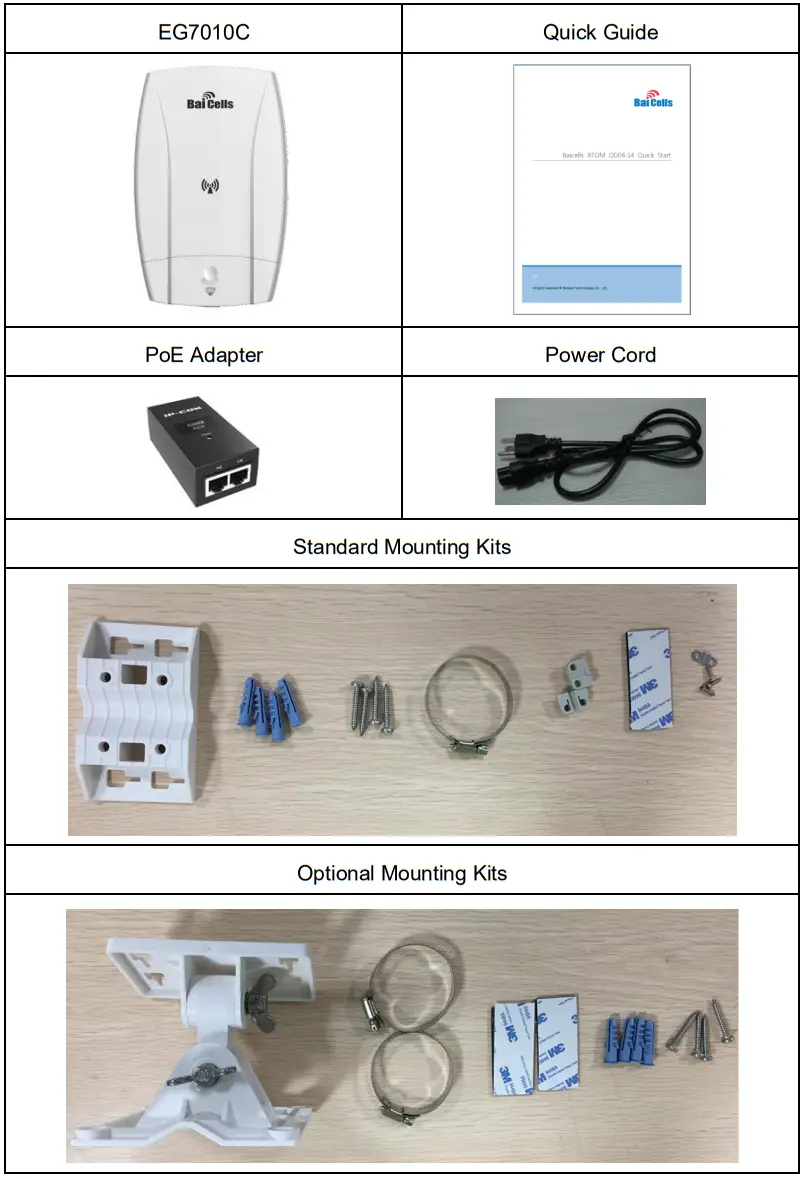
Shipping List
Make sure you have got the following parts: EG7010C
Hardware Introduction
2.1 Indicators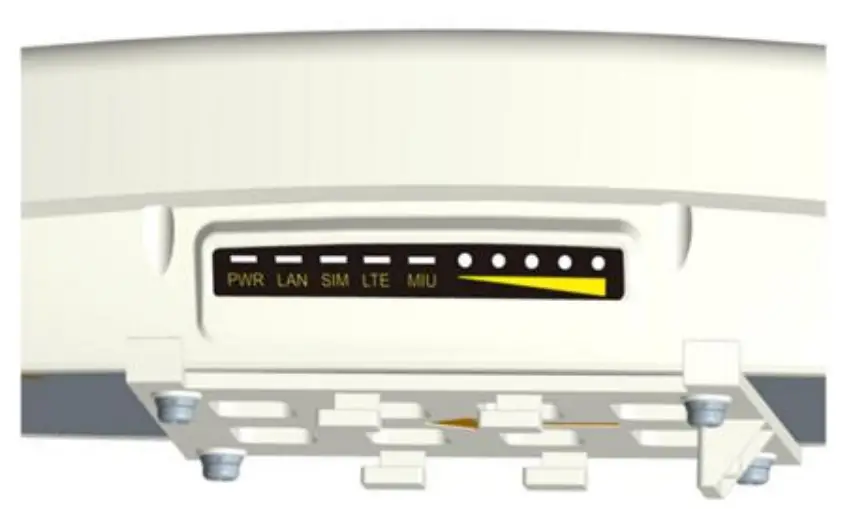
| Identity | Description | Color | Status | Description |
| MIU | – | Yellow | OFF | Reserved. |
| Steady On | Reserved. | |||
| Blanking | Reserved. | |||
| LTE | Network state Indicator | Blue | OFF | LTE disconnected. |
| Steady On | LTE connected. | |||
| SIM | SIM status indicator Card | Yellow | Steady On | The SIM card is normal. |
| Blanking | The SIM card is abnormally Or not inserted. | |||
| LAN | 100Mbps Eth Indication | Yellow | OFF | Ethernet connection does not establish. |
| Steady On | The ethernet connection is normal. | |||
| Blanking | Data is transmitted. | |||
| PWR | Power Indicator | Yellow | OFF | No Power Supply |
| Steady On | Power On | |||
| LTE Signal | 5 LTEs Indicate | Green | All OFF | The signal is too weak to attack. |
| Steady On | According to signal strength in turn light |
| Identity | Description | Color | Status | Description |
| connection state and signal strength | up | |||
| Blanking | Scanning the LTE network | |||
| The CPE is authenticating. | ||||
| CPE is getting IP addresses from the LTE network. |
2.2 Interface and Buttons
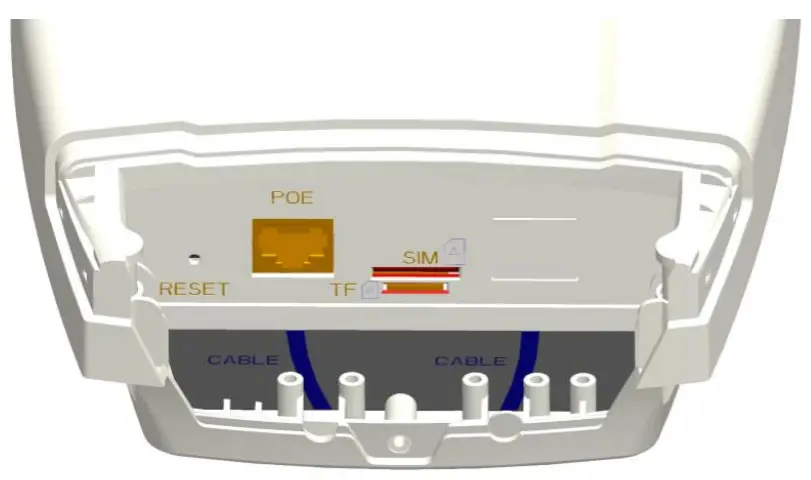
Interface & Button | Description |
| PoE | Connected to the PoE Power Adapter |
| TF | Support SD card |
| SIM | Support 1.8V/3.0V USIM 2FF |
| RESET | Long press over 10 seconds to restore the factory settings |
| GND | Connected to Earth by conductor |
Installation Guide
3.1 Support Materials
Before installation, prepare the following support materials accordingly, as given below:
| Item | Description |
| Ethernet cable | Outdoor Shield CAT5E Shorter than 330 feet |
| Ground wire | 16mm² yellow-green wire |
3.2 Install USIM Card and Cables
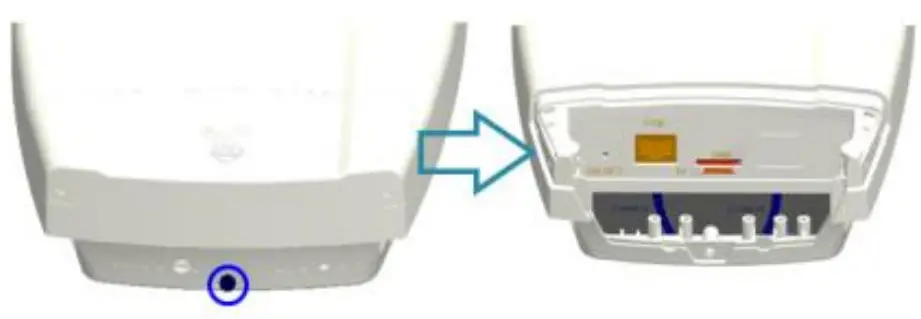 | 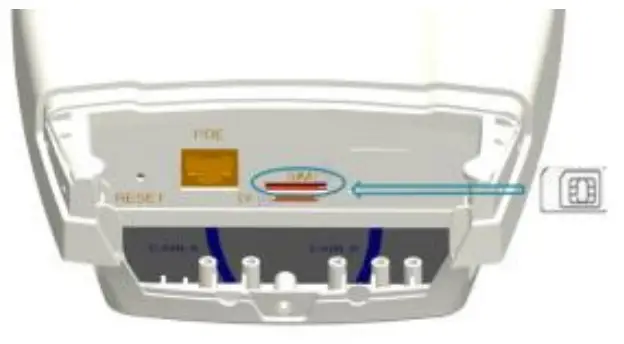 |
| (1) Screw the screw on the waterproof cover, and open the waterproof cover | (2) Insert the USIM card to the USIM slot. Note following the directions |
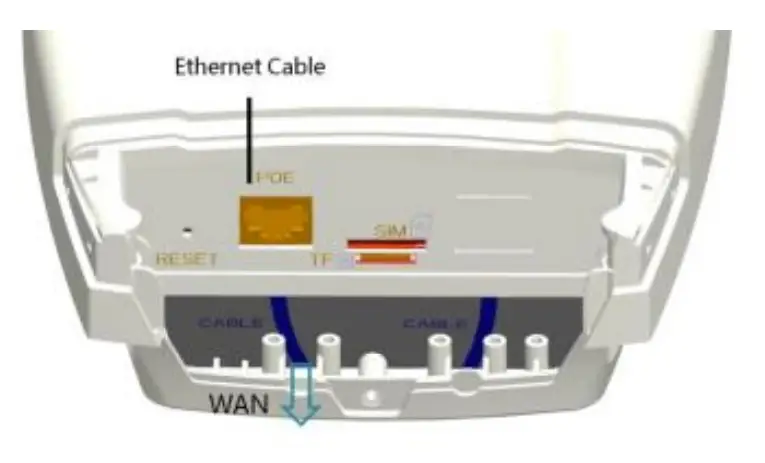 | 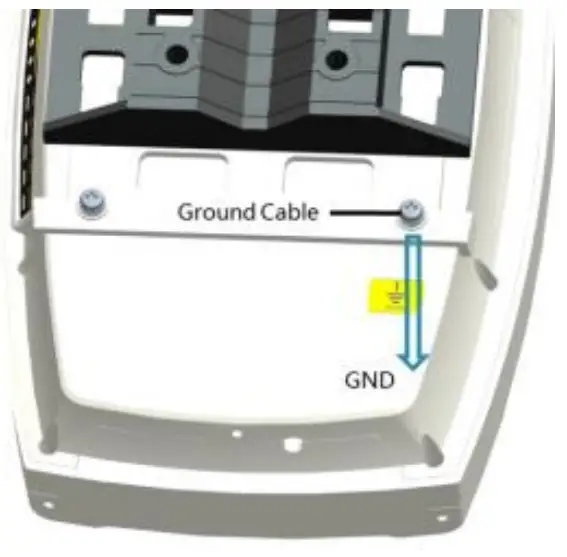 |
| (3) Connect the Ethernet cable to the PoE port | (4) connect the ground cable to the ground screw |
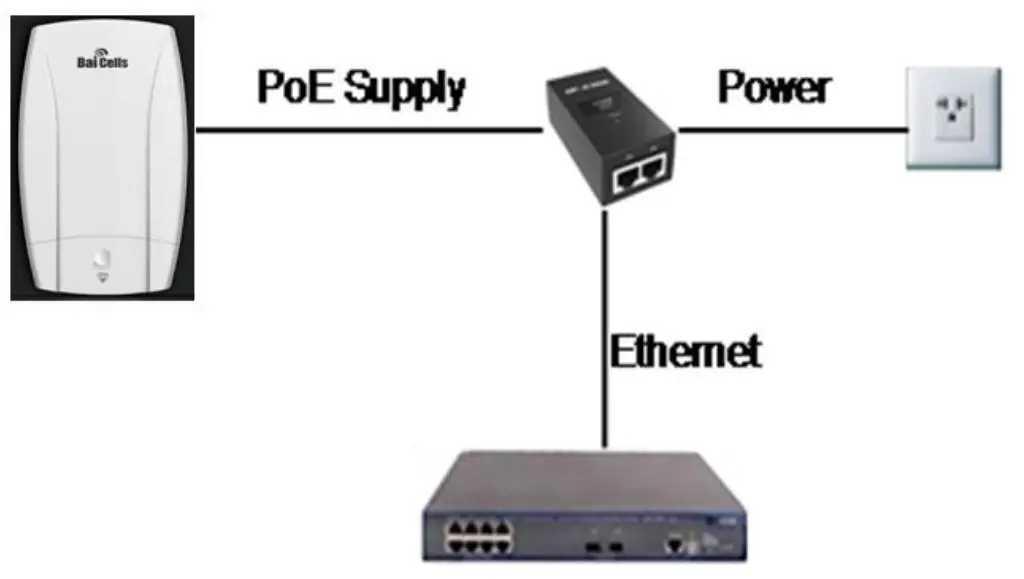 | |
| (5) Close the waterproof cover and fasten the screw on the cover. (6) Connected Ethernet cable to the power adapter. Pay attention to the power adapter interface directions. (7) Power on, the LED indicator will light up. | |
3.3 Install on Wall
- Slipping the bracket from the CPE.
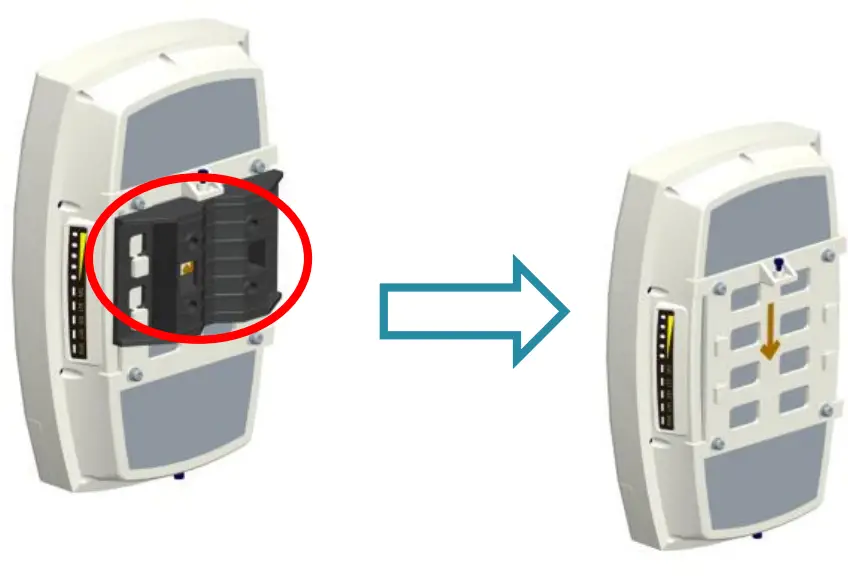
- Fit the CPE on the wall, and mark the drilling locations.
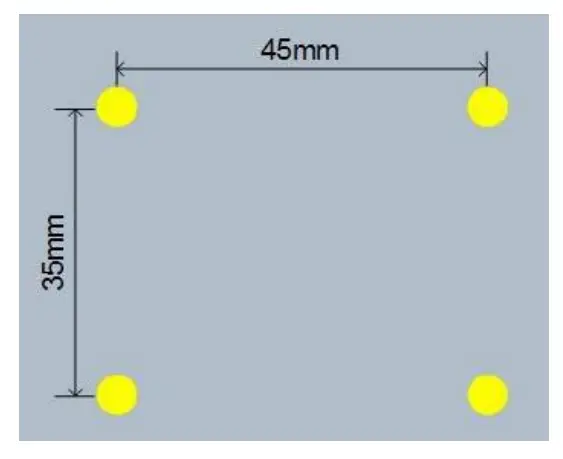
- Drill four 10mm diameter and 70mm depth holes in the wall by following the marked locations.

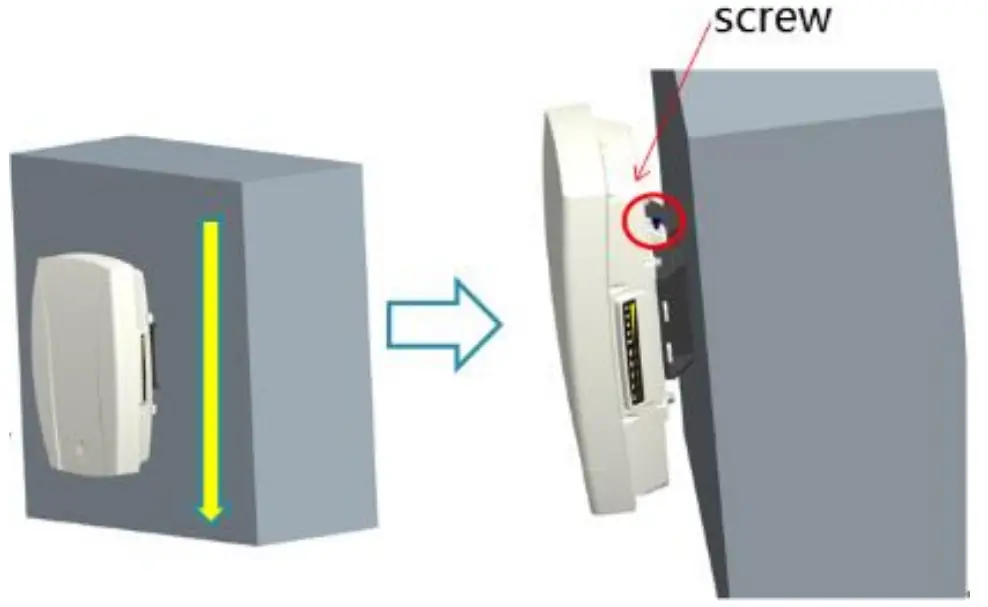
- Check the up/down direction of the bracket, and then fix it on wall using M5 tapping screws.
- Install the CPE to the bracket and fasten the screw.
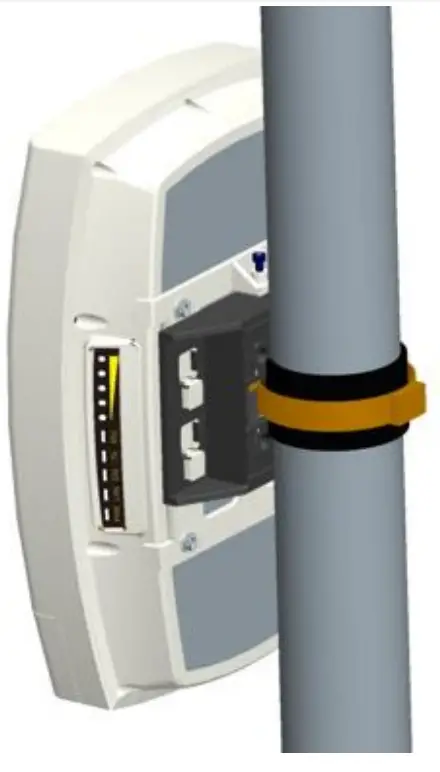
3.4 Install on Pole
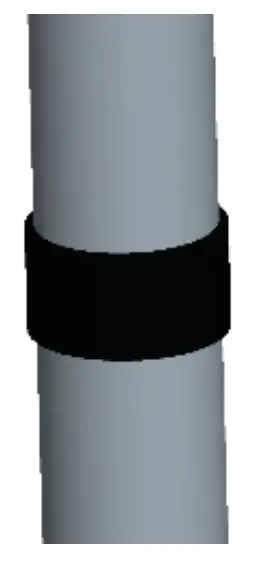
- Round an anti-slip rubber on the pole.
- Fix the bracket using the hoop.
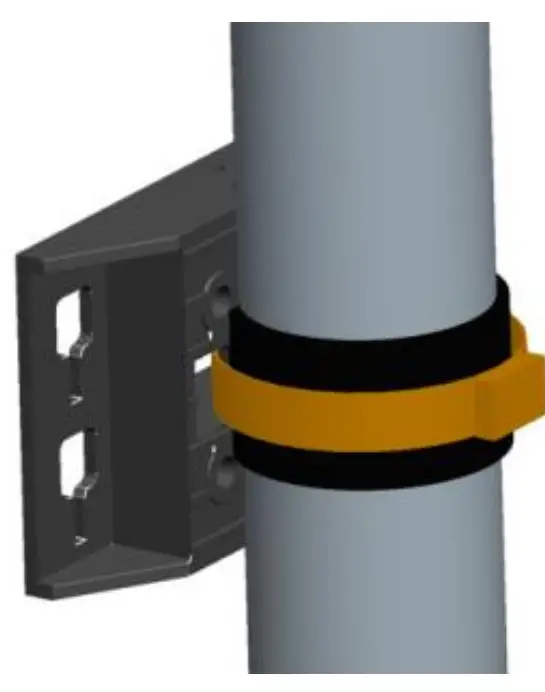
- Install the CPE to the bracket and fasten the screw.
3.5 Grounding
The EG7010C-M11 must be grounding, please contact a professional person to operate. Using the grounding cable, connect the grounding cable to the ground row
Configuration Guide
4.1 4.1 Login
The CPE manages, configures, and maintains the device by web management page. The steps to log in are as follows:
- In the address column of the browser, type in http://192.168.150.1, then press “Enter”:
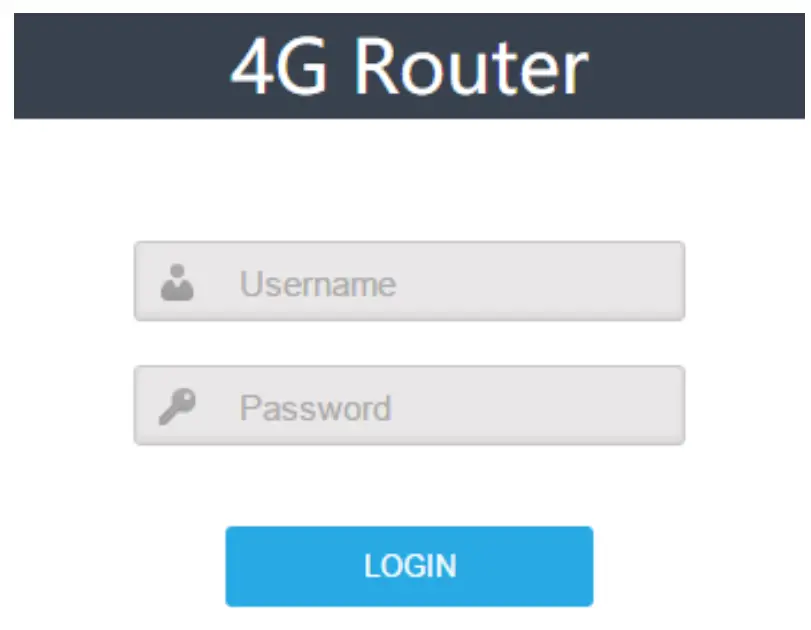
- Enter the user name and password, and click “Log in”. After password authentication, you can log on to the web management page. The default user name and password is admin.
For security, it is recommended that you open the firewall, and keep your login password, WLAN FTP passwords, and passwords well.
4.2 View Status
In the overview area, you can view the device information and LTE status, such as Product name, Software version, PLMN, IMSI, RSRP, RSRQ, CINR, SINR, Tx Power, Cell ID, PCI, and so on, as shown below: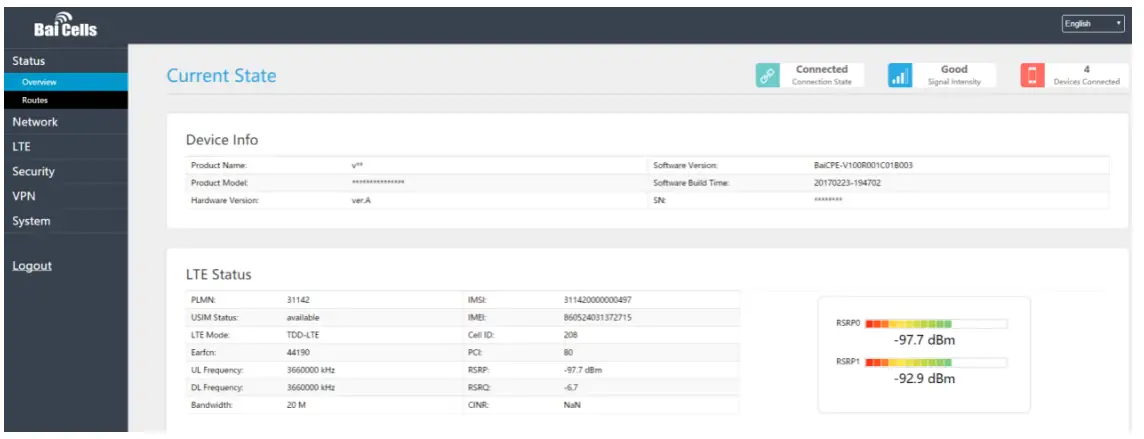 SAS Settings, as shown below: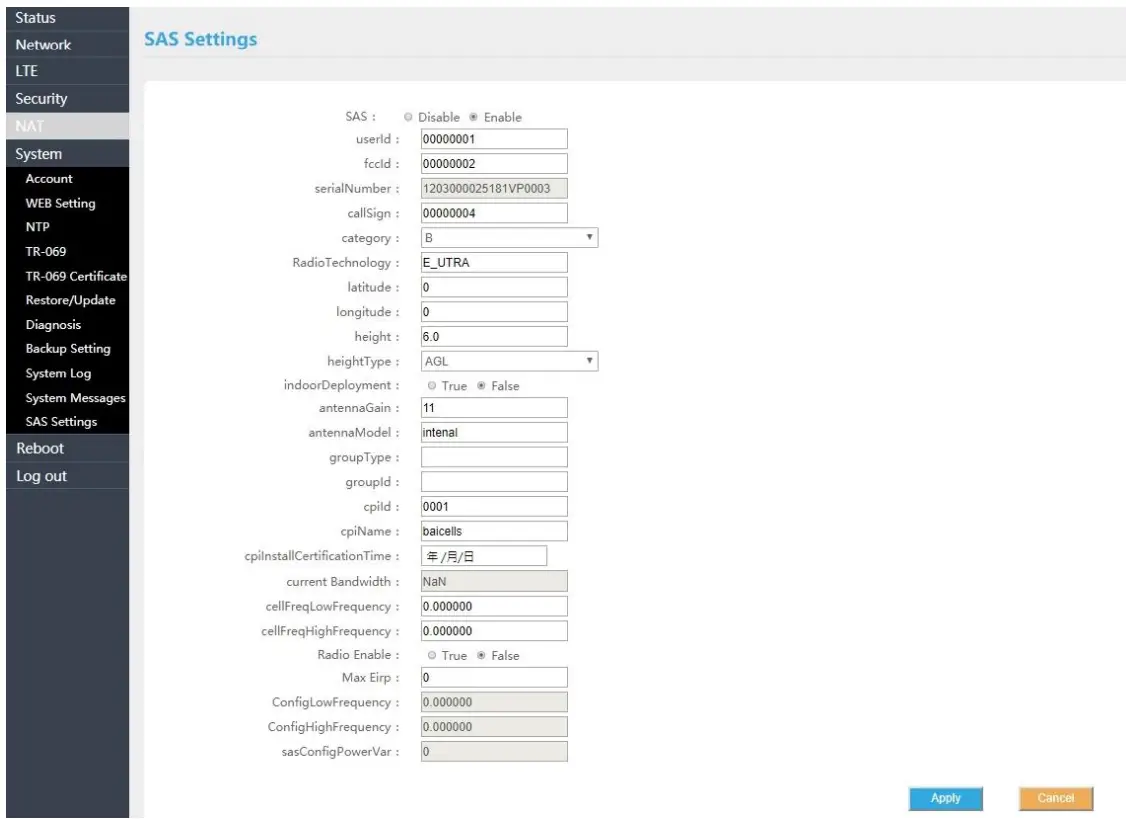
Specifications
Basic Specifications
| Item | Description |
| UE-Category | 3GPP R10, CAT 6/7 |
| SIM Slot | 1.8V/3.0V USIM 2FF |
| Ethernet Port | 1 RJ45, LAN, 10/100/1000 auto-sensing, auto-MDX, PoE |
| Power Supply | Input: Universal range 100V~240V AC Output: PoE (24V DC, 0.5A) |
| Reset Button | Tactile button. Long press over 10s to restore the factory settings |
| LED Indicators | MIU/LTE/SIM/LAN/PWR/LTE Signal |
| Dimensions | 241mm (H) x 154mm (W) x 50mm (D) |
| Weight | About 900 g |
LTE Specifications
| Item | Description |
| LTE Mode | LTE-TDD |
| LTE Bands | Band 48 |
| TXRX | 2T4R |
| Channel Bandwidth | 5MHz, 10MHz, 15MHz, 20MHz |
| Modulation | QPSK, 16QAM |
| Receive Sensitivity | -94dBm @ QPSK,20MHz, 25°C |
| MAX Output Power | 26dBm |
| Antenna Type | Internal directional-antenna |
| Antenna Gain | [email protected], 2 Ports |
| Polarization | ±45° |
| Antenna Efficiency | >70% |
| Isolation | ≤-25dB |
| VSWR | ≤2 |
| Horizontal Beam Width (3dB) | 60±3°@3.xGHz, 2 Ports |
| Vertical Beam Width (3dB) | 25±5°@3.xGHz, 2 Ports |
SW Specifications
| Item | Description |
| Language Support | English/Chinese |
| Network Mode | NAT/Bridge/Tunnel |
| IP Protocol | IPv4/IPv6 |
| SIM Management | PIN Management, SIM-Lock |
| Network Connection Management | Auto/Manual |
| LTE Scan Mode | Full band scan, Frequency Lock |
| WLAN | WPS MSSID IsolationVLAN |
| VPN | L2TP GRE |
| NAT | Port forwarding DMZ ALG Port Trigger |
|
Firewall | IP/MAC/URL Filter Access Control Block Port Scanner / SYN Flood SPI Filter |
| Network Management | TR069 SNMP |
| Diagnostics | TCPDump Ping Trace route |
| Statistics | LTE Status/Connection Time/System Up Time Device Status DHCP Client List WiFi Station List LTE Status Firewall Status |
| Maintenance | Date & Time setting Reboot Restore factory settings Restore / Back up configuration file Firmware upgrade locally/OTA (over the air) |
| System Log | Operating Log Run-time Log Filter/Select/Display/Export Log |
Environmental Specifications
| Item | Description |
| Operating Temperature | -40°C to 55°C |
| Storage Temperature | -40°C to 70°C |
| Operating Humidity | 5% to 95% |
| Ingress Protection Rating | IP65 |
Regulatory Compliance
FCC Compliance
This device complies with part 15 of the FCC Rules. Operation is subject to the following two conditions: (1) This device may not cause harmful interference, and (2) this device must accept any interference received, including interference that may cause undesired operation. Any changes or modifications not expressly approved by the party responsible for compliance could void the user’s authority to operate the equipment. This equipment has been tested and found to comply with the limits for a Class B digital device, pursuant to part 15 of the FCC Rules. These limits are designed to provide reasonable protection against harmful interference in a residential installation. This equipment generates uses and can radiate radio frequency energy and, if not installed and used in accordance with the instructions, may cause harmful interference to radio communications. However, there is no guarantee that interference will not occur in a particular installation. If this equipment does cause harmful interference to radio or television reception, which can be determined by turning the equipment off and on, the user is encouraged to try to correct the interference by one or more of the following measures:
- Reorient or relocate the receiving antenna.
- Increase the separation between the equipment and receiver.
- Connect the equipment into an outlet on a circuit different from that to which the receiver is connected.
- Consult the dealer or an experienced radio/TV technician for help.
Warning: This equipment complies with FCC radiation exposure limits set forth for an uncontrolled environment. This equipment should be installed and operated with a minimum distance 30cm between the radiator & your body.