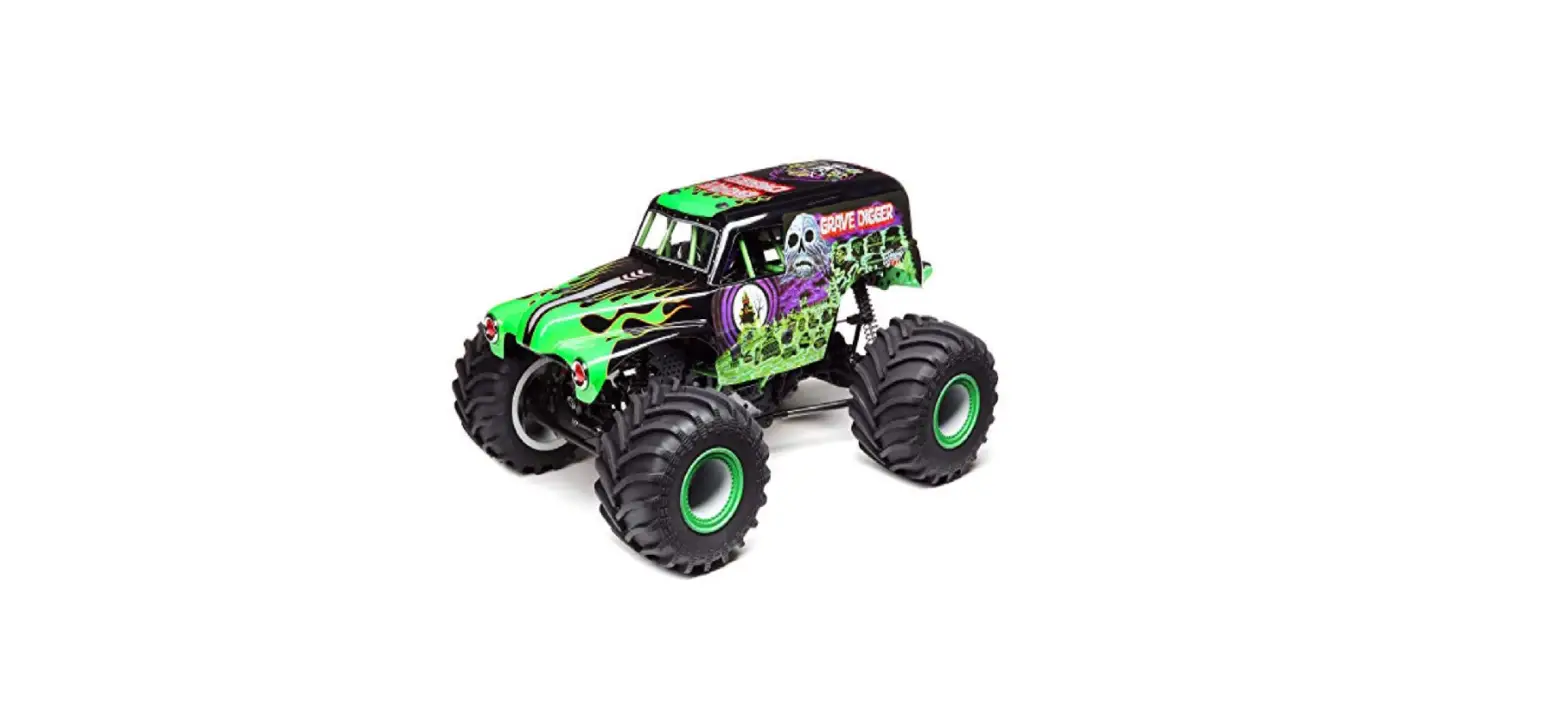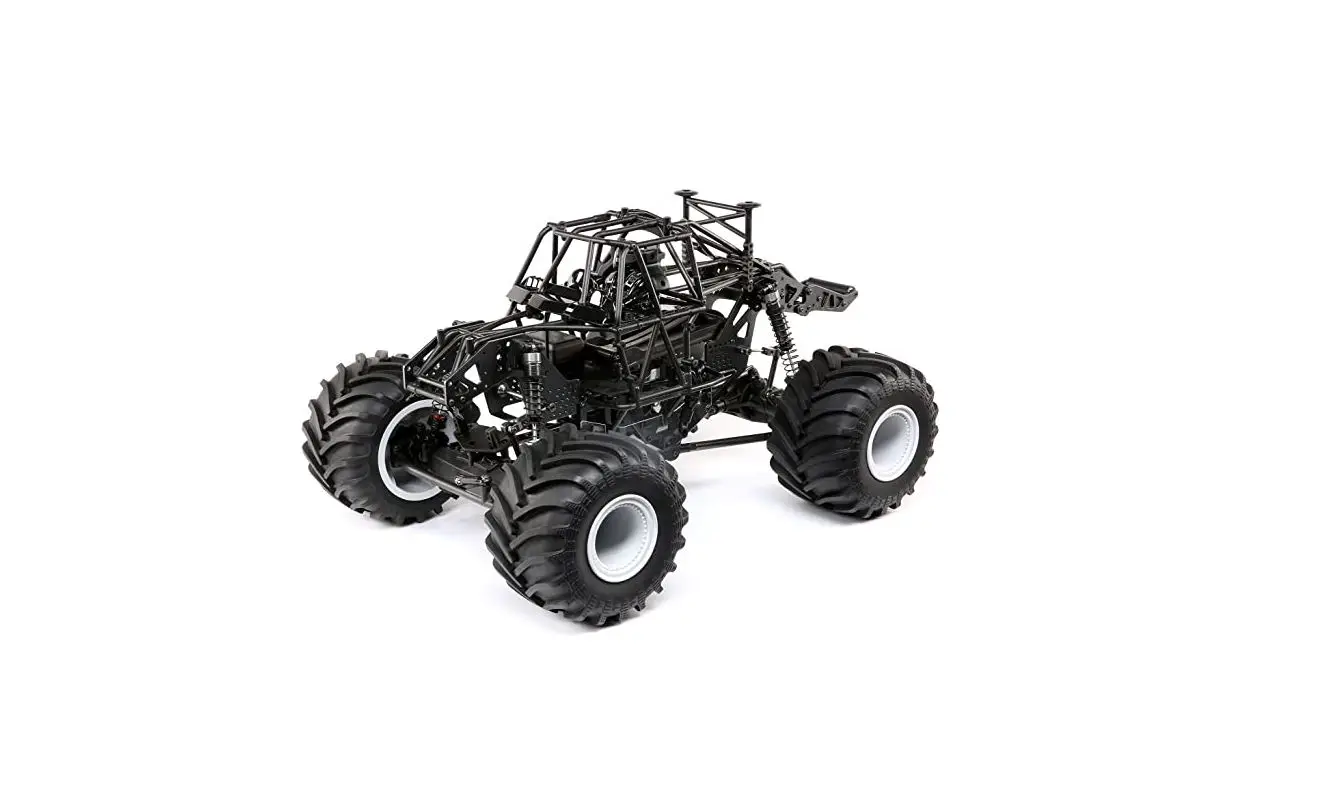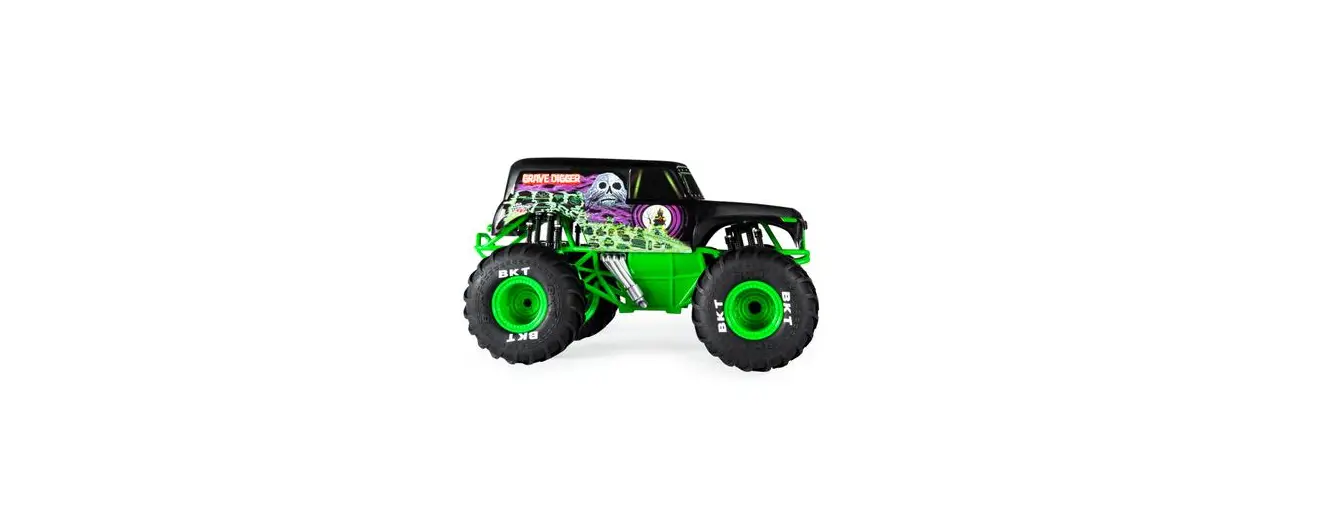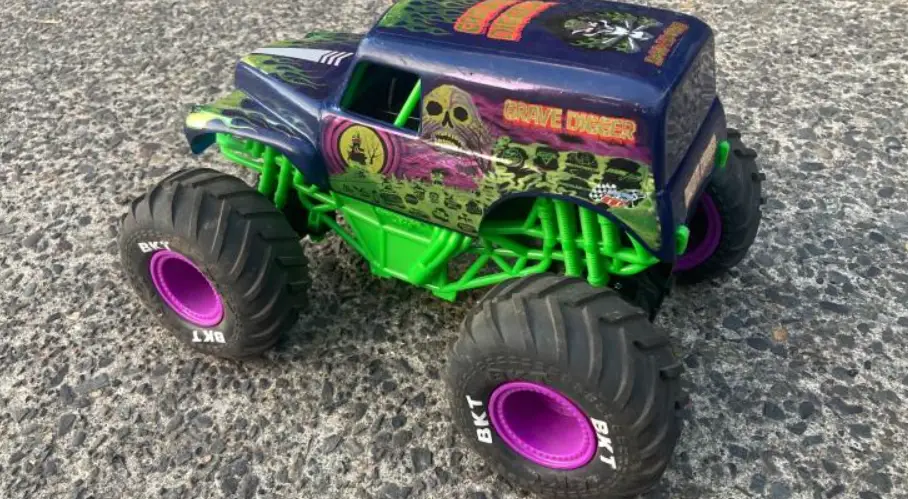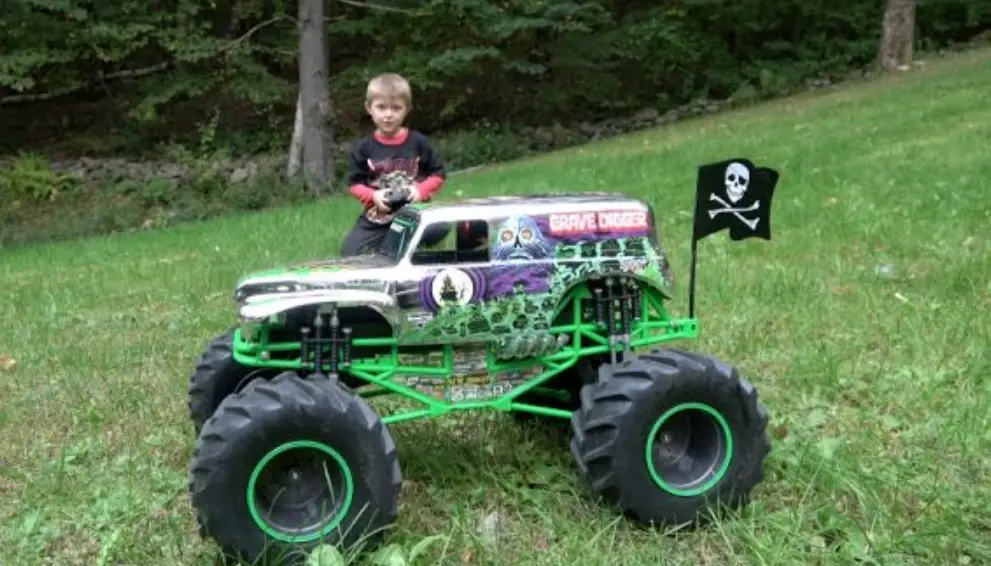

HORIZON LOS04021T1 GRAVE DIGGER Lmt Solid Axle 4wd Monster Truck Rtr
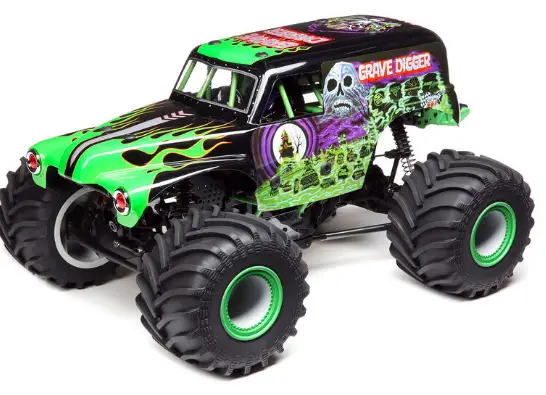
| BOX CONTENTS INCLUDED COMPONENTS REQUIRED, NOT INCLUDED RECOMMENDED SKU | |||
|
Losi® LMT Solid Axle Monster Truck RTR (LOS04021T1 LOS04021T2) | Spektrum™ DX3™ SMART Transmitter (SPMR2340) | 50C or Higher 2S – 3S Hardcase LiPo with IC5 | 2S – 3S Smart Hardcase LiPo with IC5 SPMX50002S50H5 – SPMX50003S50H5 |
| Spektrum SR315 3 Channel Telemetry Surface Receiver (SPMSR315) | |||
| Spektrum S614S Waterproof Servo (SPMS614S) | |||
| Spektrum Firma™ SMART 130A Brushless ESC (SPMXSE1130) |
2S – 3S LiPo Charger |
Spektrum S2100 Dual Port Smart Charger and IC5 adaptor SPMXC1010 and SPMXCA508 | |
| Spektrum Firma 3150 Kv Brushless Motor (SPMXSM1000) | |||
| 4 AA batteries (for transmitter) | |||
| Gravedigger Body (included with LOS04021T1) Son Uva Digger Body (included with LOS04021T2) | |||
SPEKTRUM SMART TECHNOLOGY
The LMT Solid Axle Monster Truck includes Spektrum Smart Technology in the ESC and receiver, which can provide you with telemetry information like battery voltage from your vehicle. The included DX3 Smart transmitter features an LED display to show the battery level of your vehicle during operation. For additional Smart functionality, consider upgrading to a more advanced Smart Technology compatible Spektrum transmitter like the DX5C (SPMR5100- transmitter only), or DX5 Pro (SPMR5010- transmitter only). Use Spektrum Smart batteries to power your LMT Solid Axle Monster Truck to take full advantage of Smart Technology, which can communicate detailed battery data through the system as well. Visit www.SpektrumRC.com for more information.
WATER-RESISTANT VEHICLE WITH WATERPROOF ELECTRONICS
Your new Horizon Hobby vehicle has been designed and built with a combination of waterproof and water-resistant components to allow you to operate the product in many “wet conditions,” including puddles, creeks, wet grass, snow and even rain. While the entire vehicle is highly water-resistant, it is not completely waterproof and your vehicle should NOT be treated like a submarine. The various electronic components used in the vehicle, such as the Electronic Speed Control (ESC), servo(s) and receiver are waterproof, however, most of the mechanical components are water-resistant and should not be submerged. Metal parts, including the bearings, hinge pins, screws and nuts, as well as the contacts in the electrical cables, will be susceptible to corrosion if additional maintenance is not performed after running in wet conditions. To maximize the long-term performance of your vehicle and to keep the warranty intact, the procedures described in the “Wet Conditions Maintenance” section below must be performed regularly if you choose to run in wet conditions. If you are not willing to perform the additional care and maintenance required, then you should not operate the vehicle in those conditions.
GENERAL PRECAUTIONS
- Read through the wet conditions maintenance procedures and make sure that you have all the tools you will need to properly maintain your vehicle.
- Not all batteries can be used in wet conditions. Consult the battery manufacturer before use. Caution should be taken when using Li-Po batteries in wet conditions.
- Most transmitters are not water-resistant. Consult your transmitter’s manual or the manufacturer before operation.
- Never operate your transmitter or vehicle where lightning may be present.
- Do not operate your vehicle where it could come in contact with salt water (ocean water or water on salt-covered roads), contaminated or polluted water. Salt water is very conductive and highly corrosive, so use caution.
- Even minimal water contact can reduce the life of your motor if it has not been certified as water-resistant or waterproof. If the motor becomes excessively wet, apply very light throttle until the water is mostly removed from the motor. Running a wet motor at high speeds may rapidly damage the motor.
- Driving in wet conditions can reduce the life of the motor. The additional resistance of operating in water causes excess strain. Alter the gear ratio by using a smaller pinion or larger spur gear. This will increase torque (and motor life) when running in mud, deeper puddles, or any wet conditions that will increase the load on the motor for an extended period of time.
WET CONDITIONS MAINTENANCE
- Drain any water that has collected in the tires by spinning them at high speed. With the body removed, place the vehicle upside down and pull full throttle for a few short bursts until the water has been removed.
- Remove the battery pack(s) and dry the contacts. If you have an air compressor or a can of compressed air, blow out any water that may be inside the recessed connector housing.
- Remove the tires/wheels from the vehicle and gently rinse the mud and dirt off with a garden hose. Avoid rinsing the bearings and transmission.
- Use an air compressor or a can of compressed air to dry the vehicle and help remove any water that may have gotten into small crevices or corners.
- Spray the bearings, drive train, fasteners and other metal parts with a water-displacing light oil. Do not spray the motor.
- Let the vehicle air dry before you store it. Water (and oil) may continue to drip for a few hours.
- Increase the frequency of disassembly, inspection and lubrication of the following:
- Front and rear axle hub assembly bearings.
- All transmission cases, gears and differentials.
- Motor—clean with an aerosol motor cleaner and re-oil the bushings with lightweight motor oil.
QUICK START
Please read the entire manual to gain a full understanding of the LMT Solid Axle Monster Truck RTR vehicle, fine-tuning the setup and performing maintenance.
- Read the safety precautions found in this manual.
- Charge a battery for the vehicle. Refer to the included charging warnings and instructions for battery charging information.
- Install the AA batteries in the transmitter. Only use alkaline or rechargeable batteries.
- Install the fully charged battery in the vehicle.
- Power ON the transmitter and then the vehicle. Wait 5 seconds for the ESC to initialize. Always power the transmitter ON before the vehicle and power it OFF after the vehicle has been powered OFF.
- Check the steering and throttle control directions. Verify that the servos are moving in the correct direction.
- Drive your vehicle.
- Perform any necessary maintenance.
CHARGING THE BATTERY
The LMT Solid Axle Monster Truck requires a requires a 2S or 3S hardcase LiPo Battery with IC5 plug (not included). The included Spektrum™ Firma™ SMART 130A Brushless ESC (SPMXSE1130) has an IC5™ battery connector. We recommend a Spektrum 5000mAh 2S 7.4V 50C SMART LiPo Battery (SPMX50002S50H5), or a Spektrum 5000mAh 3S 11.1V 50C SMART LiPo Battery (SPMX50003S50H5). We recommend charging Spektrum SMART Batteries paired with Spektrum Smart Chargers because Smart chargers will automatically configure the charge settings for Smart batteries. We We recommend the Spektrum S1100 SMART AC Charger, 1x100w (SPMXC1080) with IC3 to IC5 charge adapter (SPMXCA507). Refer to your battery and charger manuals for usage, safety, and charging information.
INSTALLING THE BATTERY
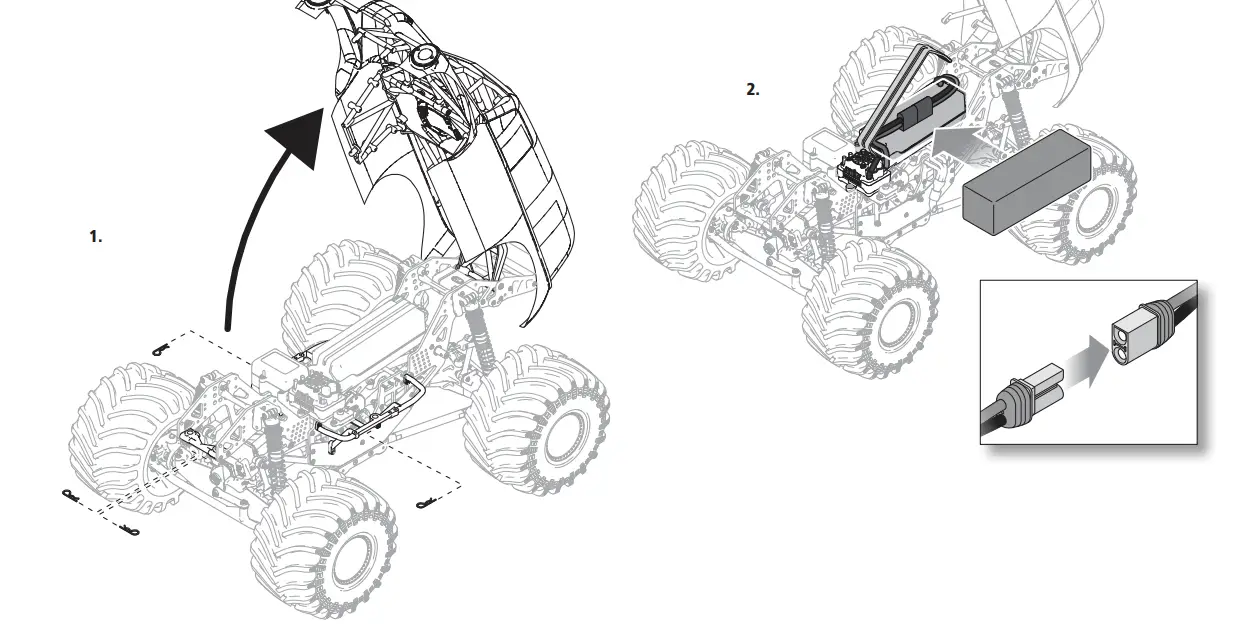
- There are four body clips securing the body, hidden under the roll cage. Remove the two body clips from the front and the body clip from each side of the vehicle as shown.
- Lift the body to access the chassis.
- Install the fully charged batteries in the vehicle.
- Secure the battery with the rubber elastomer strap.
- Connect the battery to the ESC.
IMPORTANT: Secure the battery, motor and ESC wires so they do not interfere with the drivetrain or movement of the flip top cage.
TRANSMITTER FUNCTIONS
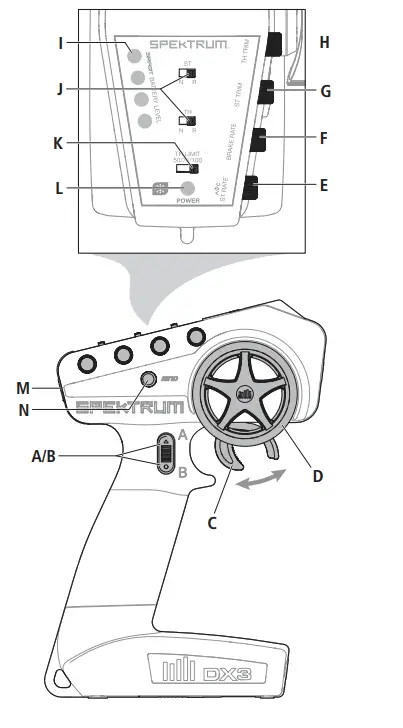
- Channel 3 Button
- Throttle/Brake
- Steering Wheel
- Steering Rate
- Adjusts the end point of the steering
- Brake Rate
- Adjusts the braking end point.
- Steering Trim
- Adjusts the steering center point. Normally, the steering trim is adjusted until the vehicle tracks straight.
- Throttle Trim
- Adjusts the throttle neutral point
- SMART Battery Level Indicator
- Servo Reversing
- To reverse the Throttle (TH) or Steering (ST) channel, switch the position of the correlating switch—
- “N” is for normal, “R” is for reverse.
- Throttle Limit
- Limits throttle output to 50/75/100%
- Select 50% or 75% for less experienced drivers or when you are driving the vehicle in a small area.
- Power LED
- Solid red lights: Indicates radio connectivity and adequate battery power
- Flashing red lights: Indicates the battery voltage is critically low. Replace batteries Power Button
- Bind Button
TRANSMITTER BATTERY INSTALLATION
This transmitter requires 4 AA batteries
- Remove the battery cover from the transmitter.
- Install the batteries as shown.
- Install the battery cover.
CAUTION: Risk of explosion if battery is replaced by an incorrect type. Dispose of used batteries according to national regulations.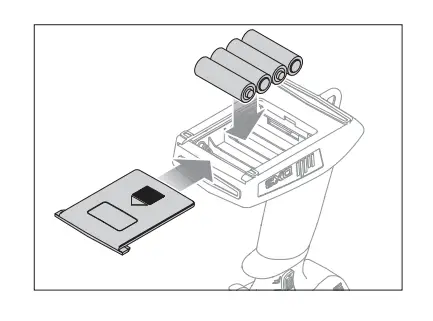
SR315 RECEIVER
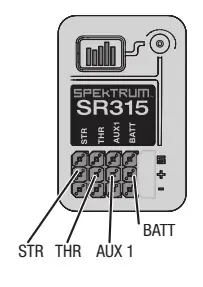
Specifications
- Type: Dual Protocol 3 Ch Receiver (SLT/DSMR) Dimensions (LxWxH): 32.5 x 21.5 x 12.4mm Antenna Length: 90mm
- Channels: 3
- Weight: 6g
- Band: 2.4GHz
- Voltage Range: 3.5–9.6V
- Bind Type: Bind Button
- Failsafe: Hold the steering wheel and throttle trigger in the desired failsafe positions during binding
RECEIVER ANTENNA
The SR315 receivers feature a coaxial antenna design for easy installation in almost any model. Think of the last 1 inch (32mm) on the tip of the antenna as the active portion of the antenna, the coaxial portion leading up to it is just an extension. Install the antenna so the active portion is positioned as high as possible in the vehicle, and not “in the shadow” of any carbon fiber or metal. The case of the receiver can accept an antenna tube directly, making optimal antenna placement easy (antenna tube not included).
BINDING THE RECEIVER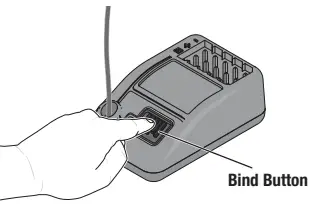
Binding is the process of programming the receiver to recognize the GUID (Globally Unique Identifier) code of a single specific transmitter. In the event of a loss of signal the receiver will default the servo outputs to the failsafe position. The failsafe positions are set during binding; Leave the throttle and steering at the neutral positions during binding.
- Press and hold the bind button, and Power ON the receiver; the orange LED will begin to flash.
- Set the trims and control positions at the desired failsafe settings, press and hold the bind button, and power ON the DX3 Smart transmitter.
- When the orange LED on the DX3 Smart transmitter remains lit, it is connected to SR315 receiver.
You must rebind when:
- Different failsafe positions are desired e.g., when throttle or steering reversing has been changed.
- Binding the receiver to a different transmitter.
POWERING ON THE VEHICLE
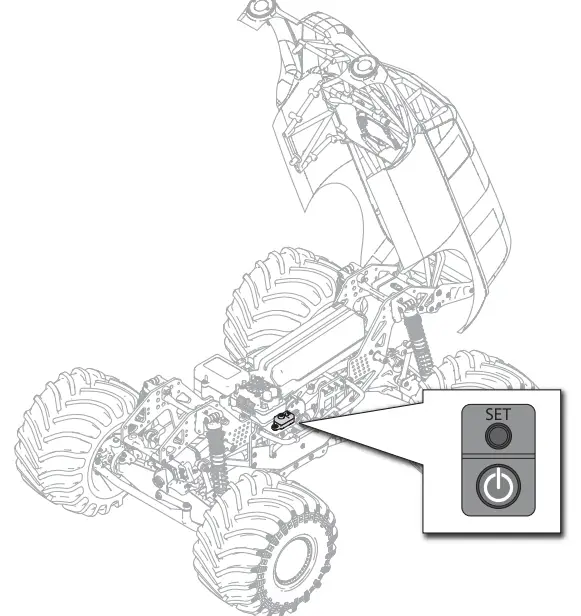
- Center the ST TRIM and TH TRIM dials on the transmitter and turn it on.
- Install a fully charged battery pack per the Installing the Battery section.
- Power on the ESC.
DRIVING PRECAUTIONS
- Maintain sight of the vehicle at all times.
- Routinely inspect the vehicle for loose wheel hardware.
- Routinely inspect the steering assembly for any loose hardware. Driving the vehicle off-road can cause fasteners to loosen over time.
- Do not drive the vehicle in tall grass. Doing so can damage the vehicle or electronics.
- Do not apply forward or reverse throttle if the vehicle is stuck.
- Applying throttle in this instance can damage the motor or ESC.
- After driving the vehicle, allow the electronics to cool before driving the vehicle again. IMPORTANT: Keep wires away from all moving parts.
BEFORE RUNNING YOUR VEHICLE
- Check for free suspension movement. All suspension arms and steering components should move freely. Any binds will cause the vehicle to handle poorly.
TIP: To increase the ride height and ground clearance of your vehicle, screw down the shock collars to compress the springs. - Charge a battery pack. Always charge the battery pack as per the battery and/or charger manufacturers’ instructions.
- Set the transmitter steering trim. Follow the instructions to set the steering trim/subtrim so that the vehicle drives straight with no input to the steering.
- Perform a Control Direction Test.
CONTROL DIRECTION TEST
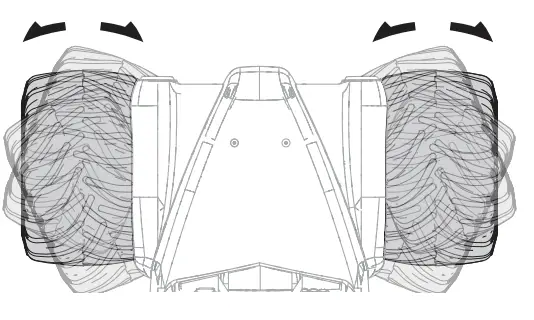
STEERING
- Move the steering wheel Left and Right and observe the direction the front wheels move.
- If the wheels move the opposite direction, reverse the STR channel.
Place the vehicle on a stand supporting the chassis so the wheels are off the ground during the steering and throttle tests. Verify all the controls work correctly before turning it on with the wheels on the ground.
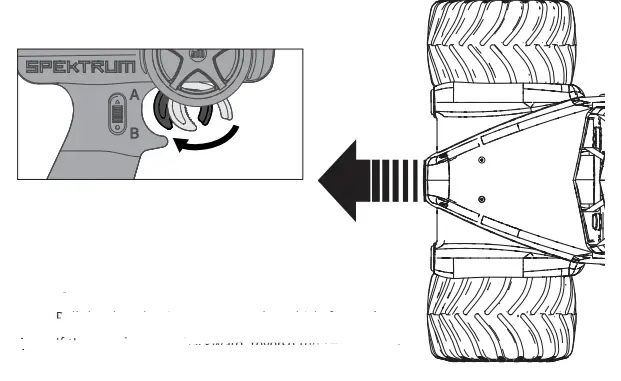
THROTTLE
- Pull the Throttle trigger to move the vehicle forward.
- If the vehicle moves backward, reverse the THR channel.
ADJUSTING STEERING AND THROTTLE TRIMS
STEERING TRIM
The vehicle should maintain a straight line without any steering wheel input. If not, adjust the STR Trim knob so the wheels maintain a straight line without having to turn the steering wheel.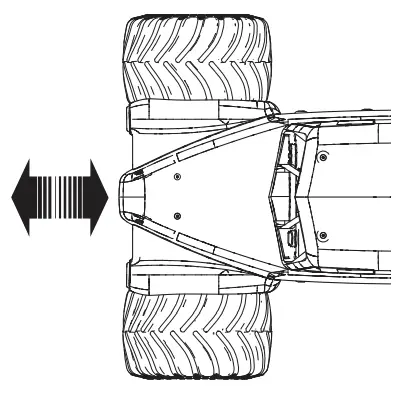
THROTTLE TRIM
Trim the vehicle with the wheels off the ground. If the wheels rotate after the vehicle is powered ON, adjust the TH Trim knob until they stop.
SPEKTRUM™ FIRMA™ SMART 130A BRUSHLESS ESC (SPMXSE1130)
SPECIFICATIONS
| Type | Sensorless, SMART Throttle Compatible |
| Output | 130A/760A |
| Function | Forward/Brake–Forward/Brake Reverse |
| Input Voltage | 7.4V–14.8V |
| BEC Output | 6V/4A |
| Dimensions (LxWxH) | 57.5mm x 46mm x 38mm |
| Weight | 154 g |
ESC LED STATUS
- No ESC LEDs will glow when there is no throttle input from the transmitter.
- The red ESC LED glows when there is any throttle input from the transmitter.
AUDIBLE WARNING TONES
- Input Voltage: The ESC checks the in put voltage when it is powered ON. If a voltage problem is detected, the ESC continuously sounds 2 beeps with a 1-second pause (xx-xx-xx). Power OFF the ESC and ensure the connections are secure and that the battery power is not too low for safe operation.
- Radio Connection: The ESC checks radio signal input when it is powered ON.
If a problem is detected, the ESC continuously sounds 1 beep with a 2 second pause (x–x–x). Power OFF the ESC and ensure the radio system is operating correctly.
NOTICE: Always disconnect the battery from the ESC after operating your vehicle. The ESC’s switch only controls power to the receiver and servos. The ESC will continue to draw current when connected to the battery, resulting in possible damage to the battery through over-discharge.
ESC CALIBRATION PROCEDURE
Complete the transmitter/receiver binding procedure prior to calibrating the ESC.
- Set the transmitter throttle channel to 100% travel and center the throttle trim.
- Connect a battery to the ESC battery lead.
- Power on the transmitter.
- Press and hold the SET button while turning on the ESC. Release the SET button when the red LED begins to flash, indicating the ESC is in calibration mode. The ESC will enter programming mode if the button is held for more than three seconds.
TIP: The red LED should be flashing when the ESC enters calibration mode. If the green LED is flashing the ESC has entered programming mode. Power off the ESC and repeat step 4, releasing the SET button when the red LED begins to flash. - With the transmitter throttle trigger at the neutral position, press and release the ESC SET button. The red LED will stop flashing, the green LED will flash one time and the motor will make a tone to indicate the neutral position has been accepted.
- While holding the throttle trigger at the full throttle position, press and release the ESC SET button. The green LED will flash twice and the motor will make two tones to indicate the full throttle position has been accepted.
- While holding the throttle trigger at the full brake position, press and release the SET button. The green LED will flash three times and the motor will make three tones to indicate the full brake position has been accepted.
The motor will operate normally after calibration is completed.
ESC FUNCTIONS AND MODES
The ESC includes programming options so you can adjust the way your vehicle performs. Refer to the included programming table to adjust the ESC for your driving conditions.
PROGRAMMING TABLE
| PROGRAMMING VALUE | |||||||||
| PROGRAMMING ITEMS | 1 | 2 | 3 | 4 | 5 | 6 | 7 | 8 | 9 |
| 1. Running Mode | Forward w/ brake | Forward/Reverse w/ brake | Forward/Reverse | ||||||
| 2. Drag Brake Force | 0% | 5% | 10% | 20% | 40% | 60% | 80% | 100% | |
| 3. Low Voltage Cutoff | non-protection | 2.6V/Cell | 2.8V/Cell | 3.0V/Cell | 3.2V/Cell | 3.4V/Cell | |||
| 4. Start Mode | Level 1 | Level 2 | Level 3 | Level 4 | Level 5 | Level 6 | Level 7 | Level 8 | Level 9 |
| 5. Max Brake Force | 25% | 50% | 75% | 100% | disable | ||||
| 6. Max Reverse Force | 25% | 50% | 75% | 100% | |||||
| 7. Initial Brake Force | = Drag Brake | 0% | 20% | 40% | |||||
| 8. Neutral Range | 6% (Narrow) | 9% (Normal) | 12% (Wide) | ||||||
| 9. Timing | 0.00º | 3.75º | 7.50º | 11.25º | 15.00º | 18.75º | 22.50º | 26.25º | |
| 10. Motor Rotation | Counterclockwise | Clockwise | |||||||
| 11. Li-Po Cells | Auto Calculate | 2 Cells | 3 Cells | 4 Cells | 5 Cells | 6 Cells | |||
ESC PROGRAMMING PROCEDURE
Programming is accomplished using the SET button on the ON/OFF switch*.
- Connect a fully charged battery to the ESC.
- Power on the transmitter.
- Power on the ESC.
- Hold the SET button until the green LED flashes. Release the set button to enter programming mode.
TIP: To reset all programming items to the default values, press and hold the set button for five seconds - Press and release the set button as needed to cycle through the programming items. The number of times the green LED flashes equals the programming item number given in the programming table.
- When at the desired programming item, press and hold the set button until the red LED flashes to select the item.
- Press and release the SET button to cycle through the values available for the programming item based on the number of times the LED flashes. Refer to the programming table.
- Save the setting by pressing and holding the SET button for 3 seconds.
- Power off the ESC to exit programming mode or to change other programming items.
DESCRIPTIONS
- Running Mode
– Forward Only with Brake
Intended for competition use, this mode allows only forward and brake controls.
– Forward/Reverse with Brake
This mode is the basic all-around mode, allowing forward, reverse and brake controls. To engage reverse while moving forward, apply the brake until the vehicle has come to a complete stop, release brake, then apply the brake again. While braking or in reverse, engaging the throttle will result in the vehicle immediately accelerating forward. - Drag Brake Force
Adjusts the amount of brake automatically applied when the throttle is returned to the neutral position. This simulates the engine braking effect of a full-scale vehicle, allowing improved turn-in and your vehicle’s general response to controls. - Low Voltage Cutoff
This function helps to prevent battery over-discharge. The ESC continuously monitors the battery’s voltage. If the voltage falls below the voltage threshold for 2 seconds, the output power shuts off and the red LED flashes twice repeatedly.
The cutoff threshold calculation is based on individual Li-Po cell voltage. For Ni-MH batteries, if the voltage battery pack is higher than 9.0V, it will be treated as a 3-cell Li-Po battery pack; if it is lower than 9.0V, it will be treated as a 2-cell Li-Po battery pack. Example: for a 8.0V Ni-MH battery pack used with a 2.6V/cell threshold, it will be treated as a 2-cell Li-Po battery pack and the low-voltage cut-off threshold will be 5.2V (2.6×2=5.2). - Start Mode (Punch)
Sets the initial throttle punch when the car accelerates. Level 1 gives
a very soft initial acceleration and level 4 gives a stronger initial acceleration. - Max Brake Force
Adjusts the maximum braking force. A higher value provides stronger braking,
but can also cause the wheels to lock, resulting in loss of control of the car. - Max Reverse Force
This parameter adjusts the maximum power when traveling in reverse. - Initial Brake Force (minimum brake)
Adjusts the minimum amount of braking power when the brakes engage. The default value is equal to the drag brake value. A high value can lock the wheels when the brake is used. - Neutral Range
Adjusts the throttle sensitivity around the neutral point. A higher value results in the throttle having to be moved more for the vehicle to move forward, backward or brake. - Timing
Adjusts the motor drive current timing. More timing gives more performance but can lower efficiency and cause damage to the motor and/or ESC by overload or overheating.
NOTICE: Always ensure the motor timing is set correctly. Failure to set the motor timing correctly can result in damage to the motor and ESC. Refer to the manufacturer instructions for recommended timing settings. - Motor Rotation
Allows you to make this change in the ESC so no wires need to be changed between the ESC and the motor. - Li-Po Cells
Allows the ESC to automatically detect or manually set the number of cells in your Li-Po battery back.
SPEKTRUM™ FIRMA™ 3150KV BRUSHLESS MOTOR
PRECAUTIONS
- Never touch moving parts.
- Never disassemble while the batteries are installed.
- Always let parts cool before touching.
- Rated for up to 3S batteries, not suitable for 4S batteries.
GEARING
Installing a pinion gear with fewer teeth will provide greater torque but will reduce top speed. Likewise, a pinion gear with more teeth will reduce torque and increase top speed. Care should be taken when installing larger pinion gears as this can “overgear” the vehicle, resulting in overheating of the motor and ESC. When testing different gearing options, pay close attention to the temperature of the motor and speed control to ensure you are operating within the temperature range of the components. The motor or ESC should never be so hot that it cannot be touched. If temperatures are too hot, a different gearing combination with a lower pinion gear and/or higher spur gear is suggested.
CHANGING THE PINION GEAR/GEAR RATIO
- Remove the screw holding the gear cover in place.
- From the slot in the top of the gear box cover, loosen the pinion gear set screw and remove the pinion gear.
- Remove the motor mounting screws to remove the motor, or adjust the motor to the location for the corresponding pinion gear.
- Install the new pinion gear on your motor. Place the pinion gear on the end of the motor shaft so that it lines up flush with the spur gear and the set screw is located over the flat on the shaft.
- Tighten the pinion gear on the motor shaft and reinstall the upper gear cover.

RUN TIME
- The largest factor in run time is the capacity of the battery pack. A larger mAh rating increases the amount of run time experienced.
- The condition of a battery pack is also an important factor in both run time and speed.
- The battery connectors may become hot during driving. Batteries will lose performance and capacity over time.
- Driving the vehicle from a stop to full speed repeatedly will damage the batteries and electronics over time. Sudden acceleration will also lead to shorter run times.
TO IMPROVE RUN TIMES
- Keep your vehicle clean and well maintained.
- Allow more airflow to the ESC and motor.
- Change the gearing to a lower ratio. A lower ratio decreases the operating temperature of the electronics. Use a smaller pinion gear or larger spur gear to lower the gear ratio.
- Use a battery pack with a higher mAh rating.
- Use the optimum charger to charge battery packs (Visit your local hobby dealer for more information).
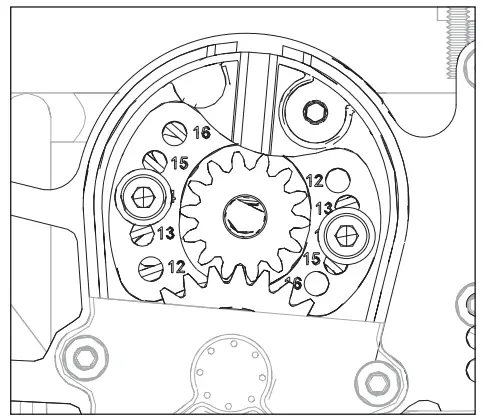
LIST OF FLUIDS Diff Fluids Front and Rear 100k Center 500k Shock Oil Front and Rear 25wt REQUIRED TOOLS 1.5mm Hex Driver 2.0mm Hex Driver 2.5mm Hex Driver 5.5mm Nut Driver 8.0mm Nut Driver NOTICE: It is important you select the correct motor mounting holes for your pinion gear selection. The gear mesh is pre-set with each pair of motor mounting holes corresponding to the pinion gear. Selecting the wrong mounting holes is likely to cause damage to the spur gear on your LMT when you attempt to apply power.
The following drawing shows the correct motor mounting holes to use for the included 14 tooth pinion gear.
TELEMETRY SETTINGS
If using the Spektrum Dashboard app or the optional speedometer module on your transmitter, set the motor pole count to 4 and the rollout distance to 1.10″ (27.9mm).
VEHICLE MAINTENANCE
The following items require semi-frequent maintenance. Always clean screw threads and apply removeable thread locking compound when threading machine screws into metal parts.
SHOCK DISASSEMBLY/CLEANING
Remove the shocks and service as needed. Replace worn parts.
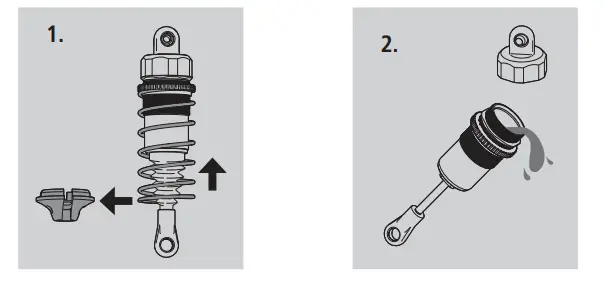
- Pull the spring up and away from the lower cup. Slide the lower spring cup up and off of the shaft. Clean with a soft brush. Remove the shock boot.
- Use the wheel wrench to hold the shock body and remove the top cap. Empty the fluid from out of the shock.
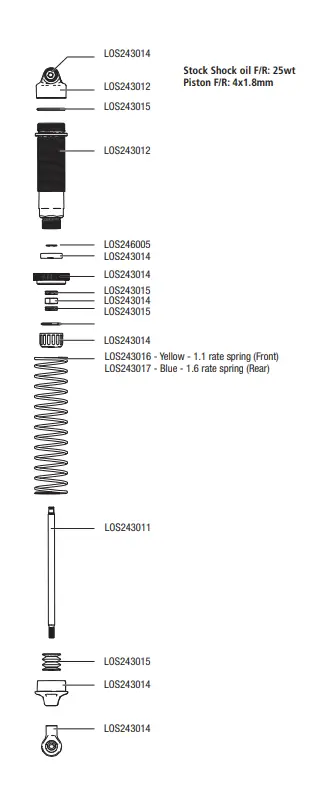
- Hold the shaft with a multi-wrench and remove the shock end. Push the shaft into the shock body and remove through the top. Remove the lower shock cap, dust cover, O-rings and spacer. Clean the shock body. Install new O-rings, re-install the spacer, replace the O-ring and install the lower shock cap. DO NOT TIGHTEN. Install the shock shaft through the shock bottom and tighten the bottom cap. Re-install the boot and shock end on the shaft.

REFILLING/BLEEDING SHOCKS
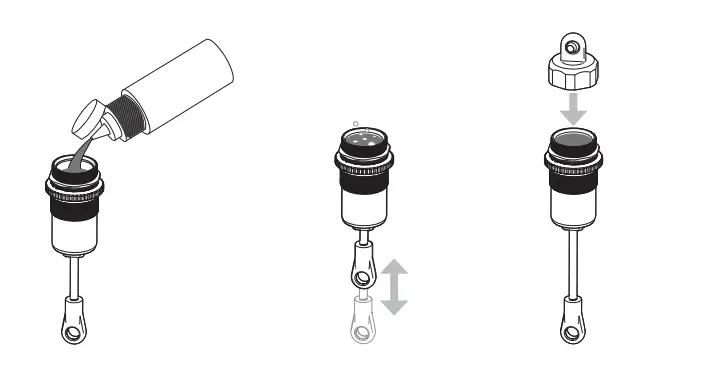
- Fill the shock body 5mm (0.2 in) from the top with 25wt silicone shock oil (TLR74004 2oz, TLR74022 4oz).
- Slowly move the piston up and down 5 times, allowing air to rise to the top. Let the shock sit for 5 minutes.
- With the piston all the way down, fill the shock body 1mm (0.04 in) from the top. Replace the shock cap, spring and spring cup.


DIFFERENTIALS
| Differential | Light Weight Oil | Heavier Weight Oil |
| Front | Increases off-power steering. Oil that is too thin will make diff action inconsistent | Increases off-power stability and on-power steering |
| Center | Has less forward drive and can unload the drivetrain easier under acceleration, which can be good on rough and slick tracks | Has more acceleration and increases on-power steering, but decreases off-power steering. Thicker center diff oil is better on high traction/smooth tracks |
| Rear | Has more side traction and increased steering in the middle of a turn | Has less steering in the middle of the turn but more forward traction |
FRONT DIFFERENTIAL
- To Remove the front differential from the axial housing, start by removing the steering servo and servo mount from the axle.
- Remove the screw holding the upper 4-link bars to the mount
- Remove the Sway bar links, shocks and lower 4-link bars from the axle housing.
- With the axle free from the chassis, remove the third member and pinion gear.
- Remove the steering spindle and spindle carrier from one side of the axle with the front universal. This will provide enough clearance to remove the differential from the axle housing.
- Check the ring and pinion as well as the bevel gears in the differential. Replace as needed. If fluid is leaking, replace the outdrive o-rings and ring gear gasket. Be sure to grease the outdrives prior to sliding them through the o-rings. Apply more grease to the ring and pinion (LOSA99209).
- Check the differential fluid and refill or replace as needed with TLR75004 (100k) fluid. The fluid level should be about 0.12 in (3.0mm) from the top surface of the case. Do not overfill or the differential unit might leak.

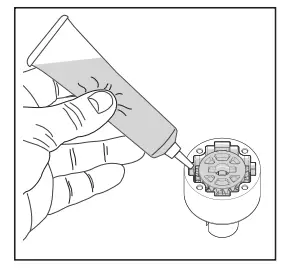
Front Differential Fluid : 100,000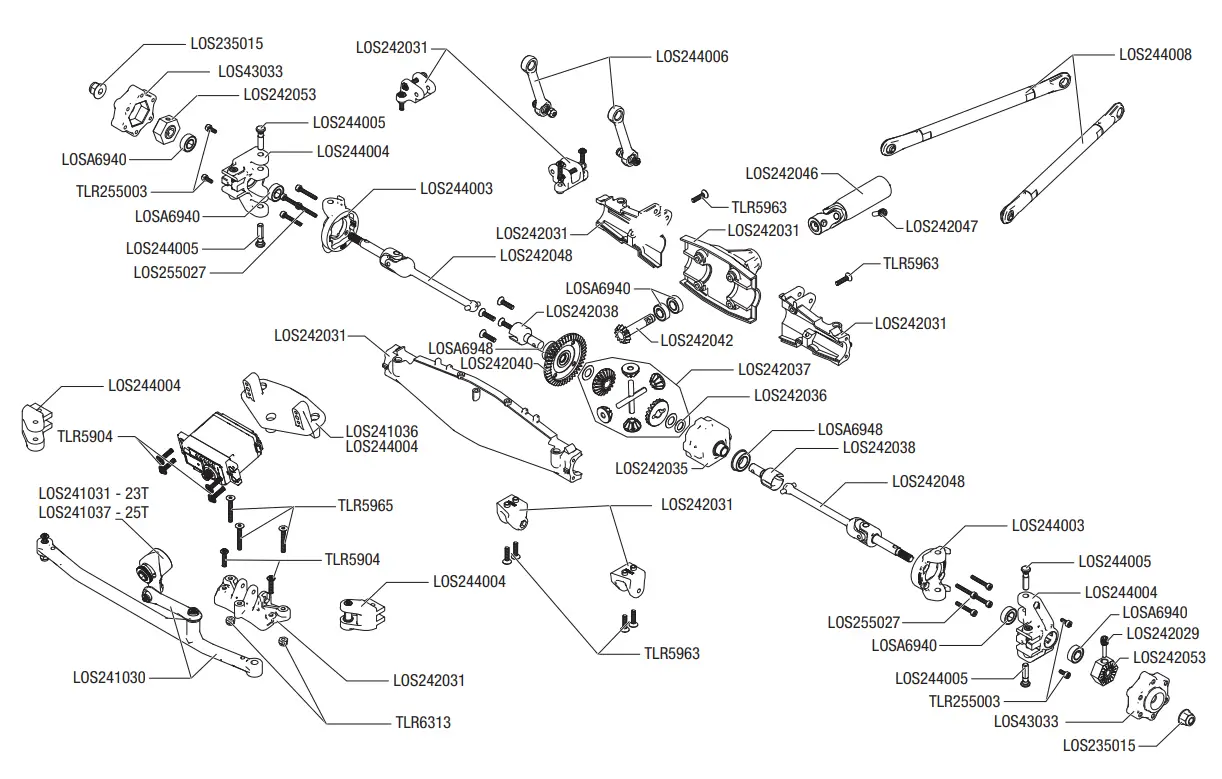
REAR DIFFERENTIAL
- To remove the rear differential, start by removing the upper 4-link mount bolt.
- Remove the Sway Bar Links and Shocks from the Axle.
- Remove the lower 4-link bars from the axle housing.
- The axle housing is now free. Remove the third member and pinion gear from the axle mount.
- Remove one side of the axle housing with the axle and dogbone. This will provide enough clearance to remove the rear differential.
- Check the ring and pinion as well as the bevel gears in the differential. Replace as needed. If fluid is leaking, replace the outdrive o-rings and ring gear gasket. Be sure to grease the outdrives prior to sliding them through the o-rings. Apply more grease to the ring and pinion (LOSA99209).
- Check the differential fluid and refill or replace as needed with TLR75004 (100k) fluid. The fluid level should be about 0.12 in (3.0mm) from the
top surface of the case. Do not overfill or the differential unit might leak.
Rear Differential Fluid : 100,000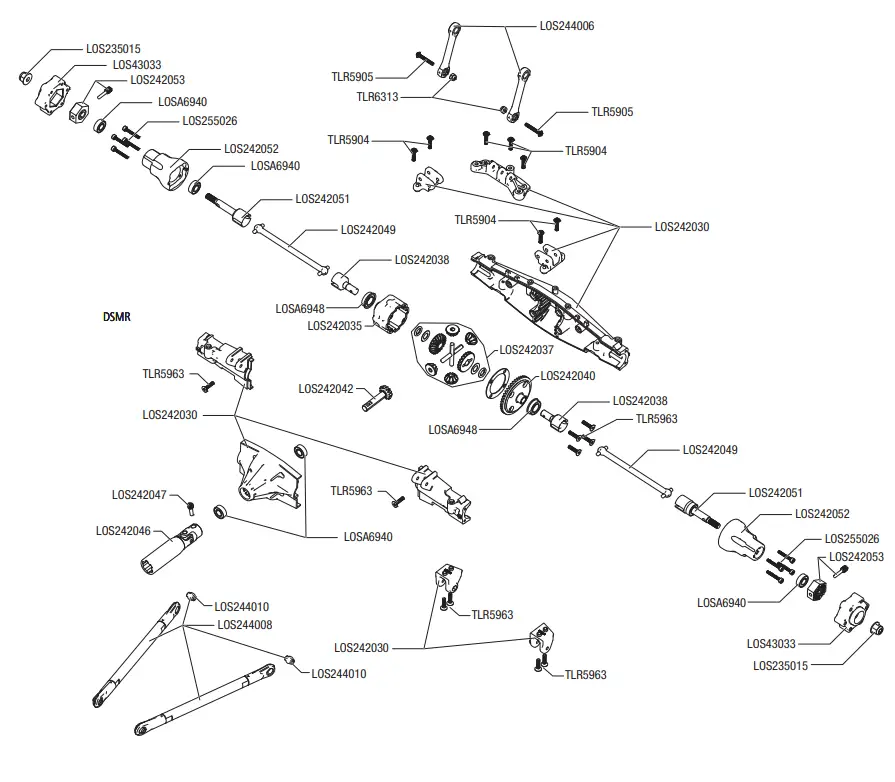
CHASSIS
CENTER DIFFERENTIAL
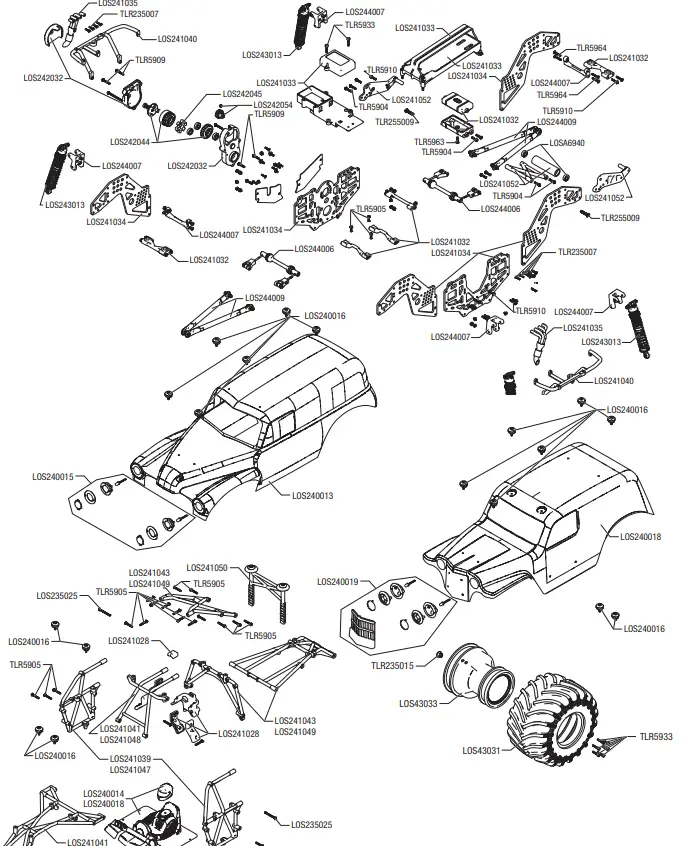
- To remove the center differential from the vehicle, remove the two screws in the center cover to expose the center differential.
- Remove the four screws holding the diff support blocks, and remove the diff support blocks.
- Remove the two screwpins holding the front and rear drivelines, and remove the center halves of the driveline. This will provide enough clearance to remove the differential out of the bottom of the vehicle.
- Check the ring and pinion as well as the bevel gears in the differential. Replace as needed. If fluid is leaking, replace the outdrive o-rings and ring gear gasket. Be sure to grease the outdrives prior to sliding them through the o-rings.. Apply more grease to the ring and pinion (LOSA99209).
- Check the differential fluid and refill or replace as needed with TLR75009 (500k) fluid. The fluid level should be about 0.12 in (3.0mm) from the
top surface of the case. Do not overfill or the differential unit might leak.
Center Differential Fluid : 500,000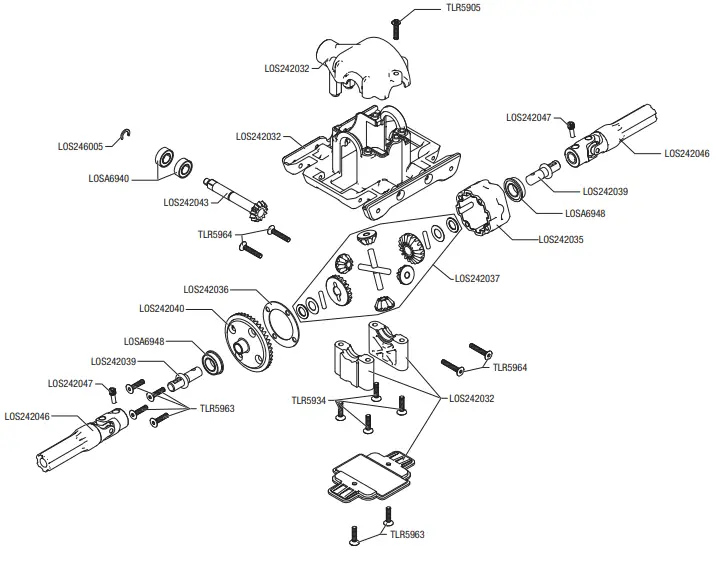
REPLACEMENT PARTS
| SKU | English |
| LOS235002 | Cap Head Screws M2.5x10mm(10) |
| LOS235012 | Set Screws M4x4mm Cup Point(10) |
| LOS235015 | Locknut Flanged M5 Serrated (10) |
| LOS235024 | Button Head Screws M3x25mm (10) |
| LOS235025 | Button Head Screws M3x30mm (10) |
| LOS236001 | 3.2mm x 7mmx .5mm Washer(10) |
| LOS240013 | Body Set, Painted, Grave Digger: LMT |
| LOS240015 | Fr Headlight Set,GraveDigger:LMT |
| LOS240017 | BodySet,Painted,SonUvaDigger:LMT |
| LOS240019 | LEDLights&Grill,SonUvaDigger:LMT |
| LOS240016 | Body Buttons,Top&Bottom(10):LMT |
| LOS241027 | Cage Set, Complete, Green: LMT |
| LOS241028 | Safety Seat Set: LMT |
| LOS241029 | Wheelie Bar Set, Green: LMT |
| LOS241030 | Steering Linkage Set: LMT |
| LOS241031 | ServoSaverSet,Complete,23T:LMT |
| LOS241032 | Cross Brace Set, Chassis: LMT |
| LOS241033 | Battery & Radio Tray Set: LMT |
| LOS241034 | Chassis Side Plate Set: LMT |
| LOS241035 | 4n1 CollectiveHeaders,Silver:LMT |
| LOS241036 | Steering Servo Mount Plate: LMT |
| LOS241039 | Side Cage and Lower Bar, Green: LMT |
| LOS241041 | Top and Upper Cage Bars, Green: LMT |
| LOS241043 | Rear Cage and Hoop Bars, Green: LMT |
| LOS241045 | Rear Body Support and Body Posts, Green: LMT |
| LOS241046 | Cage Set Complete, Blue: LMT |
| LOS241047 | Side Cage and Lower Bar, Blue: LMT |
| LOS241048 | Top and Upper Cage Bars, Blue: LMT |
| LOS241049 | Rear Cage and Hoop Bars, Blue: LMT |
| LOS241051 | Rear Body Support and Body posts, Blue: LMT |
| LOS241053 | Wheelie Bar Set, Blue: LMT |
| LOS242029 | Wheel Hex Screw Pin (10): LMT |
| LOS242030 | AxleHousingSetComplete,Rear: LMT |
| LOS242031 | AxleHousingSetComplete,Front:LMT |
| LOS242032 | Gearbox Housing Set w/covers:LMT |
| LOS242033 | Complete Diff Front or Rear: LMT |
| LOS242034 | Complete Diff Center: LMT |
| LOS242035 | Diff Housing Set (1): LMT |
| LOS242036 | Diff O-rings & Gaskets (3): LMT |
| LOS242037 | Internal Diff Rebuild Kit(1):LMT |
| LOS242038 | F/R Diff Outdrive Set (2): LMT |
| LOS242039 | Center Diff Output Shafts(2):LMT |
| LOS242040 | F/R Diff Ring Gear: LMT |
| LOS242041 | Diff Spool: LMT |
| LOS242042 | Diff Pinion, 13T (1): LMT |
| LOS242043 | 13T Cntr Trans Pinion Gear: LMT |
| LOS242044 | Idle & Cush Drive Gear Set: LMT |
| LOS242045 | CushDriveRubberDamper,Med(2):LMT |
| LOS242046 | Cntr Slider Driveshaft (1): LMT |
| LOS242047 | Cntr Driveshaft Screwpin(10):LMT |
| LOS242048 | Fr Universal Driveshaft (2): LMT |
| LOS242049 | Dogbones, Rear (2): LMT |
| LOS242051 | Stub Axle, Rear (2): LMT |
| LOS242052 | Rr Axle Mount set, 0 & 3 Deg:LMT |
| LOS242053 | 17mm Hex Adapter w/pin (4): LMT |
| LOS242054 | Pinion Gear,14T, 1.0M. 5mm shaft |
| LOS243011 | Shock Shaft, F/R (2): LMT |
| LOS243012 | Shock Body and Cap, Al (2): LMT |
| LOS243013 | Shock Set Complete (2): LMT |
| LOS243014 | Shock Plastics & Balls (4): LMT |
| LOS243015 | Shock Rebuild/HardwareSet(4):LMT |
| LOS243016 | Spring,Soft,Yel,1.1rate(4):LMT |
| LOS243017 | Spring,Soft,Blue,1.6rate(4):LMT |
| LOS243018 | Spring,Soft,Red,2.2rate(4):LMT |
| LOS244003 | Spindle Carrier Set (L/R): LMT |
| LOS244004 | Spindle Set Front (L/R): LMT |
| LOS244005 | Kingpin, Front (4): LMT |
| LOS244006 | Sway Bar Set (F/R): LMT |
| SKU | English |
| LOS235002 | Cap Head Screws M2.5x10mm(10) |
| LOS235012 | Set Screws M4x4mm Cup Point(10) |
| LOS235015 | Locknut Flanged M5 Serrated (10) |
| LOS235024 | Button Head Screws M3x25mm (10) |
| LOS235025 | Button Head Screws M3x30mm (10) |
| LOS236001 | 3.2mm x 7mmx .5mm Washer(10) |
| LOS240013 | Body Set, Painted, Grave Digger: LMT |
| LOS240015 | Fr Headlight Set,GraveDigger:LMT |
| LOS240017 | BodySet,Painted,SonUvaDigger:LMT |
| LOS240019 | LEDLights&Grill,SonUvaDigger:LMT |
| LOS240016 | Body Buttons,Top&Bottom(10):LMT |
| LOS241027 | Cage Set, Complete, Green: LMT |
| LOS241028 | Safety Seat Set: LMT |
| LOS241029 | Wheelie Bar Set, Green: LMT |
| LOS241030 | Steering Linkage Set: LMT |
| LOS241031 | ServoSaverSet,Complete,23T:LMT |
| LOS241032 | Cross Brace Set, Chassis: LMT |
| LOS241033 | Battery & Radio Tray Set: LMT |
| LOS241034 | Chassis Side Plate Set: LMT |
| LOS241035 | 4n1 CollectiveHeaders,Silver:LMT |
| LOS241036 | Steering Servo Mount Plate: LMT |
| LOS241039 | Side Cage and Lower Bar, Green: LMT |
| LOS241041 | Top and Upper Cage Bars, Green: LMT |
| LOS241043 | Rear Cage and Hoop Bars, Green: LMT |
| LOS241045 | Rear Body Support and Body Posts, Green: LMT |
| LOS241046 | Cage Set Complete, Blue: LMT |
| LOS241047 | Side Cage and Lower Bar, Blue: LMT |
| LOS241048 | Top and Upper Cage Bars, Blue: LMT |
| LOS241049 | Rear Cage and Hoop Bars, Blue: LMT |
| LOS241051 | Rear Body Support and Body posts, Blue: LMT |
| LOS241053 | Wheelie Bar Set, Blue: LMT |
| LOS242029 | Wheel Hex Screw Pin (10): LMT |
| LOS242030 | AxleHousingSetComplete,Rear: LMT |
| LOS242031 | AxleHousingSetComplete,Front:LMT |
| LOS242032 | Gearbox Housing Set w/covers:LMT |
| LOS242033 | Complete Diff Front or Rear: LMT |
| LOS242034 | Complete Diff Center: LMT |
| LOS242035 | Diff Housing Set (1): LMT |
| LOS242036 | Diff O-rings & Gaskets (3): LMT |
| LOS242037 | Internal Diff Rebuild Kit(1):LMT |
| LOS242038 | F/R Diff Outdrive Set (2): LMT |
| LOS242039 | Center Diff Output Shafts(2):LMT |
| LOS242040 | F/R Diff Ring Gear: LMT |
| LOS242041 | Diff Spool: LMT |
| LOS242042 | Diff Pinion, 13T (1): LMT |
| LOS242043 | 13T Cntr Trans Pinion Gear: LMT |
| LOS242044 | Idle & Cush Drive Gear Set: LMT |
| LOS242045 | CushDriveRubberDamper,Med(2):LMT |
| LOS242046 | Cntr Slider Driveshaft (1): LMT |
| LOS242047 | Cntr Driveshaft Screwpin(10):LMT |
| LOS242048 | Fr Universal Driveshaft (2): LMT |
| LOS242049 | Dogbones, Rear (2): LMT |
| LOS242051 | Stub Axle, Rear (2): LMT |
| LOS242052 | Rr Axle Mount set, 0 & 3 Deg:LMT |
| LOS242053 | 17mm Hex Adapter w/pin (4): LMT |
| LOS242054 | Pinion Gear,14T, 1.0M. 5mm shaft |
| LOS243011 | Shock Shaft, F/R (2): LMT |
| LOS243012 | Shock Body and Cap, Al (2): LMT |
| LOS243013 | Shock Set Complete (2): LMT |
| LOS243014 | Shock Plastics & Balls (4): LMT |
| LOS243015 | Shock Rebuild/HardwareSet(4):LMT |
| LOS243016 | Spring,Soft,Yel,1.1rate(4):LMT |
| LOS243017 | Spring,Soft,Blue,1.6rate(4):LMT |
| LOS243018 | Spring,Soft,Red,2.2rate(4):LMT |
| LOS244003 | Spindle Carrier Set (L/R): LMT |
| LOS244004 | Spindle Set Front (L/R): LMT |
| LOS244005 | Kingpin, Front (4): LMT |
| LOS244006 | Sway Bar Set (F/R): LMT |
RECOMMENDED PARTS
| SKU | English |
| LOS235002 | Cap Head Screws M2.5x10mm(10) |
| LOS235012 | Set Screws M4x4mm Cup Point(10) |
| LOS235015 | Locknut Flanged M5 Serrated (10) |
| LOS235024 | Button Head Screws M3x25mm (10) |
| LOS235025 | Button Head Screws M3x30mm (10) |
| LOS236001 | 3.2mm x 7mmx .5mm Washer(10) |
| LOS240013 | Body Set, Painted, Grave Digger: LMT |
| LOS240015 | Fr Headlight Set,GraveDigger:LMT |
| LOS240017 | BodySet,Painted,SonUvaDigger:LMT |
| LOS240019 | LEDLights&Grill,SonUvaDigger:LMT |
| LOS240016 | Body Buttons,Top&Bottom(10):LMT |
| LOS241027 | Cage Set, Complete, Green: LMT |
| LOS241028 | Safety Seat Set: LMT |
| LOS241029 | Wheelie Bar Set, Green: LMT |
| LOS241030 | Steering Linkage Set: LMT |
| LOS241031 | ServoSaverSet,Complete,23T:LMT |
| LOS241032 | Cross Brace Set, Chassis: LMT |
| LOS241033 | Battery & Radio Tray Set: LMT |
| LOS241034 | Chassis Side Plate Set: LMT |
| LOS241035 | 4n1 CollectiveHeaders,Silver:LMT |
| LOS241036 | Steering Servo Mount Plate: LMT |
| LOS241039 | Side Cage and Lower Bar, Green: LMT |
| LOS241041 | Top and Upper Cage Bars, Green: LMT |
| LOS241043 | Rear Cage and Hoop Bars, Green: LMT |
| LOS241045 | Rear Body Support and Body Posts, Green: LMT |
| LOS241046 | Cage Set Complete, Blue: LMT |
| LOS241047 | Side Cage and Lower Bar, Blue: LMT |
| LOS241048 | Top and Upper Cage Bars, Blue: LMT |
| LOS241049 | Rear Cage and Hoop Bars, Blue: LMT |
| LOS241051 | Rear Body Support and Body posts, Blue: LMT |
| LOS241053 | Wheelie Bar Set, Blue: LMT |
| LOS242029 | Wheel Hex Screw Pin (10): LMT |
| LOS242030 | AxleHousingSetComplete,Rear: LMT |
| LOS242031 | AxleHousingSetComplete,Front:LMT |
| LOS242032 | Gearbox Housing Set w/covers:LMT |
| LOS242033 | Complete Diff Front or Rear: LMT |
| LOS242034 | Complete Diff Center: LMT |
| LOS242035 | Diff Housing Set (1): LMT |
| LOS242036 | Diff O-rings & Gaskets (3): LMT |
| LOS242037 | Internal Diff Rebuild Kit(1):LMT |
| LOS242038 | F/R Diff Outdrive Set (2): LMT |
| LOS242039 | Center Diff Output Shafts(2):LMT |
| LOS242040 | F/R Diff Ring Gear: LMT |
| LOS242041 | Diff Spool: LMT |
| LOS242042 | Diff Pinion, 13T (1): LMT |
| LOS242043 | 13T Cntr Trans Pinion Gear: LMT |
| LOS242044 | Idle & Cush Drive Gear Set: LMT |
| LOS242045 | CushDriveRubberDamper,Med(2):LMT |
| LOS242046 | Cntr Slider Driveshaft (1): LMT |
| LOS242047 | Cntr Driveshaft Screwpin(10):LMT |
| LOS242048 | Fr Universal Driveshaft (2): LMT |
| LOS242049 | Dogbones, Rear (2): LMT |
| LOS242051 | Stub Axle, Rear (2): LMT |
| LOS242052 | Rr Axle Mount set, 0 & 3 Deg:LMT |
| LOS242053 | 17mm Hex Adapter w/pin (4): LMT |
| LOS242054 | Pinion Gear,14T, 1.0M. 5mm shaft |
| LOS243011 | Shock Shaft, F/R (2): LMT |
| LOS243012 | Shock Body and Cap, Al (2): LMT |
| LOS243013 | Shock Set Complete (2): LMT |
| LOS243014 | Shock Plastics & Balls (4): LMT |
| LOS243015 | Shock Rebuild/HardwareSet(4):LMT |
| LOS243016 | Spring,Soft,Yel,1.1rate(4):LMT |
| LOS243017 | Spring,Soft,Blue,1.6rate(4):LMT |
| LOS243018 | Spring,Soft,Red,2.2rate(4):LMT |
| LOS244003 | Spindle Carrier Set (L/R): LMT |
| LOS244004 | Spindle Set Front (L/R): LMT |
| LOS244005 | Kingpin, Front (4): LMT |
| LOS244006 | Sway Bar Set (F/R): LMT |
OPTIONAL PARTS
| Part # | English |
| LOS241038 | Cage Set, Complete, Black: LMT |
| LOS241037 | Servo Saver Set, 25T, Complete: LMT |
| LOS241040 | Side Cage & Lower Bar, Black:LM |
| LOS241042 | Top & Upper Cage Bars, Black:LMT |
| LOS241044 | Rear Cage & Hoop Bars, Black:LMT |
| LOS241050 | RrBodySupport&BodyPost,Black:LMT |
| LOS241052 | Wheelie Bar Set, Black: LMT |
| LOS343200 | 12mm Machined Wheel Hex (4): LMT |
| LOS343201 | 12mm Wheel Hex Screw Pin (10): LMT |
| TLR5285 | Silicone Diff Fluid, 30,000CS |
| TLR5286 | Silicone Diff Fluid, 50,000CS |
| TLR5288 | Silicone Diff Fluid, 125,000CS |
| TLR74000 | SIL SHOCK OIL,15WT,104CST,2OZ |
| TLR74001 | SIL SHOCK OIL,17.5WT,150CST,2OZ |
| TLR74002 | SIL SHOCK OIL,20WT,195CST,2OZ |
| TLR74003 | SIL SHOCK OIL,22.5WT,223CST,2OZ |
| TLR74004 | SIL SHOCK OIL,25WT,250CST,2OZ |
| TLR74005 | SIL SHOCK OIL,27.5WT,294CST,2OZ |
| TLR74006 | SIL SHOCK OIL,30WT,338CST,2OZ |
| TLR74007 | SIL SHOCK OIL,32.5WT,379CST,2OZ |
| TLR74008 | SIL SHOCK OIL,35WT,420CST,2OZ |
| TLR74009 | SIL SHOCK OIL,37.5WT,468CST,2OZ |
| TLR74010 | SIL SHOCK OIL,40WT,516CST,2OZ |
| TLR74011 | SIL SHOCK OIL,42.5WT,563CST,2OZ |
| TLR74012 | SIL SHOCK OIL,45WT,610CST,2OZ |
| TLR74013 | SIL SHOCK OIL,50WT,710CST,2OZ |
| TLR74014 | SIL SHOCK OIL,60WT,810CST,2OZ |
| TLR74015 | SIL SHOCK OIL,70WT,910CST,2OZ |
| TLR74016 | SIL SHOCK OIL,80WT,1014CST,2OZ |
| TLR74017 | SIL SHOCK OIL,90WT,1130CST,2OZ |
| TLR74018 | SIL SHOCK OIL,100WT,1325CST,2OZ |
| TLR75001 | Silicone Diff Fluid, 40,000CS |
| TLR75002 | Silicone Diff Fluid, 60,000CS |
| TLR75003 | Silicone Diff Fluid, 80,000CS |
| TLR75004 | Silicone Diff Fluid, 100,000CS |
| TLR75008 | Silicon Diff Fluid, 200,000 |
| TLR75009 | Silicon Diff Fluid, 500,000 |
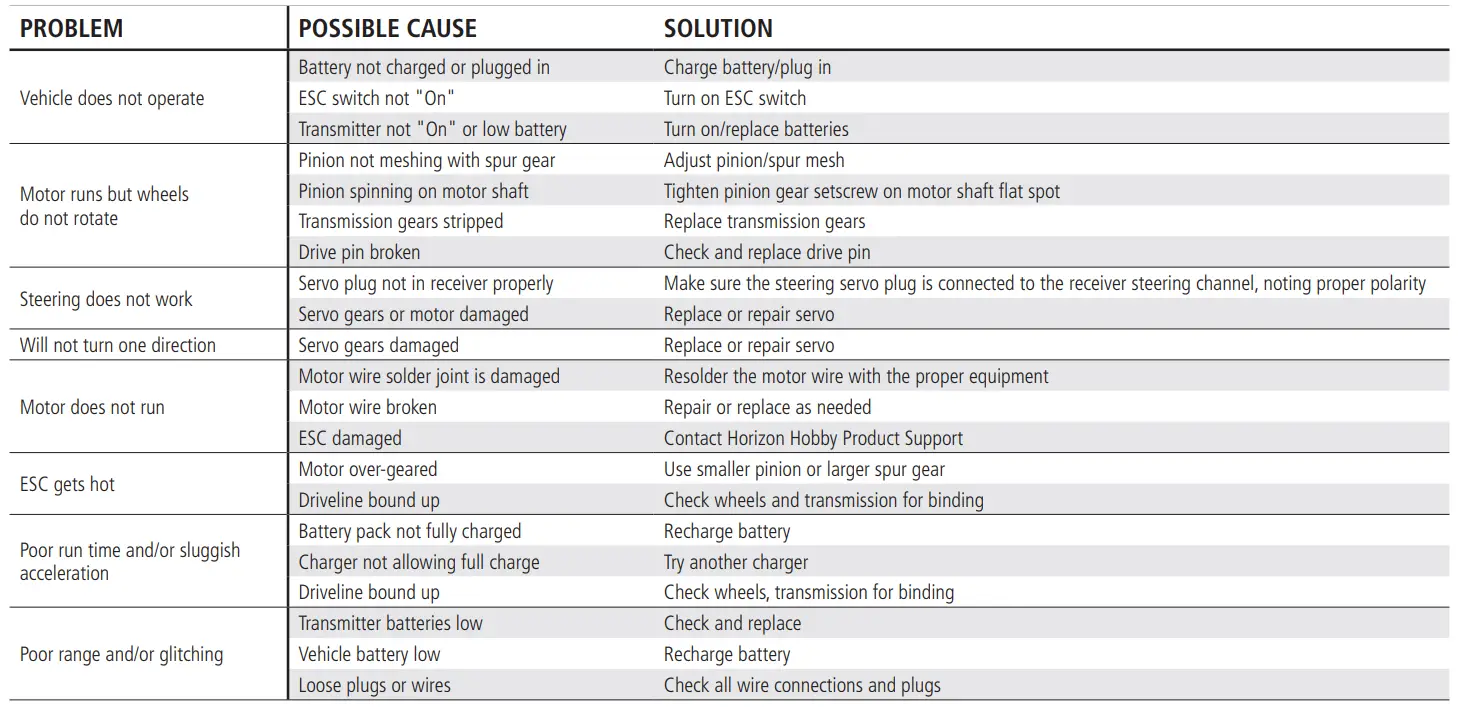
TROUBLESHOOTING GUIDE
LIMITED WARRANTY
| Country of Purchase | Horizon Hobby | Contact Information | Address |
|
United States of America | Horizon Service Center (Repairs and Repair Requests) | servicecenter.horizonhobby.com/RequestForm/ |
2904 Research Rd. Champaign, Illinois, 61822 USA |
| Horizon Product Support (Product Technical Assistance) | [email protected] 877-504-0233 | ||
| Sales | [email protected] 800-338-4639 | ||
| European Union | Horizon Technischer Service | [email protected] +49 (0) 4121 2655 100 | Hanskampring 9 D 22885 Barsbüttel, Germany |
| Sales: Horizon Hobby GmbH |
What this Warranty Covers
Horizon Hobby, LLC, (Horizon) warrants to the original purchaser that the product purchased (the “Product”) will be free from defects in materials and workmanship for a period of 2 years from the date of purchase.
What is Not Covered
This warranty is not transferable and does not cover (i) cosmetic damage, (ii) damage due to acts of God, accident, misuse, abuse, negligence, commercial use, or due to improper use, installation, operation or maintenance, (iii) modification of or to any part of the Product, (iv) attempted service by anyone other than a Horizon Hobby authorized service center, (v) Product not purchased from an authorized Horizon dealer, or (vi) Product not compliant with applicable technical regulations or (vii) use that violates any applicable laws, rules, or regulations. OTHER THAN THE EXPRESS WARRANTY ABOVE, HORIZON MAKES NO OTHER WARRANTY OR REPRESENTATION, AND HEREBY DISCLAIMS ANY AND ALL IMPLIED WARRANTIES, INCLUDING, WITHOUT LIMITATION, THE IMPLIED WARRANTIES OF NON-INFRINGEMENT, MERCHANTABILITY AND FITNESS FOR A PARTICULAR PURPOSE. THE PURCHASER ACKNOWLEDGES THAT THEY ALONE HAVE DETERMINED THAT THE PRODUCT WILL SUITABLY MEET THE REQUIREMENTS OF THE PURCHASER’S INTENDED USE.
Purchaser’s Remedy
Horizon’s sole obligation and purchaser’s sole and exclusive remedy shall be that Horizon will, at its option, either (i) service, or (ii) replace, any Product determined by Horizon to be defective. Horizon reserves the right to inspect any and all Product(s) involved in a warranty claim. Service or replacement decisions are at the sole discretion of Horizon. Proof of purchase is required for all warranty claims. SERVICE OR REPLACEMENT AS PROVIDED UNDER THIS WARRANTY IS THE PURCHASER’S SOLE AND EXCLUSIVE REMEDY.
Limitation of Liability
HORIZON SHALL NOT BE LIABLE FOR SPECIAL, INDIRECT, INCIDENTAL OR CONSEQUENTIAL DAMAGES, LOSS OF PROFITS OR PRODUCTION OR COMMERCIAL LOSS IN ANY WAY, REGARDLESS OF WHETHER SUCH CLAIM IS BASED IN CONTRACT, WARRANTY, TORT, NEGLIGENCE, STRICT LIABILITY OR ANY OTHER THEORY OF LIABILITY, EVEN IF HORIZON HAS BEEN ADVISED OF THE POSSIBILITY OF SUCH DAMAGES. Further, in no event shall the liability of Horizon exceed the individual price of the Product on which liability is asserted. As Horizon has no control over use, setup, final assembly, modification or misuse, no liability shall be assumed nor accepted for any resulting damage or injury. By the act of use, setup or assembly, the user accepts all resulting liability. If you as the purchaser or user are not prepared to accept the liability associated with the use of the Product, purchaser is advised to return the Product immediately in new and unused condition to the place of purchase.
Law
These terms are governed by Illinois law (without regard to conflict of law principals). This warranty gives you specific legal rights, and you may also have other rights which vary from state to state. Horizon reserves the right to change or modify this warranty at any time without notice.
WARRANTY SERVICES
Questions, Assistance, and Services
Your local hobby store and/or place of purchase cannot provide warranty support or service. Once assembly, setup or use of the Product has been started, you must contact your local distributor or Horizon directly. This will enable Horizon to better answer your questions and service you in the event that you may need any assistance. For questions or assistance, please visit our website at www.horizonhobby.com, submit a Product Support Inquiry, or call the toll free telephone number referenced in the Warranty and Service Contact Information section to speak with a Product Support representative.
Inspection or Services If this Product needs to be inspected or serviced and is compliant in the country you live
and use the Product in, please use the Horizon Online Service Request submission process found on our website or call Horizon to obtain a Return Merchandise Authorization (RMA) number. Pack the Product securely using a shipping carton. Please note that original boxes may be included, but are not designed to withstand the rigors of shipping without additional protection. Ship via a carrier that provides tracking and insurance for lost or damaged parcels, as Horizon is not responsible for merchandise until it arrives and is accepted at our facility. An Online Service Request is available at http://www.horizonhobby.com/content/service-center_render-service-center. If you do not have internet access, please contact Horizon Product Support to obtain a RMA number along with instructions for submitting your product for service. When calling Horizon, you will be asked to provide your complete name, street address, email address and phone number where you can be reached during business hours. When sending product into Horizon, please include your RMA number, a list of the included items, and a brief summary of the problem. A copy of your original sales receipt must be included for warranty consideration. Be sure your name, address, and RMA number are clearly written on the outside of the shipping carton.
NOTICE: Do not ship Li-Po batteries to Horizon. If you have any issue with a Li-Po battery, please contact the appropriate Horizon Product Support office.
Warranty Requirements
For Warranty consideration, you must include your original sales receipt verifying the proof-of-purchase date. Provided warranty conditions have been met, your Product will be serviced or replaced free of charge. Service or replacement decisions are at the sole discretion of Horizon.
Non-Warranty Service
Should your service not be covered by warranty, service will be completed and payment will be required without notification or estimate of the expense unless the expense exceeds 50% of the retail purchase cost. By submitting the item for service you are agreeing to payment of the service without notification. Service estimates are available upon request. You must include this request with your item submitted for service. Non-warranty service estimates will be billed a minimum of ½ hour of labor. In addition you will be billed for return freight. Horizon accepts money orders and cashier’s checks, as well as Visa, MasterCard, American Express, and Discover cards. By submitting any item to Horizon for service, you are agreeing to Horizon’s Terms and Conditions found on our website http://www. horizonhobby.com/content/service-center_render-service-center.
ATTENTION: Horizon service is limited to Product compliant in the country of use and ownership. If received, a non-compliant Product will not be serviced. Further, the sender will be responsible for arranging return shipment of the un-serviced Product, through a carrier of the sender’s choice and at the sender’s expense. Horizon will hold non-compliant Product for a period of 60 days from notification, after which it will be discarded.
WARRANTY AND SERVICE CONTACT INFORMATION
- FCC INFORMATION
- Contains FCC ID: BRWKATY1T
- FCC ID: BRWSRIRVINGV1
- Supplier’s Declaration of Conformity
- LOSI LMT Solid Axle Monster Truck, RTR (LOS04021)
- This device complies with part 15 of the FCC Rules. Operation is subject to the following two conditions: (1) This device may not cause harmful interference, and (2) this device must accept any interference received,
- CAUTION: Changes or modifications not expressly approved by the party responsible for compliance could void the user’s authority to operate the equipment.
IC INFORMATION
CAN ICES-3 (B)/NMB-3(B)
Contains IC: 6157A-KATY1T
IC: 6157A-SRIRVINGV1
This device contains license-exempt transmitter(s)/receivers(s) that comply with Innovation, Science, and Economic Development Canada’s license-exempt RSS(s). Operation is subject to the following 2 conditions: equipment does cause harmful interference to radio or television reception, which can be determined by turning the equipment off and on, the user is encouraged to try to correct the interference by one or more of the following measures:
- Reorient or relocate the receiving antenna.
- Increase the separation between the equipment and receiver.
- Connect the equipment into an outlet on a circuit different from that to which the receiver is connected.
- Consult the dealer or an experienced radio/TV technician for help.
Horizon Hobby, LLC
2904 Research Rd.,
Champaign, IL 61822
Email: [email protected] Web: HorizonHobby.com
References
 RC Airplanes and Helicopters, RC Cars and Trucks, RC Boats, RC Radios | Horizon Hobby
-
Horizon Hobby Service Center
 Product Service Center - Request Form
-
Spektrum RC Transmitters and RC Electronics | Spektrum
-
RC Airplanes and Helicopters, RC Cars and Trucks, RC Boats, RC Radios | Horizon Hobby
-
RC Airplanes and Helicopters, RC Cars and Trucks, RC Boats, RC Radios | Horizon Hobby
-
The leaders in RC car and truck innovation and design | Losi
-
Spektrum RC Transmitters and RC Electronics | Spektrum
-
RC Cars, RC Trucks, RC Airplanes, Model Trains, and Slot Cars at Tower Hobbies
-
RC Airplanes and Helicopters, RC Cars and Trucks, RC Boats, RC Radios | Horizon Hobby
 RC Airplanes and Helicopters, RC Cars and Trucks, RC Boats, RC Radios | Horizon Hobby
 Product Service Center - Request Form
 Spektrum RC Transmitters and RC Electronics | Spektrum
 RC Airplanes and Helicopters, RC Cars and Trucks, RC Boats, RC Radios | Horizon Hobby
 The leaders in RC car and truck innovation and design | Losi
 Spektrum RC Transmitters and RC Electronics | Spektrum
 RC Cars, RC Trucks, RC Airplanes, Model Trains, and Slot Cars at Tower Hobbies