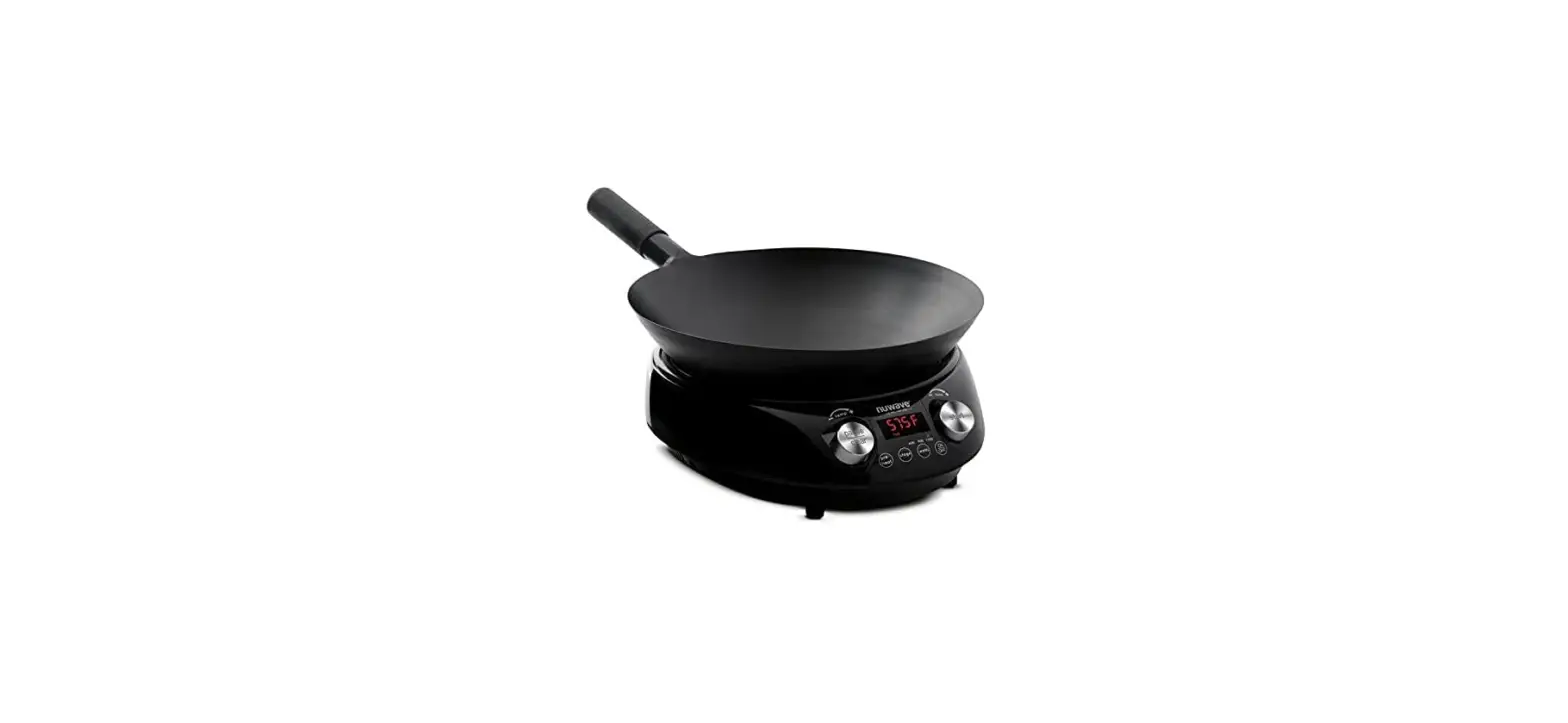

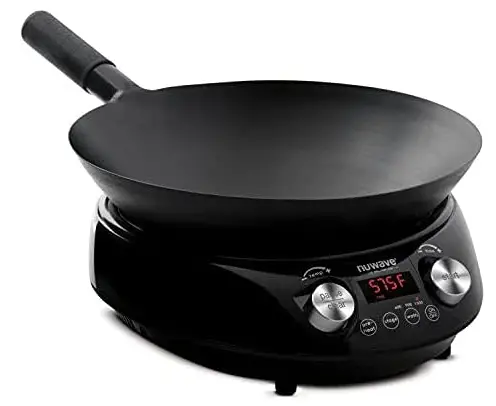
nuwave MOSAIC Induction Wok tempered glass lid
IMPORTANT SAFEGUARDS
HOUSEHOLD USE ONLY
READ ALL INSTRUCTIONS BEFORE USE
WARNING: When using the PIC, basic safety precautions should always be followed:
- There may be residual heat on the surface. Do not touch.
- To protect against electrical shock, do not immerse cord, plugs, or the PIC Flex in water or other liquids.
- Do not operate the PIC with a damaged cord, plug, after the appliance malfunctions, or has been damaged in any manner. Return appliance to the nearest authorized service facility for examination, repair, or adjustment.
- Close supervision is necessary when the PIC is used near children. This appliance is not intended for use by persons (including children) with reduced physical, sensory or mental capabilities, or lack of experience and knowledge unless they have been given supervision or instruction concerning the use of the appliance by a person responsible for their safety.
- The use of accessories that are not intended to be used with the PIC Flex is not recommended. Doing so may damage the PIC Flex and can cause accidents.
- NOT INTENDED FOR OUTDOOR USE.
- Do not use the PIC for other than its intended use.
- Do not let the cord hang over the edge of any table or countertop or touch hot surfaces.
- Do not let the cord come into contact with sharp edges.
- Do not place on or near a hot gas or electric burner, or in a heated oven, or on a Vstovetop.
- Never use the cooktop on a flammable surface (e.g., tablecloth, carpet, etc.).
- Extreme caution must be used when moving the PIC Flex with any pots or pans containing hot oil or other hot liquids.
- To disconnect, turn the PIC Flex off by pressing Pause/Clear twice, and then removing the plug from the wall outlet.
- When unplugging the PIC Flex, do so by the head, not the cord.
- Never put the PIC Flex against the wall or other appliances. There should be at least 3 inches of free space behind, to the sides, and over the top of the PIC Flex.
- Unplug the PIC Flex when not in use and before cleaning. Allow the PIC Flex to cool before cleaning, putting on or taking off parts.
- INTENDED FOR HOUSEHOLD USE ONLY.
- Keep the manual handy for future reference.
ELECTRICAL INFORMATION
A short power-supply cord is provided to reduce the risk of becoming entangled in or tripping over a longer cord. Longer detachable powersupply cords or extension cords are available and may be used if care is exercised in their use. If a longer detachable power-supply cord or extension cord is used:
- The marked electrical rating of the extension cord should be at least as great as the electrical rating of the appliance.
- The longer cord should be arranged so that it will not drape over the countertop or tabletop where it could be pulled on or tripped over. The PIC should be operated on a separate the electrical outlet from other operating appliances due to wattage limitations. The appliance has a polarized plug (one blade is wider than the other). To reduce the risk of electric shock, this plug is intended to fit into a polarized outlet only one way. If the plug does not fit fully into the outlet, reverse the plug. If it still does not fit, contact a qualified electrician. Do not attempt to modify the plug in any way.
- If the appliance is of the grounded type, the cord set or extension cord should be a groundingtype 3-wire cord.
SEE CARE & MAINTENANCE
BEFORE USE SAVE THESE INSTRUCTIONS
Read and understand the entire manual before using the PIC. DO NOT USE THE PIC FLEX OTHER THAN ITS INTENDED USE.
Note: Put the PIC on a surface that is horizontal, even, and stable. This appliance is intended for normal household use. It is not intended to be used in environments such as staff kitchens/cafeterias of shops, offices, farms, or other work environments, nor is it intended to be used by clients in hotels, motels, bed and breakfasts, and non-residential environments.
NOTICE: THE FAILURE TO FOLLOW ANY OF THE IMPORTANT SAFEGUARDS, ADDITIONAL SAFEGUARDS, OR THE INSTRUCTIONS FOR SAFE USE IS A MISUSE OF YOUR PIC THAT CAN VOID YOUR WARRANTY AND CREATE THE RISK OF SERIOUS INJURY.
WARNING
In case of malfunction, immediately unplug and contact Customer Service Department. 1-877-689-2838 [email protected]
ADDITIONAL SAFEGUARDS
- Do not place the PIC Flex close to flammable materials, heating units, or wet environments.
- Do not use the induction cooktop in close proximity to open fires or other heat sources.
- It is normal for some smoke to escape the PIC Flex when heating for the first time.
- If a lot of smoke is escaping from the air vent during operation, unplug the PIC Flex immediately and contact Customer Service.*
- Place the cooktop on a stable, level, non-metallic surface.
- Do not move the PIC Flex while in operation. Only after the PIC Flex has completely vcooled should moving be attempted.
- The cooktop’s surface is designed with temperature-resistant bglass. In the event that damage to the PIC Flex is observed, even a small crack on the glass surface, immediately disconnect the PIC Flex from the power supply.
- Children should be supervised to ensure that they do not play with the appliance.
- Never use a towel or other material or object to block the air vents. Do not block the ventilation slots of the induction cooktop. This may cause the PIC Flex to overheat.
- Make sure the cord is not compressed beneath the PIC Flex.
- Do not place devices or objects that are sensitive to magnetic fields on top of or next to the PIC Flex, e.g., credit cards, cellphones, radios, TVs, video recorders, etc.
- Prior to connecting the PIC Flex, confirm that the voltage needs indicated in this manual correspond to the voltage supply in your home. A wrong connection may lead to the PIC Flex’s damage and possible injury to persons.
- If any trouble arises during operation, any service MUST be done by NuWave LLC or authorized by the manufacturer for repairs.
- The appliance is not intended to be operated by means of an external timer or a separate remote-control system.
- Do not disassemble the PIC Flex or replace any parts without prior written consent from the manufacturer.
- Make sure the PIC Flex is always clean prior to cooking.
- Use extreme caution when operating the PIC or any other appliance.
*Customer Service Department: 1-877-689-2838 [email protected]
PARTS & ACCESSORIES
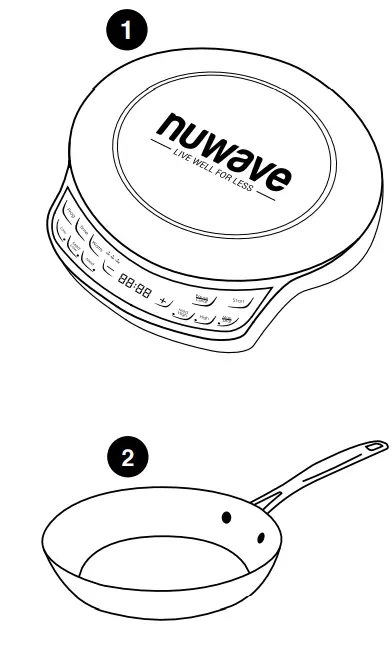
- PIC Flex
Part #: 30532 - 9-inch Ceramic Non-Stick Fry Pan
Part #: 32109
QUICKSTART
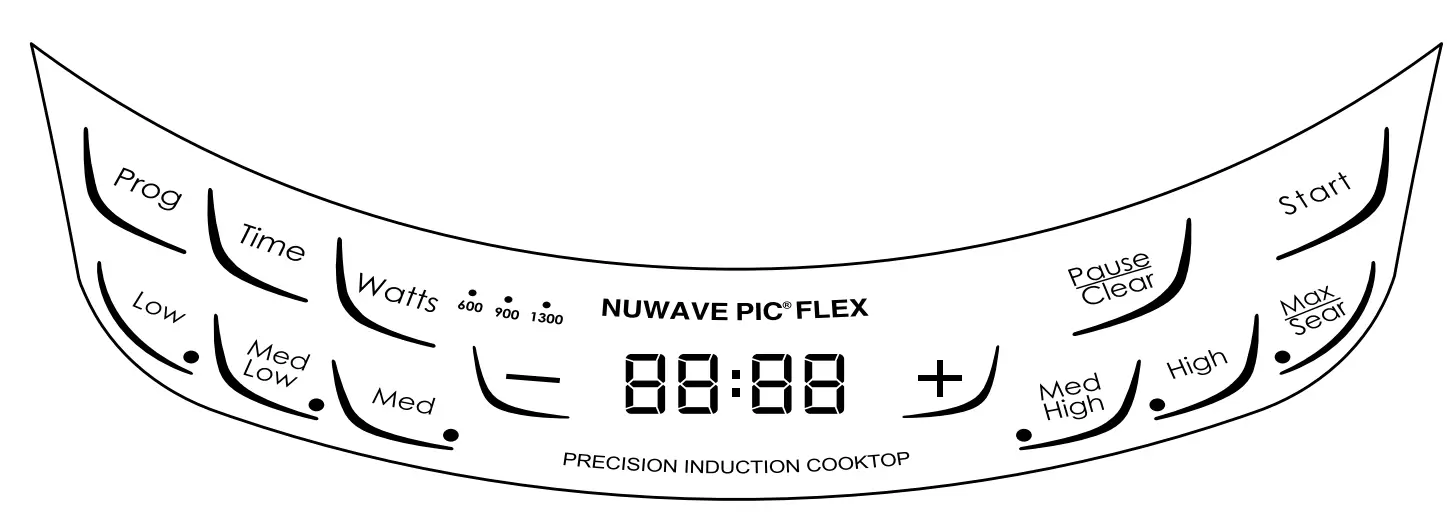
- Start
Press Start to begin cooking. If you have paused cooking, pressing Start will begin the cooking process again. - Pause/Clear
Press Pause/Clear to pause cooking. To clear out a set cooking sequence, press Pause/Clear a second time. - Prog
Set your own cooking stages. - Watts
Controls the power consumption of your PIC. The default wattage is 1300W. The lower wattage will consume less energy, ideal if your home does not take 1300 watts. Press WATTS to adjust from 1300W to 600W to 900W. - Time
Allows you to adjust the cooking time before and during the cooking process. - Low – Med Low – Med – Med High – High – Max/Sear
These are the temperature buttons. Press to cook at the temperature you prefer. Use – or + to adjust the cooking temperature lower or higher. - – or +
Use to increase or decrease the cooking temperature or time.
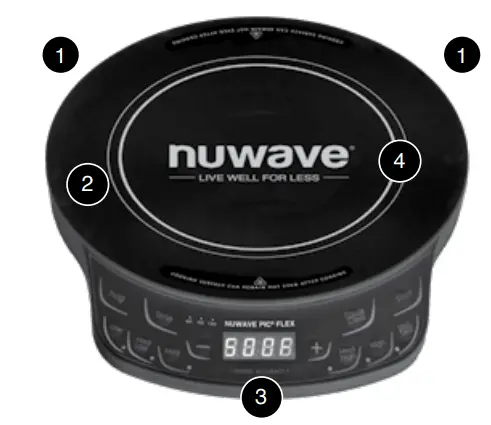
- Ventilation: Air vents are located on the back of the product to allow any heat generated by the heating element to escape. This design feature prevents heat transfer to the cooking surface and ensures efficient performance of the NuWave PIC Flex.
- Surface: The NuWave PIC Flex’s heat-resistant glass surface stays cool to the touch and cleans easily with the simple wipe of a damp cloth. Control Panel with LED
- Display: Clearly lit, easyto-
read control panel. - Heat Source:
Electromagnetic coils located below the glass surface transfer generated heat directly to induction-ready cookware.
CAUTION
While the PIC Flex is in operation, do not touch the appliance’s surface as it may become very hot, leading to the risk of burns. Cooktop may retain residual heat after cookware has been removed.
INDUCTION COOKING
As induction technology is based on magnetic principles, compatible cookware must have a ferrous (iron-based, magnetic) bottom. Some types of cookware are made of naturally magnetic metals (such as pure iron), while others are rendered magnetic by “sandwiching” a thin layer of a ferrous metal within the base. This layer will be acted upon by the magnetic field of the induction cooktop to distribute heat. High-quality stainless-steel and cast-iron cookware will work with induction cooktops. Copper, glass, and aluminum cookware will not work unless they have a magnetic base sandwiched in between. Pots that function optimally with the PIC Flex tend to be medium to heavy gauge.
ATTENTION:
The heating surface is located inside the thicker silver ring. The minimum diameter of acceptable cookware is 3 inches. Always place cookware in the center of the heating circle. You may use pans measuring up to the total width of the PIC Flex, which measures 10 inches. However, in these situations, heat will transfer more slowly to the outer edges. Not recommended for pans larger than 10 inches.
INSTRUCTIONS
Examples of compatible cookware:
- All NuWave Cookware, NuWave Duralon® Healthy Ceramic Non-Stick Cookware
- Cast iron
- Enameled iron and steel
- Stainless steel with magnetic base
Non-induction-compatible cookware:
- Copper
- Glass
- Aluminum
- Pottery-type vessels
How do I check my cookware for induction compatibility?
Three simple ways to check if existing pots and pans, or future cookware purchases, are compatible with the PIC Flex:
- A magnet is typically a great indicator. If it sticks to the bottom of a piece of cookware, this typically means the pot or pan is induction-ready. However, be cautioned that there are instances when a cooking vessel’s magnetic properties may not be strong enough for the pot to work efficiently with the PIC Flex.
- Place a small amount of water in a pot or pan and place on the PIC Flex while operating. If induction compatible, water will begin to boil.
- An inductionready symbol may be printed on the bottom of the cookware.

Getting Started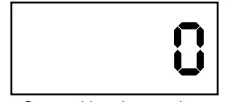
Set cooking time and press Start to begin cooking. Default temperature is 375F (191C).
Temperature can be adjusted by pressing – or +.
Watts
The default wattage of the PIC Flex is 1300 watts.
- To change the wattage, press Watts once. The light will illuminate above 600, indicating that the PIC Flex is now set to 600 watts.
- Press Watts again. The red light above 900 will illuminate, indicating the PIC Flex is now set to 900 watts.
- Press Watts once more and the red light above 1300 will illuminate, indicating that the PIC Flex is now set to the default 1300 watts.
Start
The PIC Flex is preset to cook on Med/High (375F/191C) for 1 hour.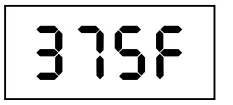
- Place an induction-ready pot on surface. Press Start.
- To cook at a power level other than Med/High, press Low, Max/Sear, or press – or + to increase or decrease the temperature in 10-degree increments. See the Panel Display Chart for more details.
- The PIC Flex will
- automatically stop cooking once time has expired and the PIC Flex will beep.
- The display will always show the current temperature during the cooking cycle.
- To display the remaining cook time, press Time and a countdown will appear, marking the duration before the cycle or stage is complete.
Note: “0” should appear on the control panel when the program is clear or when the power is on. See Pause/Clear Function for more.
Setting Temperature
This appliance is preset to cook on Med/High (375F/191C).
- To reset, press the desired temperature on the control panel then press Start. The temperature range will be displayed.
- To raise or lower the temperature in 10-degree increments press + or -. Refer to Panel Display Chart for preset temperatures.
Note: The displayed temperature represents the center temperature of 1.5Q (1.5L) of oil in the NuWave 3.5-quart Stainless Steel Pot. Thermometer location was tested at the origin (middle) of the NuWave 3.5-quart Stainless Steel Pot at an equidistant length between the pot base and the top of the oil.
ºF to ºC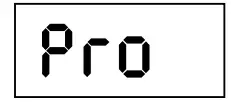
The PIC Flex is set to default to Fahrenheit (F).
- To switch the display to Celsius (C), press Prog, followed by -. Press – again to convert to Celsius.
- To return to Fahrenheit press – once more.
- To exit from the F/C conversion option press Pause/Clear until “0” is displayed.
Setting Cooking Time
- Press Time. A “0” will flash in the far right corner.
- Press + to reach your desired time.
Example 1: To program 5 minutes, press Time once, then press + until “00:05” is displayed. Press Start.
Example 2: For 20 minutes, press Time twice, then press + until “00:20” is displayed. Press Start.
Example 3: For 2 hours and 30 minutes, press Time twice, then press + until you reach “00:30”, then press Time again. Press + until 02:30 is displayed, then press Start.
The blinking “0” indicates the digit you can adjust. The maximum time is 99 hours and 60 minutes.
The display shows hours and minutes, but not seconds.
Pause/Clear Function
- Press Pause/Clear once to pause the cooking process. This will pause the PIC regardless of cooking stage.
- The temperature will remain displayed, but the “F” will be blinking.
- Press Start to resume cooking.
Note: Press Pause/Clear twice to clear the cooking mode or display while the PIC Flex is in operation. The screen will be cleared and “0” will appear.
Programming Function (Stage Cooking)
- Press Prog.
- Choose your desired set temperature, ranging from Low to Max/Sear. To increase or decrease the temperature press – or +.
- Press Time. “00:00” will be displayed then press – or + until the desired time is reached. See Setting Cooking Time for entering minutes and hours.
- To add additional stages, repeat steps 2 and 3 then press Start to begin the program.
- You may program up to 10 stages (delay is considered a stage).
- Press Pause/Clear twice to change any part of your program or start over.
Example: Boil for 5 minutes before reducing to a simmer for 20 minutes:
- Press Prog. Press Max/Sear.
- Press Time once, and then press
+ until “00:05” is reached. Press - Med/Low. Press Time twice, and then press + until “00:20” is reached. Finally, press Start.
Note: Maximum programmable cook time is 99 hours and 60 minutes.
Delay Function:
Delay lets you set programs to start at a later time.
- To delay a program, press Prog.
- Press Time. A “0” will flash in the display panel.
- Press + until the desired amount of time to delay the program start is reached. See Setting Cooking Time for more.
- Press Prog again to set the cooking program. The amount of time selected for delay is included in the programmed stages.
- To continue to the next stage enter the cooking temperature. Continue with step 2 from Programming Function.
- To begin the countdown press Start. When delay countdown reaches “0” the PIC Flex will beep twice. The cooking time will start and the temperature will be displayed.
| Panel Display Chart
Press Button Temperature Panel Display Examples | |||
| Low | 100F/38C | 100F/38C | Warm |
| Med/Low | 175F/79C | 175F/79C | Simmer |
| Med | 275F/135C | 275F/135C | Steam |
| Med/High | 375°F/191C | 375F/191C | Stir/Deep-Fry |
| High | 425F/218C | 425F/218C | Boil/Saute |
| Max/Sear | 500F/260C | SEAR | Sear |
| The minimum is 100F (38C) while the maximum temperature reaches 500F (260C). | |||
Note: Do not remove pots and pans during cooking process.
If necessary, press Pause/Clear to pause before removing.
CLEANING & MAINTENANCE
BEFORE USE:
Wipe surface with a cloth soaked in warm, soapy water. Dry throughly.
IMPORTANT – Do not immerse PIC Flex in water or attempt to cycle through dishwasher. The outer surface may be cleaned by wiping carefully with a damp dishcloth or sponge. Make sure PIC Flex has cooled completely prior to cleaning.
General Cleaning Instructions:
- Unplug the PIC Flex before cleaning.
- Clean after each use.
- Make sure the PIC Flex has cooled completely prior to cleaning.
- The outer surface may be cleaned by wiping carefully with a damp dishcloth or sponge.
- Remove the power plug prior to cleaning the NuWave PIC Flex. Do not use caustic cleaning agents and water should not penetrate the interior of the induction cooktop.
- Never immerse the PIC Flex’s cables or plug in water or other liquids.
- Wipe the glass surface with a damp cloth or use a mild, nonabrasive soap solution. Make sure the PIC Flex has cooled completely before cleaning.
- Wipe the casing and operating panel with a damp soft cloth and mild detergent.
- Do not use oil-based cleansing products as their use may damage plastic parts or the casing/operating panel.
- Do not use flammable, acidic or alkaline materials or substances near the PIC Flex, as this may reduce the service life of the induction cooktop or pose a fire risk when the induction cooktop is in use.
- Ensure that the bottom of any cookware does not scrape the PIC Flex’s glass surface, although a scratched surface will not impair the use of the induction cooktop.
- Properly clean the PIC before storing it in a cool, dry place.
IMPORTANT TIPS:
- Check power outlets to ensure proper operation. Do not use in an outlet where other major appliances are engaged. Check settings if the PIC Flex is cooking too slowly.
- The electrical plug must be properly plugged into the outlet.
TROUBLESHOOT GUIDE
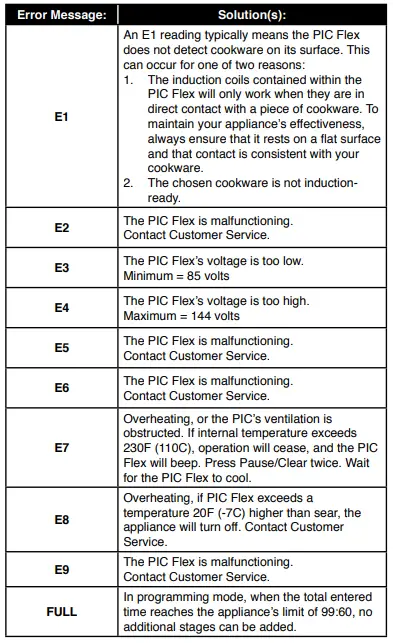
- When any of the error messages are displayed, the PIC Flex will beep at least once.
- The fan will run up to a maximum of 60 seconds after pressing Pause/Clear once. Continue cooking by pressing Start within 45 minutes.
- The PIC Flex will turn off after 45 minutes if no buttons (such as Start or Pause/Clear) are pressed. When the PIC Flex displays “0” it will clear all previous cooking history.
- After pressing Pause/Clear twice, or when cooking has stopped, the fan will run up to a maximum of 60 seconds until the PIC Flex cools. At that point, the NuWave PIC Flex will display “0”.
| After Removing
Cookware: | Beep
Sound: |
Display: |
Reference: |
|
Initial |
Single Beep |
F or C or Sear or : flashing. |
Return cookware to PIC Flex. Cooking will automatically resume. |
|
< 10 seconds |
None | F or C or Sear or : flashing. | |
|
11- 70 seconds |
Yes |
E1 | If an error is displayed, return cookware to PIC Flex and press Start to automatically resume cooking. |
|
After 70 seconds |
None |
0 | Cooking stops. Choose desired temperature setting and press Start. |
LIMITED WARRANTY
The NuWave PIC Flex® (Precision Induction Cooktop)
THE MANUFACTURER WARRANTS
The PIC Flex is to be free from manufacturer defects. All electrical components are warrantied for 1 year from the date of purchase, under normal household use, and when operated in accordance with the Manufacturer’s written instructions. The Manufacturer will provide the necessary parts and labor to repair any part of the NuWave PIC at NuWave LLC Service Department. After the expiration of the warranty, the cost of the labor and parts will be the responsibility of the owner.
THE WARRANTY DOES NOT COVER
The Limited Warranty is voided if repairs are made by an unauthorized dealer and/ or the serial number data plate is removed and/or defaced. Normal deterioration of finish due to use or exposure is not covered by this Warranty. This Limited Warranty does not cover failure, damages or inadequate performance due to accident, acts of God (such as lightning), fluctuations in electric power, alterations, abuse, misuse, misapplications, corrosive-type atmospheres, improper installation, failure to operate in accordance with the Manufacturer’s written instructions, abnormal use or commercial use. NuWave LLC reserves the right to void the Limited Warranty, where allowable by law, for products purchased from an unauthorized dealer.
TO OBTAIN SERVICE
The owner shall have the obligation and responsibility to: pay for all services and parts not covered by the warranty; prepay the freight to and from Service Department for any part or system returned under this warranty; and carefully package the product using adequate padding material to prevent damage in transit. The original container is ideal for this purpose. Include in the package the owner’s name, address, daytime telephone number, a detailed description of the problem, and your “RGA number.” Call 1-877-689-2838 or email [email protected] to obtain the RGA number (Return Goods Authorization number). Provide the cooking system model & serial number and proof of date of purchase (a copy of the receipt) when making claims under this warranty.
MANUFACTURER’S OBLIGATION
The Manufacturer’s obligation under this Limited Warranty is limited, to the extent allowable by law, to repairing or replacing any part covered by this Limited Warranty which upon examination is found to be defective under normal use. The Limited Warranty is applicable only within the continental United States and only to the original purchaser of the manufacturer’s authorized channels of distribution. THE LIMITED WARRANTY MAY NOT BE ALTERED, VARIED OR EXTENDED EXCEPT BY A WRITTEN INSTRUMENT EXECUTED BY THE MANUFACTURER. THE REMEDY OF REPAIR OR REPLACEMENT AS PROVIDED UNDER THIS LIMITED WARRANTY IS EXCLUSIVE. IN NO EVENT SHALL THE MANUFACTURER BE LIABLE FOR ANY CONSEQUENTIAL OR INCIDENTAL DAMAGES TO ANY PERSON, WHETHER OR NOT OCCASIONED BY NEGLIGENCE OF THE MANUFACTURER, INCLUDING WITHOUT LIMITATION, DAMAGES FOR LOSS OF USE, COSTS OF SUBSTITUTION, PROPERTY DAMAGE, OR OTHER MONEY LOSS.
Some states do not allow the exclusion or limitation of incidental or consequential damages, so the above limitation exclusions may not apply. This Limited Warranty gives specific legal rights, and there may also be other rights which vary from state to state. EXCEPT AS OTHERWISE EXPRESSLY PROVIDED ABOVE, THE MANUFACTURER MAKES NO WARRANTIES EXPRESSED OR IMPLIED ARISING BY LAW OR OTHERWISE, INCLUDING WITHOUT LIMITATION, THE IMPLIED WARRANTIES OF MERCHANTABILITY AND FITNESS FOR A PARTICULAR PURPOSE TO ANY OTHER PERSON. READ YOUR OWNER’S MANUAL. IF YOU STILL HAVE ANY QUESTIONS ABOUT OPERATION OR WARRANTY OF THE PRODUCT, PLEASE CONTACT NUWAVE LLC.
DISPUTE RESOLUTION PROCEDURE. For disputes relating to use of the website or use or purchase of a NuWave product or service (collectively “Disputes”), you agree to first contact NuWave LLC at (877) 689-2838 (phone), (847) 367-5486 (facsimile), or [email protected] (email). If we cannot resolve your dispute informally, any and all disputes shall be submitted to final and binding arbitration. You may start the arbitration process by submitting in writing a demand to the American Arbitration Association (“AAA”) and sending a copy to NuWave. NuWave will pay all filing costs. A single arbitrator of the AAA will conduct the arbitration in a location convenient to you or by phone. The arbitrator’s award will be binding and may be entered as a judgment in a court of competent jurisdiction. The arbitration will be conducted in accordance with the provisions of AAA’s Commercial Arbitration Rules and Mediation Procedures in effect at the time of submission of your demand for arbitration. See https://www.adr.org/sites/default/files/CommercialRules_Web. pdf. Except as may be required by law as determined by an arbitrator, no party or arbitrator may disclose the existence, content, or results of any arbitration hereunder without prior written consent of both parties.
- WAIVER OF RIGHT TO SUE. By agreeing to arbitration you understand that, to the maximum extent permitted by law, you are agreeing to waive your right to file suit in any court, to a court hearing, judge trial, and jury trial.
- CLASS ACTION WAIVER. To the maximum extent permitted by law you expressly agree to refrain from bringing or joining any claims in any representative or class-wide capacity, including but not limited to, bringing or joining any claims in any class action or class-wide arbitration.
- OPT OUT PROCEDURE. To opt out of arbitration you must contact NuWave. To request to opt out of arbitration contact us at [email protected] (email), NuWave LLC, 560 Bunker Ct., Vernon Hills, IL 60061, U.S.A., (847) 367-5486 (fax), or (877) 689-2838 or (224) 206-3019 (phone). You will have thirty (30) days from the date of product delivery to opt out of arbitration with respect to any dispute arising out of or relating to use or purchase of any NuWave product. If more than 30 days have passed you are not eligible to opt out of arbitration and will have waived your right to sue or participate in a class action with respect to the dispute arising out of your purchase or use of a NuWave product. For any dispute arising out of your use of NuWave’s website, you have thirty (30) days from the date you provided information to the website to opt out of arbitration. If more than 30 days have passed you are not eligible to opt out of arbitration and you will have waived your right to sue and participate in a class action with respect to the dispute arising out of your use of NuWave’s website.
- SOME MATTERS ARE NOT SUBJECT TO ARBITRATION. Notwithstanding the foregoing, the following shall not be subject to arbitration and may be adjudicated only in the state and federal courts of Illinois:
- any dispute, controversy, or claim relating to or contesting the validity of our intellectual property rights and proprietary rights, including without limitation, patents, trademarks, service marks, copyrights, or trade secrets;
- an action by a party for temporary, preliminary, or permanent injunctive relief, whether prohibitive or mandatory, or other provisional relief; or
- interactions with governmental and regulatory authorities. You expressly agree to refrain from bringing or joining any claims in any representative or class-wide capacity, including but not limited to, bringing or joining any claims in any class action or any class-wide arbitration.
READ YOUR OWNER’S MANUAL
If you still have any questions about operation or warranty of the product, please contact NuWave LLC at: 1-877-689-2838 or email [email protected].
REGISTER NOW!
As a special thank-you for registering your NuWave PIC Flex, you’ll automatically receive an additional 3 months added to your limited manufacturer’s warranty!*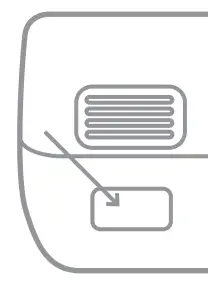
All you have to do is follow these simple steps.
- Using your smartphone or smart device, scan the QR code located on the unit label on the back of the PIC Flex.
- You will be directed to NuWave’s product registration page with your unit’s unique serial number automatically entered in the appropriate field.
NOTE: If you do not have a webenabled smart device, simply visit nuwavenow.com/QR and manually enter in your PIC’s serial number. - Fill out the remaining information and complete the optional survey.
- Once you submit your information, you will receive a confirmation email containing your extended warranty details.
DOWNLOAD THE QR CODE APP TO YOUR MOBILE DEVICE
- Open your mobile app store (App Store, Google Play).

- Search for “QR code readers.”
- Simply download the QR code reader to your phone, open it, scan the code and you are ready to go.
NOTE: You may need to open your downloaded QR code reader each time you want to scan a QR code.

FAQS
Yes, you can achieve wok hei flavor in the Mosaic.
All the Calphalon I am aware of are made of Aluminum Alloy. Thus they will not work on any induction appliance. . All cook ware must be of Carbon Steel, [even if the steel is encased in Aluminum or Stainless.
No. And you can only really season the bottom half of the wok on the induction unit. The upper half is thin enough that it won’t take a good seasoning. Will still work good. I use mine regularly and love it. But you might want to look into a preseasoned wok in the future.
Round. It fits into the induction cooktop.
The NuWave Induction Wok comes with a temperature range of 100-575°F in 5-degree increments.
Yes, it can. However, the Mosaic Induction Wok comes with the custom-made induction base with its unique curvature design that heats the sides as well.
No. Since this is an induction heating system, aluminum or any other non-ferrous material will not work. The included carbon steel wok works beautifully and is exactly the right size for the heating unit.
Yes comes with a very nice glass lid
The wok pan, a rack to put prepared food on, a rack on which to put the hot wok pan on when not cooking and the cooking base unit.
Yes
Yes.