
Lenovo 00NV402 IBM Multimedia Enclosure
Product Guide (withdrawn product)
The IBM Multimedia Backup Enclosure for Lenovo® (Machine Type 6190) is an external, 1U rack-mount backup enclosure that can accommodate up to two LTO Ultrium half-high tape drives, up to two RDX docking stations, or up to four DVD-RAM drives. It provides flexibility in choosing the type of the backup media, including support for mixed drive types within the same enclosure.
The drives in the Multimedia Backup Enclosure offer SAS, USB, and Fibre Channel (FC) host connectivity options, and they support connectivity to a wide range of Lenovo System x® and ThinkServer® servers and Flex System™ compute nodes to help protect critical data on these systems.
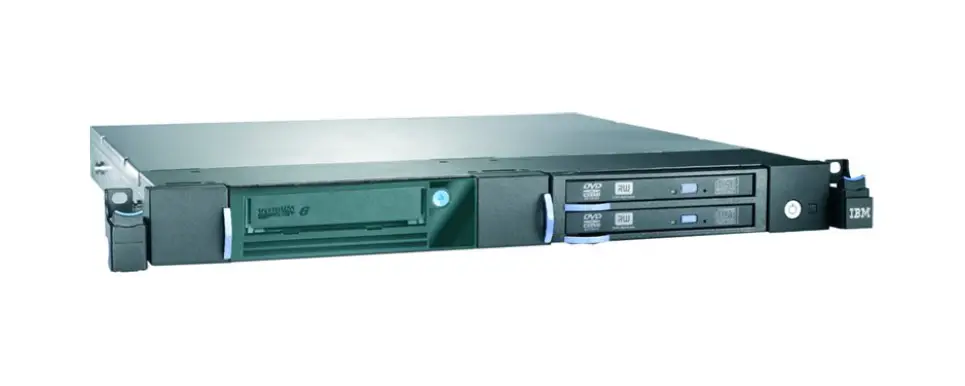
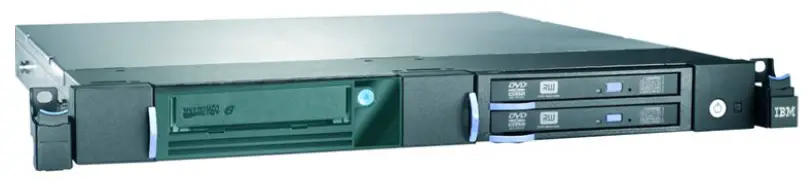
The following figure shows the IBM Multimedia Backup Enclosure for Lenovo.
Figure 1. IBM Multimedia Backup Enclosure for Lenovo
Did you know?
The Multimedia Backup Enclosure enables the performance and capacity enhancements of data backup with half-high LTO Ultrium 6 and 5 tape drives, and it provides extra versatility with RDX removable disk drives and DVD-RAM options.
With IBM disk and backup storage offerings that are available from Lenovo, Lenovo can be your trusted partner that offers “one stop shop” and single point of contact for the delivery of leading edge technologies and innovations from Lenovo and other leading IT vendors. Lenovo offerings can satisfy the wide range of your end-to-end infrastructure needs, including handheld devices, notebooks, personal computers, servers, storage, networking, services, management software, and financing.
Key features
The Multimedia Backup Enclosure delivers the following features:
Entry-level LTO Ultrium tape drives, along with RDX removable disk backup and DVD-RAM options,for reliable and flexible data backup and security.
Two drive bays that can hold tape drives, RDX drives, DVD-RAM drives, or any combination of two of these drive types.
Support for up to two half-high LTO Ultrium 5 or Ultrium 6 tape drives (one Ultrium drive per drive bay), up to two RDX drives (one RDX drive per drive bay), or up to four DVD-RAM drives (one or two DVD-RAM drives per drive bay).
Native data transfer rate of up to 140 Mbps (Ultrium 5), or up to 160 Mbps (Ultrium 6), or up to 100 MBps (RDX), or up to 2.7 MBps (DVD-RAM) per drive.
Native capacity of up to 1.5 TB (Ultrium 5), or up to 2.5 TB (Ultrium 6), or up to 2 TB (RDX), or up to 9.4 GB (DVD-RAM) per one drive.
Space-efficient rack mount design to accommodate up to four storage devices in a 1U rack space.
USB, SAS, and FC attachments for connection to select System x and ThinkServer servers and Flex
System compute nodes that run Microsoft Windows and Linux server operating systems.
Support from an extensive system of backup software vendors.
Components and connectors
The following figure shows the front of the Multimedia Backup Enclosure.
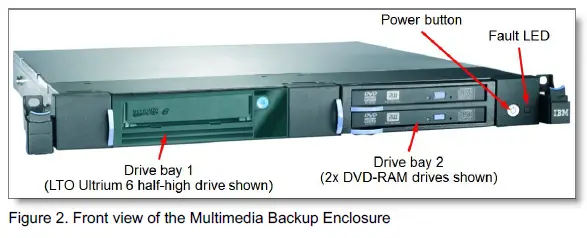
The following figure shows the rear of the Multimedia Backup Enclosure.
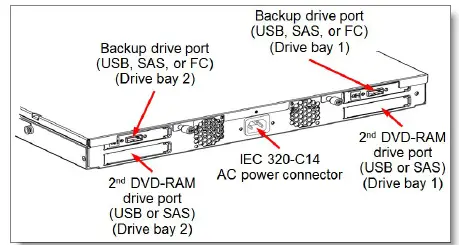
Figure 3. Rear view of the Multimedia Backup Enclosure
System specifications
The following table lists the Multimedia Backup Enclosure system specifications.
Table 1. System specifications
| Components | Specification |
| Form factor | 1U rack mount |
| Drive technology | LTO Ultrium 5 half-high drives LTO Ultrium 6 half-high drives RDX drives DVD-RAM drives |
| Drive interface | SAS (LTO Ultrium): 1x 6 Gb SAS x1 port (Mini-SAS SFF-8088) SAS (DVD-RAM): 1x 3 Gb SAS x1 port (Mini-SAS SFF-8088) FC (LTO Ultrium): 1x 8 Gb FC port (SW fiber optics, LC connector) USB (RDX): 1x USB 3.0 Type B port USB (DVD-RAM): 1x USB 2.0 Type B port |
| Number of drive bays | 2 |
| Number of drives | Up to 2 LTO Ultrium or RDX drives (one LTO Ultrium or RDX drive per drive bay), or up to 4 DVD-RAM drives (one or two DVD-RAM drives per drive bay). Intermix of different drive types is supported within the same enclosure. |
| Number of cartridge slots | 1 per drive |
| Cartridge capacity | LTO5: 1.5 TB native; up to 3.0 TB compressed (with 2:1 compression ratio) LTO6: 2.5 TB native; up to 6.25 TB compressed (with 2.5:1 compression ratio) RDX: 320 GB, 500 GB, 1 TB, or 2 TB native DVD-RAM: Up to 4.7 GB (single-layer) or 9.4 GB (dual-layer) native |
| Data transfer rate | LTO5: Up to 140 MB/s native; up to 280 MB/s compressed (with 2:1 compression ratio) LTO6: Up to 160 MB/s native; up to 400 MB/s compressed (with 2.5:1 compression ratio) RDX: Up to 100 MB/s native DVD-RAM: Up to 2.7 MB/s native read, up to 1.3 Mb/s native write |
| Security features | Application Managed Encryption (AME) for LTO5 and LTO6 drives |
| Cooling | Two fixed internal fans |
| Power supply | One 140 W AC fixed power supply with IEC 320-C14 power connector |
| Hot-swap parts | None |
| Dimensions | Height: 43 mm (1.7 in.); Width: 480 mm (18.9 in.); Depth: 454 mm (17.9 in.) |
| Weight | Empty: 5.1 kg (10.2 lb.); Typical: 7.1 kg (15.6 lb.) |
| Warranty | One-year customer-replaceable unit and onsite warranty with 9×5 next business day terms. |
| Service and support | Optional warranty service upgrades are available through Lenovo Services: 24×7 coverage, 2- hour or 4-hour response time, up to 5 years of warranty extension. |
| Host operating systems | Microsoft Windows Server 2008, 2008 R2, 2012 and 2012 R2; Red Hat Enterprise Linux (RHEL) 5, 6, and 7; SUSE Linux Enterprise Server (SLES) 10 and 11. |
| ISV backup software compatibility | Arcserve Backup, ASG Time Navigator, Barracuda Yosemite Backup, CommVault Simpana, Dell NetVault Backup, EMC NetWorker, HP OpenView Storage Data Protector, IBM Spectrum Protect, Microsoft System Center Data Protection Manager, Symantec Backup Exec, Symantec NetBackup |
Standard models
The following table lists the ordering information for the Multimedia Backup Enclosure.
Table 2. Part numbers and feature codes for ordering the Multimedia Backup Enclosure
| Description | Part number | Feature code (MTM* 6190-1U3) |
| IBM Multimedia Backup Enclosure | 61901UX | AS5Y |
MTM = Machine Type (first four digits); Model (last three digits and letters)
The part number for the Multimedia Backup Enclosure includes the following items:
- One enclosure with two drive bays
- Rack mount kit (slide rails)
- Cable management arm
- Rack power cord (2.8m 10A/100-250V, C13 to IEC 320-C14)
- Warranty information
- Documentation CD that includes Setup, Operator, and Service Guide
Backup drive options
The Multimedia Backup Enclosure has two drive bays, and each drive bay that can accommodate one LTO
Ultrium half-high tape drive, or one RDX drive, or one or two DVD-RAM drives. Different drive types can be intermixed within the same enclosure.
The following table lists ordering information for the backup drives for the Multimedia Backup Enclosure.
Table 3. Backup drive options
| Description | Part number | Feature code | Max qty per one enclosure |
| LTO Ultrium half-high tape drives: 6 Gb SAS | |||
| 6190 HH LTO5 SAS Tape Drive | 00NV402 | AS1R | 2 |
| 6190 HH LTO6 SAS Tape Drive | 00NV404 | AS1X | 2 |
| LTO Ultrium half-high tape drives: 8 Gb FC | |||
| 6190 LTO Ultrium 5 Half High Fibre Drive Sled | 00NV403 | AS1V | 2 |
| 6190 LTO Ultrium 6 Half High Fibre Drive Sled | 00NV405 | AS20 | 2 |
| RDX drives: USB 3.0 | |||
| 6190 RDX 3.0 Dock/320GB Cartridge Bundle | 00NV406 | AS0S | 2 |
| 6190 RDX 3.0 Dock/500GB Cartridge Bundle | 00NV407 | AS0T | 2 |
| 6190 RDX 3.0 Dock/1.0TB Cartridge Bundle | 00NV408 | AS0U | 2 |
| 6190 RDX 3.0 Dock/2.0TB Cartridge Bundle | 00NV455 | AS72 | 2 |
| DVD-RAM drives: 3 Gb SAS | |||
| 6190 SATA/SAS DVD-RAM Sled Drive | 00NV409 | AS0P | 2 |
| 6190 SATA/SAS DVD-RAM Drive/Cable/Card | 00NV410 | AS0Q | 2* |
| DVD-RAM drives: USB 2.0 | |||
| 6190 USB DVD-RAM Sled Drive | 00NV411 | AS17 | 2 |
| 6190 USB DVD-RAM Drive/Cable/Card | 00NV412 | AS16 | 2** |
- The second DVD-RAM drive for the 6190 SATA/SAS DVD-RAM Sled Drive (part number 00NV409).
- The second DVD-RAM drive for the 6190 USB DVD-RAM Sled Drive (part number 00NV411).
The LTO Ultrium half-high SAS tape drive part numbers (00NV402 and 00NV404) do not include SAS host connectivity cables; one SAS cable must be ordered with the drive (see Table 4 for ordering information).
The LTO Ultrium half-high FC tape drive part numbers (00NV403 and 00NV405) include one 5 m LC-LC SW Fiber Optics Cable for host connectivity.
The USB DVD-RAM option part numbers (00NV411 and 00NV412) include one 3 m USB 2.0 cable (USB Type B [drive] – USB Type A [host]) for host connectivity.
The USB RDX drive option part numbers (00NV406, 00NV407, 00NV408, and 00NV455) include one 2.7 m
USB 3.0 cable (USB Type B [drive] – USB Type A [host]) for host connectivity.
The SAS DVD-RAM option part numbers (00NV409 and 00NV410) include one 5.5 m Mini-SAS (SFF-8088) to Mini-SAS (SFF-8088) cable for host connectivity.
Table 4. SAS cable options
| Description | Part number | Feature code | Maximum quantity |
| SAS connectivity cables: Mini-SAS (SFF-8088 host) to Mini-SAS (SFF-8088 tape) | |||
| Mini-SAS to Mini-SAS Cable (5.5 m) | 00NV418 | AS11 | 4 |
| SAS connectivity cables: Mini-SAS HD (SFF-8644 host) to Mini-SAS (SFF-8088 tape) | |||
| HD-SAS Cable to Mini-SAS (4 m) | 00NV419 | AS10 | 4 |
Backup media
The LTO Ultrium half-high drive options include one cleaning cartridge and one test cartridge. The DVDRAM drive options include one test disk. The RDX drive options include one data cartridge.
The following table lists backup media that can be ordered for the drives in the Multimedia Enclosure.
Table 5. Backup media options
| Description | Part number | Feature code |
| LTO Ultrium Cleaning cartridge | ||
| Ultrium Cleaning Cartridge (universal) | 00NA017 | AS1E |
| LTO Ultrium data cartridges | ||
| Ultrium 5 Data Cartridges 5-Pack | 00NA023 | AS23 |
| Ultrium 6 Data Cartridges 5-Pack | 00NA025 | AS24 |
| RDX data cartridges | ||
| 320 GB RDX Data Cartridge | 00NV413 | AS0V |
| 500 GB RDX Data Cartridge | 00NV414 | AS0N |
| 1 TB RDX Data Cartridge | 00NV415 | EU01 |
| 2 TB RDX Data Cartridge | 00NV430 | EU2T |
LTO Ultrium Drives support the following backward compatibility for the previous generations of media:
- LTO Ultrium 6 Tape Drives can read and write LTO Ultrium 6 and Ultrium 5 data cartridges, and can read Ultrium 4 data cartridges.
- LTO Ultrium 5 Tape Drives can read and write LTO Ultrium 5 and Ultrium 4 data cartridges, and can read Ultrium 3 data cartridges.
Power cables
The Multimedia Backup Enclosure comes standard with one 2.8m 10A/100-250V, C13 to IEC 320-C14
Rack Power Cable (part number 00NA063). A line cord also can be ordered, if needed.
The part numbers and feature codes to order the power cables (one power cable per enclosure) are listed in the following table.
Table 6. Part numbers and feature codes for ordering power cables
| Description | Part number | Feature code |
| Line cords | ||
| 2.8m, 10A/120V, C13 to NEMA 5-15P (US) Line Cord | 00NA027 | AS29 |
| 2.8m, 10A/230V, C13 to CEE7-VII (Europe) Line Cord | 00NA029 | AS2A |
| 2.8m, 10A/230V, C13 to DK2-5a (Denmark) Line Cord | 00NA031 | AS2B |
| 2.8m, 10A/230V, C13 to BS 1363/A (UK) Line Cord | 00NA033 | AS2C |
| 2.8m, 10A/230V, C13 to SI 32 (Israel) Line Cord | 00NA035 | AS2D |
| 2.8m, 10A/230V, C13 to SEV 1011-S24507 (Sws) Line Cord | 00NA037 | AS2E |
| 2.8m, 10A/230V, C13 to SABS 164 (South Africa) Line Cord | 00NA039 | AS2F |
| 2.8m, 10A/230V, C13 to CEI 23-16 (Italy) Line Cord | 00NA041 | AS2G |
| 2.8m, 10A/230V, C13 to AS/NZS 3112 (Aus/NZ) Line Cord | 00NA043 | AS2H |
| 2.8m, 10A/208V, C13 to NEMA 6-15P (US) Line Cord | 00NA045 | AS2J |
| 2.8m, 10A/220V, C13 to IRAM 2073 (Argentina) Line Cord | 00NA047 | AS2K |
| 2.8m, 10A/220V, C13 to CNS 10917-3 (Taiwan) Line Cord | 00NA049 | AS2L |
| 2.8m, 10A/220V, C13 to GB 2099.1 (China) Line Cord | 00NA051 | AS2M |
| 2.8m, 10A/110V, C13 to CNS 10917-3 (Taiwan) Line Cord | 00NA053 | AS2N |
| 2.8m, 12A/100V, C13 to JIS C-8303 (Japan) Line Cord | 00NA055 | AS2P |
| 2.8m, 12A/220V, C13 to KSC 8305 (S. Korea) Line Cord | 00NA057 | AS2Q |
| 2.8m, 10A/240V, C13 to IS 6538 (India) Line Cor | 00NA059 | AS2R |
| 2.8m, 10A/220V, C13 to NBR 6147 (Brazil) Line Cord | 00NA061 | AS2T |
| Rack power cord | ||
| 2.8m, 10A/100-250V, C13 to IEC 320-C14 Rack Power Cable | 00NA063 | AS2U |
Physical specifications
The Multimedia Backup Enclosure has the following dimensions and weight (approximate):
- Height: 43 mm (1.7 in.)
- Width: 480 mm (18.9 in.)
- Depth: 454 mm (17.9 in.)
- Weight:13 kg (28.7 lb)
- Empty: 5.1 kg (10.2 lb.)
- Typical: 7.1 kg (15.6 lb.)
Operating environment
The Multimedia Backup Enclosure is supported in the following environment:
- Air temperature:
- Operating: 10 °C – 40 °C (50 °F – 104 °F)
- Non-operating: -40 °C – 65 °C (-40 °F – 149 °F)
- Maximum altitude: 3,048 m (10,000 ft)
- Humidity:
- Operating: 20% – 80% (non-condensing)
- Non-operating: 5% – 95%
- Electrical power:
- Voltage: 100 V AC – 240 V AC
- Frequency: 50 Hz – 60 Hz
- Input kilovolt-amperes (approximately): 0.047 kVA @ 120 V AC
- Power supply: 140 W
Warranty options
The Multimedia Backup Enclosure has a one-year CRU and onsite warranty with 9×5/next business day (NBD) terms. Lenovo offers the service upgrades through warranty maintenance upgrades and postwarranty maintenance agreements with a well-defined scope of services, including service hours, response
time, term of service, and service agreement terms and conditions.
Lenovo warranty service upgrade offerings are country-specific; that is, each country might have its own service types, service levels, response times, and terms and conditions. Not all covered types of warranty service upgrades might be available in a particular country or area. For more information about Lenovo warranty service upgrade offerings that are available in your country, see the Lenovo Services Product Selector that is available at this website:
https://www-304.ibm.com/sales/gss/download/spst/servicepac
The warranty service definitions for the Multimedia Backup Enclosure are listed in the following table.
| Term | Description |
| On-site service | A service technician arrives at the client’s location for equipment service. |
| 24x7x2 hour | A service technician is scheduled to arrive at the client’s location within two hours after remote problem determination is completed. Lenovo provides service around the clock, every day, including Lenovo holidays. |
| 24x7x4 hour | A service technician is scheduled to arrive at the client’s location within four hours after remote problem determination is completed. Lenovo provides service around the clock, every day, including Lenovo holidays. |
| 9×5 next business day | A service technician is scheduled to arrive at the client’s location on the business day after remote problem determination is completed. Lenovo provides service 8:00 am – 5:00 pm in the client’s local time zone, Monday – Friday, excluding Lenovo holidays. Calls received after 4:00 pm local time require an extra business day for service dispatch. Next business day service is not guaranteed. |
In general, the following types of Lenovo warranty service upgrades for the Multimedia Backup Enclosure are available:
- Up to five years of 9×5 or 24×7 service coverage
- Onsite response from next business day to 4 or 2 hours
- Up to five years of warranty extension for all service levels in one year increments
Regulatory compliance
The Multimedia Backup Enclosure conforms to the following regulations:
- FCC: Verified to comply with Part 15 of the FCC Rules, Class A
- Canada ICES-003, Class A
- European Union Council Directive 2004/108/EC
- EN 55022, Class A
- Australia and New Zealand Class A Statement
- Japan VCCI Class A statement
- People’s Republic of China Electromagnetic Interference (EMI) Class A Statement
- Taiwan EMI Class A Statement
- Korea EMI Class A Statement
- Russia EMI Class A Statement
Interoperability
Lenovo provides end-to-end storage compatibility testing to deliver interoperability throughout the network.
The backup drives in the Multimedia Backup Enclosure support attachment to Lenovo System x,ThinkServer, and Flex System hosts by using USB, SAS, or
FC storage connectivity interfaces.
Note: Tables that are provided in this section are for ordering reference purposes only. End-to-end storage configuration support must be verified through the System Storage Interoperation Center (SSIC): http://ibm.com/systems/support/storage/ssic
USB connectivity
The RDX drives can be connected to an external USB 3.0 port on System x and ThinkServer servers and Flex System compute nodes.
The DVD-RAM drives with the USB interface can be connected to an external USB 2.0 port on System x and ThinkServer servers.
SAS connectivity
The following table lists currently available System x and ThinkServer SAS adapters that are compatible with the LTO Ultrium SAS tape drives in the Multimedia Backup Enclosure.
Table 8. SAS adapters
| Description | Part number |
| System x SAS HBAs | |
| 6Gb SAS HBA (1x Mini-SAS x4 SFF-8088 external port) | 46M0907 |
| N2125 SAS/SATA HBA (6 Gb SAS, 2x Mini-SAS x4 SFF-8088 external ports) | 46C9010 |
| N2225 SAS/SATA HBA (12 Gb SAS, 2x Mini-SAS HD x4 SFF-8644 external ports) | 00AE912 |
| N2226 SAS/SATA HBA (12 Gb SAS, 4x Mini-SAS HD x4 SFF-8644 external ports) | 00AE916 |
| ThinkServer SAS HBAs | |
| Lenovo ThinkServer 9300-8e PCIe 12Gb 8 Port External SAS Adapter by LSI (2x Mini-SAS HD x4 SFF-8644 external ports) | 4XB0F28703 |
FC connectivity
The LTO Ultrium drives in the Multimedia Backup Enclosure support FC switch-based attachments for Flex System compute nodes. The Flex System FC adapters that are listed in the following table are compatible with the LTO Ultrium drives in the Multimedia Backup Enclosure.
Table 9. FC adapters
| Description | Part number |
| Flex System HBAs: 8 Gb FC | |
| Flex System FC3052 2-port 8Gb FC Adapter | 95Y2375 |
| Flex System FC3172 2-port 8Gb FC Adapter | 69Y1938 |
| Flex System HBAs: 16 Gb FC | |
| Flex System FC5052 2-port 16Gb FC Adapter | 95Y2386 |
| Flex System FC5054 4-port 16Gb FC Adapter | 95Y2391 |
Networking switches
The following table lists currently available FC embedded switches and pass-thru modules for Flex System that can be used with the LTO Ultrium drives in Multimedia Backup Enclosure solutions.
Table 10. Ethernet and FC embedded switches for Flex System
| Description | Part number |
| 8 Gb FC | |
| Lenovo Flex System FC3171 8Gb SAN Switch | 69Y1930 |
| 16 Gb FC | |
| Lenovo Flex System FC5022 16Gb SAN Scalable Switch | 88Y6374 |
| Lenovo Flex System FC5022 24-port 16Gb SAN Scalable Switch (includes two 16 Gb SFPs) | 00Y3324 |
| Lenovo Flex System FC5022 24-port 16Gb ESB SAN Scalable Switch | 90Y9356 |
| Pass-thru modules (require a compatible external switch) | |
| Lenovo Flex System FC3171 8Gb SAN Pass-thru | 69Y1934 |
For more information, see the list of Product Guides in the Flex System Switches and Pass-thru Modules
category: http://lenovopress.com/flexsystem/iomodules
The following table lists currently available FC SAN rack switches that can be used with the Flex System modules in Multimedia Backup Enclosure solutions.
Table 11. FC SAN rack switches
| Description | Part number |
| 8 Gb FC | |
| Brocade 300 FC SAN Switch | 3873AR1 |
| Lenovo B300, 8 ports activated w/ 8Gb SWL SFPs, 1 PS, Rail Kit | 3873AR3 |
| Lenovo B6505, 12 ports activated w/ 8Gb SWL SFPs, 1 PS, Rail Kit | 3873AR4 |
| Lenovo B6510, 24 ports activated w/ 8Gb SWL SFPs, 2 PS, Rail Kit | 3873BR2 |
| 16 Gb FC | |
| Brocade 6505 FC SAN Switch | 3873AR2 |
| Brocade 6510 FC SAN Switch | 3873BR1 |
| Lenovo B6505, 12 ports activated w/ 16Gb SWL SFPs, 1 PS, Rail Kit | 3873AR5 |
| Lenovo B6510, 24 ports activated w/ 16Gb SWL SFPs, 2 PS, Rail Kit | 3873BR3 |
For more information, see the list of Product Guides in the SAN Rack Switches category:
http://lenovopress.com/storage/switches/rack?rt=product-guide
Operating systems
The backup drives in the Multimedia Backup Enclosure support host attachments to the System x,
ThinkServer, and Flex System servers with the following operating systems:
- Microsoft:
- Microsoft Windows Server 2012 R2
- Microsoft Windows Server 2012
- Microsoft Windows Server 2008 R2
- Microsoft Windows Server 2008
- Red Hat:
- Red Hat Enterprise Linux 7
- Red Hat Enterprise Linux 6
- Red Hat Enterprise Linux 5
- SUSE:
- SUSE Linux Enterprise Server 11
- SUSE Linux Enterprise Server 10
ISV backup software compatibility
The Independent Software Vendors (ISVs) indicate support for the backup drives in the Multimedia Backup Enclosure for the following ISV backup software:
- Arcserve Backup
- ASG Time Navigator
- Barracuda Yosemite Backup
- CommVault Simpana
- Dell NetVault Backup
- EMC NetWorker
- HP OpenView Storage Data Protector
- IBM Spectrum Protect
- Microsoft System Center Data Protection Manager
- Symantec Backup Exec
- Symantec NetBackup
Note: Not all ISVs and software that are listed here might support all possible configurations. Support must be verified through an ISV software compatibility matrix which can be found on the respective ISV’s website.
Rack cabinets
The following table lists the rack cabinets that are offered by Lenovo that can be used in Multimedia Backup Enclosure solutions.
Table 12. Rack cabinets
| Description | Part number |
| 11U Rack Office Enablement Kit | 201886X |
| 25U S2 Standard Rack | 93072RX |
| 25U Static S2 Standard Rack | 93072PX |
| 42U S2 Standard Rack | 93074RX |
| 42U 1100mm Enterprise V2 Dynamic Rack | 93634PX |
| 42U 1100mm Enterprise V2 Dynamic Expansion Rack | 93634EX |
| 42U 1200mm Deep Dynamic Rack | 93604PX |
| 42U 1200mm Deep Static Rack | 93614PX |
| 42U Enterprise Rack | 93084PX |
| 42U Enterprise Expansion Rack | 93084EX |
For more information, see the list of Product Guides in the Rack cabinets and options category that is available at this website:
http://lenovopress.com/systemx/rack
Power distribution units
The following table lists the the power distribution units (PDUs) that are offered by Lenovo that can be used in Multimedia Backup Enclosure solutions.
Table 13. Power distribution units
| Description | Part number |
| 0U Basic PDUs | |
| 0U 24 C13 16A 3 Phase PDU with IEC 309 P+N+Gnd line cord | 46M4122 |
| 0U 24 C13 30A 3 Phase PDU with NEMA L21-30P line cord | 46M4125 |
| 0U 24 C13 30A PDU with NEMA L6-30P line cord | 46M4128 |
| 0U 24 C13 32A PDU with IEC 309 P+N+Gnd line cord | 46M4131 |
| 0U 12 C19/12 C13 32A 3 Phase PDU with IEC 309 3P+N+Gnd line cord | 46M4143 |
| 0U 12 C19/12 C13 60A 3 Phase PDU with CS8365L 3P+Gnd line cord | 46M4140 |
| Switched and Monitored PDUs | |
| 1U 9 C19/3 C13 Switched and Monitored DPI PDU (without line cord) | 46M4002 |
| 1U 9 C19/3 C13 Switched and Monitored 60A 3 Phase PDU with IEC 309 3P+Gnd line cord | 46M4003 |
| 1U 12 C13 Switched and Monitored DPI PDU (without line cord) | 46M4004 |
| 1U 12 C13 Switched and Monitored 60A 3 Phase PDU with IEC 309 3P+Gnd line cord | 46M4005 |
| 0U 24 C13 Switched and Monitored 30A PDU with NEMA L6-30P line cord | 46M4116 |
| 0U 24 C13 Switched and Monitored 32A PDU with IEC 309 P+N+Gnd line cord | 46M4119 |
| 0U 12 C19/12 C13 Switched and Monitored 32A 3 Phase PDU with IEC 309 3P+N+Gnd cord | 46M4137 |
| 0U 12 C19/12 C13 Switched and Monitored 50A 3 Phase PDU with CS8365L 3P+Gnd cord | 46M4134 |
| Ultra Density Enterprise PDUs (9x IEC 320 C13 + 3x IEC 320 C19 outlets) | |
| Ultra Density Enterprise C19/C13 PDU Module (without line cord) | 71762NX |
| Ultra Density Enterprise C19/C13 PDU 60A/208V/3ph with IEC 309 3P+Gnd line cord | 71763NU |
| C13 Enterprise PDUs (12x IEC 320 C13 outlets) | |
| DPI C13 Enterprise PDU+ (without line cord) | 39M2816 |
| DPI Single Phase C13 Enterprise PDU (without line cord) | 39Y8941 |
| C19 Enterprise PDUs (6x IEC 320 C19 outlets) | |
| DPI Single Phase C19 Enterprise PDU (without line cord) | 39Y8948 |
| DPI 60A 3 Phase C19 Enterprise PDU with IEC 309 3P+G (208 V) fixed line cord | 39Y8923 |
| Front-end PDUs (3x IEC 320 C19 outlets) | |
| DPI 30amp/125V Front-end PDU with NEMA L5-30P line cord | 39Y8938 |
| DPI 30amp/250V Front-end PDU with NEMA L6-30P line cord | 39Y8939 |
| DPI 32amp/250V Front-end PDU with IEC 309 2P+Gnd line cord | 39Y8934 |
| DPI 60amp/250V Front-end PDU with IEC 309 2P+Gnd line cord | 39Y8940 |
| DPI 63amp/250V Front-end PDU with IEC 309 2P+Gnd line cord | 39Y8935 |
| Universal PDUs (7x IEC 320 C13 outlets) | |
| DPI Universal Rack PDU with US LV and HV line cords | 39Y8951 |
| DPI Universal Rack PDU with CEE7-VII Europe line cord | 39Y8952 |
| DPI Universal Rack PDU with Denmark line cord | 39Y8953 |
| DPI Universal Rack PDU with Israel line cord | 39Y8954 |
| DPI Universal Rack PDU with Italy line cord | 39Y8955 |
| DPI Universal Rack PDU with South Africa line cord | 39Y8956 |
| DPI Universal Rack PDU with UK line cord | 39Y8957 |
| DPI Universal Rack PDU with AS/NZ line cord | 39Y8958 |
| DPI Universal Rack PDU with China line cord | 39Y8959 |
| DPI Universal Rack PDU (Argentina) | 39Y8962 |
| DPI Universal Rack PDU (Brazil) | 39Y8960 |
| DPI Universal Rack PDU (India) | 39Y8961 |
| NEMA PDUs (6x NEMA 5-15R outlets) | |
| DPI 100-127V PDU with Fixed NEMA L5-15P line cord | 39Y8905 |
| Line cords for PDUs that ship without a line cord | |
| DPI 32a Line Cord (IEC 309 3P+N+G) | 40K9611 |
| DPI 32a Line Cord (IEC 309 P+N+G) | 40K9612 |
| DPI 63a Cord (IEC 309 P+N+G) | 40K9613 |
| DPI 30a Line Cord (NEMA L6-30P) | 40K9614 |
| DPI 60a Cord (IEC 309 2P+G) | 40K9615 |
| DPI Australian/NZ 3112 Line Cord | 40K9617 |
For more information, see the list of Product Guides in the Power infrastructure category:
http://lenovopress.com/systemx/power
Uninterruptible power supply units
The following table list the uninterruptible power supply (UPS) units that are offered by Lenovo that can be used in Multimedia Backup Enclosure solutions.
Table 14. Uninterruptible power supply units
| Description | Part number |
| RT1.5kVA 2U Rack or Tower UPS (100-125VAC) | 55941AX |
| RT1.5kVA 2U Rack or Tower UPS (200-240VAC) | 55941KX |
| RT2.2kVA 2U Rack or Tower UPS (100-125VAC) | 55942AX |
| RT2.2kVA 2U Rack or Tower UPS (200-240VAC) | 55942KX |
| RT3kVA 2U Rack or Tower UPS (100-125VAC) | 55943AX |
| RT3kVA 2U Rack or Tower UPS (200-240VAC) | 55943KX |
| RT5kVA 3U Rack or Tower UPS (200-240VAC) | 55945KX |
| RT6kVA 3U Rack or Tower UPS (200-240VAC) | 55946KX |
| RT8kVA 6U Rack or Tower UPS (200-240VAC) | 55948KX |
| RT11kVA 6U Rack or Tower UPS (200-240VAC) | 55949KX |
| RT8kVA 6U 3:1 Phase Rack or Tower UPS (380-415VAC) | 55948PX |
| RT11kVA 6U 3:1 Phase Rack or Tower UPS (380-415VAC) | 55949PX |
For more information, see the list of Product Guides in the Power infrastructure category:
http://lenovopress.com/systemx/power
Lenovo Financial Services
Lenovo Financial Services reinforces Lenovo’s commitment to deliver pioneering products and services that are recognized for their quality, excellence, and trustworthiness. Lenovo Financial Services offers financing solutions and services that complement your technology solution anywhere in the world.
We are dedicated to delivering a positive finance experience for customers like you who want to maximize your purchase power by obtaining the technology you need today, protect against technology obsolescence, and preserve your capital for other uses.
We work with businesses, non-profit organizations, governments and educational institutions to finance their entire technology solution. We focus on making it easy to do business with us. Our highly experienced team of finance professionals operates in a work culture that emphasizes the importance of providing outstanding customer service. Our systems, processes and flexible policies support our goal of providing customers with a positive experience.
We finance your entire solution. Unlike others, we allow you to bundle everything you need from hardware and software to service contracts, installation costs, training fees, and sales tax. If you decide weeks or months later to add to your solution, we can consolidate everything into a single invoice.
Our Premier Client services provide large accounts with special handling services to ensure these complex transactions are serviced properly. As a premier client, you have a dedicated finance specialist who manages your account through its life, from first invoice through asset return or purchase. This specialist develops an in-depth understanding of your invoice and payment requirements. For you, this dedication provides a high-quality, easy, and positive financing experience.
For your region specific offers, contact your Lenovo sales representative or your technology provider about the use of Lenovo Financial Services. For more information, see the following Lenovo website: http://www.lenovofs.com
Related publications and links
For more information, see the following resources:
- Lenovo Storage product page:
http://www.lenovo.com/systems/storage - US Announcement Letter – IBM Multimedia Backup Enclosure for Lenovo:
http://ibm.com/common/ssi/cgi-bin/ssialias?infotype=dd&subtype=ca&&htmlfid=897/ENUS114-129 - Standalone Solutions Configuration Tool:
http://ibm.com/support/entry/portal/docdisplay?lndocid=MIGR-62168 - System Storage Interoperation Center (SSIC):
http://ibm.com/systems/support/storage/ssic
Related product families
Product families related to this document are the following:
- Backup Units
Notices
Lenovo may not offer the products, services, or features discussed in this document in all countries. Consult your local Lenovo representative for information on the products and services currently available in your area. Any reference to a Lenovo product, program, or service is not intended to state or imply that only that Lenovo product,program, or service may be used. Any functionally equivalent product, program, or service that does not infringe any Lenovo intellectual property right may be used instead. However, it is the user’s responsibility to evaluate and verify the operation of any other product, program, or service. Lenovo may have patents or pending patent applications covering subject matter described in this document. The furnishing of this document does not give you any license to these patents. You can send license inquiries, in writing, to:
Lenovo (United States), Inc.
8001 Development Drive
Morrisville, NC 27560
U.S.A.
Attention: Lenovo Director of Licensing
LENOVO PROVIDES THIS PUBLICATION ”AS IS” WITHOUT WARRANTY OF ANY KIND, EITHER EXPRESS OR IMPLIED, INCLUDING, BUT NOT LIMITED TO, THE IMPLIED WARRANTIES OF NON-INFRINGEMENT, MERCHANTABILITY OR FITNESS FOR A PARTICULAR PURPOSE. Some jurisdictions do not allow disclaimer of express or implied warranties in certain transactions, therefore, this statement may not apply to you.
This information could include technical inaccuracies or typographical errors. Changes are periodically made to the information herein; these changes will be incorporated in new editions of the publication. Lenovo may make improvements and/or changes in the product(s) and/or the program(s) described in this publication at any time without notice.
The products described in this document are not intended for use in implantation or other life support applications where malfunction may result in injury or death to persons. The information contained in this document does not affect or change Lenovo product specifications or warranties. Nothing in this document shall operate as an express or implied license or indemnity under the intellectual property rights of Lenovo or third parties. All information contained in this document was obtained in specific environments and is presented as an illustration. The result obtained in other operating environments may vary. Lenovo may use or distribute any of the information you supply in any way it believes appropriate without incurring any obligation to you.
Any references in this publication to non-Lenovo Web sites are provided for convenience only and do not in any manner serve as an endorsement of those Web sites. The materials at those Web sites are not part of the materials for this Lenovo product, and use of those Web sites is at your own risk. Any performance data contained herein was determined in a controlled environment. Therefore, the result obtained in other operating environments may vary significantly. Some measurements may have been made on development-level systems and there is no guarantee that these measurements will be the same on generally available systems. Furthermore, some measurements may have been estimated through extrapolation. Actual results may vary. Users of this document should verify the applicable data for their specific environment.
© Copyright Lenovo 2022. All rights reserved.
This document, TIPS1306, was created or updated on April 5, 2016.
Send us your comments in one of the following ways:
- Use the online Contact us review form found at:
https://lenovopress.lenovo.com/TIPS1306 - Send your comments in an e-mail to:
[email protected]
This document is available online at https://lenovopress.lenovo.com/TIPS1306.
Trademarks
Lenovo and the Lenovo logo are trademarks or registered trademarks of Lenovo in the United States, other countries, or both. A current list of Lenovo trademarks is available on the Web at https://www.lenovo.com/us/en/legal/copytrade/.
The following terms are trademarks of Lenovo in the United States, other countries, or both:
- Lenovo®
- Flex System
- Lenovo Services
- Standalone Solutions Configuration Tool
- System x®
- ThinkServer®
The following terms are trademarks of other companies:
Linux® is the trademark of Linus Torvalds in the U.S. and other countries.
Microsoft®, Windows Server®, and Windows® are trademarks of Microsoft Corporation in the United States, other countries, or both.
Other company, product, or service names may be trademarks or service marks of others.
References
 IBM Support
-
IBM System Storage Interoperation Center (SSIC)
 Blade Networking Modules > Lenovo Press
-
Rack SAN Switches > Lenovo Press
-
Power Distribution Units > Lenovo Press
-
Rack Cabinets > Lenovo Press
-
Enterprise Storage Server Solutions for Your Data Center | Lenovo US
-
Lenovo Financial Services | Lenovo US
-
Backup Units > Lenovo Press
-
IBM Multimedia Enclosure for Lenovo Product Guide (withdrawn product) > Lenovo Press
-
Copyright and Trademark Information | Lenovo US | Lenovo US
 IBM Support
 Blade Networking Modules > Lenovo Press
 Enterprise Storage Server Solutions for Your Data Center | Lenovo US
 Lenovo Financial Services | Lenovo US
 Backup Units > Lenovo Press