
140nm
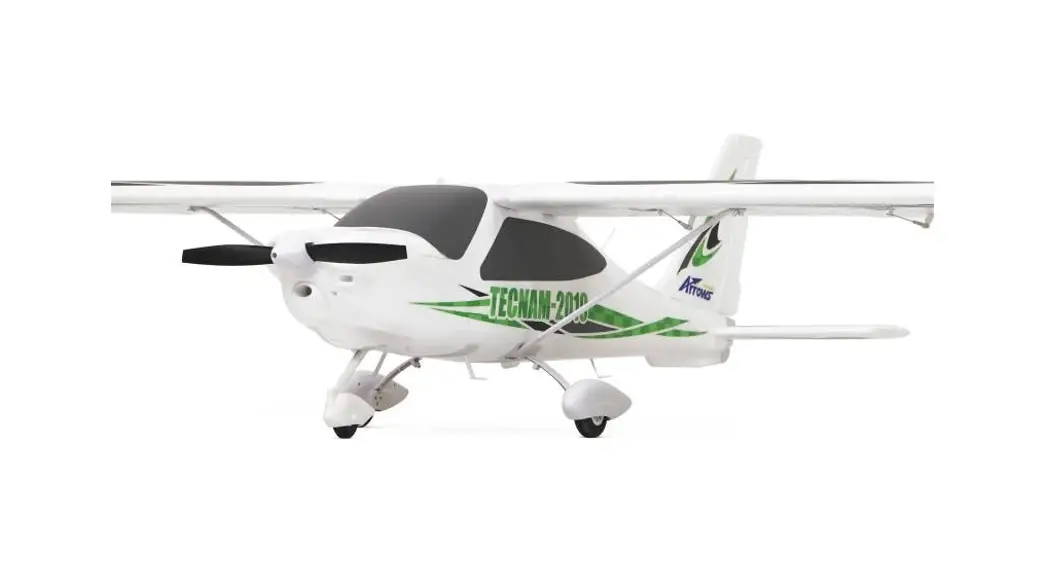
Tecnam-2010
Operating Manual
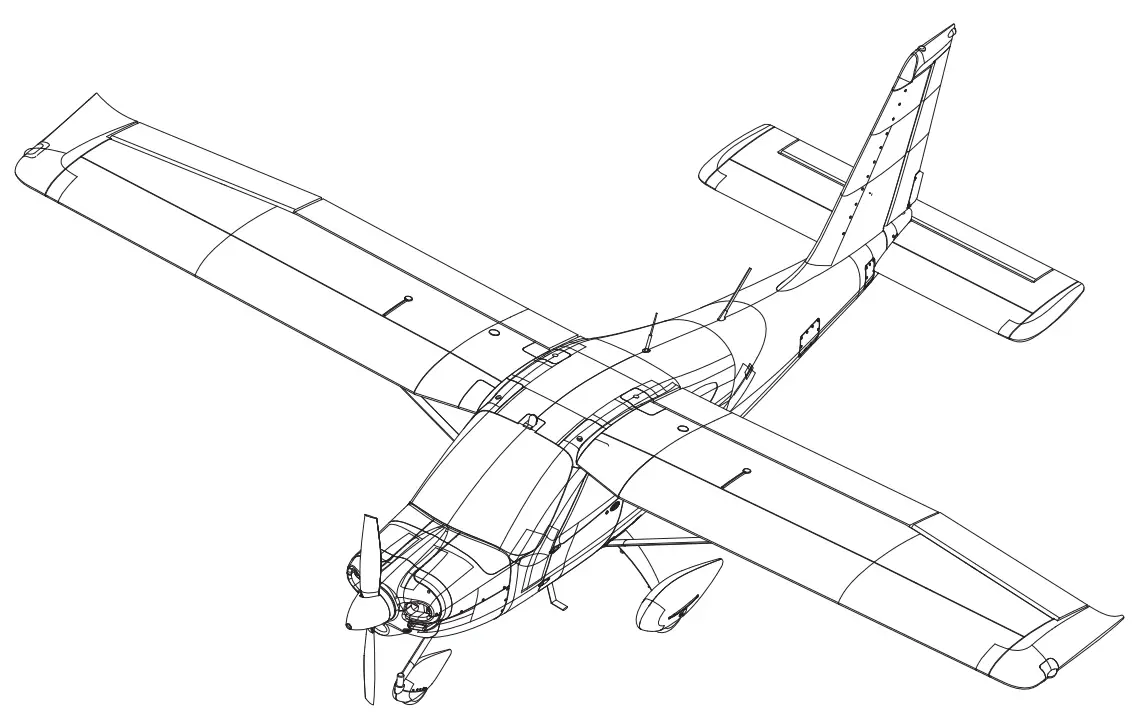
WARNING: This manual contains important information that will help you maintain and operate your model aircraft in a reliable and safe manner. Please read the instructions and warnings carefully prior to assembly, setup, or use.
As this model aircraft is a sophisticated hobby product, it must be flown with safety and common sense in mind, failure in doing so may result in injury or property damage. This product is not intended for use by children without direct adult supervision.
Safety, precautions, and Warnings
As the user, you are solely responsible for the safe operation and maintenance of this product. Follow the directions and warnings listed in this manual, as well as that of supporting equipment (chargers, batteries, etc.), and always use common sense.
This is not a toy. Not for children under 14 years of age.
- Always operate your model in an open area away from buildings, cars, traffic, or people. Never operate near people-especially children who can wander unpredictably. Never operate in populated areas for any reason, where injury or damage can occur.
- Always keep a safe distance in all directions around your model to avoid collisions or injury. This model is controlled by a radio signal subject to interference from many sources outside your control. Interference can cause momentary loss of control.
- Never catch the aircraft while it is in flight, the structure of the fuselage was not designed and protected for this
- Never operate your model in bad weather, including in excessively windy or precipitating conditions.
- Never operate your model with low transmitter batteries.
- Keep your throttle quadrant in its lowest position prior to and after every flight. Use the throttle cut function if able.
- Always use fully charged batteries and move batteries before disassembly.
- Avoid water exposure to all equipment not specifically designed and protected for this purpose.
- Avoid cleaning this product with chemicals.
- Never lick or place any part of your model in your mouth as it could cause serious injury or even death.
- Keep all chemicals, small parts, and anything electrical out of the reach of children.
Introduction
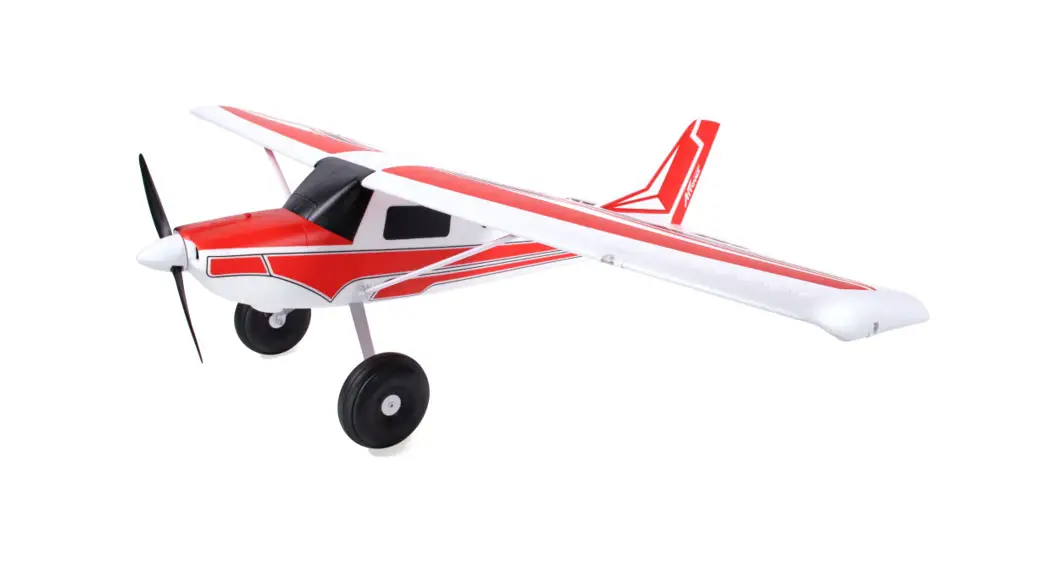
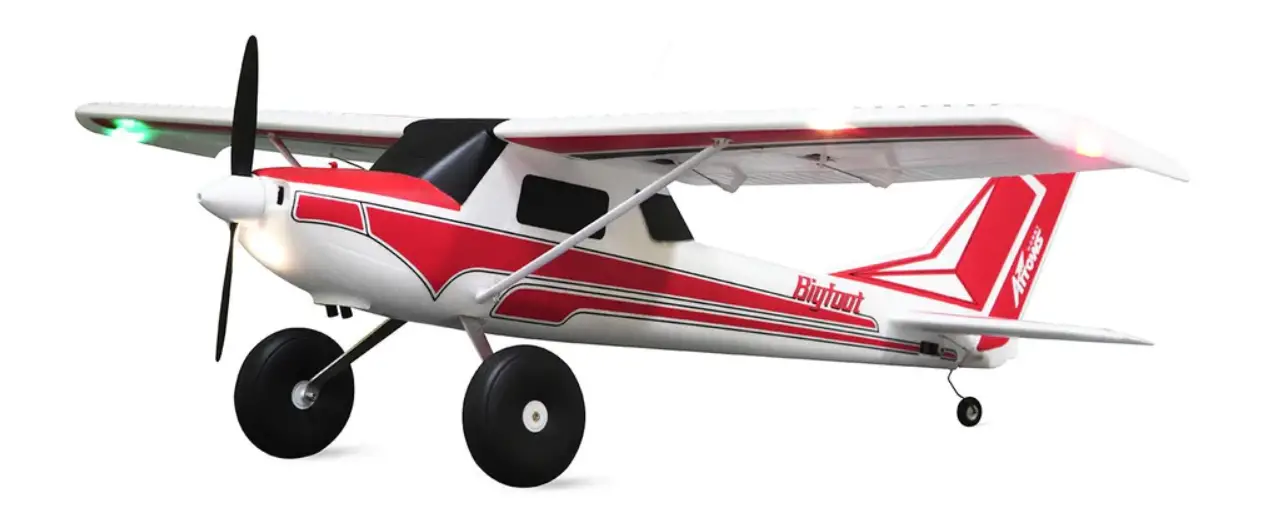
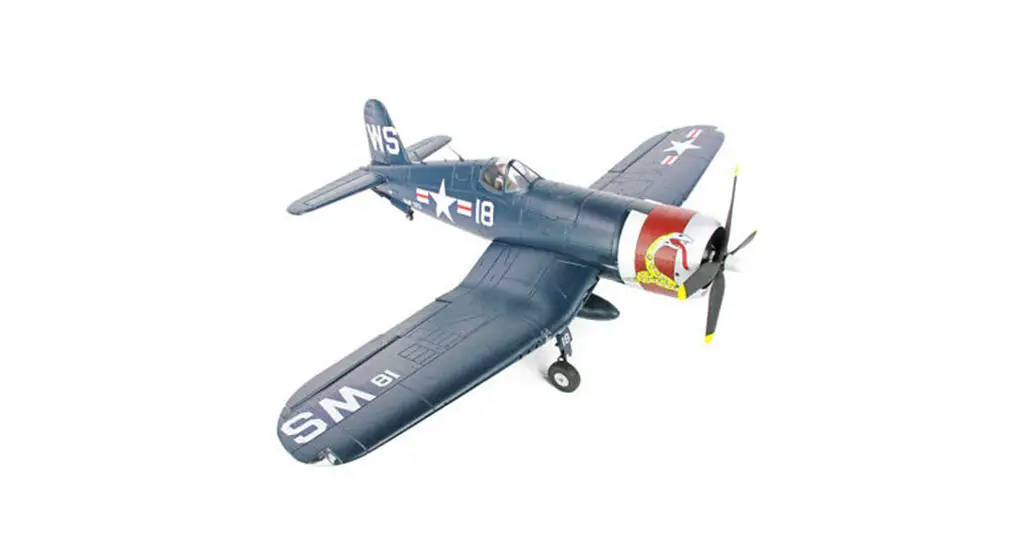
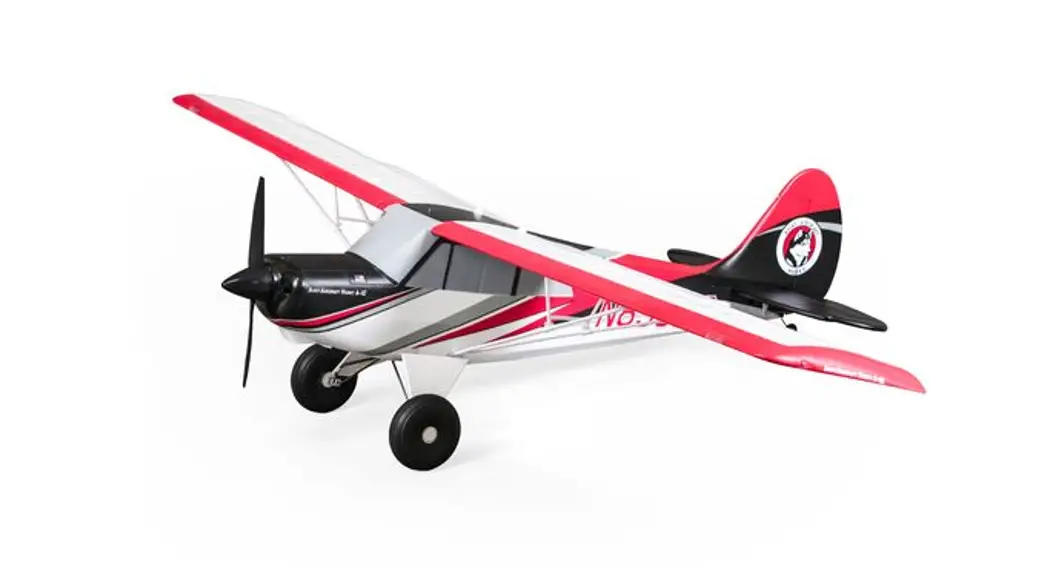
Explore new heights with the Arrows Hobby 1450mm Tecnam-2010
Designed from the ground up as a beginner-friendly aircraft, the Arrows Hobby Tecnam-2010 is easy to build and easy to fly.
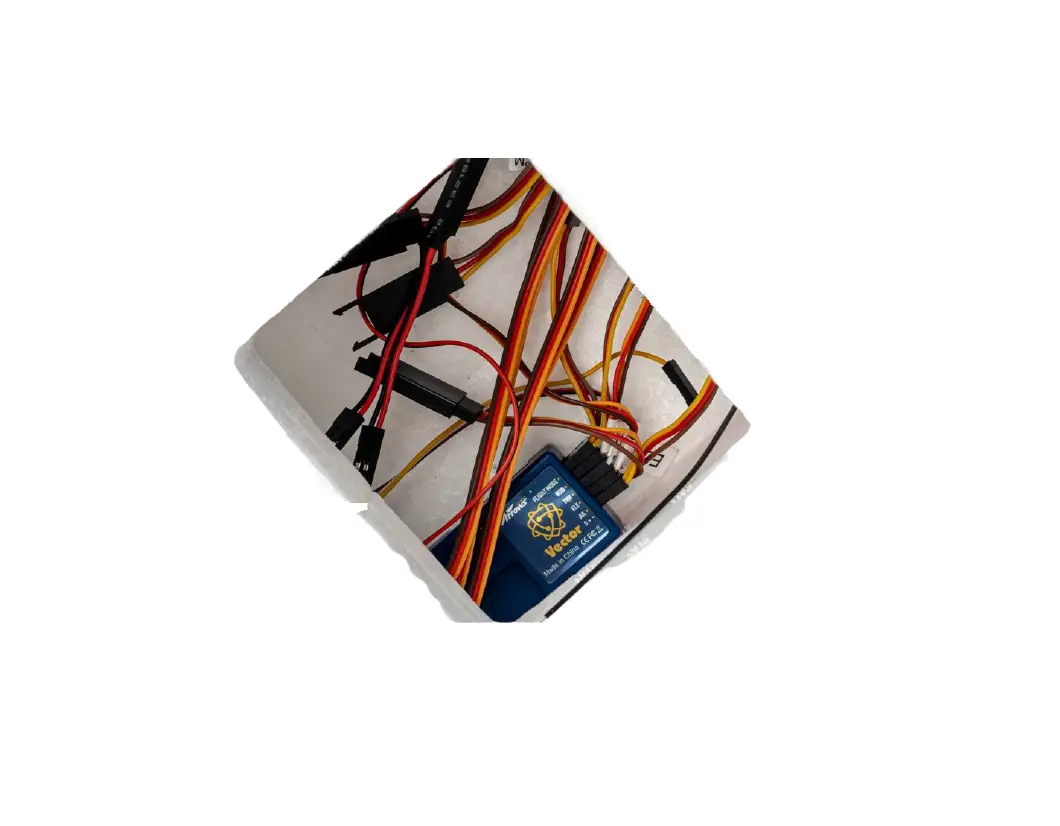
Easy to build: Thanks to the modular construction of the airframe, the aircraft is ready for flight with the installation of only a few screws. Remove the screws and the aircraft easily comes apart for transportation and storage. Easy to fly: Light wing loading and a high-lift airfoil design give the aircraft highly predictable flight characteristics. With the pre-installed Vector system, the Tecnam-2010 is one of the most forgiving aircraft on the market, while retaining aerobatic performance for advanced pilots looking for a relaxing weekend flyer. The nose wheel and rudder are controlled by independent servos- allowing for easy ground handling.
Power: Power comes courtesy of a high-quality 3536-850KV motor and 30A ESC (Arrows recommends an 11.1V 2200mAh 25C flight battery). when paired with the highly efficient 11×7 propeller and proper throttle management, expect flight times of up to 15 minutes! Advanced features: Built using durable EPO material and equipped with rugged plastic wing struts, the Tecnam-2010 will stand up to a surprising amount of wear and tear. A latch-type battery cover makes changing batteries a painless experience.
Floats are included for pilots who want to explore the thrills of floatplane flying!
Whether you’re a beginner or an advanced pilot, the Arrows Hobby 1450mm Tecnam-2010 is the perfect aircraft to have in your fleet!
Features:
|
|
Specifications
| Wingspan | 1450mm (57.1in) |
| Overall length | 1110mm (43.7in) |
| Flying weight | ∼1280g |
| Motor size | 3536-KV850 |
| Wing load | 42.7g/dm2 (0.09oz/in2) |
| Wing area | 30dm2 (464sq.in) |
| ESC | 30A |
| Servo | 9g Servo x 7 |
| Recommended battery | 11.1V 2200mAh 25C |
Kit contents
Before assembly, please inspect the contents of the kit. The photo below details the contents of the kit with labels. If any parts are missing or defective, please identify the name or part number (refer to the spare parts list near the end of the manual) then contact your local shop.
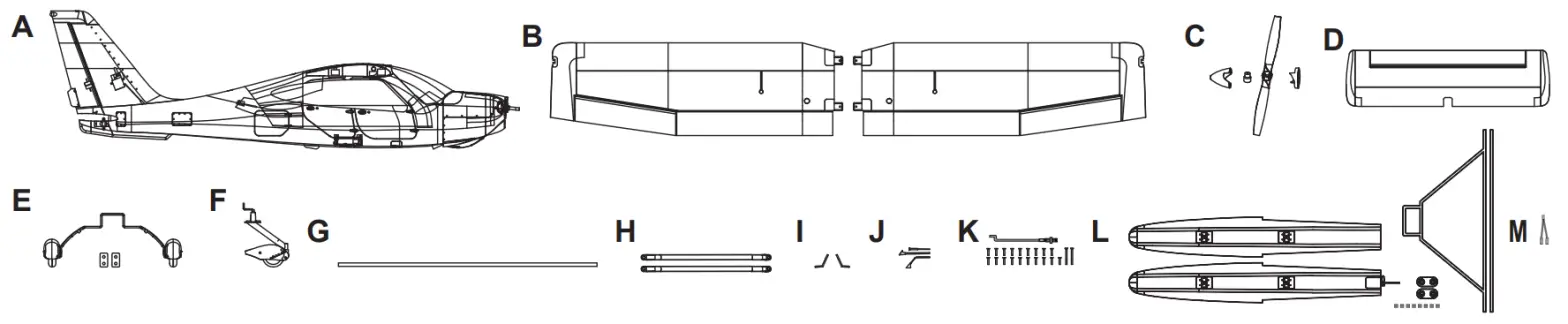
| A: Fuselage B: Main wing C: Propeller and spinner D: Horizontal stabilizer E: Main landing gear assembly F: Nose landing gear assembly | G: Wing spar H: Wing struts I: Side steps J: Antennae (HKM3.0X26-1) K: Screws and pushrod sets L: Floats (HKM3.0X10-16) M: Y-harness |
Model assembly
Main Wing installation
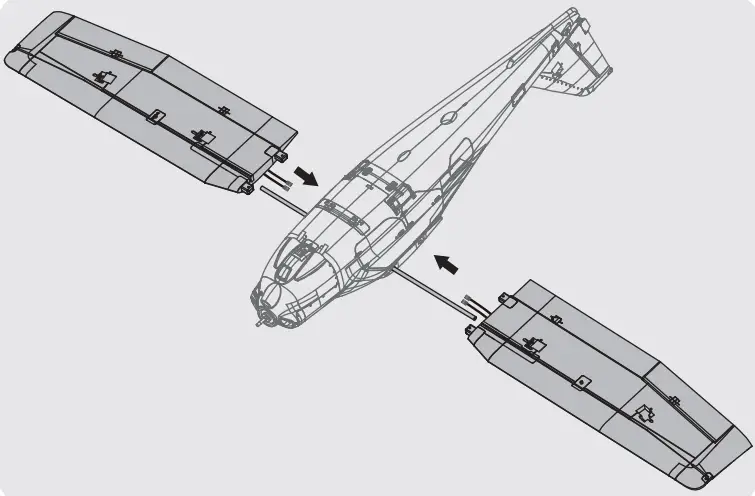
- Install the wing spar into the fuselage cutout.
- Slide the wing halves onto the wing spar.

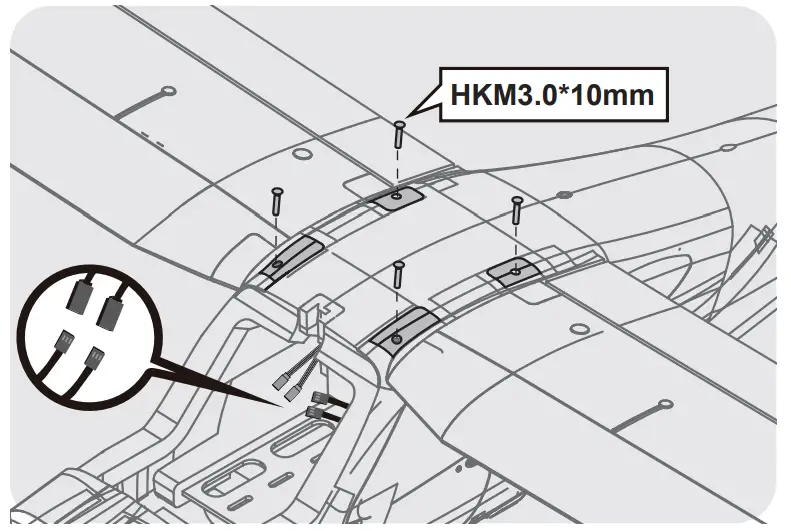
- Run the aileron wire harness, flaps, and lighting cables into the fuselage and connect using a Y connector.
- Secure the wing halves onto the fuselage using the included screws. Make sure not to over-tighten the screws.


- Install the wing struts, making sure that they are facing the right orientation.
- Secure the wing struts using body clips.
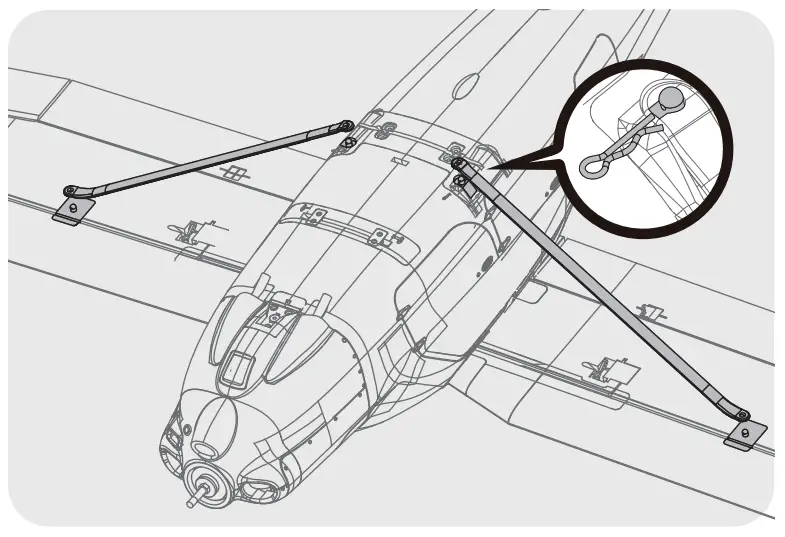
Horizontal stabilizer installation
- Install the horizontal stabilizer into the fuselage slot as shown in the picture.
- Move the rudder control surface to one side, this will help with the alignment of the final screw.
Note: be careful not to over-tighten the screws.

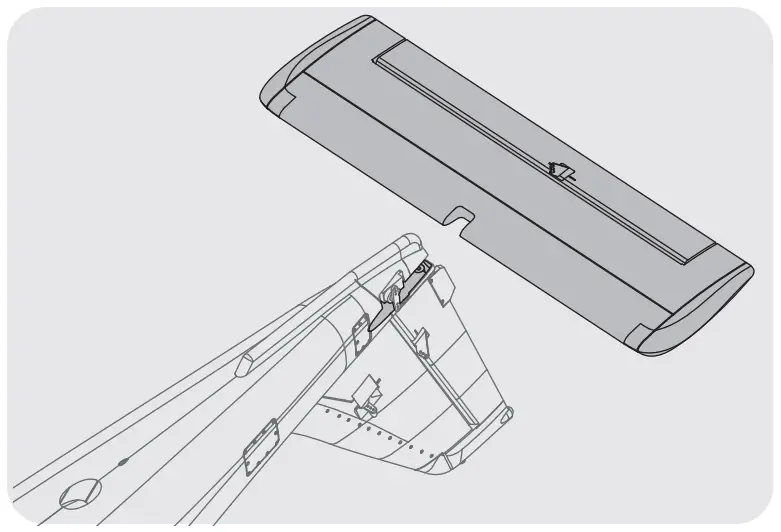
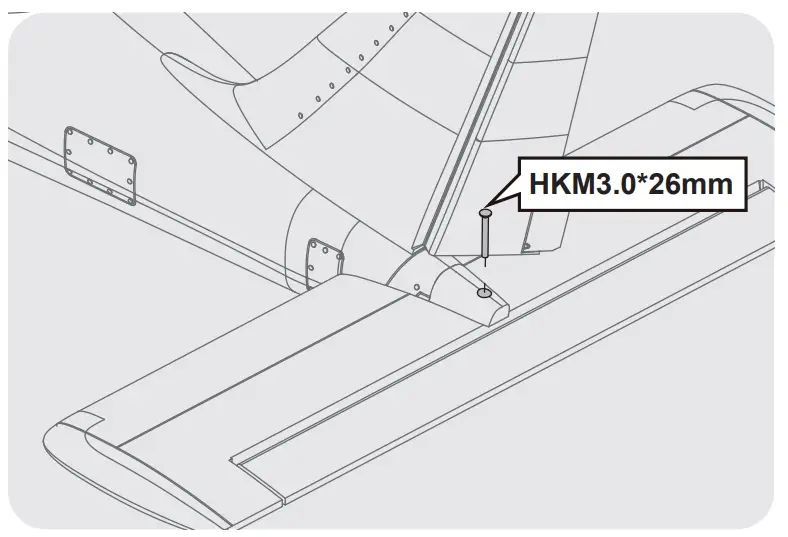
Push roils and controls arm installations
- With the elevator servo centered and in its neutral position, connect the pushrod and clevis onto the elevator control horn.

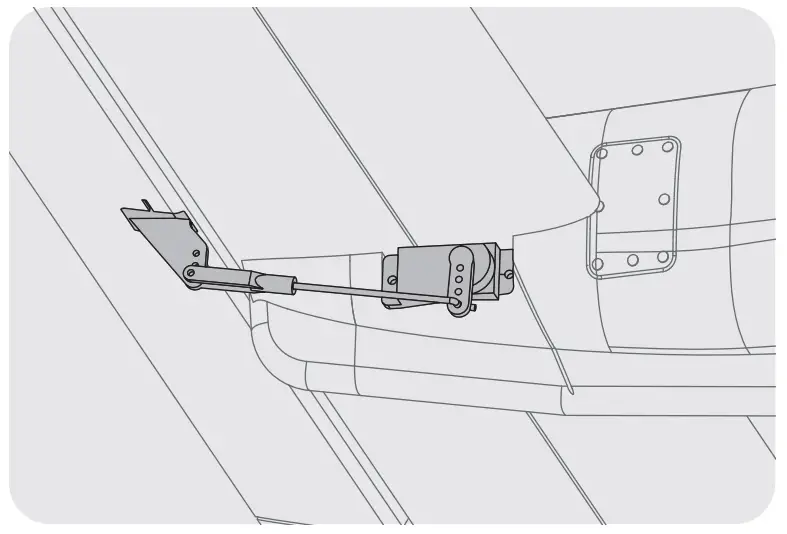
Landing gear installation
- Install the landing gear assembly onto the aircraft making sure that the landing gear is orientated correctly.
- Secure the landing gear assembly using the retainers and screws as shown in the picture.

- Install the nose landing gear into its slot, ensuring that the pushrod is linked with the control horn.
- Secure the nose landing gear with screws.

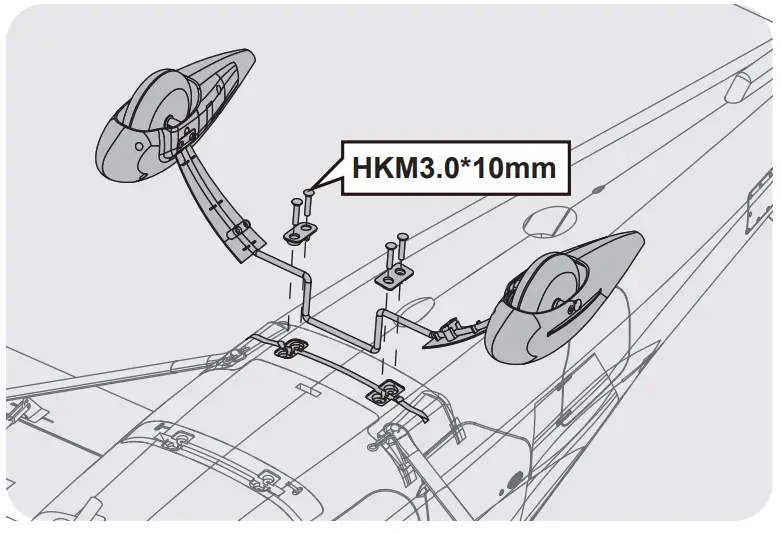
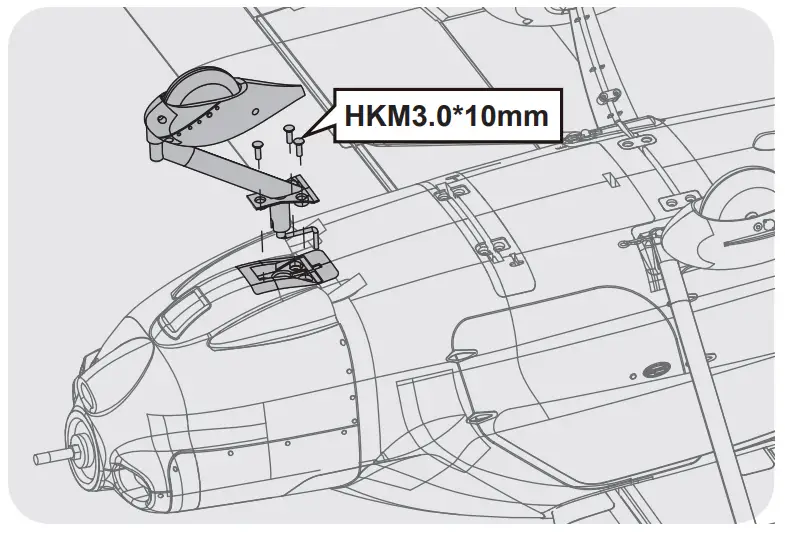
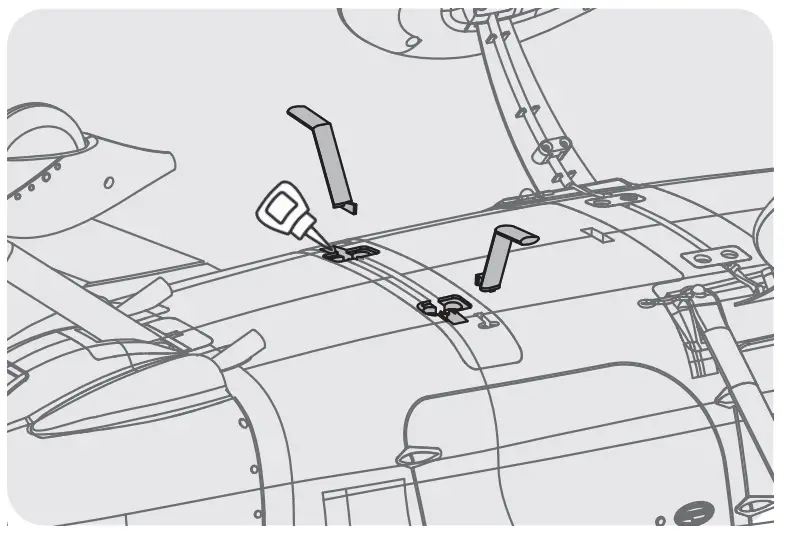
Sidestep installed
- Apply glue to the location shown in the photo and adhere the side steps onto the fuselage.

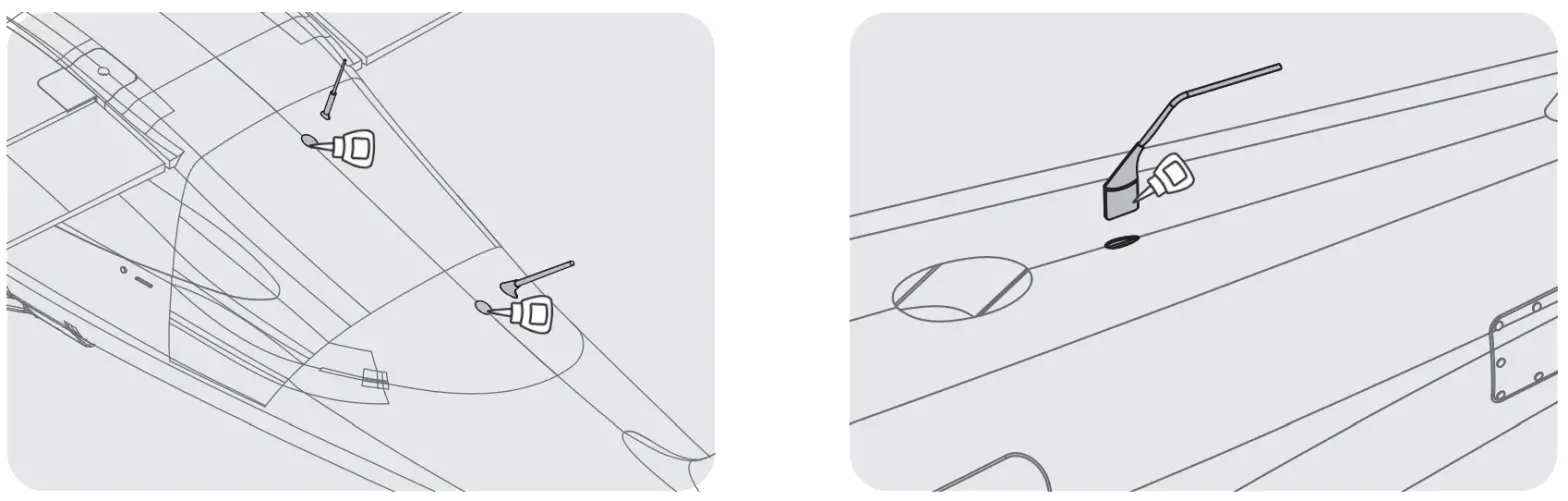
Antenna installation
- Apply glue to the location shown in the photo and adhere the antennae onto the fuselage.

Propeller and spinner installation
- Install the propeller and spinner in the order shown, be careful not to over tighten the bolt.

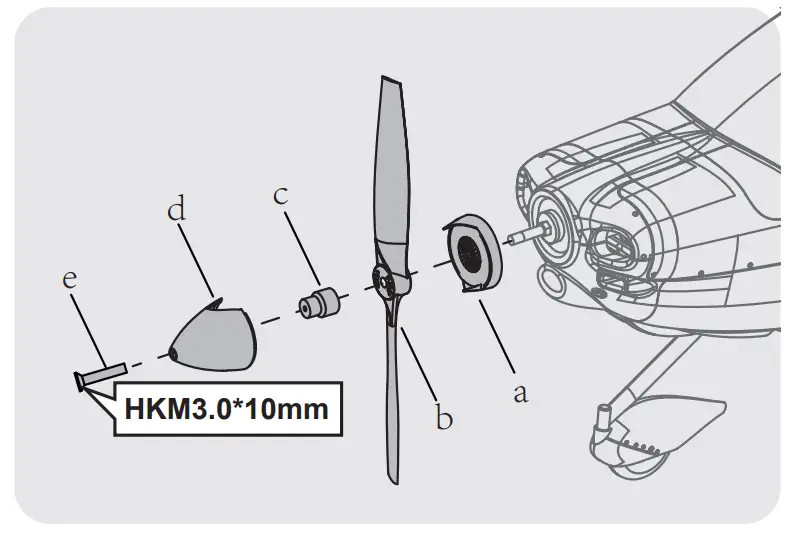
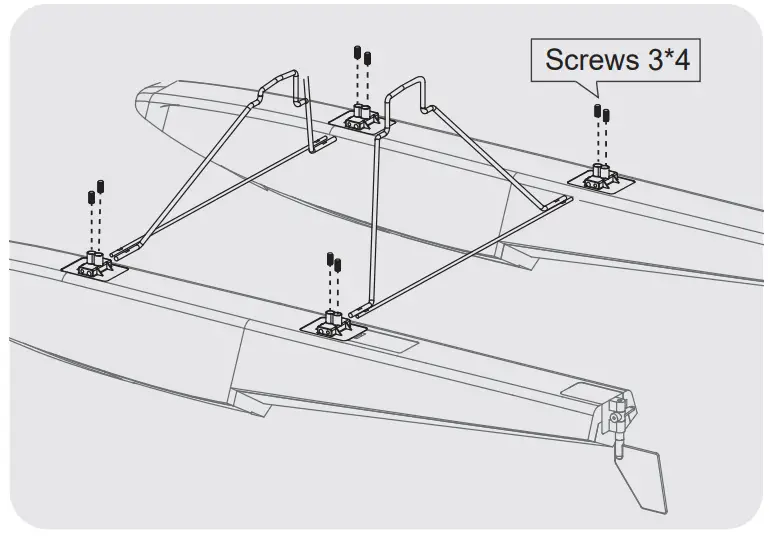
Installation of floats
- Assemble the float struts to the plastic holder as shown and secure the struts with screws.

- Secure the float set onto the bottom of the fuselage using the included plastic parts and screws as shown.
Notice: The connectors on both sides should be attached precisely and firmly.
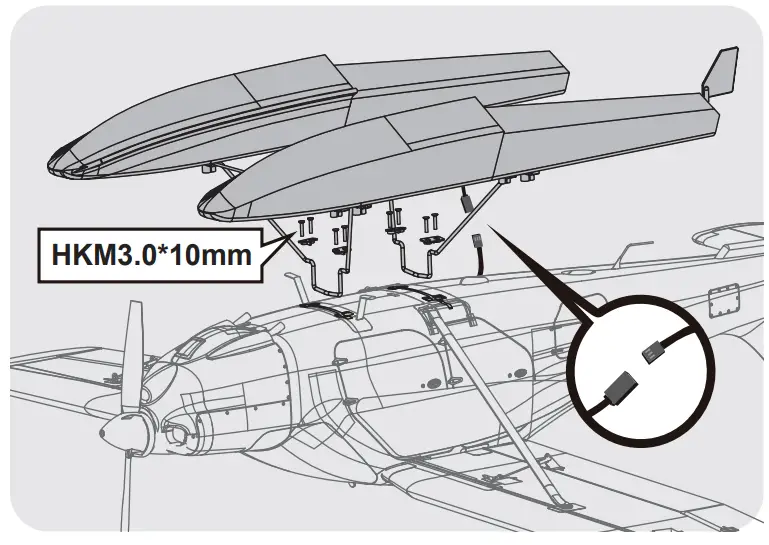
Battery installation
- Remove the battery hatch.
- Remove the hook and loop tape from the fuselage. Apply the looped surface to the battery.
- Install the battery into the fuselage- securing it with the preinstalled battery straps.
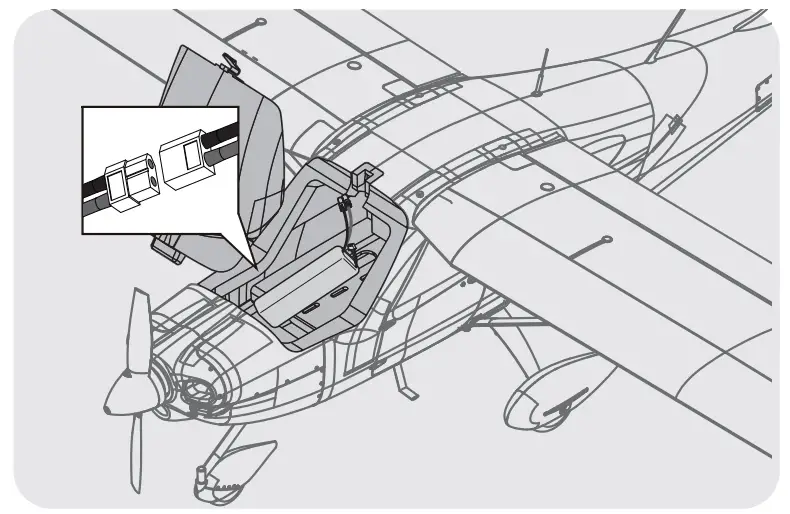
Note: The weight of each battery may vary due to different manufacturing techniques. Move the battery fore or aft to achieve the optimal center of gravity.
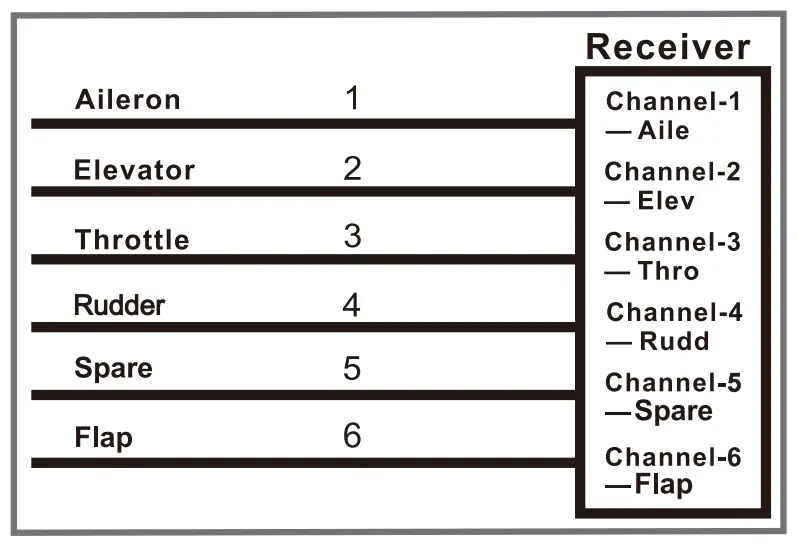
Receiver diagram
The cables from the servo connector board should be connected to your receiver in the order shown.
Note that the LEDs can be powered by any spare channel on the receiver. Tuck the wire leads into the recessed cavity towards the rear of the battery hatch.
Preflight cheek
Important ES and model information
- The ESC included with the model has a safe start. If the moto battery is connected to the ESC and the throttle stick is not in the low throttle or off position, the motor will do not start until the throttle stick is moved to the low throttle or off position. Once the throttle stick is moved to the low throttle or off position, the motor will emit a series of beeps. Several beeps with the same tune mean the ESC has detected the cells of the battery. The count of the beeps equals the cels of the battery. The motor is now armed and will start when the throttle is moved.
- The motor and ESC come pre-connected and the motor rotation should be correct. If for any reason the motor is rotating in the wrong direction, simply reverse two of the three motor wires to change the direction of rotation.
- The motor has an optional brake setting. The ESC comes with a brake switched off and we recommend that the model be flown with the brake off. However, the brake could be accidentally switched on if the motor battery is connected to the ESC while the throttle stick is set at full throttle. To switch the brake off, move the throttle stick to the full throttle and plug in the motor battery. The motor will beep one time. Move the throttle stick to the low throttle or the off position. The motor is ready to run and the brake will be switched off.
- Battery Selection and Installation. We recommend the 11.1V 2200mAh 25C Li-Po battery. If using another battery, the battery must be at least an 11.1V 2200mAh 25C battery. Your battery should be approximately the same capacity, dimension, and weight as the 11.1V 2200mAh 25C Li-Po battery to fit the fuselage without changing the center of gravity significantly.
transmitter and model setup
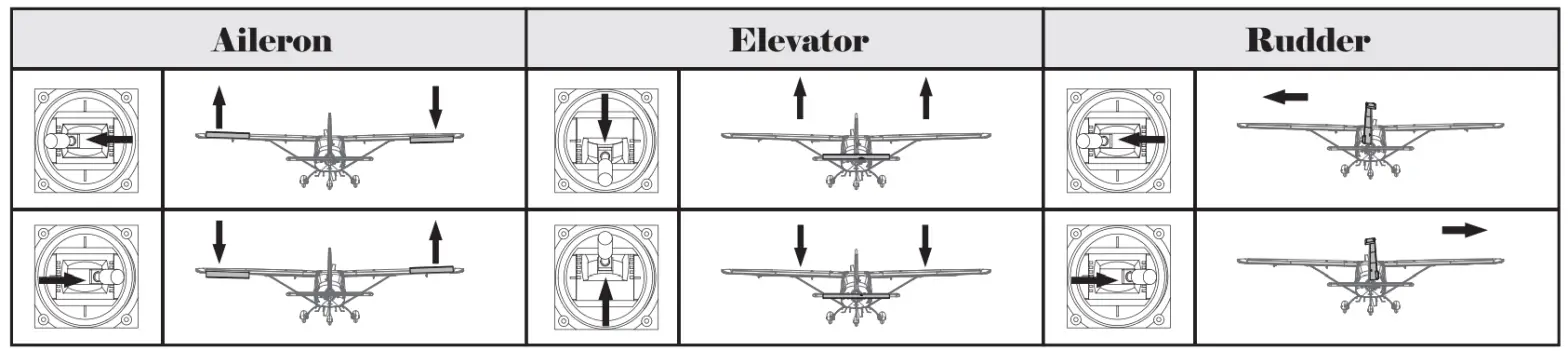
After assembly and prior to your first flight, make sure all control surfaces respond correctly to your transmitter by referring to the diagram below.
Control throws
The suggested control throw setting for the 1450mm Tecnam-2010 are as follows (dual-rate setting):
Tips: The maiden flight should always be flown using low rates, fly the aircraft until you are familiar with its characteristics prior to trying high rates. Make sure the aircraft is flying at a decent altitude and speed prior to using high rates, as the aircraft will be sensitive to control inputs with the larger control surface movements.
| High Rate | Low Rate | |
| Elevator | 18mm up / down | 12mm up / down |
| Rudder | 24mm left / right | 18mm left / right |
| Aileron | 16mm up/ down | 10mm up / down |
Control horn and servo arm settings
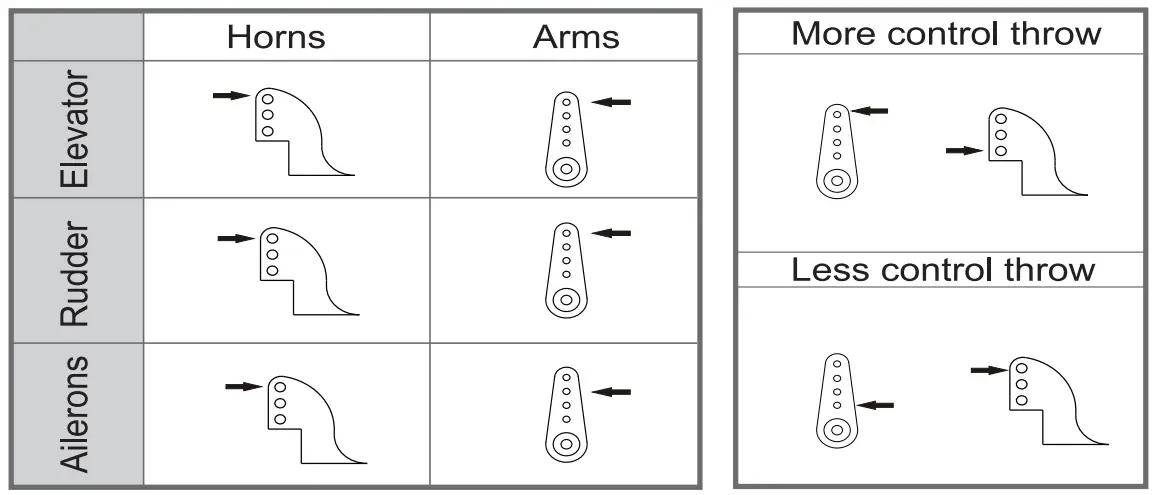
- The table shows the factory settings for the control horns and servo arms. Fly the aircraft at the factory settings before making changes.
- After flying, you may choose to adjust the linkage positions for the desired control response.
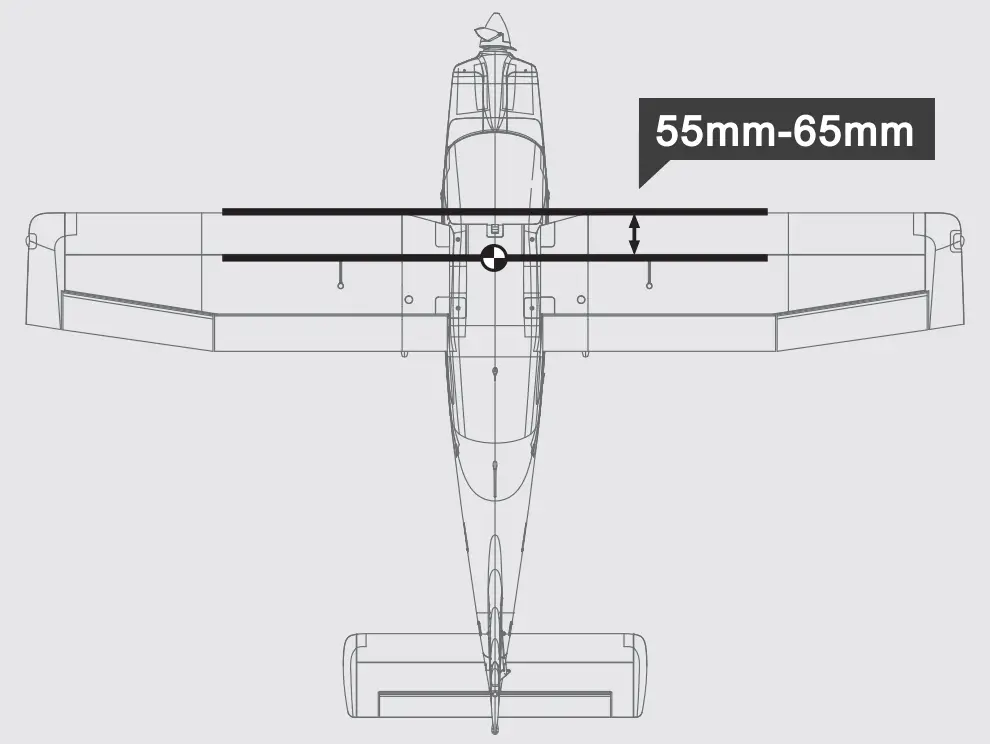
Finding the center of gravity
Finding the correct center of gravity is critical in ensuring that the aircraft performs In a stable and responsive manner. Please adjust the weight distribution so the aircraft balances In the range stated on the diagram.
- Depending on the capacity and weight of your chosen flight batteries, move the battery forward or backward to adjust the center of gravity.
- If you cannot obtain the recommended CG by moving the battery to a suitable location, you can also install a counterweight to achieve the correct CG. However, with the recommended battery size, a counterweight is not required. We recommend flying without unnecessary counterweight.
Before flying the model
Find a suitable flying site
Find a flying site dear of buildings, trees, power lines, and other obstructions. Until you know how much area will be required and have mastered flying your plane in confined spaces, choose a site that is at least the size of two to three football fields – a flying field specifically for R/C planes is best. Never fly near people – especially children, who can wander unpredictably.
Performing a range check
A radio range check should be performed prior to the first flight of the day. This test may assist you in detecting electronic problems that may lead to a loss of control- problems such as low transmitter batteries, defective or damaged radio components, or radio interference. This usually requires an assistant and should be done at the flying site.
Always turn your transmitter on first. Install a fully charged battery in the battery bay, then connect it to the ESC. In this process, make sure that the throttle cut functionality is on, and that the throttle stick is secured in its lowest position- otherwise. the propeller/fan will engage and possibly cause bodily harm.
Note: Please refer to your transmitter manual that came with your radio control system to perform a ground range check. If the controls are not working correctly or if anything seems wrong, do not fly the model until you correct the problem. Make certain all the servo wires are securely connected to the receiver and the transmitter batteries have a good connection.
Before flying the moth
Monitor your flight time
Monitor and limit your flight time using a timer (such as a stopwatch or on the transmitter, if available). As modern Lithium Polymer batteries are not designed to discharge completely, when the battery runs low, the ESC will lower their completely cut the power to the motors to protect the battery. Often (but not always) power can be briefly restored after the motor cuts off by holding the throttle stick all the way down for a few seconds. To avoid an unexpected dead-stick landing on your first flight, set your timer to a conservative 4 minutes. When your alarm sounds you should land right away.
Flying course
Take off
Point the aircraft into the wind while slowly applying power until the aircraft starts to track straight, use the rudder when necessary. When the aircraft reaches takeoff speed, ease back on the elevator stick until the aircraft is climbing at a constant rate without decelerating. Climbing at too steep of an angle at the relatively low speeds of a takeoff climb may result in an aerodynamic stall.
Flying
Always choose a wide-open space for flying your plane. It is ideal for you to fly at a sanctioned flying field. If you are not flying at an approved site always avoid flying near houses, trees, wires, and buildings. You should also be careful to avoid flying in areas where there are many people, such as busy parks, schoolyards, or soccer fields. Consult laws and ordinances before choosing a location to fly your aircraft. After takeoff, gain some altitude. Climb to a safe height before trying technical maneuvers.
Landing
Land the aircraft when you start to feel the sluggish motor response. If using a transmitter with a timer, set the timer so you have enough flight time to make several landing approaches. The model’s three-point landing gear allows the model to land on hard surfaces. Align the model directly into the wind and fly down to the ground. Fly the airplane down to the ground using 1/4-1/3 throttle to keep enough energy for proper flare. Before the model touches down, always fully decrease the throttle to avoid damaging the propeller or other components. The key to a great landing is to manage the power and elevator all the way to the ground and set down lightly on the main landing gear. With some practice, you will be able to set the aircraft gently on its main gear and hold it that way until the speed reduces enough where the nose wheel (tricycle landing gear aircraft) or tail wheel (tail draggers) settles onto the ground.
Maintenance
Repairs to the foam should be made with foam-safe adhesives such as hot glue, foam-safe CA, and 5min epoxy. When parts are not repairable, see the spare parts 1st for ordering by item number. Always check to make sure all screws on the aircraft are tightened. Pay special attention to make sure the spinner is firmly in place before every flight.
Troubleshooting
| Problem | Possible Cause | Solution |
| Aircraft will not respond to the throttle but respond to other controls. |
|
|
| Excessive vibration or propeller noise. |
|
|
| Reduced flight time or ft aircraft underpowered. |
|
|
| Control surfaces are unresponsive or sluggish. |
|
|
| Controls reversed. |
|
|
| Motor loses power Motor power pulses then motor loses power. |
|
|
Spare parts list
| AHAP101 | Fuselage | AHAP117 | Tire set |
| AHAP102 | Main Wing | AHAP118 | Float set |
| AHAP103 | Horizontal Stabilizer | AHPROP011 | Propeller |
| AHAP104 | Cowl | AHMount005 | Motor Mount |
| AHAP105 | Battery Cover | AHShaft005 | Motor Shaft |
| AHAP106 | Spinner | AHBoard010 | Motor Board |
| AHAP107 | R clasp | AHKV850 | 3536-KV850 |
| AHAP108 | Sticker | AHESC30A | 30A ESC |
| AHAP109 | Linkage Rods | AH9G54P | 9g gear servo 54 degree |
| AHAP110 | Screws set | AH9GPW | 9g Servo (with waterproof function) |
| AHAP111 | Pipe | AH9GP | 9g Servo |
| AHAP112 | Control Horns | ||
| AHAP113 | Supporting Struts | ||
| AHAP114 | Front Landing Gear Set | ||
| AHAP115 | Rear Landing Gear Set | ||
| AHAP116 | Landing Gear Insert |
www.arrowshobby.com
MADE IN CHINA