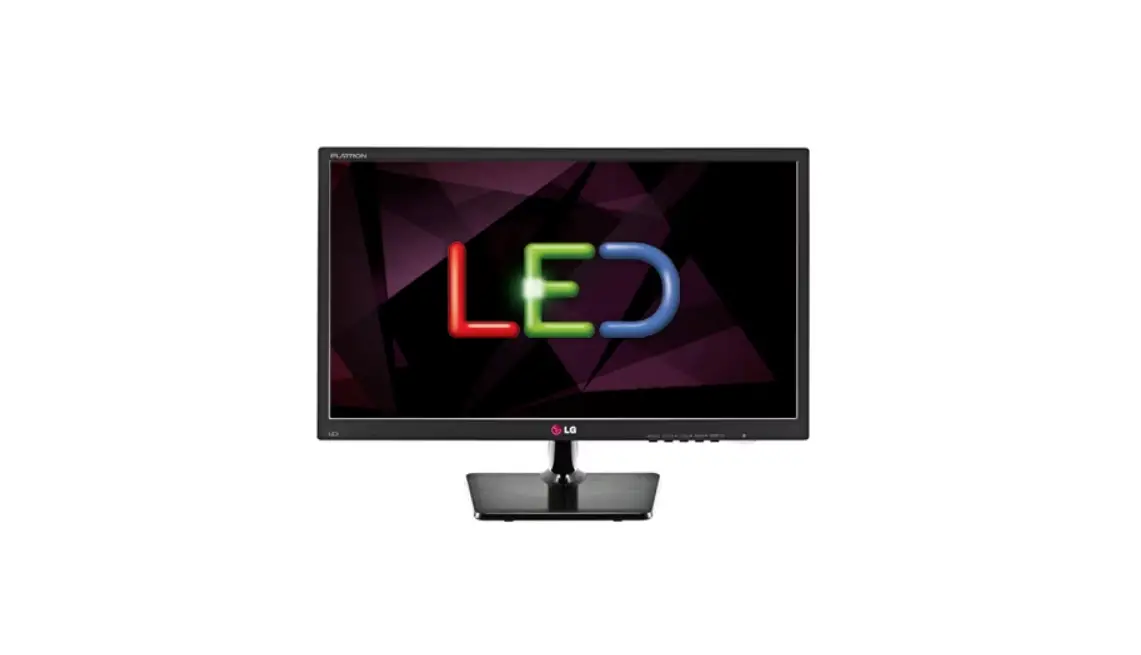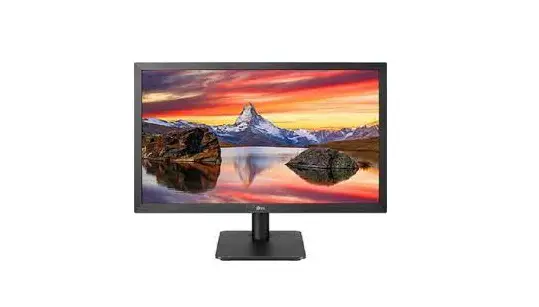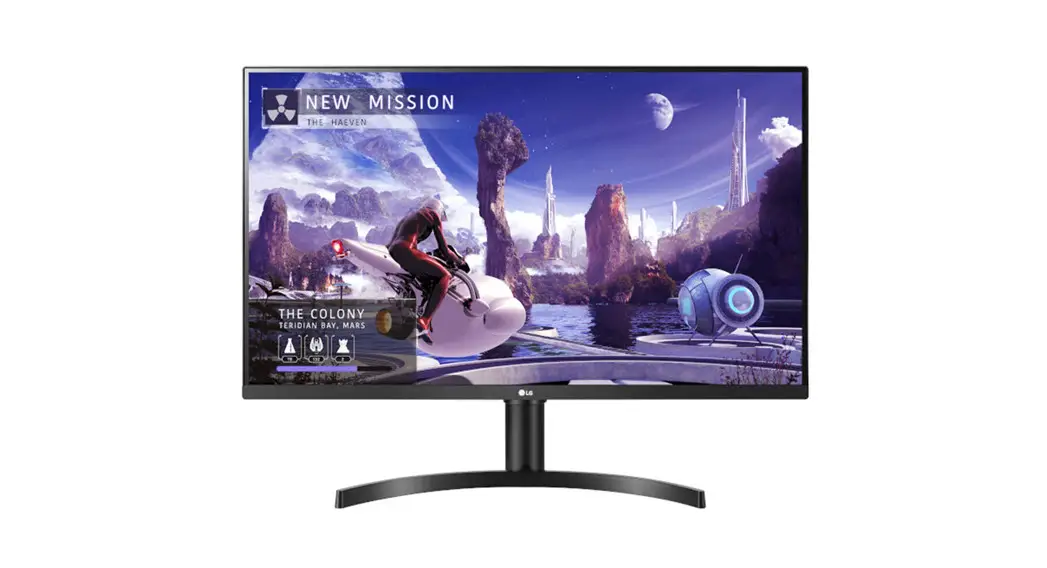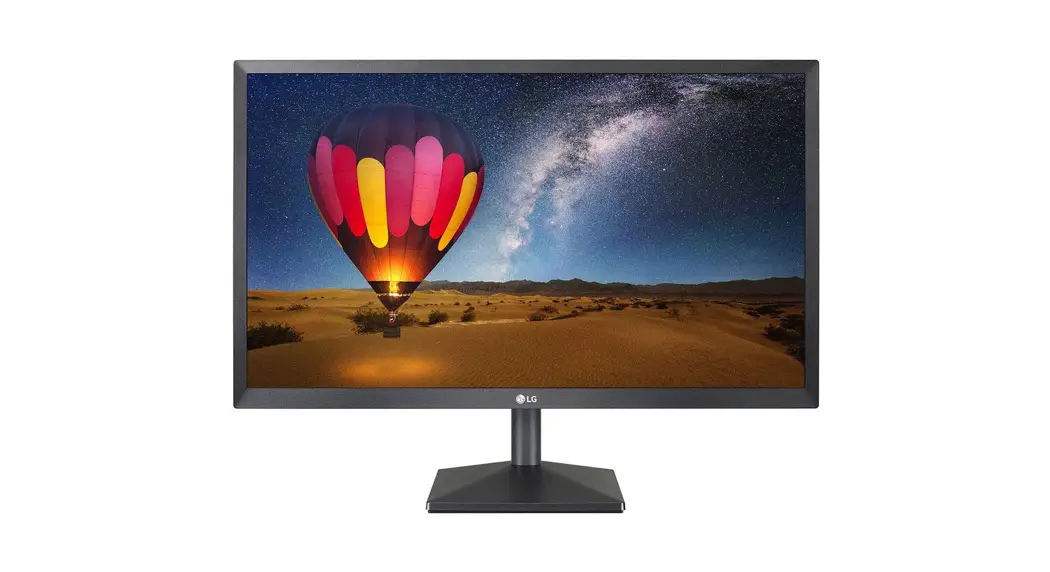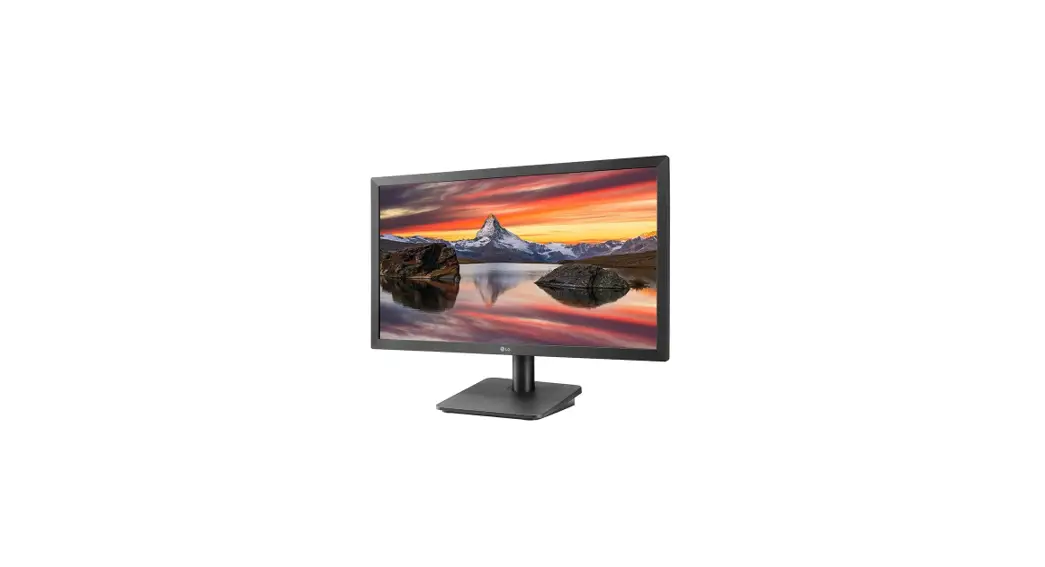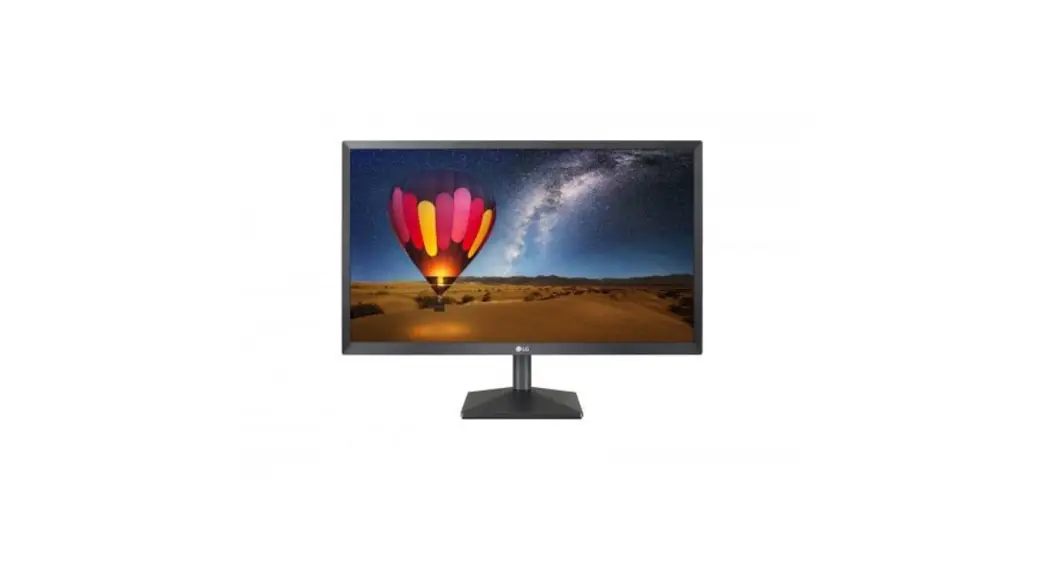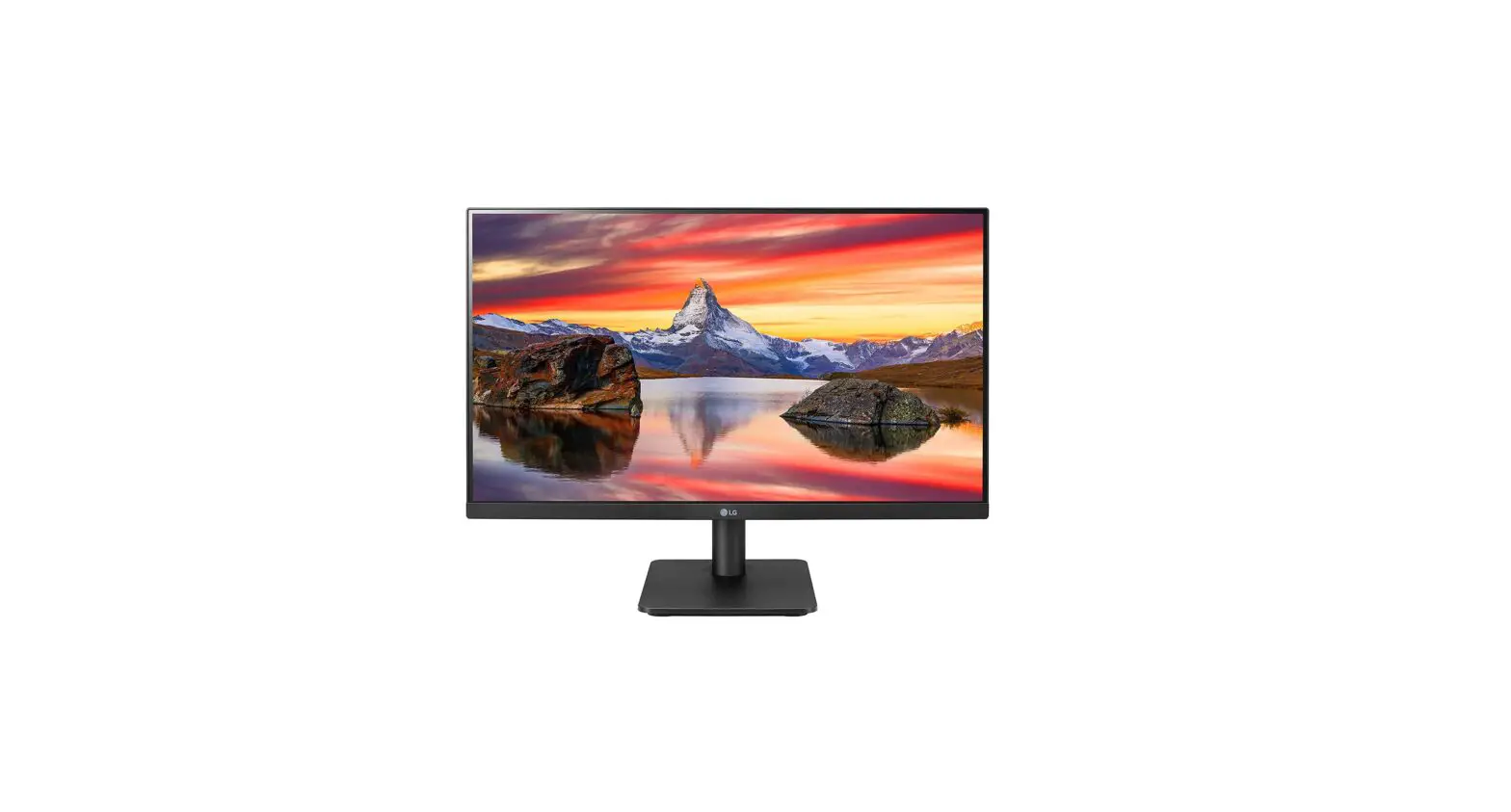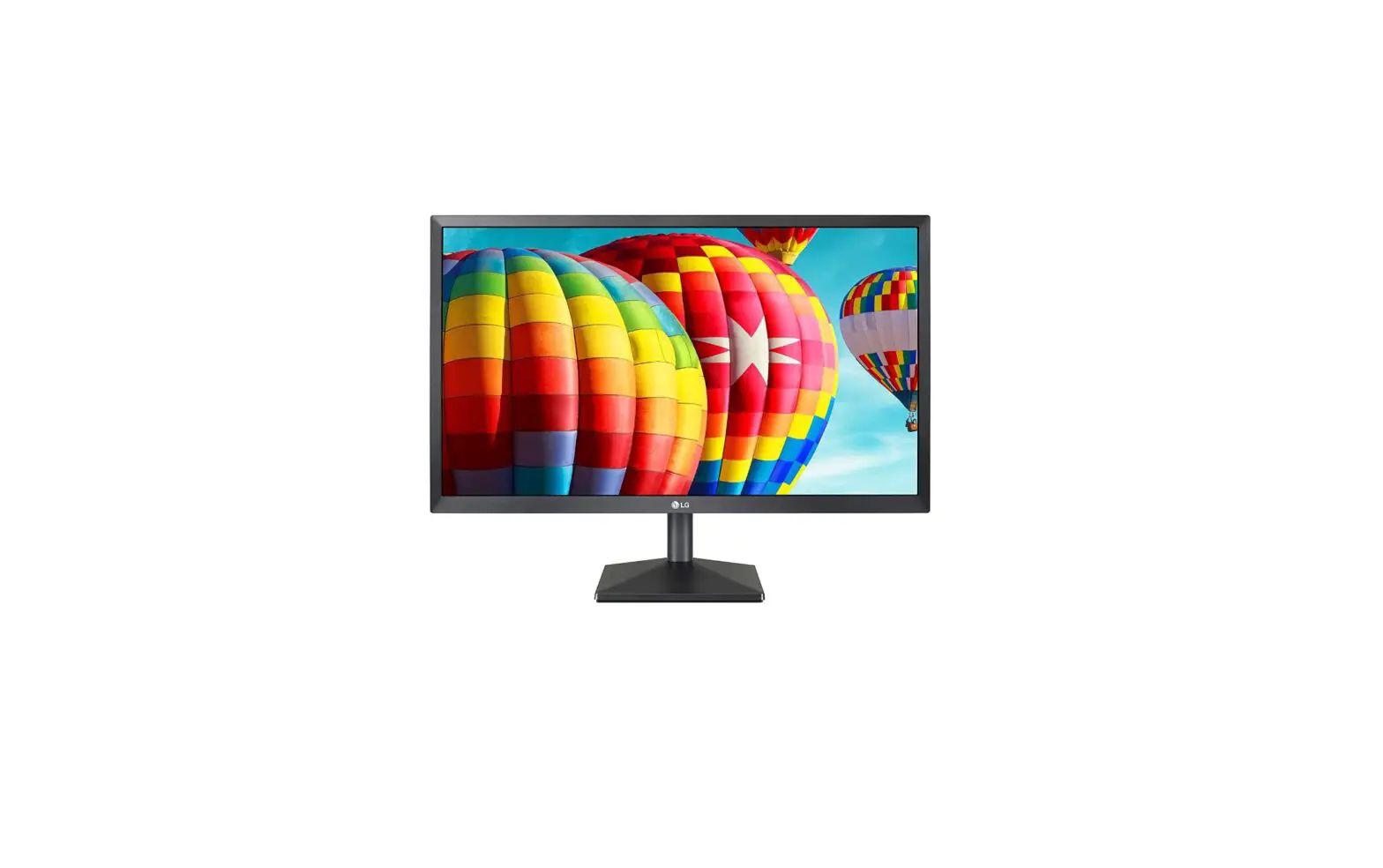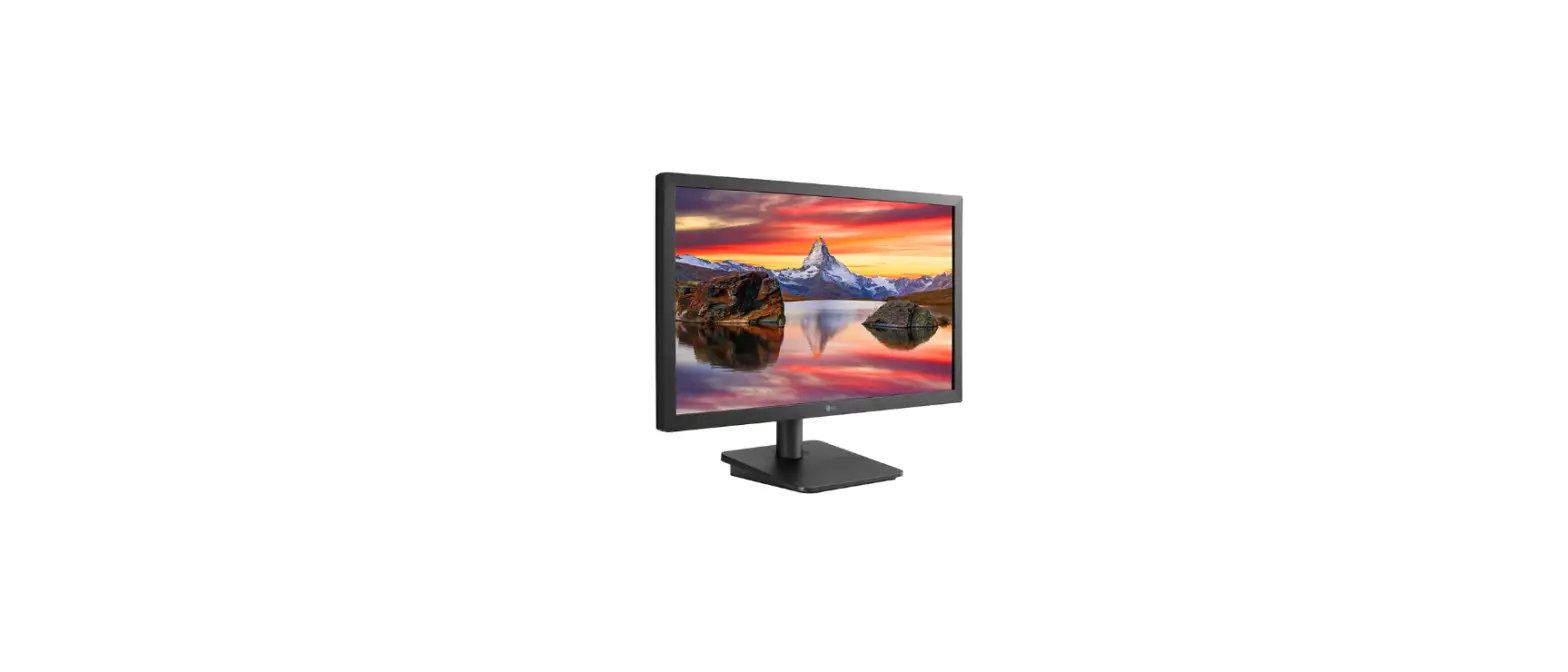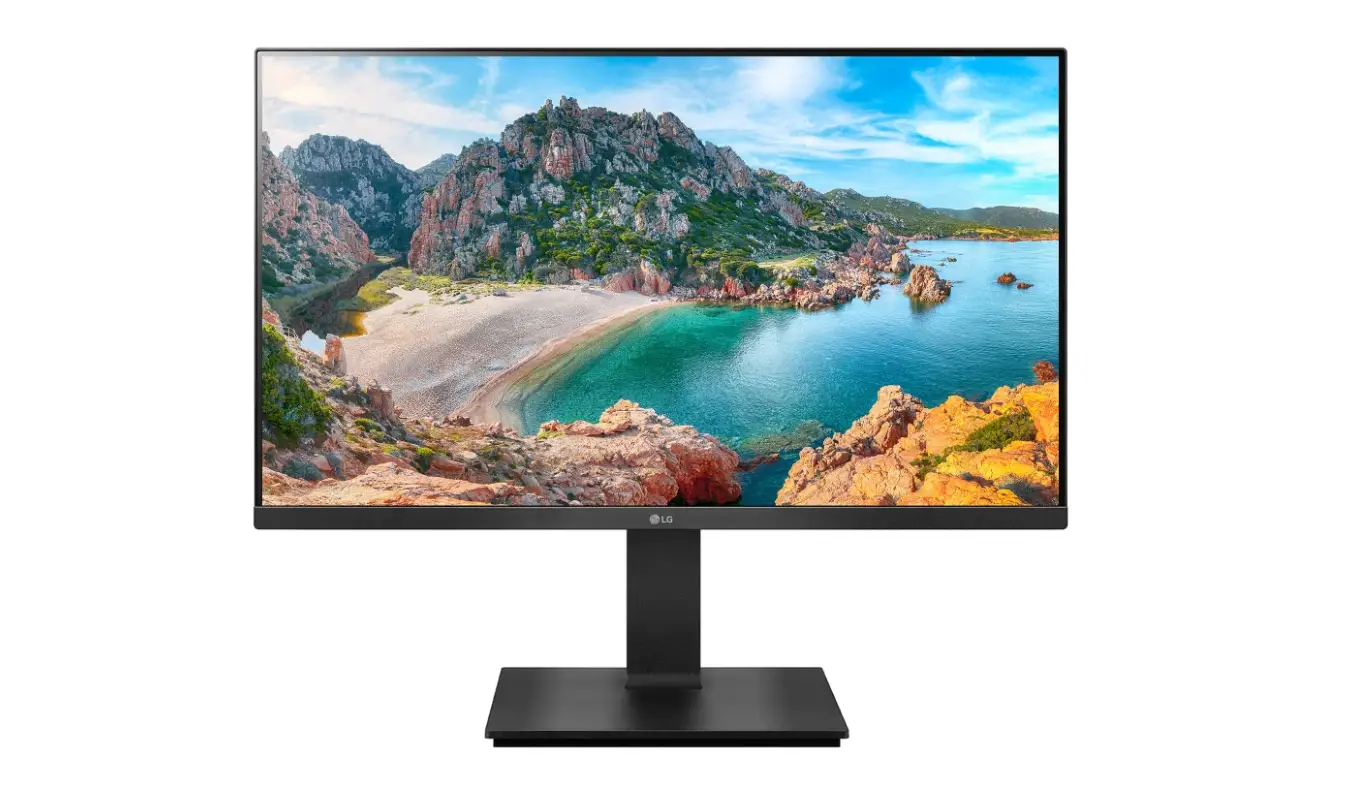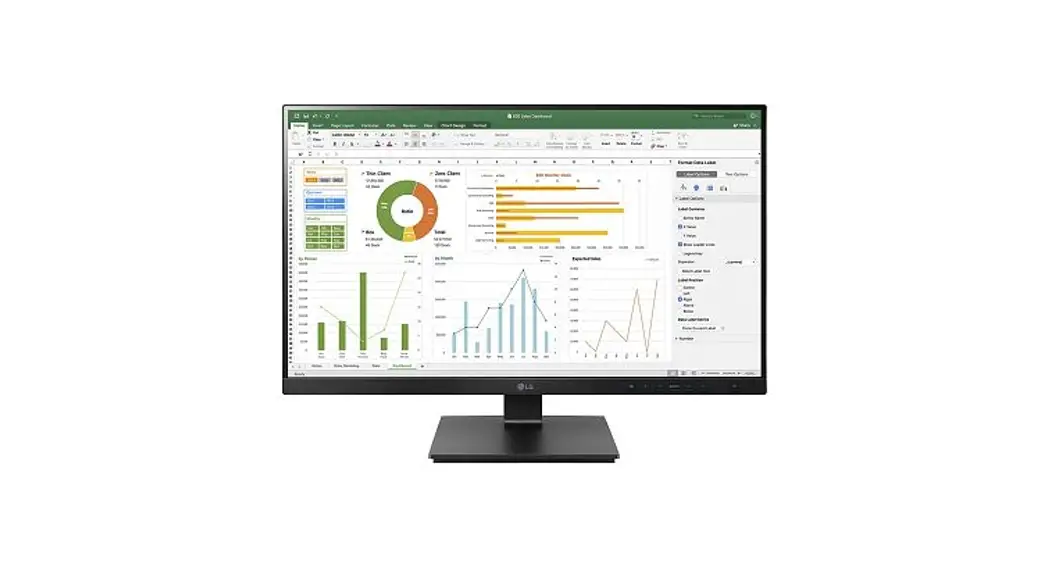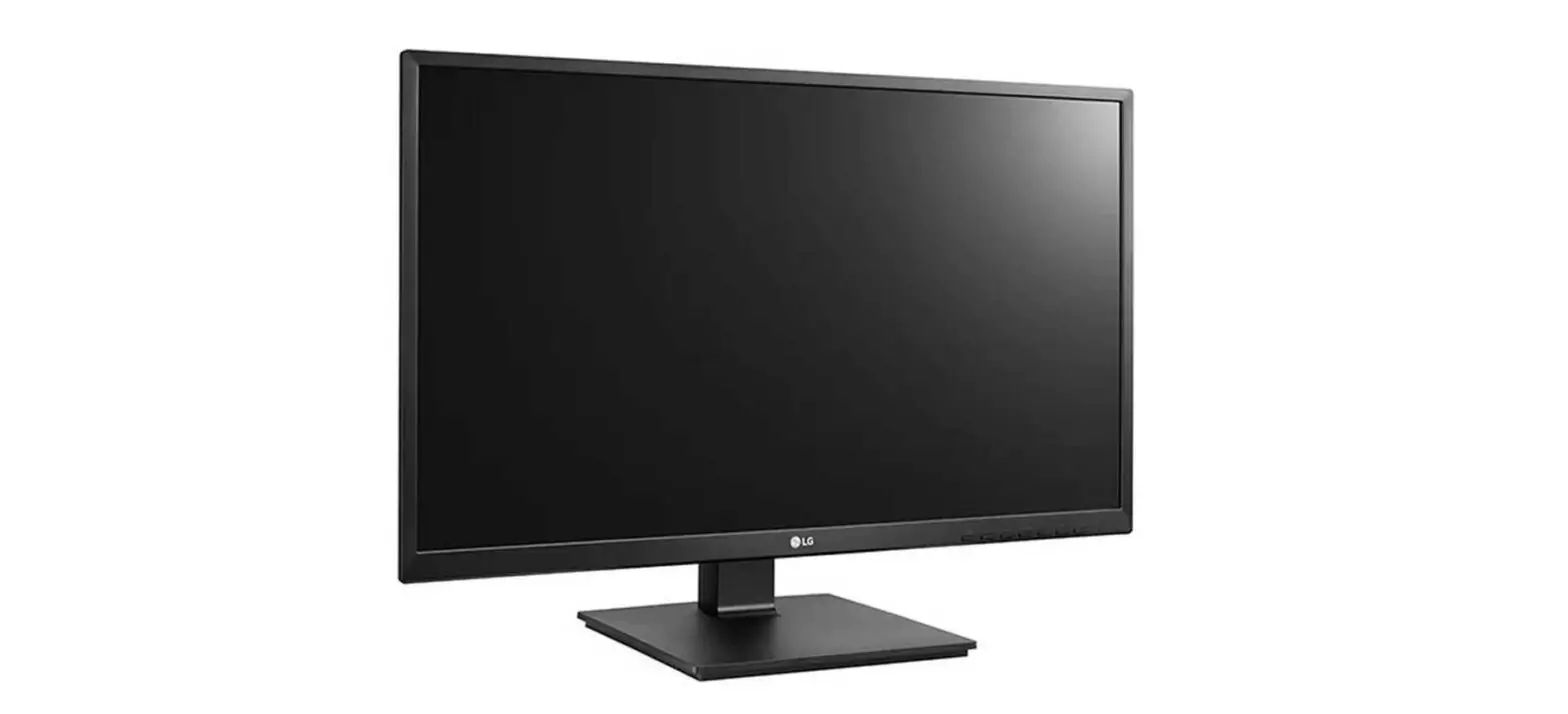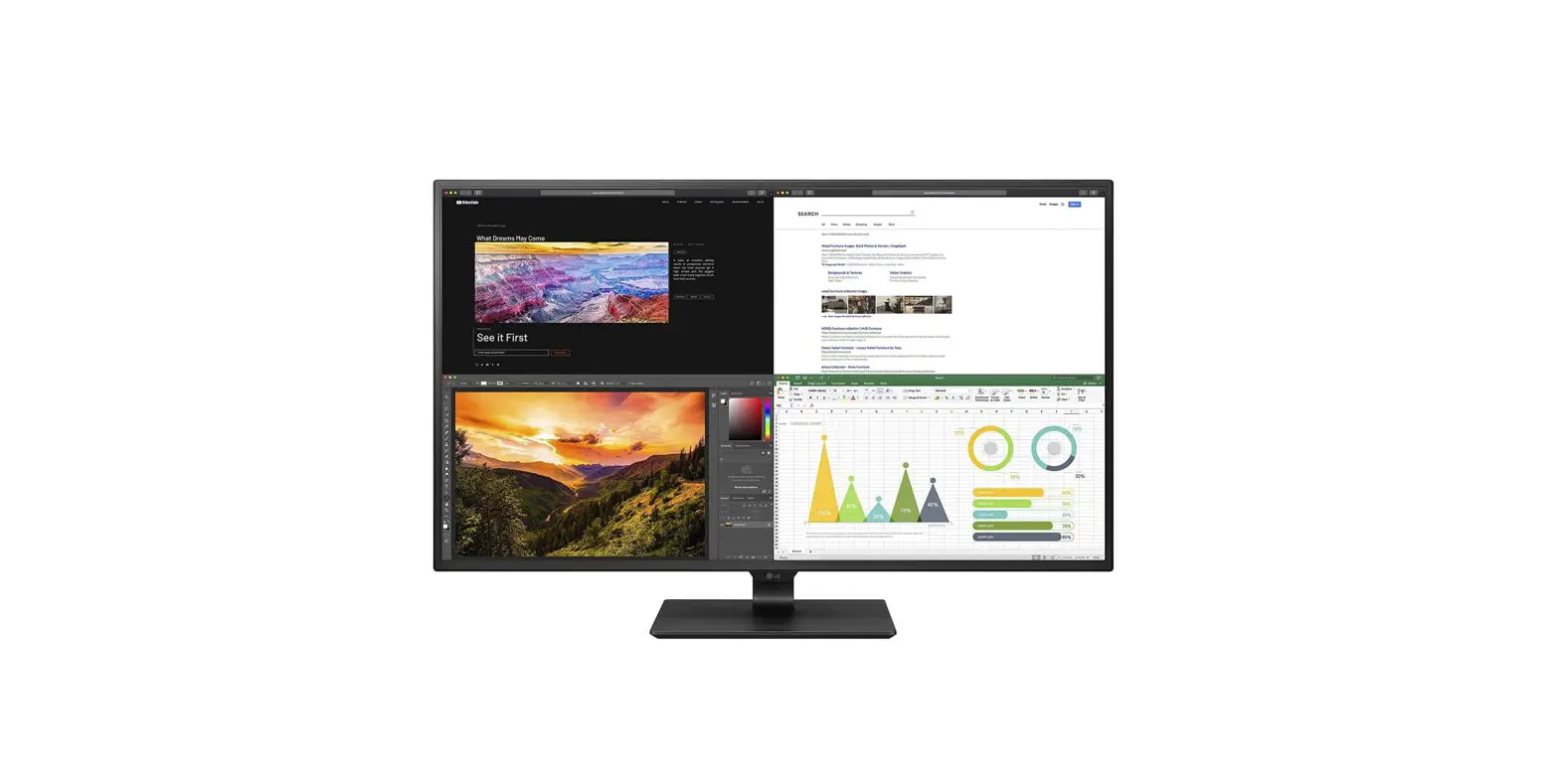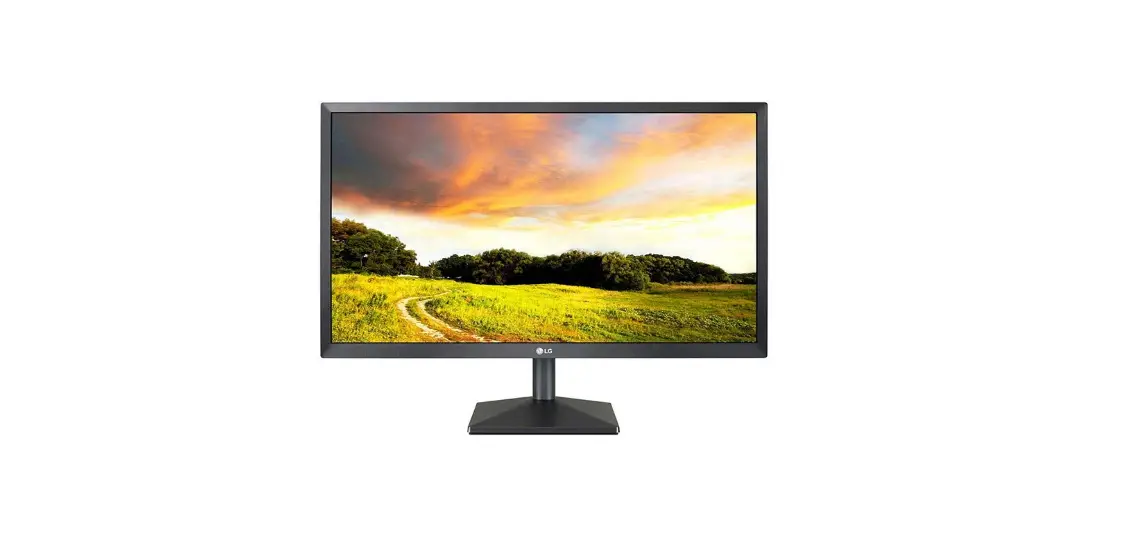

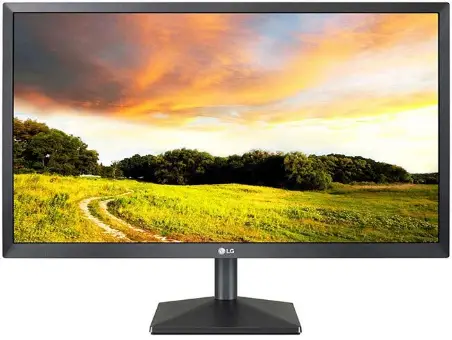
LG 22MK400H-B FHD LED Monitor
ASSEMBLING AND PREPARING
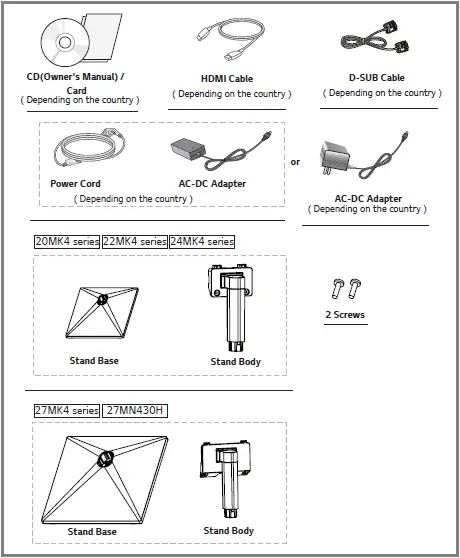
Product Components
Please check whether all the components are included in the box before using the product. If there are missing components, contact the retail store where you purchased the product. Note that the product and components may look different from those shown here.
 CAUTION
- Always use genuine components to ensure safety and product performance.
- The product warranty will not cover damage or injury caused by the use of counterfeit components.
- It is recommended that use the supplied components.
- If you use generic cables not certified by LG, the screen may not display or there may be image noises.
 NOTE
NOTE
- Note that the components may look different from those shown here.
- Without prior notice, all information and specifications in this manual are subject to change to improve the performance of the product.
- To purchase optional accessories, visit an electronics store or online shopping site or contact the retail store where you purchased the product.
Supported Drivers and Software
You can download and install the latest version from the LGE website (www.lg.com).
| Drivers and Software | Installation Priority |
| Monitor Driver | Recommended |
| OnScreen Control | Recommended |
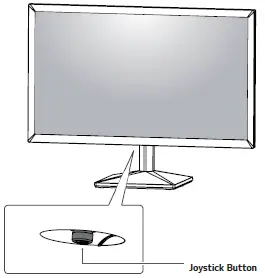
How to Use the Joystick Button
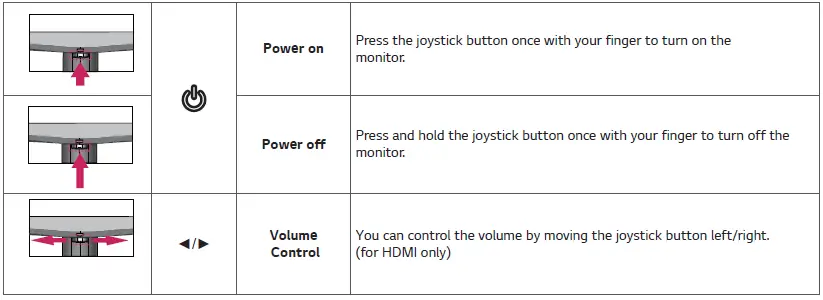
You can easily control the functions of the monitor by pressing the joystick button or moving it left/right with your finger.
Basic Functions
NOTE
- The joystick button is located at the bottom of the monitor.
Input Connector
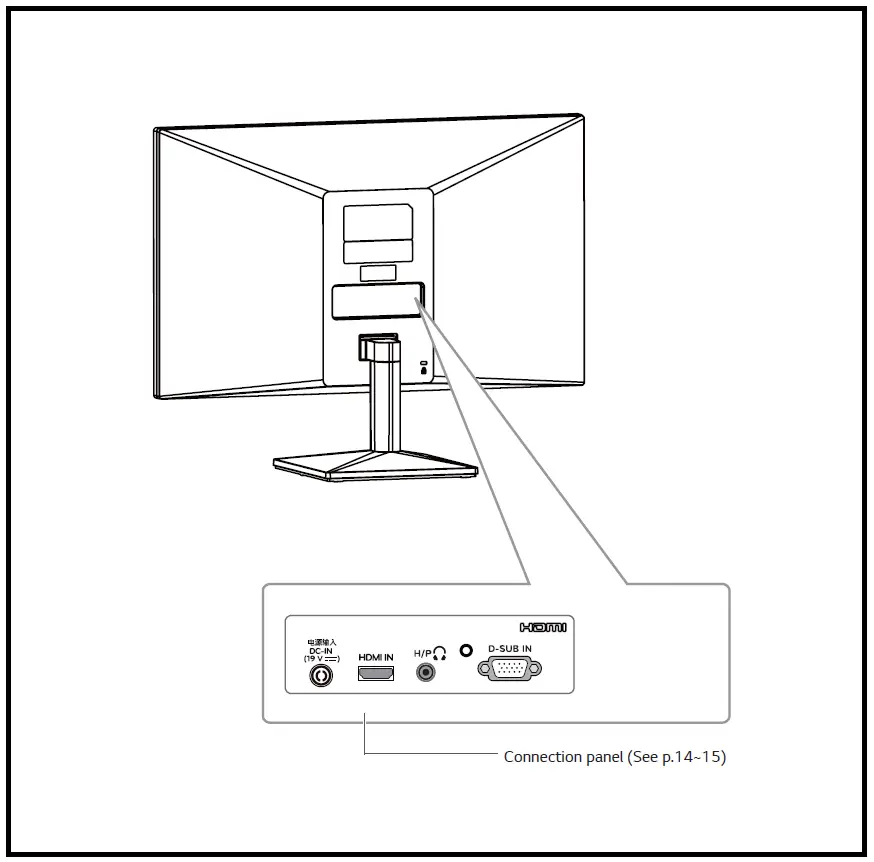
Moving and Lifting the Monitor
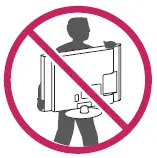
When moving or lifting the monitor, follow these instructions to prevent the monitor from being scratched or damaged and to ensure safe transportation regardless of its shape or size.
- It is advisable to place the monitor in the original box or packing material before attempting to move it. y Before moving or lifting the monitor, disconnect the power cord and all cables.
- Hold the top and bottom of the monitor frame firmly.
Do not hold the panel itself.
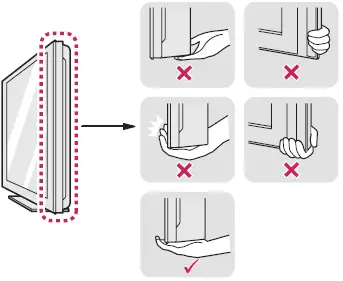
- When holding the monitor, the screen should face away from you to prevent it from being scratched.

- When moving the monitor, avoid any strong shock or vibrations to the product.
- When moving the monitor, keep it upright, never turn the monitor on its side or tilt it sideways.
CAUTION
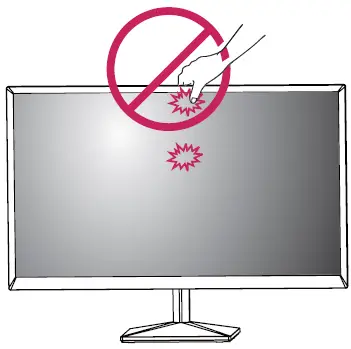
- As far as possible, avoid touching the monitor screen. This may result in damage to the screen or some of the pixels used to create images.
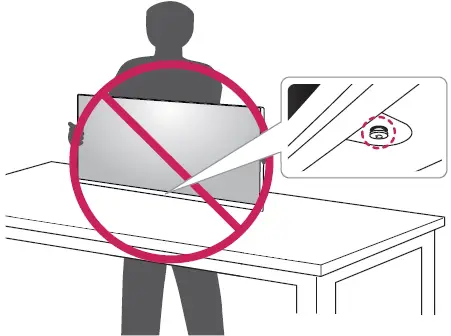
- If you use the monitor panel without the stand base, its joystick button may cause the monitor to become unstable and fall, resulting in damage to the monitor or human injury. In addition, this may cause the joystick button to malfunction.
Setting up the Monitor set
Attaching the Stand Base
- 20MK4 series
- 22MK4 series
- 24MK4 series
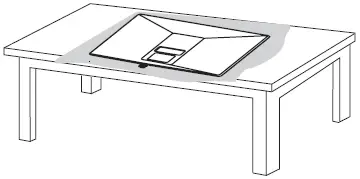
CAUTION
- To protect the screen from scratches, cover the surface with a soft cloth.
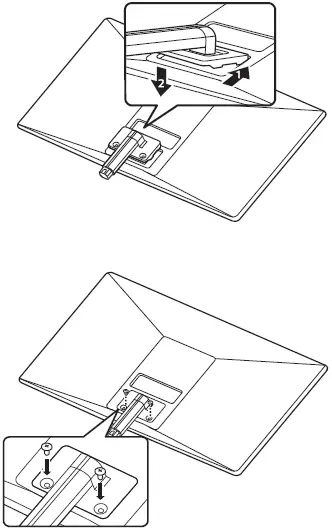
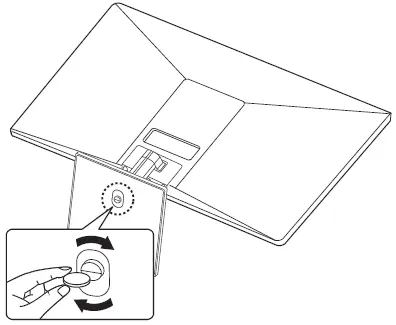
27MK4 series 27MN430H
CAUTION
- To protect the screen from scratches, cover the surface with a soft cloth.
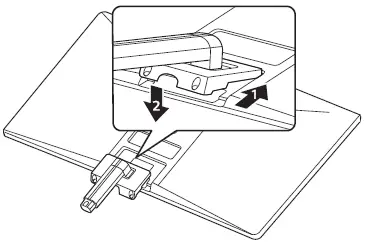
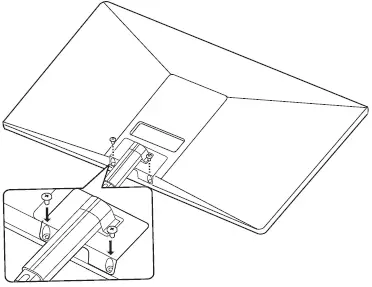
WARNING
To avoid injury to the fingers and foot when Assembly Stand Body and Base, should hold the Base when assembling the stand body and base.
CAUTION
- Illustrations in this document represent typical procedures, so they may look different from the actual product.
- Do not carry the monitor upside down by just holding the stand base. This may cause the monitor to fall off the stand and could result in personal injury.
- When lifting or moving the monitor, do not touch the monitor screen. The force applied to the monitor screen may cause damage to it.
- Do not apply foreign substances (oils, lubricants, etc.) to the screw parts when assembling the product. (Doing so may damage the product.)
- Applying excessive force when tightening screws may cause damage to the monitor. Damage caused in this way will not be covered by the product warranty.
NOTE
- You can disassemble the stand in the reverse order of the assembly.
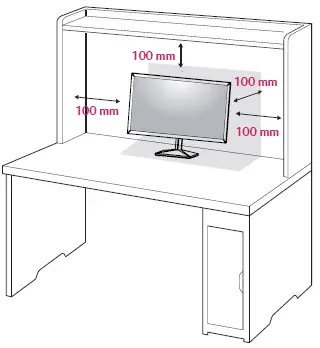
Mounting on a table
- Lift and tilt the Monitor set into its upright position on a table. Leave a 100 mm (minimum) space from the wall for proper ventilation.

- Connect the AC-DC Adapter and Power Cord to a wall outlet.

- Press the joystick button on the bottom of the monitor to turn on the monitor.
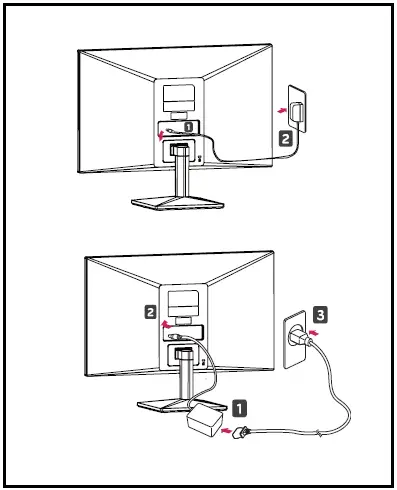
CAUTION
Unplug the power cord prior to moving or installing the monitor. There is the risk of electric shock.
WARNING
When you adjust the angle, do not hold the bottom of the Monitor set frame as shown in the following illustration, as may injure your fingers.
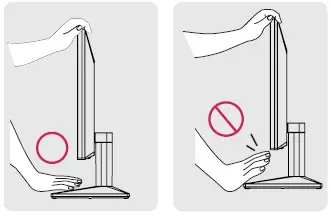
Do not touch or press the screen when adjusting the angle of the monitor.
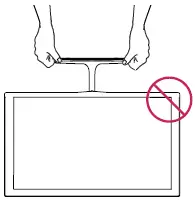
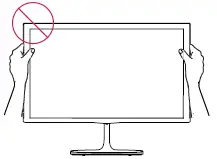 Do not hold this set like the below picture. The monitor screen can detach from the stand base and injure your body.
NOTE
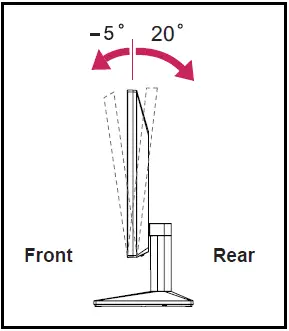
The angle of the screen can be adjusted forward or backward from -5° to 20° for a comfortable viewing experience.
Using the Kensington security system
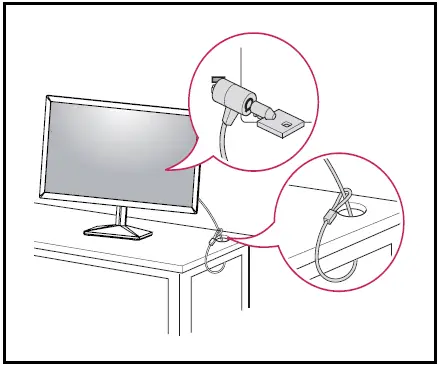
The Kensington security system connector is located at the back of the Monitor set. For more information on installation and use, refer to the manual supplied with the Kensington security system or visit http://www.kensington.com.
Connect the Kensington security system cable between the Monitor set and a table.
NOTE
The Kensington security system is optional. You can obtain it from most electronics stores.
Mounting on a wall
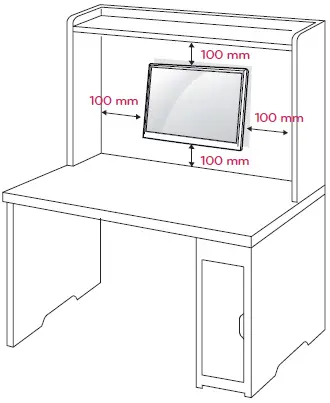
For proper ventilation, allow a clearance of 100 mm on each side and from the wall. Detailed instructions are available from your dealer, see the optional Tilt Wall Mounting Bracket Installation and Setup Guide.
If you intend to mount the Monitor set to a wall, attach Wall mounting interface (optional parts) to the back of the set. When you install the Monitor set using a wall mounting interface (optional parts), attach it carefully so it will not drop.
- If you use screws longer than standard, the monitor might be damaged internally.
- If you use improper screws, the product might be damaged and drop from the mounted position. In this case, LG Electronics is not responsible for it.
| Model | 20MK4 series | 22MK4 series | |
| 24MK4 series | |||
| Wall Mount (A x B) | 75 x 75 | ||
| Standard screw | M4 | ||
| Number of screws | 4 | ||
| Model | 27MK4 series | 27MN430H | |
| Wall Mount (A x B) | 100 x 100 | ||
| Standard screw | M4 | ||
| Number of screws | 4 | ||
- Wall Mount (A x B)
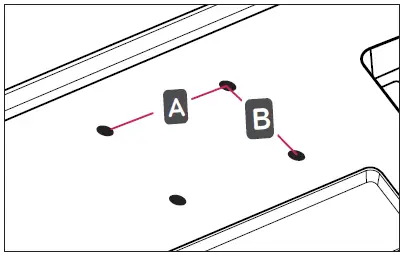
CAUTION
- Disconnect the power cord first, and then move or install the Monitor set. Otherwise, an electric shock may occur.
- If you install the Monitor set on a ceiling or slanted wall, it may fall and result in severe injury.
- Use only an authorized LG wall mount and contact the local dealer or qualified personnel.
- Do not over-tighten the screws as this may cause damage to the Monitor set and void your warranty.
- Use only screws and wall mounts that meet the VESA standard. Any damages or injuries by misuse or using an improper accessory are not covered by the warranty.
- The screw length from the outer surface of the back cover should be under 8mm.
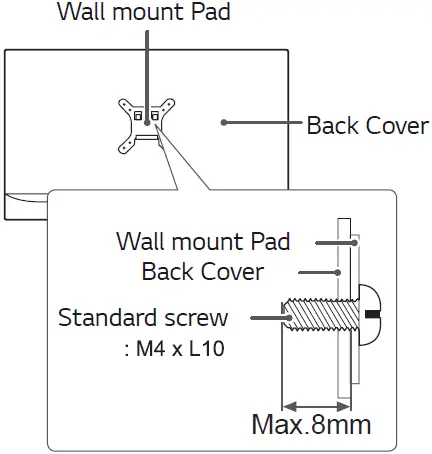
NOTE
- Use the screws that are listed on the VESA standard screw specifications.
- The wall mount kit will include an installation manual and necessary parts.
- The wall mount bracket is optional. You can obtain additional accessories from your local dealer.
- The length of the screws may differ depending on the wall mount. Be sure to use the proper length.
- For more information, refer to the instructions supplied with the wall mount.
USING THE MONITOR SET
Connecting to a PC
- Your Monitor set supports Plug & Play*.
Plug & Play: A PC recognizes a connected device that users connect to a PC and turn on, without device configuration or user intervention.
HDMI connection
Transmits the digital video and audio signals from your PC to the Monitor set. Connect the PC and the Monitor set with the HDMI cable as shown in the following illustrations.
D-SUB connection
Transmits analog video from your PC to the Monitor set. Connect the PC and the Monitor set with the supplied D-sub 15-pin signal cable as shown in the following illustrations.
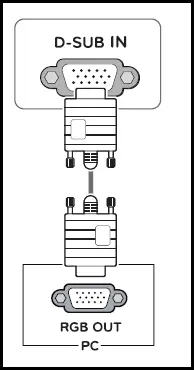
NOTE
When using a D-Sub signal input cable connector for Macintosh
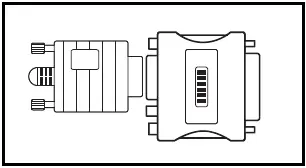
Mac adapter
For Apple Macintosh use, a separate plug adapter is needed to change the 15-pin high-density (3-row) D-SUB VGA connector on the supplied cable to a 15-pin 2-row connector.
HDMI connection
Transmits the digital video and audio signals from your PC to the Monitor set. Connect the PC and the Monitor set with the HDMI cable as shown in the following illustrations.
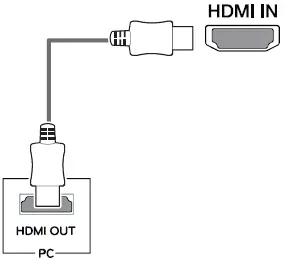
NOTE
- If you use HDMI PC, it can cause compatibility problems.
- Use a certified cable with the HDMI logo attached. If you do not use a certified HDMI cable, the screen may not display or a connection error may occur.
- Recommended HDMI cable types
- High-Speed HDMI®/TM Cable
- High-Speed HDMI®/TM Cable with Ethernet
NOTE
- When you want to use two PC in our Monitor, please connect the signal cable(D-SUB/DVI-D/HDMI) respectively in Monitor set.
- If you turn the Monitor set on while it is cold, the screen may flicker. This is normal.
- Some red, green, or blue spots may appear on the screen. This is normal.
Connecting to AV Devices
HDMI connection
Transmits the digital video and audio signals from your AV devices to the monitor. Connect your AV device to the monitor with the HDMI cable as illustrated below.
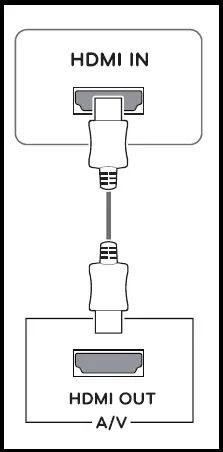
NOTE
- If you use HDMI PC, it can cause compatibility problems.
- Use a certified cable with the HDMI logo attached.
If you do not use a certified HDMI cable, the screen may not display or a connection error may occur.
- Recommended HDMI cable types
- High-Speed HDMI®/TM Cable
- High-Speed HDMI®/TM Cable with Ethernet
Connecting Peripherals
Connecting Headphones
Connect peripherals to the monitor via the headphones port. Connect as illustrated.
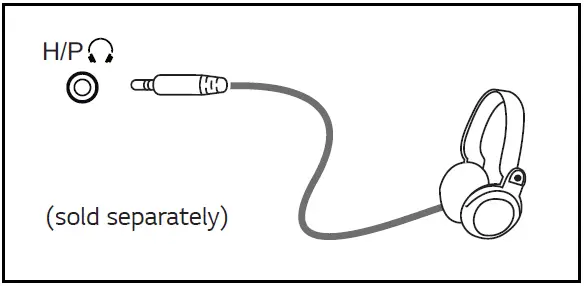
NOTE
- Peripheral devices are sold separately.
- If you use angled headphones, it may cause a problem with connecting another external device to the monitor. Therefore, it is recommended to use straight headphones.
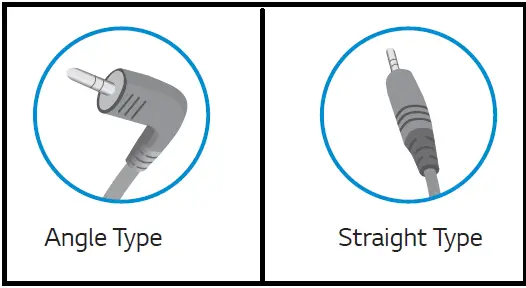
Depending on the audio settings of the PC and external device, headphones, and speaker functions may be limited.
CUSTOMIZING SETTINGS
Activating the Main Menu
- Press the joystick button on the bottom of the monitor.
- Move the joystick up/down (▲/▼) and left/right(◄/►) to set the options.
- Press the joystick button once more to close the main menu.
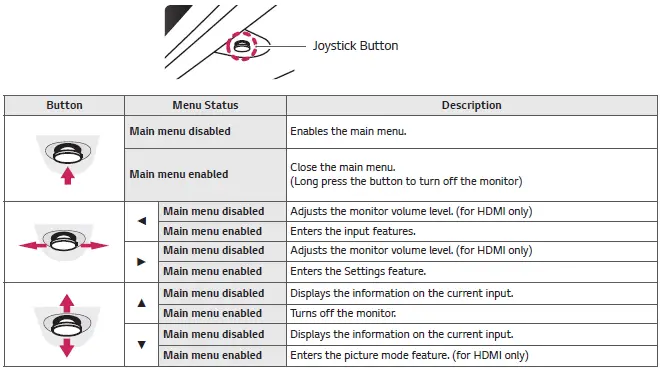
Main Menu Features
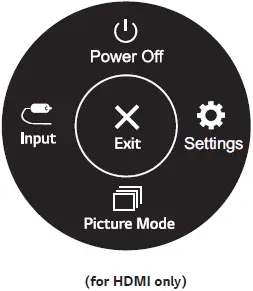
| Main Menu | Description |
| Settings | Configures the screen settings. |
| Picture Mode | Select picture mode to achieve the best display effect. |
| Input | Sets input mode. |
| Power Off | Turns off the monitor. |
| Exit | Exits the main menu. |
Customizing settings
| Settings > Quick Settings | Description |
| Brightness | Adjusts the contrast and brightness of the screen. |
| Contrast | |
| Volume | Adjusts the volume. (for HDMI only) |
| NOTE Ÿ You can adjust Mute/ Unmute by moving the joystick button to ▼ the Volume menu. |
| Settings > Input | Description | |
| Input List | Selects the input mode. | |
| Aspect Ratio | Adjusts the aspect ratio of the screen. | |
| Full Wide | Displays the video on a widescreen, regardless of the video signal input. | |
| Original | Displays video according to the aspect ratio of the video signal input. | |
| NOTE Ÿ 22MK4 series The options may disable at the recommended resolution (1920 x 1080). | ||
Customizing settings
| Settings > Picture | Description | ||
| Picture Mode | Custom | Allows the user to adjust each element. The color mode of the main menu can be adjusted. | |
| Reader | Optimizes the screen for viewing documents. You can brighten the screen in the OSD menu. | ||
| Photo | Optimizes the screen to view photos. | ||
| Cinema | Optimizes the screen to improve the visual effects of a video. | ||
| Color Weak- ness | This mode is for users who cannot distinguish between red and green. It enables users with color weakness to easily distinguish between the two colors. | ||
| Game | Optimizes the screen for gameplay. | ||
| Picture Adjust | Brightness | Adjusts the contrast and brightness of the screen. | |
| Contrast | |||
| Sharpness | Adjusts the sharpness of the screen. | ||
| SUPER RESOLUTION+ | High | Optimized picture quality is displayed when a user wants crystal-clear images. It is effective for high quality video or games. | |
| Middle | The optimized picture quality is displayed when a user wants images between low and high modes for comfortable viewing. It is effective for UCC or SD video. | ||
| Low | The optimized picture quality is displayed when a user wants smooth and natural images. It is effective for slow-moving pictures or still images. | ||
| Off | Select this option for everyday viewing. SUPER RESOLUTION+ is turned off in this mode. | ||
| Black Level | Sets the offset level (for HDMI only). Ÿ Offset: as a reference for a video signal, this is the darkest color the monitor can display. | ||
| High | Keeps the current contrast ratio of the screen. | ||
| Low | Lowers the black levels and raises the white levels from the current contrast ratio of the screen. | ||
| DFC | On | Adjusts the brightness automatically according to the screen. | |
| Off | Disables the DFC feature. | ||
NOTE
- This is a subsidiary for color weakness users. Therefore if you feel uncomfortable with the screen, please turn off this function.
- This function can’t distinguish some colors in some images.
| Game Adjust | Response Time | Sets a response time for displayed pictures based on the speed of the screen. For a normal environment, it is recommended that you use Fast. For a fast-moving picture, it is recommended that you use Faster. Once Faster Mode is selected, Motion Blur may occur depending on the content. | |
| Faster | Sets the response time to faster. | ||
| Fast | Sets the response time to fast. | ||
| Normal | Sets the response time to normal. | ||
| Off | Does not use the response time improvement feature. | ||
| FreeSync 22MK4 series 24MK4 series 27MK4 series 27MN430H | Provides seamless and natural images by synchronizing the vertical frequency of the input signal with that of the output signal. CAUTION Ÿ Supported Interface: HDMI. Ÿ Supported Graphic Card : A graphic card that supports AMD’s FreeSync is necessary. Ÿ Supported Version : Make sure to update the graphic card to the latest driver. Ÿ For more information and requirement, refer to AMD website at http://www.amd.com/ FreeSync | ||
| On | FreeSync function on. | ||
| Off | FreeSync function off. | ||
| Black Stabilizer | Black Stabilizer: You can control the black contrast to have better visibility in dark scenes. Increasing the Black Stabilizer value brightens the low gray level area on the screen. (You can easily distinguish objects on dark game screens.) Reducing the Black Stabilizer value darkens the low gray level area and increases the dynamic contrast on the screen. | ||
| Crosshair | Crosshair provides a mark on the center of the screen for First Person Shooter(FPS) games. Users can select the Crosshair that fits their gaming environment among four different Crosshairs. Ÿ When the monitor is off or enters energy saving mode, the Crosshair feature is automatically turned off. | ||
| Color Adjust | Gamma | Mode 1, Mode 2, Mode 3 | The higher the gamma value, the darker the image becomes. Likewise, the lower the gamma value, the lighter the image becomes. |
| Mode 4 | If you do not need to adjust the gamma settings, select Mode 4. | ||
| Color Temp | Selects the factory default picture color. Warm: Sets the screen color to a reddish tone. Medium: Sets the screen color between a red and blue tone. Cool: Sets the screen color to a bluish tone. Custom: The user can adjust it to red, green or blue by customization. | ||
| Red/Green/ Blue | You can customize the picture color using Red, Green, and Blue colors. | ||
| Configuration Adjust (D-SUB only) | Horizontal | To move image left and right. | |
| Vertical | To move the image up and down. | ||
| Clock | To minimize any vertical bars or stripes visible on the screen background. The horizontal screen size will also change. | ||
| Phase | To adjust the focus of the display. This item allows you to remove any horizontal noise and clear or sharpen the image of characters. | ||
| Resolution (D-SUB only) | Users can set the desired resolution. This option is enabled only when the screen resolution on your computer is set to the following(D-SUB only). | ||
| NOTE The function is enabled only when the screen resolution on your computer is set to the following, except that the PC output the wrong resolution. | |||
| 1024×768, 1280×768, 1360×768, 1366×768,Off | |||
| 1280×960, 1600×900,Off 22MK4 series | |||
| 1440×900, 1600×900,Off 22MK4 series | |||
| Picture Reset | Do you want to reset your settings? | ||
| No | Cancel the select. | ||
| Yes | Returns to the default settings. | ||
| Settings > General | Description | |
| Language | To choose the language in which the control names are displayed. | |
| SMART ENERGY SAVING | High | Saves energy using the high-efficiency SMART ENERGY SAVING feature. |
| Low | Saves energy using the low-efficiency SMART ENERGY SAVING feature. | |
| Off | Disables the SMART ENERGY SAVING feature. | |
| Automatic Standby | The monitor will automatically switch to standby mode after a certain period. | |
| OSD Lock | Prevents incorrect key input. | |
| On | Key input is disabled. | |
| NOTE Ÿ All functions except for the OSD Lock mode, brightness, Contrast, Input, Information, and Volume are disabled. | ||
| Off | Key input is enabled. | |
| Information | The display information will be shown the Model, Serial Number, Total Power On Time, and Resolution. | |
| Reset | Do you want to reset your settings? | |
| No | Cancel the selection. | |
| Yes | Returns to the default settings. | |
NOTE
- Saving Data depends on the So, those values should be different from each panel and panel vendor. If the SMART ENERGY SAVING option is High or Low, monitor luminance becomes lower or higher depending on the source.
TROUBLESHOOTING
Check the following before calling for service.
| No image appears | |
| Is the power cord of the display connected? | Ÿ Check and see if the power cord is connected properly to the power outlet. |
| Do you see an “Out of Range” message on the screen? | Ÿ This message appears when the signal from the PC (video card) is out of the horizontal or vertical frequency range of the display. See the ‘Specifications’ section of this manual and configure your display again. |
| Do you see a “NO SIGNAL” message on the screen or a black screen? | Ÿ After the monitor is on “NO SIGNAL”, the monitor goes to DPM mode. Ÿ This is displayed when the signal cable between the PC and the monitor is missing or disconnected. Check the cable and reconnect it. Ÿ Check PC status. |
| Can’t you control some functions in OSD? | |
| Can’t you select some menu in OSD? | Ÿ You can unlock the OSD controls at any time by entering the OSD lock menu and changing items to off. |
CAUTION
- Check Control Panel ► Display ► Settings and see if the frequency or the resolution was changed. If yes, readjust the video card to the recommended resolution.
- If the recommended resolution (optimal resolution) is not selected, letters may be blurred and the screen may be dimmed, truncated or biased. Make sure to select the recommended resolution.
- The setting method can differ by computer and O/S (Operation System), and the resolution mentioned above may not be supported by the video card performance. In this case, please ask the computer or the video card manufacturer.
- Keep proper posture when using the monitor, otherwise, the screen may not be optimized.
| The display image is incorrect | |
| The screen color is mono or abnormal. | Ÿ Check if the signal cable is properly connected and use a screwdriver to fasten if necessary. Ÿ Make sure the video card is properly inserted in the slot. Ÿ Set the color setting higher than 24 bits (true color) in Control Panel ► Settings. |
| The screen blinks. | Ÿ Check if the screen is set to interlace mode and if yes, change it to the recommended resolution. |
| Do you see an “Unrecognized monitor, Plug&Play (VESA DDC) monitor found” message? | |
| Have you installed the display driver? | Ÿ Be sure to install the display driver from our website: http://www.lg.com. Ÿ Make sure to check if the video card supports the Plug&Play function. |
| The screen is flickering. | |
| Did you select the recommended resolution? | Ÿ 22MK4 series If the selected resolution is HDMI 1080i 60/50 Hz, the screen may be flickering. Change the resolution to the recommended resolution of 1080P. |
SPECIFICATIONS
20MK4 series
| 20MK4 series | |||
| LCD Screen | Type | TFT (Thin Film Transistor) LCD(Liquid Crystal Display) Screen | |
| Resolution | Maximum Resolution | 1366 x 768 @ 60Hz (HDMI) | |
| 1366 x 768 @ 60Hz (D-sub) | |||
| Recommended Resolution | 1366 x 768 @ 60Hz | ||
| Video Signal | Horizontal Frequency | 30 kHz to 61 kHz | |
| Vertical Frequency | HDMI -PC: 56 Hz to 75 Hz -AV: 50 Hz to 61 Hz D-SUB: 56 Hz to 75 Hz | ||
| Synchronization | Separate Sync, Digital. | ||
| Input Connector | HDMI IN, D-SUB IN, H/P OUT | ||
| Power Input | 19 V 0.8 A | ||
| Power Consumption | On Mode : 13 W Typ. ( Outgoing condition ) * Sleep Mode (Standby Mode) ≤ 0.3 W ** Off Mode ≤ 0.3 W | ||
| AC/DC adaptor | Type ADS-18SG-19-3 19016G, manufactured by SHENZHEN HONOR ELECTRONIC or Type ADS-18FSG-19 19016GPG, manufactured by SHENZHEN HONOR ELECTRONIC or Type ADS-18FSG-19 19016GPI, manufactured by SHENZHEN HONOR ELECTRONIC or Type ADS-18FSG-19 19016GPCU, manufactured by SHENZHEN HONOR ELECTRONIC or Type ADS-18FSG-19 19016GPB, manufactured by SHENZHEN HONOR ELECTRONIC or Type ADS-25SFA-19-3 19016E, manufactured by SHENZHEN HONOR ELECTRONIC or Type ADS-25FSF-19 19016EPCU-1, manufactured by SHENZHEN HONOR ELECTRONIC or Type ADS-25FSF-19 19016EPBR-1, manufactured by SHENZHEN HONOR ELECTRONIC or Type ADS-25FSF-19 19016EPI-1, manufactured by SHENZHEN HONOR ELECTRONIC or Type ADS-25FSF-19 19016EPG-1, manufactured by SHENZHEN HONOR ELECTRONIC or Type ADS-25FSF-19 19016EPB-1, manufactured by SHENZHEN HONOR ELECTRONIC or Type ADS-25FSF-19 19016EPG, manufactured by SHENZHEN HONOR ELECTRONIC or Type LCAP42, manufactured by LIEN CHANG ELECTRONIC ENTERPRISE or Type LCAP36-A, manufactured by LIEN CHANG ELECTRONIC ENTERPRISE or Type LCAP36-E, manufactured by LIEN CHANG ELECTRONIC ENTERPRISE or Type LCAP36-I, manufactured by LIEN CHANG ELECTRONIC ENTERPRISE or Type LCAP36-U, manufactured by LIEN CHANG ELECTRONIC ENTERPRISE or Type DA-16C19, manufactured by Asian Power Devices Inc. or Type WA-16D19FG, manufactured by Asian Power Devices Inc. or Type WA-16E19FA, manufactured by Asian Power Devices Inc. or Type AD10570LF, manufactured by PI Electronics (H.K.) Ltd. or Type AD2152S20, manufactured by PI Electronics (H.K.) Ltd. or Type AD2152620, manufactured by PI Electronics (H.K.) Ltd. | ||
| OUTPUT: 19 V 0.84 A | |||
| Environmental conditions | Operating Temperature Operating Humidity | 0 °C to 40 °C Less than 80% | |
| Storage Temperature Storage Humidity | -20 °C to 60 °C Less than 85 % | ||
| Dimension | Monitor Size (Width x Height x Depth) | ||
| With Stand | 463.8 mm x 366.5 mm x 181.9 mm | ||
| Without Stand | 463.8 mm x 276.4 mm x 38.4 mm | ||
| Weight (Without Packaging) | With Stand | 2.3 Kg | |
| Without Stand | 2.0 Kg | ||
| Tilt Range | -5° to 20° | ||
Product specifications shown above may be changed without prior notice due to the upgrade of product functions.
- The power consumption level can be different by operating conditions and monitor settings.
- The On mode power consumption is measured with the LGE test standard(Full White pattern, Maximum resolution).
- The monitor goes to Sleep Mode in a couple of minutes(Max 5 minutes)
22MK4 series
| LCD Screen | Type | TFT (Thin Film Transistor) LCD(Liquid Crystal Display) Screen |
| Resolution | Maximum Resolution | 1920 x 1080 @ 75 Hz (HDMI) |
| 1920 x 1080 @ 60 Hz (D-sub) | ||
| Recommended Resolution | 1920 × 1080 @ 60 Hz | |
| Video Signal | Horizontal Frequency | HDMI : 30 kHz to 85 kHz D-SUB: 30 kHz to 83 kHz |
| Vertical Frequency | HDMI -PC: 56 Hz to 75 Hz -AV: 50 Hz to 61 Hz D-SUB: 56 Hz to 75 Hz | |
| Synchronization | Separate Sync, Digital. | |
| Input Connector | HDMI IN, D-SUB IN, H/P OUT | |
| Power Input | 22MK430H:19 V 1.3 A Or 19 V 0.8 A 22MK400H: 19 V 0.8 A | |
| Power Consumption | On Mode : 19.7 W Typ. ( Outgoing condition ) * Sleep Mode (Standby Mode) ≤ 0.3 W ** Off Mode ≤ 0.3 W | |
| AC/DC adaptor | Type ADS-40SG-19-3 19025G, manufactured by SHENZHEN HONOR ELECTRONIC or Type ADS-40FSG-19 19025GPG-1, manufactured by SHENZHEN HONOR ELECTRONIC or Type ADS-40FSG-19 19025GPBR-1, manufactured by SHENZHEN HONOR ELECTRONIC or Type ADS-40FSG-19 19025GPI-1, manufactured by SHENZHEN HONOR ELECTRONIC or Type ADS-40FSG-19 19025GPCU-1, manufactured by SHENZHEN HONOR ELECTRONIC or Type ADS-40FSG-19 19025GPB-2, manufactured by SHENZHEN HONOR ELECTRONIC or Type ADS-25FSG-19 19025EPCU-1L, manufactured by SHENZHEN HONOR ELECTRONIC or Type ADS-25SFA-19-3 19025E, manufactured by SHENZHEN HONOR ELECTRONIC or Type ADS-25FSF-19 19025EPB-1, manufactured by SHENZHEN HONOR ELECTRONIC or Type LCAP21, manufactured by LIEN CHANG ELECTRONIC ENTERPRISE or Type LCAP26-A, manufactured by LIEN CHANG ELECTRONIC ENTERPRISE or Type LCAP26-E, manufactured by LIEN CHANG ELECTRONIC ENTERPRISE or Type LCAP26-I, manufactured by LIEN CHANG ELECTRONIC ENTERPRISE or Type LCAP26-B, manufactured by LIEN CHANG ELECTRONIC ENTERPRISE or Type LCAP51, manufactured by LIEN CHANG ELECTRONIC ENTERPRISE or Type WA-24C19FS, manufactured by Asian Power Devices Inc. or Type WA-24C19FU, manufactured by Asian Power Devices Inc. or Type WA-24C19FK, manufactured by Asian Power Devices Inc. or Type WA-24C19FB, manufactured by Asian Power Devices Inc. or Type WA-24C19FN, manufactured by Asian Power Devices Inc. or Type DA-24B19, manufactured by Asian Power Devices Inc. or Type AD10560LF, manufactured by PI Electronics (H.K.) Ltd. or Type AD2139S20, manufactured by PI Electronics (H.K.) Ltd. or Type AD2139620, manufactured by PI Electronics (H.K.) Ltd. | |
| OUTPUT: 19 V 1.3 A | ||
22MK4 series
| LCD Screen | Type | TFT (Thin Film Transistor) LCD(Liquid Crystal Display) Screen |
| Resolution | Maximum Resolution | 1920 x 1080 @ 75 Hz (HDMI) |
| 1920 x 1080 @ 60 Hz (D-sub) | ||
| Recommended Resolution | 1920 × 1080 @ 60 Hz | |
| Video Signal | Horizontal Frequency | HDMI : 30 kHz to 85 kHz D-SUB: 30 kHz to 83 kHz |
| Vertical Frequency | HDMI -PC: 56 Hz to 75 Hz -AV: 50 Hz to 61 Hz D-SUB: 56 Hz to 75 Hz | |
| Synchronization | Separate Sync, Digital. | |
| Input Connector | HDMI IN, D-SUB IN, H/P OUT | |
| Power Input | 22MK430H:19 V 1.3 A Or 19 V 0.8 A 22MK400H: 19 V 0.8 A | |
| Power Consumption | On Mode : 19.7 W Typ. ( Outgoing condition ) * Sleep Mode (Standby Mode) ≤ 0.3 W ** Off Mode ≤ 0.3 W | |
| AC/DC adaptor | Type ADS-40SG-19-3 19025G, manufactured by SHENZHEN HONOR ELECTRONIC or Type ADS-40FSG-19 19025GPG-1, manufactured by SHENZHEN HONOR ELECTRONIC or Type ADS-40FSG-19 19025GPBR-1, manufactured by SHENZHEN HONOR ELECTRONIC or Type ADS-40FSG-19 19025GPI-1, manufactured by SHENZHEN HONOR ELECTRONIC or Type ADS-40FSG-19 19025GPCU-1, manufactured by SHENZHEN HONOR ELECTRONIC or Type ADS-40FSG-19 19025GPB-2, manufactured by SHENZHEN HONOR ELECTRONIC or Type ADS-25FSG-19 19025EPCU-1L, manufactured by SHENZHEN HONOR ELECTRONIC or Type ADS-25SFA-19-3 19025E, manufactured by SHENZHEN HONOR ELECTRONIC or Type ADS-25FSF-19 19025EPB-1, manufactured by SHENZHEN HONOR ELECTRONIC or Type LCAP21, manufactured by LIEN CHANG ELECTRONIC ENTERPRISE or Type LCAP26-A, manufactured by LIEN CHANG ELECTRONIC ENTERPRISE or Type LCAP26-E, manufactured by LIEN CHANG ELECTRONIC ENTERPRISE or Type LCAP26-I, manufactured by LIEN CHANG ELECTRONIC ENTERPRISE or Type LCAP26-B, manufactured by LIEN CHANG ELECTRONIC ENTERPRISE or Type LCAP51, manufactured by LIEN CHANG ELECTRONIC ENTERPRISE or Type WA-24C19FS, manufactured by Asian Power Devices Inc. or Type WA-24C19FU, manufactured by Asian Power Devices Inc. or Type WA-24C19FK, manufactured by Asian Power Devices Inc. or Type WA-24C19FB, manufactured by Asian Power Devices Inc. or Type WA-24C19FN, manufactured by Asian Power Devices Inc. or Type DA-24B19, manufactured by Asian Power Devices Inc. or Type AD10560LF, manufactured by PI Electronics (H.K.) Ltd. or Type AD2139S20, manufactured by PI Electronics (H.K.) Ltd. or Type AD2139620, manufactured by PI Electronics (H.K.) Ltd. | |
| OUTPUT: 19 V 1.3 A | ||
| AC/DC adaptor | Type ADS-18SG-19-3 19016G, manufactured by SHENZHEN HONOR ELECTRONIC or Type ADS-18FSG-19 19016GPG, manufactured by SHENZHEN HONOR ELECTRONIC or Type ADS-18FSG-19 19016GPI, manufactured by SHENZHEN HONOR ELECTRONIC or Type ADS-18FSG-19 19016GPCU, manufactured by SHENZHEN HONOR ELECTRONIC or Type ADS-18FSG-19 19016GPB, manufactured by SHENZHEN HONOR ELECTRONIC or Type ADS-25SFA-19-3 19016E, manufactured by SHENZHEN HONOR ELECTRONIC or Type ADS-25FSF-19 19016EPCU-1, manufactured by SHENZHEN HONOR ELECTRONIC or Type ADS-25FSF-19 19016EPBR-1, manufactured by SHENZHEN HONOR ELECTRONIC or Type ADS-25FSF-19 19016EPI-1, manufactured by SHENZHEN HONOR ELECTRONIC or Type ADS-25FSF-19 19016EPG-1, manufactured by SHENZHEN HONOR ELECTRONIC or Type ADS-25FSF-19 19016EPB-1, manufactured by SHENZHEN HONOR ELECTRONIC or Type ADS-25FSF-19 19016EPG, manufactured by SHENZHEN HONOR ELECTRONIC or Type LCAP42, manufactured by LIEN CHANG ELECTRONIC ENTERPRISE or Type LCAP36-A, manufactured by LIEN CHANG ELECTRONIC ENTERPRISE or Type LCAP36-E, manufactured by LIEN CHANG ELECTRONIC ENTERPRISE or Type LCAP36-I, manufactured by LIEN CHANG ELECTRONIC ENTERPRISE or Type LCAP36-U, manufactured by LIEN CHANG ELECTRONIC ENTERPRISE or Type DA-16C19, manufactured by Asian Power Devices Inc. or Type WA-16D19FG, manufactured by Asian Power Devices Inc. or Type WA-16E19FA, manufactured by Asian Power Devices Inc. or Type AD10570LF, manufactured by PI Electronics (H.K.) Ltd. or Type AD2152S20, manufactured by PI Electronics (H.K.) Ltd. or Type AD2152620, manufactured by PI Electronics (H.K.) Ltd. or Type AD2152U20, manufactured by PI Electronics (H.K.) Ltd. | |
| OUTPUT: 19 V 0.84 A | ||
| Environmental conditions | Operating Temperature Operating Humidity | 0 °C to 40 °C Less than 80% |
| Storage Temperature Storage Humidity | -20 °C to 60 °C Less than 85 % | |
| Dimension | Monitor Size (Width x Height x Depth) | |
| With Stand | 509.6 mm x 395.8 mm x 181.9 mm | |
| Without Stand | 509.6 mm x 305.7 mm x 38.5 mm | |
| Weight (Without Packaging) | With Stand | 22MK430H: 2.8 kg 22MK400H: 2.4 kg |
| Without Stand | 22MK430H: 2.5 kg 22MK400H: 2.1 kg | |
| AC/DC adaptor | Type ADS-18SG-19-3 19016G, manufactured by SHENZHEN HONOR ELECTRONIC or Type ADS-18FSG-19 19016GPG, manufactured by SHENZHEN HONOR ELECTRONIC or Type ADS-18FSG-19 19016GPI, manufactured by SHENZHEN HONOR ELECTRONIC or Type ADS-18FSG-19 19016GPCU, manufactured by SHENZHEN HONOR ELECTRONIC or Type ADS-18FSG-19 19016GPB, manufactured by SHENZHEN HONOR ELECTRONIC or Type ADS-25SFA-19-3 19016E, manufactured by SHENZHEN HONOR ELECTRONIC or Type ADS-25FSF-19 19016EPCU-1, manufactured by SHENZHEN HONOR ELECTRONIC or Type ADS-25FSF-19 19016EPBR-1, manufactured by SHENZHEN HONOR ELECTRONIC or Type ADS-25FSF-19 19016EPI-1, manufactured by SHENZHEN HONOR ELECTRONIC or Type ADS-25FSF-19 19016EPG-1, manufactured by SHENZHEN HONOR ELECTRONIC or Type ADS-25FSF-19 19016EPB-1, manufactured by SHENZHEN HONOR ELECTRONIC or Type ADS-25FSF-19 19016EPG, manufactured by SHENZHEN HONOR ELECTRONIC or Type LCAP42, manufactured by LIEN CHANG ELECTRONIC ENTERPRISE or Type LCAP36-A, manufactured by LIEN CHANG ELECTRONIC ENTERPRISE or Type LCAP36-E, manufactured by LIEN CHANG ELECTRONIC ENTERPRISE or Type LCAP36-I, manufactured by LIEN CHANG ELECTRONIC ENTERPRISE or Type LCAP36-U, manufactured by LIEN CHANG ELECTRONIC ENTERPRISE or Type DA-16C19, manufactured by Asian Power Devices Inc. or Type WA-16D19FG, manufactured by Asian Power Devices Inc. or Type WA-16E19FA, manufactured by Asian Power Devices Inc. or Type AD10570LF, manufactured by PI Electronics (H.K.) Ltd. or Type AD2152S20, manufactured by PI Electronics (H.K.) Ltd. or Type AD2152620, manufactured by PI Electronics (H.K.) Ltd. or Type AD2152U20, manufactured by PI Electronics (H.K.) Ltd. | |
| OUTPUT: 19 V 0.84 A | ||
| Environmental conditions | Operating Temperature Operating Humidity | 0 °C to 40 °C Less than 80% |
| Storage Temperature Storage Humidity | -20 °C to 60 °C Less than 85 % | |
| Dimension | Monitor Size (Width x Height x Depth) | |
| With Stand | 509.6 mm x 395.8 mm x 181.9 mm | |
| Without Stand | 509.6 mm x 305.7 mm x 38.5 mm | |
| Weight (Without Packaging) | With Stand | 22MK430H: 2.8 kg 22MK400H: 2.4 kg |
| Without Stand | 22MK430H: 2.5 kg 22MK400H: 2.1 kg | |
Product specifications shown above may be changed without prior notice due to the upgrade of product functions.
- The power consumption level can be different by operating conditions and monitor settings.
- The On mode power consumption is measured with the LGE test standard(Full White pattern, Maximum resolution).
- The monitor goes to Sleep Mode in a couple of minutes(Max 5 minutes)
24MK4 series
| LCD Screen | Type | TFT (Thin Film Transistor) LCD(Liquid Crystal Display) Screen |
| Resolution | Maximum Resolution | 1920 x 1080 @ 75 Hz (HDMI) |
| 1920 x 1080 @ 60 Hz (D-sub) | ||
| Recommended Resolution | 1920 × 1080 @ 60 Hz | |
| Video Signal | Horizontal Frequency | HDMI : 30 kHz to 85 kHz D-SUB: 30 kHz to 83 kHz |
| Vertical Frequency | HDMI -PC: 56 Hz to 75 Hz -AV: 50 Hz to 61 Hz D-SUB: 56 Hz to 75 Hz | |
| Synchronization | Separate Sync, Digital. | |
| Input Connector | HDMI IN, D-SUB IN, H/P OUT | |
| Power Input | 19 V 1.3 A | |
| Power Consumption | On Mode : 26 W Typ. ( Outgoing condition ) * Sleep Mode (Standby Mode) ≤ 0.3 W ** Off Mode ≤ 0.3 W | |
| AC/DC adaptor | Type ADS-40SG-19-3 19025G, manufactured by SHENZHEN HONOR ELECTRONIC or Type ADS-40FSG-19 19025GPG-1, manufactured by SHENZHEN HONOR ELECTRONIC or Type ADS-40FSG-19 19025GPBR-1, manufactured by SHENZHEN HONOR ELECTRONIC or Type ADS-40FSG-19 19025GPI-1, manufactured by SHENZHEN HONOR ELECTRONIC or Type ADS-40FSG-19 19025GPCU-1, manufactured by SHENZHEN HONOR ELECTRONIC or Type ADS-40FSG-19 19025GPB-2, manufactured by SHENZHEN HONOR ELECTRONIC or Type ADS-25FSG-19 19025EPCU-1L, manufactured by SHENZHEN HONOR ELECTRONIC or Type ADS-25SFA-19-3 19025E, manufactured by SHENZHEN HONOR ELECTRONIC or Type ADS-25FSF-19 19025EPCU-1, manufactured by SHENZHEN HONOR ELECTRONIC or Type ADS-25FSF-19 19025EPBR-1, manufactured by SHENZHEN HONOR ELECTRONIC or Type ADS-25FSF-19 19025EPI-1, manufactured by SHENZHEN HONOR ELECTRONIC or Type ADS-25FSF-19 19025EPG-1, manufactured by SHENZHEN HONOR ELECTRONIC or Type ADS-25FSF-19 19025EPB-1, manufactured by SHENZHEN HONOR ELECTRONIC or Type LCAP21, manufactured by LIEN CHANG ELECTRONIC ENTERPRISE or Type LCAP26-A, manufactured by LIEN CHANG ELECTRONIC ENTERPRISE or Type LCAP26-E, manufactured by LIEN CHANG ELECTRONIC ENTERPRISE or Type LCAP26-I, manufactured by LIEN CHANG ELECTRONIC ENTERPRISE or Type LCAP26-B, manufactured by LIEN CHANG ELECTRONIC ENTERPRISE or Type LCAP51, manufactured by LIEN CHANG ELECTRONIC ENTERPRISE or Type WA-24C19FS, manufactured by Asian Power Devices Inc. or Type WA-24C19FU, manufactured by Asian Power Devices Inc. or Type WA-24C19FK, manufactured by Asian Power Devices Inc. or Type WA-24C19FB, manufactured by Asian Power Devices Inc. or Type WA-24C19FN, manufactured by Asian Power Devices Inc. or Type DA-24B19, manufactured by Asian Power Devices Inc. or Type AD10560LF, manufactured by PI Electronics (H.K.) Ltd. or Type AD2139S20, manufactured by PI Electronics (H.K.) Ltd. or Type AD2139620, manufactured by PI Electronics (H.K.) Ltd. | |
| OUTPUT: 19 V 1.3 A | ||
| Environmental conditions | Operating Temperature Operating Humidity | 0 °C to 40 °C Less than 80% |
| Storage Temperature Storage Humidity | -20 °C to 60 °C Less than 85 % | |
| Dimension | Monitor Size (Width x Height x Depth) | |
| With Stand | 555 mm x 421 mm x 181.9 mm | |
| Without Stand | 555 mm x 330.9 mm x 38.4 mm | |
| Weight (Without Packaging) | With Stand | 24MK430H: 3.1 kg 24MK400H: 2.8 kg |
| Without Stand | 24MK430H: 2.8 kg 24MK400H: 2.5 kg | |
Product specifications shown above may be changed without prior notice due to the upgrade of product functions.
- The power consumption level can be different by operating conditions and monitor settings.
- The On mode power consumption is measured with the LGE test standard(Full White pattern, Maximum resolution).
- The monitor goes to Sleep Mode in a couple of minutes(Max 5 minutes)
| 27MK4 series | 27MN430H | ||||
| LCD Screen | Type | TFT (Thin Film Transistor) LCD(Liquid Crystal Display) Screen | |||
| Resolution | Maximum Resolution | 1920 x 1080 @ 75 Hz (HDMI) | |||
| 1920 x 1080 @ 60 Hz (D-sub) | |||||
| Recommended Resolution | 1920 × 1080 @ 60 Hz | ||||
| Video Signal | Horizontal Frequency | HDMI : 30 kHz to 85 kHz D-SUB: 30 kHz to 83 kHz | |||
| Vertical Frequency | HDMI -PC: 56 Hz to 75 Hz -AV: 50 Hz to 61 Hz D-SUB: 56 Hz to 75 Hz | ||||
| Synchronization | Separate Sync, Digital. | ||||
| Input Connector | HDMI IN, D-SUB IN, H/P OUT | ||||
| Power Input | 19 V | 1.3 A | |||
| Power Consumption | On Mode : 25.2 W Typ. (Outgoing condition)* Sleep Mode (Standby Mode) ≤ 0.3 W ** Off Mode ≤ 0.3 W | ||||
| AC/DC adaptor | Type ADS-40SG-19-3 19025G, manufactured by SHENZHEN HONOR ELECTRONIC or Type ADS-40FSG-19 19025GPG-1, manufactured by SHENZHEN HONOR ELECTRONIC or Type ADS-40FSG-19 19025GPBR-1, manufactured by SHENZHEN HONOR ELECTRONIC or Type ADS-40FSG-19 19025GPI-1, manufactured by SHENZHEN HONOR ELECTRONIC or Type ADS-40FSG-19 19025GPCU-1, manufactured by SHENZHEN HONOR ELECTRONIC or Type ADS-40FSG-19 19025GPB-2, manufactured by SHENZHEN HONOR ELECTRONIC or Type ADS-25FSG-19 19025EPCU-1L, manufactured by SHENZHEN HONOR ELECTRONIC or Type ADS-25SFA-19-3 19025E, manufactured by SHENZHEN HONOR ELECTRONIC or Type ADS-25FSF-19 19025EPCU-1, manufactured by SHENZHEN HONOR ELECTRONIC or Type ADS-25FSF-19 19025EPBR-1, manufactured by SHENZHEN HONOR ELECTRONIC or Type ADS-25FSF-19 19025EPI-1, manufactured by SHENZHEN HONOR ELECTRONIC or Type ADS-25FSF-19 19025EPG-1, manufactured by SHENZHEN HONOR ELECTRONIC or Type ADS-25FSF-19 19025EPB-1, manufactured by SHENZHEN HONOR ELECTRONIC or Type LCAP21, manufactured by LIEN CHANG ELECTRONIC ENTERPRISE or Type LCAP26-A, manufactured by LIEN CHANG ELECTRONIC ENTERPRISE or Type LCAP26-E, manufactured by LIEN CHANG ELECTRONIC ENTERPRISE or Type LCAP26-I, manufactured by LIEN CHANG ELECTRONIC ENTERPRISE or Type LCAP26-B, manufactured by LIEN CHANG ELECTRONIC ENTERPRISE or Type LCAP51, manufactured by LIEN CHANG ELECTRONIC ENTERPRISE or Type WA-24C19FS, manufactured by Asian Power Devices Inc. or Type WA-24C19FU, manufactured by Asian Power Devices Inc. or Type WA-24C19FK, manufactured by Asian Power Devices Inc. or Type WA-24C19FB, manufactured by Asian Power Devices Inc. or Type WA-24C19FN, manufactured by Asian Power Devices Inc. or Type DA-24B19, manufactured by Asian Power Devices Inc. or Type AD10560LF, manufactured by PI Electronics (H.K.) Ltd. or Type AD2139S20, manufactured by PI Electronics (H.K.) Ltd. or Type AD2139620, manufactured by PI Electronics (H.K.) Ltd. | ||||
| OUTPUT: 19 V 1.3 A | |||||
| Environmental conditions | Operating Temperature Operating Humidity | 0 °C to 40 °C Less than 80% | |||
| Storage Temperature Storage Humidity | -20 °C to 60 °C Less than 85 % | ||||
| Dimension | Monitor Size (Width x Height x Depth) | |
| With Stand | 625.6 mm x 468.7 mm x 204.1 mm | |
| Without Stand | 625.6 mm x 375.2 mm x 44 mm | |
| Weight (Without Packaging) | With Stand | 4.6 kg |
| Without Stand | 4.2 kg | |
The specifications are subject to change without notice.
- The power consumption level can be different by operating conditions and monitor
- The On mode power consumption is measured with the LGE test standard (Full White pattern, Maximum resolution).
- The monitor goes to Sleep Mode in a couple of minutes(Max 5 minutes)
Preset Modes (Resolution)
D-SUB / HDMI PC Timing
| 20MK4 series | |||||
| Display Modes (Resolution) | Horizontal Frequency(kHz) | Vertical Frequency(Hz) | Polarity(H/V) | ||
| 720 x 400 | 31.468 | 70.08 | -/+ | ||
| 640 x 480 | 31.469 | 59.94 | -/- | ||
| 640 x 480 | 37.5 | 75 | -/- | ||
| 800 x 600 | 37.879 | 60.317 | +/+ | ||
| 800 x 600 | 46.875 | 75 | +/+ | ||
| 1024 x 768 | 48.363 | 60 | -/- | ||
| 1366 x 768 | 47.712 | 59.79 | +/+ | Recommend Mode | |
D-SUB PC Timing
| 22MK4 series | 24MK4 series | 27MK4 series | 27MN430H | |||||
| Display Modes (Resolution) | Horizontal Frequency(kHz) | Vertical Frequency(Hz) | Polarity(H/V) | |||||
| 720 x 400 | 31.468 | 70.08 | -/+ | |||||
| 640 x 480 | 31.469 | 59.94 | -/- | |||||
| 640 x 480 | 37.5 | 75 | -/- | |||||
| 800 x 600 | 37.879 | 60.317 | +/+ | |||||
| 800 x 600 | 46.875 | 75 | +/+ | |||||
| 1024 x 768 | 48.363 | 60 | -/- | |||||
| 1024 x 768 | 60.023 | 75.029 | +/+ | |||||
| 1152 x 864 | 67.500 | 75 | +/+ | |||||
| 1280 x 1024 | 63.981 | 60.023 | +/+ | |||||
| 1280 x 1024 | 79.976 | 75.035 | +/+ | |||||
| 1680 x 1050 | 65.290 | 59.954 | -/+ | |||||
| 1920 x 1080 | 67.500 | 60 | +/+ | Recommend Mode | ||||
HDMI PC Timing
| 22MK4 series | 24MK4 series | 27MK4 series | 27MN430H |
| Display Modes (Resolution) | Horizontal Frequency(kHz) | Vertical Frequency(Hz) | Polarity(H/V) | |
| 720 x 400 | 31.468 | 70.08 | -/+ | |
| 640 x 480 | 31.469 | 59.94 | -/- | |
| 640 x 480 | 37.5 | 75 | -/- | |
| 800 x 600 | 37.879 | 60.317 | +/+ | |
| 800 x 600 | 46.875 | 75 | +/+ | |
| 1024 x 768 | 48.363 | 60 | -/- | |
| 1024 x 768 | 60.023 | 75.029 | +/+ | |
| 1152 x 864 | 67.500 | 75 | +/+ |
| 1280 x 1024 | 63.981 | 60.023 | +/+ | |
| 1280 x 1024 | 79.976 | 75.035 | +/+ | |
| 1680 x 1050 | 65.290 | 59.954 | -/+ | |
| 1920 x 1080 | 67.500 | 60 | +/+ | Recommend Mode |
| 1920 x 1080 | 83.89 | 74.97 | +/+ |
HDMI AV Timing
| 20MK4 series | ||||
| Factory support mode (Preset Mode) | Horizontal Frequency(kHz) | Vertical Frequency(Hz) | HDMI | |
| 480P | 31.50 | 60 | O | |
| 576P | 31.25 | 50 | O | |
| 720P | 37.50 | 50 | O | |
| 720P | 45.00 | 60 | O Recommend Mode | |
| 22MK4 series | 24MK4 series | 27MK4 series | 27MN430H |
| Factory support mode (Preset Mode) | Horizontal Frequency(kHz) | Vertical Frequency(Hz) | HDMI |
| 480P | 31.50 | 60 | O |
| 576P | 31.25 | 50 | O |
| 720P | 37.50 | 50 | O |
| 720P | 45.00 | 60 | O |
| 1080P | 56.25 | 50 | O |
| 1080P | 67.50 | 60 | O Recommend Mode |
Make sure to read the Safety Precautions before using the product. The model and serial number of the product are located on the back and on one side of the product. Record them below in case you ever need service.
FAQ’s
What is the screen size of the LG 22MK400H-B monitor?
The LG 22MK400H-B has a screen size of 22 inches.
What is the resolution of the monitor?
The monitor has a Full HD (1920 x 1080 pixels) resolution.
Does the LG 22MK400H-B support AMD FreeSync technology?
Yes, the monitor supports AMD FreeSync, which helps reduce screen tearing and stuttering during gaming.
What is the response time of the monitor?
The LG 22MK400H-B has a response time of 1ms (millisecond), which is ideal for fast-paced gaming and reduces motion blur.
Does the monitor have built-in speakers?
No, the LG 22MK400H-B does not have built-in speakers. You will need external speakers or headphones for audio output.
What is the refresh rate of the monitor?
The monitor has a refresh rate of 75Hz, which means it can display up to 75 frames per second.
Does the LG 22MK400H-B have VESA mount compatibility?
Yes, the monitor is compatible with VESA mounts (75mm x 75mm), allowing you to mount it on a wall or an adjustable arm.
What kind of video inputs does the monitor have?
The LG 22MK400H-B offers HDMI and VGA inputs for connecting to various devices such as computers, gaming consoles, and more.
Does the monitor have adjustable height or tilt?
No, the LG 22MK400H-B does not have adjustable height or tilt. It has a fixed stand.
Is the monitor compatible with HDR (High Dynamic Range) content?
No, the LG 22MK400H-B does not support HDR. It provides standard SDR (Standard Dynamic Range) visuals.
What are the dimensions and weight of the monitor?
The dimensions of the monitor (with the stand) are approximately 20.1 inches (width) x 7.2 inches (depth) x 15.3 inches (height). The weight is around 6.2 lbs (2.8 kg).
Download this PDF Link: LG 22MK400H-B FHD LED Monitor Owner’s Manual