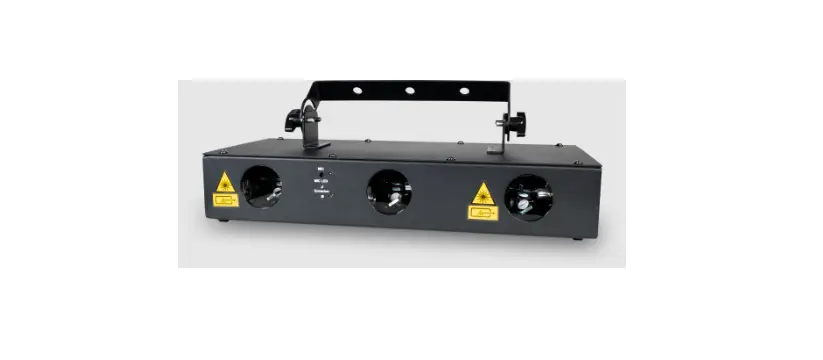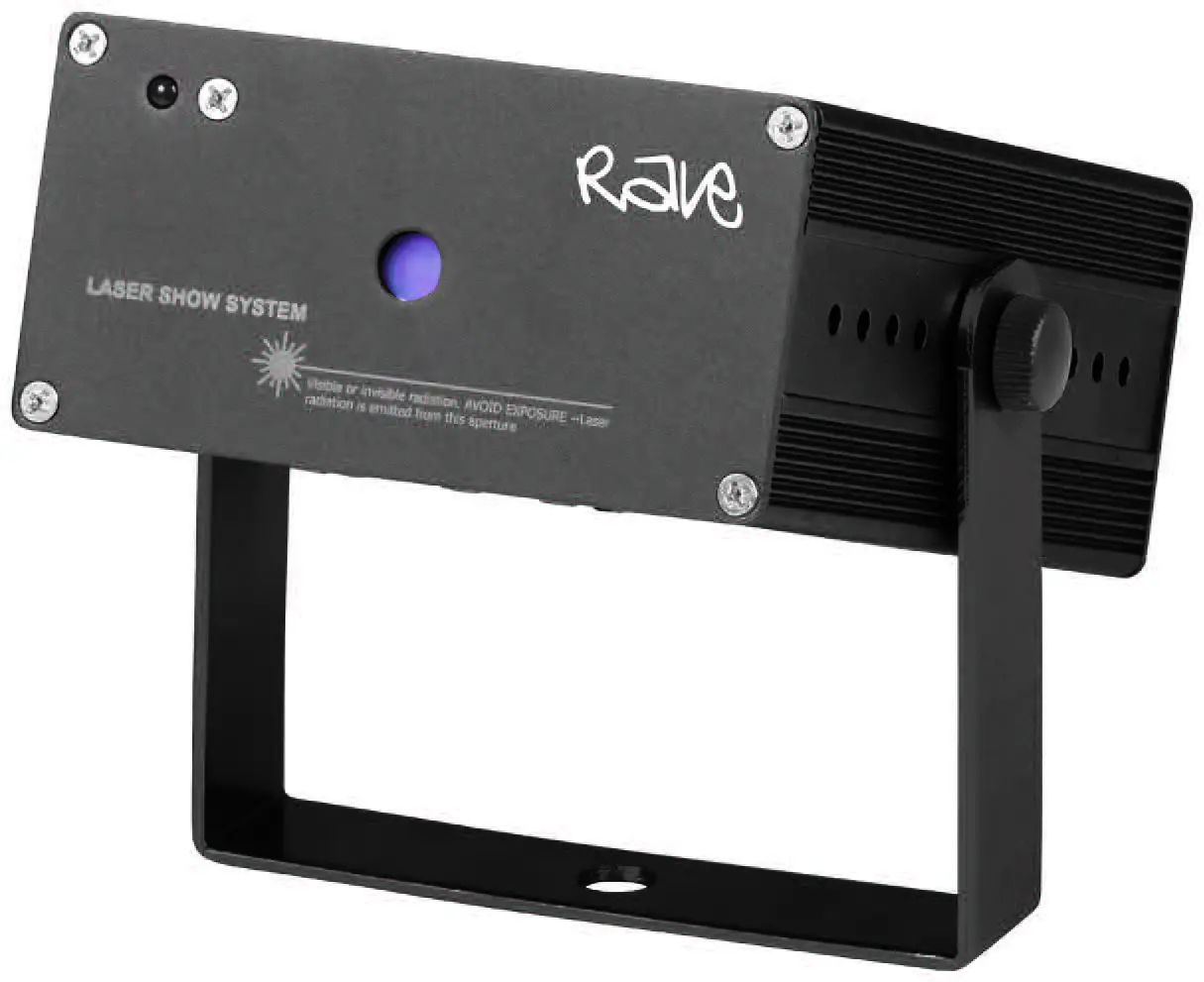

eHAHO L2600 RGB Laser Light
Product Information
The product is a laser system that requires careful usage and maintenance to avoid laser eye injury and breaking the law. The product comes with a user manual that contains important safety and operation information. The manual includes tips on channel functions, pattern color change, dots effect, drawing functions, dynamic drawing effects, twist pattern change, grating selection, out of bounds and pattern size, pattern zoom IN/OUT, pattern rotation, X and Y moving, X and Y zoom IN/OUT, fixed color setting, and pattern color change.
Product Usage Instructions
Before powering on the laser unit for the first time, read and understand all instructions in the user manual to avoid laser eye injury and breaking the law. Keep the manual in a safe place for future reference.
To use the product:
- Connect the power cable to the light.
- Read the tips section of the manual to understand the different channel functions and their values.
- Use the channel functions to change the pattern color, dots effect, drawing functions, dynamic drawing effects, twist pattern change, grating selection, out of bounds and pattern size, pattern zoom IN/OUT, pattern rotation, X and Y moving, X and Y zoom IN/OUT, fixed color setting, and pattern color change.
- Pay close attention to each safety REMARK and WARNING statement in the user manual to avoid laser eye injury.
- If you have any questions or concerns about the product, contact your dealer or the company for service.
This manual contains important laser system safety and operation information. Read and understand all instructions prior to powering on laser unit the first time, to avoid laser eye injury and to avoid breaking the law. Keep this manual in a safe place for future reference.
OVERVIEW
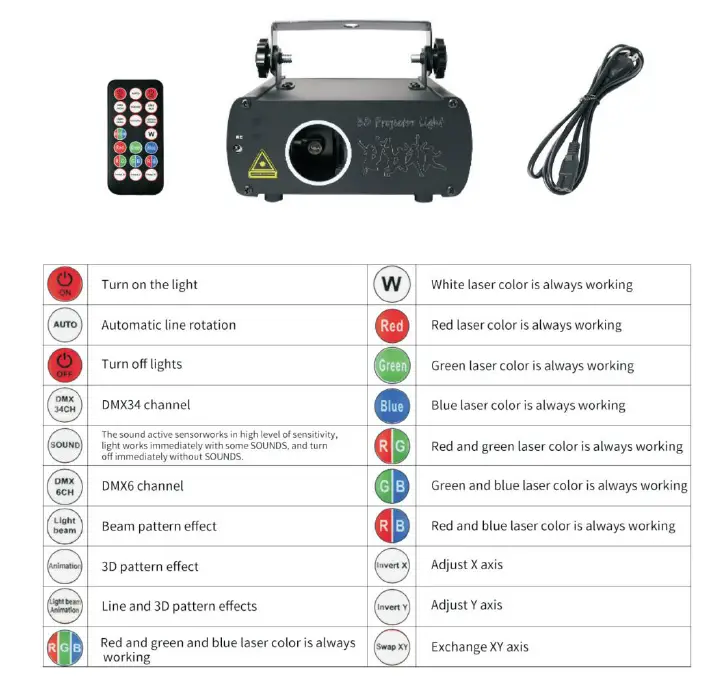
TIPS:
- Please note that all these perfect effects are created “In Smoke Environment”. Without smoke, just can see some pattern effects and the dynamic beams and scanning effects will not see.
- For the best user experience, the sound-activated mode should be used together with a loud volume speaker. Do not use the phone speaker to test the sound-activated mode since the phone speaker is not powerful enough to trigger sound-activated mode.
- Built-in motor spins quickly and may make a sound during working, this is a normal phenomenon.
- Please do not keep your eyes on the light for a long time, so as not to damage your eyes. Keep away from children.
- Please use a professional glass cleaner regularly and clean the lens with a flannel to ensure the maximum brightness output of the light and extend the life of the light.
| Channel | Function | Value | Description |
|
CH29 |
Pattern color change | 32-39 | cyan |
| 40-47 | blue | ||
| 48-55 | pink | ||
| 65-63 | white | ||
| 64-95 | Whole pattern RGB. the bigger value, the faster speed | ||
| 96-127 | Whole pattern YCP. the bigger value, the faster speed | ||
| 128-159 | Whole pattern RGBYCPW. the bigger value, the faster speed | ||
| 160-191 | 7 Color RGBYCPW. the bigger value, the faster speed | ||
| 192-223 | Sine Chasing color change | ||
| 224-255 | Cosine Chasing color change | ||
| CH30 | Dots | 0-63 | Original Dots |
| 64-127 | Pattern no Dots effect, sweep line blanking | ||
| 128-159 | Pattern no Dots effect, Sweep line no blanking | ||
| 160-255 | Saving | ||
| CH31 | Drawing and other functions(working with Channel 15) | 0-255 | On CH15 value 0-127,pattern moving drawing all ON to keep the time |
| 0-255 | On CH15 value 128-255, walking drawing line quantity | ||
|
CH32 | Drawing (CH15 and CH14 together) | 0-63 | Sine manual drawing |
| 64-127 | Cosine manual drawing | ||
| 128-159 | Dynamic drawing A Effects. the bigger value, the faster speed | ||
| 160-191 | Dynamic drawing B Effects. the bigger value, the faster speed | ||
| 192-223 | Dynamic drawing C Effects. the bigger value, the faster speed | ||
| 224-255 | Dynamic drawing D Effects. the bigger value, the faster speed | ||
| CH33 | Twist pattern change | 0-255 | The more value, the less twisting (notes: when zoom in, rotation, moving, rolling twisting effects, CH16 can control the effect) |
|
CH34 | Grating selection (notes: in some sections, more value then less gobo angle) | 0-19 20-39 40-59 3…..240-25 5 13 |
Grating group 1. 1. The bigger digit, the smaller pattern. |
Warranty Warnings:
- Damages caused by the disregard of this user manual are not subject to Warranty.
The dealer will not accept liability for any resulting defects or problems. - Please consider that unauthorized modifications on the device are forbidden due to safety reasons. Please note that damages caused by manual modifications on the device or unauthorized operation by unqualified persons are not subject to warranty.
- If this device will be operated in any way different to the one described in this manual, it may suffer damages and the guarantee becomes void. Furthermore, any other operation may lead to dangers like short-circuit, burns electric shock, etc.
- For any questions about this light, please contact your dealer or our company for service.
| Channel | Function | Value | Description |
| CH19 | Out of bounds and pattern size | 50-99 | Out of bounds Reentry |
| 100-149 | Out of bounds Blanking | ||
| 150-255 | Saving | ||
| 0-49 | Out of bounds Crossing | ||
| CH20 | No function | blank | |
| CH21 | Pattern selections | 0-255 | Each value for one pattern; If over the pattern numbers, then program displaying the max number |
|
CH22 | Pattern Zoom IN/OUT | 0-127 | Static pattern size |
| 128-159 | Dynamic Zoom OUT. the bigger value, the faster speed | ||
| 160-191 | Dynamic Zoom IN. the bigger value, the faster speed | ||
| 192-223 | Dynamic Zoom IN/OUT. the bigger value, the faster speed | ||
| 224-255 | Dynamic Zoom Rotation. the bigger value, the faster speed | ||
|
CH23 |
Pattern rotation | 0-127 | Static rotation |
| 128-159 | Dynamic rotation 2 circles clockwise and counter clockwise. the bigger value, the faster speed | ||
| 160-191 | Dynamic rotation 1 circle clockwise and counter clockwise. the bigger value, the faster speed | ||
| 192-223 | Dynamic rotation clockwise. the bigger value, the faster speed | ||
| 224-255 | Dynamic rotation counter clockwise. the bigger value, the faster speed | ||
|
CH24 |
X Moving | 0-127 | Static X moving |
| 128-159 | Dynamic UP moving wave effect. the bigger value, the faster speed | ||
| 160-191 | Dynamic DOWN moving wave effect. the bigger value, the faster speed | ||
| 192-223 | Dynamic LEFT moving. the bigger value, the faster speed | ||
| 224-255 | Dynamic RIGHT moving. the bigger value, the faster speed | ||
|
CH25 |
Y Moving | 0-127 | Static Y moving |
| 128-159 | Dynamic RIGHT moving wave effect. the bigger value, the faster speed | ||
| 160-191 | Dynamic LEFT moving wave effect. the bigger value, the faster speed | ||
| 192-223 | Dynamic DOWN moving. the bigger value, the faster speed | ||
| 224-255 | Dynamic UP moving. the bigger value, the faster speed | ||
|
CH26 |
X Zoom IN/OUT | 0-127 | Static size |
| 128-159 | Dynamic UP moving distortion. the bigger value, the faster speed | ||
| 160-191 | Dynamic DOWN moving distortion. the bigger value, the faster speed | ||
| 192-223 | Dynamic Zoom IN/OUT | ||
| 224-255 | Dynamic Rotation Zoom IN/OUT. the bigger value, the faster speed | ||
|
CH27 |
Y Zoom IN/OUT | 0-127 | Static size |
| 128-159 | Dynamic RIGHT moving distortion. the bigger value, the faster speed | ||
| 160-191 | Dynamic LEFT moving distortion. the bigger value, the faster speed | ||
| 192-223 | Dynamic Zoom IN/OUT | ||
| 224-255 | Dynamic Rotation Zoom IN/OUT. the bigger value, the faster speed | ||
| CH28 | Fixed Color setting | 0 | Original color |
| 1-255 | Color change with each n dot | ||
| CH29 | Pattern color change | 0-7 | Original color |
| 8-15 | red | ||
| 16-23 | yellow | ||
| 24-31 | green |
General Instructions
Unpacking:
Thank you for purchasing this product. Please read user guide for safety and operations information before using the product. Keep this manual for future reference. This product can create perfect light programs and effects since it has passed a series of strictly tests before delivery. Please check the attachments listed on the page after opening the carton. Immediately upon receiving a fixture, carefully unpack the box. Check the box contents to ensure that all parts are present and that they are in good condition. If any part appears damaged from shipping, or if the box shows signs of mishandling, notify the shipper immediately. In addition, retain the box and all the packing material for inspection. In any event, save the carton and all packing material because, in case that you have to return the fixture to the factory, you will have to do so in its original box, with its original packing.
What is included: 1* Light, 1*Power Cable, 1*User Guide
- Safety Notice: Please read the following notes carefully because they include important safety information about the installation, usage and maintenance of this product. It is important to read all these notes before starting to work with this product.
- Lasers can be hazardous and have unique safety considerations. Permanent eye injury and blindness is possible if lasers are used incorrectly. Pay close attention to each safety REMARK and WARNING statement in the user manual. Read all instructions careful.
Laser Safety Warnings
- Potential laser injury hazard exists with this product! Read these Instructions carefully, which include important information about installation, safe use and service!
Caution:
- Avoid direct eye contact with laser light. Never intentionally expose your eyes or others to direct laser radiation.
- This laser product can potentially cause instant eye injury or blindness if laser light directly strikes the eyes.
- It is illegal and dangerous to shine this laser into audience areas, where the audience or other personnel could get direct laser beams or bright reflections into their eyes.
- It is a US Federal offense to shine any laser at aircraft.
NON-INTERLOCKED HOUSING WARNING
- This unit contains high power laser devices internally. Do not open the laser housing, due to potential exposure to unsafe levels of laser radiation. The laser power levels accessible if the unit is opened can cause instant blindness, skin burns and fires.
Installation 
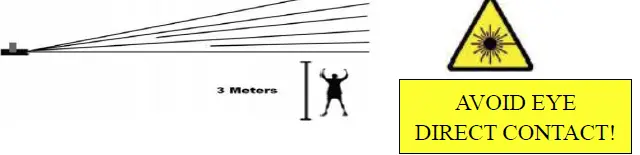
- Laser effects projected 3 meters (9.8 ft) above the audience are eye safe. A survey should be taken to assess the likelihood of any reflective surfaces (such as high windows, chrome bars etc) bouncing stray beams back down into the audience.
- Using a fastening clamps on the light and tight to the ceiling in a strong hook..
- Make sure its correct power output and plug the power cable to the wall socket.
- Power must be in earth! Power on the light.
- Do not shoot the beams to the audience!
- Do not look direct into the laser aperture once the laser light is ON. Please pay attention to the Laser Danger Warning Label!
Cleaning
- Fixture Cleaning: Due to fog residue, smoke, and dust cleaning the internal and external lenses should be carried out periodically to optimize light output.
- Use normal glass cleaner and a soft cloth to wipe down the out- side casing.
- Clean the external optics with glass cleaner and a soft cloth every 20 days.
- Always be sure to dry all parts completely before plugging the unit back in. Cleaning frequency depends on the environment in which the fixture operates (I.e. smoke, fog residue, dust, dew). In heavy use we recommend cleaning on a monthly basis. Periodic cleaning will ensure longevity, and crisp beam output.
Caution
- After setting up, and before public use, test laser to ensure proper function.
- Do not use if any defect is detected.
- Do not use if laser emits only one or two laser beams rather than dozens/ hundreds, as this could indicate damage to the diffraction grating optic, and could allow emission of higher laser levels above Class 3B.
- Do not point lasers at people or animals. Never look into the laser aperture or laser beams.
- Do not point lasers in areas in which people can potentially get exposed, such as uncontrolled balconies, etc.
- Do not point lasers at highly reflective surfaces, such as windows, mirrors and shiny metal. Even laser reflections can be hazardous.
- Never point a laser at aircraft, this is a federal offense.
- Never point un-terminated laser beams into the sky.
- Do not expose the output optic (aperture) to cleaning chemicals.
- Do not use laser if the laser appears to be emitting only one or two beams.
- Do not use the laser if the housing is damaged, the housing is open, or if the optics appear damaged in any way.
- Never open the laser housing. The high laser power levels inside of the protective housing can start fires, burn skin and will cause instant eye injury.
- Never leave this device running unattended.
| Channel | Function | Value | Description |
| CH11 | Fixed Color setting | 0 | Original color |
| 1-255 | Color change with each n dot | ||
|
CH12 |
Pattern color change | 0-7 | Original color |
| 8-15 | red | ||
| 16-23 | yellow | ||
| 24-31 | green | ||
| 32-39 | cyan | ||
| 40-47 | blue | ||
| 48-55 | pink | ||
| 65-63 | white | ||
| 64-95 | Whole pattern RGB. the bigger value, the faster speed | ||
| 96-127 | Whole pattern YCP. the bigger value, the faster speed | ||
| 128-159 | Whole pattern RGBYCPW. the bigger value, the faster speed | ||
| 160-191 | 7 Color RGBYCPW. the bigger value, the faster speed | ||
| 192-223 | Sine Chasing color change | ||
| 224-255 | Cosine Chasing color change | ||
| CH13 | Dots | 0-63 | Original Dots |
| 64-127 | Pattern no Dots effect, sweep line blanking | ||
| 128-159 | Pattern no Dots effect, Sweep line no blanking | ||
| 160-255 | Saving | ||
| CH14 | Drawing and other functions(working with Channel 15) | 0-255 | On CH15 value 0-127,pattern moving drawing all ON to keep the time |
| 0-255 | On CH15 value 128-255, walking drawing line quantity | ||
|
CH15 |
Drawing (CH15 and CH14 together) | 0-63 | Sine manual drawing |
| 64-127 | Cosine manual drawing | ||
| 128-159 | Dynamic drawing A Effects. the bigger value, the faster speed | ||
| 160-191 | Dynamic drawing B Effects. the bigger value, the faster speed | ||
| 192-223 | Dynamic drawing C Effects. the bigger value, the faster speed | ||
| 224-255 | Dynamic drawing D Effects. the bigger value, the faster speed | ||
| CH16 | Twist pattern change | 0-255 | The more value, the less twisting (notes: when zoom in, rotation, moving, rolling twisting effects, CH16 can control the effect) |
| CH17 | Grating selection (notes: in some sections, more value then less gobo angle) | 0-19 20-39 40-59 3….. 240-255 13 | Grating group 1. 1. The bigger digit, the smaller pattern. |
|
CH18 |
ON/OFF Laser | 0 | All OFF |
| 1-99 | AUTO | ||
| 100-199 | SOUND | ||
| 200-254 | Saving | ||
| 255 | Group A OFF, Group B ON | ||
| CH19 | Out of bounds and pattern size | 0-49 | Out of bounds Crossing. The bigger digit, the smaller pattern. |
| Channel | Function | Value | Description |
|
CH1 |
Laser ON/OFF | 0 | Laser OFF |
| 1-99 | AUTO | ||
| 100-199 | Sound active | ||
| 200-254 | Saving | ||
| 255 | Pattern A, OFF | ||
|
CH2 | Out of bounds and Pattern size | 0-49 | Out of bounds Crossing |
| 50-99 | Out of bounds Reentry | ||
| 100-149 | Out of bounds Blanking | ||
| 150-199 | Pattern zoom out, Out of bounds Blanking | ||
| 200-255 | Saving | ||
| CH3 | Group selections | 0-223 | Group 1 |
| 244-255 | Group 0 | ||
| CH4 | Pattern selections | 0-255 | Each value for one pattern; If over the pattern numbers, then program displaying the max number |
|
CH5 | Pattern Zoom IN/OUT | 0-127 | Static pattern size |
| 128-159 | Dynamic Zoom OUT. the bigger value, the faster speed | ||
| 160-191 | Dynamic Zoom IN. the bigger value, the faster speed | ||
| 192-223 | Dynamic Zoom IN/OUT. the bigger value, the faster speed | ||
| 224-255 | Dynamic Zoom Rotation. the bigger value, the faster speed | ||
|
CH6 |
Pattern rotation | 0-127 | Static rotation |
| 128-159 | Dynamic rotation 2 circles clockwise and counter clockwise. the bigger value, the faster speed | ||
| 160-191 | Dynamic rotation 1 circle clockwise and counter clockwise. the bigger value, the faster speed | ||
| 192-223 | Dynamic rotation clockwise. the bigger value, the faster speed | ||
| 224-255 | Dynamic rotation counter clockwise. the bigger value, the faster speed | ||
|
CH7 |
X Moving | 0-127 | Static X moving |
| 128-159 | Dynamic UP moving wave effect. the bigger value, the faster speed | ||
| 160-191 | Dynamic DOWN moving wave effect. the bigger value, the faster speed | ||
| 192-223 | Dynamic LEFT moving. the bigger value, the faster speed | ||
| 224-255 | Dynamic RIGHT moving. the bigger value, the faster speed | ||
|
CH8 |
Y Moving | 0-127 | Static Y moving |
| 128-159 | Dynamic RIGHT moving wave effect. the bigger value, the faster speed | ||
| 160-191 | Dynamic LEFT moving wave effect. the bigger value, the faster speed | ||
| 192-223 | Dynamic DOWN moving. the bigger value, the faster speed | ||
| 224-255 | Dynamic UP moving. the bigger value, the faster speed | ||
|
CH9 |
X Zoom IN/OUT | 0-127 | Static size |
| 128-159 | Dynamic UP moving distortion. the bigger value, the faster speed | ||
| 160-191 | Dynamic DOWN moving distortion. the bigger value, the faster speed | ||
| 192-223 | Dynamic Zoom IN/OUT | ||
| 224-255 | Dynamic Rotation Zoom IN/OUT. the bigger value, the faster speed | ||
|
CH10 |
Y Zoom IN/OUT | 0-127 | Static size |
| 128-159 | Dynamic RIGHT moving distortion. the bigger value, the faster speed | ||
| 160-191 | Dynamic LEFT moving distortion. the bigger value, the faster speed | ||
| 192-223 | Dynamic Zoom IN/OUT | ||
| 224-255 | Dynamic Rotation Zoom IN/OUT. the bigger value, the faster speed |
- During Assembly, operation, maintenance, please pay special attention to avoid possible exposure to laser and collateral radiation in excess of the accessible emission limits.
- Use of controls or adjustments or performance of procedures other than those specified herein may result in hazardous radiation exposure.
- Protective eye wear is typically required where direct viewing of a Class 3B laser beam may occur.
 The projector must be installed in a location with adequate distance.
 The projector must be installed in a location with adequate distance.
Laser Expected Lifespan
- Laser gradually decline in brightness over time. HEAT is the dominant factor that leads to the acceleration of this decline. Packaged in clusters, Laser exhibit higher operating temperatures than in ideal or singular optimum conditions. For this reason when all color Laser are used at their fullest intensity, life of the Laser is significantly reduced. It is estimated that a viable lifespan of 5,000 to 10,000 hours will be achieved under normal operational conditions.
- If improving on this lifespan expectancy is of a higher priority, place care in providing for lower operational temperatures.
- This may include climatic-environmental and the reduction of overall projection intensity.
Attention!
- The scan speed of any laser software control must be less than the scanner speed of your laser light, otherwise, the patterns possible have distortion, or else the scanner will be damaged by over-speed running software!
Technical Specification
- Feature: Animation laser with high-speed optical scanner to create animated graphics,hundreds of beam show and graphics show patterns, and with the function of color change, AUTO, Sound activate, rotating, movement, rotation, zoom (+/-), drawing and speed etc.
- Scanner High-speed optical scanner, big angle scanning
- Play Mode Sound Active, AUTO-Beam, AUTO-Animation, DMX, Master/ Slave, PC Control
- DMX channel: 6CH/34CH
- Digital display function
- Sound-activated sensitivity regulation: Turn the knob clockwise to change the sensitivity from low to high
- Power Supply Bi-Voltage AC100V to 240V /2A,50/60HZ
- Applicable place: logo projector, company advertising, superstar fashion show, DJs, Bands, Bars, Pubs, Clubs, Roller skating rinks, KTV, Family Party, etc.
Fixture Rear Plate:
DMX Control
The system only accepts the DMX512 signal of international standard to control the system.
DMX Control Parameter Chart
Simple DMX mode:
| Channel | Function | Value | Description |
| CH1 | Laser ON/OFF | 0 | OFF |
| 1–255 | ON | ||
|
CH2 |
Movement AUTO/SOUND control | 0–31 | Preset effects AUTO mode |
| 32–63 | Preset Serial AUTO mode | ||
| 64–95 | Preset mixed AUTO mode | ||
| 96–127 | Saving the effects | ||
| 128–159 | Preset effects SOUND mode | ||
| 160–191 | Preset Serial SOUND mode | ||
| 192–223 | Preset mixed SOUND mode | ||
| 224–225 | Saving the effects | ||
|
CH3 | Patterns selection (1.Group number over the max, then the program is default with the max group. 2. When CH2 is under preset mixed mode, this Channel is invalid. ) | 0–15 | Group 1 patterns |
| 16–31 | Group 2 patterns | ||
| …… | |||
| 192–223 | Group 15 patterns | ||
| 224–255 | Group 0 patterns | ||
|
CH4 |
Theme selection |
0–255 | Each value is for one pattern. (1.Group number over the max, then the program is default with the max group. 2. When CH2 is under preset mixed mode, this Channel is invalid. ) |
|
CH5 |
Color selection | 0–31 | Full color |
| 32–63 | red | ||
| 64–95 | yellow | ||
| 96–127 | green | ||
| 128–159 | cyan | ||
| 160–191 | blue | ||
| 192–223 | pink | ||
| 224–255 | white | ||
| CH6 | Speed adjustment | 0 | No movement |
| 1–255 | Slow to fast |
Digital display function: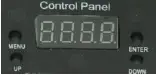
- Menu” is Menu, “Enter” is confirm, “Previous” is UP, “Next” is down.
- Displaying mode setting: press MENU to switch the modes: preset effects, professional DMX512, simple DMX512.
- preset effects: press ENTER to switch AUTO and Sound mode
- Preset AUTO mode: SE+digits, (the fourth Decimal point OFF, digit is the displaying serial number)
- preset Sound mode: SE+digits, (the fourth Decimal point ON, digit is the displaying serial number)
- press UP/DOWN to change the serial number.
- Professional DMX512 mode: A+digit (digit means the DMX value)
- If there is DMX signal, the fourth Decimal point ON; if there is no DMX signal, the fourth Decimal point OFF.
- laser light setup mode: press MENU to enter the laser light setup mode.
- Optional modes: X-invert, Y-invert, XY co-invert, X-invert position, Y-invert position, Remote control OFF.
- X-Invert
- X-invert display: x.INV
- Under X-invert mode, press ENTER to change the direction.
- Forward direction: the fourth Decimal point OFF; backward: the fourth Decimal point ON 2-3: Y-invert
- Y-invert display: y.INV
- Under Y-invert mode, press ENTER to change the direction
- Forward direction: the fourth Decimal point OFF; backward: the fourth Decimal point ON 2-4: XY co-invert
- XY co-invert display: \.INV
- Under this mode, press ENTER to change the direction
- Forward direction: the fourth Decimal point OFF; backward: the fourth Decimal point ON 2-5: Remote control OFF
- Remote control OFF display: OFF
- Under this mode, press ENTER to ON/OFF the remote control function.
- ON: the fourth Decimal point OFF; OFF: the fourth Decimal point ON
- Master/Slave mode:
- In the digital display, set the “Slave” unit into “E.001”.
- Questions or Concerns?
- Our team will solve your any problems in 24hours [email protected]