
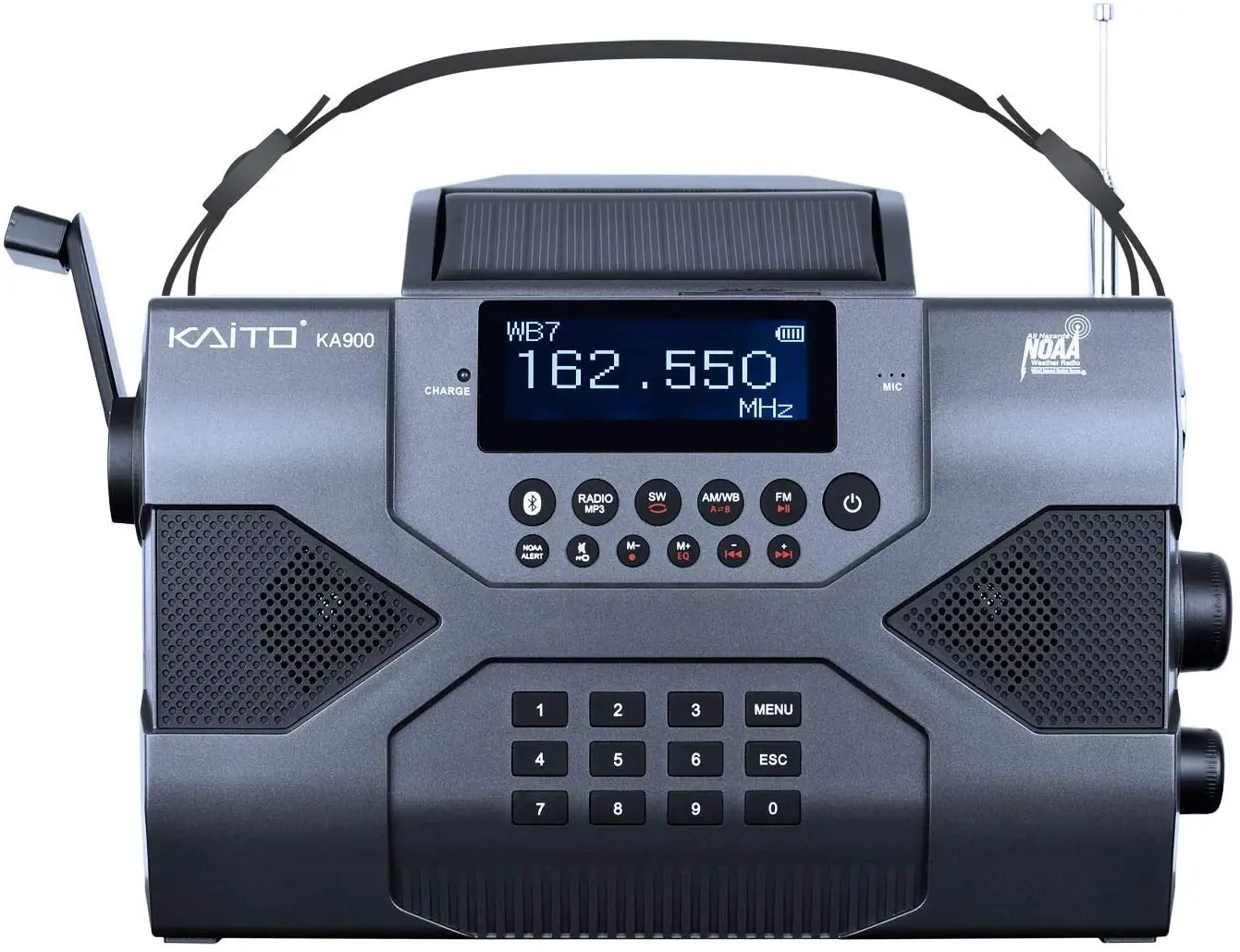
Kaito Emergency Radio Voyager Max KA900 Digital Solar Dynamo Crank Wind Up
Specifications
- HEADSET JACK SOCKET: 3.5 mm
- SENSITIVITY: FM<10uV, MW<1mV/m, SW < 30uV
- RECHARGEABLE BATTERY: 2,000 mAh li-ion
- DIMENSIONS: 9 ½ x 5 ½ x 2 ½ inches
- WEIGHT: 1.lbs. 11 oz
Introduction
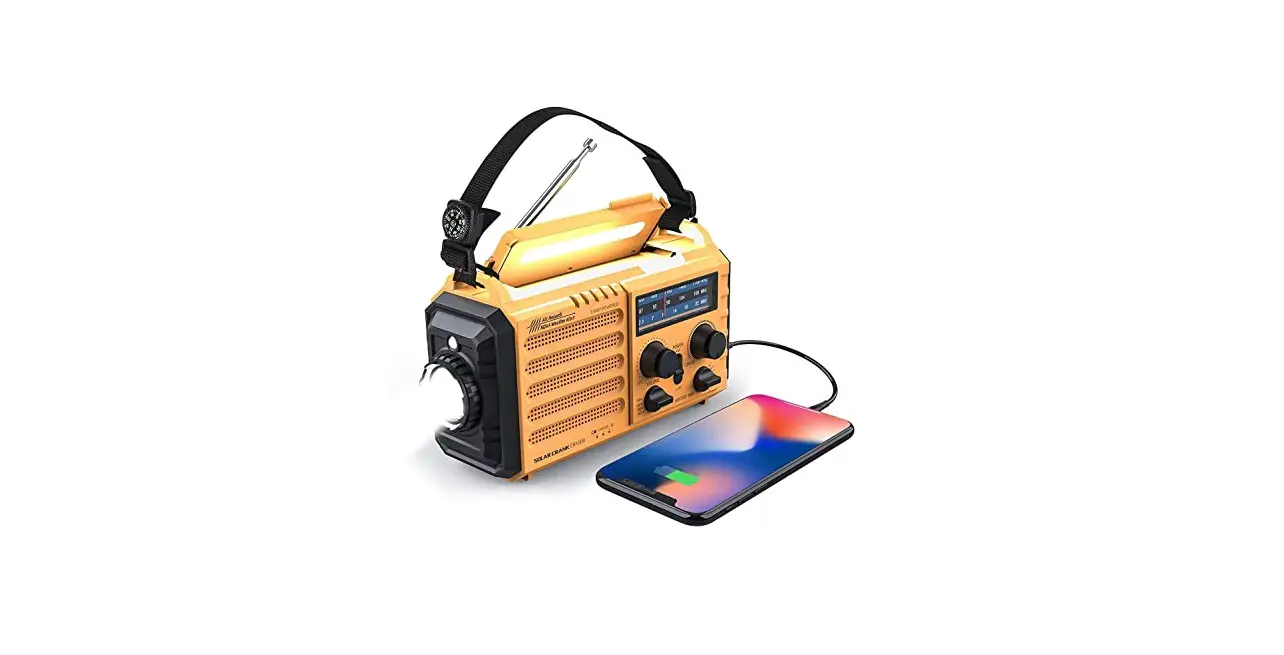
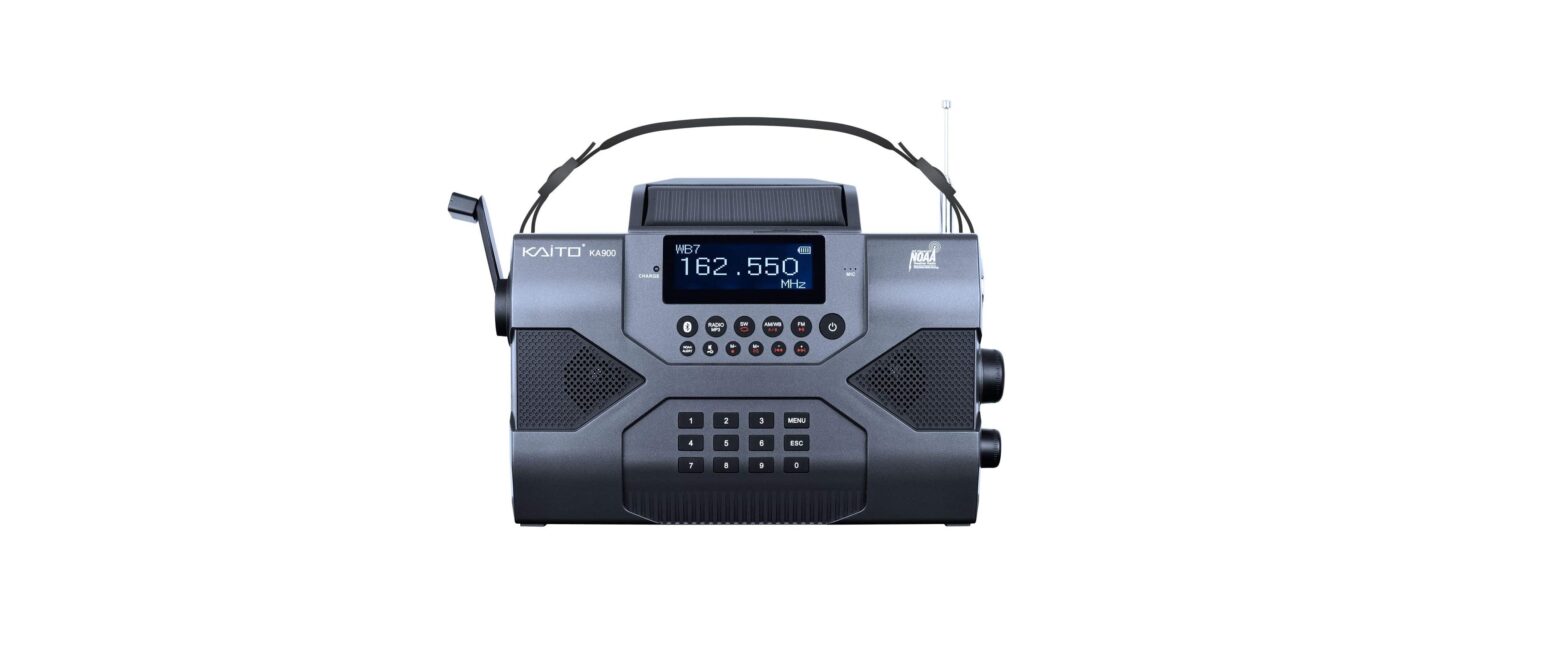
Introducing the KA900 Voyager Max, the newest and most technologically sophisticated member of the Kaito Voyager family. This portable digital receiver is intended for both regular use and emergency preparedness applications. A variety of power sources are available for it as an emergency preparedness tool, including an AC/DC adapter (NOT included), a built-in rechargeable 2,000 mAh lithium battery that can be charged by the optional AC adapter, hand cranking or a USB power source, and the patented flip-up 180-degree adjustable solar panel, which powers the radio even when no battery is installed. With its ground-breaking design and multifaceted features, it makes a fantastic bedside radio in addition to being an essential tool for travel, camping, hiking, emergency preparedness, and other outdoor activities.
AM, FM, shortwave, and NOAA weather stations can all be picked up by the KA900’s wide range of band reception. The tuning knob may be used to easily and comfortably tune into the 7 pre-programmed weather channels, which are numbered from 1 to 7. This eliminates the need for guesswork while tuning in to the stations. Additionally, if the radio is in the “Alarm” mode, it will turn on automatically when it detects alert signals from NOAA weather stations.
What’s in the box
- Voyager Max Radio
- 2,000 mAh li-ion rechargeable battery (installed)
- 23-ft retractable shortwave antenna
- Micro USB charging cable
- Quick reference guide
- User manual
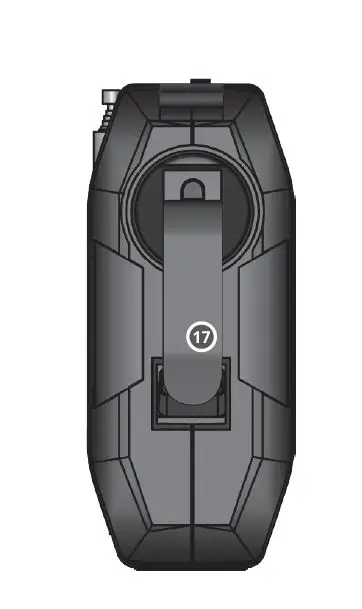
- Registration card
- Emergency Preparedness Guidebook
Controls and Function
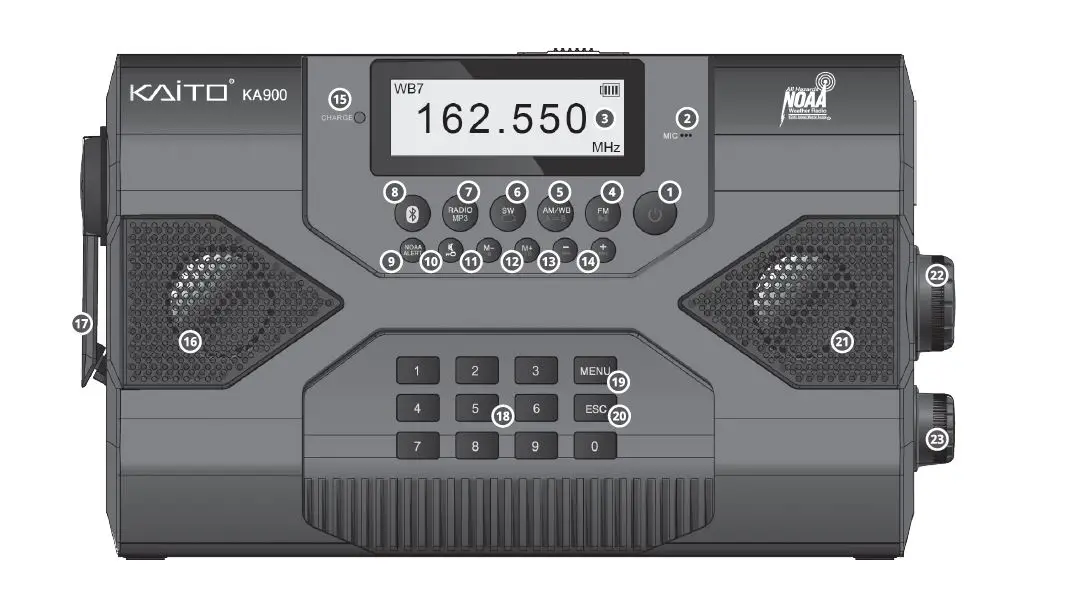
- Power Switch
Long press the button to power on and short press the button to power this radio off.
- Built-in Microphone
Used by built-in recorder to record sound from outside. - LCD Display with Backlight.
- FM Band Play or Pause Button
In the radio mode, short press this button to enter the FM band. In the MP3 player mode, short press this button to pause or continue playing the music. - AM or NOAA Weather Band and AB Repeat Loop Mode
In the radio mode, short press this button to enter the AM or NOAA weather band. In the MP3 player mode, this button is to set start A and end B, then A=B repeat loop play mode is set up. - Shortwave Band or MP3 Loop Play Mode Button
In the radio mode, short press this button to enter the Shortwave band. In the MP3 player mode, press this button repeatedly to select a different Ioop playback mode. - Radio and MP3 Player Mode Select Button
Press this button to choose the radio mode or MP3 player mode alternately. - Bluetooth Connection Button
Press this button to enter the Bluetooth mode, find this Bluetooth on your mobile phones or other devices, and connect it, then you can play music through this radio. - NOAA Weather Alert Button
In the NoAA Weather band mode, press this button to enter the NOAA Weather Alert work mode. - Mute and Lock Button
Short press this button to mute the speaker. Long press this button to lock button’s and knob’s functionality. - Backward Recall Stored Radio Stations and Sound Recording Function
In the radio mode, short press this button to backward recall stored radio station. In any work mode, long press this button to enter sound recording mode immediately. - Forward Recall Stored Radio Stations and Equalizer Function of the MP3 Player
In the radio mode, short press this button to backward recall stored radio station. In MP3 player work mode, long press this button to choose equalizer mode alternately as you wish. - Backward Progress Button
In any work mode, press this button to select backward progress on functions, frequencies, tracks, etc. - Forward progress Button
In any work mode, press this button to select forward progress on functions, frequencies, tracks, etc. - Charging LED Indicator
When the radio is in charging status, the red charge indicator will flash until the built-in battery is fully charged. - Built-in Right Speaker
- Dynamo Crank Handle
Turn the dynamo crank handle to charge the built-in rechargeable lithium battery.
- Numeric Keypad Buttons from 0 to 9
Press these buttons to directly enter frequency values, digital music tracks, etc. and select them immediately. - MENU Button
Use this button to enter menu mode in different modes, and press it again to enter different sub-menu or to confirm those selections. or use it as a setting menu pointer to select different options such as setting time etc - ESC Button
Short press this button to escape the current working mode, or leave and save the currently confirmed option. - Built-in Left Speaker
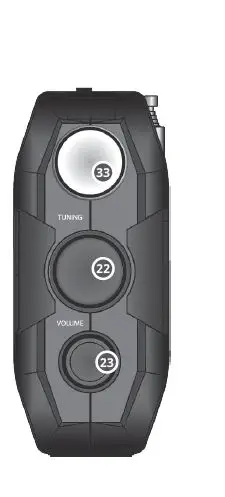
- Digital Tuning Dial Knob
Turn this digital tuning knob to select your desired radio station or use it to select the desired option in menu. - Sound Volume Control Knob
Turn this knob to increase or decrease the radio’s output volume.
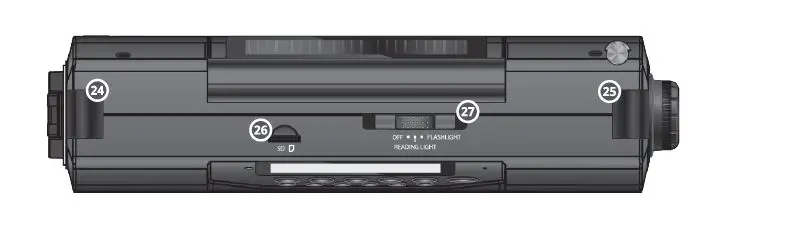
- Right Hand Strap Buckle
- Left Hand Strap Buckle
- Micro-SD Memory Card Slot
Insert a Micro-SD memory card into this slot and use this radio to play back music, record audio, etc. The Max Micro-SD card size is 32GB. - Reading Lamp and Flashlight Slide Switch
Slide the switch to turn on the bright 5-LED reading lamp and flashlight respectively.
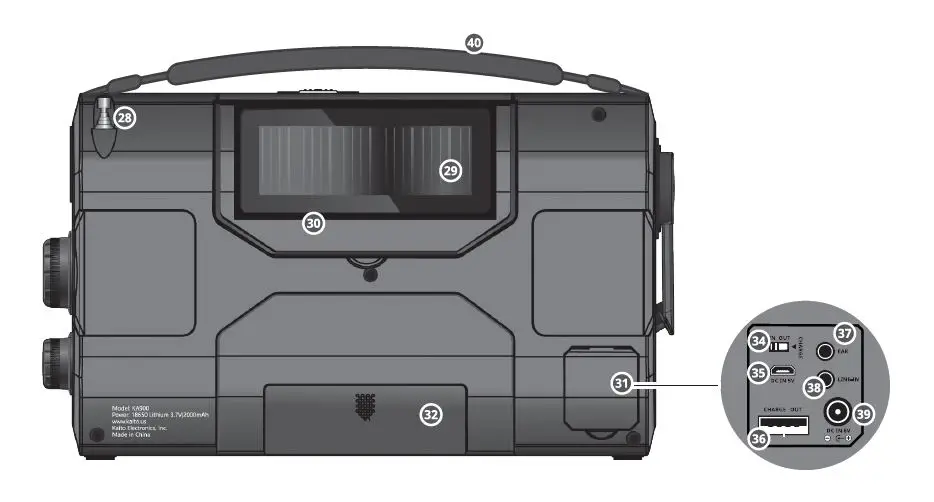
- Straight Pull Antenna
When using the FM, WB or shortwave band to listen to the radio, pull out the antenna for optimal reception. - Solar Power Panel
Solar panel is designed to trickle charge the built-in rechargeablelithium battery. - Reading Lamp and Solar Panel Module
Reading lamp and solar panel module that is foldable and adjustable tilt angle to 150° Max. The bright 5-LED reading light is hidden behind the module. - Input and Output Function Dock
- Built-in 18650 Rechargeable Lithium Battery Compartment
- Bright LED Flashlight
- Power Input and Output Switch
This switch is used to select how you want to use the USB ports. To charge out to your cellphone, set it to “OUT”; to charge the built-in battery, set it to “IN”
Important: if you are not charging out t0 a cellphone or other devices, please set the switch to “IN”. Otherwise, you may hear noise on AM and Shortwave bands. - Micro-USB Input charge Port
- USB Output Charge Port
- 5mm Stereo Earphone Jack
- 5mm Line-in Audio Input Jack
With the Line-in audio input jack, you can connect your cell phone, computer, iPad, iPod, MP3 player or other audio source device directly to the radio to play music. - 0mm Dc 6V DC-in Input Charge Jack

- Removable soft hand strap

FAQs
- The finest Kaito radio station?
Best Overall: KA500 Kaito - A good radio, is Kaito?
It is a fantastic choice for someone who wishes to use it as a traditional radio to listen to music because of its high AM and FM ratings. Similar to previous crank radios, it can receive the NOAA weather band. One of the quietest radios we tested, the maximum level is only 76.7 dB at one metre from the speaker. - What is the lifespan of a wind-up radio?
The radio may run for up to a day when fully charged; one minute of winding results in 20 minutes of playback. The radio can run for up to 7 hours after being completely charged via a USB connector. - What is the Voyager weather radio used for?
Set the band selection to WEATHER and select your local weather station on the weather band to use the NOAA Alert feature. The Power Selector Switch should then be set to NOAA Alert. I’m done now! When the National Weather Service issues an alert, the Voyager Radio will immediately turn on. - Any American-made emergency radios exist?
The Storm All-Weather Safety Whistle is a potent safety whistle made by the All-Weather Whistle Company that can be heard underwater. Produced in the USA. - Is shortwave radio a reliable emergency tool?
Despite not being the ideal option for daily listening, emergency crank-powered analogue shortwave radios are excellent as a backup radio because they can be self-powered. - Can a hand-cranked radio withstand an EMP?
Small, portable electronic equipment may be able to recover from an EMP attack, but the damage will vary depending on the strength of the EMP. However, when exposed to EMPs, systems connected to power lines, such as an electric-powered grid network or a telephone, may sustain lasting component damage. - Is a rescue radio required?
A battery-operated radio is always advised to be included in your emergency kit by disaster agencies. The majority of radios are basic battery-operated versions intended more for enjoyment than strictly as tools for emergency management. Keep the radio you already have and purchase some more batteries if you already have one of these radios in your home. - How reliable are hand-crank radios?
The hand-crank radio is an essential component of any emergency situation since it is a renewable, multipurpose source of important information, electricity, light, and even amusement. - CB radios may still be purchased.
Initially, an FCC license was needed in order to operate a CB radio. But now that it’s no longer required, anyone can use a CB radio – as long as they’re using FCC-approved gear.