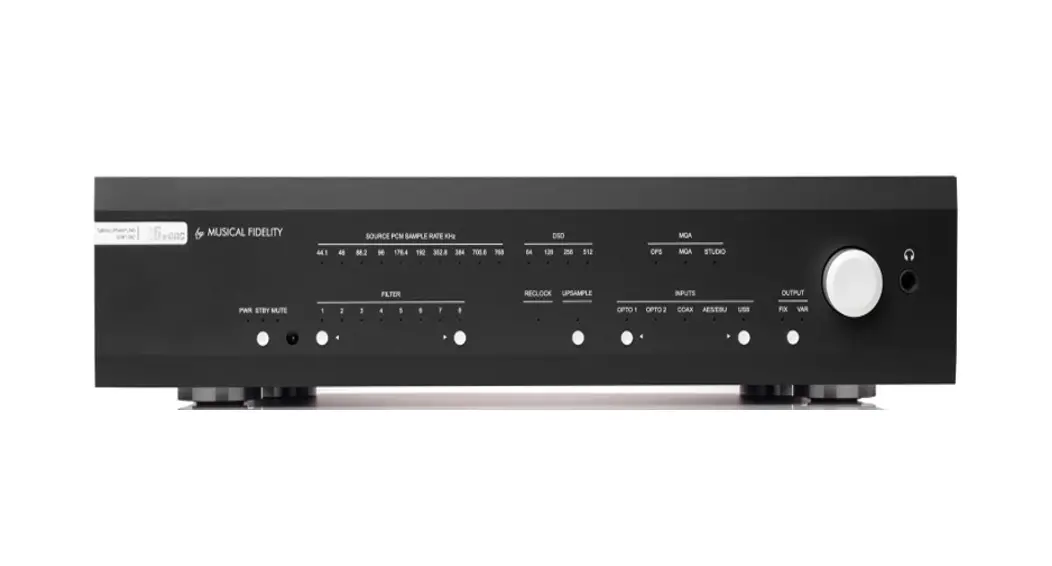
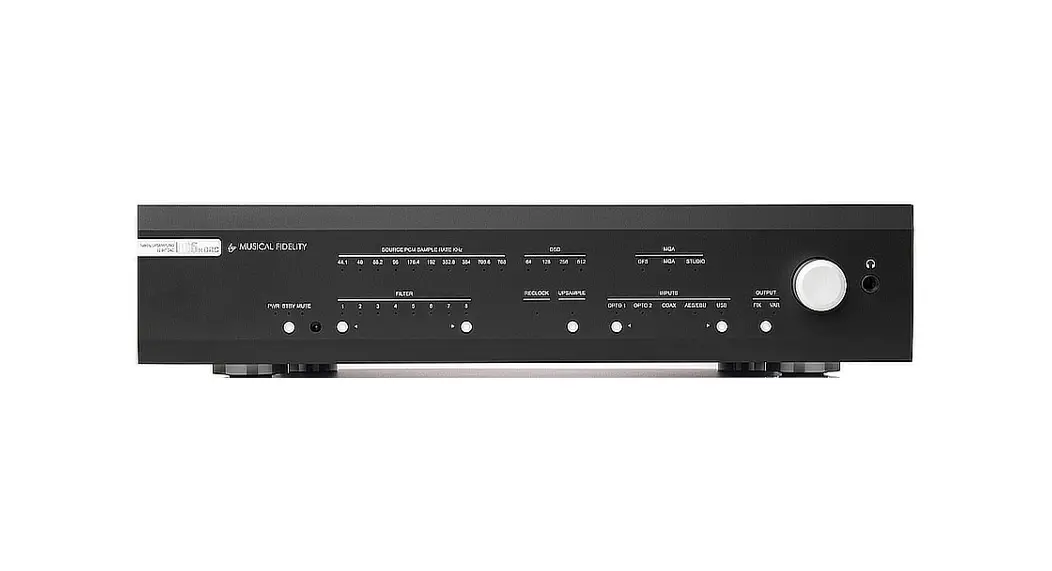
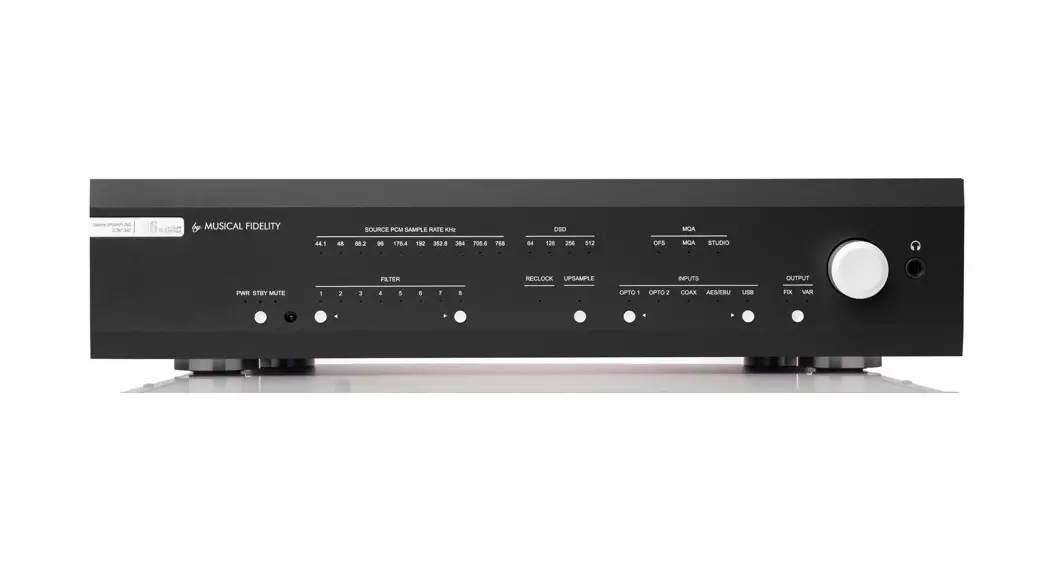
M3x DAC 192kHz Upsampling 32 Bit Dac
Product Information
The M3x DAC is a high-performance digital-to-analog converter
designed to deliver exceptional audio quality from various digital
sources. It can be used to upgrade CD players, TVs, set-top-boxes,
DAB tuners, USB Streamers, PCs, laptops, and other devices with
digital outputs. The unit is built to provide trouble-free
performance and is equipped with RCA and XLR audio outputs for
optimal signal transfer.
Safety Information
- This unit is supplied with a mains lead fitted with a moulded
13-amp plug. - If the plug needs to be removed, remove the fuse holder and
dispose of the plug safely. - Do not plug the unit into a mains outlet without the proper
plug. - The wires in the mains lead are colored as follows:
- Green and yellow: Earth
- Blue: Neutral
- Brown: Live
- This appliance must be earthed.
- Unauthorized opening of the equipment will invalidate any
warranty claim.
Precautions & User Information
- Any modifications to this product, not expressly approved by
Musical Fidelity, could void the user’s authority to operate this
equipment. - Remove the mains plugs during electrical storms to protect the
audio system from lightning damage. - To help the dealer identify the M3x DAC for after-sales
service, quote the serial number located on the rear panel of the
unit.
Installation
Before cleaning or installing the unit, switch off power at the
mains switch and remove the mains plug from the wall socket. Use a
moist cloth to clean the cabinet and remote-control unit, avoiding
solvents, white spirit, or thinners that could damage the surface
finish.
Position the M3x DAC on a stable, horizontal surface where it
won’t be knocked or subjected to vibration from loudspeakers.
Power Connections
The M3x DAC comes with a standard IEC mains cable that plugs
into the IEC socket at the back of the unit.
Audio Output Connections
RCA audio outputs: Use good quality RCA phono audio cables
(fully connected signal and ground) for optimum signal
transfer.
XLR audio outputs: Use good quality XLR audio cables (fully
connected hot and cold signals and ground) for absolute optimum
signal transfer.
Interconnects
Note: Musical Fidelity does not currently make any
interconnecting cables other than those supplied with the unit.
Musical Fidelity does not endorse any other manufacturer’s
cables.
Instruction Manual
Manual in different languages available from www.musicalfidelity.com
Contents Safety Information ……………………………………………………………………. 3 Precautions & User Information…………………………………………………. 3 Installation ………………………………………………………………………………. 4 Facilities & Connections……………………………………………………………. 5 Operation ………………………………………………………………………………… 6 Remote Control Handset…………………………………………………………… 7 Digital Filters…….. …………………………………………………………………….. 8 Troubleshooting….. …………………………………………………………………… 9 Technical Specifications…………………………………………………………..10 Item Disposal Information for Europe………………………………………..11
*Manuals in other languages can be found on the Musical Fidelity website. Please navigate to the Downloads section of the M3x DAC product page to access them
2
Safety Information
This unit is supplied with a mains lead fitted with a moulded 13-amp plug. If, for any reason, it is necessary to remove the plug, please remove the fuse holder and dispose of the plug safely, out of reach of children. It must not be plugged into a mains outlet.
The wires in the mains lead supplied with this appliance are coloured in accordance with the following code
Green and yellow ……………………………..Earth
Blue …………………………………………… Neutral
Brown…………………………………………………… Live
This new M3x DAC is designed and built to provide trouble-free performance. As with all electronic devices it is necessary to observe a few precautions:
· Heed all warnings shown on the back of the product.
· Only connect the M3x DAC to a mains outlet having the same voltage as marked at the back of the unit.
· Always ensure that when disconnecting and reconnecting your audio equipment the mains supply is switched off.
· Position the mains lead and signal interconnects where they are not likely to be walked on or trapped by items placed on them.
WARNING – This appliance MUST be earthed.
The colours of the wires of the mains lead of this appliance, may not correspond with the coloured markings identifying the terminals in the plug, proceed as follows:
· The wire which is coloured green and yellow must be connected to the terminal in the plug which is marked with the letter E or coloured green or green-and-yellow, or by the earth symbol:
· The wire which is coloured brown must be connected to the terminal which is marked with the letter L or coloured red.
· The wire which is coloured blue must be connected to the terminal which is marked with the letter N or coloured black.
· Do not use near water, or place water-filled containers on the M3x DAC, for example, a flower vase or potted plants. If water does spill inside, immediately pull out the mains plug from the wall socket and inform the dealer, who should then check the unit before further use. Entry of liquid into the M3x DAC is dangerous and may cause electric shock or fire hazard.
· Do not place the unit near direct heat sources such as radiators, direct sunlight or other equipment.
· Do not remove any covers or try to gain access to the inside. There are no user adjustments or fuses to change without qualification. Refer all service work to an authorized Musical Fidelity agent.
· If connecting to a BS1363 plug, a 13-amp fuse must be used.
Note: Unauthorized opening of the equipment will invalidate any warranty claim.
Precautions & User Information
WARNING: Any modifications to this product, not expressly approved by Musical Fidelity, who is the party responsible for standards compliance could void the user’s authority to operate this equipment.
3
The electronics in modern hi-fi equipment are complex and may, therefore, be adversely affected or damaged by lightning. For protection of the audio system during electrical storms, remove the mains plugs. If after-sales service is required, to help the dealer identify the M3x DAC please quote the serial number located on the rear panel of the unit.
Installation
Introduction This unit will deliver the ultimate performance possible from any digital source. It is designed to upgrade CD players, TVs, set-top-boxes, DAB tuners, USB Streamers and PCs and Laptops and any other source providing a variety of digital outputs.
Note: In normal operation, the unit dissipates a small quantity of power at all times, and it is important that it is adequately ventilated. The M3x DAC must be protected from humidity if the unit is moved from a cold place to a warm room, leave the unit for an hour or so to allow sufficient time for the moisture to evaporate.
Cleaning Before cleaning the unit, switch off power at the mains switch and remove the mains plug from the wall socket. Clean the cabinet and remote-control unit using a moist cloth. Using solvents, white spirit or thinners is not advised, as they could damage the surface finish.
Installation Position the M3x DAC on a stable, horizontal surface where there is no risk of it being knocked or subjected to vibration such as from loudspeakers.
Power Connections The M3x DAC is supplied with a standard IEC mains cable which plugs into the IEC socket at the back of the unit.
Audio Output Connections RCA audio outputs: Use good quality RCA phono audio cables (fully connected signal and ground), for optimum signal transfer.
XLR audio outputs: Use good quality XLR audio cables (fully connected hot and cold signals and ground), for absolute optimum signal transfer.
Digital Input connections COAXIAL inputs: Connect RCA digital source to digital input RCA sockets. Use a good quality fully connected (signal and ground) coaxial digital cable, for optimum signal transfer. OPTICAL inputs: Connect optical digital source to optical input socket. Use a good quality “Toslink” cable, for optimum signal transfer. USB input: Connect computer or similar USB “host” source to USB input socket. Use a good quality USB 2.0 type cable (not supplied), for optimum signal transfer. Try to keep USB cable length to a minimum for best reliability. The USB standard maximum for a single cable is 5M, after which repeaters (normally mains-powered USB hubs) are required. We do however; recommend avoiding such a setup if at all possible.
Interconnects
Note: Musical Fidelity currently do not make any interconnecting cables other than those supplied with the unit. Musical Fidelity does not endorse any other manufacturer’s cables.
If necessary, please refer to the dealer who can advise on quality cables for any particular setup.
4
Facilities & Connections
1 2
3
1 Power/Standby/Mute button and LED’s 2 IR Receiver
3 Filter selection
4 5
6
4 PCM Sample rate LED’s 5 DSD Sample rate LED’s 6 Input selection
7
8
9
10 11
12
13
7 RCA Analogue output L/R 8 XLR Balanced output L/R 9 USB digital input
Standard XLR Balanced input/output lead connections:
10 COAXIAL digital inputs 1,2 11 OPTICAL digital inputs 1,2 12 230/110 V switch 13 Mains IEC socket
Pin functions:
1 Ground, 0V 2 Normal polarity (“hot” or “+”) 3 Inverted polarity (“cold” or “-“)
(for reference only, no XLR signal leads supplied)
5
Operation
Once the M3x DAC unit is correctly wired up, and plugged into mains, the orange STBY led should be lit.
USB Input
The USB input is capable of accepting up to 32 bit 192 kHz PCM and DSD 256 (DoP and native) data streams.
In this mode the M3x DAC is consuming a minimal amount of power.
To switch the unit on, press the Power button (1) on the front of the unit. The blue PWR indicator will light up.
Input selection
The M3x DAC has a total of five inputs available. These are Optical 1 and 2, Coaxial 1 and 2 and also USB.
When the power cable is inserted into the Mains IEC socket 12 the Optical 1 input is selected by default.
When the M3x DAC is taken out of sleep mode, it will default to the last input selected.
From the front panel you can cycle through the inputs by using the and buttons (6). Pressing while on the USB input will cycle back to Optical 1. Whilst on Optical 1 the button will take you to the USB input again.
The remote control has direct access buttons for each input. Simply press the appropriate button to move directly to that input.
Computer settings for USB
A good quality USB 2.0 cable is required to connect the unit to the computer. Normal USB standards stipulate that this should be 5M or less; and we recommend keeping it as short as possible.
WARNING: Older USB cables are often heavy and bulky and must be supported to avoid damage to the USB socket. Any physical damage caused to this socket will not be covered by warranty.
The computer should now detect the M3x DAC. A driver installation is only required on Windows. · Linux kernel 2.6.33 or later (no driver required) · Apple OS X® 10.6.4 or later (no driver required) · Windows 10 Creators Edition or later (driver found on included CD or on Musical Fidelity website)
For playing native DSD on Windows a driver installation is required.
Any device that is compliant to the USB Audio Class 2.0 standard should also operate with the M3x DAC. However Musical Fidelity are unable to provide support for operation with anything other than the system listed above.
When a valid signal is received on the selected input, an indicator in either group 4 or 5 will light to show you the incoming sample rate.
Optical and coaxial inputs All optical and coaxial inputs are capable of accepting up to 24 bit 192 kHz PCM stereo data streams. The incoming data sample rate is displayed on the front panel LED’s for reference.
Note: The indicators 4 and 5 show the actual sample rate of the digital data received by the M3x DAC. Some playback software may have altered this compared to the original file.
CD, MP3, WAV, AAC/+, OGG, FLAC, and any other audio file types played on suitable playback software will now play through the unit.
Note: This USB input has a high-speed serial data processor, and by its nature, requires a very high volume of USB bandwidth. It will benefit greatly from being the only device connected on its USB `bus’. Sharing the same bus with other devices could cause unwanted artifacts such as dropouts or temporary loss of signal. This especially includes the use of the unit on a USB hub/splitter whether alongside other USB components or not. A direct connection to the host computer by shortest USB 2.0 lead possible is very much recommended.
6
Digital Filters The filters can be set with the buttons 3 on the front panel. For a detailed description of each filter see page 10. During DSD playback, the the DAC’s internal DSD filters are turned on and you can choose between 2 different DSD filters.
Upsampling Upsampling is always on for PCM data up to 192kHz on any input. Incoming sample rates up to 192kHz are resampled to 192kHz.
Outputs On the rear of the unit are 2 sets of outputs. RCA (single ended) and XLR (balanced). You can connect the M3x DAC to your amplifier using whichever is more convenient.
Remote Control Handset
The remote control shown below enables functions from this and other units from the M3, M5 and M6 ranges to be operated from a convenient distance.
The remote control buttons are split into 3 distinct areas.
The three rows of grey buttons at the bottom are used to control the M3xDAC and M6xDAC (and previous version of M6 DACs) and are detailed below.
The blue buttons control an amplifier such as the M6si. Consult the amplifier manual for more information.
The remaining grey buttons located in the upper section control a CD player such as M6scd. Consult the CD player manual for more information.
As the handset uses an invisible infra-red light beam, the front edge must be pointed directly towards the receiver window at the front of the player, without visual obstruction between them. If the range of the remote control greatly decreases, replace the batteries with new ones. Do not mix old and new batteries two are required, size AAA, LR03 or SUM-4.
Please dispose of used batteries in accordance to local battery disposal regulations.
OPTICAL 1 selects OPTICAL input 1 OPTICAL 2 selects OPTICAL input 2 COAX 1 selects COAXIAL input 1 COAX 2 selects COAXIAL input 2 USB selects USB input STBY switch the M3xDAC between standby and operating mode FILTER selects digital filter
Only for M6x DAC:
UPSAMPLE enables or disables upsampling VOLUME controls main output of M6xDAC in variable mode or headphone level (if headphones are connected)
7
Digital Filters PCM filters 1. Digital sharp roll-off filter Cutoff starting at roughly 0.45 x fs (meaning 0.45 times the sample
rate) and stopband at 0.54 x fs at -98dB (meaning at half the sample rate this filter is reducing the signal by 96dB). Most complete frequency response, avoids aliasing, provides crisp clean highs. 2. Digital slow roll-off filter Cutoff starting at roughly 0.21 x fs and stopband at 0.73 x fs at -80dB (meaning at roughly 75% of the sample rate this filter is reducing the signal by 80dB). Less pre and post ringing than the sharp roll-off filter resulting in tighter, more accurate reproduction of transient detail at the cost of decreased frequency response and increased aliasing. DSD filters 1. Analogue FIR-3 filter Cutoff frequency at 85kHz. 2. Analogue FIR-1 filter Cutoff frequency at 185kHz.
8
Troubleshooting
Problem
Probable Cause
Remedy
No power. Excessive hum from system speakers.
Digital input not working.
No audio output, or too low level output. Dropouts in sound.
No audio output from USB input.
Not detected when connected to USB.
Power plug is not inserted into socket correctly. Audio connector plug not fully pushed in. Cable Fault. Unsuitable Cable (e.g. cable grounds not connected).
No connection to that input. Incorrect input selected. Wrong data type sent to DAC.
Incorrect or missing connections. USB Driver not selected.
Plug in securely into unit’s IEC socket.
Insert plug securely. Check cable is connected at both ends. Some “esoteric” cables have internal wiring intentionally disconnected/modified. For best results on all inputs, please use good quality screened coax; signal and screen directly connected both ends.
Check connection and cable. Select correct input. Check source digital output is set for “16 bit stereo PCM” or similar. This particularly applies to some TVs, most DVD players, and other home theatre type devices that may give a multichannel digital output. Refer to the source’s manual for further information.
Check connections and make sure they are secure. See the Musical Fidelity website for relevant OS setup information.
Digital input lead not properly connected. Faulty digital input lead. Faulty optical lead.
Check input lead is fully secured. Change lead. Please use a good quality straight-through signal-and-ground phono to phono lead. Optical lead breakage. This can occur if the optical lead is bent into a radius too small. Avoid tight corners in routing optical leads.
USB Cable not connected. M6 USB Driver not selected.
USB Cable faulty. USB not working/ enabled on computer. Correct USB drivers not installed.
Check connections and make sure they are secure. See software section for relevant OS setup information. Please check device is listed in device manager (Windows®) or in Sound, audio devices for MAC OS X. Make sure the Musical Fidelity USB audio device is selected as the default OUTPUT device. Check USB port functions with another device.
Check and replace cable. Check USB port functions with another device. Download and install the device driver from the software downloads section on the Musical Fidelity website.
Dropouts in sound (USB input).
Shared USB port with another device. Computer busy with another application. Computer low on resources.
Avoid sharing the USB port with other devices, if possible.
At times an application (program) may intervene, sometimes invisibly e.g. a virus scanner. When this happens, computer resources are temporarily used up, and playback may suffer. This is not a fault. Try running fewer applications if possible.
9
Technical Specifications
Output (RCA/XLR) Output impedance Output, digital 0dB level
DAC SRC converter Total correlated jitter Linearity Frequency response Channel separation Signal to noise Total harmonic distortion Total harmonic distortion + noise
Connections Line level outputs
Digital inputs
Power requirement Mains voltages Consumption Weight Unit only, unboxed In shipping carton & inc. accessories
Unit dimensions Wide High, including feet Deep (front to back) including terminals
< 50 ohms RCA 2V RMS, XLR 4V RMS
PCM1795 with 2 digital filters (2 for PCM and 2 for DSD). SRC4392 <48 picoseconds peak to peak <0.2dB down to -100dB -0,2dB at 20Hz, 0,1dB at 20kHz, 1,5dB at 70kHz < -115dB at 10kHz @ 0dBFS > 107dB ,,A”-wt. at 1kHz @ 0dBFS < 0,004% at 1kHz @ 0dBFS < 0,005% at 1kHz @ 0dBFS
1 pair line level RCA (phono), left and right 1 pair line level XLR (balanced), left and right
2 RCA coaxial SPDIF in (up to 24bit/192kHz stereo PCM) 2 TOSLINK optical in (up to 24bit/192kHz stereo PCM) 1 USB 2.0 in for computer/PDA/other “host” (up to 32bit/192kHz stereo PCM, DSD256 DoP/native), fully asynchronous (Actual data determined by source file/computer software settings)
110 230 V max. 15W, <0,5W in standby
6,8 kg ca. 10,8 kg
440 mm 100 mm 378 mm
Musical Fidelity reserves the right to make improvements which may result in specification or feature changes without notice. E&OE. Microsoft and Windows® are either registered trademarks or trademarks of Microsoft Corporation in the United States and/or other countries. Mac and Mac OS are trademarks of Apple Inc., registered in the U.S. and other countries All other trademarks used herein are the property of their respective owners.
10
Item Disposal Information for Europe
DISPOSAL
The crossed out wheeled bin label that appears on the back panel of the product indicates that the product must not be disposed of as normal household waste. Toprevent possible harm to the environment please separate the product from other waste to ensure that it can be recycled in an environmentally safe manner. Please contact your local government office or your retailer for available collection facilities. DISPOSITION
La poubelle sur roulettes barrées X, qui apparaît en logo sur le panneau arrière du produit, indique que celui-ci ne doit pas être traité comme un déchet domestique commun. Afin de protéger l’environnement, ce produit électronique devra être géré séparément et donc recyclé selon les nouvelles normes Européennes Rohs concernant les déchets d’appareils électroniques. Prière de contacter les services concernés gouvernementaux ou votre point de vente pour l’élimination et l’enlèvement de déchets électroniques équipés de composants électroniques. DISPOSAL
La etiqueta cruzada hacia fuera del compartimiento que aparece en el panel trasero del producto indica que el producto no se debe reciclarse como basura normal de la casa. Para prevenir daños posible al ambiente separe por favor el producto de otras basura para asegurarse de que puede ser reciclada de una manera ambientalmente segura. Entre en contacto por favor a su oficina gubernamental local o a su minorista para las instalaciones disponibles de la colección. RIFIUTI
L’etichetta del cassonetto barrato riportato sul retro dell’apparecchio indica che il prodotto non deve essere smaltito tramite la procedura normale di smaltimento dei rifiuti domestici. Per evitare eventuali danni all’ambiente, separare questo prodotto da altri rifiuti domestici in modo che possa venire riciclato in base alle procedure di rispetto ambientale. Per maggiori dettagli sulle aree di raccolta disponibili, contattate l’ufficio govenativo locale od il rivenditore del prodotto. FACHGERECHTE ENTSORGUNG:
Das auf der Geräterückseite angebrachte Label deutet
darauf hin, dass das Produkt nicht mit konventionellem Hauskehricht entsorgt werden darf. Um Schäden und Verschmutzungen an Umwelt und Mensch zu vermeiden, muss das Produkt fachgerecht entsorgt und von anderem Abfall getrennt werden. Wenden Sie sich bei Fragen hierzu an Ihren Fachhändler oder an eine öffentliche Informationsstelle.
AFVAL
Het label op de achterzijde van dit apparaat, een afvalbak op wielen met een kruis doorgehaald, geeft aan dat dit apparaat niet samen met gewoon huishoudafval mag worden weggegooid. Om mogelijke schade aan onze leefomgeving te voorkomen dient dit apparaat, gescheiden van gewoon huishoudelijk afval, te worden afgevoerd zodat het op een milieuvriendelijke manier kan worden gerecycled. Neem voor beschikbare inzamelplaatsen contact op met uw gemeentelijke reinigingsdienst of met uw elektronica leverancier. HÄVITTÄMINEN
Yliruksattua jäteastiaa kuvaava tarra tuotteen
takalevyssä kertoo, että tuotetta ei saa käsitellä normaalina talousjätteenä. Ympäristön suojelemiseksi on tuote pidettävä erillään muusta jätteestä ja se on kierrätettävä ekologisesti kestävällä tavalla. Ota yhteyttä laitteen myyjään tai Pirkanmaan Ympäristökeskukseen lähimmän kierrätyskeskuksen löytämiseksi.
AFSKAFNING
Logoet med en skraldespand med kryds over på bagsiden af apparatet indikerer at dette produkt ikke må kasseres som normal husholdningsaffald. For at forebygge mulig skade på miljøet, bedes De separere dette produkt fra andet affald, og sikre at det bliver genbrugt på en miljørigtig måde. Kontakt venligst de lokale myndigheder eller din forhandler for oplysning om nærmeste tilgængelige opsamlingssted for elektronikaffald.
. , . .
a Division of Audio Tuning Vertriebs GmbH
Margaretenstrasse 98 A-1050 Vienna AUSTRIA
+43 1 544 858 0400 http://www.musicalfidelity.com
11
 Musical Fidelity | World-Class Manufacturer of Award Winning Amplifiers, CD Players, DACs and Digital Audio Devices