
essence TR-KPD Smart Security
Product Description
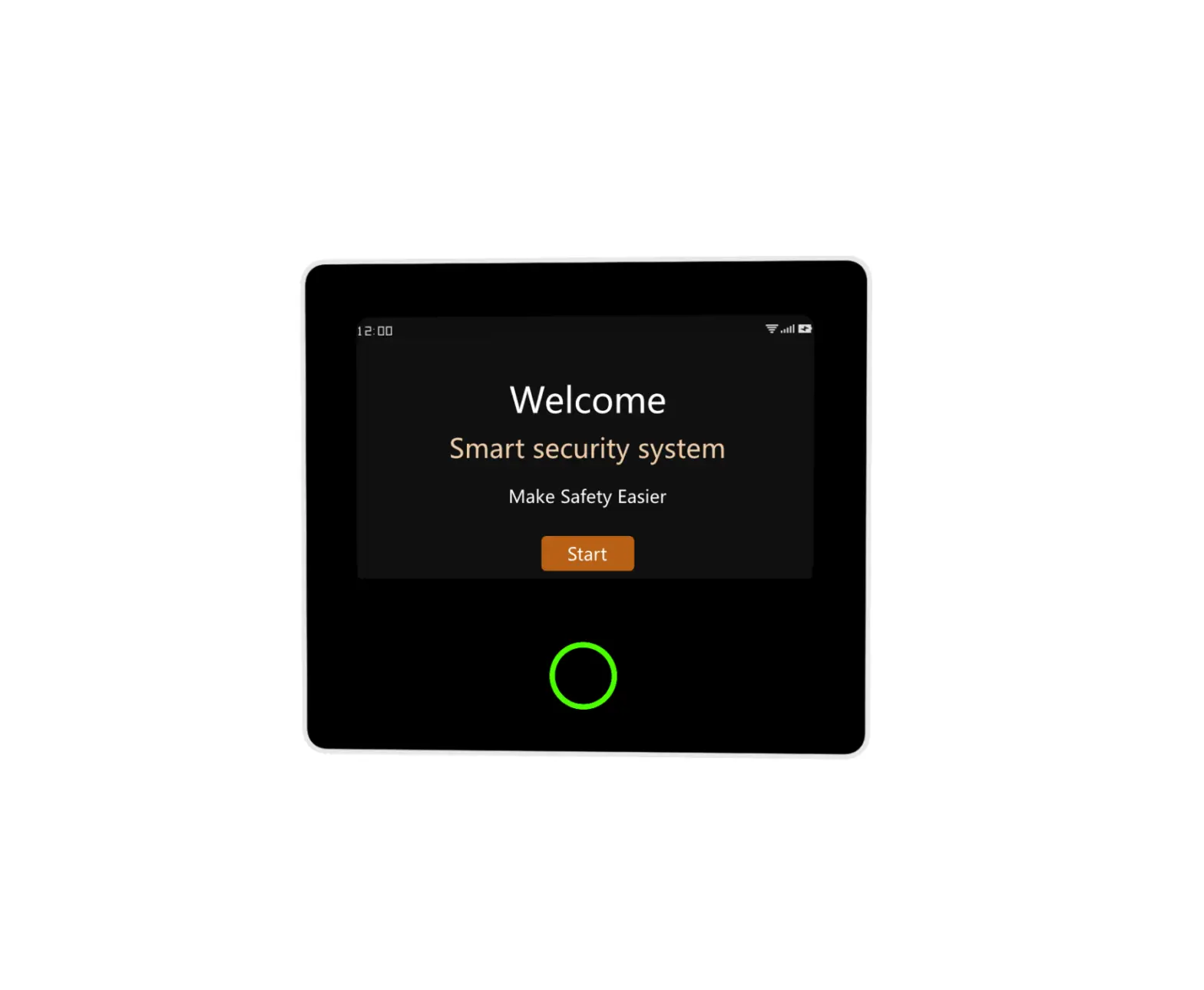
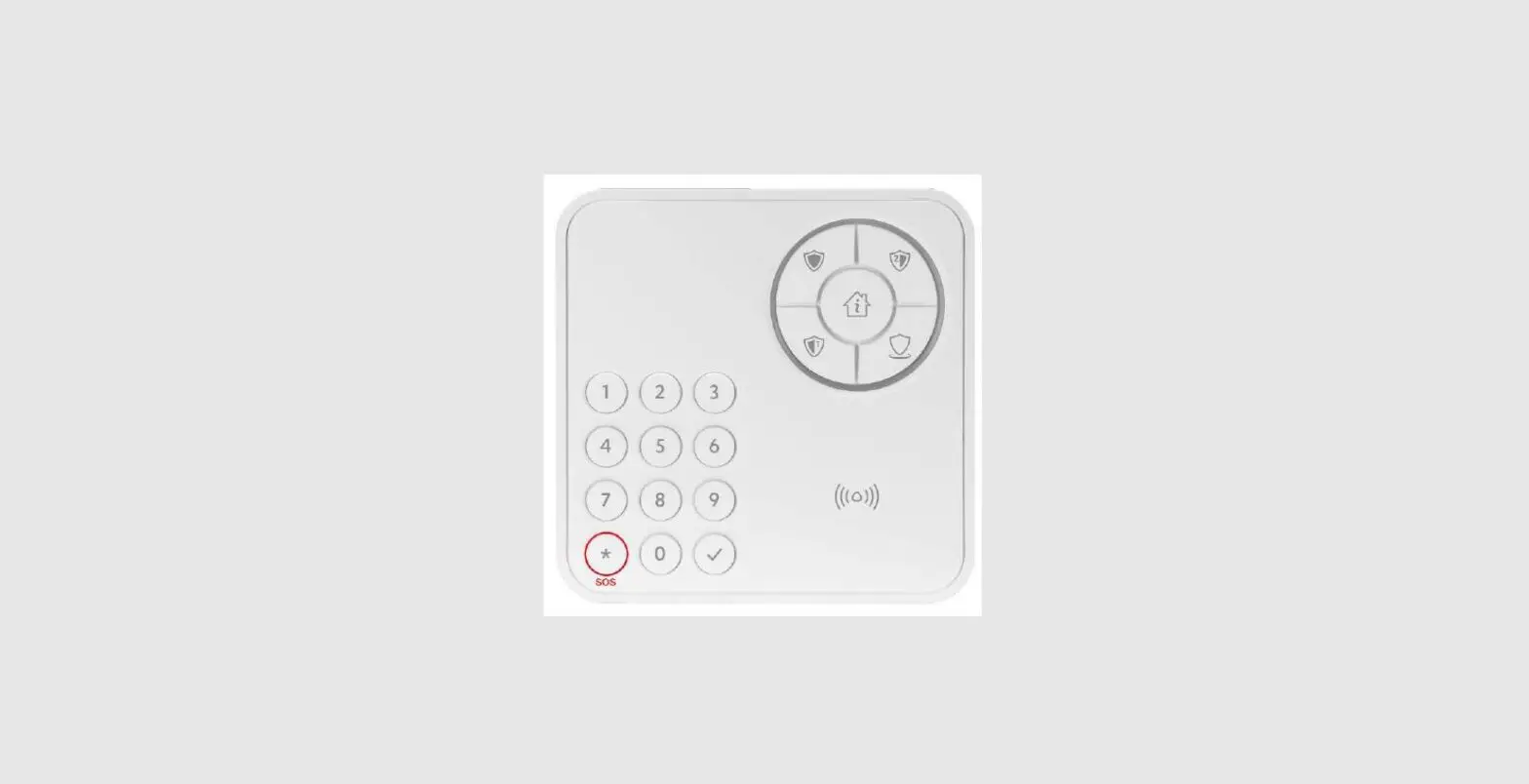
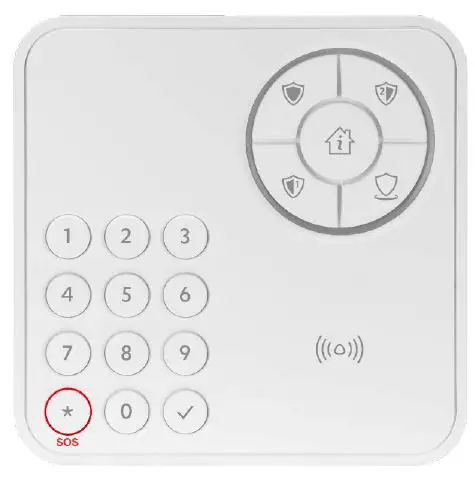
The TR-KPD (keypad) is an encrypted, battery-operated, wireless, access control and system arming device.
Key features include:
- User identity verification using a proximity RFID tag or passcode
- MiFare® DESFire® RFID technology
- Five-button design provides system activation controls and status indications
- Full numeric keypad
- Functions:
- Arm
- Disarm
- Partial arm
- Panic alarm
- Efficient power consumption to extend battery life
- Supports automatic over-the-air software programming and configuration upgrade (RSU)
Installing the Keypad
Ensure that you have:
- Four AA batteries
- A screw and wall anchor
- Screwdriver
- Drill
To install the keypad:
- Choose a smooth, flat indoor wall near the door.
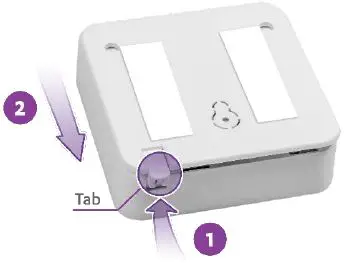
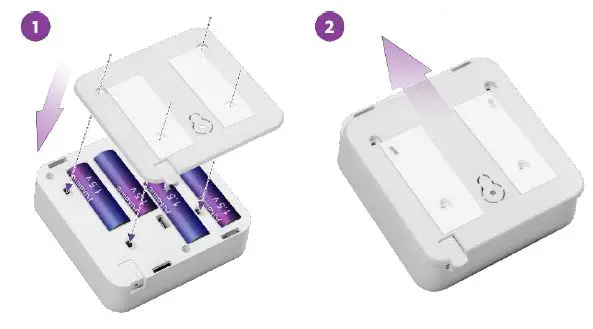
- Release the keypad’s mounting base by lifting the tab and sliding the base in the tab’s direction.

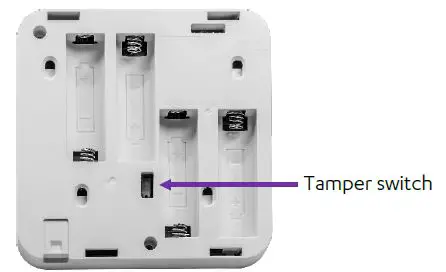
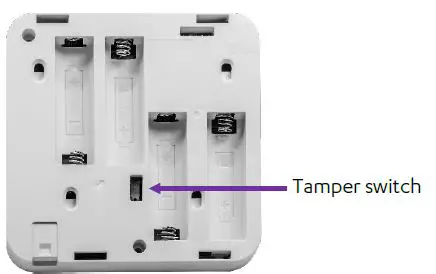
- Press the tamper switch several times.

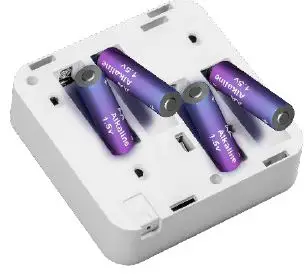
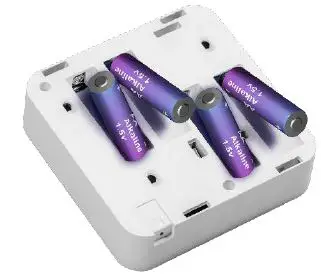
- Insert four fresh new AA alkaline batteries, according to the correct polarity.

WARNING! A new battery can explode if it is incorrectly installed. - Drill a hole in the wall and insert a wall anchor.
- Clean and dry the wall.
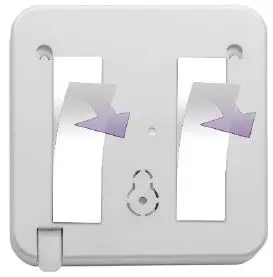
- Peel off the mounting-tape protective strips.

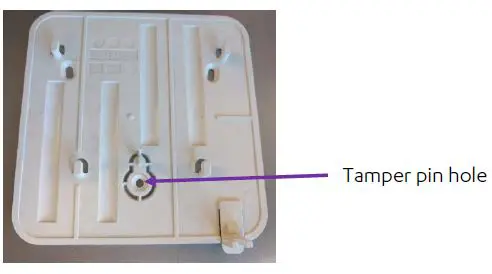
- Ensure that the wall anchor and tamper pin holes are aligned.

- Press the wall mount into place.
- Insert a screw in the tamper pin hole and tighten.
- Align the keypad onto the mounting base, and slide the keypad into place.

Arming and Disarming
You can use the keypad to activate the following arming modes:
- Armed Away – Arms all devices
- Armed Partial- Arms a specified group of devices
- Armed Perimeter – Arms perimeter devices
- Disarmed
Arming 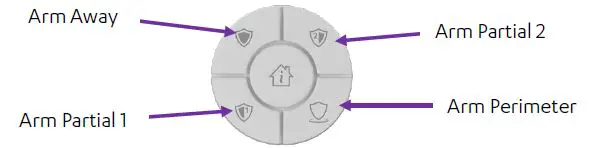
To arm:
- Press the button for the arming mode you want.
- If your installation requires authentication for arming, enter your numeric passcode or place your tag over the

Partial and perimeter arming modes can be activated at the same time.

Disarming
To disarm:
- If your user does not require a passcode, place the tag over the
- If your user is configured for passcode only, enter the passcode and press √.
- If your user requires a tag and a passcode, enter the passcode and then place the tag over the
Checking Arming Status
To check the system’s arming status, press
- If
 lights are green, the system is disarmed.
 - If
 light red, the system is armed. The button or buttons that light indicate the arming mode.
 light red, the system is armed. The button or buttons that light indicate the arming mode.
Triggering a Panic Alarm
In case of an emergency, you can trigger a panic alarm. To trigger a panic alarm, press and hold the keypad’s SOS button for at least five seconds. 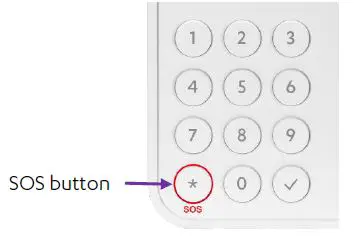
Changing the Batteries
To change the keypad’s batteries:
- Release the keypad’s mounting base by lifting the tab and sliding the keypad away from the tab.
- Remove the old batteries.
- Press the tamper switch several times.

- Insert four new fresh AA alkaline batteries, according to the correct polarity.

- Align the keypad onto the mounting base, and slide the keypad into place.
Specifications
| Item | Data |
| Part Number | ES700TRKPD |
| Communications | Bi-directional protocol: ECOP – Essence proprietary communication protocol Maximum RF range: Up to 700m (2,296 ft.) – open air Modulation and frequency: Europe: 868.3 MHz 2FSK The Americas: 916.5 MHz 2FSK RFID 106 kbps, 13.56 Mhz Data Security RF: 32-bit ID, over four billion combinations RFID: 128-bit ID, DES, AES, and ECC |
| Security and safety | Tamper mechanism – wall tamper Unique electronic serial number |
| Power supply | Keypad Batteries: Four 1.5V AA alkaline batteries Battery life: Three years with 10 tag-reads and 10 code entries per day Tag: No batteries required |
| Dimensions | Size (H x W x D): Keypad: 103 x 103 x 20 mm (4.1 x 4.1 x 1.2 in.) Tag: 10 x 34 x 50 mm (0.39 x 1.34 x 1.97 in.) Weight: Keypad: 135 g (0.3 lbs.) – battery not included Tag: 10 g (0.02 lbs.) |
| Environment | Operating ambient temperature range: -10° C – 55° C (14° F – 131° F) Storage ambient temperature range: -20°C – 60°C (-4°F – 140°F) Operating humidity: Up to 95% non-condensing |
| Item | Data |
| Compliance Pending | EMC and Radio EN 300 220-1: V3.1.1 EN 300 220-2: V3.1.1 EN 300 330: V2.1.1 EN 301 489-1 v 1.9.2 EN 301 489-3 v 1.6.1 EN 61000-6-3: 2007 + A1:2011 EN 50130-4:2011 + A1:2014 FCC CFR 47, Part 15 IC: RSS-210 n Safety: EN 62368: 2014 n Performance: EN 50131-3: 2009 EN 50131-1:2006 + A2:2017 Grade 2 EN 50131-6:2017 EN 50131-5-3: 2017 UL 2610: 2018 n Environmental: EN 50130-5 Class II n RoHS: EN 50581 n ISO: ISO 9001:2008, ISO 14000 n RFID: ISO/IEC 14443 MIFARE Identification cards |
Appendix A
Keypad Indications and Actions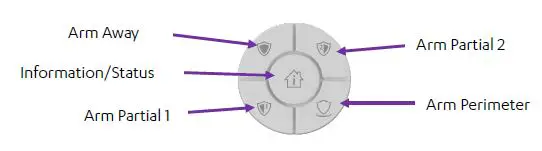
The following table describes the keypad’s indications and actions.
|
Action/Status | Indication | |||||
|
Sound |  |
|  |
|  | |
| Arm Away – Success | Three short beeps | Lights red for two seconds | ||||
| Arm Partial 2- Success | Three short beeps | Lights red for two seconds | ||||
| Arm Partial 1 – Success | Three short beeps | Lights red for two seconds | ||||
| Arm Perimeter – Success | Three short beeps | Lights red for two seconds | ||||
| Arm – Failure | One long beep | Blinks red for two seconds | ||||
| Delay Arm – Countdown | Countdown beeps | Orange clockwise | ||||
| Delay Arm – Success | Three short beeps | Lights red for two seconds | ||||
| Attempt to arm when armed away | One long beep | Lights red for two seconds | ||||
|
Action/Status | Indication | |||||
|
Sound | |  | |  | | |
| Attempt to arm with no devices associated with arming profile | One long beep | Flashes red for two seconds | ||||
| Entry delay countdown | Orange clockwise | |||||
| Disarm – Success | Three short beeps | Lights green for two seconds | ||||
| Disarm – Failure | One long beep | Blinks red for two seconds | ||||
| Attempt to disarm when already disarmed | Three short beeps | Lights green for two seconds | ||||
| Panic – Success | Three short beeps | Red clockwise for 30 seconds | ||||
| Panic – Failure | One long beep | Blinks red for two seconds | ||||
| Press non- numeric key when alarm in memory | Red clockwise for two seconds | |||||
| Press information – Disarmed | Lights green for two seconds | |||||
|
Action/Status | Indication | |||||
|
Sound | | | | | | |
| Press information- Armed Away | Lights red for two seconds | |||||
| Press information- Armed Partial 2 | Lights red for two seconds | |||||
| Press information- Armed Partial 1 | Lights red for two seconds | |||||
| Press information – Armed Perimeter | Lights red for two seconds | |||||
| Press information- Alarm in memory | Red clockwise for two seconds | |||||
| Press keys when the keypad is locked | One long beep | Flashes red for two seconds | ||||
| Tag Learn – Success | Three short beeps | Lights green for two seconds | ||||
| Tag Learn – Failure | One long beep | Flashes red for two seconds | ||||
| No response from panel | One long beep | Blinks red for two seconds | ||||
FCC Rules
This device complies with FCC Rules Part 15 and with Industry Canada’s license-exempt RSS. Operation is subject to the following two conditions:
- This device may not cause harmful interference
- this device must accept any interference received including interference that may cause undesired operation.
NOTE: This equipment has been tested and found to comply with the limits for a Class B digital device, pursuant to Part 15 of the FCC Rules. These limits are designed to provide reasonable protection against harmful interference in a residential installation. This equipment generates, uses and can radiate radio frequency energy and, if not installed and used in accordance with the instructions, may cause harmful interference to radio communications. However, there is no guarantee that interference will not occur in a particular installation. If this equipment does cause harmful interference to radio or television reception, which can be determined by turning the equipment off and on, the user is encouraged to try to correct the interference by one or more of the following measures:
- Reorient or relocate the receiving antenna.
- Increase the separation between the equipment and receiver.
- Connect the equipment into an outlet on a circuit different from that to which the receiver is connected.
- Consult the dealer or an experienced radio/TV technician for help.
For Industry Canada:
- This Class B digital apparatus complies with Canadian ICES-003.
- Cet appareil numerique de la classe B est conforme a la norme NMB-003 du Canada.
WARNING! To comply with FCC RF exposure compliance requirements, the device should be located at a distance of at least 20 cm from all persons during normal operation. The antennas used for this product must not be co-located or operated in conjunction with any other antenna or transmitter. Changes or modifications to this equipment not expressly approved by the party responsible for compliance (Essence Security International Ltd.) could void the user’s authority to operate the equipment.
Legal Notice
Usage of this document, and all information (including product information) provided within, are subject to the following terms and conditions, and all applicable laws. If you do not agree with these terms, please do not access or use the remainder of this document.
This document contains highly confidential information, which is proprietary to Essence Security International (E.S.I.) Ltd. and/or its affiliates (hereafter, “Essence”). No part of this document’s contents may be used, copied, disclosed or conveyed to any third party in any manner whatsoever without prior written permission from Essence.
The information included in this document is intended for your knowledge and for negotiation purposes only. Essence makes no implicit representations or warranties with respect to such information.
The information included in this document is subject to change without notice. Any decision to rely on the information contained herein shall be at your sole responsibility, and Essence will not accept any liability for your decision to use any information or for any damages resulting therefrom.
Certain laws do not allow limitations on implied warranties or the exclusion or limitation of certain damages. If these laws apply to you, some or all of the above disclaimers, exclusions, or limitations may not apply to you.
By using the information contained herein, you agree that the laws of the State of Israel, without regard to principles of conflict of laws, will govern any dispute of any sort that might arise between you and Essence regarding the information contained herein, and any such dispute shall be settled exclusively in the competent courts of Tel Aviv-Jaffa, Israel.
All registered or unregistered trademarks, product names, logos and other service marks mentioned within this document are the property of Essence or their respective owners. Nothing contained herein shall be construed as conferring by implication, estoppels, or otherwise, any license or right, either express or implied, under any patent or trademark of Essence or any third party. No use of any trademark may be made without the prior written
authorization of Essence. This document and all of its contents are protected intellectual property of Essence. Any copying, reprinting, reuse, reproduction, adaptation, distribution or translation without the prior written permission of Essence is prohibited. Please check your End User License Agreement (EULA) for terms and conditions. © 2020 All rights reserved to Essence Security International (E.S.I.) Ltd.
For more information, please contact:
Essence Security International (E.S.I.) Ltd. 12 Abba Eban Avenue,
Ackerstein Towers Bldg. D
Herzliya Pituach, 4612001 Israel
www.essence-grp.com
Tel: +972-73-2447777
Fax: +972-9-7729962
 Home - Essence Group