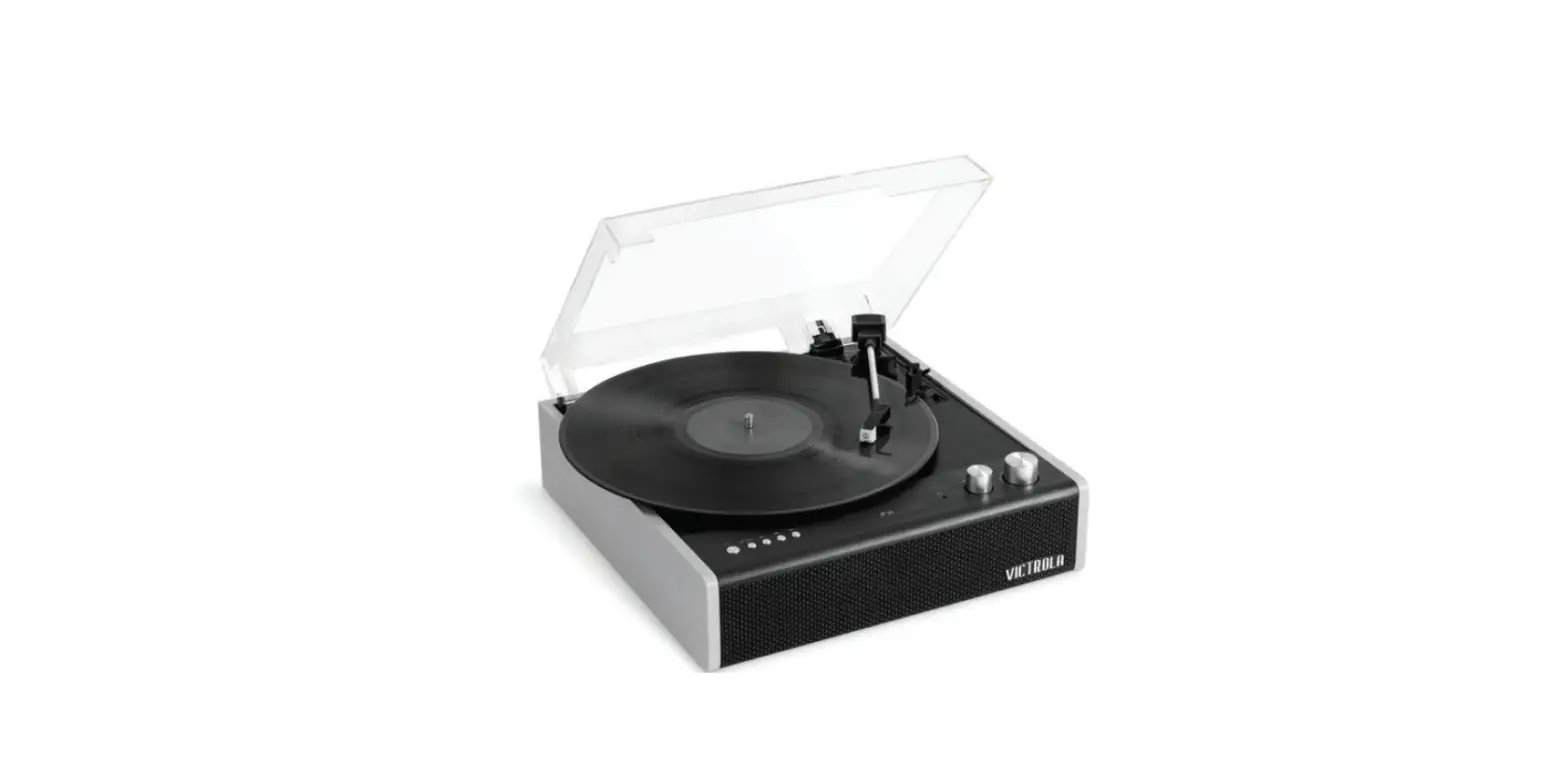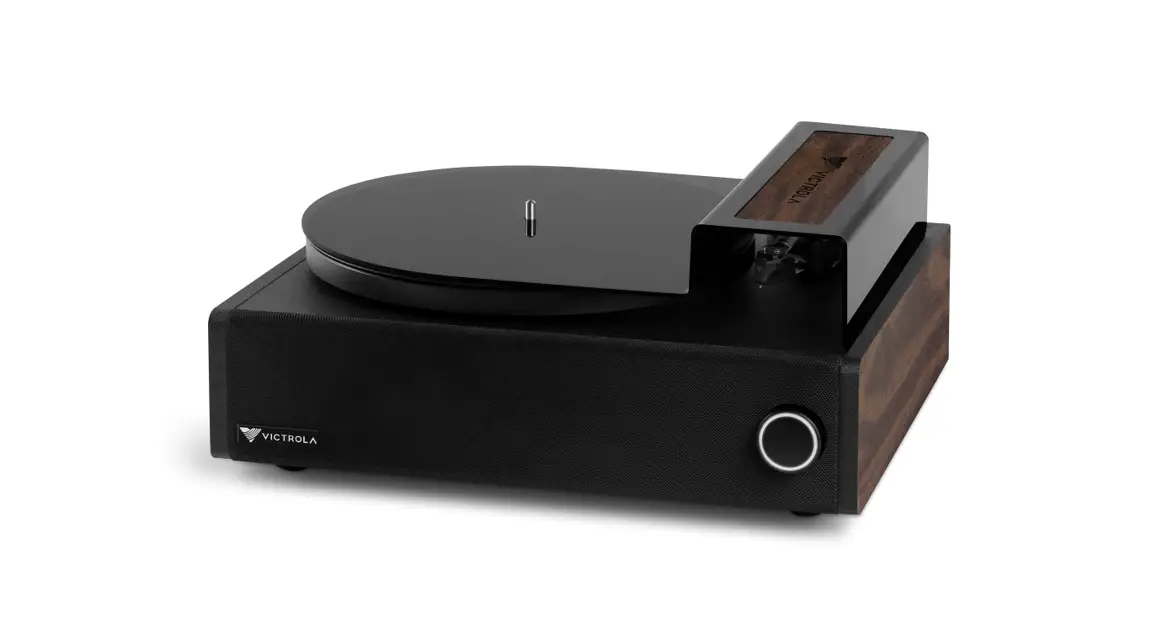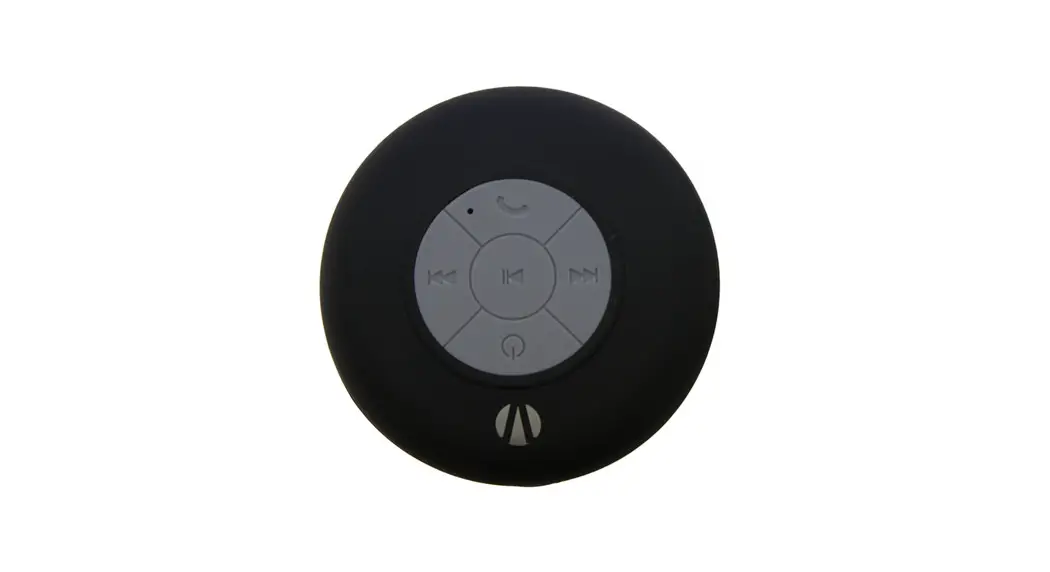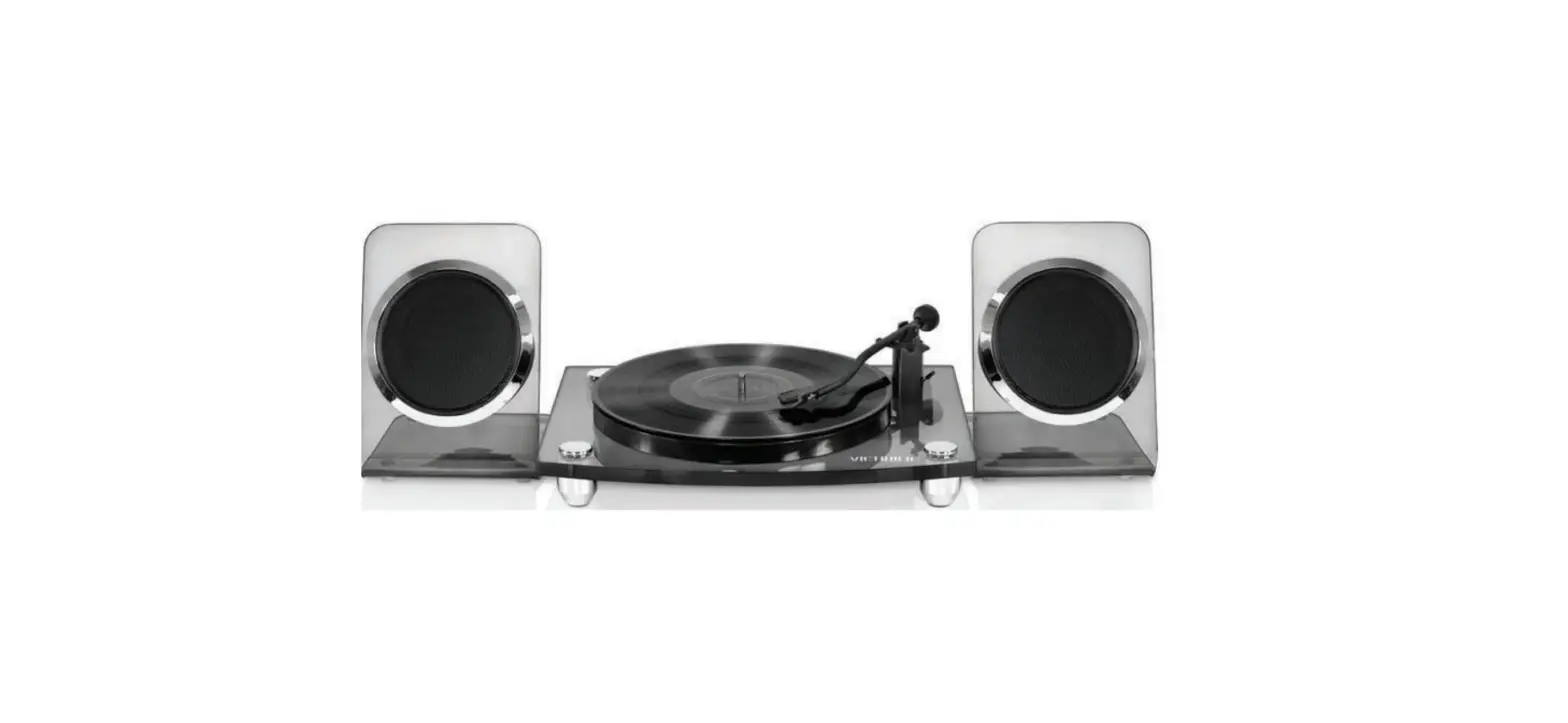
 Victrola VM-110C Acrylic Turntable Wireless Speakers
 Victrola VM-110C Acrylic Turntable Wireless Speakers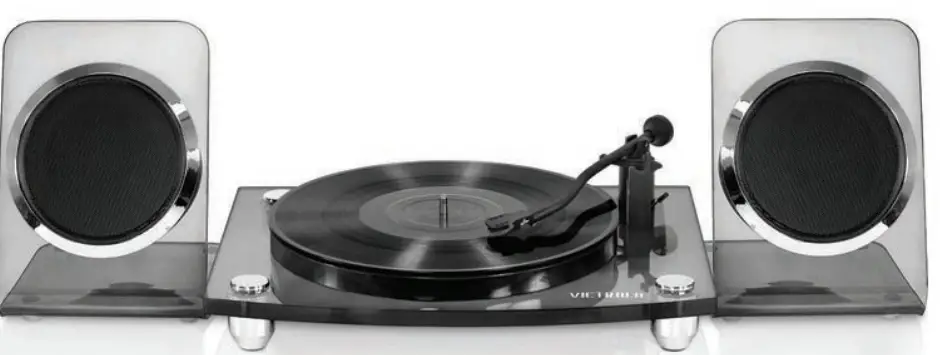
IMPORTANT SAFETY INSTRUCTIONS
 CAUTION: TO REDUCE THE RISK OF ELECTRIC SHOCK, DO NOT REMOVE THE COVER (OR BACK). NO USER-SERVICEABLE PART INSIDE, REFER SERVICING TO QUALIFIED SERVICE PERSONNEL.
DANGEROUS VOLTAGE: The lightning flash with an arrowhead symbol within an equilateral triangle is intended to alert the user to the presence of uninsulated “dangerous voltage” within the product’s enclosure that may be of sufficient magnitude to constitute a risk of electric shock to persons.
ATTENTION: The exclamation point within an equilateral triangle is intended to alert the user to the presence of important operating and maintenance (servicing) instructions in the literature accompanying the appliance.
WARNING: TO PREVENT FIRE OR SHOCK HAZARDS, DO NOT EXPOSE THIS UNIT TO RAIN OR MOISTURE.
WARNING: USE UNDER THE SUPERVISION OF AN ADULT DUE TO LONG CORD This unit has a long cord that can be easily tripped on or pulled on, causing injury. Please make sure it is arranged so that it will not drape over a tabletop, etc. Where it can be pulled on by children or tripped over accidentally.
SAFETY INSTRUCTIONS
Before using the unit, be sure to read all operating instructions carefully, please note that these are general precautions and may not pertain to your unit. For example, this unit may not have the capability to be connected to an outdoor antenna.
- Read these instructions All the safety and operating instructions should be read before the appliance is operated.
- Keep these instructions The safety and operating instructions should be kept for future reference.
- Heed all warnings All warnings on the appliance and in the operating instructions should be adhered to.
- Follow all instructions All operation and use instructions should be followed.
- Do not use this apparatus near water The appliance should not be used near water; for example, near a bath tub, washbowl, kitchen sink, laundry tub, in a wet basement, or near a swimming pool.
- Clean only with dry cloth The appliance should be cleaned only as recommended by the manufacturer.
- Do not block any ventilation openings. Install in accordance with the manufacturer’s instructions. Slots and openings in the cabinet and in the back or bottom are provided for ventilation, to ensure reliable operation of the product and to protect it from overheating. These openings must not be blocked or covered. The openings should never be blocked by placing the product on a bed, sofa, rug, or similar surface. This product should never be placed near or over a radiator or heat source. This product should not be placed in a built-in installation, such as a bookcase or rack unless proper ventilation is provided or the manufacturer’s instructions have been adhered to.
- Do not install near any heat sources such as radiators, heat registers, stoves, or other apparatus (including amplifiers) that produce heat.
- Do not defeat the safety purpose of the polarized or grounding-type plug. A polarized plug has two blades with one wider than the other. A grounding type plug has two blades and a third grounding prong. The wide or the third prong is provided for your safety. If the provided plug does not fit into your outlet, consult an electrician for replacement of the obsolete outlet.
- Product the power cord from being walked on or pinched particularly at plugs, convenience receptacles, and the point where they exit from the apparatus.
- Only use attachments/ accessories specified by the manufacturer.
- Use only with a cart, stand, tripod, bracket, or table specified by the manufacturer, or sold with the apparatus. When a cart is used, use caution when moving the cart/apparatus combination to avoid injury from tip-over. An appliance and cart combination should be moved with care. Quick stop, excessive force and uneven surfaces may cause the appliance and cart combination to overturn.
- Unplug this apparatus during lightning storms or when unused for long periods of time. To protect your product from a lightning storm, or when it is left unattended and unused for long periods of time, unplug it from the wall outlet and disconnect the antenna or cable system. This will prevent damage to the product due to lightning and power-line surges.
- Refer all servicing to qualified service personnel. Servicing is required when the apparatus has been damaged in any way, such as power-supply cord or plug is damaged, liquid has been spilled or objects have fallen into the apparatus, the apparatus has been exposed to rain or moisture, does not operate normally, or has been dropped.
- Power source This product should be operated only from the type of power source indicated on the marking label. If you are not sure of the type of power supply to your home, consult your appliance dealer or local power company. For products intended to operate from battery power, or another source, refer to the operation instructions.
- Power lines An outside antenna system should not be located in the vicinity of overhead power lines or other electric light or power circuits, or where it can fall into such power lines or circuits. When installing an outside antenna system, extreme care should be taken to keep from touching such power lines or circuits as contact with them might be fatal.
- Overloading Do not overload wall outlets and extension cords as this can result in a risk of fire or electric shock.
- Object and liquid entry Never push objects of any kind into the product through openings as they may touch dangerous voltage points or short out parts that could result in fire or electric shock. Never spill or spray any type of liquid on the product.
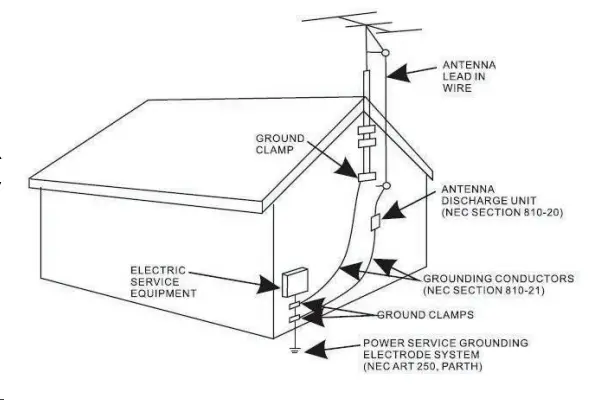
- Outdoor antenna grounding If an outside antenna is connected to the product, be sure the antenna system is grounded so as to provide some protection against voltage surges and built-up static charges. Section 810 of the National Electric Code ANSI/ NFPA 70 provides information with respect to proper grounding of the mast and supporting structure, grounding of the lead-in wire to an antenna discharge product, size of grounding conductors, location of antenna discharge product, connection to grounding electrodes, and requirements for the grounding electrodes.

- Replacement parts When replacement parts are required, be sure the service technician uses replacement parts specified by the manufacturer or those that have the same characteristics as the original parts. Unauthorized substitutions may result in fire or electric shock or other hazards.
- Safety check Upon completion of any service or repairs to this product, ask the service technician to perform safety checks to determine that the product is in proper operating condition.
- Wall or ceiling mounting The product should be mounted to a wall or ceiling only as recommended by the manufacturer.
- Damage requiring service Unplug this product from the wall outlet and refer service to qualified service personnel under the following conditions.
- When the power- supply cord or plug is damaged.
- If liquid has been spilled or objects have fallen into the product.
- If the product has been exposed to rain or water.
- If the product does not operate normally by following the operating instructions. Adjust only those controls that are covered by the operating instructions, as an adjustment of other controls may result in damage and will require extensive work by a qualified technician to restore the product to its normal operation.
- If the product has been dropped or the cabinet has been damaged.
- When the product exhibits a distinct change in performance – this indicates a need for service.
- Note to CATV system installer This reminder is provided to call the CATV system installer’s attention to Article 820-40 of the NEC which provides guidelines for proper grounding and, in particular, specifies that the cable ground shall be connected to the grounding system of the building, as close to the point of cable entry as practical.
NOTE: Refer all servicing to qualified service personnel. Servicing is required when the unit has been damaged in any way such as the following: the power-supply cord or plug has been damaged, liquid has been spilled into unit, the unit has been exposed to rain or moisture, the unit has been dropped or the unit does not operate normally.
CALIFORNIA PROP 65 WARNING: “WARNING” This product contains chemicals known to the State of California to cause birth defects or other reproductive harm. For more information on these regulations and a list of chemicals, log on the following website address: http://www.oehha.ca.gov/prop65.html
IC CAUTION This device complies with Industry Canada license-exempt RSS standard(s). Operation is subject to the following two conditions: (1) this device may not cause interference, and (2) this device must accept any interference, including interference that may cause undesired operation of the device.
BEFORE USE
- As the unit may become warm during operation, always leave sufficient space around the unit for ventilation.
- The voltage supplied to the unit should match the voltage as printed on the rear panel. If you are in any doubt regarding this matter, consult an electrician.
- Choose the installation location of your unit carefully. Avoid placing it in direct sunlight or close to a source of heat. Also avoid locations subject to vibrations and excessive dust, heat, cold or moisture.
- Do not place the unit on an amplifier/receiver.
- Do not open the cabinet as this might result in damage to the circuitry or electrical shock. If a foreign object should get into the unit, contact your dealer or service company.
- When removing the power plug from the wall outlet, always pull directly on the plug, and never yank the cord.
- Do not attempt to clean the unit with chemical solvents this might damage the finish. Use a clean, dry cloth.
- Keep this manual in a safe place for future reference.
DO NOT MOVE THE UNIT DURING PLAYBACK
During playback, the record rotates at high speed. Do NOT lift or move the unit during playback. Doing so may damage the record or the turntable.
WHEN MOVING THIS UNIT When changing the unit’s location or packing the unit for moving, be sure to remove the record or disc. Moving this unit with the record or disc loaded may result in damage to this unit.
PRODUCT OVERVIEW
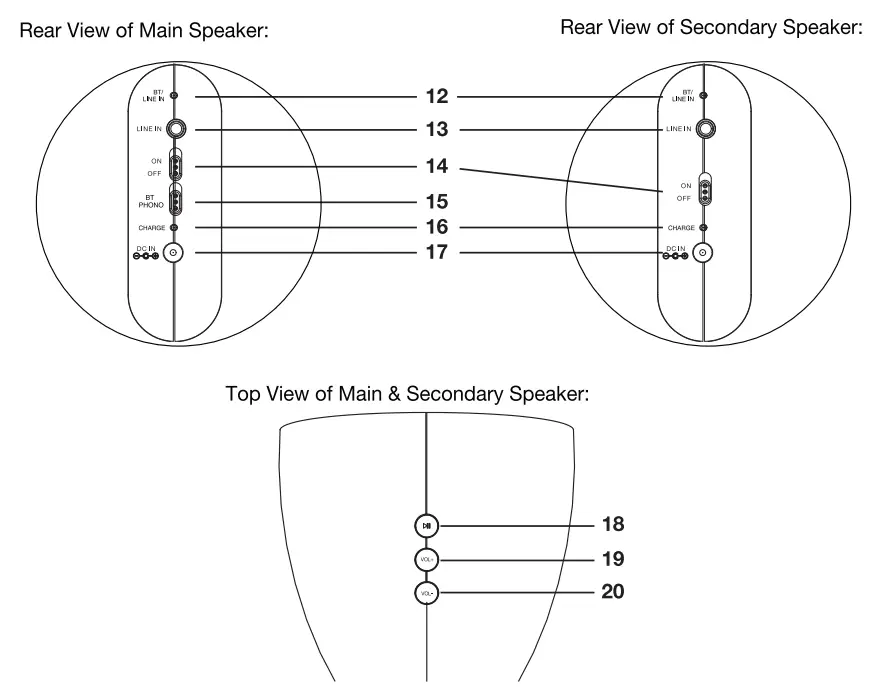
Overhead View of Turntable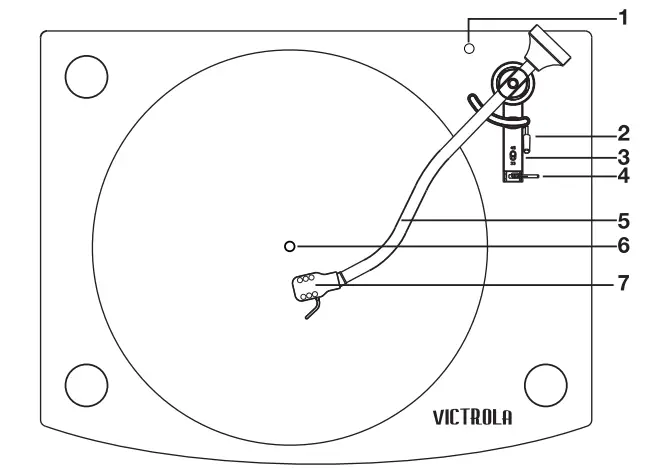 Rear View of Turntable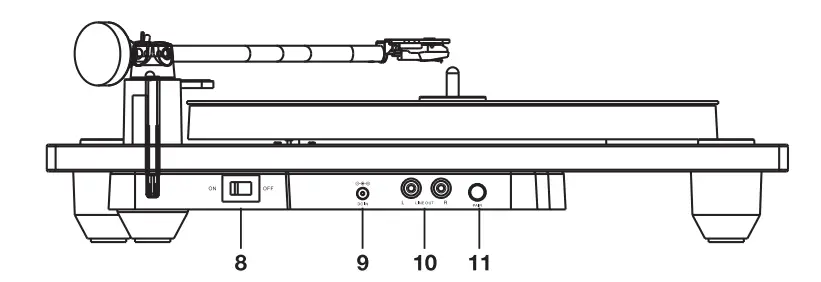
- LED Indicator
- Cue Lever
- Speed Selector
- Tone Arm Holder
- Tone Arm
- Turntable
- Stylus Cartridge
- ON/OFF Switch
- DC-IN Jack
- LINE-OUT
- Jacks Pair Button
- BT/LINE-IN Indicator
- LINE-IN Jack
- ON/OFF Switch
- BT/PHONO Switch
- Charge Indicator
- DC-IN Jack
- HI Play/Pause Button
- VOL+ Button
- VOL – Down Button
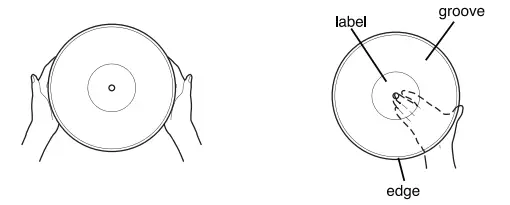
HANDLING RECORDS
- Do not touch the record’s grooves. Only handle records by the edges of the label. Make sure your hands are clean. Skin oils from even clean hands can leave a residue on the record surface that will gradually deteriorate the quality of your record.

- Keep your records away from dust. Keep them in a cool, dry place.
- To avoid dust and scratches, keep records in their sleeves and jackets when not in use.
- Store records upright on their edges. Records stored horizontally will eventually bend and warp.
- do not expose records to direct sunlight or high humidity and temperature. Long exposure to high temperatures will warp the record.
- Do not store your records in the trunk of your car. The temperature in a closed trunk can ruin your collection.
- Store records in an area with a stable temperature and low humidity.
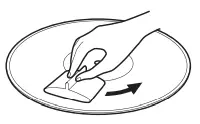
- Should the record become dirty, gently wipe the surface in a circular motion, using a soft anti-static cloth?

REPLACING STYLUS
The stylus should last about 50 hours under normal use. However, it is recommended that the stylus be replaced as soon as you notice a change in sound quality. CAUTION
- Do not remove or bend the stylus.
- To avoid injury, do not touch the needle.
- Turn off the unit’s power before you replace the stylus.
- Keep out of the reach of children.
- Handle with care, as the stylus is delicate. The use of a bent or broken stylus may damage the record and cause the turntable stylus to malfunction.
- Do not expose the stylus to extreme heat.
- Contact a qualified repair company if you experience difficulty in changing the stylus.
HOW TO REPLACE THE TURNTABLE NEEDLE
Removing the Stylus from the Cartridge
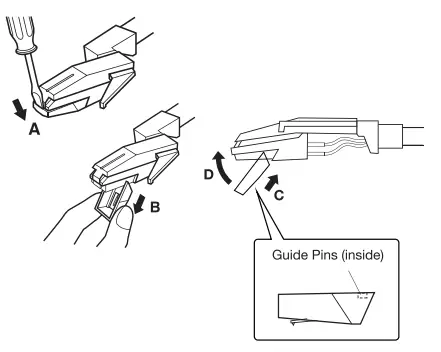
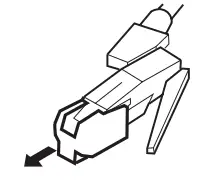
- Set a screwdriver at the tip of the stylus and push it down to the direction “A”. WARNING: When applying force to the stylus, too much may damage or break the stylus.
- Pull the stylus out toward the direction “B”.

Installing the Stylus
- Hold the tip of the stylus and insert the other edge by pressing toward direction “C”.
- Push the stylus up toward direction “D” until it locks at the tip.
Speakers SETUP
Speakers must be setup properly before use with turntable, smartphone, etc.
- STEP 1 Insert the AC/DC Adaptor plug into the DC Cable Splitter (included), plug each end of the DC Cable Splitter into the DC IN Jack of each speaker. Then Plug the AD/DC Adaptor into a wall outlet. Charge the speakers for about 5-6 hours, or until fully charged (red Charge Indicator LED will turn off when the speakers are fully charged).
- STEP2 Turn on BOTH speakers and wait for a quick audible beep from each speaker.
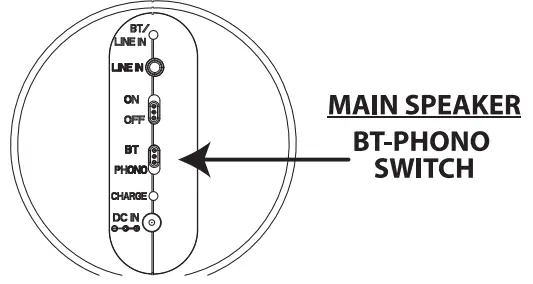
- STEP3 Identify the Main Speaker by looking for the BT-PHONG Switch on the back of one speaker.
 CAUTION The built-in rechargeable battery is not replaceable. Do not remove or replace it, do not throw in the trash or in a fire. Do not dispose of device at standard garbage disposal sites. Dispose of the device at available Battery Recycling Sites after fully discharging battery. Not doing so may violate local disposal laws and regulations. Please refer to local regulations for proper battery disposal.
 CAUTION The built-in rechargeable battery is not replaceable. Do not remove or replace it, do not throw in the trash or in a fire. Do not dispose of device at standard garbage disposal sites. Dispose of the device at available Battery Recycling Sites after fully discharging battery. Not doing so may violate local disposal laws and regulations. Please refer to local regulations for proper battery disposal.
TROUBLESHOOTING
If your speakers do not follow the below steps for the “one-time” wireless
- Make sure BOTH speakers are turned OFF.
- Identify the Main Speaker by looking for the B
- On the back of the Main Speaker, move BT.
- Turn ON BOTH speakers.
- Quickly press the PLAY/PAUSE button on each make a chime sound. Wait 2-3 seconds and the Main Speaker will be blinking and the blue This confirms both speakers have successfu **If no chime sound is heard after 6 seconds, ON BOTH speakers again and quickly press then quickly press the PLAYIPAUSE button make a chime sound, then wait 2-3 seconds on the Main Speaker will be blinking and the solid. This confirms both speakers have been paired.
- Please turn OFF both speakers and follow the setup section above.
TURNTABLE OPERATION
Note: Before operation, detach the stylus guard (white plastic cover) by pulling it straight off the front of the cartridge.
- STEP 1 After setting up the speakers properly, move the BT-PHONO Switch (on the Main Speaker) to PHONO.

- STEP2 Plug in the power adaptor (DC Cable Splitter is not needed) and switch power to ON. The LED Indicator will blink momentarily and then turn off.
- STEP3 Press the pair button on the turntable. The LED will flash (about 5-15 seconds) and then beep/turn solid once paired.

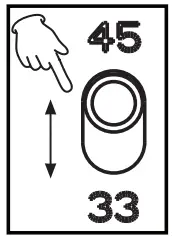
- STEP4 Place a record on the center spindle and slide the Speed Selector to 33 or 45 to match the play speed of the record.
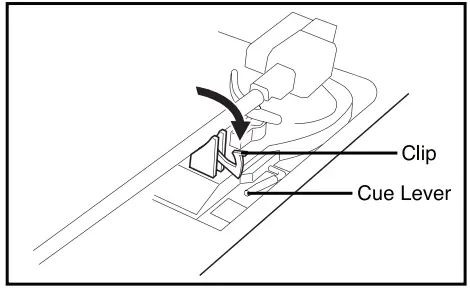
- STEP5 Unlock the Tone Arm from the holder. Raise the Cue Lever to raise the Tone Arm and release the lever to put the Tone Arm onto the record. Playback will start automatically.

BLUETOOTH OPERATION
- STEP1 After setting up the speakers properly, move the BT-PHONO Switch (on the back of the Main Speaker) to BT.
- STEP2 Make sure Bluetooth is enabled on your device. Select “VM-100” from your device’s Bluetooth Menu to pair your device.
- STEP3 An audible beep will sound once pairing is successful.
- STEP4 Control functions from either speaker or from your paired device.
- Press the Ml Play/Pause button to Play or Pause music.
- Press VOL+ or VOL buttons to adjust the volume.
- Press and Hold the Ml Play/Pause button on the Main Speaker to disconnect your device. NOTE: When the LINE-IN Cable is connected, the unit will automatically be in LINE-IN Mode. You must disconnect the LINE-IN Cable to use the Bluetooth function.
LINE-IN/ LINE-OUT OPERATION
LINE-IN OPERATION: (SPEAKERS ONLY)
- STEP 1 Make sure both speakers are set at MAX Volume before connecting your device.
- STEP 2 Connect the Red end of the LINE-IN Cable (included) to one speaker and the White end of the LINE-IN Cable to the other speaker. Then connect the other end of the LINE-IN Cable into your device. The BT/LINE-IN Indicator on the back of the speakers will turn red indicating they are now in LINE IN Mode.
- STEP 3
- Play music and control volume/functions from your external device.
LINE-OUT OPERATION: (TURNTABLE ONLY)
- STEP 1 Connect one end of an RCA Audio Connection Cable (not included) to the Line-In/Aux-In on the external audio amplifier (not included).
- STEP2 Connect the other end of the RCA Cable to the LINE-OUT Jacks on the back of the turntable.
- STEP3 Power on the unit and follow standard music playback.
- STEP4 Power on the external audio amplifier and set it to LINE-IN Mode to play turntable sound.
TROUBLESHOOTING GUIDE
lf you experience any problems with the unit, please take a moment to look through this guide and see if you can resolve the problem yourself before calling customer support.
NO POWER Check the connection to the AC power source. Make sure the AC Power source is turned on.
NO SOUND Adjust the volume on either speaker.
DISTORTED SOUND The unit is too close to a TV set or similar appliances. Relocate the unit further away from them, or turn the other appliances off.
TURNTABLE NOT WORKING
- Detach the stylus guard (The stylus guard is a white plastic cover that protects the stylus during transportation. Failing to remove this guard will not allow the needle to contact the grooves of the record and no sound will be heard).
- If the stylus is worn-out, replace the stylus.
SOUND SKIPS
- Place the unit on a stable surface to avoid vibration and shock. Make sure the unit is level both from back to back and side to side.
- Clean the surface of the record.
- Don’t use scratched, damaged, or warped records.
BEWARE OF CONDENSATION When the unit (or a record) is moving from a cold to a warm place or used after a sudden temperature change, there is danger of condensation. Vapor in the air could condense on the internal mechanism making correct operation erratic or impossible. To prevent this, or if this occurs, leave the unit turned on for one or two hours. The unit will stabilize at the temperature of its surroundings.
MAINTENANCE
Always keep the turntable clean. f the surface of the unit gets dirty, wipe with a soft cloth or use a diluted mild liquid soap. Be sure to remove any excess liquid completely. Do not use thinner, benzine or alcohol as they may damage the surface of the unit, Allow the surface of the unit to dry completely before using.
SPECIFICATIONS
- POWER REQUIREMENT: Do 9v —2A OCO
- SPEAKER OUTER POWER:2X 20W
- BLUETOOTH RANGE: Up to 10 meters (33 ft)
- TURNTABLE SPEED: 33 RPM & 45 RPM
- SPEAKER RUNNING TIME: about 7.5 HOurS (about Volume)
- SPEAKER CHARGE TIME: ABOUT 5-6 Hours
- SPEAKER BUILT-IN BATTERY: 7.4V,2500mAh
- ACCESSORIES: instruction Manual AC/DC Adaptor DC Cable Splitter 45 RPM Adaptor Line-In Cable
Please note: As a result of continual improvements, the design and specifications of this product are subject to change without notice. Bluetooth is a registered trademark of Bluetooth SIG, Inc. Other trademarks and trade names are those of their respective owners. Made in China.
WARRANTY
Victroa is a registered trademark of Innovative Technobgy Eoctronics LLC. innovative Technobgy Electronics LLC. Limited Warranty: 90 Days Labor, One Year Parts Innovative Technokogy Electronics LLC. 0T) warrants the product to be free from “Defects” in materials under normal use for a period of “One Year” from the date of the original purchase. The Warranty is “Nat transferable. IT agrees, within the initial “90 Day period, to repair or replace the product if it is determined to be defective at “No Charge”. It is further agreed that T will cover the cost to repair or replace damaged “Parts only for a total period of one Year from the date of the original purchase. The warranty does not cover cosmetic damage, antennas, AC cords, cabinets, headbands, pads, or damage due to line power surges connection to improper voltage supply or settings, misuse, mishandling, accident, acts of God, or attempted repair by an unauthorized service agent. To obtain service, the purchaser MUST present an original sales receipt/ proof of purchase. Please contact us at www.ithomeproducts.com to request an RMA (Return Material Authorization) number to return products for service or replacement. Returns without an RMA number on the package will be refus0d and returned to sender. Upon receipt of the returning item and our full inspection (IT) may issue a replacement to the customer for the same item or afane that has equivalent value and features. To return an item, supply full name, return address, phone number, item purchased, receipt of purchase, and reason for return to obtain RMA number. All returns must be in the original packaging or a reasonable substitute to prevent damage. The customer Must include full name, shipping address, and telephone number inside the package. No return will be shipped back to a PO Box or APO address. Please include your check or money order in the amount of
- USD $S0 for items $1000 to $39.99 (Price Paid Per Unit)
- USD $1000 for items S4000 to $9999. (Price Paid Per Unit)
- USD $1600, for items $100.00 and up. (Price Paid Per Unit)
- Shipping fees are non-refundable
to be payable to Innovative Technobgy Ebctronics LLC. (or hending and return shipping charges) (I) will not be responsible for delays or unprocessed claims resulting from a purchaser’s failure to provide any/ all of the necessary information. Send all inquiries or RMA requests via our website www.ithomeproducts.com/support. Innovative Technalogy Eectronics LLC. 1 Channel Drive Port Washington, NY 11050 Toll tree: 1-877-483-2497 Website for support: www.ithomeproducts.com/support There are no express warranties except as listed above. REPAIR OR REPLACEMENT AS PROVIDED UNDER THIS WARRANTY IS THE EXCLUSIVE REMEDY OF THE CUSTOMER, (IT) SHALL NOT BE LIABLE FOR ANY INCIDENTAL OR CONSEQUENTIAL DAMAGES FOR BREACH OF ANY EXPRESS OR IMPLIED WARRANTY ON THIS PRODUCT EXCEPT TO THE EXTENT PROHIBITED BY APPLICABLE LAW. ANY IMPLIED WARRANTY OF MERCHANTABILITY OR FITNESS FOR A PARTICULAR PURPOSE ON THIS PRODUCT IS LIMITED IN DURATION TO THE DURATION OF THIS WARRANTY. Some states do not allow the exclusion or Imitation of incidental or consequential damages, or limitations on how long an implied warranty lasts, so the above exclusions ar Imitations may not apply to you. This warranty gives you specific legal rights and you may also have other rights, which vary from state to state.
FCC NOTICE
This equipment has been tested and found to comply with the limits for a Class B digital device, pursuant to Part 15 of the FCC Rules. These limits are designed to provide reasonable protection against harmful interference in a residential installation. This equipment generates, uses, and can radiate radio frequency energy and, if not installed and used in accordance with the instructions, may cause harmful interference to radio communications. However, there is no guarantee that interference will not occur in a particular installation. If this equipment does cause harmful interference to radio or television reception, which can be determined by turning the equipment off and on, the user is encouraged to try to correct the interference by one or more of the following measures:
- Reorient or relocate the receiving antenna.
- Increase the separation between the equipment and receiver.
- Connect the equipment into an outlet on a circuit different from that to which the receiver is connected.
- Consult the dealer or an experienced radio/TV technician for help.
FCC STATEMENT: This device complies with part 15 of the FCC Rules. Operation is subject to the following two conditions:
- (1) This device may not cause harmful interference, and (2) This device must accept any interference received, including interference that may cause undesired operation. The antenna(s) used for this transmitter must be installed to provide a separation distance of at least 20 cm from all persons and must not be co-located or operating in conjunction with any other antenna or transmitter.
FCC WARNING: To assure continued operation, follow the attached installation instructions and use only shielded cables when connecting to other devices. Changes or modifications not expressly approved by the party responsible for compliance could void the user’s authority to operate the equipment.
FAQS
This is exactly what I was talking about when I said charging the speakers was awkward. You need to unplug the power line from the turntable itself and plug it into the one female end of that cable you’re talking about, and then each of the two male ends will plug into the speakers.
Yes, are you looking for a replacement manual?
The speakers blink blue to denote that they are paired to each other as they are wireless Bluetooth speakers. The main unit can be fiddly to connect to the speakers and you have to follow a sequence.
The speakers need to be close for them to pair. And every time you turn off the device you will need to pair the items. I have found it easier to turn the speakers on first and pair them. Then turn on the turntable and press pair. I usually turn speakers on PHONO prior to turning them on, I don’t know if that makes a difference or not.
Not sure. Possibly not.
our portable turntable is the perfect combination of functionality, vintage/retro style, and sound quality whether you play it using the built-in speaker or hook it up to an external speaker.
Simply join your turntable to your Bluetooth home speakers by plugging the RCA input side of your cable into the turntable and the 3.5mm side of your cable into your Bluetooth speaker.
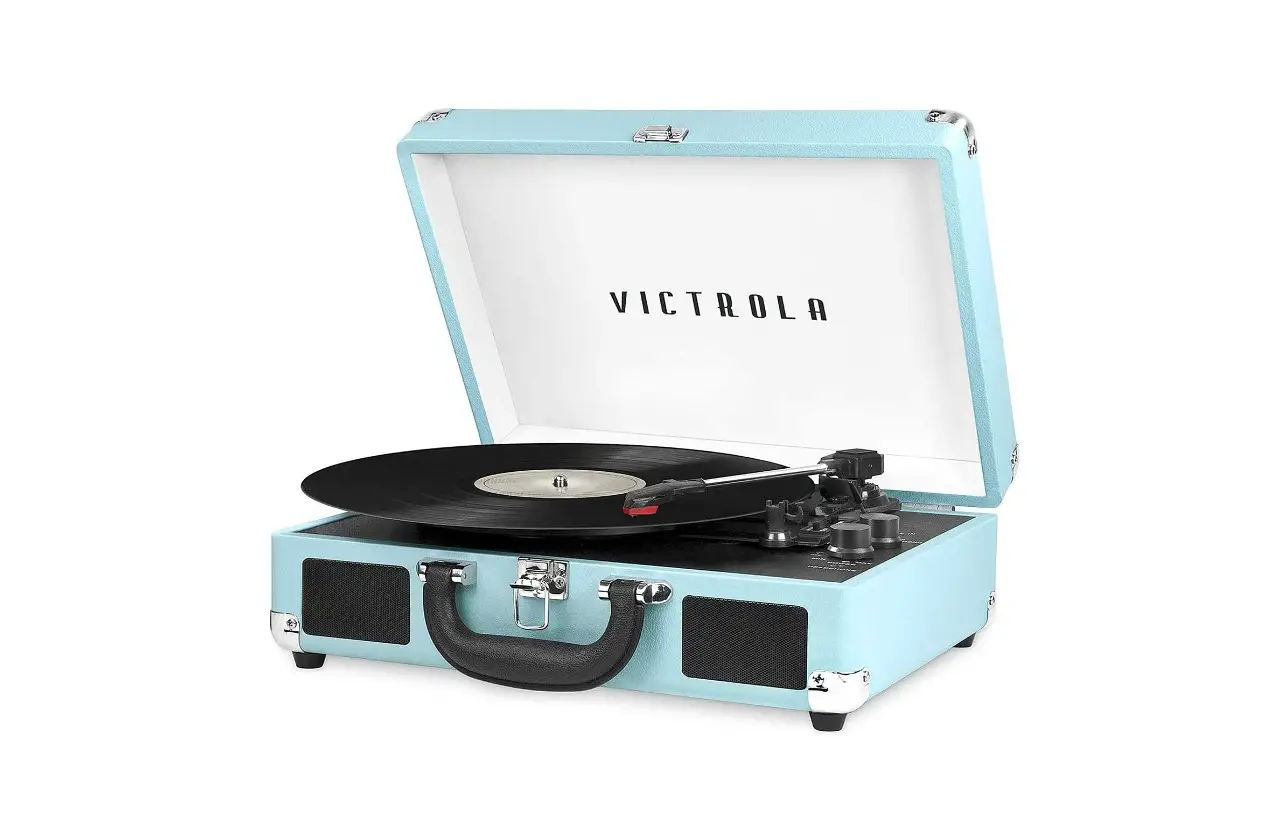
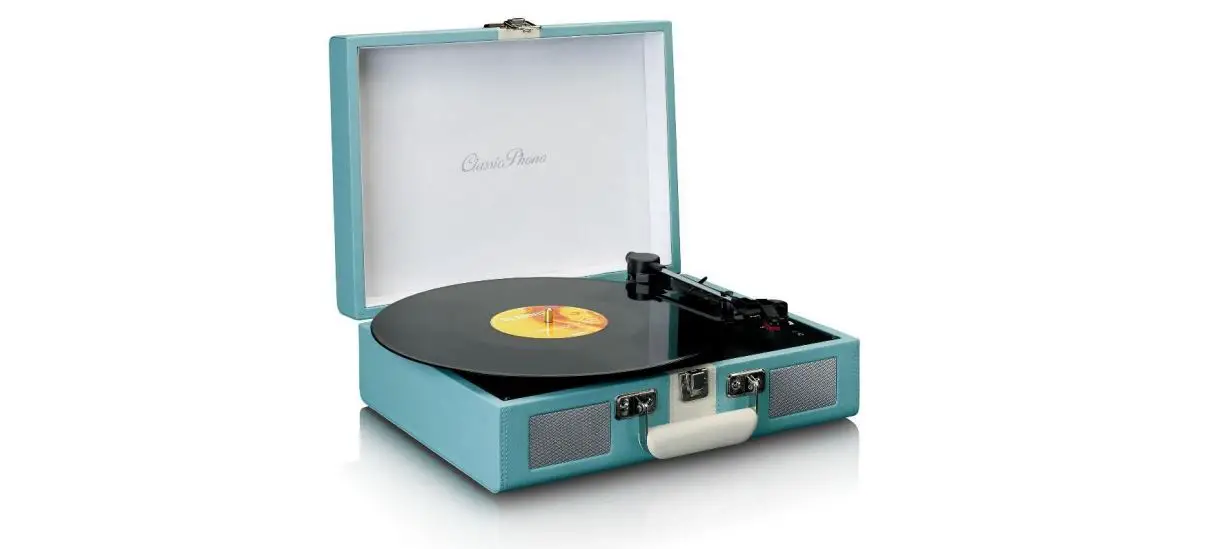
Models like this suitcase record player with speakers have a portable design and come complete with Bluetooth, an Aux-in jack, and 3-speed belt-driven turntable. You can also plug an external speaker into it with the RCA Aux-in.
To transmit your turntable’s signal via Bluetooth, all you need is a phono preamp and a Bluetooth transmitter. If you have a built-in preamp on your turntable, then you just connect the transmitter to your turntable’s RCA output.
The Victrola Journey portable suitcase turntable is an absolute classic and loaded with features. Includes built-in Bluetooth technology to wirelessly stream music from any Bluetooth-enabled device, 3-speed (33 1/3, 45, 78 RPM) belt-driven turntable and 3.5mm aux-in jack for playing music from any non-Bluetooth device.
The Bluetooth transmitter will be able to plug directly into your record player if it includes a built-in preamp, or into your external preamp. Once connected you’ll be able to set up and play your music through your wireless Bluetooth speakers.
Most Victrola (internal horn) models are still quite commonly found at estate sales and on eBay, with the average selling price in the $50 to $200 range for typical “attic-stored” machines.
Yes, Record Players Need Speakers
In reality, there are a few intermediary steps to go from the grooves in the record to grooving on the dance floor. One of which is the speakers. And yes, as a short answer, speakers are needed to listen to your record collection.
Tommy Johnson’s 1930 cut ‘Alcohol and Jake Blues’ goes for $37,100 on eBay. An original Paramount Records blues release has become the most expensive 78rpm record ever sold after a buyer forked out $37,100 in an online auction.
You don’t need special speakers for vinyl. There are, however, many ways to connect speakers to a turntable, depending on the type of speakers and turntable.
Victrola, one of the leading turntable manufacturers, was born in 1906 in Camden, NJ when first introduced to the American public by the Victor Talking Machine Company.