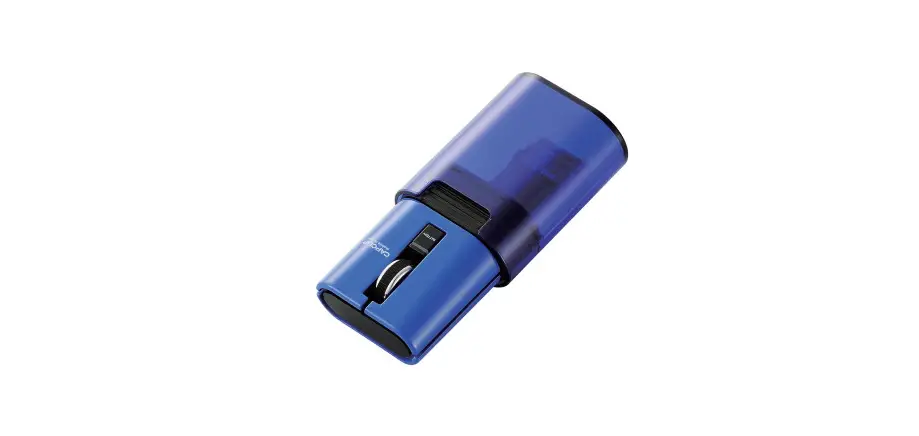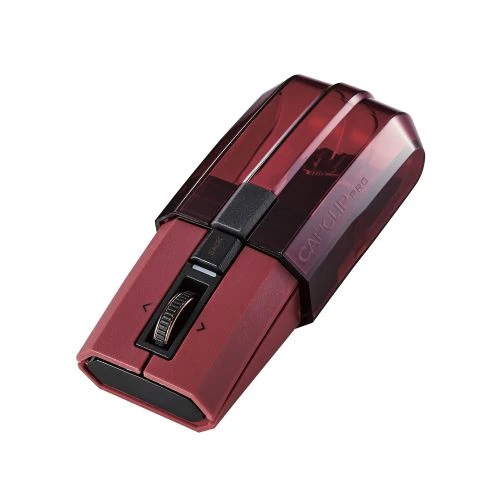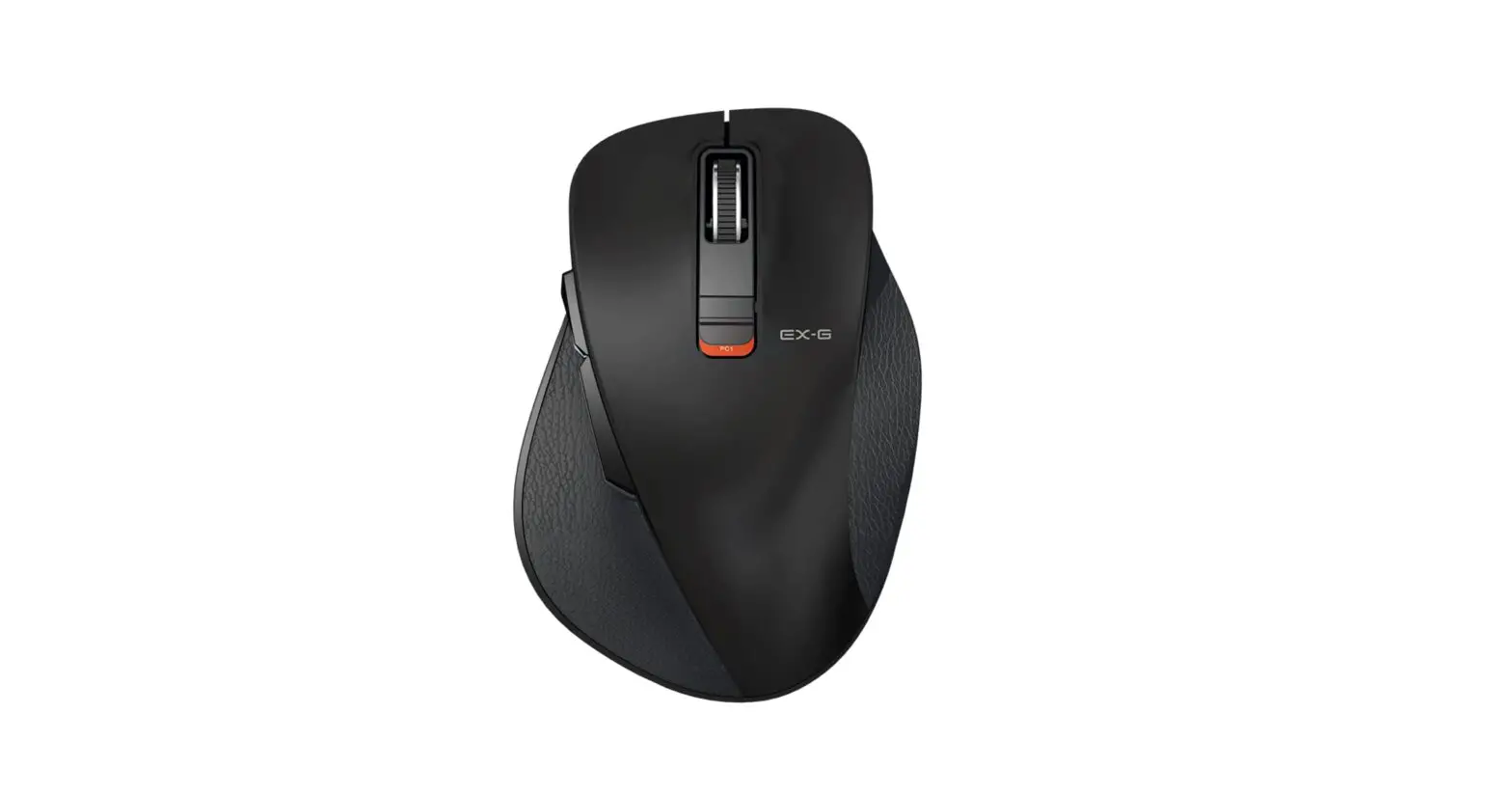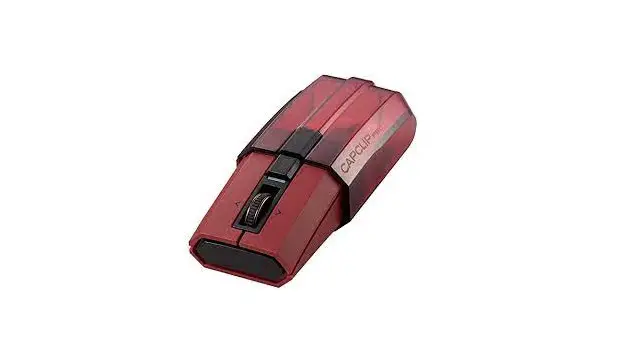
Elecom M-ccp1bb Bluetooth Mouse Ultimate Blueled Silent Clippable Mouse User Manual

Elecom M-ccp1bb Bluetooth Mouse Ultimate Blueled Silent Clippable Mouse User Manual

M-CCP1BB Bluetooth Mouse Ultimate BlueLED Silent Clippable Mouse


 

NEXA logo

IKEA logoozito logoDell LOGOHoneywell logoMAJORITY LOGOSDC LOGOHUAWEI logoRussell Hobbs LOGO


Russell logoWORX logoMajority logoDMP LOGO 1hama-logohama logo 1


MIBOXER logomicrolife LOGOPERUN logoHDMI logoBluetooth® logo


Mi Light logoSONY LOGOkinomap logoADC LOGOSONY logo


Mi-Light logoHDMISALUS logoMOUSER LOGO


Avantree BTHS-NB16 Wireless Neckband Earphones. - PressTIMING KEYuAvionix AV-20 AV 20-S - NOTEicon 12Note Symbol tip icon   email ICONFaultCOMARK RF400 WiFi Monitoring - Alarmmanufeactur iconMIBOXER FUT106 6W GU10 RGB+CCT LED Spotlight-Lamp    MAJORITY NEP-FM-WHT NEPTUNE Docking Station and Radio Alarm-bluetoothwarning 4MIBOXER FUT106 6W GU10 RGB+CCT LED Spotlight-circuitDim brightnessSignal transmitting ecicon


warning 2        warningWI-FI symbolYou tube SymbolNote symbol 2BatteryTemperatureread this guide    WARNINGHAYLOU Solar Smart Watch-tracksHAYLOU Solar Smart Watch-heartHAYLOU Solar Smart Watch-fotballHAYLOU Solar Smart Watch-remote musicHAYLOU Solar Smart Watch-weatherHAYLOU Solar Smart Watch-timer  Fan Speed buttontimer button    Do not tumble dryDo not iron


Hand Washing Sharp element  Danger of harmingChemical inhalation hazardBroken glass hazard  Wear protective glovesWear eye protectionWear ear protectionWear dust maskWear protective clothingUnlock  risk of injuryMake sure the tool      Double insulation  Before workingAvoid danger of injuryAccessories


ERC SYMBOL  Brinsea Chicksafe Advance Automatic Chicken Coop Door -flash  DO NOT COVER   Light on & off ICONFan speed 3 (high) ICONFan speed 2 (medium) ICONFan speed 1 (low) ICONFan off ICON       Note 2     manual carefullyindoor use only.    Double insulationProtective 5 A limitedIntertak Symbol instructions    cautionwarning 4sinope Smart Double Pole Thermostat-Flashessymbol 1Add Device

Type BFDustbin IconWarning iconDanger iconNOTETipSymbolScan QRhama 00184072 Bluetooth Headphones Spirit Go - CECALL SERVICEWEBSITE ICONSEARCH ICONmakita ML003G 1100LM 40V Max XGT Cordless LED Worklight - ICONOperating InstructionsConfirmedFaultyCautionCautionwarningwarningDisconnecthandlingFOX-ESS HV2600 High Voltage Batteries - ProtectiveFOX-ESS HV2600 High Voltage Batteries - risk of electric shockSYMBOLsymbolsymbol


microlife MT 1961 Digital Thermometer - EC

remove your maskramp timePush instructions    cautionwarning 4 UP  Down radio symbolalarm iconStarkey Standard Charger & Custom-Consult    MENU buttoninstructions Ensure that childrenEspenstrasseKeep dry    Type BF HOBO Pendant MX Temp MX2201-NoteHOBO Pendant MX Temp MX2201-DotHOBO Pendant MX Temp MX2201-view  HOBO Pendant MX Temp MX2201-share the dataHOBO Pendant MX Temp MX2201-Save Information or noticeExample Attention   Govee           IoT Portfolio

MIBOXER Dual White LED Controller Kits-warningMIBOXER Dual White LED Controller Kits-warningFLAG - 1 warning CE SYMBOL warningpro tip icon       cautionwarning 4   KnobHome ButtonSettings      BRILLIHOOD CL14,190,5CCT Smart Color Changing LED Ceiling Light - safty  BRILLIHOOD CL14,190,5CCT Smart Color Changing LED Ceiling Light - NOTEframe indicatesdisplay 1Economic temperature modeFrost protection modeHold

keyshold       DownUPPowerNOTE  Warning iconwarning 2Flammable Warning Icon Direct CurrentWARNING ICONDustbin IconwarningFlammable Warning IconElectric Warning IconWARNING 2Risk of burns ICONWARNINGNOTICEWarningNOTESicon 1Recycle IconREAD ALL INSTRUCTIONS    Do not stare at operating lamp.Optical RadiationOLIGHT O-MARAUDER2-US Marauder 2 Rechargeable Flashlight - No reaching inDANGER


Use appropriate shielding TimeoutUltrasonic Sensitivity ANKER D2131121 Nebula Solar Portable -y Google Features Earthdanger of suffocationContents ANKER D2131121 Nebula Solar Portable -Buttonicon - 1press iconsetting iconANKER D2131121 Nebula Solar Portable - cast iconicon 1note 1icon - 2 Read ICONDISPOSALwarning 2FanLow HeatingERC symbololumeiconour rotational speediconpress iconaccuracy iconFine accuracy iconpress iconicon 1


CANYON CND-SGS01 Gaming Keyboard and Mouse and Headset -REC keyCANYON CND-SGS01 Gaming Keyboard and Mouse and Headset -scroll LockCANYON CND-SGS01 Gaming Keyboard and Mouse and Headset -Page downCANYON CND-SGS01 Gaming Keyboard and Mouse and Headset -LightINDOOR ICONREAD MANUALDanger iconWear ear-muff s icon cautionWear safety goggles icon cautionWear a breathing masks icon cautionTIPSRead AND CE ICONPicture sizeANTENNA iconRegulatory Compliance MarkCANYON CND-SGS01 Gaming Keyboard and Mouse and Headset - FNhour figuresindicatorhour figuresindicatorWarrantyhearing damage


recyclinstructionsImportant informationUl symbol Risk or burningWarning iconWarning-icon.pngERC symbolIMPORTANTNOTEslide bargo offturn blue symbolpadlock iconPower-Button-Icon.pngcardo PACKTALK SKI User Manual - Call iconFACEBOOKCONTACT USJPOWER 9 Inch Digital Twin Window Fan VF - Thermostat icon TIMING KEYBluetoothLOUVER KEYDown ButtonsUp ButtonsUk CA SymbolDe Dietrich 315331 Combi Microwave Oven- Minute


MODE KEYSPEED KEYMenuSettingsTwiterSmsGlobalREAD icon AUTO and SLEEP modeCE and DustbinElectric Warning Iconwarning 2unlockSettings menuPowerMenuholdRedGreenBlueBlackYellowWhitedouble-insulated designchild locktimer  filterfan speedHUMMINBIRD ICE Helix Chirp Series- NOTEOptical modesBluetooth modeLamp Symbol


icon 7icon 6warning 2Do not useDo not immerseCIRRULAM ICONLED ligh iconicon 8SYMBOLS 4SYMBOLS 3     Toggles caps lock   Launcher iconLauncher icon   Files app   Explore app

IMPORTANT ICON


warning 2CIRRULAM ICONIMPORTANT ICONFC ICONProhibitproduct near cigarettesPower buttonNoteDo not immerseDo not disassembleWARNINGUpUnderRightLeftBackpairing button

relion lithium batteries - icon 5relion lithium batteries - icon 4relion lithium batteries - icon 3relion lithium batteries - icon 1  relion lithium batteries - icon 11  relion lithium batteries - iconrelion lithium batteries - icon 9relion lithium batteries - icon 8relion lithium batteries - icon 7relion lithium batteries - icon 6relion lithium batteries - symbol 1RELiON logorelion lithium batteries - icon 14relion lithium batteries - icon 13relion lithium batteries - icon 12relion lithium batteries - icon 16

SymbolUpUnderRightLefteffectsNote symbol Attention iconlock button 1setpoint temperaturelock buttonWarrantyPower buttonCAUTIONbatteriesART 945-A Art 9 Series Professional Active Speakers-WARNINGwill appearART 945-A Art 9 Series Professional Active Speakers- WASTE - CopyART 945-A Art 9 Series Professional Active Speakers- CAUTIONART 945-A Art 9 Series Professional Active Speakers- NOTES - CopyART 945-A Art 9 Series Professional Active Speakers


Lifetimewarning 2Important informationElectric Warning IconNOTESIMPORTANT symbolNote 12 AttationNoteinterface Call TUNING knob 2  pause ClockFlash sync speedSONY MDR-RF855RK Wireless Stereo Headphone System - warningregulatorUk CA SymbolCE SYMBOLDustbin Icon No soundicon appearsInput signalTV MuteTurn offUMAX Symbol

pauseTUNING knob 2 or LullabyChargingBatteryZoomvolume  Time SetSleep ModeSignalSettingsCameras   Camera SelectedCamera CycleBrightnessbattery2AlarmNight Vision   Lullabieshold POWER

savio Car Transmitter TR-10 - iconsavio Car Transmitter TR-10 - icon 1ANKER A2507 Charge Fast Live More - ICON 1ANKER A2507 Charge Fast Live More - INPUTANKER A2507 Charge Fast Live More - OUTPUTANKER A2507 Charge Fast Live More - SIZEANKER A2507 Charge Fast Live More - ICON 2ANKER A2507 Charge Fast Live More - ICON 6ANKER A2507 Charge Fast Live More - ICON 7


GOODWE AC-coupled Battery Storage - warningGOODWE AC-coupled Battery Storage - warning 2GOODWE AC-coupled Battery Storage - warning 1GOODWE AC-coupled Battery Storage - syambol  GOODWE AC-coupled Battery Storage - syambol 6GOODWE AC-coupled Battery Storage - syambol 5GOODWE AC-coupled Battery Storage - syambol 4GOODWE AC-coupled Battery Storage - syambol 3GOODWE AC-coupled Battery Storage - syambol 2GOODWE AC-coupled Battery Storage - syambol 1GOODWE AC-coupled Battery Storage - ce


Start  Direct CurrentVideo modemode 1left indicatesOSiVOOMi Wi-Fi Router-iconiVOOMi Wi-Fi Router-icon 2ICONAVSL Desktop PA with Bluetooth DELTA-50 - icon 1AVSL Desktop PA with Bluetooth DELTA-50 - icon 2AVSL Desktop PA with Bluetooth DELTA-50 - icon 3AVSL Desktop PA with Bluetooth DELTA-50 - icon 3AVSL Desktop PA with Bluetooth DELTA-50 - icon 5


BadAuto ModeFan Speed ButtonAuto ButtonVery GoodGoodTimer ButtonSleep Mode ButtonOff ButtonModerate Display Off Button    Power buttonfunctionHold BOTHmenu    muteHome MenuTapunmuteBluetooth modeChef XL


Govee H6071 LED Floor Lamp-youtubeGovee H6071 LED Floor Lamp-warrantyGovee H6071 LED Floor Lamp-twitterGovee H6071 LED Floor Lamp-tiktokGovee H6071 LED Floor Lamp-support  Govee H6071 LED Floor Lamp-officialGovee H6071 LED Floor Lamp-inestargram  Govee H6071 LED Floor Lamp-facebook Govee H6071 LED Floor Lamp-Emailwarning 2DisassemblyPull the plugbattery chargerCution SymbolBluetooth iconHeadphone 1PowerHeadphone 2Avantree BTHT-4186 Bluetooth Transmitter and Headphone Set-Videopairing buttonWi-Fi buttonImportantWebsitePhoneIceComfort SymbolAntena


Important informationwarning 2Volume Adjustmentvoice messagesspeakerphoneRegisteringRegistereRegister FailedRedialheadset connecte  Call Mute and Un-mute


Standard modecomfortable temperatureeconomic temperatureFrost protection modHOLIDAY modeinstaller modeselection confirmationPARTY modeNote Symbol


FORTINET FAZ-150G-QSG FortiAnalyzer 150G - off 1FORTINET FAZ-150G-QSG FortiAnalyzer 150G - Amber 1FORTINET FAZ-150G-QSG FortiAnalyzer 150G - Flashing Amber FORTINET FAZ-150G-QSG FortiAnalyzer 150G - Green 1FORTINET FAZ-150G-QSG FortiAnalyzer 150G - Green  FORTINET FAZ-150G-QSG FortiAnalyzer 150G - off    FORTINET FAZ-150G-QSG FortiAnalyzer 150G - AmberFORTINET FAZ-150G-QSG FortiAnalyzer 150G - RedGAGGENAU VL 414 Vario 400 Series Downdraft Ventilation - iconGAGGENAU VL 414 Vario 400 Series Downdraft Ventilation - icon 1GAGGENAU VL 414 Vario 400 Series Downdraft Ventilation - Constant ligGAGGENAU VL 414 Vario 400 Series Downdraft Ventilation - FlashingGAGGENAU VL 414 Vario 400 Series Downdraft Ventilation - OffGAGGENAU VL 414 Vario 400 Series Downdraft Ventilation - symbolGAGGENAU VL 414 Vario 400 Series Downdraft Ventilation - call


Power iconiconiconiconIconiconicon


MONSTER ILLUMINESSENCE MML-WFB Smart WiFi Bridge - syambol 4  MONSTER ILLUMINESSENCE MML-WFB Smart WiFi Bridge - syambol 1MONSTER ILLUMINESSENCE MML-WFB Smart WiFi Bridge - syambol 6 MONSTER ILLUMINESSENCE MML-WFB Smart WiFi Bridge - syambol 5MONSTER ILLUMINESSENCE MML-WFB Smart WiFi Bridge - syambol 3MONSTER ILLUMINESSENCE MML-WFB Smart WiFi Bridge - syambol 2 MONSTER ILLUMINESSENCE MML-WFB Smart WiFi Bridge - syambol


Tenda E12 AC1200 Wireless PCI Express Adapter - ICON 2Tenda E12 AC1200 Wireless PCI Express Adapter - ICONTenda E12 AC1200 Wireless PCI Express Adapter - WiFi network Tenda E12 AC1200 Wireless PCI Express Adapter - ICON 5Tenda E12 AC1200 Wireless PCI Express Adapter - ICON 4Tenda E12 AC1200 Wireless PCI Express Adapter - ICON 3Tenda E12 AC1200 Wireless PCI Express Adapter - ICON 2  Tenda E12 AC1200 Wireless PCI Express Adapter - FC Tenda E12 AC1200 Wireless PCI Express Adapter - CEsymbolAiRROBO P10 Robot Vacuum Cleaner - iconAiRROBO P10 Robot Vacuum Cleaner - icon 1AiRROBO P10 Robot Vacuum Cleaner - Edge cleaningAiRROBO P10 Robot Vacuum Cleaner - ChargingAiRROBO P10 Robot Vacuum Cleaner - Wi-FiAiRROBO P10 Robot Vacuum Cleaner - Spiral cleaningAiRROBO P10 Robot Vacuum Cleaner - Spot cleaningAiRROBO P10 Robot Vacuum Cleaner - Start StopAiRROBO P10 Robot Vacuum Cleaner - symbolAiRROBO P10 Robot Vacuum Cleaner - Spot cleaningDeLonghi FH2133 Rapid Crisp Air Fryer - icon 1 DeLonghi FH2133 Rapid Crisp Air Fryer - t  DeLonghi FH2133 Rapid Crisp Air Fryer - face book


SP Tools Digital Multimeter Electrical SP62012 - Earth groundSP Tools Digital Multimeter Electrical SP62012 - WARNINGSP Tools Digital Multimeter Electrical SP62012 - WARNING 1Telephone   SP Tools Digital Multimeter Electrical SP62012 - ICON 2SP Tools Digital Multimeter Electrical SP62012 - FuseSP Tools Digital Multimeter Electrical SP62012 - DoubleSP Tools Digital Multimeter Electrical SP62012 - ICON 3ICON 2SP Tools Digital Multimeter Electrical SP62012 - ICON 1AIR INNOVATION MH-902 Clean Mist Top-Fill Sensa Touch Humidifier - WARNINGAIR INNOVATION MH-902 Clean Mist Top-Fill Sensa Touch Humidifier - symbol 1


RGBlink MSP 318-4 Transmitter - icon 3SALUS RS600 Roller Shutter - iconSALUS RS600 Roller Shutter - icon 3SALUS RS600 Roller Shutter - icon 2SALUS RS600 Roller Shutter - icon 1


RFWiFitechcolorstemperatureDim brightnessAppwarningicon 3icon 6 icon 5 icon 4


Normal ModeNatural Mode  MODE button   OSC button  power iconSleep ModeSPEED buttonTIMER button


iconiconAiRROBO P10 Robot Vacuum Cleaner - Edge cleaningAiRROBO P10 Robot Vacuum Cleaner - ChargingAiRROBO P10 Robot Vacuum Cleaner - Spot cleaningAiRROBO P10 Robot Vacuum Cleaner - Spiral cleaningAiRROBO P10 Robot Vacuum Cleaner - Wi-FiAiRROBO P10 Robot Vacuum Cleaner - Start StopAiRROBO P10 Robot Vacuum Cleaner - iconAkuvox R15 Series SIP Phone - ICON17Akuvox R15 Series SIP Phone - music


 tp-link TL-SG2218 Business Networking Solution - syambolAkuvox R15 Series SIP Phone - GideAkuvox R15 Series SIP Phone - ICON14iconRGBlink MSP 318-4 Transmitter - icon 2nedis KABT150EBK 2-Slice Toaster - laptopnedis KABT150EBK 2-Slice Toaster - icon


MATelec FPC-30120 SMS Alarm Status Communicator - iconMATelec FPC-30120 SMS Alarm Status Communicator - icon 5MATelec FPC-30120 SMS Alarm Status Communicator - icon 4MATelec FPC-30120 SMS Alarm Status Communicator - icon 3MATelec FPC-30120 SMS Alarm Status Communicator - icon 2symbolwarningwarningwarning   minx TV CA0772 Sound Plinth with Bluetooth - pairingminx TV CA0772 Sound Plinth with Bluetooth - Bluetooth  minx TV CA0772 Sound Plinth with Bluetooth - Blue LED  secrui M508 F55 Wireless Doorbell - icon  secrui M508 F55 Wireless Doorbell - icon 1


AIR INNOVATION MH-906 Clean Mist Top-Fill Sensa Touch Bluetooth Humidifier - google play storAIR INNOVATION MH-906 Clean Mist Top-Fill Sensa Touch Bluetooth Humidifier - Bluetooth iconAIR INNOVATION MH-906 Clean Mist Top-Fill Sensa Touch Bluetooth Humidifier - Apple app   AIR INNOVATION MH-906 Clean Mist Top-Fill Sensa Touch Bluetooth Humidifier - iconAIR INNOVATION MH-902 Clean Mist Top-Fill Sensa Touch Humidifier - sound icon


icon  icon  icon  icon  icon  icon  icon  icon  iconsetting  FourAmZ RX-V100 Robot Vacuum Cleaner - icon  FourAmZ RX-V100 Robot Vacuum Cleaner - icon 1  LaMotte 3586 Aqua Phoenix Water Link Spin Touch Photometer - icon   LaMotte 3586 Aqua Phoenix Water Link Spin Touch Photometer - icon 9  LaMotte 3586 Aqua Phoenix Water Link Spin Touch Photometer - icon 8   LaMotte 3586 Aqua Phoenix Water Link Spin Touch Photometer - icon 7   LaMotte 3586 Aqua Phoenix Water Link Spin Touch Photometer - icon 6   LaMotte 3586 Aqua Phoenix Water Link Spin Touch Photometer - icon 5   LaMotte 3586 Aqua Phoenix Water Link Spin Touch Photometer - icon 4   LaMotte 3586 Aqua Phoenix Water Link Spin Touch Photometer - icon 3   LaMotte 3586 Aqua Phoenix Water Link Spin Touch Photometer - icon 2   LaMotte 3586 Aqua Phoenix Water Link Spin Touch Photometer - icon 1Starkey Surflink BKLT0209 Wireless Programmer - ICON 5


warningwarningWarningWRININGWERNINGWRINING  Starkey Surflink BKLT0209 Wireless Programmer - ICON 8Warningwarningwarning icon   Warning iconIDTECH VP3300 MagStripe EMV Contact and EMV Contactless Reader - WarningWarningcervelo P-SERIES Retailer Disc - warningicon


warning - 4warning - 3warning - 2warning - 1  testo 805 Infrared Thermometer - warningtesto 805 Infrared Thermometer - symbolSENNHEISER SEBT4 HD 450BT Wireless Headphone - syambolSENNHEISER SEBT4 HD 450BT Wireless Headphone - call iconSENNHEISER SEBT4 HD 450BT Wireless Headphone - Music iconiconJBL Quantum 350 Wireless PC gaming Headset - icon 6JBL Quantum 350 Wireless PC gaming Headset - icon 5JBL Quantum 350 Wireless PC gaming Headset - icon 4  JBL Quantum 350 Wireless PC gaming Headset - icon 1JBL Quantum 350 Wireless PC gaming Headset - icon 2JBL Quantum 350 Wireless PC gaming Headset - icon 3JBL Quantum 350 Wireless PC gaming Headset - icon 8JBL Quantum 350 Wireless PC gaming Headset - icon 7JBL Quantum 350 Wireless PC gaming Headset - icon 9WESTERMO Industrial Ethernet 5-port Switch SDW-500 - ICONWESTERMO Industrial Ethernet 5-port Switch SDW-500 - ICON 2


lower alarmupper alarmiconiconiconiconiconiconicon  battaryMOTOsafety MPAAS1P1 Plug-In OBD Vehicle Tracker - buleMOTOsafety MPAAS1P1 Plug-In OBD Vehicle Tracker - GreenMOTOsafety MPAAS1P1 Plug-In OBD Vehicle Tracker - Orange

dengerDangerec  iconCONRAD K3 2265919 Infrared Thermometer - icon

icon 1

icon USB Type-C port  Power buttonKensington lockicon - 2   icon - 1  Warningsymbel  FIRST DEGREE FITNESS Power Cube Fluid Power Zone - iconFIRST DEGREE FITNESS Power Cube Fluid Power Zone - icon 1HAKII-ICE True Wireless Semi In-Ear Sports Earphones - BeattariICONICONEz Life Infrared Thermometer BSX906 - ICON6ICON


ICONICON - 13  ICONICONICONICONICON      BluetoothBatteryBatteryTHERMCO ACC895WRFT Wireless Fridge Freezer Temperature Monitoring - iconTHERMCO ACC895WRFT Wireless Fridge Freezer Temperature Monitoring - icon1


Battery   AirplaneAlarm  Vibrate   Silent  SMS iconNetworkiconFCSENNHEISER HD 400 PRO Headphone - warningSENNHEISER HD 400 PRO Headphone - warning 1  SENNHEISER HD 400 PRO Headphone - symbol 3SENNHEISER HD 400 PRO Headphone - symbol 1  SENNHEISER HD 400 PRO Headphone - iconSENNHEISER HD 400 PRO Headphone - ercThermometers PC868. Infrared Thermometer - Batch code   Thermometers PC868. Infrared Thermometer - WarningThermometers PC868. Infrared Thermometer - Warning 2Thermometers PC868. Infrared Thermometer - Warning 1  Thermometers PC868. Infrared Thermometer - symbol 2Thermometers PC868. Infrared Thermometer - symbol 1   Thermometers PC868. Infrared Thermometer - ec  Thermometers PC868. Infrared Thermometer - dengerThermometers PC868. Infrared Thermometer - Warning 2iHealth PO3M Wireless Pulse Oximeter - syambol


SymbolSymbol  SYMBOL

Syambollogic controls LS-8900 Kitchen Display Station Controller - symbollogic controls LS-8900 Kitchen Display Station Controller - symbol 2logic controls LS-8900 Kitchen Display Station Controller - symbol 1logic controls LS-8900 Kitchen Display Station Controller - Connectivitylogic controls LS-8900 Kitchen Display Station Controller - Displayslogic controls LS-8900 Kitchen Display Station Controller - Power Status LED

BliTZWOlF BW-WA3 Wireless Bluetooth 100W Speaker - mode controlBliTZWOlF BW-WA3 Wireless Bluetooth 100W Speaker - paly and pauseBliTZWOlF BW-WA3 Wireless Bluetooth 100W Speaker - rgbBliTZWOlF BW-WA3 Wireless Bluetooth 100W Speaker - tws BliTZWOlF BW-DLT1 Folding Desk Lamp - ICONBliTZWOlF BW-DLT1 Folding Desk Lamp - ICON 1

⊆ iconiconiconiconRYOBI 18 Volt Palm Router P601 - symbol

RYOBI Hanging Wall Cabinet STH401 - symbol

hama RCR 110 Projection Alarm Clock - icon 12  hama RCR 110 Projection Alarm Clock - icon 1symbolCoopers Parasol Base Bronze H268 BZ - ICON SEALEY FJ48.V5 Farm Jacks - ICONSEALEY FJ48.V5 Farm Jacks - ICON 3SEALEY FJ48.V5 Farm Jacks - ICON 2  SAMSUNG SCG12 Z Flip3 5G Smartwatch - mamo icon SAMSUNG SCG12 Z Flip3 5G Smartwatch - mobail iconSAMSUNG SCG12 Z Flip3 5G Smartwatch - slide keySAMSUNG SCG12 Z Flip3 5G Smartwatch - mark

Ez Life Infrared Thermometer BSX906 - ICON14Ez Life Infrared Thermometer BSX906 - ICON13  Ez Life Infrared Thermometer BSX906 - ICON12Ez Life Infrared Thermometer BSX906 - ICON11Ez Life Infrared Thermometer BSX906 - ICON10Ez Life Infrared Thermometer BSX906 - ICON4Ez Life Infrared Thermometer BSX906 - ICON9Ez Life Infrared Thermometer BSX906 - ICON8   Ez Life Infrared Thermometer BSX906 - ICON2Ez Life Infrared Thermometer BSX906 - ICON1   Ez Life Infrared Thermometer BSX906 - ICON16

iconiconiconiconicon iconiconiconiconicon  icon

SEALEY FJ48.V5 Farm Jacks - ICONSEALEY FJ48.V5 Farm Jacks - ICON 8SEALEY FJ48.V5 Farm Jacks - ICON 7SEALEY FJ48.V5 Farm Jacks - ICON 6ICONSEALEY FJ48.V5 Farm Jacks - ICON 4SEALEY FJ48.V5 Farm Jacks - ICON 5SEALEY FJ48.V5 Farm Jacks - ICON 2

Tefal CY505E51 Electric Pressure Cooker - icon2  Tefal CY505E51 Electric Pressure Cooker - icon3  Power button   Tefal CY505E51 Electric Pressure Cooker - icon5  Tefal CY505E51 Electric Pressure Cooker - icon8  Tefal CY505E51 Electric Pressure Cooker - icon7   Tefal CY505E51 Electric Pressure Cooker - icon6  Tefal CY505E51 Electric Pressure Cooker - icon2,Tefal CY505E51 Electric Pressure Cooker - icon3Tefal CY505E51 Electric Pressure Cooker - icon4SP tools SP70935 6mm Camera Deluxe Borescope -LAPTOPSP tools SP70935 6mm Camera Deluxe Borescope -ICONYRU Universal Car Phone Holder - icon2YRU Universal Car Phone Holder - icon1ICONWI-FIWeather UndergroundIFTTT ConnectionsGoogle Nest   Google HomeMicrosoft CortanaAmazon AlexawarningMesko MS 4126 - icon


Elecom - logo

Model: M-CCP1BB

Mouse Assistant
elecomus.com/web/mouse-assistant/
Download “ELECOM Mouse Assistant” from the ELECOM website to use its button assignment and high-speed scrolling functions.

ELECOM M-CCP1BB Bluetooth Mouse Ultimate BlueLED Silent Clippable Mouse - qr codehttps://elecomus.com/web/mouse-assistant/

Manual
Wireless Mouse

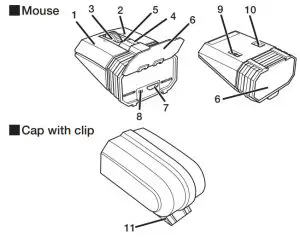
Name and function of each part
ELECOM M-CCP1BB Bluetooth Mouse Ultimate BlueLED Silent Clippable Mouse - each part

  1. Left button
  2. Right button
  3. Tilt wheel
    You can scroll horizontally by tilting the wheel to the left or right.
    ELECOM M-CCP1BB Bluetooth Mouse Ultimate BlueLED Silent Clippable Mouse - icon To use the horizontal scroll function on

    Windows®, ELECOM Mouse Assistant must be installed.
  4. The “Back” button
    Operates the “Back” button on the Web browser.
    ELECOM M-CCP1BB Bluetooth Mouse Ultimate BlueLED Silent Clippable Mouse - icon To use the “Back” button on your Macintosh, it is necessary to install the “ELECOM Mouse Assistant”.

  5. LED light
    • During the pairing standby state, the LED blinks green.
    •  Turns on in red when charging.
    •  Turns on in green for a fixed period of time when the power is turned on. When the remaining battery becomes low during use, the LED blinks red.
  6. Connector cover
  7. Micro USB connector for charging
  8. Pairing button
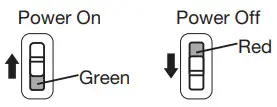
  9. Power Switch
    ELECOM M-CCP1BB Bluetooth Mouse Ultimate BlueLED Silent Clippable Mouse - Power Switch

  10. Optical sensor
    * Please note that looking directly into the sensor light may hurt your eyes.
  11. Clip
    Clip it to your bag, breast pocket, laptop, etc.
    * When clipping the mouse to your laptop, please be careful not to scratch the casing or the LCD screen of your laptop.

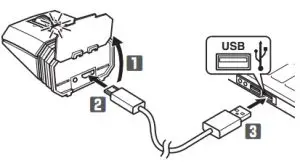
Charging

ELECOM M-CCP1BB Bluetooth Mouse Ultimate BlueLED Silent Clippable Mouse - Charging

  1. Open the connector cover.
  2. Connect the USB [micro-B] connector of the included USB charger cable to the charging micro USB connector of the product.
  3. Connect the USB [A] connector of the USB charger cable to the USB port on a PC.
    ELECOM M-CCP1BB Bluetooth Mouse Ultimate BlueLED Silent Clippable Mouse - icon 2 Be sure to sufficiently check the connector orientation and the insertion location.
  4. If the PC is not on, turn it on.
    The LED light turns on in red, and charging begins.
    When charging is finished, this light will turn off.
    ELECOM M-CCP1BB Bluetooth Mouse Ultimate BlueLED Silent Clippable Mouse - icon 2 If the LED lamp does not stop blinking even after the prescribed charging time (approximately 3.5 hours), remove the charging USB cable and stop charging for the moment. Otherwise, this can cause heating, explosions, or fires.

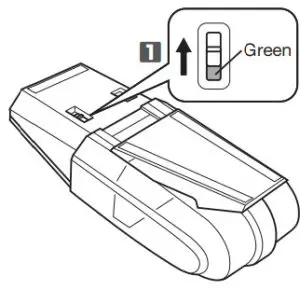
Turning the Power On

ELECOM M-CCP1BB Bluetooth Mouse Ultimate BlueLED Silent Clippable Mouse - Power On

  1. Slide the power switch to the ON position (the green side).
    The LED light is lit green for a fixed time.
    * When the remaining battery is low, the LED blinks red for a fixed time.
    ELECOM M-CCP1BB Bluetooth Mouse Ultimate BlueLED Silent Clippable Mouse - icon Power-saving mode

    When the mouse is left untouched for a fixed period of time while the power is ON, it automatically shifts to power-saving mode. The mouse is released from the power-saving mode when it is touched.
    * Mouse operation may be unstable for a few seconds after returning from the power-saving mode.

Pairing with a PC

  • Pairing involves registering Bluetooth ® devices (in this case, this product and your device) with each other, and authorizing a connection between them.
  • This section covers Windows® and Macintosh standard Bluetooth ® functions. Depending on your device or Bluetooth ® adaptor, unique Bluetooth® functions may be used. Please read the respective manuals for each function.
  • Please carry out the pairing operation using your current mouse or touchpad on your device.

Windows® 10

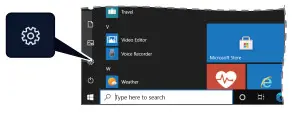
  1. Click on the “Start” button on the lower left of the screen, and click on the “Settings” setting icon  icon.
    ELECOM M-CCP1BB Bluetooth Mouse Ultimate BlueLED Silent Clippable Mouse - Settings

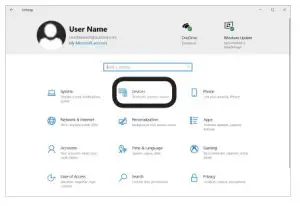
  2. Click on “Devices” on the “Settings” screen.
    The “Devices” page will appear.
    ELECOM M-CCP1BB Bluetooth Mouse Ultimate BlueLED Silent Clippable Mouse - 2

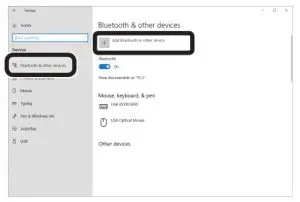
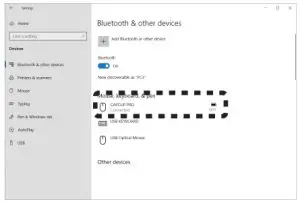
  3. Click on “Bluetooth & other devices”, and click on “Add Bluetooth or another device”.
    ELECOM M-CCP1BB Bluetooth Mouse Ultimate BlueLED Silent Clippable Mouse - Bluetooth or other device

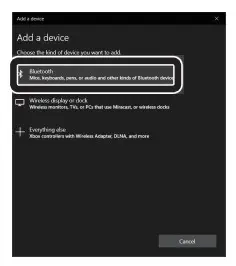
  4. Click on “Bluetooth”.
    ELECOM M-CCP1BB Bluetooth Mouse Ultimate BlueLED Silent Clippable Mouse - BluetoothELECOM M-CCP1BB Bluetooth Mouse Ultimate BlueLED Silent Clippable Mouse - 1


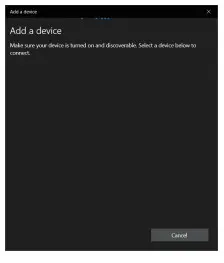
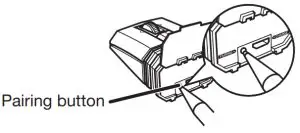
  5. When the “Add a device” window appears, use a pointed item to press the pairing button of the device for 2 to 3 seconds, and then release.
    Pairing mode is activated, and the LED light blinks green.
    ELECOM M-CCP1BB Bluetooth Mouse Ultimate BlueLED Silent Clippable Mouse - LED light blinks green

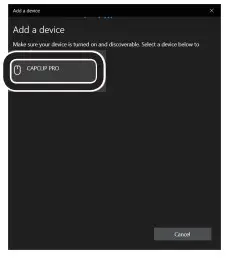
  6. Click on “CAPCLIP PRO” to start pairing.
    ELECOM M-CCP1BB Bluetooth Mouse Ultimate BlueLED Silent Clippable Mouse - CAPCLIP PRO

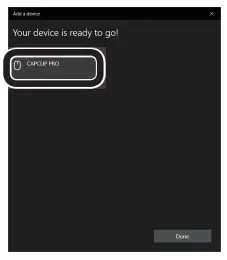
  7. When it changes to “Connected”, click on “Done”.
    ELECOM M-CCP1BB Bluetooth Mouse Ultimate BlueLED Silent Clippable Mouse - Connected

  8. This product is added to “Mouse, keyboard, & pen”, displays “Connected “ and pairing is complete.
    ELECOM M-CCP1BB Bluetooth Mouse Ultimate BlueLED Silent Clippable Mouse - pairing is complete

macOS Catalina (10.15)

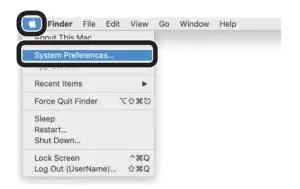
  1. From the Apple menu, click “System Preferences…” to display the system environment settings screen.
    ELECOM M-CCP1BB Bluetooth Mouse Ultimate BlueLED Silent Clippable Mouse - 3

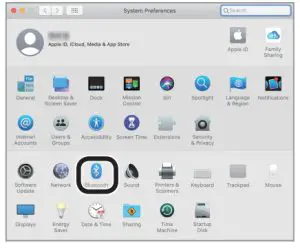
  2. Click “Bluetooth” to display the “Bluetooth” environment settings screen.
    ELECOM M-CCP1BB Bluetooth Mouse Ultimate BlueLED Silent Clippable Mouse - environment settings screen

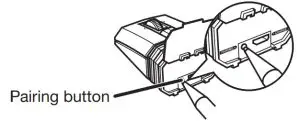
  3. When searching for the device, use a pointed item to press the pairing button at the bottom of the device for 2 to 3 seconds, and then release.
    Pairing mode is activated, and the LED light blinks green.
    ELECOM M-CCP1BB Bluetooth Mouse Ultimate BlueLED Silent Clippable Mouse - Pairing button

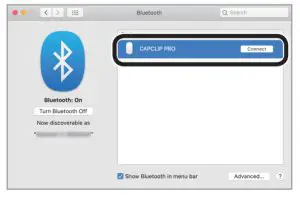
  4. Select “CAPCLIP PRO”, and click “Connect” to start pairing.
    ELECOM M-CCP1BB Bluetooth Mouse Ultimate BlueLED Silent Clippable Mouse - CAPCLIP P RO 1

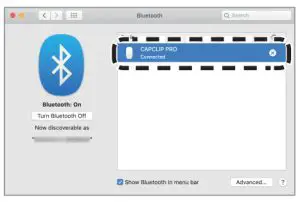
  5. Pairing is complete when the “Connected” pops up on the screen, and the status of the “CAPCLIP PRO” is “Connected”.
    ELECOM M-CCP1BB Bluetooth Mouse Ultimate BlueLED Silent Clippable Mouse - CAPCLIP PRO 2When keyboard setup assistant appears

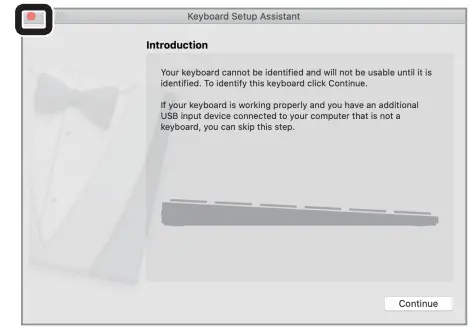
    ELECOM M-CCP1BB Bluetooth Mouse Ultimate BlueLED Silent Clippable Mouse - icon Depending on the environment, ”Keyboard Setup Assistant” may appear.

    In this case, click the “Close” button on the top left to end “Keyboard Setup Assistant”. There is no issue here.

When using the mouse

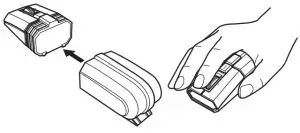
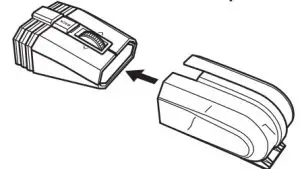
  1. Attach the cap to the rubber at the back end of the mouse before use.
    ELECOM M-CCP1BB Bluetooth Mouse Ultimate BlueLED Silent Clippable Mouse - cap

Storing the mouse

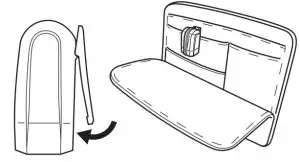
  1. Insert the mouse into the cap to store it.
    ELECOM M-CCP1BB Bluetooth Mouse Ultimate BlueLED Silent Clippable Mouse - mouse

  2. .You can clip it to your bag, breast pocket, or PC and carry it around.
    ELECOM M-CCP1BB Bluetooth Mouse Ultimate BlueLED Silent Clippable Mouse - PC and carry

Specifications

Supported OSWindows° 10, Windows° 8.1, macOS Catalina(10.15), i0S13.5/iPadOS13.5, Android OS 7 to 10
(Updating the OS or installing a service pack may be necessary.)
* Compatibility information was retrieved during operation confirmation in our verification environment. There is no guarantee of complete compatibility with all devices, OS versions, and applications.
Resolution1600 dpi
Compatible standardBluetooth 5.0 Class2
ProfileHOGP (HID Over GATT Profile)
Radiofrequency2.4 GHz band
Radio wave methodGFSK
Radio wave rangeMagnetic surfaces (such as steel desks): approximately 3 m
Non-magnetic surfaces (such as wooden desks): approximately 10 m
*These are test values in the company environment and are not guaranteed.
Dimensions
(W x D x H)
When in use:
Approximately 1.7″ x 4″ x 1.38″ When stored:
Approximately 1.7″ x 2.5″ x 1.38″
WeightApproximately 0.14Ib
*Including the battery
Operational temperature/humidity41°F to 104°F/ up to 90%RH (without condensation)
Storage temperature/ humidity14°F to 140°F/ up to 90%RH (without condensation)
BatteryBuilt-in lithium-ion rechargeable battery (the battery cannot be moved or replaced)
Operating timeGuidelines when used with a fully charged battery
Continuous operation time: Approx. 14 hours Continuous standby time: Approx. 26 days Estimated usage time: Approx. 24 days (The usage time is estimated given a mouse operation percentage of 5% of the 8 hours per day spent operating a PC.)

Safety Precautions

Thermometers PC868. Infrared Thermometer - Warning 2 Prohibited action
Thermometers PC868. Infrared Thermometer - Warning Mandatory action
ELECOM M-CCP1BB Bluetooth Mouse Ultimate BlueLED Silent Clippable Mouse - icon 2 The situation that needs attention

WERNING DANGER

Thermometers PC868. Infrared Thermometer - Warning Please use the included charging cable, and perform the charging operation as directed by ELECOM.
Using a charging cable other than the one provided, or not properly following the charging operation directions, may result in overheating, leakage, or explosion.
Thermometers PC868. Infrared Thermometer - Warning 2 Do not tamper with or attempt to take apart the product.
This may result in re or electric shock.
Thermometers PC868. Infrared Thermometer - Warning 2 Do not use this product if it is leaking.
Thermometers PC868. Infrared Thermometer - Warning If the internal battery is leaking, immediately stop the use of the product. This can pose a risk of overheating and/or damage.
Immediately stop using this product if you notice anything unusual.
Thermometers PC868. Infrared Thermometer - Warning Do not use this product if you notice a leaking battery, odd color changes, warping, or any other abnormalities. Continuing to use the product under these conditions may result in overheating or explosion.
Thermometers PC868. Infrared Thermometer - Warning If a liquid substance from this product comes into contact with any part of your body or clothing, immediately use and wash the contacted area with clean water.
Contact between your skin and any liquid inside the internal battery may result in skin damage.
Thermometers PC868. Infrared Thermometer - Warning Only use this product at the specified rated voltage.
Using this product outside of the specified rated voltage range may result in overheating, electric shock, or injury.

WERNING WARNING
Thermometers PC868. Infrared Thermometer - Warning In the case that liquid from the internal battery enters your eyes, do not rub, as this may cause loss of vision. Immediately ush the contacted area with clean water and seek treatment from a physician as soon as possible.
Thermometers PC868. Infrared Thermometer - Warning If a foreign object (water, metal chip, etc.) enters the product, immediately stop using the product, and then turn the product off. Continuing to use the product under
these conditions may cause a re or electric shock.
If an abnormality is found with this product (such as smoke or an unexpected smell from the product), immediately stop using it and turn the power off. When charging, disconnect the included cable from the USB power supply, such as a USB AC adapter.
After doing this, contact the retailer from whom you purchased the product.
Thermometers PC868. Infrared Thermometer - Warning 2 Do not drop or hit this product.
If this product is damaged, immediately stop using the product and turn the mouse body off.
If you continue to use the product under these conditions, it may cause are or electric shock.
Thermometers PC868. Infrared Thermometer - Warning 2 Do not attempt to disassemble, modify or repair this product by yourself, as this may cause are electric shock or product damage.
If you continue to use the product under these conditions, it may cause are or electric shock.
Thermometers PC868. Infrared Thermometer - Warning 2 Do not put this product in re, as the product may burst, resulting in are or injury.

WERNING CAUTION

Thermometers PC868. Infrared Thermometer - Warning 2 Do not place this product in any of the following environments:

  • In a car exposed to sunlight, a place exposed to direct sunlight, or a place that becomes hot (around a heater, etc.)
  • In a moist place or a place where condensation may occur
  • In an uneven place or a place exposed to vibration
  • In a place where a magnetic eld is generated (near a magnet, etc.)
  • In a dusty place

Thermometers PC868. Infrared Thermometer - Warning 2 This product does not have a waterproof structure. Use and store this product in a place where the product body will not be splashed with water or other liquids.
Rain, water mist, juice, coffee, steam, or sweat may also cause product damage.
ELECOM M-CCP1BB Bluetooth Mouse Ultimate BlueLED Silent Clippable Mouse - icon 2 Do not look directly at the light from the optical sensor.
ELECOM M-CCP1BB Bluetooth Mouse Ultimate BlueLED Silent Clippable Mouse - icon 2 Doing so may lead to eye damage.

ELECOM M-CCP1BB Bluetooth Mouse Ultimate BlueLED Silent Clippable Mouse - icon 2 Only use this mouse with PCs and video game systems.
ELECOM M-CCP1BB Bluetooth Mouse Ultimate BlueLED Silent Clippable Mouse - icon 2 Do not use this product with any device that may significantly be affected if the product were to malfunction.
ELECOM M-CCP1BB Bluetooth Mouse Ultimate BlueLED Silent Clippable Mouse - icon 2 If this product is used on a transparent surface, such as glass, or a highly reactive surface, such as a mirror, the optical sensor will not function correctly and mouse cursor movement will become unstable.

ELECOM M-CCP1BB Bluetooth Mouse Ultimate BlueLED Silent Clippable Mouse - icon 2 When you no longer need to use this product and the battery, be sure to dispose of it in accordance with the local ordinances and laws of your area.

Cautions for Wireless Equipment

This product is wireless equipment using the entire range of the 2.4 GHz band and it is possible to avoid the band of mobile object identification systems. GFSK is used for the
radio wave method. The interference distance is 10 m. The 2.4 GHz band is also used by medical equipment, Bluetooth, and wireless LAN equipment conforming to the IEEE802.11b/11g/11n standard.

  • Before using this product, check that there are no other “radio stations”* operating nearby.
  • If electromagnetic interference occurs between this product and other “radio stations”, move this product to another location or stop using this product.
  • Other “radio stations” refer to industrial, scientific, and medical devices using the 2.4 GHz band, as this product does, other radio stations of this type, licensed radio station premises for a mobile object identification system that is used in factory production lines, certain non-licensed low power radio stations and amateur radio stations.

WERNING WARNING

Thermometers PC868. Infrared Thermometer - Warning 2

  • Do not use this product with a device that may have a serious function or inuence. There are rare cases where an external radio wave at the same frequency or the radio
    wave emitted from a mobile phone causes this product to malfunction, slow down or fail to operate.
  • Do not use this product in a hospital or other locations where the use of radio waves is prohibited. The radio waves of this product may affect electronic and medical
    devices (e.g. pacemakers).
  • The use of a wireless mouse in an aircraft is prohibited by aviation law because doing so may interfere with night safety. Turn off the power of the mouse body before
    boarding an aircraft and do not use it in the aircraft.
  • ELECOM is not liable for any accident or any indirect or consequential damage incurred due to the failure of this product.

Limitation of Liability

In no event will ELECOM Co., Ltd be liable for any lost profits or special, consequential, indirect, punitive damages arising out of the use of this product.
ELECOM Co., Ltd will have no liability for any loss of data, damages, or any other problems that may occur to any devices connected to this product.

FC FCC ID:
YWO-M-CCP1BB

This device complies with Part 15 of the FCC Rules. Operation is subject to the following two conditions:
(1) this device may not cause harmful interference, and (2) this device must accept any interference received, including interference that may cause undesired operation.

NOTE; This equipment has been tested and found to comply with the limits for a Class B Digital Device, pursuant to part 15 of the FCC Rules. These limits are designed to provide reasonable protection against harmful interference in a residential installation. This equipment generates, uses, and can radiate radio frequency energy and, if not installed and used in accordance with the instruction, may cause harmful interference to radio communication. However, there is no guarantee that interference will not occur in a particular installation. If this equipment does cause harmful interference to radio or television reception, which can be determined by turning the equipment off and on, the user is encouraged to try to correct the interference by one or more of the following measures:
– Reorient or relocate the receiving antenna
– Increase the separation between the equipment and receiver
– Connect the equipment into an outlet on a circuit different from that to which the receiver is connected
– Consult the dealer or an experienced radio/TV technician for help

NOTICE: The manufacture is not responsible for any radio or TV interference caused by unauthorized modifiation of this equipment. Such modifications could void the user’s authority to operate the equipment. In order to make improvements to this product, the design and specifications are subject to change without prior notice.

ELECOM M-CCP1BB Bluetooth Mouse Ultimate BlueLED Silent Clippable Mouse - qr code 1CONTACT US
elecom.net

ELECOM M-CCP1BB Bluetooth Mouse Ultimate BlueLED Silent Clippable Mouse - qr code 2FOLLOW US
facebook.com/elecomus

  • Unauthorized copying and/or reproducing of all or part of this manual is prohibited.
  • The specifications and appearance of this product may be changed without prior notice for product improvement purposes.
  • When exporting this product, check the export regulations for the country of origin.
  • The Bluetooth ® word mark and logos are registered trademarks owned by Bluetooth SIG, Inc., and any use of such marks by ELECOM CO., LTD. is under license.
  • Windows is a trademark of the Microsoft Corporation.
  • macOS Catalina, Macintosh, and iPad OS are trademarks of Apple Inc., registered in the U.S. and other countries.
  • Company names, product names, and other names in this manual are either trademarks or registered trademarks.

A customer who purchases outside Japan should contact the local retailer in the country of purchase for inquiries.
In “ELECOM CO., LTD. (Japan)”, no customer support is available for inquiries about purchases or usage in/from any countries other than Japan. Also, no foreign language other than Japanese is available. Replacements willbe made under the stipulation of the Elecom warranty, but are not available from outside of Japan.

Elecom - logoWireless Mouse
Manual, Safety precautions, and Compliance with regulations

1st edition, November 30, 2020
©2020 ELECOM Co., Ltd. All Rights Reserved.
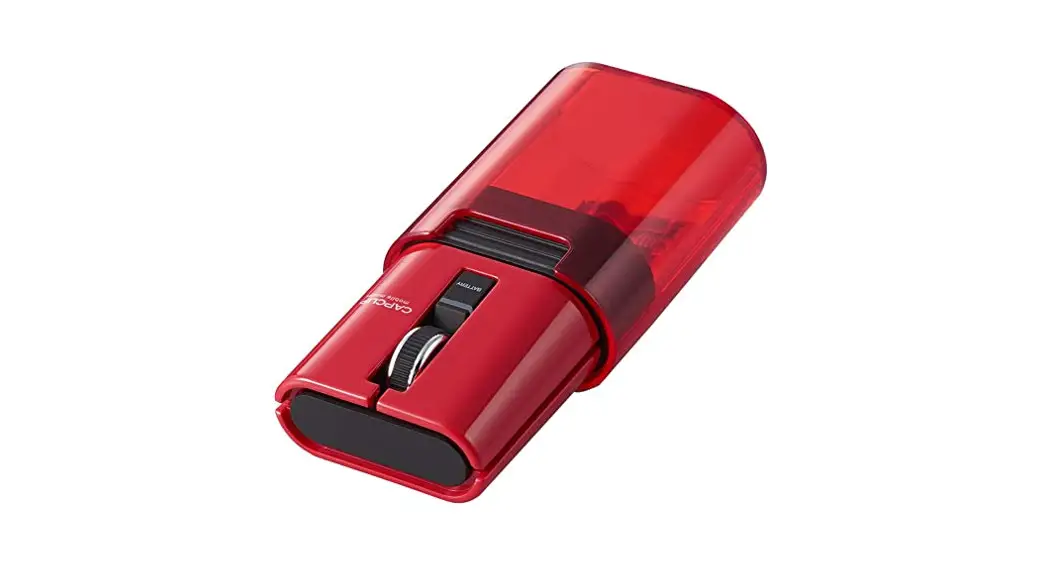
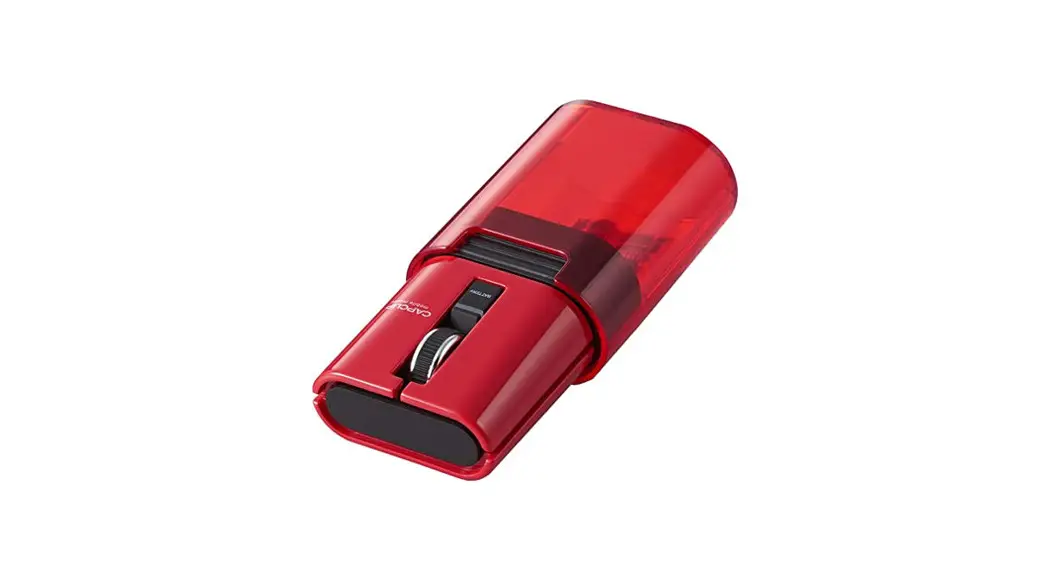
Documents / Resouces

Download manual
Here you can download full pdf version of manual, it may contain additional safety instructions, warranty information, FCC rules, etc.


Related Manuals