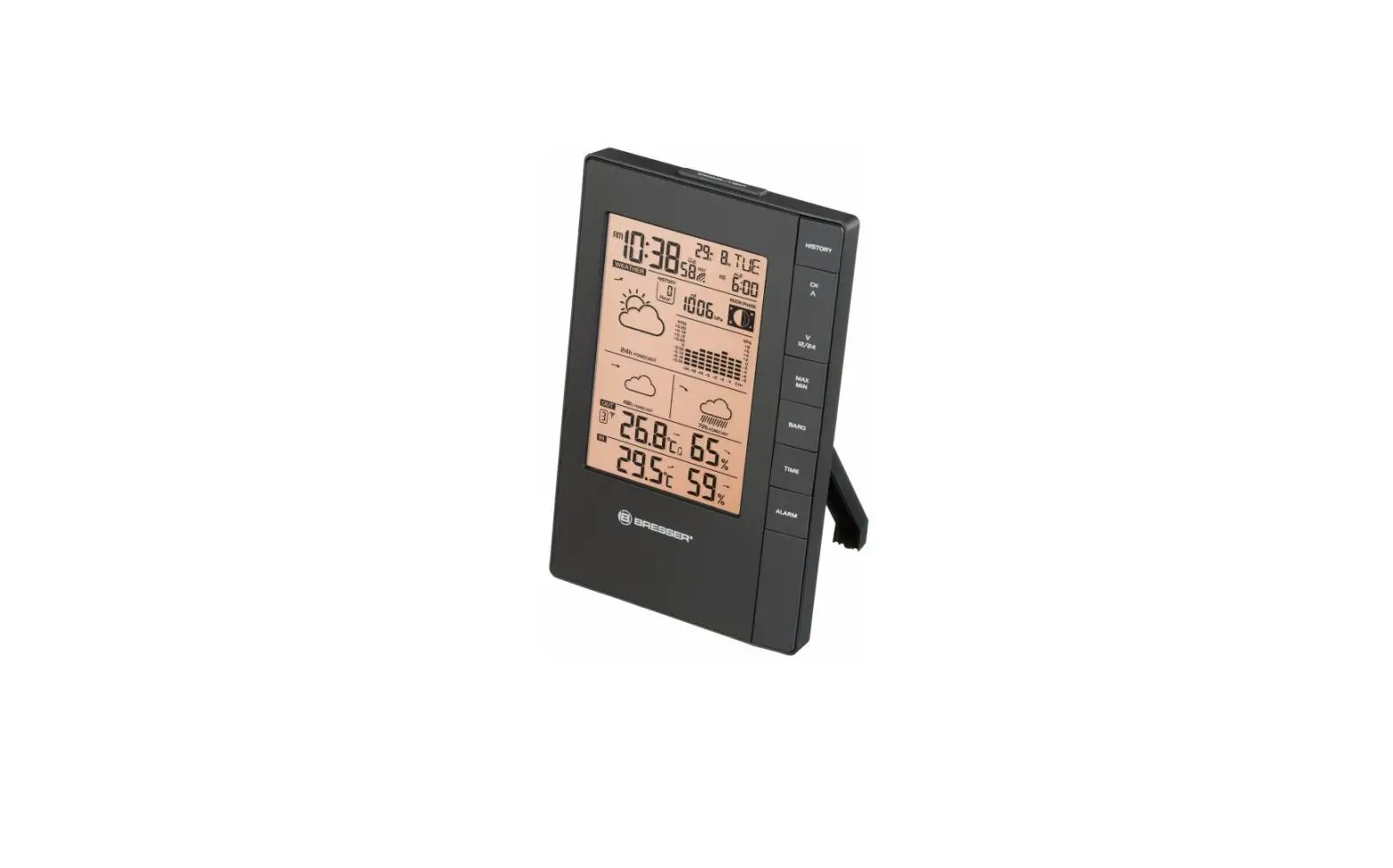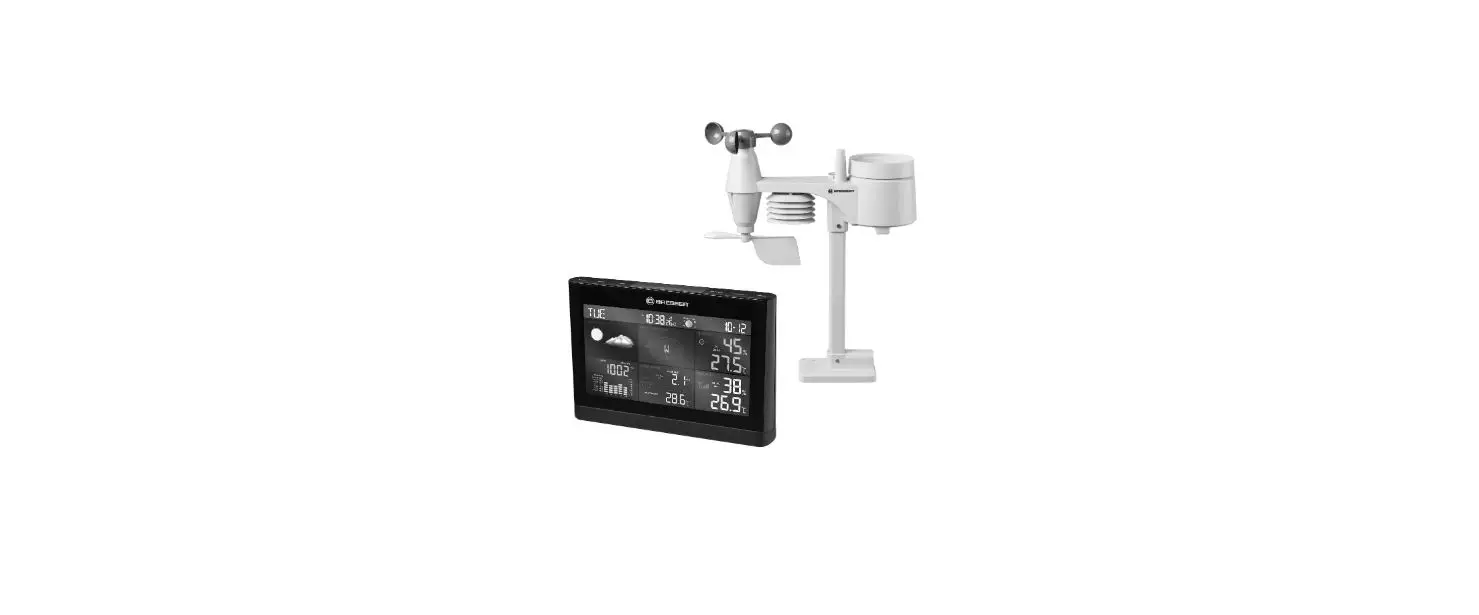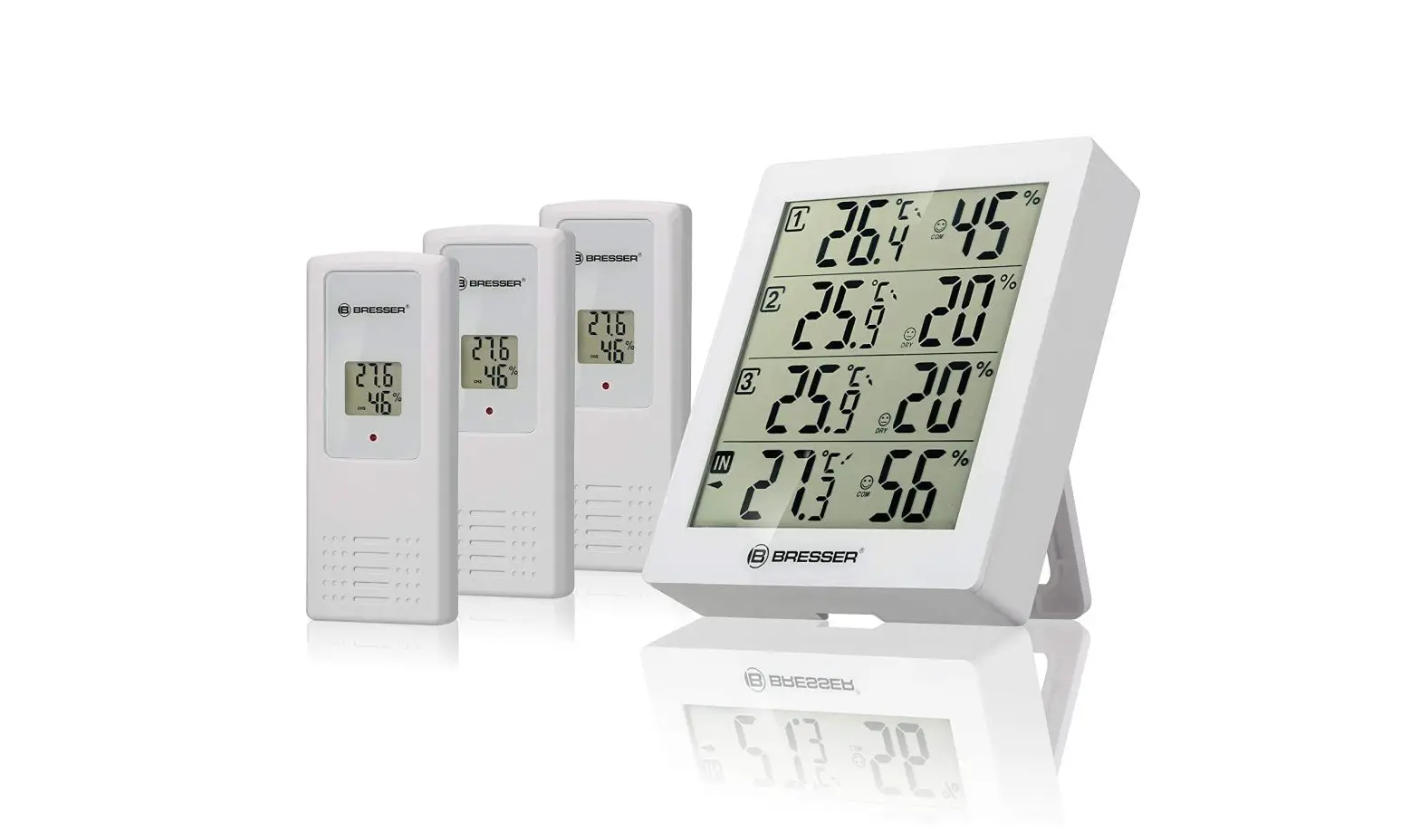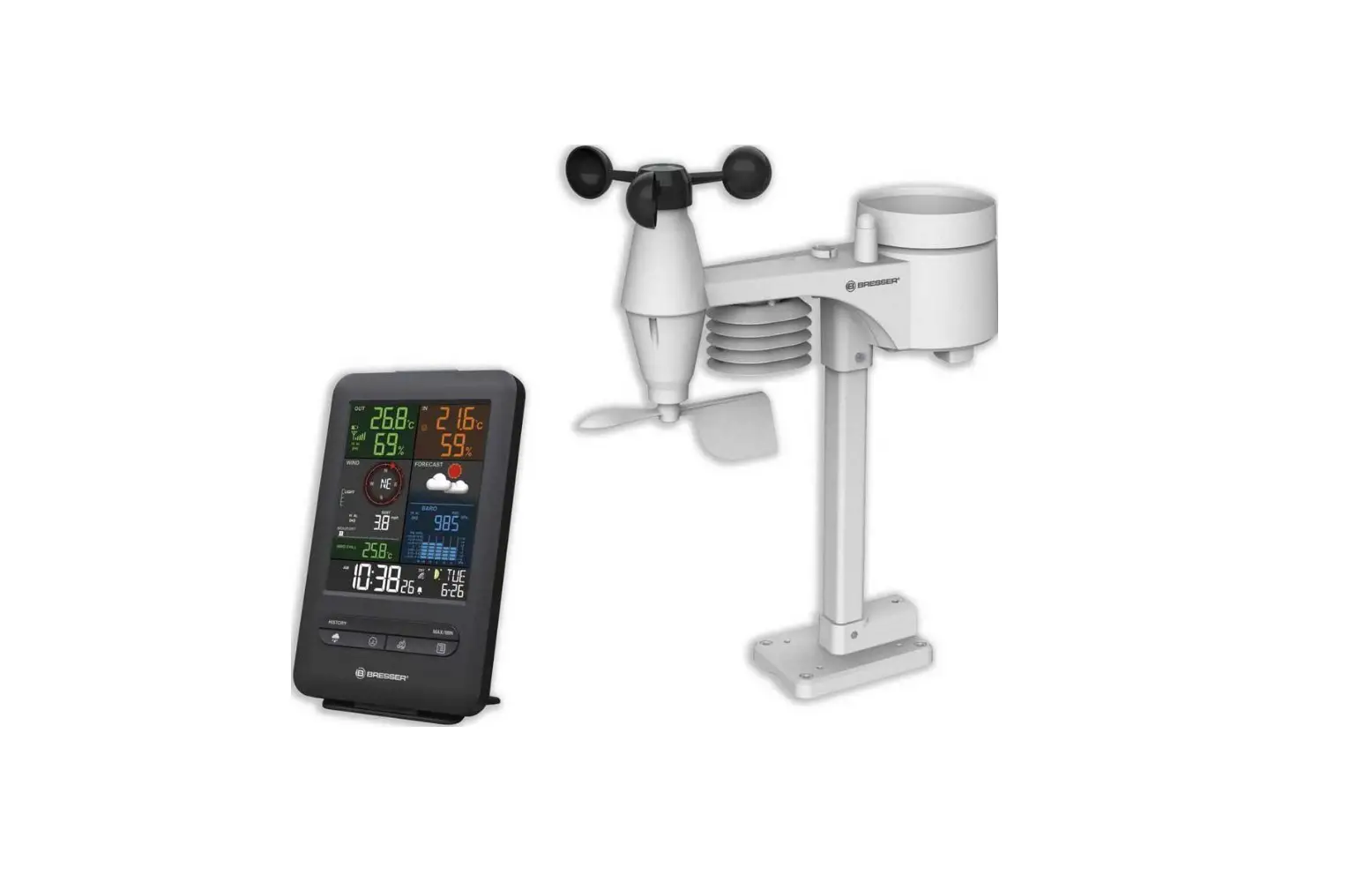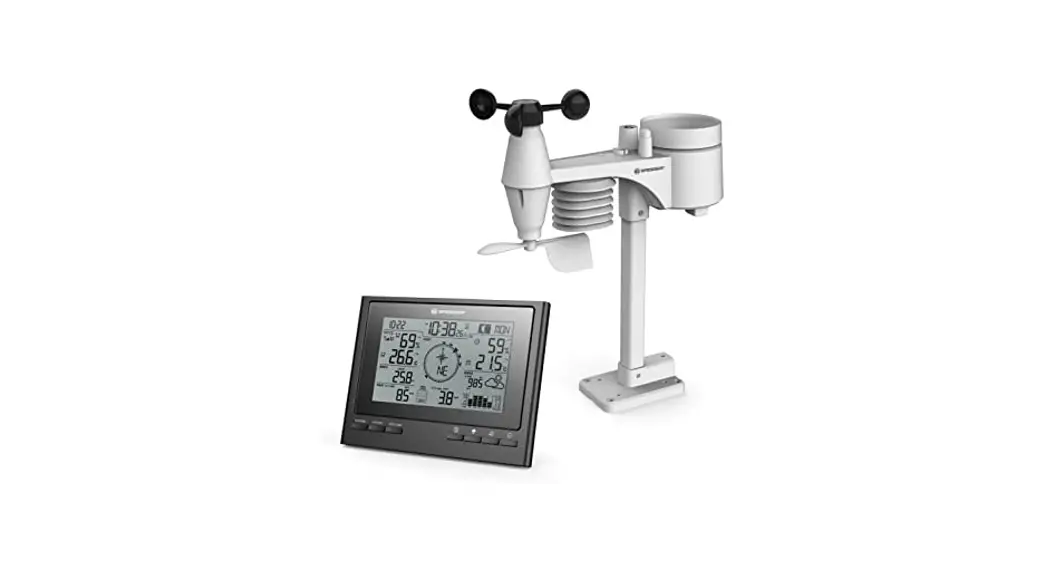
 7-in-1 Exclusive Weather Center ClimateScout
RC Weather Station with 7-in-1 Sensor
Art. No. 7003100CM3000 / 7003110CM3000 (blackz)
7003100GYE000 / 7003110GYE000 (white)
7003100HZI000 / 7003110HZI000 (silver)
7003100QT5000 / 7003110QT5000 (grey)
INSTRUCTION MANUAL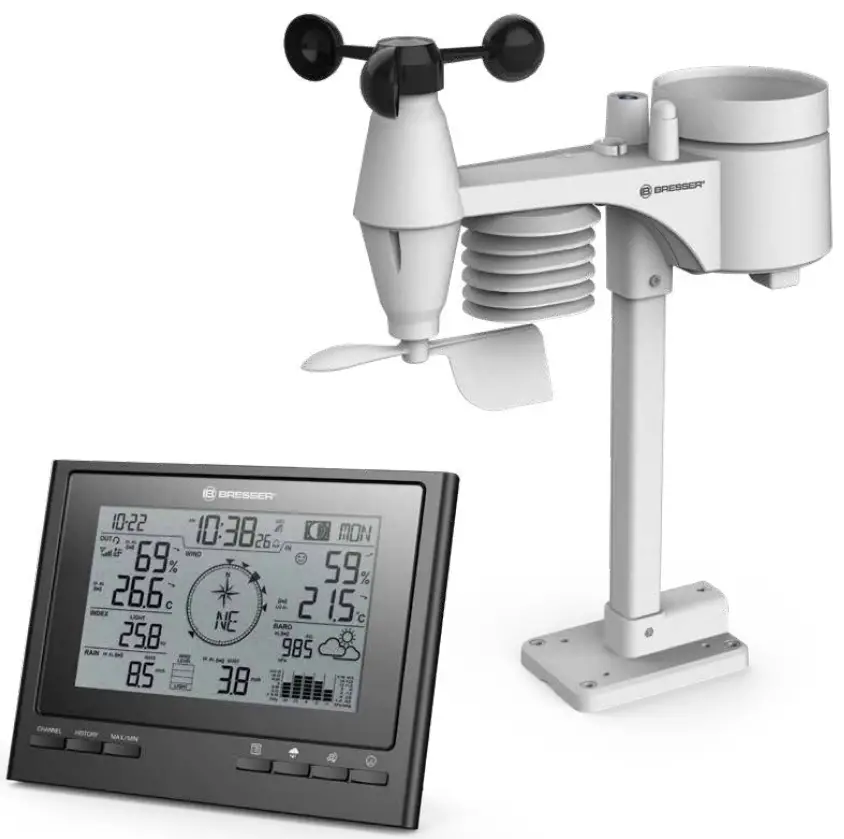
7-in-1 Exclusive Weather Center ClimateScout
 MANUAL DOWNLOAD (OTHER LANGUAGES): www.bresser.de/P7003100000000
 http://www.bresser.de/P7003100000000
ABOUT THIS INSTRUCTION MANUAL
 These operating instructions are to be considered a component of the device.
Please read the safety instructions and the operating instructions carefully before use.
Keep these instructions for renewed use at a later date. When the device is sold or given to someone else, the instruction manual must be provided to the new owner/user of the product.
This product is intended only for private use. It was developed as an electronic medium for the use of multimedia services.
GENERAL WARNINGS
 RISK OF CHOKING!
Keep packaging material, like plastic bags and rubber bands, out of the reach of children, as these materials pose a choking hazard. RISK OF ELECTRIC SHOCK!
This device contains electronic components that operate via a power source (batteries). Children should only use the device under adult supervision.
Only use the device as described in the manual; otherwise, you run the risk of an electric shock. RISK OF CHEMICAL BURN!!
Leaking battery acid can lead to chemical burns. Avoid contact of battery acid with skin, eyes and mucous membranes. In the event of contact, rinse the affected region immediately with a plenty of water and seek medical attention. RISK OF FIRE/EXPLOSION!
Use only the recommended batteries. Do not shortcircuit the device or batteries, or throw them into a fire.
Excessive heat or improper handling could trigger a short-circuit, a fire or an explosion.! NOTE!
Do not disassemble the device. In the event of a defect, please contact your dealer. The dealer will contact the Service Centre and can send the device in to be repaired, if necessary.
Do not immerse the unit in water.
Do not subject the unit to excessive force, shock, dust, extreme temperature or high humidity, which may result in malfunction, shorter electronic life span, damaged batteries and distorted parts.
Use only the recommended batteries. Always replace weak or empty batteries with a new, complete set of batteries at full capacity. Do not use batteries from different brands or with different capacities. Remove the batteries from the unit if it has not been used for a long time.
The manufacturer is not liable for damage related to improperly installed batteries!
INTRODUCTION
Thank you for your purchase of this weather station with 7-IN-1 sensor.
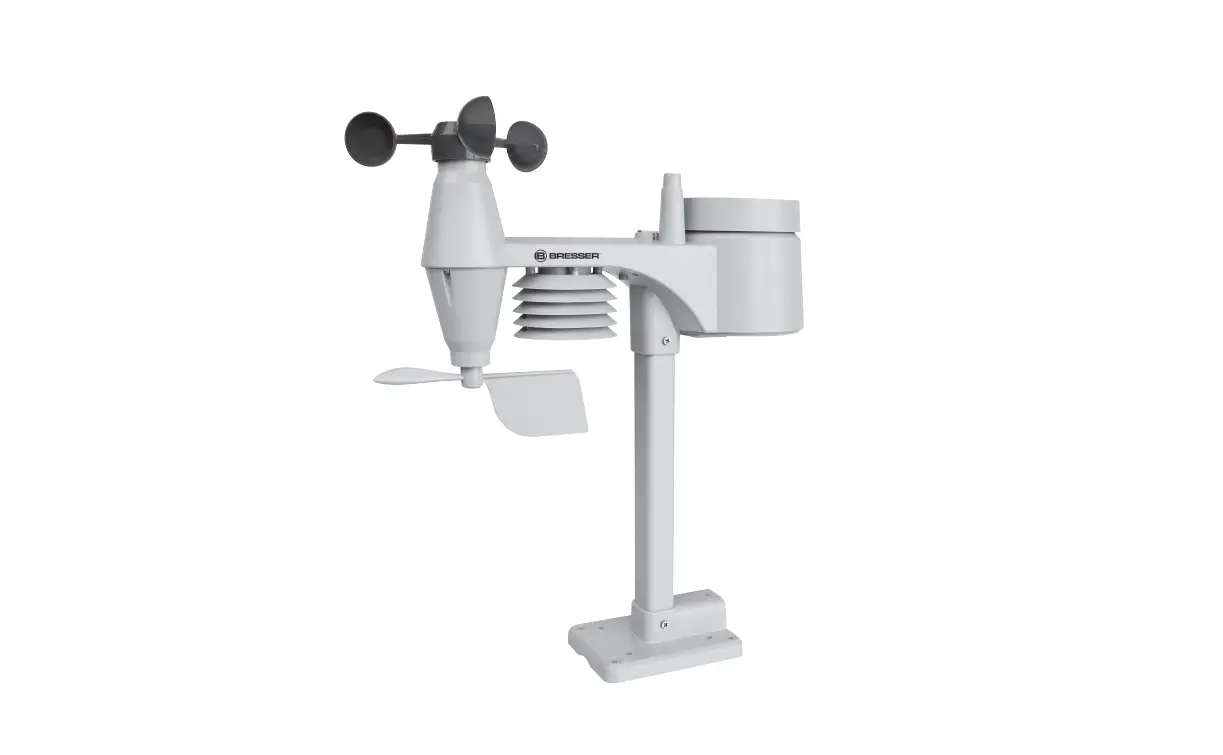
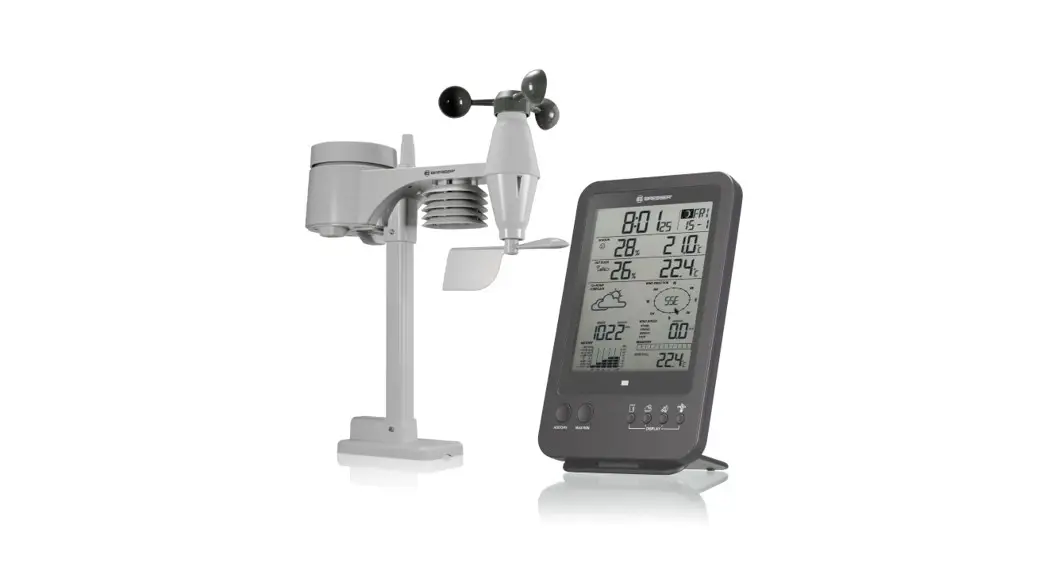
The wireless 7-IN-1 sensor contains a self-emptying rain collector for measuring rainfall, UV index, light intensity, anemometer, wind vane, temperature and humidity sensors. It is calibrated for your easy installation. It sends data by a low power radio frequency to the console up to 150m away (line of sight).
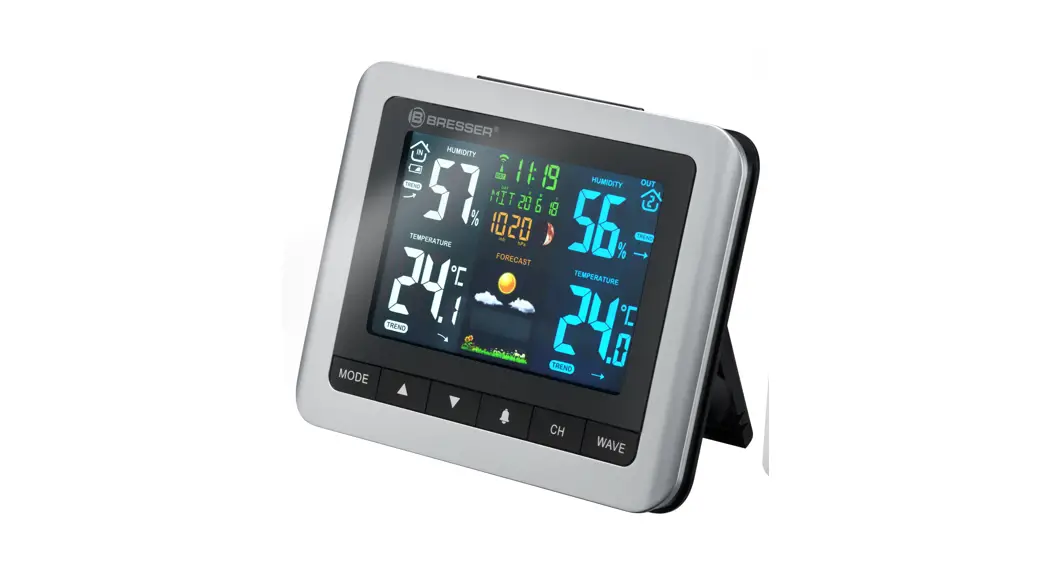
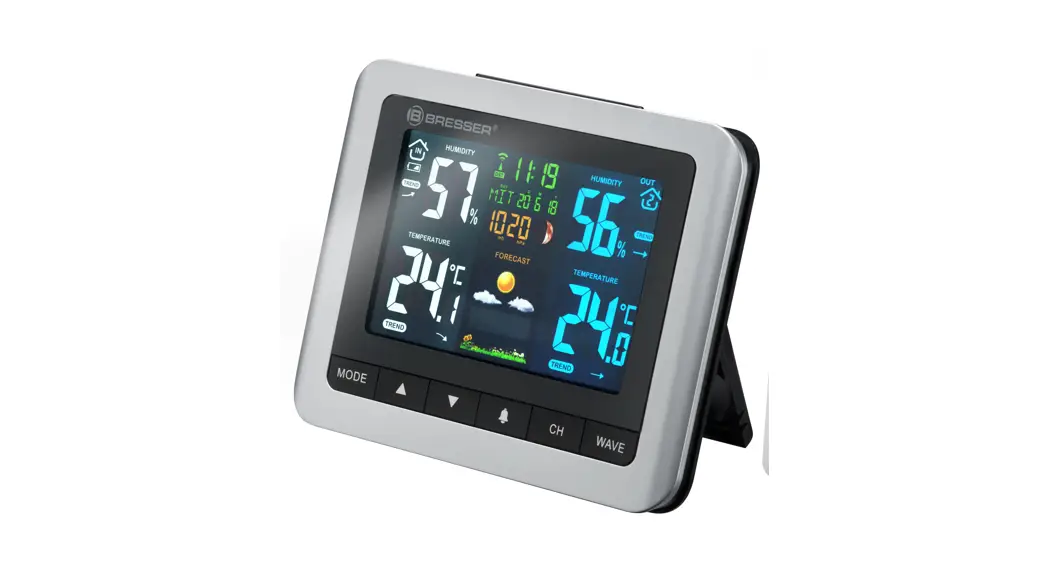
The display console displays all the weather data received from the 7-IN-1 sensor outside. It remembers the data for a time range for you to monitor and analyze the weather status for past 24 hours. It has advance features such as the HI / LO Alert alarm which will alert the user when the set high or low weather criteria are met. The barometric
pressure records are computed to give users forthcoming weather forecast and stormy warning.
Day and date stamps are also provided to the corresponding maximum and minimum records for each weather details.
The system also analyzes the records for your convenient viewing, such as the display of rainfall in terms of rain rate, daily, weekly and monthly records, whereas wind-speed in different levels. Different useful readings such as Feels like, Wind-chill, Heat Index, Dew-point, Comfort level are also provided.
With Radio-controlled / Atomic clock feature builtin, the system is truly a remarkable personal Professional Weather Station for your own backyard.
NOTE:
This instruction manual contains useful information on the proper use and care of this product. Please read this manual through to fully understand and enjoy its features, and keep it handy for future use.
SCOPE OF DELIVERY (FIG. 1)
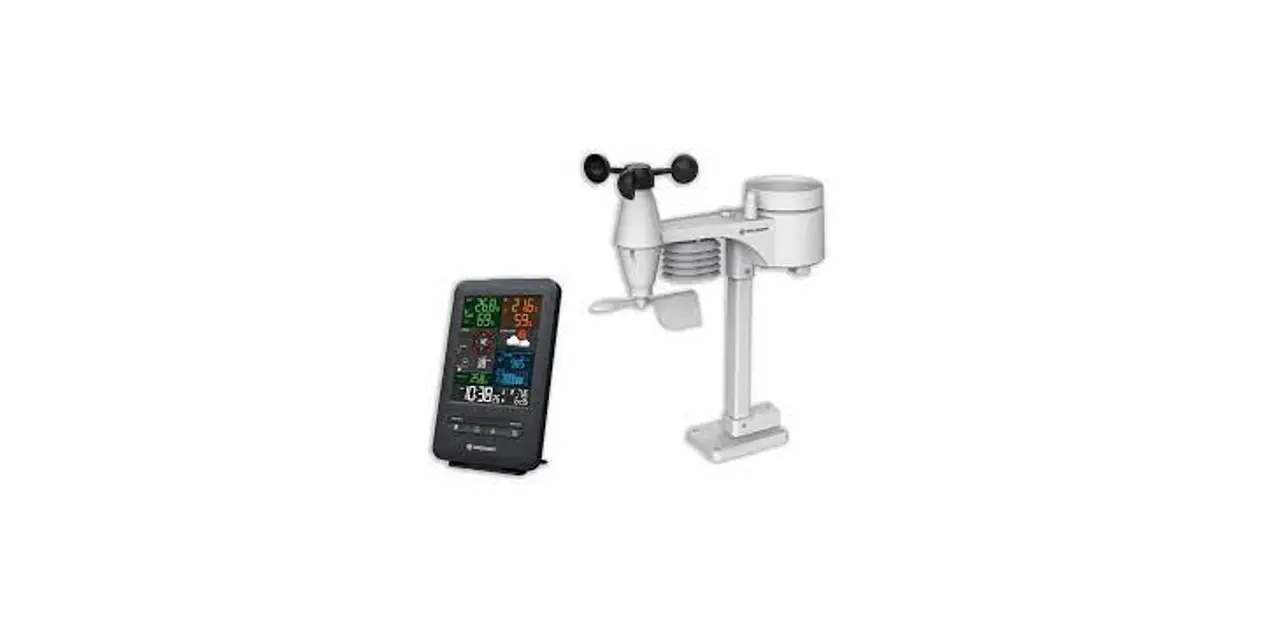
Main unit (A), Wireless 7-in-1 Sensor (B), Mounting material (C), Instruction manual
Required batteries (not included with purchase):
Main unit: 4 pieces of micro batteries (1.5V, type AA)
Wireless 7-in-1 Sensor: 3 pieces of micro batteries (1.5V, type AA)

OVERVIEW
CONSOLE
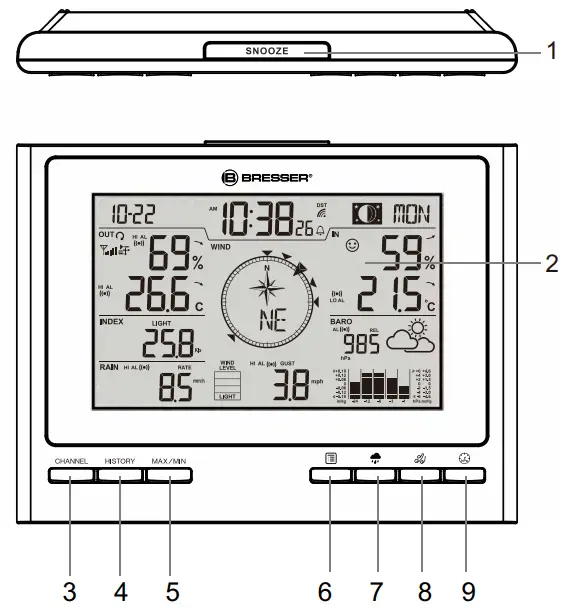
| 1. [ SNOOZE ] key 2. LCD display 3. [ CHANNEL ] key 4. [ HISTORY ] key 5. [ MAX/MIN ] key 6. [ INDEX ] key 7. [ RAIN ] key | 8. [ WIND ] key 9. [ BARO ] key 10. [ TIME SET ] key 11. [ ALARM ] key 12. Wall mount hole 13. [ ALERT ] key 14. [ DOWN ] key |
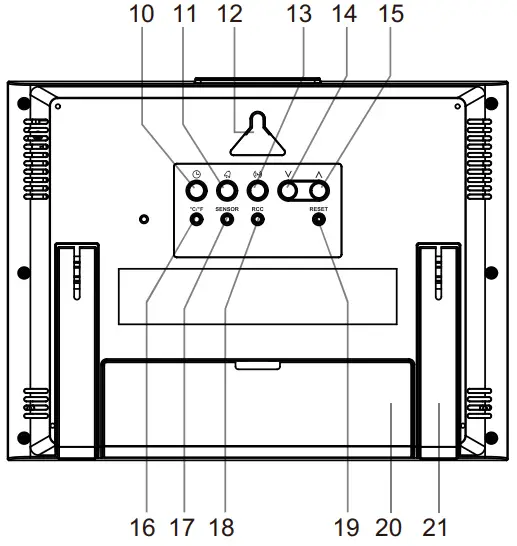
| 15. [ UP ] key 16. [ °C / °F ] key 17. [ SENSOR ] key 18. [ RCC ] key | 19. [ RESET ] key 20. Battery compartment 21. Table stand |
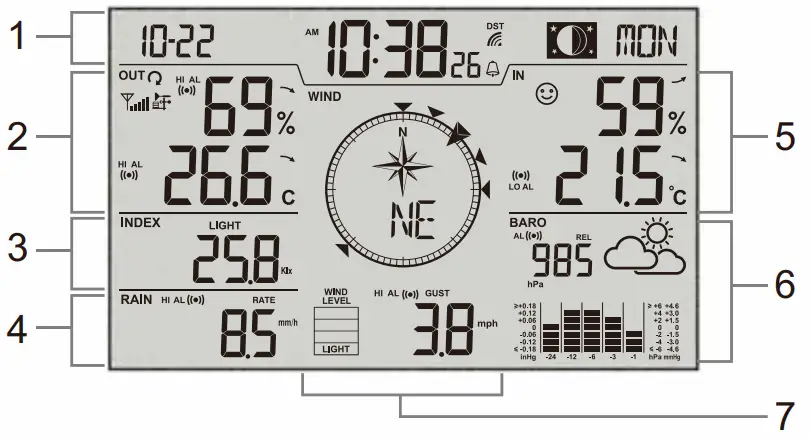
LCD DISPLAY
- Time & date, moon phase
- Outdoor temperature & humidity
- Index, UV & light intensity
- Rainfall & Rain rate
- Indoor temperature & humidity
- Barometer & weather forecast
- Wind direction / speed
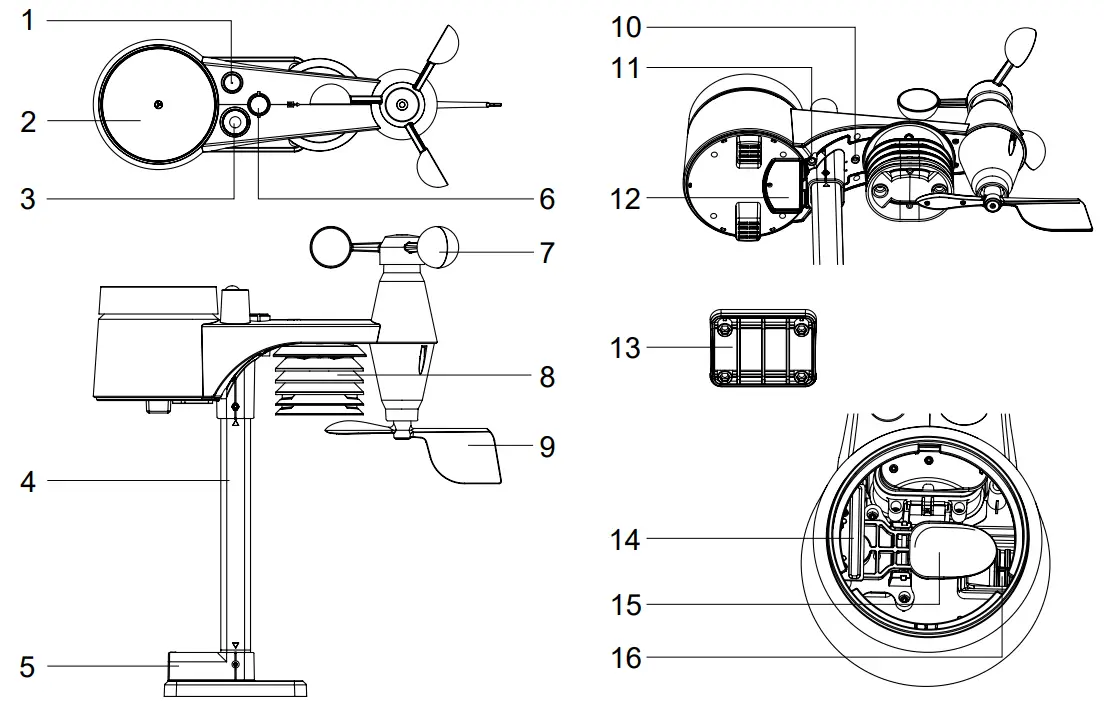
WIRELESS 7-IN-1 SENSOR
| 1. Antenna 2. Rain collector 3. UV / light sensor 4. Mounting pole 5. Mounting base 6. Balance indicator 7. Wind cup 8. Radiation shield | 9. Wind vane 10. Red LED indicator 11. [ RESET ] key 12. Battery door 13. Mounting clamp 14. Rain sensor 15. Tipping bucket 16. Drain holes |
INSTALLATION
WIRELESS 7-IN-1 SENSOR
Your wireless 7-IN-1 sensor measures wind speed, wind direction, rainfall, UV index, light intensity, temperature and humidity for you. It’s fully assembled and calibrated for your easy installation.
BATTERY AND INSTALLATION
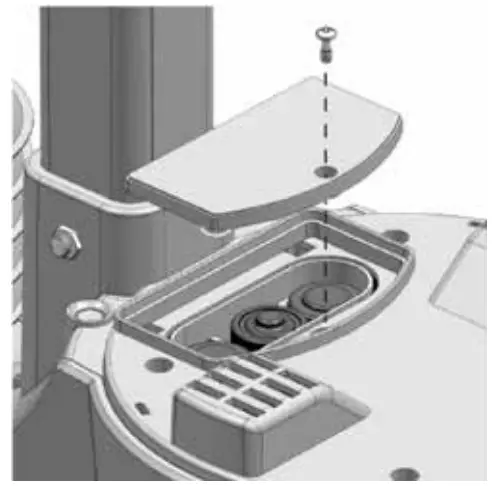
Unscrew the battery door at bottom of unit and insert the batteries according to the +/- polarity indicated.
Screw the battery door compartment on tightly. NOTE:
NOTE:
– Ensure the water tight O-ring is properly aligned in place to ensure water resistant.
– The red LED will begin flashing every 12 seconds.
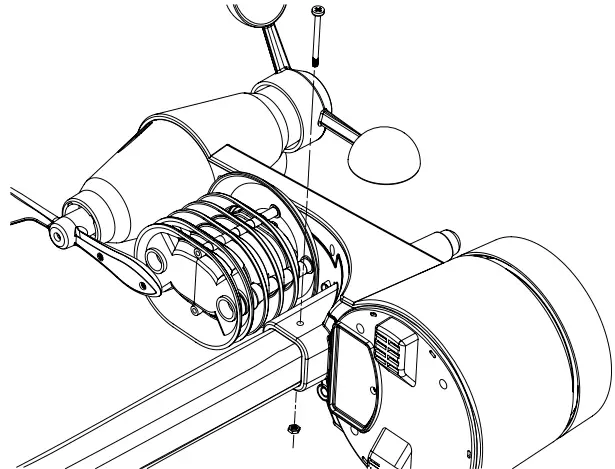
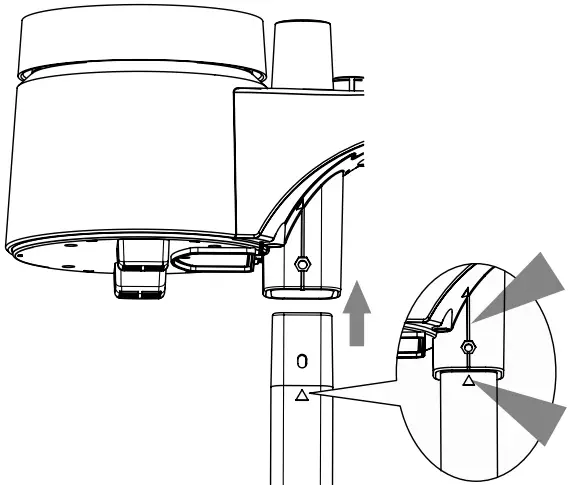
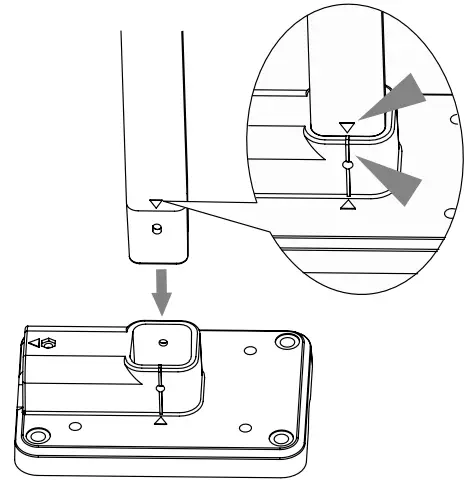
ASSEMBLY THE STAND AND POLE
| Step 1 Insert the top side of the pole to the square hole of the weather sensor. NOTE: Ensure the pole and sensor’s indicator align. | Step 2 Place the nut in the hexagon hole on the sensor, then insert the screw in other side and tighten it by the screw driver. |
 |  |
| Step 3 Insert the other side of the pole to the square hole of the plastic stand. NOTE: Align the pole and stand marking. | Step 4 Place the nut in the hexagon hole of the stand, then insert the screw in other side and then tighten it by the screw driver. |
 | 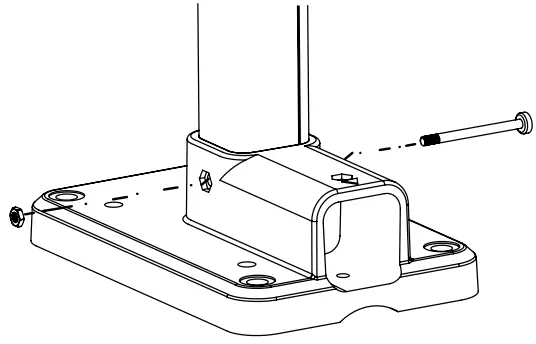 |
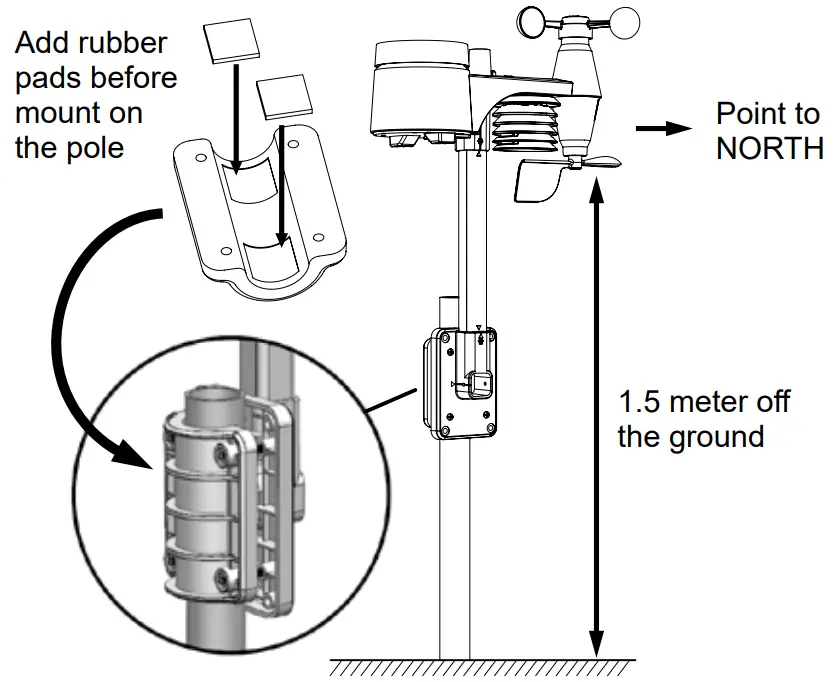
Install the wireless 7-IN-1 sensor in an open location with no obstructions above and around the sensor for accurate rain and wind measurement. Install the sensor with the smaller end facing the North to properly orient the wind direction vane.
Secure the mounting stand and clamps (included) to a post or pole, and allow minimum 1.5m off the ground.
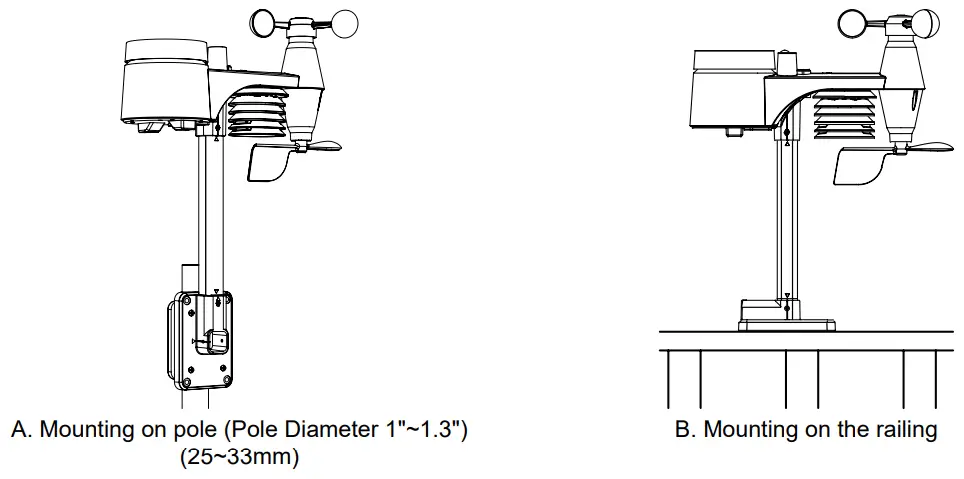
MOUNTING GUIDELINES
- Install the wireless 7-IN-1 sensor at least 1.5m off the ground for better and more accurate wind measurements.
- Choose an open area within 150 meters from the LCD console.
- Install the wireless 7-IN-1 sensor as level as possible to achieve accurate rain and wind measurements.
- Mount the wireless 7-IN-1 sensor with the wind meter end pointing to the North to correctly orient direction of the wind vane.
CONSOLE
BATTERIES INSTALLATION
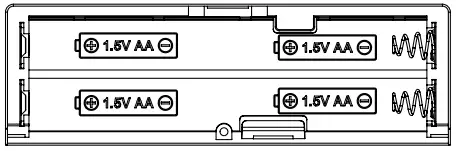
- Remove the battery door on the back side of the console.
- Insert 4 new AA batteries according to the “+/-” polarity mark on the battery compartment.
- Replace the battery door.
- Once the console power up, all the segments of the LCD will be shown.
- The RC clock will automatically start scanning for the radio-controlled time signal in 8 seconds.
NOTE:
– If no display appears on the LCD after inserting the batteries, press [ RESET] key by using a pointed object.
– In some cases, you may not receive the signal immediately due to the atmospheric disturbance.
PAIRING OF WIRELESS 7-IN-1 SENSOR WITH CONSOLE
After power up, the console will automatically search and connect the wireless 7-IN-1 sensor (antenna blinking). Once the connection is successful, antenna mark and readings of outdoor temperature, humidity, wind speed, wind direction, UV index, light intensity and rainfall will appear on the display.
CHANGING BATTERIES AND MANUAL PAIRING OF SENSOR
Whenever you changed the batteries of the wireless 7-IN-1 sensor, pairing must be done manually.
- Change all the batteries to new ones.
- Press [ SENSOR ] key on the console.
- Press [ RESET ] key on the sensor.
NOTE:
– Pressing [ RESET ] key at the bottom of wireless 7-IN-1 sensor will generate a new code for pairing purpose.
– Always dispose old batteries in an environmentally safe manner.
TIME & CALENDAR
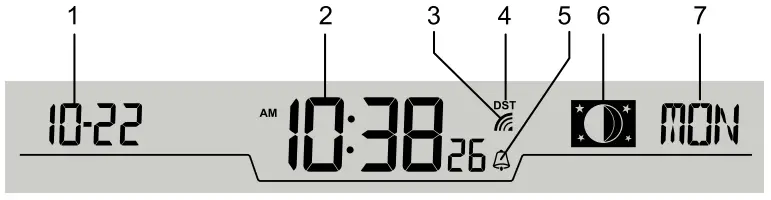
| 1. Date 2. Time 3. RCC signal strength indicator 4. DST | 5. Alarm 6. Moon phase 7. Day of the week |
RADIO CONTROLLED / ATOMIC CLOCK FUNCTION
When the unit receives RCC signal, a sync-time symbol  will appear on the LCD, and synchronizes daily.
SIGNAL STRENGTH INDICATOR
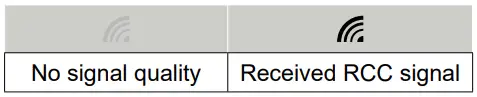
The signal indicator shows signal receive status. Flashing wave segment means RCC signals are being received. The signal receiving status could be classified into 2 types:
NOTE:
– Everyday the unit will automatically search for the time signal at 2:00am, 8:00am, 2:00pm and 8:00pm
– The strength of radio-controlled time signal from the transmitter tower may be affected by geographical location or building around.
– Always place the console away from interfering sources such as TV set, computer, etc.
– Avoid placing the console on or next to metal plates.
– The console can more easy to received the signal, if the distance between console and the adapter is 1m or more.
– Closed areas such as airport, basement, tower block, or factory are not recommended.
TIME SETTING
The unit automatically set itself accordingly to the Radio Controlled Clock signal it received. To set the clock/ calendar manually, first permanently disable the reception by holding the RCC key for 8 seconds (Press RCC key for 8 seconds again to enable the RCC reception).
TO MANUALLY SET THE CLOCK / TIME ZONE SELECTION
- Press and hold [ TIME SET ] key for 2 seconds until 12 or 24 Hr flashes.
- Use [ UP ] or [ DOWN ] key to adjust, and press [ TIME SET ] key to proceed to the next setting.
- Press [ TIME SET ] key again to step the setting items in this sequence: 12/24 Hour format
 Hour Minute Second Year Date format Month Day Hour offset Weekday Language DST AUTO / OFF.
NOTE:
– The unit will automatically exit setting mode if no key was pressed in 60 seconds.
– DST (Daylight Saving Time) feature is set to Auto (factory set). The clock has been programmed to automatically switch when the daylight saving time is in effect.
– DST feature only valid when RCC function is on.
SETTING ALARM TIME
- In normal time mode, press and hold [ ALARM ] key for 2 seconds until the alarm hour digit flashes to enter alarm time setting mode.
- Press [ UP ] or [ DOWN ] key to change the value. Press and hold the key for quick-adjust.
- Press [ ALARM ] key again to step the setting value to Minute with the Minute digit flashing.
- Press [ UP ] or [ DOWN ] key to adjust the value of the flashing digit.
- Press [ ALARM ] key to save and exit the setting.
NOTE:
– In alarm mode, the “  ” icon will display on the LCD.
– The alarm function will turn on automatically once you set the alarm time.
ACTIVATING ALARM AND TEMPERATURE PRE-ALARM FUNCTION
- In normal mode, press [ ALARM ] key to show the alarm time for 5 seconds.
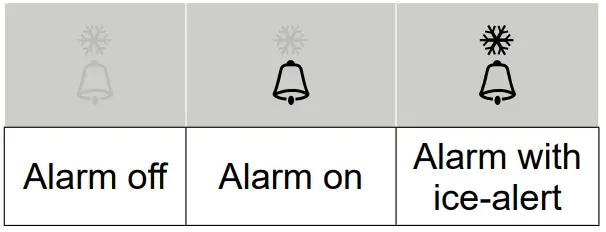
- When the alarm time displays, press [ ALARM ] key again to activate the alarm function. Or press [ ALARM ] key twice to activate the alarm with ice pre-alarm function.
STOP ALARM ALERT & SNOOZE
- Press [ SNOOZE ] key to stop the current alarm and enter snooze. Alarm icon will be flashing continuously.
The alarm will sound again in 5 minutes. Snooze can be operated continuously in 24 hours. - When the alarm is sounding, it will stop automatically without pressing any key in 2 minutes. Also you can press and hold the [ SNOOZE ] key for 2 seconds or press [ ALARM ] key to stop the current alarm. And the alarm will automatically sound again at the alarm time next day.
NOTE:
– Pressing the [ ALARM ] key twice when alarm time is being displayed will activate the temperature-adjusted pre-alarm.
– The alarm will sound 30 minutes earlier if it detects outside temperature is below -3°C.
TEMPERATURE & HUMIDITY
OUTDOOR / CHANNEL
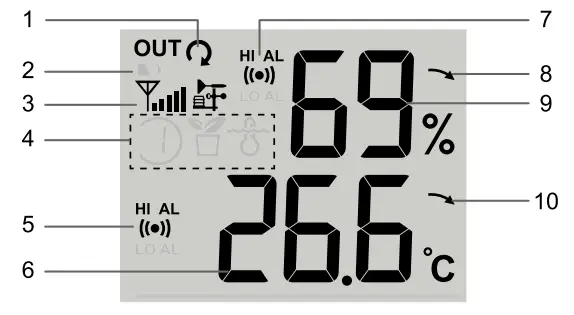
| 1. Auto loop indicator 2. Low battery indicator 3. Signal strength indicator 4. CH indicator and sensor indicator 5. Temperature alert indicator | 6. Temperature reading 7. Humidity alert indicator 8. Humidity trend 9. Humidity reading 10. Temperature trend |
INDOOR
- Humidity alert indicator
- Comfort indication
- Temperature alert indicator
- Humidity trend
- Humidity reading
- Temperature trend
- Temperature reading
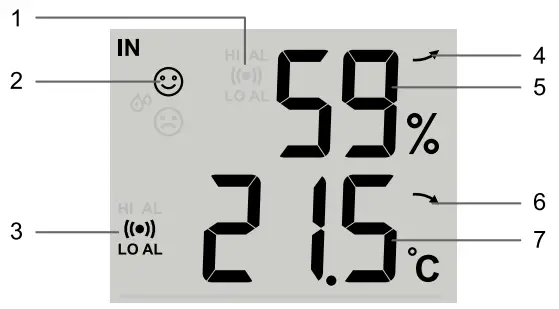
TREND INDICATOR
The trend indicator shows the trends of changes in the forthcoming few minutes. The icon will appear in temperature and humidity.

COMFORT INDICATION
The comfort indication is a pictorial indication based on indoor air temperature and humidity in an attempt to determine comfort level.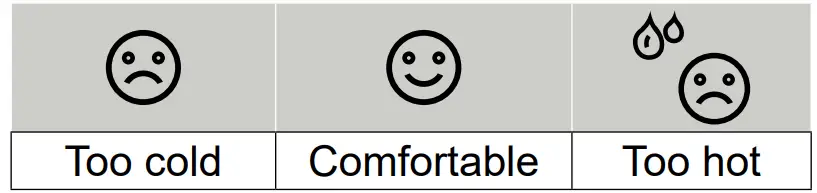
VIEW THE OTHER CHANNELS (OPTIONAL FEATURE WITH ADD ON EXTRA SENSORS)
This console is capable to pair with a wireless 7-IN-1 sensor and up to 3 wireless thermo-hygro sensors. If you have 2 or more Indoor sensors, you can press [ CHANNEL ] key to switch between different wireless channels in normal mode, or press and hold [ CHANNEL ] key for 2 seconds to toggle auto-cycle mode to display the connected channels at 4 seconds interval.
During auto-cycle mode, the ”  ” icon will show on the channel section of the display. Press [ CHANNEL ] key to stop auto cycle and display the current channel.
NOTE:
– Comfort indication can vary under the same temperature, depending on the humidity.
– There is no comfort Indication when temperature is below 0°C (32°F) or over 60°C (140°F).
OTHER OPTIONAL SENSOR
This console can also support the following optional sensors for channels 1 ~3.
| SENSOR NAME | Wireless thermo-hygro sensor | Wireless floating pool & SPA sensor | Wireless soil moisture & temperature sensor |
| PHOTO | 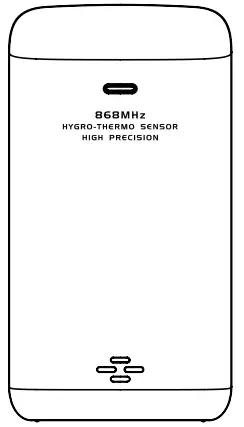 | 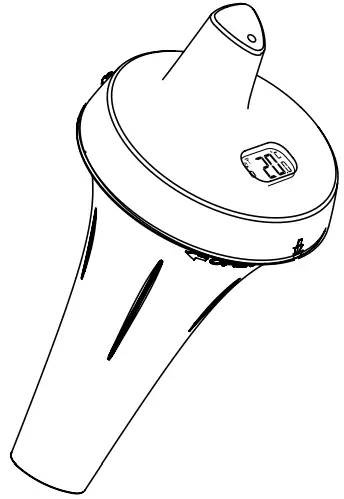 | 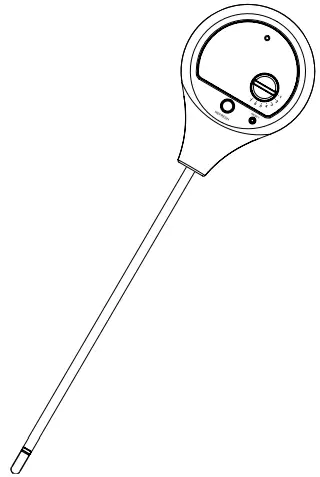 |
| ICON IN CHANNEL |  |  | |
| DATA | Temperature & Humidity | Water temperature | Temperature & soil moisture |
BAROMETRIC PRESSURE & WEATHER FORECAST
- Baro pressure alert indicator
- Baro pressure reading
- Unit of measure
- Group of baro pressure
- Absolute / Relative pressure indicator
- Weather forecast icon
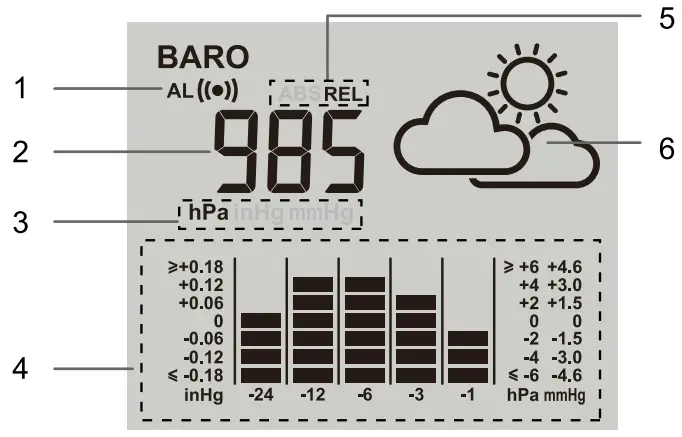
WEATHER FORECAST ICON
The device contains sensitive pressure sensor built-in with sophisticated and proven software that predicts weather for the next 12 ~ 24 hours within a 30 to 50 km (19-31 miles) radius.

NOTE:
– The accuracy of a general pressure-based weather forecast is about 70% to 75%.
– The weather forecast is meant for the next 12 hours, it may not necessarily reflect the current situation.
– The weather icon will flash on display when the rainstorm comes.
– The SNOWY weather forecast is not based on the atmospheric pressure, but based on the outdoor temperature. When the outdoor temperature is below -3°C (26°F), the SNOWY weather indicator will be displayed on the LCD.
TO SELECT THE PRESSURE DISPLAY MODE
Press [ BARO ] key fo select between ABS and REL mode:
– ABS the absolute atmospheric pressure of your location.
– REL the relative atmospheric pressure based on the sea.
TO SELECT THE MEASUREMENT UNIT FOR THE BAROMETER AND SET RELATIVE PRESSURE VALUE
- Press and hold the [ BARO ] key for 2 seconds to enter unit setting mode.
- Use [UP] or [DOWN] key to change the unit between inHg / mmHg / hPa.
- Press [ BARO ] key to the relative pressure value setting mode
- Press [UP] or [DOWN] key to change the relative pressure value.
- Press [BARO] key to save and back to ABS or REL mode that you selected before.
NOTE:
– When power up the console, it will display the relative pressure reading and default value is 1013 hPa (29.91 inHg), which refers to the average atmosphere pressure.
– When you change the relative atmospheric pressure value, the weather indicators will change along with it.
– The relative atmospheric pressure is based on the sea level, but it will change with the absolute atmospheric pressure changes after operating the clock for 1 hour.
RAIN
- Rain alert indicator
- Rainfall reading indicator
- Reading
- Rain rate indicator
- Unit of measure
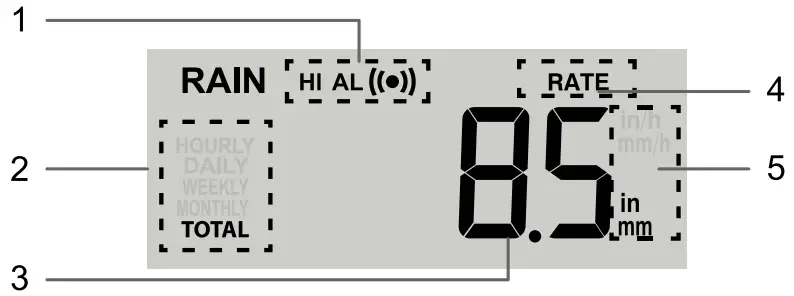
TO SELECT THE RAINFALL DISPLAY MODE
The device displays how many mm or in of rain are accumulated in an hour time period, based on current rainfall rate. Press the [ RAIN ] key to toggle between:
– RATE Current rain rate in past an hour
– HOURLY The reading indicate total rainfall from last hour
– DAILY The reading indicate the total rainfall from midnight
– WEEKLY The reading indicate the total rainfall from the current week
– MONTHLY The reading indicate the total rainfall from the current calendar month
– TOTAL The reading indicate the total rainfall since station was powered up
TO SELECT THE MEASUREMENT UNIT FOR THE RAINFALL
- Press and hold the [ RAIN ] key 2 seconds to enter unit setting mode.
- Use [ UP ] or [ DOWN ] key to toggle between mm (millimeter) and in (inch).
- Press the [ RAIN ] key to confirm and exit.
TO CLEAR THE RAIN RECORDS
During installation of the wireless 7-IN-1 sensor, the sensors were likely to be triggered, resulting in erroneous rainfall and wind measurements. After the installation, user may clear out all the erroneous data from the console, without needing to reset the clock and re-establish pairing. Simply follow the below step to clear out the rain data that recorded before.
In normal mode, press the [ HISTORY ] key for 8 seconds.
WIND SPEED & WIND DIRECTION
- Wind direction reading
- Wind alert indicator
- Wind speed level
- Current wind direction indicator
- Wind directions appeared in last 5 minutes (max 6 indicator mark)
- Gust or average wind speed indicator
- BFT and Wind speed unit of measure
- Wind speed reading
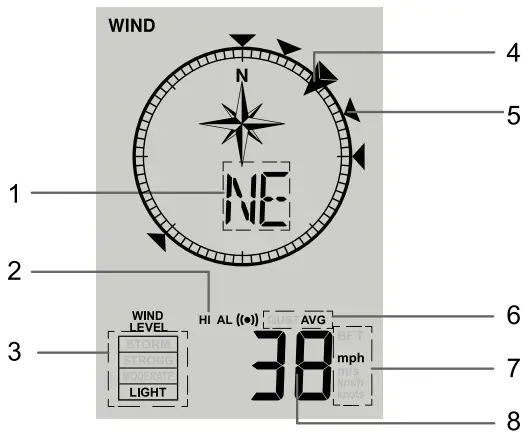
NOTE: The wind direction language will be shown according to the selected day of week language.
TO SELECT THE WIND SPEED DISPLAY MODE
Press the [ WIND ] key to toggle between:
– AVG (AVERAGE): The AVERAGE wind speed will display the average of all wind speed numbers recorded in the previous 12 seconds.
– GUST: The GUST wind speed will display the highest wind speed recorded from last reading.
– BFT: The Beaufort scale of current wind speed will displayed.
TO SELECT THE WIND UNIT
- Press and hold [ WIND ] key for 2 seconds to enter unit setting mode.
- Use [ UP ] or [ DOWN ] key to change the unit between mph (miles per hour) / m/s (meter per second) / km/h (kilometer per hour) / knots.
- Press [ WIND ] key to for select the wind direction display mode
- Use [ UP ] or [ DOWN ] key to toggle between 360 degree or 16 direction mode.
- Press [ WIND ] key to confirm and exit.
The wind speed level provides a quick reference on the wind condition.
| Level | LIGHT | MODERATE | STRONG | STORM |
| Speed | 1 ~ 19 km/h | 20 ~ 49 km/h | 50 ~ 88 km/h | > 88 km/h |
BEAUFORT SCALE
Beaufort scale is an international scale of wind velocities from 0 (calm) to 12 (Hurricane force).
| Beaufort Scale | Description | Wind Speed | Land Condition |
| 0 | Calm | < 1 km/h | Calm. Smoke rises vertically. |
| < 1 mph | |||
| < 1 knot | |||
| < 0.3 m/s | |||
| 1 | Light air | 1.1 — 5.5 km/h | Smoke drift indicates wind direction. Leaves and wind vanes are stationary. |
| 1 — 3 mph | |||
| 1 — 3 knot | |||
| 0.3 — 1.5 m/s | |||
| 2 | Light breeze | 5.6 — 11 km/h | Wind felt on exposed skin. Leaves rustle. Wind vanes begin to move. |
| 4 — 7 mph | |||
| 4 — 6 knot | |||
| 1.6 — 3.3 m/s | |||
| 3 | Gentle breeze | 12— 19 km/h | Leaves and small twigs constantly moving, light flags extended. |
| 8 — 12 mph | |||
| 7 — 10 knot | |||
| 3.4 — 5.4 m/s | |||
| 4 | Moderate breeze | 20 — 28 km/h | Dust and loose paper raised. Small branches begin to move. |
| 13 — 17 mph | |||
| 11 — 16 knot | |||
| 5.5 — 7.9 m/s | |||
| 5 | Fresh breeze | 29 — 38 km/h | Branches of a moderate size move. Small trees in leaf begin to sway. |
| 18 — 24 mph | |||
| 17 — 21 knot | |||
| 8.0 — 10.7 m/s | |||
| 6 | Strong breeze | 39 — 49 km/h | Large branches in motion. Whistling heard in overhead wires. Umbrella use becomes difficult. Empty plastic bins tip over. |
| 25 — 30 mph | |||
| 22 — 27 knot | |||
| 10.8 — 13.8 m/s | |||
| 7 | High wind | 50 — 61 km/h | Whole trees in motion. Effort needed to walk against the wind. |
| 31 — 38 mph | |||
| 28 — 33 knot | |||
| 13.9 — 17.1 m/s | |||
| 8 | Gale | 62 — 74 km/h | Some twigs broken from trees. Cars veer on road. Progress on foot is seriously impeded. |
| 39 — 46 mph | |||
| 34 — 40 knot | |||
| 17.2 — 20.7 m/s | |||
| 9 | Strong gale | 75 — 88 km/h | Some branches break off trees, and some small trees blow over. Construction /temporary signs and barricades blow over. |
| 47 — 54 mph | |||
| 41 — 47 knot | |||
| 20.8 — 24.4 m/s | |||
| 10 | Storm | 89 — 102 km/h | Trees are broken off or uprooted, structural damage likely. |
| 55 — 63 mph | |||
| 48 — 55 knot | |||
| 24.5 — 28.4 m/s | |||
| 11 | Violent storm | 103 — 117 km/h | Widespread vegetation and structural damage likely. |
| 64 — 73 mph | |||
| 56 — 63 knot | |||
| 28.5 — 32.6 m/s | |||
| 12 | Hurricane force | 118 km/h | Severe widespread damage to vegetation and structures. Debris and unsecured objects are hurled about. |
| 74 mph | |||
| 64 knot | |||
| 32.7m/s |
UV INDEX, LIGHT INTENSITY & WEATHER INDEX
- Index indicator
- Reading
- UV index & light indicator
- Unit of measure
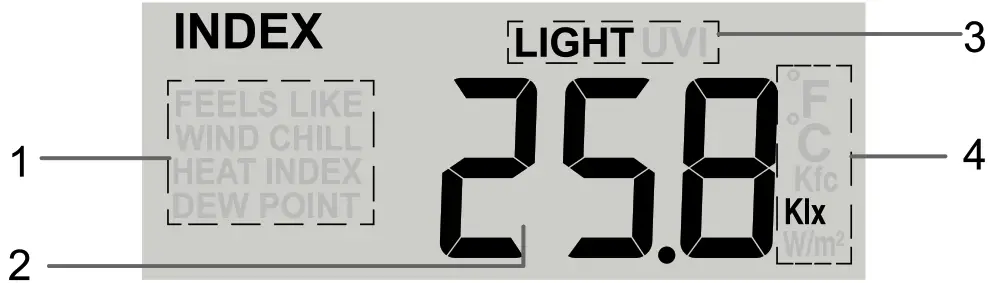
In this section, you can press [ INDEX ] key to view the weather index in this sequence: UV INDEX  LIGHT INTENSITY FEELS LIKE WIND CHILL HEAT INDEX DEW POINT.
UV INDEX
To show the current UV index that detected by the wireless 7-in-1 sensor.
LIGHT INTENSITY
To show the current light intensity that detected by the wireless 7-in-1 sensor.
To set the light intensity unit of measure: Klx (lx), Kfc (fc) and W/m².
- When the reading is showing, press and hold [ INDEX ] key with 2 seconds to enter light intensity unit setting mode.
- Press [ UP ] or [ DOWN ] key to change the unit in sequence: Klx (lx) Kfc (fc) W/m2.
- Press [ INDEX ] key to exit the setting.
FEELS LIKE
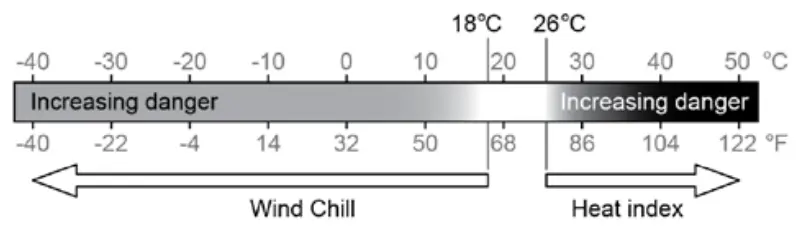
Feels Like Temperature shows what the outdoor temperature will feel like. It’s a collective mixture of Wind Chill factor (18°C or below) and the Heat Index (26°C or above). For temperatures in the region between 18.1°C to 25.9°C where both wind and humidity are less significant in affecting the temperature, the device will show the actual outdoor measured temperature as Feels Like Temperature.
HEAT INDEX
The heat index, which is determined by the wireless 7-IN-1 sensor’s temperature & humidity data, when the outdoor temperature is between 27°C (80°F) and 50°C (120°F).
| Heat Index range | Warning | Explanation |
| 27°C to 32°C (80°F to 90°F) | Caution | Possibility of heat exhaustion |
| 33°C to 40°C (91°F to 105°F) | Extreme Caution | Possibility of heat dehydration |
| 41°C to 54°C (106°F to 129°F) | Danger | Heat exhaustion likely |
| ≥55°C (≥130°F) | Extreme Danger | Strong risk of dehydration / sun stroke |
WIND CHILL
A combination of the wireless 7-IN-1 sensor’s temperature and wind speed data determines the current wind chill factor. Wind chill number are always lower than the air temperature for wind values where the formula applied is valid (i.e. due to limitation of formula, actual air temperature higher than 10°C with wind speed below 9km/h may result in erroneous wind chill reading).
DEW POINT
– The dew point is the temperature below which the water vapor in air at constant barometric pressure condenses into liquid water at the same rate at which it evaporates. The condensed water is called dew when it forms on a solid surface.
– The dew point temperature is determined by the temperature & humidity data from wireless 7-IN-1 sensor.
UV INDEX AND LIGHT INTENSITY CALIBRATION
- When the UV index reading is showing, press and hold [ INDEX ] key with 2 seconds to enter the UV calibration mode.
- Press [ UP ] or [ DOWN ] key to adjust the UV gain value. (Default is 1.0)
- Press [ INDEX ] key again to enter the light intensity calibration mode.
- Press [ UP ] or [ DOWN ] key to adjust the light intensity gain value. (Default is 1.0)
- Press [ INDEX ] key to exit calibration.
HISTORY DATA (ALL RECORDS IN THE PAST 24 HOURS)
The console will record past 24 hours weather data automatically that included past indoor and outdoor temperature & humidity, baro, wind chill, wind speed and rainfall records.
- Press the [ HISTORY ] key to check past 1 hour history records.
- Press [ HISTORY ] key repeatedly to show past 2, 3, 4 , 5…….24 history weather records.
MAX/MIN MEMORY FUNCTION
The console can record the accumulated MAX / MIN weather data with the corresponding time stamp for you to easy review.
TO VIEW THE ACCUMULATED MAX / MIN RECORDS
When the outdoor temperature / humidity is shown:
Press the [ MAX / MIN ] key to check the MAX / MIN records in the following display sequence: Indoor MAX temperature Indoor MIN temperature Indoor MAX humidity Indoor MIN humidity MAX pressure MIN pressure Outdoor MAX temperature Outdoor MIN temperature Outdoor MAX humidity Outdoor MIN humidity MAX feels like temperature MIN feels like temperature MAX wind chill MIN wind chill MAX heat index MIN heat index MAX dew point MIN dew point MAX average wind speed MAX gust MAX rain rate MAX UV index MAX light intensity.
When the valid CH 1, 2 or 3 temperature / humidity is shown:
Press the [ MAX / MIN ] key to check the MAX / MIN records in the following display sequence: Indoor MAX temperature Indoor MIN temperature Indoor MAX humidity Indoor MIN humidity MAX pressure MIN pressure CH MAX temperature CH MIN temperature CH MAX humidity CH MIN humidity.
TO CLEAR THE MAX/MIN RECORDS
During the MAX / MIN record mode, press and hold the [ MAX / MIN ] key for 2 seconds to reset the current display records.
WEATHER ALERT SETTING
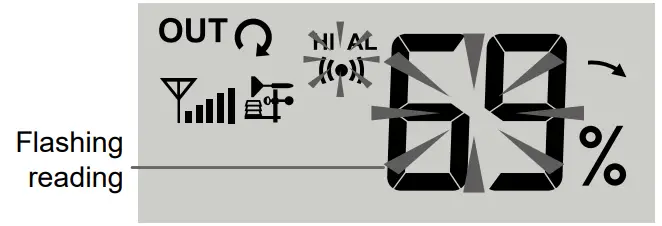
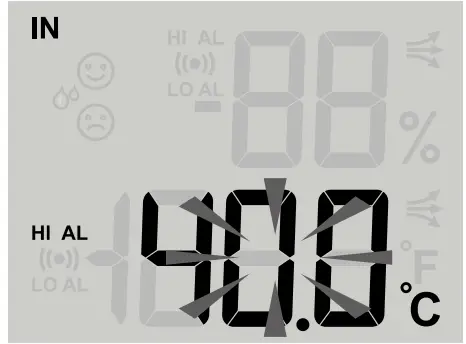
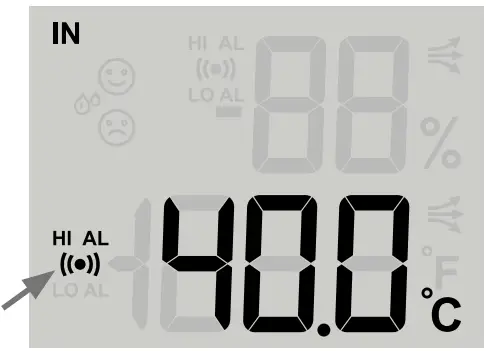
Weather Alert can alert you of certain weather conditions. Once the alert criterion is met, the alarm sound will activate and on screen alert icon and the reading will flash.
TO VIEW & SET THE ALERT
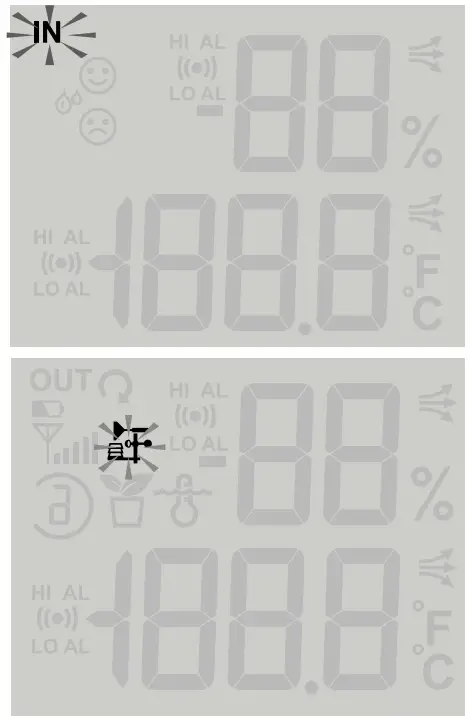
- Press [ ALERT ] key to enter the alert mode

- Press [ UP ] or [ DOWN ] key to select the section: Indoor Outdoor CH1 CH2 CH3
- Once you selected the section, press [ ALERT ] key to select the alert type
• When Indoor symbol appear, the select sequence is: In Temperature HIIn Temperature LO In Humidity HI In Humidity LO Baro Pressure.
• When Outdoor symbol appear, the select sequence is: Out Temperature HIOut Temperature LO Out Humidity HI Out Humidity LO Wind HI Rain rate HI.
• When CH1, 2 or 3 symbol appear, the select sequence is: CH Temperature HI
CH Temperature LO
CH Humidity HI
CH Humidity LO. - In the alert type, the selected value will flashing, than press [ UP ] or [ DOWN ] key to adjust the value or press and hold the key to change rapidly.

- Press [ ALARM ] key to toggle the regarding alert on / off.

- Press [ ALERT ] key to confirm and shift to next alert reading.
- When you complete the setting, press and hold with 2 second to exit alert setting.
NOTE:
– If no key is pressed, it will automatically exit alert mode after 60 seconds.
– When ALERT alarm is on, the area and type of alarm that triggered the alarm will be flashing and the alarm will sound for 2 minutes.
– To silence the Alert alarm beeping, press the [ SNOOZE ] or [ ALARM ] key, or let the beeping alarm automatically turn off after 2 minutes.
WIRELESS SIGNAL RECEPTION
The 7-IN-1 sensor the capable of transmitting data wirelessly over an approximate operating of 150m range (line of sight). Occasionally, due to intermittent physical obstructions or other environmental interference, the signal may be weaken or lost. In case that the sensor signal is lost completely, you will need to relocate the Console or the wireless 7-IN-1 sensor.

NOTE:
The CH 1~3 optional thermo-hygro sensor signal strength indicator is same as 7-IN-1 sensor.
BACK LIGHT
This console have LCD back light, user can press the [ SNOOZE / LIGHT ] key to light up the LCD with 5 seconds.
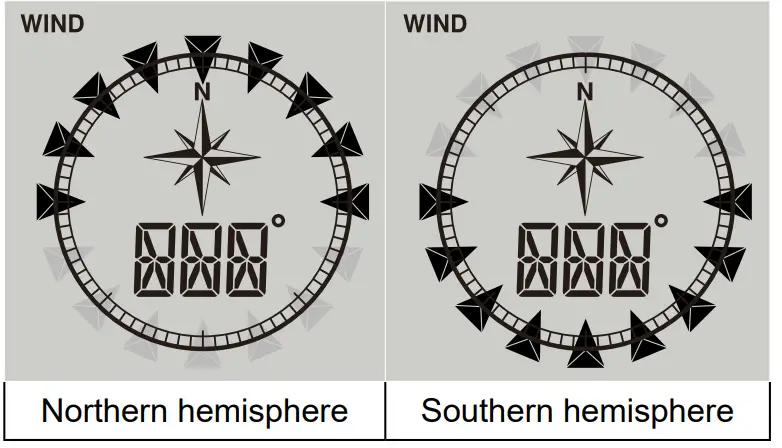
POINTING 7-IN-1 SENSOR TO THE SOUTH
The outdoor 7-IN-1 sensor is calibrated to be pointing to North by default. However, in some cases, users may wish to install this sensor point to South:
- First install the outdoor 7-IN-1 sensor with its arrow pointing to the South.
- On the Console, press and hold the [ WIND ] key for 8 seconds until the upper part (Northern Hemisphere) of the compass lights up and blinking.
- Use [ UP ] or [ DOWN ] key to change to lower part (Southern Hemisphere).
- Press the [ WIND ] key to confirm and exit.
NOTE:
Changing from hemisphere setting will automatically switch the direction of the moon phase on the display.
MOON PHASE
In the Northern hemisphere, the moon waxes (the part of the moon we see that glows after the New Moon) from the right. Hence the sun-lit area of the moon moves from right to left in the Northern Hemisphere, while in the Southern Hemisphere, it moves from left to right.
Below is the table which illustrate how the moon will appear on the console.
| Northern hemisphere | Moon Phase | Southern hemisphere |
 | New Moon |  |
| Waxing Crescent | ||
| First quarter | ||
| Waxing Gibbous | ||
| Full Moon | ||
| Waning Gibbous | ||
| Third quarter | ||
| Waning Crescent |
MAINTENANCE
BATTERY REPLACEMENT
When low battery indicator ” ” is showing on the OUT section, it indicates the current sensor’s battery power is low. Please replace the sensor batteries with new batteries accordingly.
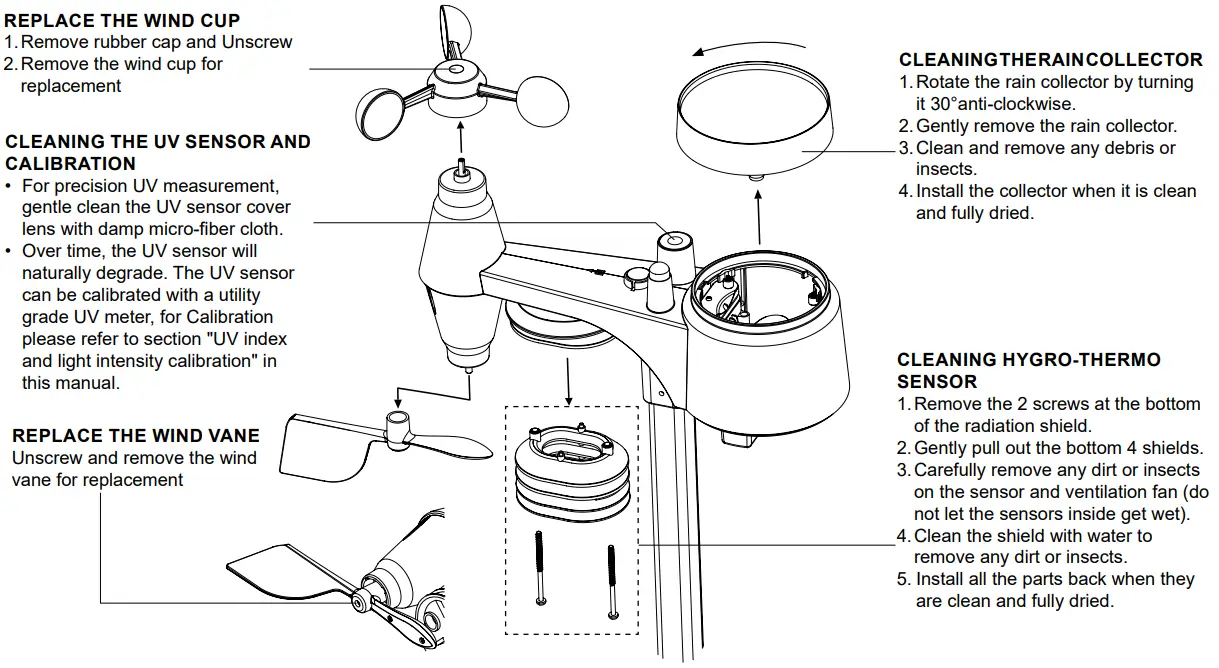
WIRELESS 7-IN-1 SENSOR MAINTENANCE
TROUBLESHOOTING
| Problem / Symptom | Solution |
| Strange or no measurement of Rain Sensor | 1.Check the drain hole in the rain collector. 2.Check the balance indicator. |
| Strange or no measurement of Thermo / Hygro Sensor | 1.Check the radiation shield. 2.Check the sensor casing. |
| Strange or no measurement of Wind Speed and Direction | 1.Check wind cups (Anemometer). 2.Check the wind vane. |
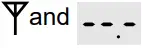 (Signal lost for 15 minutes) (Signal lost for 15 minutes)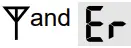 (Signal lost for 1 hour) (Signal lost for 1 hour) | 1.Relocate the console and 7-IN-1 sensor closer to each other. 2.Make sure the console is placed away from other electronic appliances that may interfere with the wireless communication (TVs, computers, microwaves). 3.If problem continues, reset both console and 7-IN-1 sensor. |
| Temperature reading too high in the day time | Make certain that the sensor array is not too close to heat generating sources or structures, such as buildings, pavement, walls or air conditioning units. |
| Some condensation beneath the UV sensor may occur overnight | This will disappear when temperature rises up under the sun and will not affect the performance of the unit. |
SPECIFICATIONS
| CONSOLE | |
| Dimensions (W x H x D) | 180 x 137 x 22 mm |
| Weight | 424.8g (with batteries) |
| Main power | 4 x AA batteries |
| Supported sensors | Wireless 7-IN-1 sensor (Wind speed, Wind direction, Rain gauge, Thermo-hygro, UV, Light) |
| RF frequency | 868Mhz (for EU or UK version) |
| RADIO-CONTROLLED / ATOMIC CLOCK | |
| Synchronization | Auto or disabled |
| Clock display | HH:MM:SS / Weekday |
| Hour format | 12hr AM / PM or 24hr |
| Calendar | DD / MM |
| Weekday in 5 languages | EN/ FR/ DE/ ES/ IT |
| RCC time signal | DCF or MSF (based on the country version) |
| DST | AUTO / OFF (only available when RCC is ON) |
| INDOOR BAROMETER | |
| Barometer unit | hPa, inHg and mmHg |
| Measuring range | 540 — 1100hPa |
| Accuracy | (700 — 1100hPa ± 5hPa) / (540 — 696hPa ± 8hPa) (20.67 — 32.48inHg ± 0.15inHg) / (15.95 — 20.55inHg ± 0.24inHg) (525 — 825mmHg ± 3.8mmHg) / (405 — 522mmHg ± 6mmHg) Typical at 25°C (77°F) |
| Resolution | 1 hPa / inHg is 2 decimal place / mmHg is 1 decimal place |
| Weather forecast | Sunny / Clear, Slightly Cloudy, Cloudy, Rainy, Rainy / Stormy and Snowy |
| Memory modes | Historical data for last 24hrs, Max / MIN |
| INDOOR TEMPERATURE | |
| Temperature unit | °C or °F |
| Range | -5°C to 50°C (14°F to 122°F) |
| Resolution | °C / °F (1 decimal place) |
| Accuracy | <0°C or >40°C ± 2°C (<32°F or >104°F ± 3.6°F) 0-40°C ±1°C (32-104°F ± 1.8°F) |
| Memory modes | Historical data for last 24hrs, Max / MIN |
| INDOOR HUMIDITY | |
| Range | 20% to 90% RH (<20%: LO; > 90%: HI) (Temperature between 0°C to 60°C) |
| Resolution | 1% |
| Accuracy | 20 – 40% RH, ± 8% RH, at 25°C (77°F) 41%- 70% RH, ± 5% RH, at 25°C (77°F) 71% – 90% RH, ± 8% RH, at 25°C (77°F) |
| Memory modes | Historical data for last 24hrs, Max / MIN |
| OUTDOOR TEMPERATURE (Note: Data detect from wireless 7-IN-1 sensor) | |
| Temperature unit | °C or °F |
| Range | -40°C to 60°C (-40°F to 176°F) Based on non-rechargeable lithium batteries |
| Resolution | °C I °F (1 decimal place) |
| Accuracy | 5.1 – 60°C ± 0.4°C (41.2 – 140°F ± 0.7°F) -19.9 – 5°C ± 1°C (-3.8 – 41°F ± 1.8°F) -40 – -20°C ± 1.5°C (-40 – -4°F ± 2.7°F) |
| Memory modes | Historical data for last 24hrs, Max / MIN |
| OUTDOOR HUMIDITY (Note: Data detect from wireless 7-IN-1 sensor) | |
| Range | 1% to 99% RH |
| Resolution | 1% |
| Accuracy | 1 – 20% RH ± 6.5% RH @ 25°C (77°F) 21 – 80% RH ± 3.5% RH @ 25°C (77°F) 81 – 99% RH ± 6.5% RH @ 25°C (77°F) |
| Memory modes | Historical data for last 24hrs, Max / MIN |
| RAIN (Note: Data detect from wireless 7-IN-1 sensor) | |
| Rainfall unit | mm and in |
| Range for rainfall | 0-9999mm (0-393.7inches) |
| Resolution | 0.4 mm (0.0157 in) |
| Accuracy for rainfall | Greater of +/- 7% or 1 tip |
| Memory modes | Historical data for last 24hrs, Max |
| WIND (Note: Data detect from wireless 7-IN-1 sensor) | |
| Wind speed unit | mph, m/s, km/h, knots |
| Wind speed range | 0-112mph, 50m/s, 180km/h, 97knots |
| Wind speed resolution | 0.1mph or 0.lknot or 0.1m/s |
| Speed accuracy | < 5m/s: +1- 0.5m/s; > 5m/s: +/- 6% |
| Direction resolutions | 16 or 360 degree |
| Memory modes | Historical data for last 24hrs, Max |
| UV INDEX (Note: Data detect from wireless 7-IN-1 sensor) | |
| Range | 0 -16 |
| Resolution | 1 decimal place |
| Memory modes | Historical data for last 24hrs, Max |
| LIGHT INTENSITY (Note: Data detect from wireless 7-IN-1 sensor) | |
| Light intensity unit | Klx (Ix), Kfc (fc) and W/m2 |
| Range | 0 – 200Klx |
| Resolution | Klx, Kfc, fc, and W/m2 (1 decimal place), lx (integer) |
| Memory modes | Historical data for last 24hrs, Max |
| WIRELESS 7-IN-1 SENSOR | |
| Dimensions (W x H x D) | 343.5 x 393.5 x 136mm (13.5 x 15.5 x 5.35in) installed mounting |
| Weight | 757g with batteries |
| Battery | 3 x AA size 1.5V batteries (Lithium battery recommended for low temperature usage) |
| RF Frequency | 868 MHz (for EU or UK version) |
| RF transmission range | Up to 150 meters |
| Transmission | Every 12 seconds |
DISPOSAL Dispose of the packaging materials properly, according to their type, such as paper or cardboard. Contact your local waste-disposal service or environmental authority for information on the proper disposal.
 Do not dispose of electronic devices in the household garbage!
As per Directive 2002/96/EC of the European Parliament on waste electrical and electronic equipment and its adaptation into German law, used electronic devices must be collected separately and recycled in an environmentally friendly manner. In accordance with the regulations concerning batteries and rechargeable batteries, disposing of them in the normal household waste is explicitly forbidden. Please make sure to dispose of your used batteries as required by law — at a local collection point or in the retail market. Disposal in domestic waste violates the Battery Directive.
Batteries that contain toxins are marked with a sign and a chemical symbol. “Cd” = cadmium, “Hg” = mercury, “Pb” = lead.
EC DECLARATION OF CONFORMITY Hereby, Bresser GmbH declares that the equipment type with part number: 7003100000000 is in compliance with Directive: 2014/53/EU. The full text of the EU declaration of conformity is available at the following internet address: http://www.bresser.de/download/7003100000000/CE/7003100000000_CE.pdf
UKCA DECLARATION OF CONFORMITY Bresser GmbH has issued a “Declaration of Conformity” in accordance with applicable guidelines and corresponding standards. The full text of the UKCA declaration of conformity is available at the following internet address: www.bresser.de/download/7003100000000/UKCA/7003100000000_UKCA.pdf
WARRANTY & SERVICE
The regular guarantee period is 5 years and begins on the day of purchase. You can consult the full guarantee terms and details of our services at www.bresser.de/warranty_terms.
Service
Please contact the service centre first for any questions regarding the product or claims, preferably by e-mail.
E-Mail: [email protected]
Telephone*: +44 1342 837 098
BRESSER UK Ltd.
Suite 3G, Eden House
Enterprise Way
Edenbridge, Kent TN8 6HF
United Kingdom
*Number charged at local rates in the UK (the amount you will be charged per phone call will depend on the tariff of your phone provider); calls from abroad will involve higher costs.
Contact
Bresser GmbH
Gutenbergstraße 2
46414 Rhede · Germany
www.bresser.de @BresserEurope
 IBERIA.COM en United States - the best prices for Iberia flights
 Bresser | Startseite | Expand Your Horizon mit BRESSER