
Get started.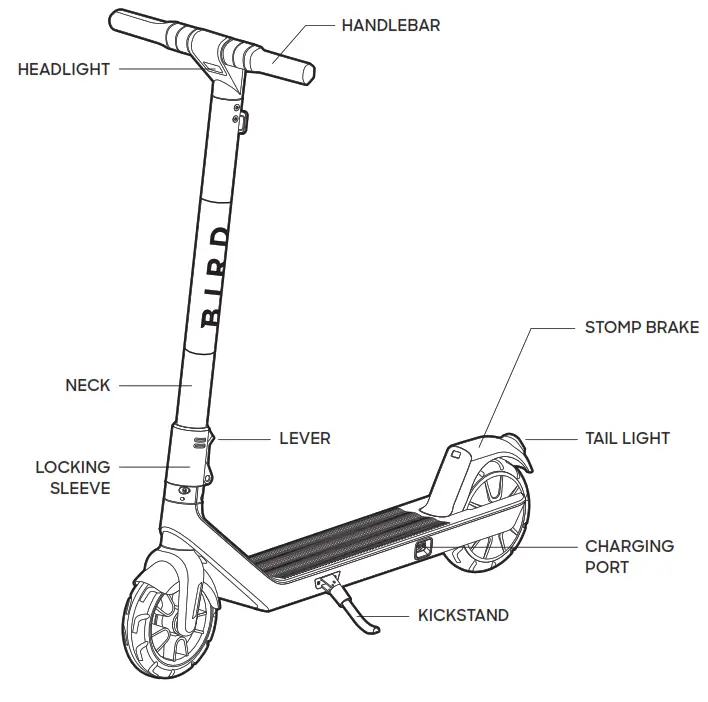
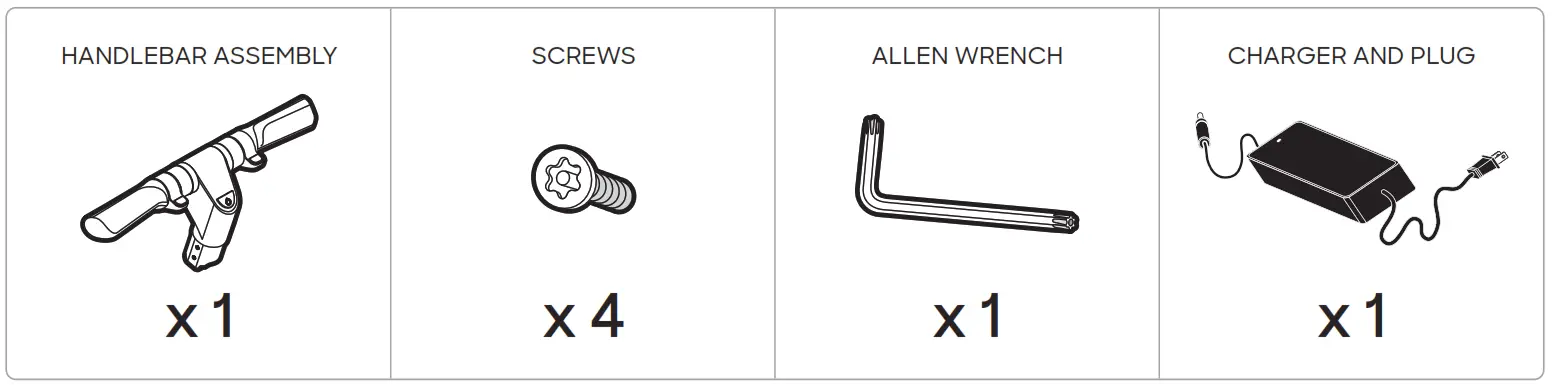
Assembly Materials
BIRD AIR VEHICLE (FOLDED)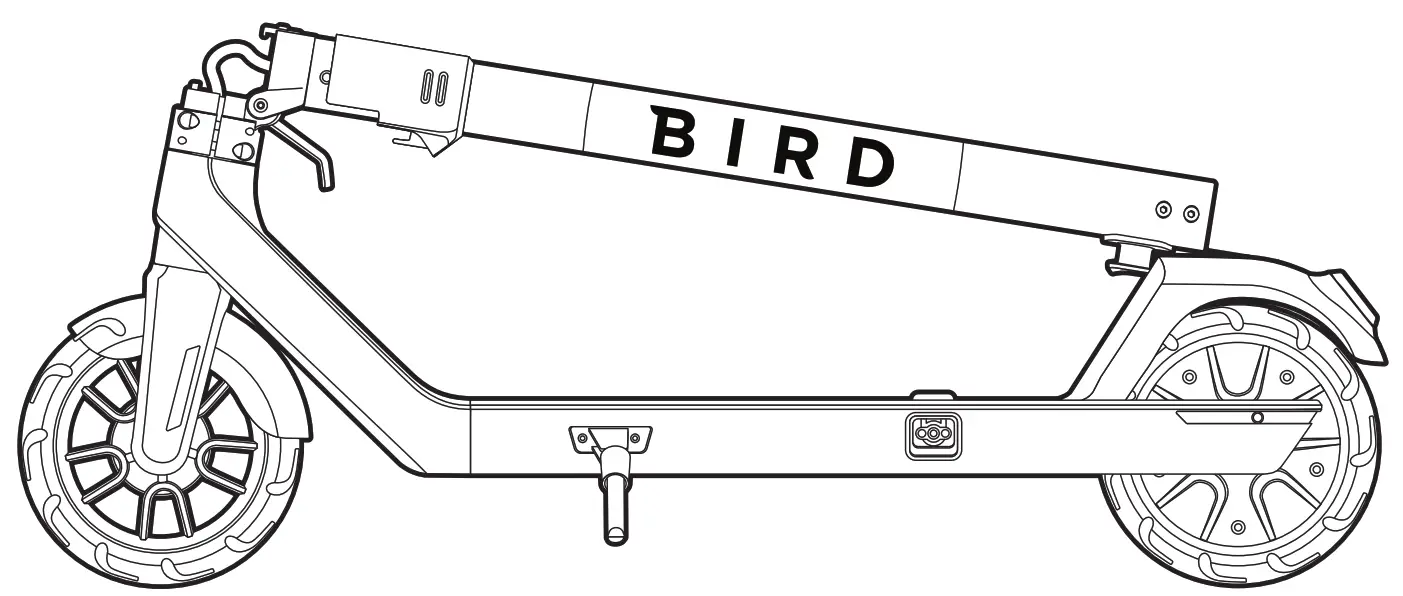
Assembly
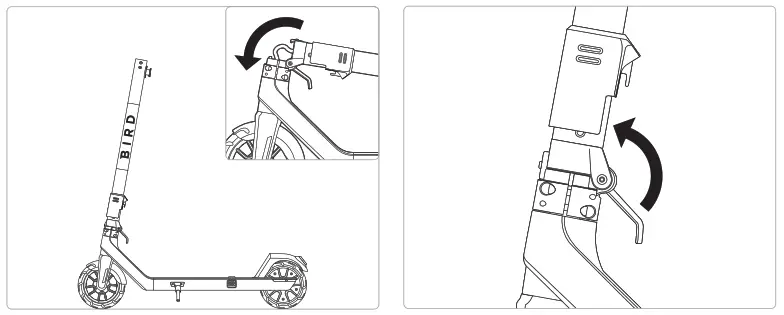 | |
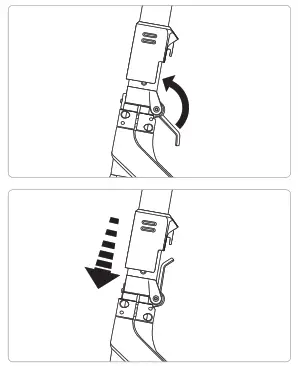
| 1. LIFT THE NECK Lift the vertical tube (neck) from the top and move it to an upright position. | 2. ROTATE THE NECK INTO PLACE Rotate the lever at the base of the neck up while holding the neck in place. The lever must be completely locked in the upright position. |
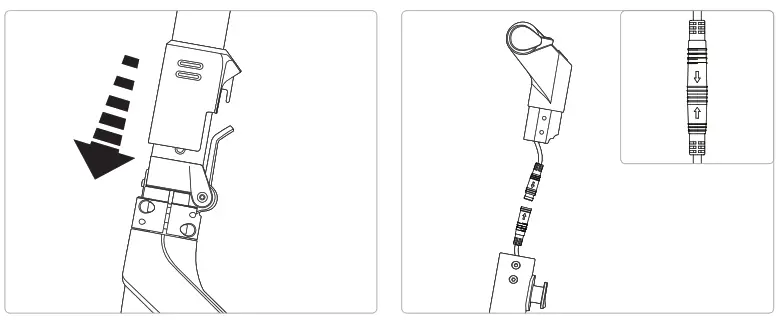 | |
| 3. SLIDE THE LOCKING SLEEVE DOWN Slide the locking sleeve down until it clicks into place with the lever. | 4. CONNECT THE HANDLEBAR ASSEMBLY Take the handlebar assembly and connect its connector (green) to the Bird Air connector at the top of the neck. Align the connectors using the arrows as visual aids. Once arrows are aligned push them together to connect. |
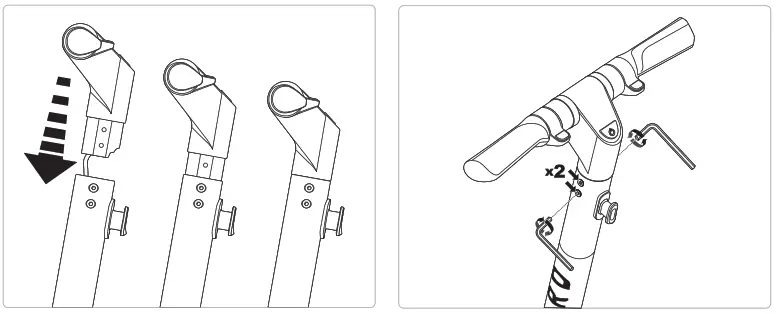 | |
| 5. SLIDE THE HANDLEBARS INTO PLACE Slide the handlebar assembly down into the neck with the wires inside. The middle part of the handlebars should slope down toward the rear of the vehicle. Push the handlebar down, until it’s fully seated in the neck. | 6. INSTALL THE (4) SCREWS Pick up the (4) screws and the Allen wrench. Then, find the (4) screw holes at the top of the neck, near the handlebar assembly. There are two holes each on opposite sides of the neck. Use the Allen wrench to install the (4) screws. Tighten the screws until they are snug and then rotate an additional ¼ turn. |
Charging
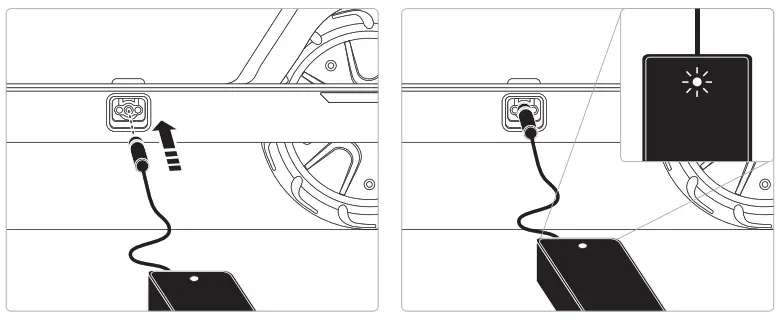 | |
| 1. CONNECT THE POWER ADAPTER Once you’ve assembled your Bird Air, it’s time to charge. Use the included power supply and connect it to the charging port. | 2. FINISH CHARGING When fully charged, a green light on the power supply indicates the charge is complete. Disconnect the power supply from the charging port before riding. |
 WARNING: Do not attempt to charge if the charging port or power adaptor is we WARNING: Only use the charger specified by the manufacturer.
MANUFACTURER: DONGGUAN ANGDI TECHNOLOGY CO LTD, MODEL: BC26642020 WARNING: Ambient temperature must be 32-104°F (0-40°C)″ during charging. The battery will not charge outside of these temperature limits. WARNING: Risk of Fire: Do not attempt to disassemble the charger. No user-serviceable parts.
Riding
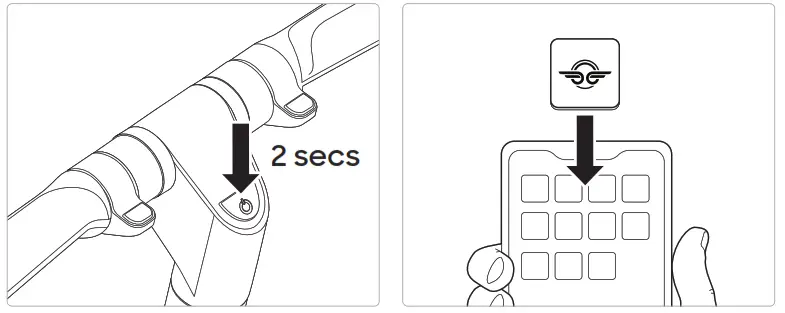 | |
| 1. POWER ON To turn the Bird Air on or off, hold down the Power button for at least 2 seconds at the bottom of the dash display (center console of the handlebar assembly). The vehicle will audibly “beep” when it is powered on or off. Additionally, the dash display will activate. | 2. DOWNLOAD THE BIRD APP Download and install the Bird App on your smartphone to gain wireless access to the dash display controls. Follow the in-app instructions to pair with the vehicle. |
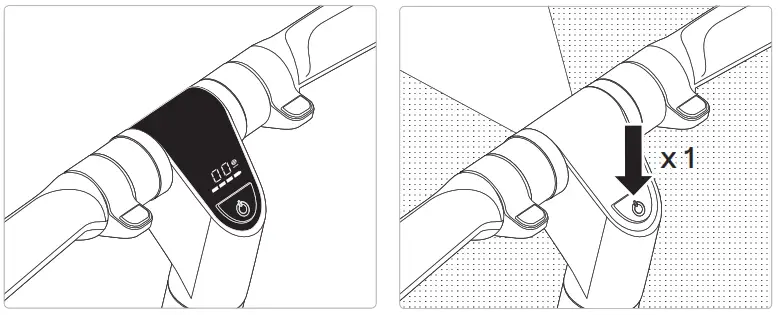 | |
| 3. CHECK THE DASH DISPLAY The Bird Air uses a dash display screen to show the speed (miles per hour or kilometers per hour) and charge level. | 4. TURN ON THE HEADLIGHT Press the power button once to turn the headlight on and off. |
The dash display shows the speed mode the Bird Air is in. There are 3 different speed modes:
| TAKEOFF | GLIDE | F LY |
| Max speed of 9 mph/15 km/h | Max speed of 12-12.5 mph/20 km/h, indicated by a yellow circle S | Max speed of 16 mph/26 km/h, indicated by a red circle S |
To switch between the three modes, double-tap the power button. Double-tapping will always cycle in the order of Takeoff, Glide, and Fly speed.
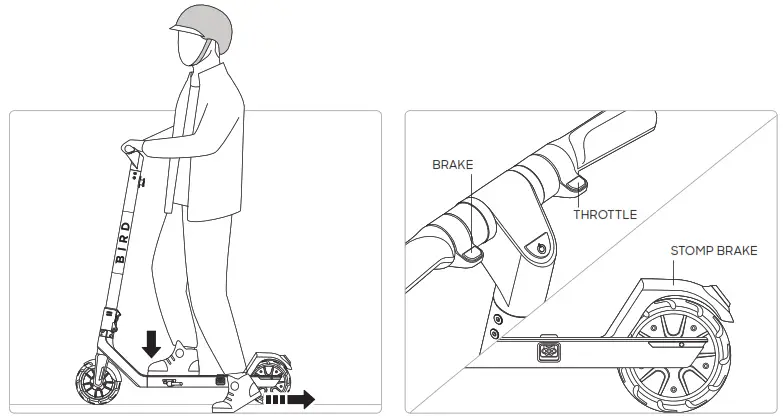 | |
| 5. STARTING To start a ride, first, make sure to fold in the kickstand. Kick to start the Bird Air by having one foot on the vehicle and one foot on the ground. Push the vehicle with at least two kicks before boarding it to ride. Press the throttle (accelerator) down at the right handlebar to accelerate the scooter. | 6. STOPPING Use the brake at the left handlebar to decelerate or stop the vehicle. Additionally, it is possible to use the stomp brake as a brake for the vehicle. |
Folding
The Bird Air can be folded for convenience. Ensure the Bird Air is powered off before attempting to fold it.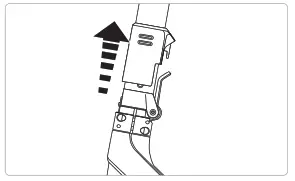
- SLIDE THE LOCKING SLEEVE UP
Take hold of the locking sleeve and slide the sleeve up from the lever.
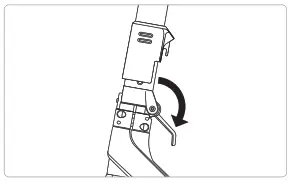
- ROTATE THE LEVER DOWN
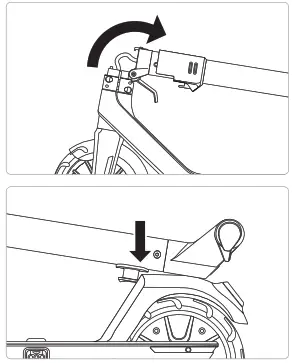
While holding the locking sleeve in place atop the lever, rotate the lever down. - FOLD THE NECK DOWN
Take hold of the neck and fold it down 90 degrees until the handlebar assembly is just above the stomp brake.
- LOCK THE NECK INTO THE FENDER
Push the neck down atop the stomp brake until the black tab at the base of the handlebar assembly meets with the stomp brake.
Hold the stomp brake down, then push the neck further into the fender until the black tab locks into place.
Let go of the stomp brake and neck. It is now possible to lift the scooter from the neck.
Unfolding
Reverse the folding process to unfold the Bird Air.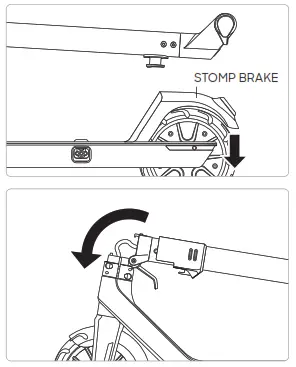
- RELEASE THE TAB
Push down the stomp brake to free the tab at the base of the handlebar assembly. - SET THE NECK AND LEVER
Lift the neck 90 degrees to the upright position on the vehicle.
Push the lever at the base of the neck up.
- SLIDE THE LOCKING SLEEVE DOWN
Slide the locking sleeve down into the lever, making sure it clicks into place. The lever must be completely locked in the upright position.
WARNING:
Failure to follow unfolding instructions could result in unintentional folding. Ensure that the lever is upright and the sleeve is locked in place. 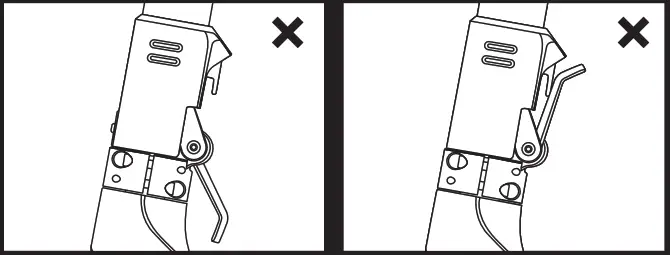
Specifications
| Battery | 5.2 Ah (10S2P) |
| Range | Up to 15.5 miles |
| Charging | Fast charge port |
| App | iOS and Android |
| Firmware | Over-the-Air updates |
| Connectivity | Bluetooth |
| Splash Resistant | Chassis IP34, Motor IP67, Battery IP67 |
| Lights | Front LED, automatic rear LED |
| Braking | Throttle and foot |
| Wheels | 7.9′ Semi-solid |
| Top Speed | 16 mph |
| Hill Grade | 8% grade |
| Weight Limit | 220 lb (100 kg) |
| Storage Temperature | 14 -104’F (-10-40’C) |
| Operating Temperature | 14 -104’F (-10-40’C) |
Charger Specifications
| Input Voltage | 100-240AC, Output Voltage = 42VDC, Output Current: 2.0 Amps, Charger Manufacturer: DONGGUAN ANGDI TECHNOLOGY CO LTD, Model: BC266420200 (Only Use Charger Provided) |
| Charging Temperature | 32-104°F (0-40°C) |
Dimensions
| Length x Width x Height | 38.6″ X 18.1″ X 45.1″ (981 mm X 460 mm X 1145 mm) |
| Weight | 25.35 lb (11.5 kg) |
Cleaning and Storage
- Use a soft, wet cloth to wipe the mainframe clean. hard-to-remove dirt can be scrubbed with a toothbrush, then cleaned with a soft wet cloth.
- Do not wash your Bird Air with alcohol, gasoline, acetone, or other corrosive solvents. These substances may damage the appearance and internal structure of your Bird Air. Do not wash your Bird Air with a power washer or hose.
- Warning – Make sure your Bird Air is powered OFF and the charging cable is unplugged before cleaning; otherwise, you may damage the electronic components.
– Storage Temperatures: 14–104°F (-10-40°C)
Battery Pack Maintenance
– Do not store or charge the battery at temperatures outside of the stated limits (see specifications).
Do not puncture the battery. Refer to your local laws and regulations regarding battery recycling and/or disposal.
– A well-maintained battery can perform well even after many miles of riding. Charge the battery after each ride to avoid draining the battery completely. When used at room temperature (70°F [22°C]) the battery range and performance is best.
– Warning: Do not attempt to disassemble the battery. Risk of fire. No user-serviceable parts.
– Warning: Do not ride when the ambient temperature is outside of the operation temperature (see specifications), because low/high temperature will limit the maximum power/torque. Doing so could cause personal injury or property damage due to slips or falls.
Questions? We’ve got answers.
Visit support.bird.co for help.
+1 (866) 205-2442
Bird Rides
406 Broadway Avenue #369
Santa Monica, CA 90401
Instructions & Safety Guidelines
Before each use, conduct a basic safety inspection of the Bird Air, including
(i) trueness of the wheels & condition of tires;
(ii) safe operation of all brakes and lights;
(iii) good condition of the frame;
(iv) sufficient battery charge power; and
(v) any sign of damage, unusual or excessive wear, or other open and obvious mechanical problem/maintenance needs.
Components shall be maintained and repaired in accordance with the manufacturer’s specifications and using only the manufacturer’s authorized replacement parts with installation performed by dealers or other skilled persons. Do not modify the scooter as it will void your warranty and introduce potential safety issues. Read and understand all safety warnings listed on the product label.
- Recommended age: 16+ years old.
- Maximum weight: 220.0 lb (99.8 kg). No more than one rider should ride at a time.
- Risk of injury or death from loss of control, collisions, and falls. Helmets and other protective equipment are highly recommended and may be required by law.
- Be sure to read the User Manual local to your region found on support.bird.co.
- Product warranty for your region can be found by visiting support. bird.co
- Comply with local laws and regulations when riding this product. Do not ride where prohibited.
- Ensure the intended area of operation is safe. Do not ride in the snow, in the rain, or on roads that are wet, muddy, icy, or that are slippery for any reason. Do not ride over obstacles. Avoid sharp bumps, drainage grates, and sudden surface changes.
- Avoid streets and surfaces with water, sand, gravel, dirt, leaves, and other debris.
- The scooter should not be used for racing, stunt riding, or other maneuvers.
Instructions & Safety Guidelines
- Avoid contact with moving parts. Ensure hands, feet, hair, clothing, and other body parts stay clear of moving parts like the motor or front wheel.
- ALWAYS keep both hands on the handlebar when riding.
- You should not ride the Bird Air:
- if under the influence of alcohol or drugs,
- if you have a heart condition, are pregnant, have head, back, or neck ailments that limit your ability to ride safely,
- if you have any mental or physical conditions that may make you susceptible to injury or impair your physical dexterity or mental capabilities to recognize, understand, and perform all of the safety instructions and to be able to assume the hazards inherent with the Bird Air.
- DO NOT attempt to disassemble the battery. Risk of fire.
- Never modify the electrical system as this may result in a risk of electric shock, electrocution, or fire.
- DO NOT attempt to charge a vehicle while wet.
- DO NOT ride or attempt to charge a vehicle that has been submerged in water or if there is risk of water intrusion into the battery compartment, even if the vehicle is no longer wet. Contact Bird for further instructions.
- To prevent electric shock when cleaning, remove the charger plug from the outlet and wipe the vehicle with a dry cloth. Only use the charging cable provided by the manufacturer.
- Only store in dry areas. Never store in wet conditions.
- Devices are not intended for use at elevations greater than 2000 m above sea level.
- Prolonged exposure to UV Rays, Rain, and the Elements May Damage the Enclosure Materials, Store Indoors When Not in Use.
Federal Communications Commission (FCC) Compliance Statement for the USA
This device complies with part 15 of the FCC rules. Operation is subject to the following two conditions: (1) This device may not cause harmful interference, and (2) this device must accept any interference received, including interference that may cause undesired operation.
Note: This equipment has been tested and found to comply with the limits for a Class B digital device, pursuant to part 15 of the FCC Rules. These limits are designed to provide reasonable protection against harmful interference in a residential installation. This equipment generates, uses, and can radiate radio frequency energy; if not installed and used in accordance with the instructions, it may cause harmful interference to radio communications. There is no guarantee that interference will not occur in a particular installation. If this equipment does cause harmful interference to radio or television reception, which can be determined by powering the equipment off and on, the user is encouraged to try to correct the interference by using any of the following measures:
- Reorienting or relocating the receiving antenna.
- Increasing the separation between the equipment and receiver.
- Connecting the equipment into an outlet on a circuit different from that to which the receiver is connected.
- Consult the dealer or an experienced radio/TV technician for help.
This equipment complies with FCC radiation exposure limits set forth for an uncontrolled environment.
Caution: Changes or modifications not expressly approved by the party responsible for compliance could void the user’s authority to operate the equipment.
 Disclosure for Users in the State of California
as required by CA Vehicle Code 407.5
YOUR INSURANCE POLICIES MAY NOT PROVIDE COVERAGE FOR ACCIDENTS INVOLVING THE USE OF THIS SCOOTER. TO DETERMINE IF COVERAGE IS PROVIDED, YOU SHOULD CONTACT YOUR INSURANCE COMPANY OR AGENT.
YOU MAY NOT MODIFY OR ALTER THE EXHAUST SYSTEM OF THIS SCOOTER CAUSE IT TO AMPLIFY OR CREATE EXCESSIVE NOISE PER VEHICLE CODE SECTION 21226, OR TO FAIL TO MEET APPLICABLE EMISSION REQUIREMENTS PER VEHICLE CODE 27156.