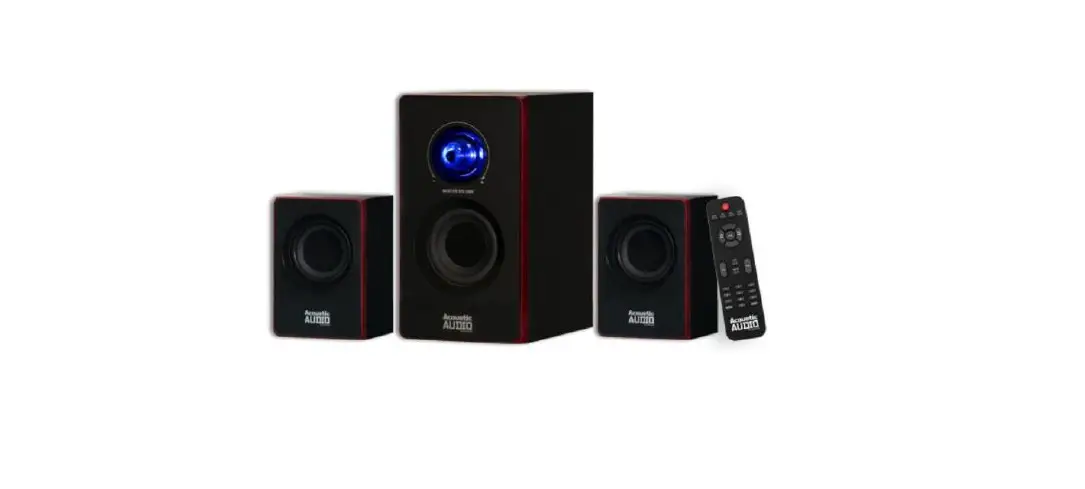

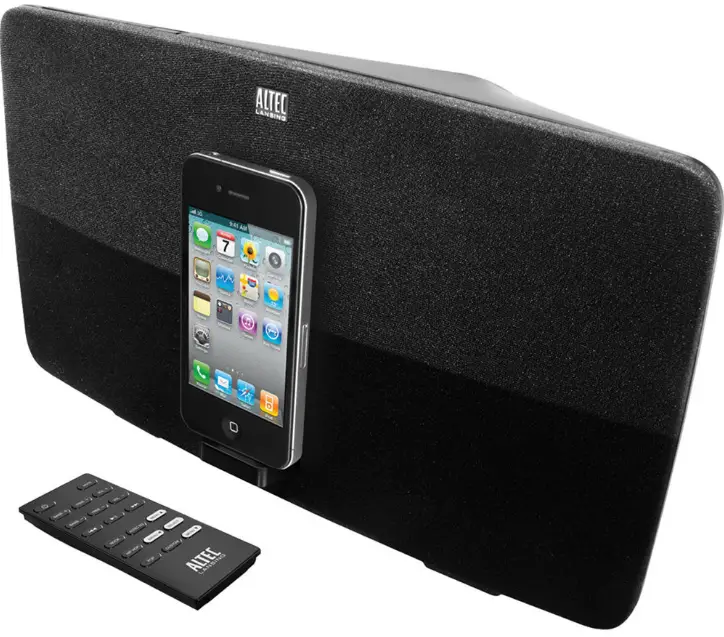
Altec Lansing M650 Speaker System Slate
INTRODUCTION
Welcome
Thank you for purchasing the Altec Lansing Octiv 650 speaker system. Designed specifically to work with your iPhone or iPod, this docking/ charging speaker system re-imagines room-filling sound with elegance of line and intelligent design that’s as unobtrusive as it is powerful. It’s the epitome of stylish audio performance. Please carefully read this User Guide for instructions on setting up and using your Octiv 650 speaker system. Prior to installing or operating the Altec Lansing Octiv 650 speaker system, refer to the important product safety information.
Getting Assistance
- The answers to most setup and performance questions can be found in the Troubleshooting section of this guide. You can also consult the frequently asked questions (FAQ) in the customer support section of our Web site at www.alteclansing.com.
- If you live in North America and still can’t find the information you need, please call our customer service team for assistance before returning this product to your retailer under their return policy.
- Tel: 800-258-3288 (Toll Free in US and Canada)
- Email: [email protected]
- If you live outside of North America, please visit our Web site at www.alteclansing.com and select your region to locate your country’s distributor.
- For the most up-to-date information, be sure to check our Web site at www.alteclansing.com.+International Distribution
- International customers: For information regarding the distribution of Altec
- Lansing products in your country, please visit www.alteclansing.com and click on your region.
Registering Your Product
Visit www.alteclansing.com to register your product online, so we can provide you with the best possible service and technical support.
Safety Information
- Read these instructions.
- Keep these instructions.
- Heed all warnings.
- Follow all instructions.
- Do not use this apparatus near water.
- This apparatus shall not be exposed to dripping or splashing, and no objects filled with liquids, such as vases, shall be placed on the apparatus.
- Clean only with dry cloth.
- Do not block any ventilation openings. Install in accordance with the manufacturer’s instructions.
- Do not install near any heat sources such as radiators, heat registers, stoves, or other apparatus (including amplifiers) that produce heat.
- Do not defeat the safety purpose of the polarized or grounding-type plug. A polarized plug has two blades with one wider than the other.
- A grounding type plug has two blades and a third grounding prong.
- The wide blade or the third prong are provided for your safety. If the provided plug does not fit into your outlet, consult an electrician for the replacement of the obsolete outlet.
- Protect the power cord from being walked on or pinched particularly at plugs, convenience receptacles, and the point where they exit from the apparatus.
- Only use attachments/accessories specified by the manufacturer.
- Use only with the cart, stand, tripod, bracket, or table specified by the manufacturer or sold with the apparatus.
- When a cart is used, use caution when moving the cart/apparatus combination to avoid injury from tip-over.
- Unplug this apparatus during lightning storms or when unused for long periods of time.
- Refer all servicing to qualified service personnel.
- Servicing is required when the apparatus has been damaged in any way, such as power-supply cord or plug is damaged, liquid has been spilled or objects have fallen into the apparatus, the apparatus has been exposed to rain or moisture, does not operate normally, or has been dropped.
- Do not install in an area which impedes the access to the power plug.
- Disconnecting the power plug is the only way to completely remove power to the product and must be readily accessible at all times.
- Please read FCC information and important safety logos on the bottom of the unit.
Package Contents
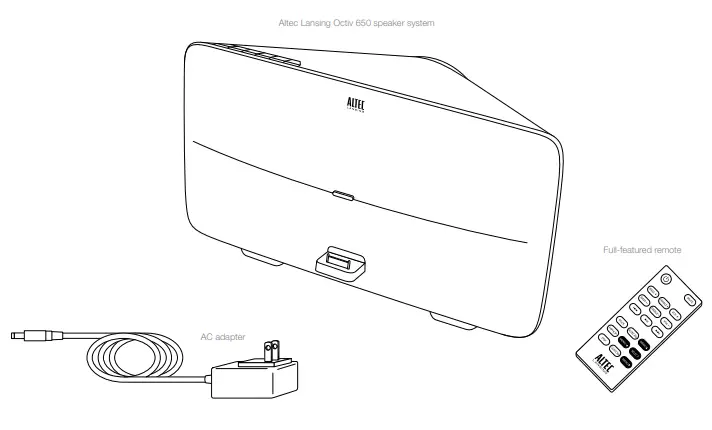
Speaker Features and Indicators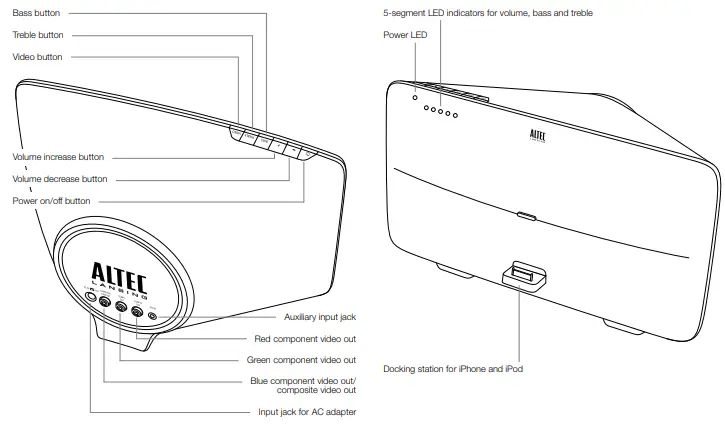
Full-featured Remote Details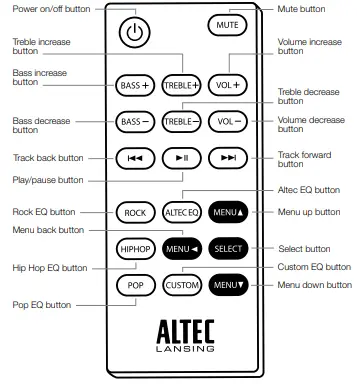
Getting Started
Place your Altec Lansing Octiv 650 speaker system on a desk, bookshelf, counter, or other hard surface.
WARNING
- The Octiv 650 features an exposed subwoofer on the bottom of the speaker system.
- When placing your Octiv 650, be careful to avoid bumping the subwoofer against sharp corners or setting the system on top of sharp objects.
- This could damage the subwoofer.
- In order to prevent accidentally dropping your iPhone or iPod, be sure to remove it from the docking station before picking up the speaker system.

How to Install the AC Adapter
- Connect the AC adapter cable plug into the speaker system’s jack.
- The jack is located on the back of the system.
- Plug the AC adapter into the wall outlet
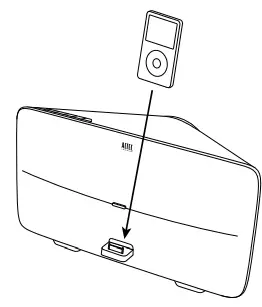
How to Dock Your iPhone or iPod
Place your iPhone or iPod into position. Align your iPhone or iPod’s connection port with the dock connector on the Octiv 650 speaker system. Slide your iPhone or iPod onto the dock connector.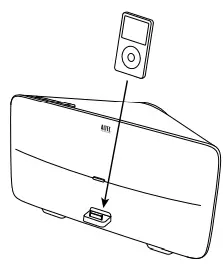
How to Turn On Your Speaker System
- Make sure you have power to the unit.
- Ensure the AC adapter is connected to the system and plugged into the wall. See the Getting Started section for more information.
- Turn the unit on.
- Press the button on either the speaker system or the remote.
How to Turn Off Your Speaker System
- Turn off the unit.
- Press the button on either the speaker system or the remote.
How to Find Your Desired Song or Video
Use the remote to locate the song or video you want to enjoy.
- Skip to the beginning of the current song or video.
- Press the button on the remote.
- Skip to the beginning of the next song or video.
- Press the button on the remote.
- Rewind the currently playing song or video.
- While a song or video is playing, press and hold the button on the remote. This gives you high-speed reverse search of the current song or video.
- Fast-forward the currently playing song or video.
- While a song or video is playing, press and hold the button on the remote. This gives you high-speed forward search of the current song or video.
How to Play/Pause Your Music or Video
The remote is capable of controlling playback on your iPhone or iPod. Begin playing a selected music track or video. Press the button on the remote. Sound from your device will start playing through the speaker. And if you have your speaker system configured to do so, video will display on your external monitor or TV. See the How to Output Video to an External Monitor or TV section.
How to Adjust the Volume
Turn up the volume.
Press the “+” button on the speaker system or the “VOL +” button on the remote until the desired volume is reached.
Turn down the volume.
Press the “–” button on the speaker system or the “VOL –” button on the remote until the desired volume is reached.
Mute the sound.
Press the “MUTE” button on the remote. To unmute the sound, press the “MUTE” button again.
How to Listen to Your iPhone or iPod
- Dock your iPhone or iPod in the Altec Lansing Octiv 650 speaker system.
- Turn on your speaker system.
- Find your desired song or video.
- Start playing your song or video.
- Adjust the volume

How to Listen to Your Non-docking Portable Device
If you have a non-docking portable audio or video device, you can enjoy it through your Altec Lansing Octiv 650 speaker system as well. Just connect it via the AUX jack. Here’s how: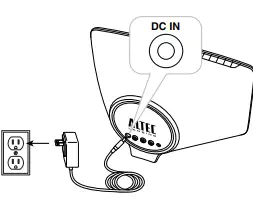
- Locate a 3.5mm stereo cable (not included).
- Plug one end of the stereo cable into your device.
- Your device should have either a headphone or LINE OUT jack for you to plug into.
- Plug the other end of the stereo cable into your speaker system’s AUX jack.
- The AUX jack is located on the back of the speaker system.
- Turn on your speaker system.
- Turn on your device.
- Find your desired song or video.
- Start playing the song or video.
- Adjust the volume.
How to Maintain Your Speaker System
Place your speaker system on a level surface away from sources of direct sunlight or excessive heat. Protect your furniture with a piece of cloth or other protective material when placing your speaker system on a natural wood or lacquered finish. Clean your speaker system with only a dry cloth. Cleaning agents, such as benzene, thinner or similar materials, can damage the surface of the unit.
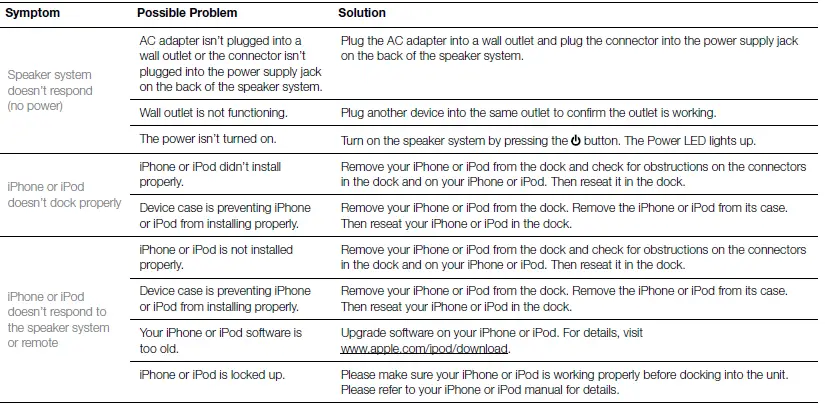
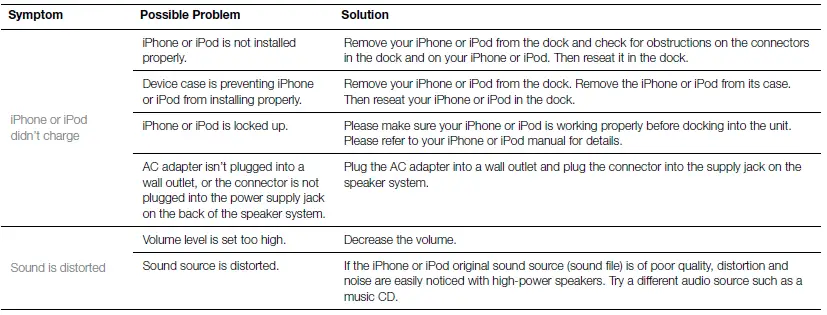
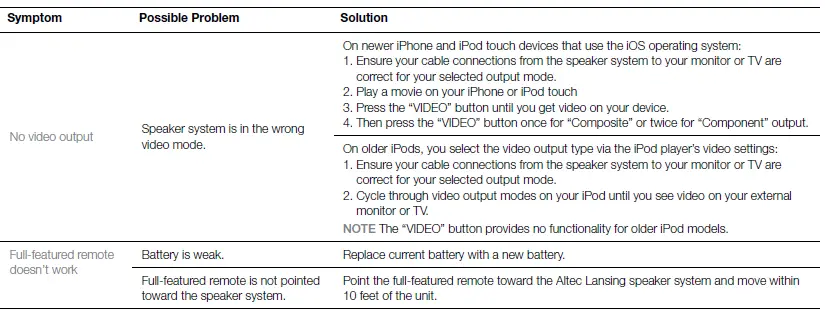
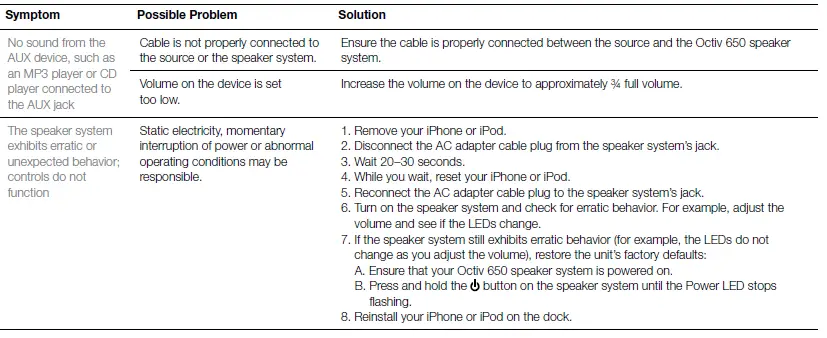
Troubleshooting


Warranty
ALTEC LANSING ONE-YEAR LIMITED WARRANTY
What Does the Warranty Cover?
Altec Lansing warrants that its products shall be free from defects in materials or workmanship, with the exceptions stated below.
What Is the Period of Coverage?
This warranty runs for one year from the date of purchase. The term of any warranties implied by law shall expire when your limited warranty expires. Some states and/or Member States in the European Union do not allow limitations on how long an implied warranty lasts, so the above limitation may not apply to you.
What Does the Warranty Not Cover?
This warranty does not cover any defect, malfunction or failure that occurs as a result of: improper installation; misuse or failure to follow the product directions; abuse; or use with improper, unintended or faulty equipment. (For information on proper installation, operation and use consult the manual supplied with the product. If you require a replacement manual, you may download a manual from www.alteclansing.com.) Also, consequential and incidental damages are not recoverable under this warranty. Some states do not allow the exclusion or limitation of incidental or consequential damages, so the above limitation or exclusion may not apply to you.
What Will Altec Lansing Do to Correct the Problem?
Altec Lansing will, at its option, repair or replace any product that proves to be defective in material or workmanship. If your product is no longer being manufactured, or is out of stock, at its option, Altec Lansing may replace your product with a similar or better Altec Lansing product.
How to Get Warranty Service
To get a covered product repaired or replaced, you must contact Altec Lansing during the warranty period by email ([email protected]). You must include in your email, your name, address, email address, telephone number, date of purchase and a complete description of the problem you are experiencing. In the United States, you may alternatively contact Altec Lansing by telephone at 1-800-ALTEC88 – please be prepared to provide the same information. If the problem appears to be related to a defect in material or workmanship, upon proof of purchase Altec Lansing will provide you a return authorization and instructions for return shipment. Return shipments shall be at the customer’s expense. You should insure the shipment as appropriate because you are responsible for the product until it arrives at Altec Lansing.
How Will State Law Affect Your Rights?
This warranty gives you specific legal rights, and you may also have other rights which vary from state to state. Please note that in the European Union, you as a consumer might have other legal rights under national legislation of European Union Member States governing the sale of Altec Lansing’s goods. Those rights are not affected by this guarantee. The above limited warranties and remedies are sole warranties and remedies available to purchaser, if, and to the extent, valid and enforceable under the applicable law.
Disposal of Old Electrical and Electronic Equipment
This symbol on the product or on its packaging indicates that this product shall not be treated as household waste. Instead it shall be handed over to the applicable collection point for the recycling of electrical and electronic equipment. By ensuring this product is disposed of correctly, you will help prevent potential negative consequences for the environment and human health, which could otherwise be caused by inappropriate waste handling of this product. The recycling of materials will help to conserve natural resources. For more detailed information about recycling of this product, please contact your local city office or your household waste disposal service.
FCC Compliance
Changes or modifications not expressly approved by the party responsible for compliance could void the user’s authority to operate this equipment. This device complies with Part 15 of the FCC Rules. Operation is subject to the following two conditions:
- This device may not cause harmful interference, and
- This device must accept any interference received, including interference that may cause undesired operation.
FAQS
Is this a Passive, constant resistance?
Don’t know what that means.
What is the difference between cdt and r speakers? can i mix and match or do i need buy all cdt or r speakers?
“CDT” stands for “Controlled Dispersion Technology” and refers to a feature in a few of our in-ceiling speaker models
The speaker screen size is 7″ by 10″. Does this fit?
my screen is closer to 7×10⁻¹/2
Can it be used for center channel speaker
Yes, you can use the R-1650-W as a center channel speaker.
What speaker Enclosures do i need for klipch r1650w speaker
They are an in-wall speakers, you don’t need enclosures for them. The enclosure is your wall.
What size is the cut in hole?
Approximately 1/4 of an inch smaller than the speaker dimensions. It comes with an accurate cut-out board in the packaging.
Can blown in insulation go directly on top of them or should they have a barrier?
We have blown in insulation.
i want to make sure before i purchase these speakers if the “dog ear” brackets come with the speaker??
The dog legs will come with the speaker, but you cannot mount an in-wall speaker into the ceiling. The mounts will not support the weight when the face of the speaker is facing the ground. You will need to find an in-ceiling model or install this speaker into the wall instead.
Is there a way to mount these on-wall?
The R-2650-W II is an in-wall speaker.
Can i paint the speaker covers? if so do i need to remove the felt on the back side of covers?
Yes, and the felt back or scrim will have to be removed before painting.
Are these good for indoor rear speakers?
Yes, that’s what we use them for.
Can this speaker perform as a center channel speaker?
It could, but there are other speakers designed to be center channel speakers. And usually they don’t go into the wall.
Is the price for a pair of speakers or for one?
Price includes 1 speaker
Is this Passive, constant resistance?
The R-2650-W II is a passive speaker that requires a speaker wire connection to an amplifier or receiver for audio signal and power.
What is the cutout size
The R-2650-C II cutout dimensions are 13″ Height x 8″ Width.
Can I mount these vertically instead of horizontally?
Yes, they can be mounted vertically.