
Guangzhou Meijia Intelligent Technology ED-B Induction Charger
Warm Prompt
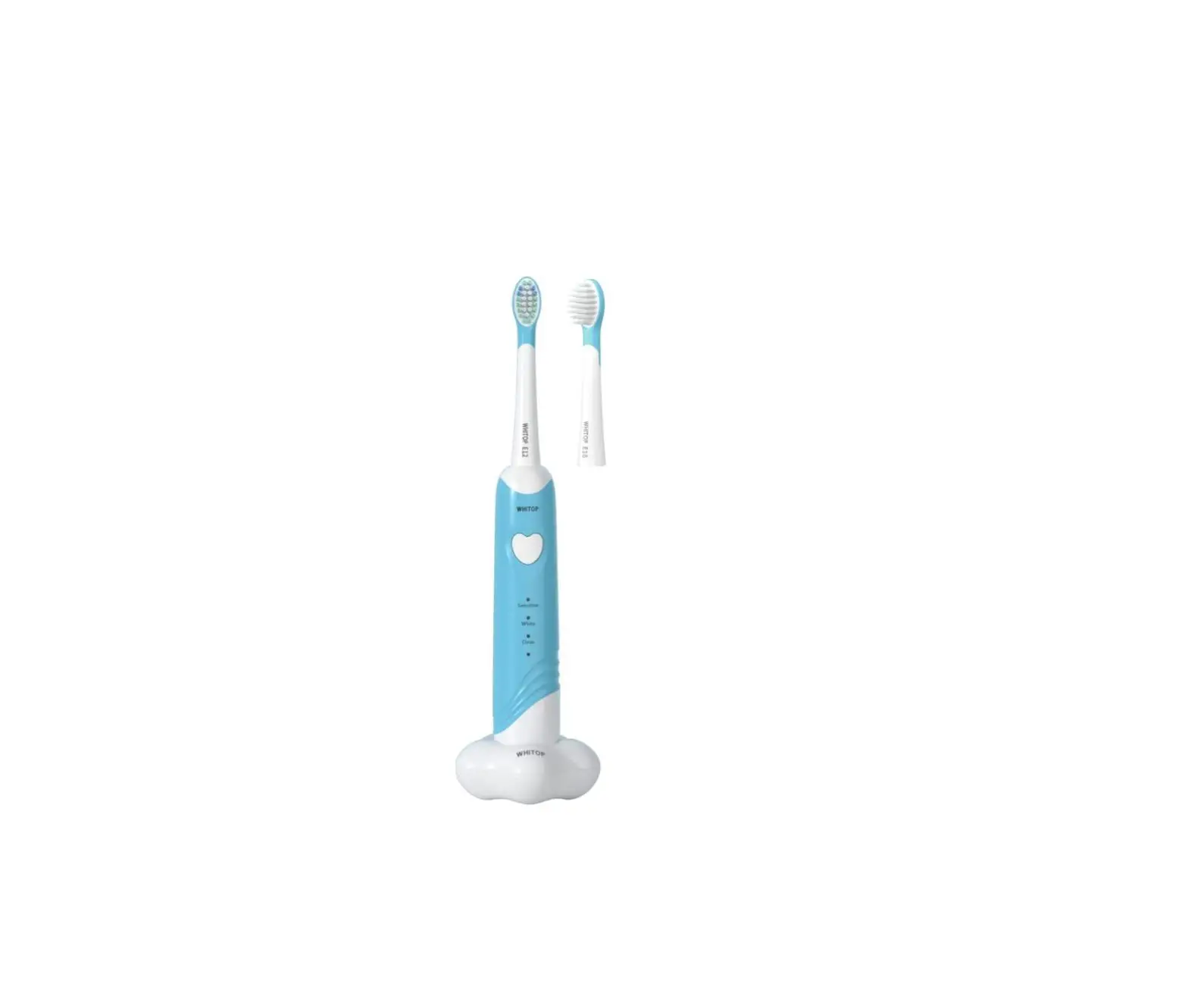
Dear parents, WHITOP (皓王) children/student rechargeable electric toothbrushes are developed by a professional team to clean teeth more effectively. This product will allow your children to easily master correct method of brushing teeth and easily cope with the dead corners of mouth.
We are committed to make every child enjoy new WHITOP experience. The children model is suitable for young children aged 3-8 years, and the student model is suitable for primary and middle school students aged 8-16; please read these instructions carefully before showing your children how to use the product. When using WHITOP electric toothbrush for the first time, it’s recommended that parents personally supervise and guide them nearby to help their children familiarize themselves with the product functions and using method.
Safety Precautions
Before using the product, please read these important instructions carefully and keep this manual properly for future reference.
- This product is not suitable for children under 3 years old. Children, those with disabilities due to physical, sensory and mental reasons, and persons who lack experience and knowledge in using toothbrushes need to use this product safely under the supervision of others and with understanding of the possible dangers.
- Do not leave cleaning and maintenance work to children. Never let children play with this product.
Warning: Please properly dispose of the packaging bag of this product and keep it away from infants and young children. - Otherwise, it may cause accidents such as babies and toddlers asphyxia.
Power: Do not connect the adapter plug to household power outlet with wet hands, or unplug the adapter plug from household power outlet with wet hands. - Otherwise, it may cause electric shock or injury.
Please use an adapter or portable mobile power supply that meets product requirements to charge the product. - Adapter or other power equipment shall be (5V/1A, USB interface), otherwise it may affect normal charging.
- Do not immerse the charging base in water or clean it with running water.
- Do not place the charging stand on or near a sink or bathtub filled with water.
- If the power cord is damaged or the connection with adapter is loose, do not use it again.
- Do not damage the power cord or power plug.
- Do not damage, modify, forcefully bend, pull, twist or bundle the power cord or power plug. In addition, do not place heavy objects on the power cord or squeeze the power cord.
- Do not exceed the rating of the household power outlet or wiring during use.
- If too many plugs are connected to a household power outlet exceeding the rating power, it may overheat and cause a fire.
When cleaning the charging stand, be sure to unplug the adapter from the household power outlet or unplug the USB plug from other portable mobile power sources. - Otherwise, it may cause electric shock or injury.
In case of an abnormality or malfunction
If an abnormality or malfunction occurs, stop using it immediately and unplug the adapter plug or USB interface.
- Otherwise, it may cause fire, electric shock or injury.
(Abnormal or fault conditions)
- The body, adapter, or power cord is deformed or becomes abnormally hot. 2. The body, adapter or power cord emits a burning smell. 3. The body, adapter or power cord makes abnormal noises during use or charging.
- Please contact the Customer Consultation & Service Center immediately.
This product
This product contains a built-in rechargeable battery. Do not put the product into fire or heat it, or charge, use or place the product in a high-temperature place, and do not impact or knock the product.
- Otherwise, it may cause overheating, fire or explosion.
Do not modify or repair this product by yourself. - Otherwise, it may cause electric shock, injury or fire.
- Please contact the customer service center (for battery replacement, etc.).
Meanwhile, please note the following
The charging base cannot be replaced. If the charging base is damaged, it should be discarded. Always replace with original charging base.
- Otherwise, an accident or injury may result.
Note
- If you have had oral or gum surgery in the previous 2 months, please consult your dentist before using this product.
- People with severe periodontal disease, teeth being treated, or those who are worried about discomfort in the mouth should consult a dentist before use.
- If the gums bleed heavily after using this product or if the symptoms continue after 1 week of use, please consult your dentist.
- If you feel discomfort or pain when using this product, please also consult your dentist.
- WHIP electric toothbrushes comply with the safety standards of electromagnetic devices. For any questions involving pacemakers or other implanted devices,
please consult your doctor or the manufacturer of the relevant implanted device before use.
Use toothbrush
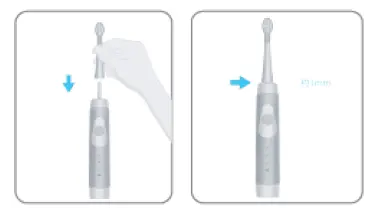
- Correctly install the brush head on the brush head shaft.
- Align the front of the body with the front of the brush head. Use moderate force to press the toothbrush head down onto the metal shaft until stopping.
- There is a small gap (about one millimeter) between the brush head and the body. This is a necessary operating clearance and is not a malfunction.

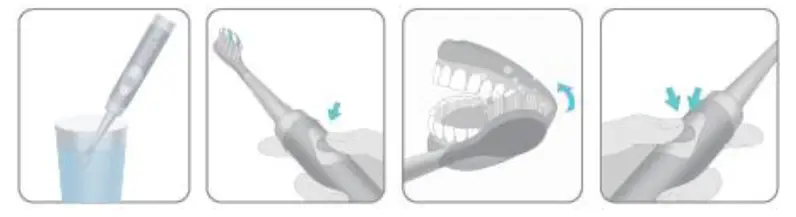
- Soak the bristles and apply a little toothpaste.
- Place the bristles of the toothbrush on the teeth at a small angle (within 45 degrees). To avoid toothpaste and other splashes, put the brush head in your mouth first, and then turn on the power switch.

- Place the bristles of the toothbrush on the teeth at a small angle (within 45 degrees). To avoid toothpaste and other splashes, put the brush head in your mouth first, and then turn on the power switch.
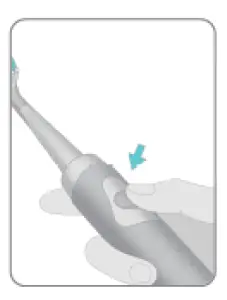
- Turn on/off/change gears
- Turn on: Short press to turn on
- Shut down (there are three ways to shut down) a. After 5s since the power is turned on, short press the on/off button; b. After the power is turned on, it will automatically shut down after continuous operation for 2 minutes; c. Switch the working mode continuously within 5s after the power is turned on until it is turned off.
- Children model: three modes: Sensitive, White, and Clean.
- Student model: Four modes: Clean, White, Sensitive, and Gum Care.

- Healthy brushing
- Gentle start In order to adapt the teeth to high-speed vibration, the toothbrush will gradually reach the selected speed and vibration amplitude after about 3 seconds after starting.
- 30-second brushing reminder timer function
- Pause once every 30 seconds during brushing process to remind the user to change sides.
- Pattern memory function Each time you turn on the power switch, the toothbrush will operate in the mode you used last time. For example, if you use the SENSITIVE mode, turn off the power switch, then next time you turn on the power switch, the toothbrush will start in the SENSITIVE mode.
Example of brushing sequence
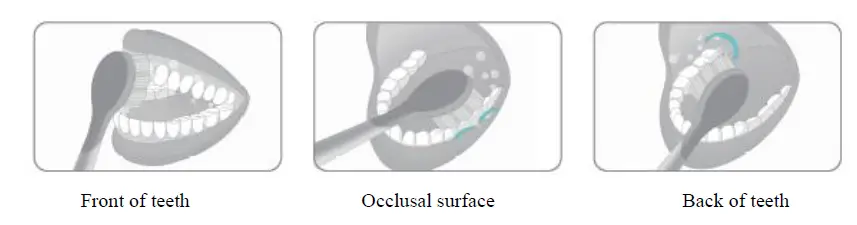
As shown in the figure, the inside of oral cavity is divided into four areas: up and down, left and right,
- Start brushing from the lower teeth, slowly moving toothbrush head, first brush the front of teeth, then the back of teeth, and finally brush the occlusal surface. There will be a short pause every 30s to remind you to change zones.
- It takes about 2 minutes to clean the inside of oral cavity evenly and without omission.

Cleaning the brush head and body
- When using detergent to clean toothbrush, please use a neutral detergent for kitchen.
- Do not use thinner, gasoline, alcohol, etc. to clean the product.
- Do not clean the product by putting the body in hot water exceeding 60 degrees Celsius.
Warm Prompt:
Since toothpaste may contain Chinese herbal medicines, fruity and other ingredients, which remaining on the brush head for a long time may cause discoloration of bristles and growth of bacteria, therefore, for your oral health, please rinse the brush head with clean water after brushing your teeth, ensuring there is no toothpaste residue; at the same time, it is recommended that you regularly remove the brush head to clean the handle to reduce growth of bacteria in the gap between brush head and handle.
- Remove the brush head straight from the brush head shaft

- Rinse the brush head with running water

- Flush the body with running water

- Dry the water drops on the brush head and the body


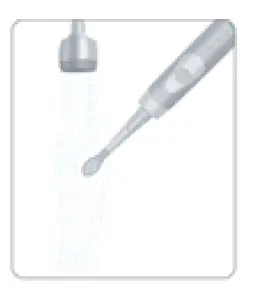
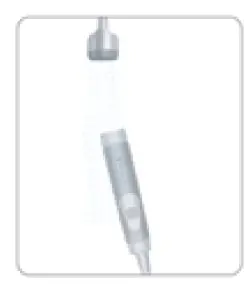
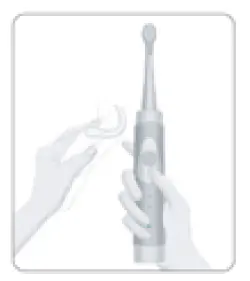
- Do not damage or scratch the waterproof rubber sealing ring with hard objects.
- Do not immerse the body in water for a long time (otherwise it may cause water to enter inside).
Replace the toothbrush head
Considering of your oral health, it is recommended to replace the toothbrush head every 2 to 3 months; The bristles contain two bundles of color-changing bristles, so that if the bristles change color, please replace the brush head. This product only matches WHITOP brush heads, other brand brush heads are not suitable for this product.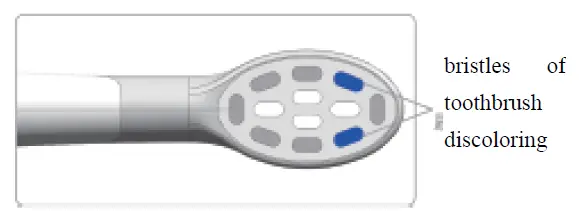
Common fault diagnosis
| Fault | Possible reason | Corrective Action |
|
The charging indicator does not light up | The toothbrush is just bought or haven’t been used for a long time | The indicator light may not light up for a few minutes at the beginning of charging, but it will light up if you continue to charge. If the charging indicator light still does not light up after a period of time, please contact the customer service center. |
| The product can only work for a short time even if it is charged | The main unit is not properly plugged into the charger | Place the main unit vertically on it so that its bottom is in contact with the charging base, and confirm that indicator light is on and flashing |
| Toothbrush is not working | 1. The charging time is not enough; 2. The product has not been used for a long time; 3. The battery has reached the end of service life | 1/2. Please charge; 3. Replace the battery; please contact WHITOP customer service center |
Product specifications
| Product name | Product number | Charger rated input | Charging time | Place of origin | Production date | Executive standard |
| Electric toothbrush | See the mark on product | 5V-1A | See attachment | Guangzhou, China | See the mark on product | GB4706.1-2005 GB4706.59-2008 |
Notes
During charging, do not wrap the power cord around the charger.
- Otherwise, the power cord may be disconnected, and electric shock or fire may occur due to a short circuit.
Except for the time to charge product, disconnect the product from the power supply. - Otherwise, it may cause electric leakage due to deterioration of insulation performance, which may cause electric shock or fire.
When unplugging the adapter, you should hold the plug of adapter and not just the power cord. - Otherwise, it may cause electric shock or fire due to short circuit.
Usage notice
Do not use paint thinner, gasoline, alcohol or other chemicals to clean the product.
- Otherwise, the product may crack or discolor. You can use a soft cloth slightly dampened with tap water or soapy water to clean the case.
After use, this product should be placed away from pools, bathrooms, or other high-humidity areas exposed to water or moisture; avoid high-temperature or direct sunlight.
Product Introduction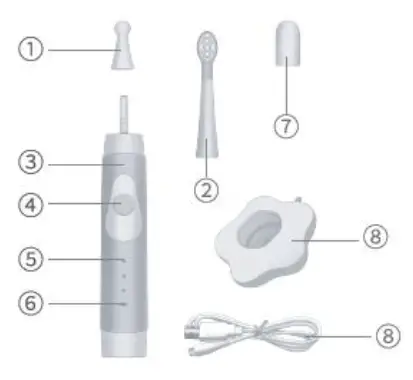
- Host shaft protection cover
- Hidden brushing mode indicator
- Breathing charging indicator
- Brush head cover
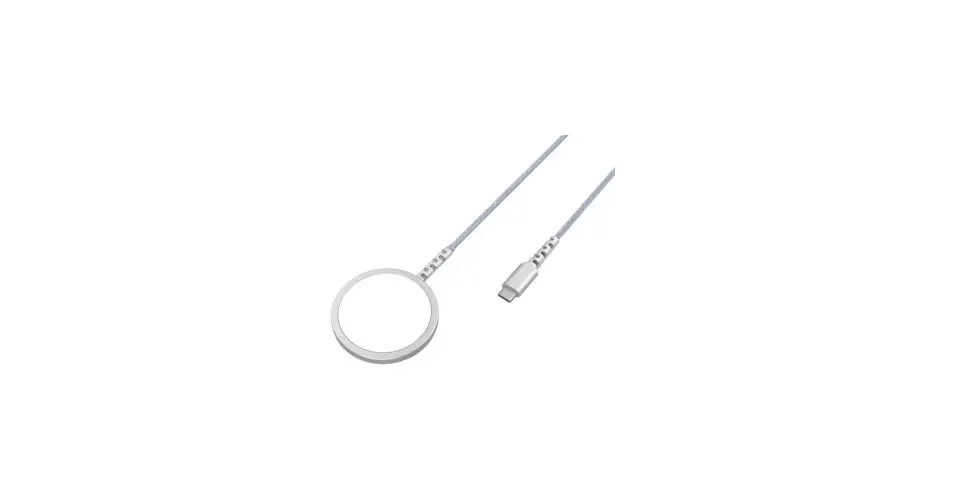
- Charging stand/USB charging cable
Note: The contents of packaging box may vary depending on the model purchased.
Toothbrush charging
The charging indicator will start to flash in red, indicating that the product has a low battery and reminding that it needs to be charged;
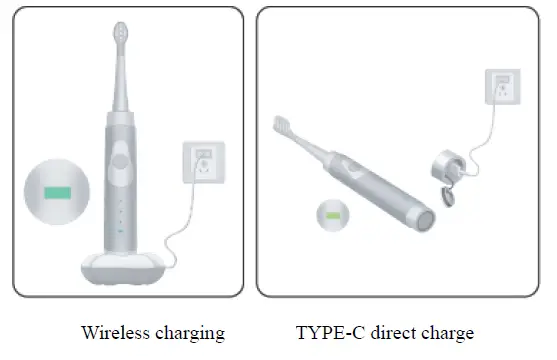
- Wireless charging model (with charging stand): connect the adapter, plug into an external socket, or directly connect to the portable mobile power supply through USB interface, and put the front of body straight forward on the charging base;
- TYPE-C direct charge (with USB charging cable): plug in the USB cable to connect adapter, plug into an external socket, or directly connect the USB interface to portable mobile power supply.
Charging time: Please see the attached table for charging time of specific models. During the charging process, the power indicator will change from flashing red light to steady green light, indicating that the battery is fully charged.
Environmental prompt:
This product contains batteries and/or recyclable electronic waste. In order to protect the environment, please do not dispose of this product together with household garbage, please send it to the electronic waste collection point provided in your home country. This is conducive to environmental protection.
At the end of the service life of product, please remove the battery, by the parent or under the supervision and guidance of the parent.
Except for disposing of discarded batteries, do not disassemble the product. Please drain the battery before removing it. When removing the battery, please wear protective equipment (gloves, safety glasses, etc.). After taking out the battery and isolating it (using tape), put it in a plastic bag and discard it. Please disassemble the brush handle as shown in the figure: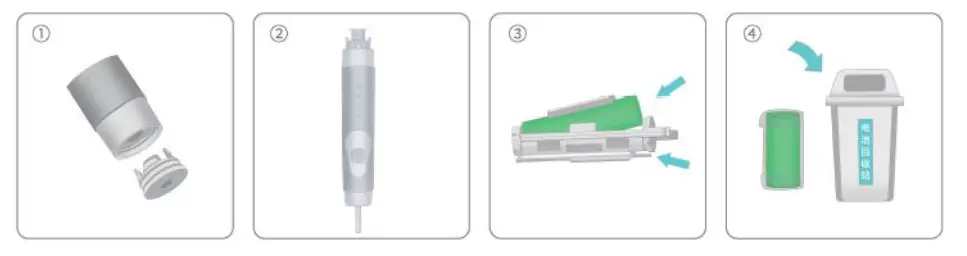
Warranty
The warranty (free repair) of WHITOP products during warranty period will be implemented from the date of purchase.
- Products within the warranty period can only be repaired in the place of origin of WHITOP;
- In the following period from the date of purchase, the warranty will be carried out in the case of failure in normal use;
- Brush heads, auxiliary devices – provided for a fee;
- The whole machine (except the above parts) – free warranty within 3 years;
- In one of the following situations, even during warranty period, it cannot be treated as a warranty, but repairs can be implemented for a fee:
- Failure to follow the requirements of product instruction manual for use, maintenance, and storage, resulting in damage;
- Damage caused by incorrect operation, abnormal power supply, or damage (such as: falling, etc.);
- Damage caused by dismantling by the maintenance staff of the maintenance shop without WHITOP;
- Fail to present warranty card and valid purchase invoice;
- The information recorded on the warranty card is inconsistent with physical identification of the product or is altered;
- Damage caused by force majeure factors (such as lightning, earthquake, fire, flood, etc.);
- This warranty clause is only applicable to occasions when consumers purchase and use for personal consumption needs, not for business use.
Name and content of hazardous substances in the product
|
Part name | Hazardous substance |
Remarks | |||||
| Pb | Hg | Cd | Hexavalent chromium | Polybrominated biphenyls | Polybrominated | ||
| Plastic parts | 〇 | 〇 | 〇 | 〇 | 〇 | 〇 | |
| Metal parts | 〇 | 〇 | 〇 | 〇 | 〇 | 〇 | |
| Electric circuit components | 〇 | 〇 | 〇 | 〇 | 〇 | 〇 | |
| Power cord | 〇 | 〇 | 〇 | 〇 | 〇 | 〇 | |
| This form is compiled in accordance with regulations of SJ/T11364. | |||||||
| 〇: Indicate that the content of hazardous substance in all homogeneous materials of the part is below limit requirement specified in GB/T26572. X: Indicate that the content of hazardous substance in at least one of the homogeneous materials of the part exceeds the limit requirement of GB/T26572. | |||||||
Attached table of WHITOP series product information
| Type | Charging method | Charging time | Time of endurance | Remarks |
| ED01 | Wireless charging (with charging base) | 11h | 50 days | |
| ED02 | Wireless charging (with charging base) | 11h | 50 days | |
| ED03 | Wireless charging (with charging base) | 11h | 50 days | |
| ED04 | TYPEC direct charge (with USB cable) | 7h | 70 days | |
| ED05 | Wireless charging (with charging base) | 11h | 50 days | |
| ED06 | TYPEC direct charge (with USB cable) | 7h | 70 days | |
| ED07 | Wireless charging (with charging stand) | 11h | 50 days | |
| ED08 | TYPEC direct charge (with USB cable) | 7h | 70 days | |
| ED09 | TYPEC direct charge (with USB cable) | 5h | 70 days |
Note: In a laboratory environment and when the battery is fully charged, take the Sensitive mode (Sensitive) use time as example, calculated based on 2min/2 times a day, the product can be used for 70 days/50 days respectively.
Warranty Card
| Product name | |
| Model | |
| Purchase date | |
| Customer name | |
| Telephone | |
| Contact address | |
| Fault description |
Please fill in your information carefully, and please send this card together with the product to be repaired to our maintenance center.