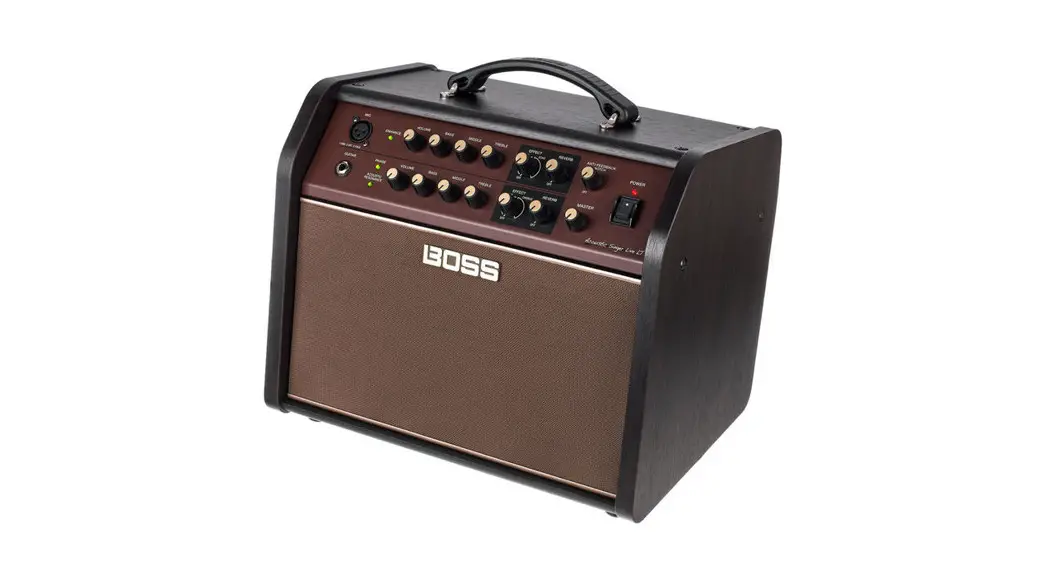


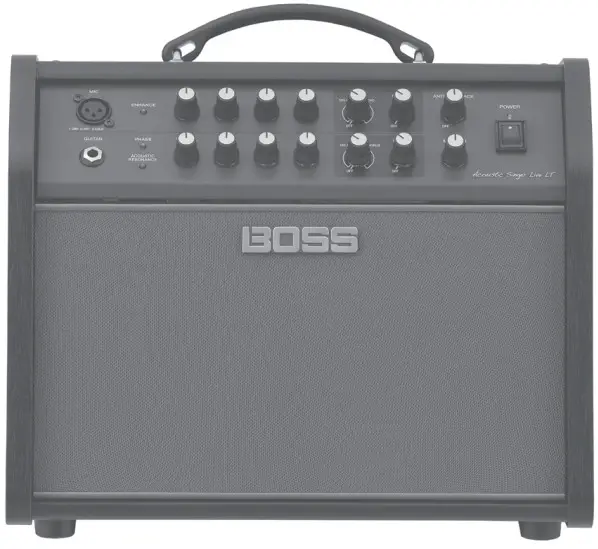
Acoustic Amplifier
Owner’s Manual
Before using this unit, carefully read “IMPORTANT SAFETY INSTRUCTIONS” (inside front cover), “USING THE UNIT SAFELY” (p. 2), and “IMPORTANT NOTES”
(p. 3). After reading, keep the document(s) where it will be available for immediate reference.
USING THE UNIT SAFELY
INSTRUCTIONS FOR THE PREVENTION OF FIRE, ELECTRIC SHOCK, OR INJURY TO PERSONS
About WARNING and CAUTION Notices
| WARNING | Used for instructions intended to alert the user to the risk of death or severe injury should the unit be used improperly? |
| CAUTION | Used for instructions intended to alert the user to the risk of injury or material damage should the unit be used improperly. * Material damage refers to damage or other adverse effects caused with respect to the home and all its furnishings, as well to domestic animals or pets. |
About the Symbols
| The  symbol alerts the user to important instructions or warnings.The specific meaning of the symbol is determined by the design contained within the triangle. In symbol alerts the user to important instructions or warnings.The specific meaning of the symbol is determined by the design contained within the triangle. Inthe case of the symbol at left, it is used for general cautions, warnings, or alerts to danger. |
 | The symbol alerts the user to items that must never be carried out (are forbidden). The specific thing that must not be done is indicated by the design contained within symbol alerts the user to items that must never be carried out (are forbidden). The specific thing that must not be done is indicated by the design contained withinthe circle. In the case of the symbol at left, it means that the unit must never be disassembled. |
 | The symbol alerts the user to things that must be carried out. The specific thing that must be done is indicated by the design contained within the circle. In the symbol alerts the user to things that must be carried out. The specific thing that must be done is indicated by the design contained within the circle. In thecase of the symbol at left, it means that the power-cord plug must be unplugged from the outlet. |
ALWAYS OBSERVE THE FOLLOWING
Make sure that the power cord is groundedConnect the mains plug of this model to a mains socket outlet with a protective earthing connection.
To completely turn off power to the unit, pull out the plug from the outletEven with the power switch turned off, this unit is not completely separated from its main source of power. When the power needs to be completely turned off, turn off the power switch on the unit, then pull out the plug from the outlet. For this reason, the outlet into which you choose to connect the power cord’s plug should be one that is within easy reach and readily accessible.
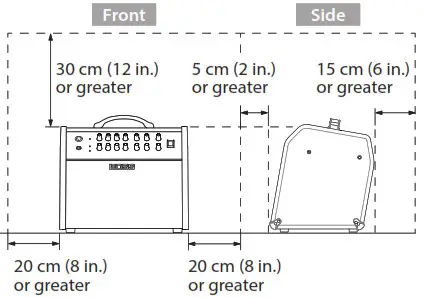
Secure a sufficient amount of space at the setup locationSince this unit normally emits a slight amount of heat, make sure to secure sufficient space around it, as shown below.
Do not disassemble or modify by yourselfDo not carry out anything unless you are instructed to do so in the owner’s manual. Otherwise, you risk causing malfunction.
Do not repair or replace parts by yourselfBe sure to contact your dealer, a Roland service center, or an official Roland dealer. For a list of Roland service centers and official Roland dealers, refer to the Roland website.
Do not place in an unstable location Otherwise, you risk injury as the result of the unit toppling over or dropping down.
WARNING
Do not use or store in the following types of locations
 Subject to temperature extremes (e.g., direct sunlight in an enclosed vehicle, near a heating duct, on top of heat-generating equipment); or are
 Damp (e.g., baths, washrooms, on wet floors); or are
- Exposed to steam or smoke; or are
- Subject to salt exposure or are
- Exposed to rain; or are
- Dusty or sandy; or are
- Subject to high levels of vibration and shakiness or are
- Placed in a poorly ventilated location.
Connect the power cord to an outlet of the correct voltage The unit should be connected to a power supply only of the type described as marked on the rear side of the unit.
Use only the supplied power cord Use only the attached power cord. Also, the supplied power cord must not be used with any other device.
Do not bend the power cord or place heavy objects on it Otherwise, fire or electric shock may result.
Avoid extended use at high volumeUse of the unit at high volume for extended periods of time may cause hearing loss. If you ever experience any hearing loss or ringing in the ears, you should immediately stop using the unit and consult a specialized physician.
Do not allow foreign objects or liquids to enter the unit; never place containers with liquid on unitDo not place containers containing liquid (e.g., flower vases) on this product.Never allow foreign objects (e.g., flammable objects, coins, wires) or liquids (e.g., water or juice) to enter this product. Doing so may cause short circuits, faulty operation, or other malfunctions.
 Subject to temperature extremes (e.g., direct sunlight in an enclosed vehicle, near a heating duct, on top of heat-generating equipment); or are
 Damp (e.g., baths, washrooms, on wet floors); or are
 WARNING
Turn off the unit if an abnormality or malfunction occursIn the following cases, immediately turn off the power, remove the power cord from the outlet, and contact your dealer, a Roland service center, or an official Roland dealer
for service.
- The power cord has been damaged; or
- If smoke or unusual odor occurs; or
- Objects have fallen into, or liquid has been spilled onto the unit; or
- The unit has been exposed to rain (or otherwise has become wet); or
- The unit does not appear to operate normally or exhibits a marked change in performance. For a list of Roland service centers and official Roland dealers, refer to the Roland website.
Be cautious to protect children from injuryAlways make sure that an adult is on hand to provide supervision and guidance when using the unit in places where children are present, or when a child will be using the unit.
Do not drop or be subject to strong impactOtherwise, you risk causing damage or malfunction.
Do not share an outlet with an unreasonable number of other devicesOtherwise, you risk overheating or fire.
Do not use overseasBefore using the unit overseas, consult with your retailer, the nearest Roland service center, or an authorized Roland distributor. For a list of Roland service centers and
official Roland dealers, refer to the Roland website.
Don’t place burning objects on the unitDon’t place any burning object (such as a candle) on the unit.
Be aware of weather conditionsUse the apparatus in moderate climates.
CAUTION
When disconnecting the power cord, grasp it by the plugTo prevent conductor damage, always grasp the power cord by its plug when disconnecting it.
Periodically clean the power plugAn accumulation of dust or foreign objects between the power plug and the power outlet can lead to fire or electric shock. At regular intervals, be sure to pull out the
power plug, and using a dry cloth, wipe away any dust or foreign objects that may have accumulated.
Disconnect the power plug whenever the unit will not be used for an extended period of timeFire may result in the unlikely event that a breakdown occurs.
CAUTION
Route all power cords and cables in such a way as to prevent them from getting entangledThe injury could result if someone were to trip on a cable and cause the unit to fall or topple.
Avoid climbing on top of the unit, or placing heavy objects on itOtherwise, you risk injury as the result of the unit toppling over or dropping down.
Never connect/disconnect a power plug if your hands are wet Otherwise, you could receive an electric shock.
Disconnect all cords/cables before moving the unitBefore moving the unit, disconnect the power plug from the outlet, and pull out all cords from external devices.
CAUTION
Before cleaning the unit, disconnect the power plug from the outletIf the power plug is not removed from the outlet, you risk receiving an electric shock.
Whenever there is a threat of lightning, disconnect the power plug from the outletIf the power plug is not removed from the outlet, you risk causing malfunction or receiving an electric shock.
Do not remove the speaker grille and speaker Do not remove the speaker grille and speaker by any means. Speaker is not user-replaceable. Shock hazardous voltages and currents are present inside the enclosure.
IMPORTANT NOTES
Power Supply
- • Do not connect this unit to the same electrical outlet that is being used by an electrical appliance that is controlled by an inverter or a motor (such as a refrigerator, washing machine, microwave oven, or air conditioner). Depending on the way in which the electrical appliance is used, power supply noise may cause this unit to malfunction or may produce audible noise. If it is not practical to use a separate electrical outlet, connect a power supply noise filter between this unit and the electrical outlet.
Placement
- Using the unit near power amplifiers (or other equipment containing large power transformers) may induce hum. To alleviate the problem, change the orientation of this unit; or move it farther away from the source of interference.
- This unit may interfere with radio and television reception. Do not use this unit in the vicinity of such receivers.
- Noise may be produced if wireless communications devices, such as cell phones, are operated in the vicinity of this unit. Such noise could occur when receiving or initiating a call, or while conversing. Should you experience such problems, you should relocate such wireless devices so they are at a greater distance from this unit, or switch them off.
- Do not allow lighting devices that normally are used while their light source is very close to the unit (such as a piano light), or powerful spotlights to shine upon the same area of the unit for extended periods of time. Excessive heat can deform or discolor the unit.
- When moved from one location to another where the temperature and/or humidity is very different, water droplets (condensation) may form inside the unit. Damage or malfunction may result if you attempt to use the unit in this condition. Therefore, before using the unit, you must allow it to stand for several hours until the condensation has completely evaporated.
- Do not paste stickers, decals, or the like to this instrument. Peeling such matter off the instrument may damage the exterior finish.
- Depending on the material and temperature of the surface on which you place the unit, its rubber feet may discolor or mar the surface.
- Do not place containers or anything else containing liquid on top of this unit. Also, whenever any liquid has been spilled on the surface of this unit, be sure to promptly wipe it away using a soft, dry cloth.
Maintenance
- To clean the unit, use a dry, soft cloth; or one that is slightly dampened. Try to wipe the entire surface using an equal amount of strength, moving the cloth along with the grain of the wood. Rubbing too hard in the same area can damage the finish.
- Never use benzene, thinners, alcohol or solvents of any kind, to avoid the possibility of discoloration and/or deformation.
Repairs and Data
- Before sending the unit away for repairs, be sure to make a backup of the data stored within it; or you may prefer to write down the needed information. Although we will do our utmost to preserve the data stored in your unit when we carry out repairs, in some cases, such as when the memory section is physically damaged, restoration of the stored content may be impossible. Roland assumes no liability concerning the restoration of any stored content that has been lost.
Additional Precautions
- Roland assumes no liability concerning the restoration of any stored content that has been lost
- Use a reasonable amount of care when using the unit’s buttons, sliders, or other controls; and when using its jacks and connectors. Rough handling can lead to malfunctions.
- When disconnecting all cables, grasp the connector itself—never pull on the cable. This way you will avoid causing shorts, or damage to the cable’s internal elements.
- A small amount of heat will radiate from the unit during normal operation.
- To avoid disturbing others nearby, try to keep the unit’s volume at reasonable levels.
- Do not use connection cables that contain a built-in resistor. Intellectual Property Right
- This product contains parts integrated software platform of eSOL Co., Ltd. Paris is a trademark of eSOL Co., Ltd. in Japan.
- Roland and BOSS are either registered trademarks or trademarks of Roland Corporation in the United States and/or other countries.
- Company names and product names appearing in this document are registered trademarks or trademarks of their respective owners.
Panel Descriptions
Front Panel
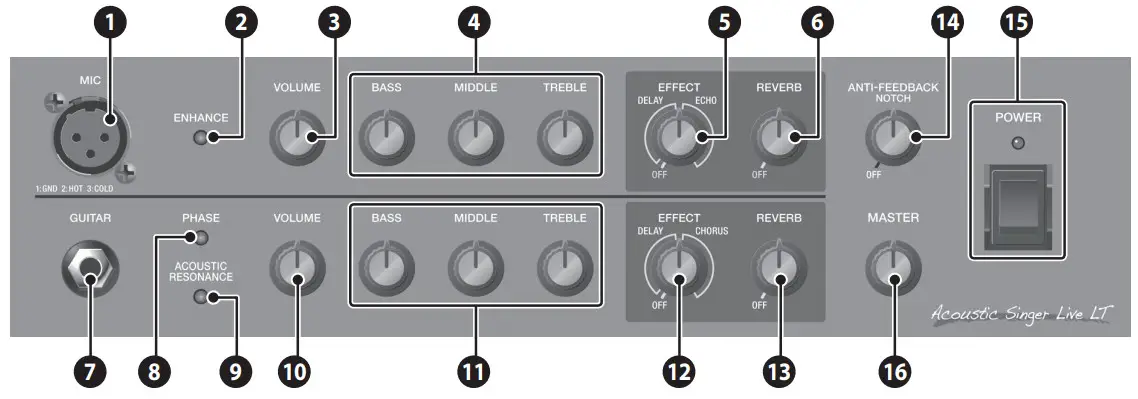
Mic Channel (Upper Row)
This is the channel for connecting a vocal mic. Here you can adjust the volume and tone of a mic connected to the MIC jack.
- MIC jack
Connect your mic here.
- [ENHANCE] button
Improves the clarity of the sound. - [VOLUME] knob
Adjusts the volume. - Equalizer
Adjusts the loudness of each frequency region. For standard mic settings, place the knobs in the center position.
[BASS] knob
Adjusts the sound level of the low-frequency range.
[MIDDLE] knob
Adjusts the sound level of the middle-frequency range.
[TREBLE] knob
Adjusts the sound level of the high-frequency range.
[REVERB] knob
Adjusts the reverb depth.
[REVERB] knob
Adjusts the reverb depth. - [EFFECT] knob
Applies delay/echo effect. Either DELAY or ECHO is selected
depending on the position of the knob.
Turn the knob to adjust the depth of the effect.
- [REVERB] knob
Adjusts the reverb depth.Type Effect Delay Produces an echo-like effect. Echo Produces a distinctively spacious effect similar to a Guitar Channel (Lower Row)
This is the channel for connecting a guitar, such as an acoustic-electric guitar. Here you can adjust the volume and tone of a guitar connected to the GUITAR jack. - GUITAR jack
Connect your guitar here. You can connect any guitar that is equipped with a pickup. - [PHASE] button
Suppresses acoustic feedback by inverting the phase of the guitar input.
If this does not provide sufficient effect, turn the [PHASE] button off and then use the [ANTI-FEEDBACK] knob to find the point at which acoustic feedback is reduced. - [ACOUSTIC RESONANCE] button
Adds the natural resonance of an acoustic guitar. The sound changes in the following order each time you press the button.Button Explanation Green A full sound with emphasized body resonance Orange A bright sound with boosted mid-range resonance Red A brilliant sound extending to the high range Unlit Off - [VOLUME] knob
Adjusts the volume. - Equalizer
Adjusts the loudness of each frequency region. For standard guitar settings, place the knobs in the center position.
[BASS] knob
Adjusts the sound level of the low-frequency range.
[MIDDLE] knob
Adjusts the sound level of the middle-frequency range.
[TREBLE] knob
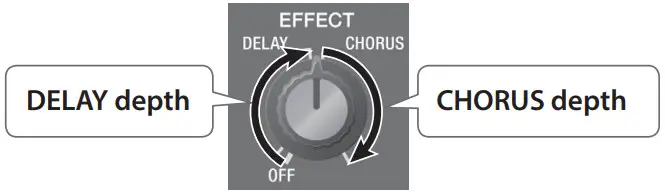
Adjusts the sound level of the high-frequency range. - EFFECT] knob
Applies delay/chorus effect. Either DELAY or CHORUS is selected depending on the position of the knob. Turn the knob to adjust the depth of the effect. - [REVERB] knob
Adjusts the reverb depth.Type Effect Delay Produces an echo-like effect. Chorus Adds subtle modulation to the sound, giving it beautiful spaciousness and depth.
- MIC jack
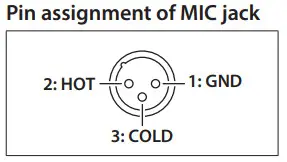
Panel Descriptions
Rear Panel
* To prevent malfunction and equipment failure, always turn down the volume, and turn off all the units before making any connections.
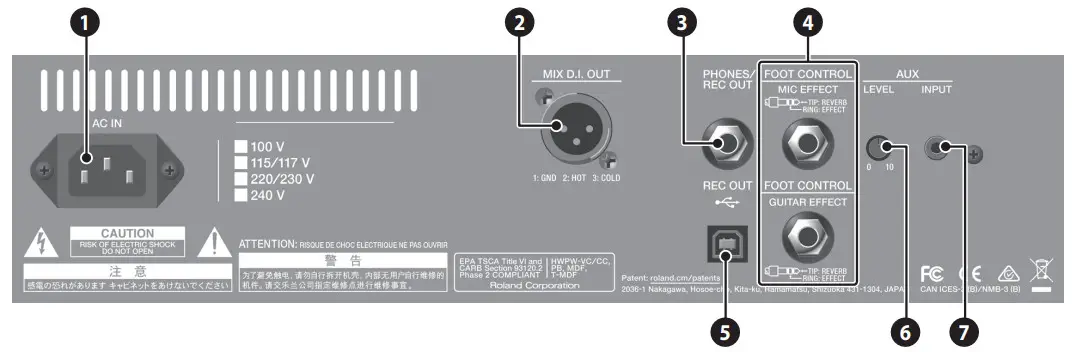
- AC IN jack
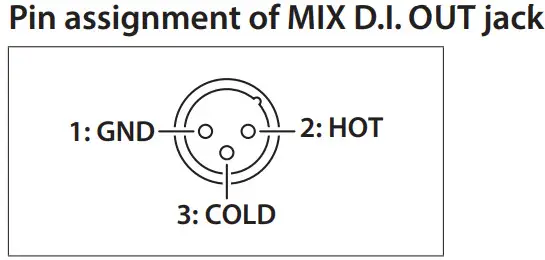
Connect the included power cord. - MIX D.I. OUT jack
Connect this to your PA system or recorder.
You can use this in conjunction with an external PA system, or
to record your performance via direct line while monitoring
the sound from this unit.
5 Adjust the output level using the [VOLUME] knob of each
channel.
5 The sounds of the mic channel, the guitar channel, and the
audio input from the AUX INPUT jack are all mixed and output.
- PHONES/REC OUT jack
Connect headphone.
5 To adjust the volume, each channel’s [VOLUME] knob along
with the [MASTER] knob.
5 If a plug is inserted in the PHONES/REC OUT jack, no sound
will be output from the Acoustic Singer’s own speaker. This is
convenient if you don’t want the loud sound to be produced from
the speaker, such as when you’re practicing at night. - FOOT CONTROL
MIC EFFECT jack
Let’s you turn the mic channel effect on/off with your foot.Switch Explanation TIP: REVERB Turns REVERB on/off. RING: EFFECT Turns DELAY or CHORUS on/off. GUITAR EFFECT jack
Lets you turn the guitar channel effect on/off with your foot.Switch Explanation TIP: REVERB Turns REVERB on/off. RING: EFFECT Turns DELAY or ECHO on/off. 
- REC OUT
 port
port
Use a USB 2.0 cable to connect the unit to your computer.
This unit functions as a USB audio interface. You can record the sound of this unit into your computer, or use this unit to playback sound from your computer.
You must install the USB driver when connecting the unit to your computer.
Download the USB driver from the BOSS website. For details, refer to Readme.htm which is included in the download. http://www.boss.info/support/
• The USB connection provides three stereo outputs and one stereo input. Specify the desired sound device on your computer.
Output (this unit → computer)Device indication Output audio MIX Mixed sound of the mic channel and the guitar channel 1-2 MIC Mic channel sound 3-4 GUITAR Guitar channel sound 5-6 Input (the computer→this unit)* The upper line is the device indication shown for Windows, and the lower line is the device indication shown for Mac.
* The sound that is input from the AUX INPUT jack is not output* The nominal level of the signal that is output from USB provides 20 dB of margin from the maximum level. If the sound is not loud enough, adjust the level on your computer.Device indication Input specifications MIX The L/R channels of the stereo audio input from the computer are mixed to mono audio.
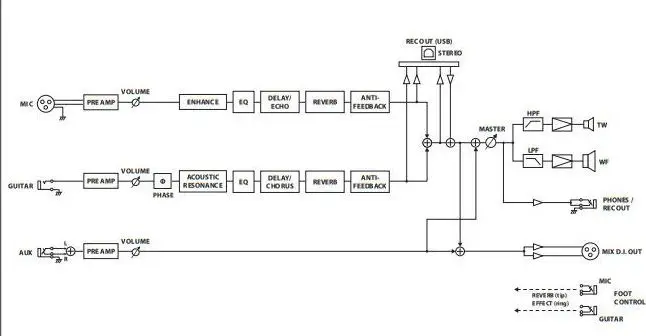
For details on the signal flow, refer to “Block Diagram” (back cover). - AUX [LEVEL] knob
Adjusts the volume of the instrument connected to the AUX
INPUT jack. - AUX INPUT jack
Connect your CD player, audio player, or electronic musical
instrument. You can play along with your own performance.
* The sound that is input from the AUX INPUT jack is not output
from the REC OUT () jack.
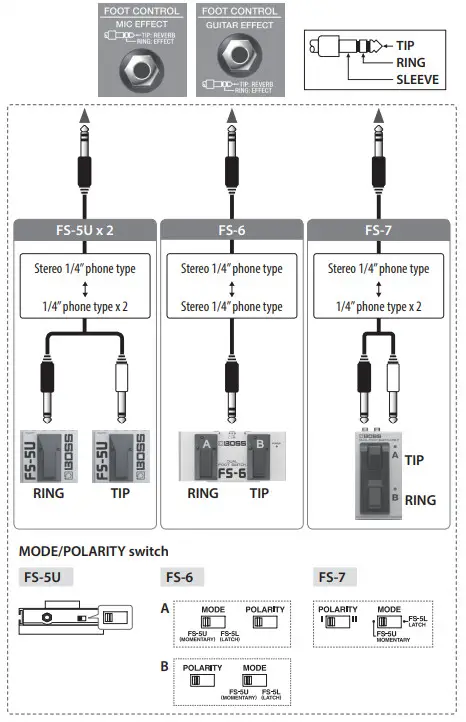
 port
portTurning the Power On/Off
* Once everything is properly connected, be sure to follow the procedure below to turn on their power. If you turn on equipment in the wrong order, you risk causing malfunction or equipment failure.
* Before turning the unit on/off, always be sure to turn the volume down. Even with the volume turned down, you might hear some sound when switching the unit on/off. However, this is normal and does not indicate a malfunction.
- Make sure that this unit’s [MASTER] knob and the volume of the devices connected to this unit are set to a minimum.
- Turn on this unit.

Turn on the power of the devices connected to the MIX D.I. OUT jack, PHONES/REC OUT jack, and REC OUT (O) port.
4. Use each channel’s [VOLUME] knob and [MASTER] knob to adjust the volume of this unit.
5. Adjust the volume levels for the connected devices.
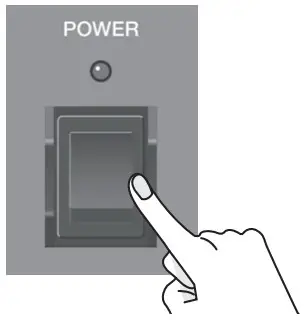
When powering down
Before switching off the power, lower the volume on each of the devices in your system and then TURN OFF the devices in the reverse order to which they were switched on.
* If you need to turn off the power completely, first turn off the unit, then unplug the power cord from the power outlet. Refer to “To completely turn off power to the unit, pull out the plug from the outlet” (p. 2).
Main Specifications
BOSS Acoustic Singer Live LT (ACS-LIVELY): Acoustic Amplifier
| Rated Power Output | 60 W (Woofer: 50 W, Tweeter: 10 W) | |
| Nominal Input Level | MIC INPUT | -33 dBu (2.5 k.0) |
| GUITAR INPUT | -10 dBu (5 MO) | |
| AUX INPUT | -8 dBu (10 K2) | |
| Speaker | 16 cm (6.5 inches) Woofer x 1, 2.5 cm (1 inch) Dome Tweeter x 1 | |
| Connectors | MIC connector | XLR type |
| GUITAR jack | 1/4-inch phone type | |
| AUX INPUT jack | Stereo miniature phone type | |
| PHONES/REC OUT jack | Stereo 1/4-inch phone type | |
| MIX D.I. OUT connector | XLR type | |
| FOOT CONTROL MIC EFFECT jack | 1/4-inch TRS phone type | |
| FOOT CONTROL GUITAR EFFECT jack | 1/4-inch TRS phone type | |
| USB port | USB B type | |
| AC IN jack | ||
| Power Consumption | 40 W | |
| Dimensions | 364 (W) x 271 (D) x 300 (H) mm 14-3/8 (W) x 10-11/16 (D) x 11-13/16 (H) inches | |
| Weight | 10.2 kg 22 lbs 8 oz | |
| Accessories | Owner’s Manual, Power cord | |
| Options (sold separately) | Footswitch: FS-5U, FS-6, FS-7 | |
* 0 dBu = 0.775 Vrms
* This document explains the specifications of the product at the time that the document was issued. For the latest information, refer to the Roland website.