
Global Speaker FHB-S2
Read the guide carefully before you use the product. Keep the manual for future reference.
Be ware of cautions mentioned in this guide.
Cautions:
- In order to reduce the risk of fire or electric shock, do not leave the equipment in the rain or damp
- Use the accessories only
- The adapter, which is used as the power device of the equipment, should be kept available at all times.
- This active speaker has high sound pressure level output.
- Do not listen too close
- Do not listen for long time in the high sound pressure level output state.
- Do not attempt to disassemble the base of the active speaker.
- Risk: Prevent equipment from falling to the ground.
- Risk: Prevent equipment from striking sharp corners.
Moisture: - Active speakers should be placed away from moisture and water.
- Do not operate the equipment near water.
- Do not expose the device to the rain or any dripping water area.
- Do not splash water on the equipment.
- Connect the active speaker according to the instructions in the manual.
Connection: - Connect the active speaker according to the instructions in the manual.
- Connect the active speaker to the correct power supply voltage according to the data shown on the device.
- Protect the power cord from being trampled or clamped, especially at the plug, convenient socket and the power cable lead of the equipment.
- Unplug the device during a thunderstorm or when it’s not used for a long time.
- Do not put in places where the power plug cannot be used. Pulling the power plug out of the socket is the only way to cut off the power
- The plug must be available anytime.
Maintenance
Please ask for maintenance services from qualified maintenance people no matter what type of damages to the equipment. For example:
- The power cable or plug is damaged.
- The equipment was splashed with water or there are objects falling into the equipment.
- The equipment is wet or damp.
- The equipment is not working or falls on the ground carelessly.
Note: The repairing instructions are only used for qualified maintenance person. Please do not repair the equipment unless the maintenance people is qualified. Otherwise it may cause electric shock.
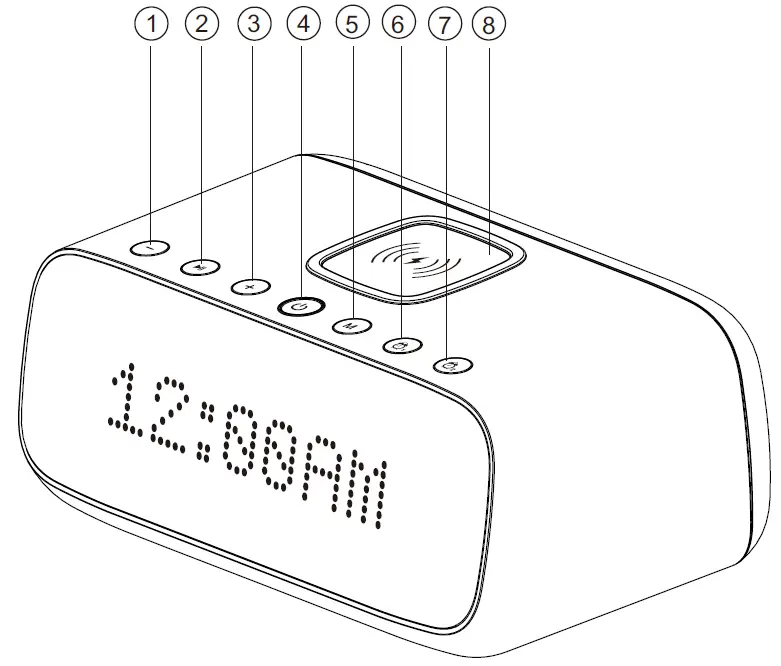
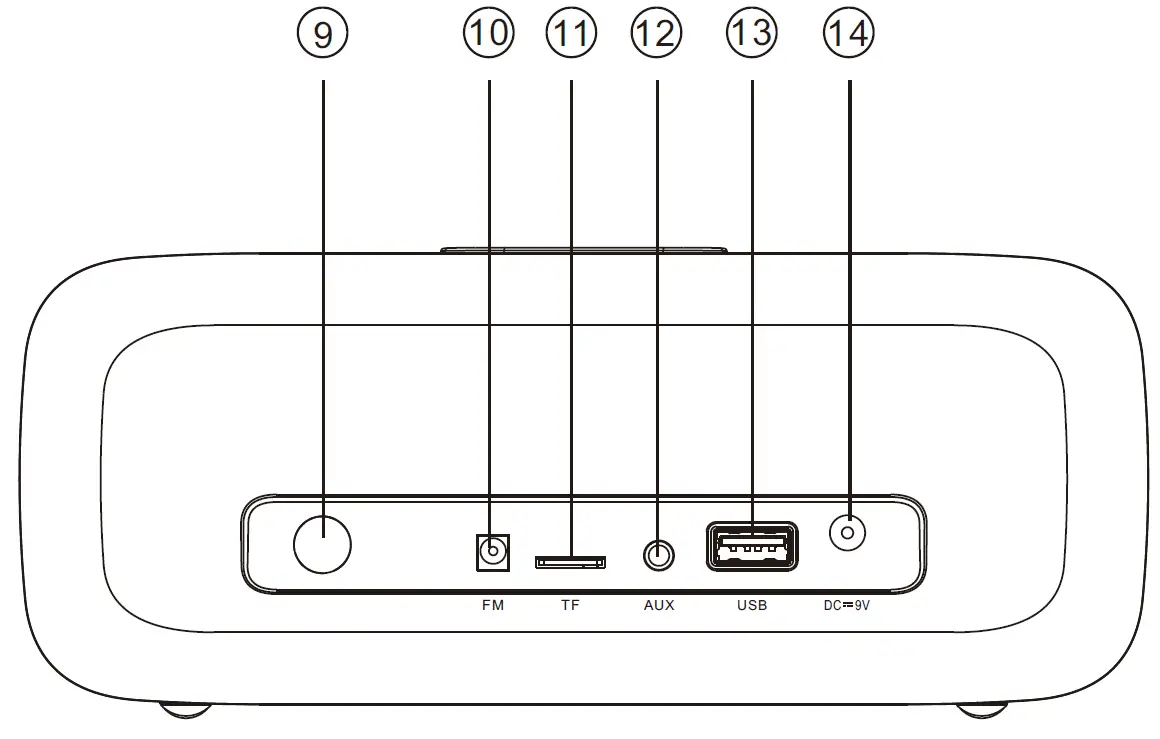
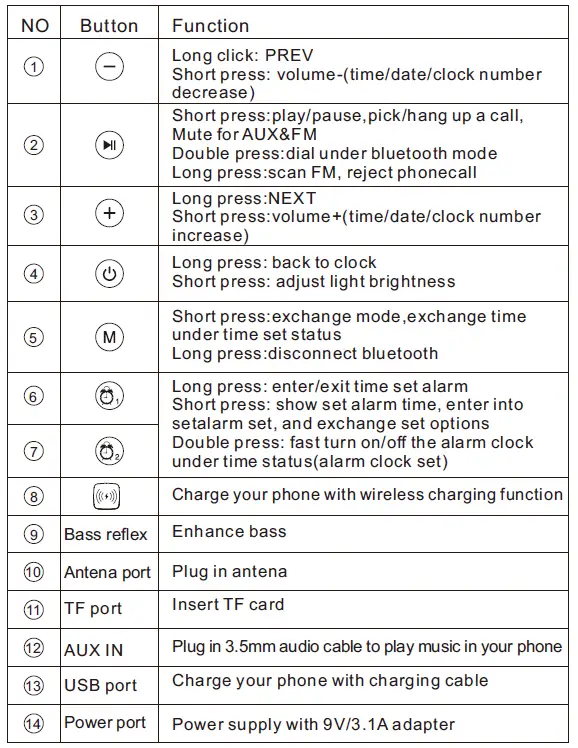
Bluetooth Mode
- Bluetooth version: 5.0,supports HSP/ HFP/ A2DP/ AVRCP profile. This speaker is with “didi” voice prompt and paring name is FHB-S2.
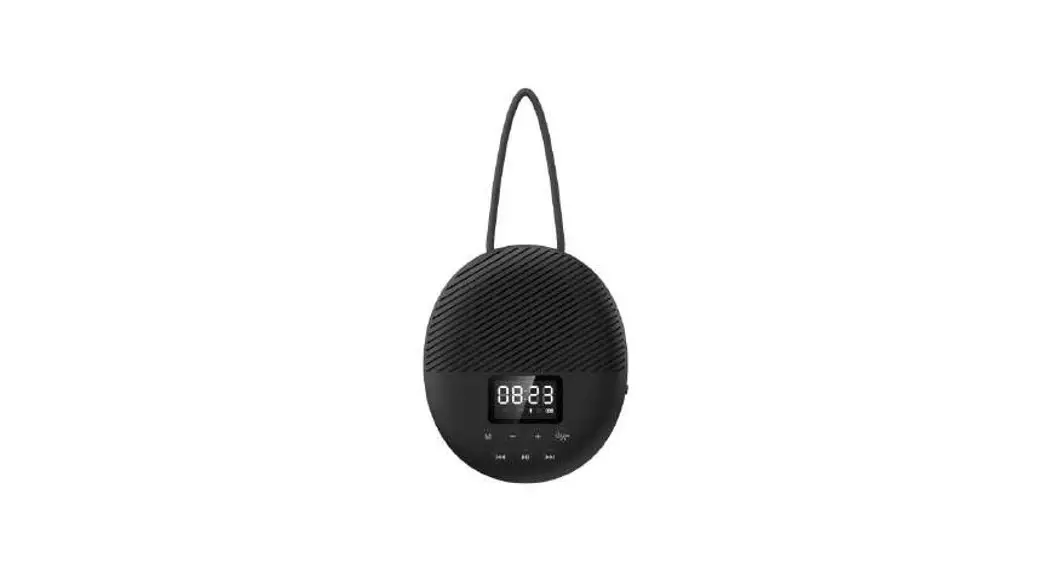
- ON/OFF: Plug in the power adapter, speaker will enter into time mode (AM/PM indication for 12 hours system, SUN/MOON& STAR icons for 24 hours system) .
- Bluetooth pairing:Long press to turn on the speaker with voice prompt “power on”.Short press button into bluetooth mode with blinking,and search FHB-S2 in your phone for connection, after showing for 3 s , it will display time automatically.
- Bluetooth disconnection: long press M for disconnection.
- Brightness adjustment: Short press to switch the light brightness.4 options in total: highlight, bright, power saving, screen off.
- Bluetooth re-connection:speaker will automatically connect the lastest paired bluetooth device.
- Long press / for PREV/NEXT.Short press / for VOL+/VOL-
- Double press to dial a call, and short press to pick up , with “dudu”+ English number voice prompt, long press to reject it.
- Long press to exit bluetooth mode and enter into time mode.
Wireless Charger
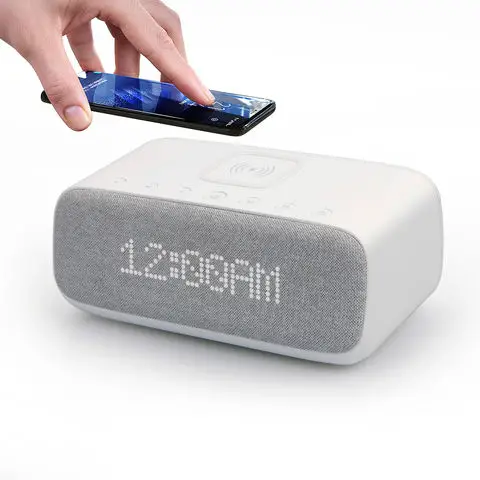
Wireless charging: once speaker is powered, put your phone on the wireless charging panel to charge directly, with a constant blue light for indication. The light will go off in 4 s after taking away your phone.
TF Card Mode
- Speaker will switch to TF card mode automatically after inserting TF card. Short press for play/pause,long press +/ – for NEXT/ PREV, short press / for VOL+/VOL-.
- Support music format MP3/WAV/APE/FLAC
- Long press to exit TF mode and back to time display
AUX IN mode
- Plug in the 3.5mm audio cable to enter AUX IN mode,short press for play/pause,short press / for VOL+/VOL-.
- After plugged audio cable, AUX word displays on screen and then soon back to time display.
- When playing music, double press M to exit AUX mode and back to time mode.
FM mode
- Press to switch to FM mode
- Scan stations:long press to scan stations and will store them automatically.(please insert the pick tail antenna for radio signal)
- Short press / for VOL+/VOL-,and long press for NEXT/ PREV stations, press for play/pause.
- Long press to exit FM mode and back to time display.
Sleep mode(white noise)
- Short press for sleep mode to play white noise with time display.
- Long press / for NEXT/PREV,short press for VOL+/-
- Short press for play/pause.
- Long press to set cycle play modes by pressing / . is single cycle, is order cycle. Short press to set your favorite mode .
- Long press , flashes slowly, short press or to set the play time from 15min to 120 min, long press back to previous set, long press to set down. ( means cycle play,15-120 min means music will shut down after 15-120min) Remarks: In the setting up process, if there is no setting action within 10 seconds, the speaker will exit setting mode and save the current setting.
Clock setting
Step 1: Long press to choose 12h or 24h system.
Step 2: In 10 seconds, short press, hour number flashes slowly, short press/to set the hour number.
Step 3: Then, short press again switch to minute setting, minute number flashes slowly, short press/to set the minute number.
Step 4: short press again to confirm the time. And then directly switch to week setting, week number flashes slowly, short press/to set the week number.
Step 5: After completion of setting, short press ,and the speaker exits time clock setting and store it.
Remarks: During setting process, if no action within 10 seconds, the speaker will automatically exit time setting mode and save the current setting.
Alarm setting
- Short press the and the speaker displays the alarm time, if no operation, it will return to clock display after 10 seconds.
- Short press the , the speaker enters the alarm hour setting, the hour value slowly flashes, short press or, and set the number.
- Short press the , switch to the minute setting, and the minute number will flash slowly, short press or , and set the number.
- Short press the , switch to the setting of alarm ring, press or , switch and select the alarm bell.
- Short press the , switch to the alarm week setting, and short press or to select 1-5, 1-7 and 6-7. (1-5 means alarm from Monday to Friday. 1-7 means from Monday to Sunday.6-7 means from Saturday to Sunday.)
- Short press the , switch to the OFF/ON by pressing or . OFF [OFF alarm], ON [ON alarm].
- Short press the , and the speaker exits the alarm setting and saves it. fast on/off alarm Settings: under clock status, double-click the alarm button, can turn on/off alarm 1.(same as alarm clock 2).
- Snooze mode 1: when the alarm rings, short press any button to pause the alarm and enter the snooze mode. It will ring again in 9 minutes later. Or long press any key, alarm off for the day.
- Snooze mode 2: when the alarm rings, it will go snooze after 2 minutes if no operation, and it will ring again 9 minutes later, repeating 3 times and it will not ring again that day.
Note: if there is no setting operation within 10 seconds, the speaker will automatically exit the setting of alarm clock without saving
Note 2: the setting of alarm clock 1 is the same as alarm clock 2
Others
USB output: DC 5V/2A.
There will be output protection when above 2.5V and will recover when less than 2.5A
SPECIFICATION
| Product name | Bluetooth speaker |
| Product mode | FHB-S2 |
| Dimension | 200x117x83mm |
| Weight | 460g |
| BT distance | ≥10m |
| Output power | |
| Power adpter | 9V/3A |
| Power charger | 10W |