 OF STORTFORD K878i Pilot Watch
Instruction Manual
FEATURES
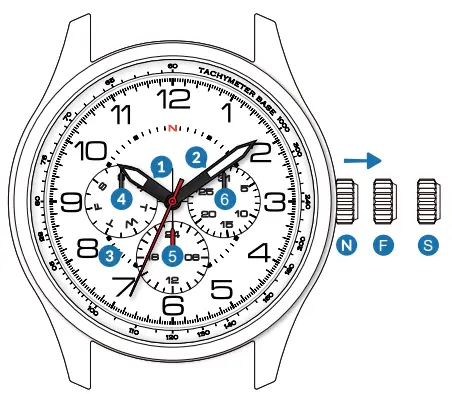
- Hour hand
- Minute hand
- Second hand
- Day hand
- 24h-hand
- Date hand
CROWN
N. Normal position
F. First click position
S. Second click position
HOW TO SET DATE AND DAY OF THE WEEK
Pull the crown out to the first click position F.
Date correction
Pull the crown out to the first position.Turn the crown counterclockwise to set the date.
Pull the crown out to the first click position S.
Day correction S.Pull the crown out to the second click position S.24h-hand will be follow Hour hand,the day hand advances to the next day
Note
– Do not set the date and the day hands between 9:00 p.m. and 4:00 a.m.
Otherwise they may not move properly.
– While setting the date and the day hands, check that they move properly in one-day increments
– It is necessary to adjust the date on the first day after a 30-day month and February.
HOW TO SET TIME
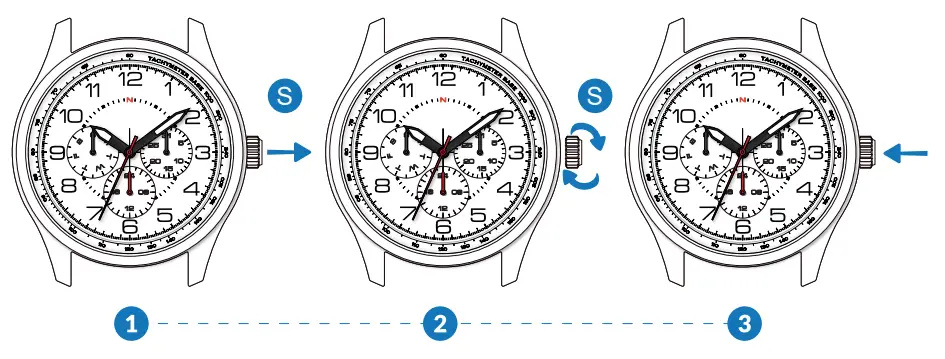 | ||
| Pull the crown out to the second position. | Turn the crown counterclockwise to set the time. | After the date has been set, push the crown back to the normal position. |
Advance setting technique
– The 24-hour hand moves correspondingly with the hour hand.
– When setting the hour hand, check that the 24-hour hand is correctly set.
– When setting the minute hand, advance it 4 to 5 minutes ahead of the desired time and then turn it back to the exact time.