Honeywell TPPLBAWA4SNNNNN Touchpoint Plus Gas Detection Controller User Guide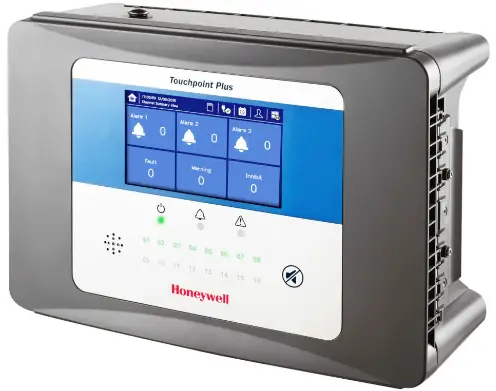
Information
Read this entire guide before installing the Touchpoint Plus, as it contains information that is essential for your safety and for the correct operation of the Touchpoint Plus.
Safety
Incorrect setup, maintenance, operation or modification of the Touchpoint Plus gas detection system or its installation may constitute a serious hazard to the health and safety of personnel and their environment. It is therefore imperative that the contents of this chapter are thoroughly understood by everyone who has access to the gas and fire detection system or its associated equipment.
Conditions of Use
This Touchpoint Plus equipment should only be operated under the following circumstances:
- By properly trained personnel.
- Under approved conditions.
- With due authorisation.
- Using approved maintenance and servicing procedures.
Packaging list
Check that your package was undamaged, and that you have received the following:
- Touchpoint Plus
- Allen Key
- Quick start guide (this document)
Go to www.honeywellanalytics.com to download the Technical Handbook, which contains full install instructions.
General Introduction
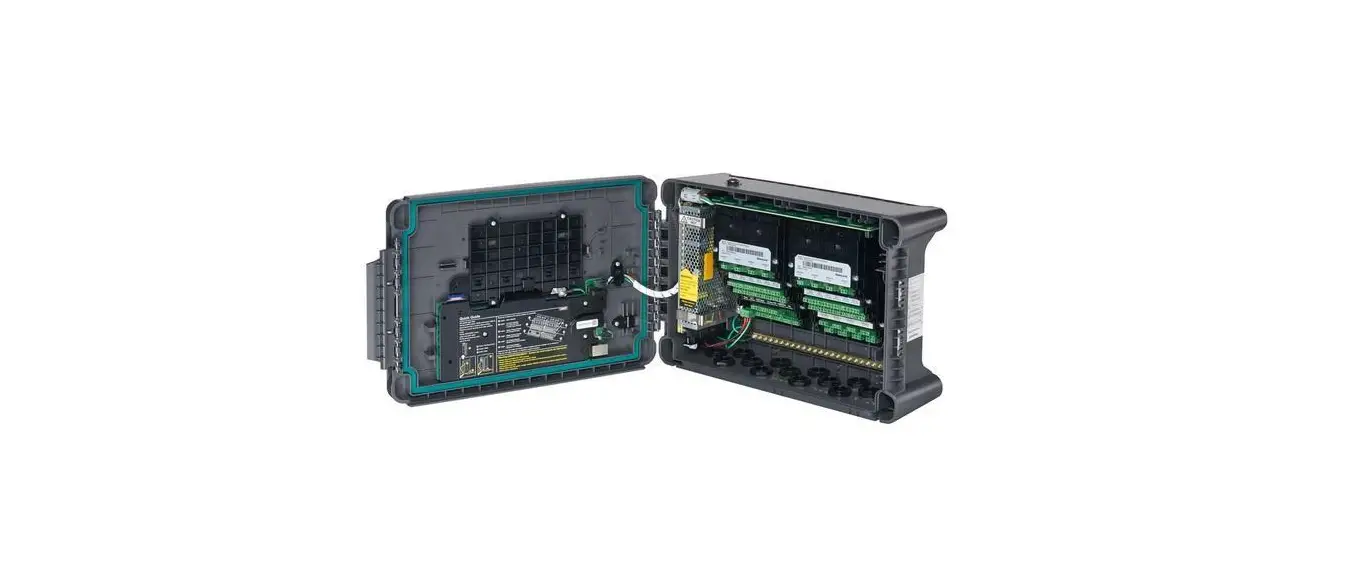
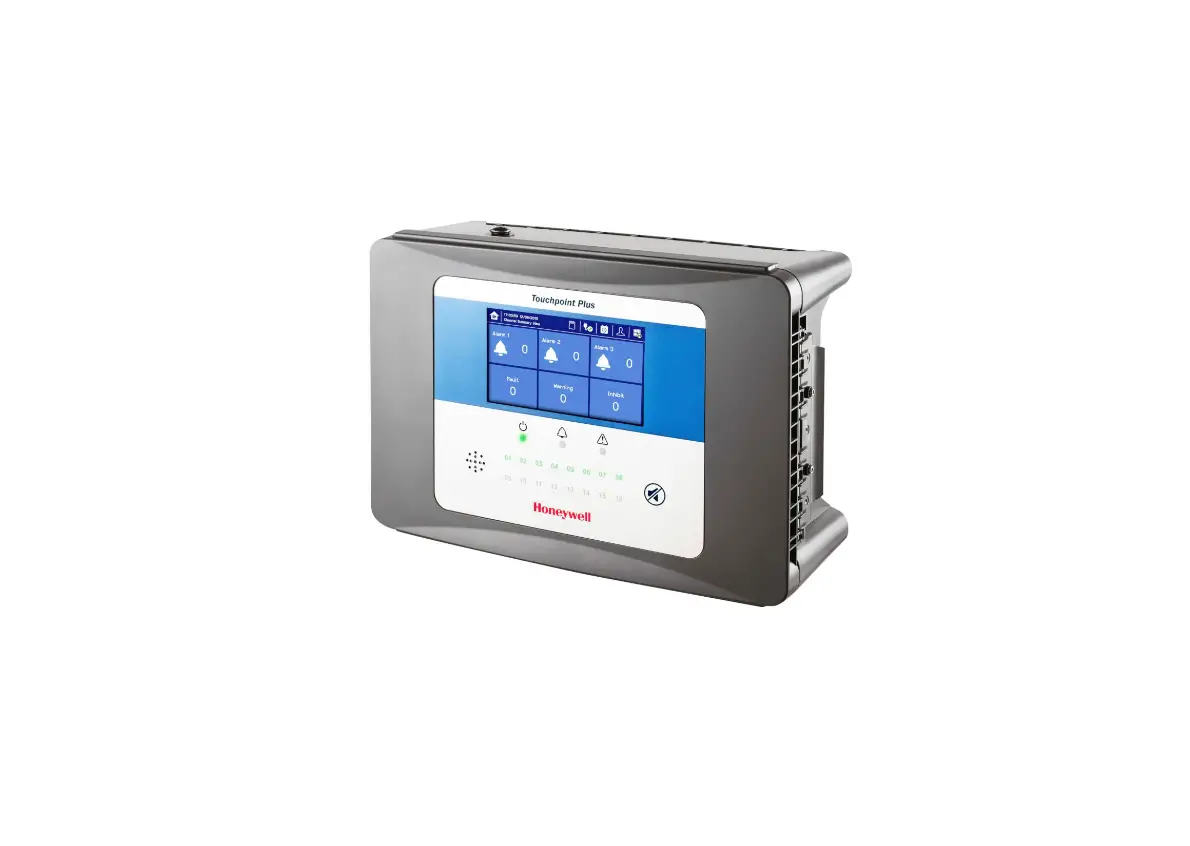
The Touchpoint Plus is an entry level (or upgrade) touch-screen digital controller for light industrial and commercial gas detection installations.
It has eight inputs, with eight inputs available through an expansion unit.
It can handle a wide range of milliamp, millivolt and catalytic sensors and analogue inputs, and it can control various outputs such as audible and visible signals and solenoid valves.
The cabinets are constructed from high–impact plastic, are rated IP65, and have fully-sealed, easy opening access. They are supplied with a wall mount bracket or can be directly mounted to any solid vertical surface or rack. Cable entry is via entry glands on the lower side.
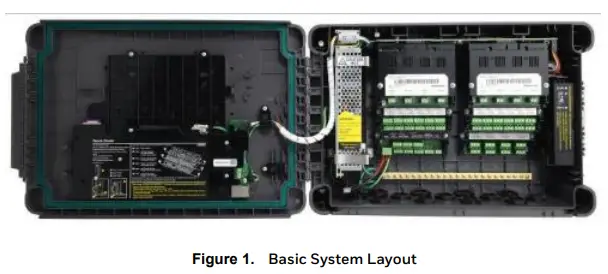
Figure 1 shows the basic layout of the Touchpoint Plus Controller:
Installation
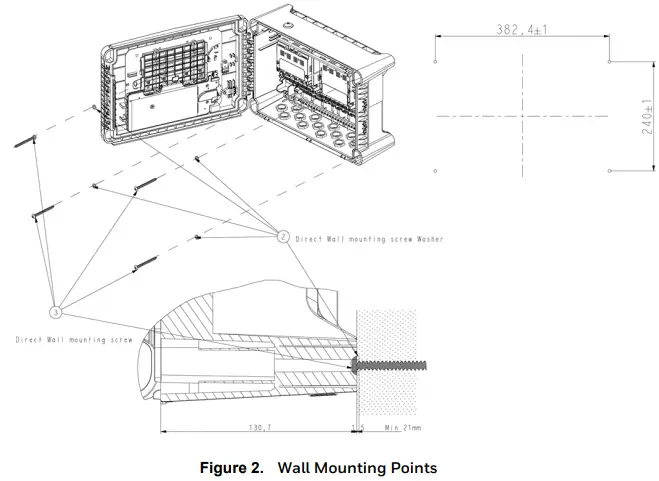
Mount the Unit Directly to the Wall
Fixings Required
Screw x 4; corrosion resistant, sized according to the fixing surface:
- Screw Head dia. < 14 mm (12.1 mm recommended)
- Screw Body dia. < 7.5 mm (6.15 mm recommended)
- Screw Length > 76.2 mm (3 in) (If using concrete anchor, > 55 mm + anchor depth)
Flat Washer x 4; corrosion resistant, 19.05 mm max. OD, to fit the screws above.
Mount the Unit Using the Optional Wall Bracket
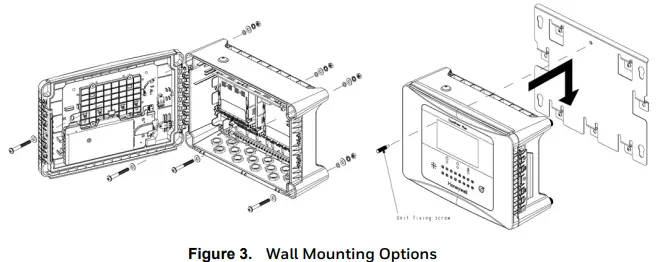
Refer to the wall mount bracket instructions (part number: TPPLOWMB).
Wiring and Connections
Power Connection
The Touchpoint Plus systems are factory set to operate at a switchable voltage of 110/220 VAC, on a single phase, 50 to 60 Hz supply. They can also be wired to DC 18 — 32 V.
Every Unit has a typical peak power consumption of less than 105W, and must be directly connected to supplies via a Main Isolator Switch that leaves protective earth (ground) permanently connected.
The circuit should incorporate a Residual Current Device or Residual Current Circuit Breaker (RCD or RCCB).
Touchpoint Plus systems are not certified for connection to domestic power supplies.
Expansion Power Module
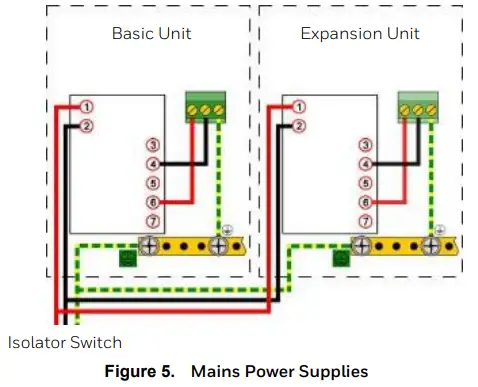
TPPL has the option to add an expansion unit that has the same power equipment and modules as the base unit except that it has no Motherboard or GUI. See Figure 5 for wiring details.
AC Power Supply
To confirm or alter the pre-set operating voltage, open the system front cover, locate the SMPS RS–150–24 transformer and, if required, change the voltage selector inserting a screwdriver at the point shown by the Voltage Selector label below:
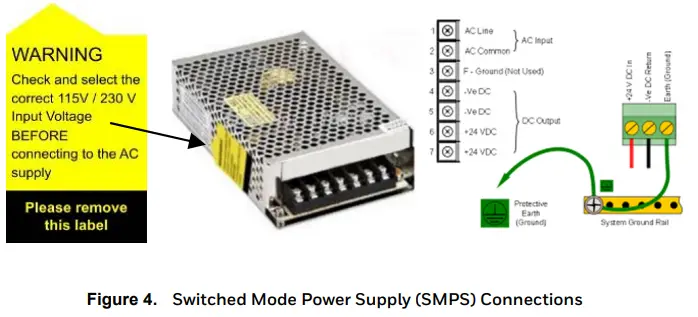
Note: Mains Earth (Ground) must only be connected to the Protective Earth (Ground) rail, and not to the SMPS.
Regional power cable wires are coloured in accordance with the following code:
| Wire | Europe | Canada | USA | Asia |
| Protective Earth (Ground) | Green + Yellow | Green | Green | Green |
| Isolated Earth (Ground) | — | Green | Green + Yellow | — |
| Neutral | Blue | White | White | Black |
| Live | Brown | Red or Black | Blue, Red, or Black | Red, Yellow, or Blue |
Table 1. Regional Power Cable Colours
Before making any electrical connections or changes ensure:
- The mains supply isolator switch and backup battery switch are in the Off position.
- The system is set up to operate at the correct voltage.
Refer to the User Manual for further information on system electrical specifications and power requirements.
Note 1: Input voltage of less than 24 VDC will fail to charge the backup battery, and the battery will discharge over time.
Note 2: Remote sensors may need their own power supplies if they exceed 15W power consumption.
DC Power Supply
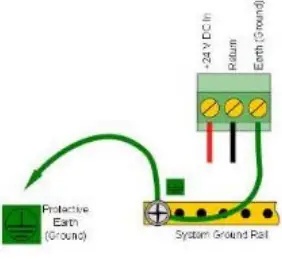
It is possible to power the Touchpoint Plus controller directly from a DC 24V supply without using AC supplies at all. However, batteries alone will not suffice as they must not drop below 22 volts.
Note: The system must still be connected to Protective Earth (Ground) when using an external DC supply.
Field Device Cables
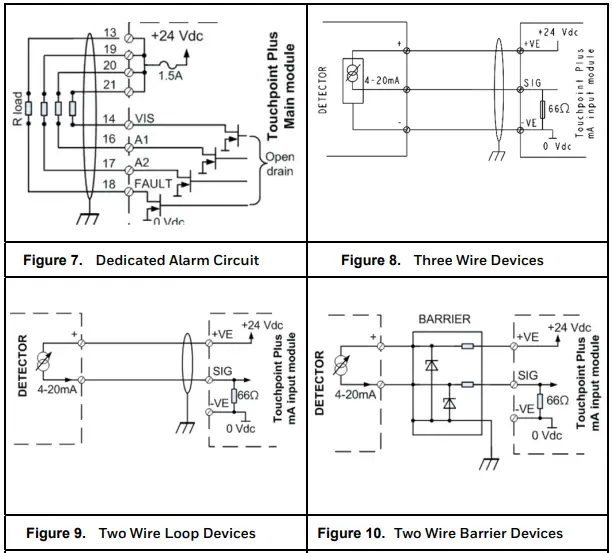
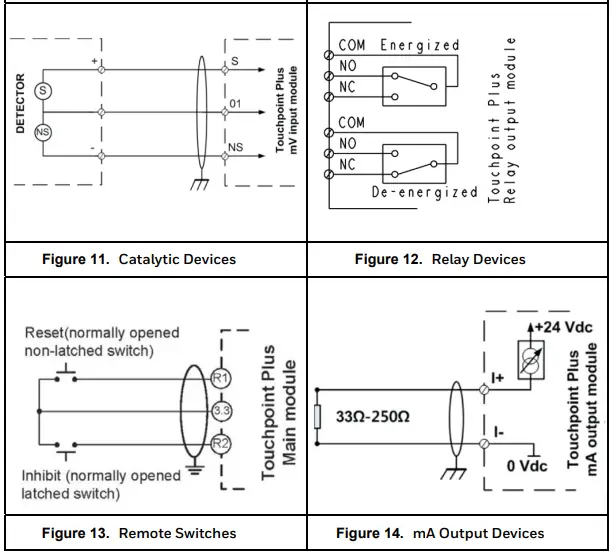
Field Device cabling (sensors, lights, solenoids, etc.) should be appropriate to the zone classification, and in accordance with the device manufacturer’s recommendations. Refer to local and national regulations where appropriate, and to the device user manual.
All sensor field cables must be screened and earthed (grounded) in order to:
- Ensure correct operation of the system
- Avoid spurious signals
- Meet European Standards for RFI and EMC
Ensure that the maximum loop resistance is not exceeded, as specified by the device manufacturer.
Take account of voltage drops due to line resistance to ensure that the correct voltage level is present at the field device, as specified by the device manufacturer.
The I/O modules will accept wire sizes to a maximum of 2.5 mm²
Main Module Connections
The Main Module controls the Touchpoint Plus and its ancillary components.
| Terminal | Label | Channel | Remarks |
| 1 | +DC | Power | +18 – 32 V |
| 2 | –DC | -V Return | |
| 3 | — | Earth / Ground | |
| 4 | NC | System State Relay 1 | Fig. 12 |
| 5 | COM | Fig. 12 | |
| 6 | NO | Fig. 12 | |
| 7 | NC | System State Relay 2 | Fig. 12 |
| 8 | COM | Fig. 12 | |
| 9 | NO | Fig. 12 | |
| 10 | NC | System Failure Relay 3 | Fig. 12 |
| 11 | COM | Fig. 12 | |
| 12 | NO | Fig. 12 | |
| 13 | +24 VDC | Visual Output | Fig. 7 |
| 14 | VIS | Fig. 7 | |
| 15 | Unused | — | |
| 16 | A1 | External Alarms | Fig. 7 |
| 17 | A2 | Fig. 7 | |
| 18 | F | Fig. 7 | |
| 19 | +24 VDC | External Alarm Power | Fig. 7 |
| 20 | +24 VDC | Fig. 7 | |
| 21 | +24 VDC | Fig. 7 | |
| 22 | 3.3 V | Remote COM/Reset/Inhibit | Fig. 13 |
| 23 | R1 | Fig. 13 | |
| 24 | R2 | Fig. 13 | |
| 25 | CAN_H | CAN | Expansion Unit Connection |
| 26 | CAN_L | Expansion Unit Connection |
Table 2. Main Module Connections
mA Input Module Connections
This is an optional module for providing up to eight mA loop inputs.
(see Technical Handbook, Ch.5.2.10)
| Terminal | Label | Input | Field Device |
| 1 | +Ve | mA input 1 | + 24 VDC |
| 2 | –Ve | 0 VDC |
| 3 | Sig | 4 – 20 mA signal | |
| 4 | +Ve | mA input 2 | + 24 VDC |
| 5 | –Ve | 0 VDC | |
| 6 | Sig | 4 – 20 mA signal | |
| 7 | +Ve | mA input 3 | + 24 VDC |
| 8 | –Ve | 0 VDC | |
| 9 | Sig | 4 – 20 mA signal | |
| 10 | +Ve | mA input 4 | + 24 VDC |
| 11 | –Ve | 0 VDC | |
| 12 | Sig | 4 – 20 mA signal | |
| 13 | +Ve | mA input 5 | + 24 VDC |
| 14 | –Ve | 0 VDC | |
| 15 | Sig | 4 – 20 mA signal | |
| 16 | +Ve | mA input 6 | + 24 VDC |
| 17 | –Ve | 0 VDC | |
| 18 | Sig | 4 – 20 mA signal | |
| 19 | +Ve | mA input 7 | + 24 VDC |
| 20 | –Ve | 0 VDC | |
| 21 | Sig | 4 – 20 mA signal | |
| 22 | +Ve | mA input 8 | + 24 VDC |
| 23 | –Ve | 0 VDC | |
| 24 | Sig | 4 – 20 mA signal |
Table 3. mA Input Module Connections
mV Input Module Connections
This is an optional module for mV CAT sensor inputs.
(see Technical Handbook, Ch.5.2.11)
| Terminal | Label | Input | Field Device |
| 1 | S | mV input 1 | Sensitive (+) |
| 2 | 01 | Signal | |
| 3 | NS | Sensitive (–) | |
| 4 | S | mV input 2 | Sensitive (+) |
| 5 | 01 | Signal | |
| 6 | NS | Sensitive (–) | |
| 7 | S | mV input 3 | Sensitive (+) |
| 8 | 01 | Signal | |
| 9 | NS | Sensitive (–) | |
| 10 | S | mV input 4 | Sensitive (+) |
| 11 | 01 | Signal | |
| 12 | NS | Sensitive (–) | |
| 13 | S | mV input 5 | Sensitive (+) |
| 14 | 01 | Signal | |
| 15 | NS | Sensitive (–) | |
| 16 | S | mV input 6 | Sensitive (+) |
| 17 | 01 | Signal | |
| 18 | NS | Sensitive (–) | |
| 19 | S | mV input 7 | Sensitive (+) |
| 20 | 01 | Signal | |
| 21 | NS | Sensitive (–) | |
| 22 | S | mV input 8 | Sensitive (+) |
| 23 | 01 | Signal | |
| 24 | NS | Sensitive (–) |
Table 4. mV Input Module Connections
Dual Input Module
This is an optional module for providing 2 or 4 x mA Loop + 2 or 4 x mV CAT inputs.
| Terminal | Label | Input | Field Device |
| 1, 7, 4, 10 | +Ve | mA Inputs 1 – 4 | + 24 VDC |
| 2, 5, 8, 11 | –Ve | 0 VDC | |
| 3, 6, 9, 12 | Sig | 4 – 20 mA signal | |
| 13, 16, 19, 22 | S | mV Inputs 1 – 4 | Sensitive (+) |
| 14, 17, 20, 23 | 01 | Signal | |
| 15, 18, 21, 24 | NS | Sensitive (–) |
Table 5. Relay Output Module Connections
Modbus RTU Option
This is an option that uses Modbus RTU (RS-485) control protocols.
Full details are given in the Touchpoint Plus Modbus Installation Guide.
Relay Output Module Connections
This is an optional module providing 12 relay outputs.
(see Technical Handbook, Ch.5.2.14)
| Terminal | Label | Output |
| 1 | NC | Relay 1 |
| 2 | COM | |
| 3 | NO | |
| 4 | NC | Relay 2 |
| 5 | COM | |
| 6 | NO | |
| 7 | NC | Relay 3 |
| 8 | COM | |
| 9 | NO | |
| 10 | NC | Relay 4 |
| 11 | COM | |
| 12 | NO | |
| 13 | NC | Relay 5 |
| 14 | COM | |
| 15 | NO | |
| 16 | NC | Relay 6 |
| 17 | COM | |
| 18 | NO | |
| 19 | NC | Relay 7 |
| 20 | COM | |
| 21 | NO | |
| 22 | NC | Relay 8 |
| 23 | COM | |
| 24 | NO | |
| 25 | NC | Relay 9 |
| 26 | COM | |
| 27 | NO | |
| 28 | NC | Relay 10 |
| 29 | COM | |
| 30 | NO | |
| 31 | NC | Relay 11 |
| 32 | COM | |
| 33 | NO | |
| 34 | NC | Relay 12 |
| 35 | COM | |
| 36 | NO |
Table 6. Relay Output Module Connections
mA Output Module
This is an optional module for providing isolation mA loop output (see Technical Handbook, Ch.5.2.13)
| Terminal | Label | Output |
| 1 | I+ | mA Out 1 |
| 2 | I– | |
| 3 | I+ | mA Out 2 |
| 4 | I– | |
| 5 | I+ | mA Out 3 |
| 6 | I– | |
| 7 | I+ | mA Out 4 |
| 8 | I– |
Table 7. mA Output Module Connections
Field Device Circuit Diagrams
Backup Battery Option
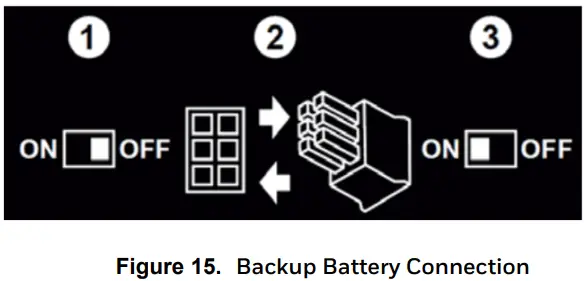
The optional backup battery is shipped in sleep mode. You must read the manual before connecting it to the system.
Technical Specifications
| General Specifications | |
| Capacity | Up to 8 inputs Base Unit, + 8 inputs with Expansion Unit |
| Type of Inputs | 2 or 3 wires, mA, mV |
| Size (Wall Units only) | 426 mm x 300 mm x 156 mm |
| Weight | 9 Kg (20 lbs) Base Unit, 8.5 Kg (18.7 lb) Expansion Unit |
| User Interface | |
| Display | 7 inch Colour LCD Touch Screen GUI |
| Visual Indicators | 3 LED Master Indicators and 16 LED inputs, Green for Normal, Yellow for Fault/ Inhibit, and Red for Alarm |
| Audible Alarm | 70 dB @ 1 metre (40 ins) |
| Button | One alarm mute and reset membrane button |
| Languages | Selectable English, Chinese (Simplified), Dutch, French, German, Italian, Portuguese, Russian, Spanish |
| Power Supply | |
| Power AC | AC 110/220 V, 50 — 60 Hz (Manual Voltage Selection via SMPS) |
| Power DC | DC 18 — 32 V (24 VDC Nominal). DC 24 – 32 V advised |
| Power Consumption | 105 W max (including field devices), 210 W max with Expansion Unit |
| Environmental | |
| Operating Temperature | –10 to +55 °C (+14 to +131 °F) continuous operation |
| Storage Temperature | Instrument –25 to +60 °C (–13 to +140 °F) |
| Humidity Range | 5 – 95 %RH non-condensing |
| Ingress Protection | IP65 (wall mounted), NEMA 4X indoors only |
| I/O Capacities | |
| mV Input | Pellistor type Catalytic gas sensors (HA models). 2, 4, or 8 channels with Base Unit or 10, 12, or 16 channels with Expansion Unit |
| 4 – 20 mA Input | 2 or 3 wire, SOURCE. 2, 4, or 8 channel module |
| 4 – 20 mA Output | 4 or 8 repeated 0 – 22 mA outputs, 12 or 16 with expansion unit. (4 – 20 mA = 0 – 100 %FSD) |
| Relay Output | Configurable time delay On/Off option. 1.7 A @ 250 VAC, 1.7 A @ 30 VDC, 12 relays per module |
| Certifications | |
| Electrical Safety | Compliant with CE, EN 50270:2015, UL/ IEC/EN 61010-1, UL 508 |
| Performance | EN 60079-29-1, EN 50104, EN 45544-1/2/3 and EN 50271 IEC/EN61508:2010 and SIL2 certification CSA 22.2 no.152 |
| Marine | MED (Item No.: 3.54) |
| Hazardous Approval | ISA 12.12.01–2013 (Class 1, Div 2, Groups A,B,C,D & T4) CSA C22.2 No. 213–M1987 |
| Others | |
| Backup Batteries | 22.2 V Lithium Ion, 2600 mAh. Circa 30 mins Buffer time when fully charged. |
| Data Logging | Configuration backups and event / TWA logging onto SD Card. Can be transferred to PC or Printer (.bin and .csv) |
| Communication | Modbus RTU & TCP, Web Monitoring |
Default Password
The default access password for all levels is “TPPL”, but it is the User’s responsibility to immediately change the passwords as to avoid unauthorized access. Full instructions are contained in the Technical Handbook, and Honeywell will not accept any liability caused by failing to follow these instructions.
Find out more:
www.honeywellanalytics.com
Please note:
While every effort has been made to ensure accuracy in this publication, no responsibility can be accepted for errors or omissions. Data may change, as well as legislation and you are strongly advised to obtain copies of the most recently issued regulations, standards and guidelines. This publication is not intended to form the basis of a contract.
Part No. 3011M5000_EN
H_MAN0985
Iss.4.0_02/2019 HAA190006
© 2019 Honeywell Analytics

 Honeywell - The Future Is What We Make It
 Honeywell Analytics