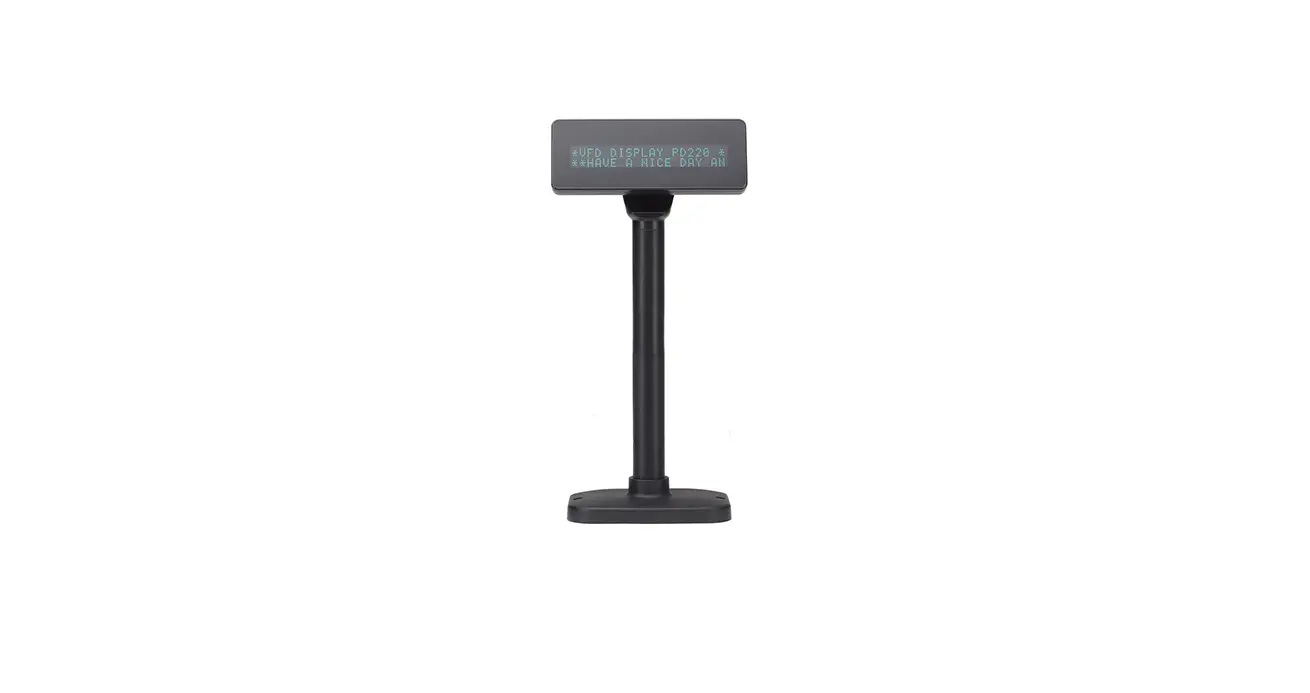

elzabhellas LD220 VFD PD220V-II Vacuum Fluorescent Displays
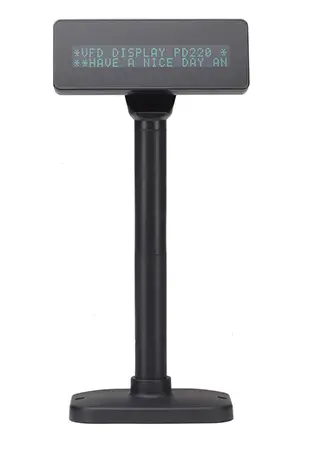
Introduction
Features
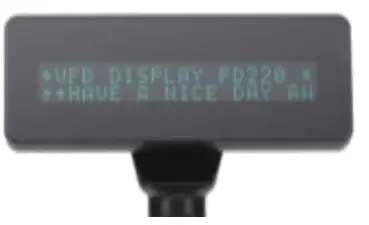
- The customer display is Vacuum Fluorescent Displays which display 20 columns and 2 lines, each columns is 5×7 dots. ‰Blue-green fluorescent color is easy on the eyes.
- The display panel is movable so that it can be adjusted for the best viewing angle.
- The customer display have different height by adjusting the support.
- The interface of customer display is RS-232, with baud rates select from 9600 or 19200 bps.
- The customer display have provided the pass through function to reduce the cable connection.
- The user defined and international character sets are the standard of customer display.
- Supports 10 command modes, with EPSON command mode set as default
- Supports power from 5V to 12V, it prevents any mindless use of improper power input to cause malfunction
- Easy configure & various settings through its free powerful set up software i.e. Welcome message and plenty of code pages setting and others setting.
- Control boards design in top panel to prevent water or wet counter surface may damage from the bottom.
- 2nd Choice round-shape mini base for space-saving, stable and ingenious
- Panel is structured to easy-detachable and available for wall mounting install and OEM
Attention
- This specification shall apply only to the product(s) coming along with this manual inside.
- This manual may not apply to the previous or later product(s).
- This specification may be modified without any notice. If it is necessary for “customers” to have a latest manual about specification, please inquire your suppliers.
Outline
The customer display outline has included of three parts: the panel, the support, and the interface adapter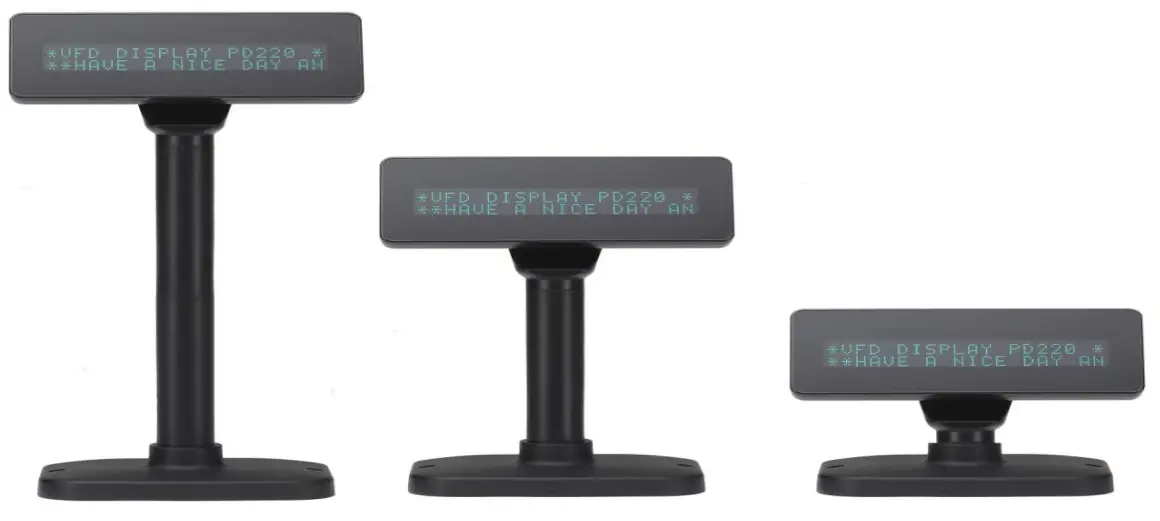 The standard VFD customer display should include following accessories:
| Item | Description | Dimension (mm) | Q’ty |
| 1 | Panel of customer display | 220(L)*87(W)*50(H) | 1 |
| 2 | Support | 130 | 2 |
| 3 | D-SUB 9PIN RS-232 Cable | 1600 | 1 |
|
4 | +5V PC 4P Plug Power Kit or PS/2 Power Kit or USB Power Kit or 100V~240V Universal Adapter (5V/2A) or 110V US or 230V Europe 2P Adapter |
100(W) x 59(D) x 33(H) 76(W) x 51(D) x 31(H) |
1 |
| (5V/2A) |
Above accessories may be different due to customers’ requirement when delivery.
General Specification
Tube Display
| Customer Display | Vacuum Fluorescent Display Blue Green |
| Display Pattern | 5 x 7 Dot Matrix |
| Brightness | 350~700 cd/m² |
| Character Type | 95 Alphanumeric & 32 International Characters |
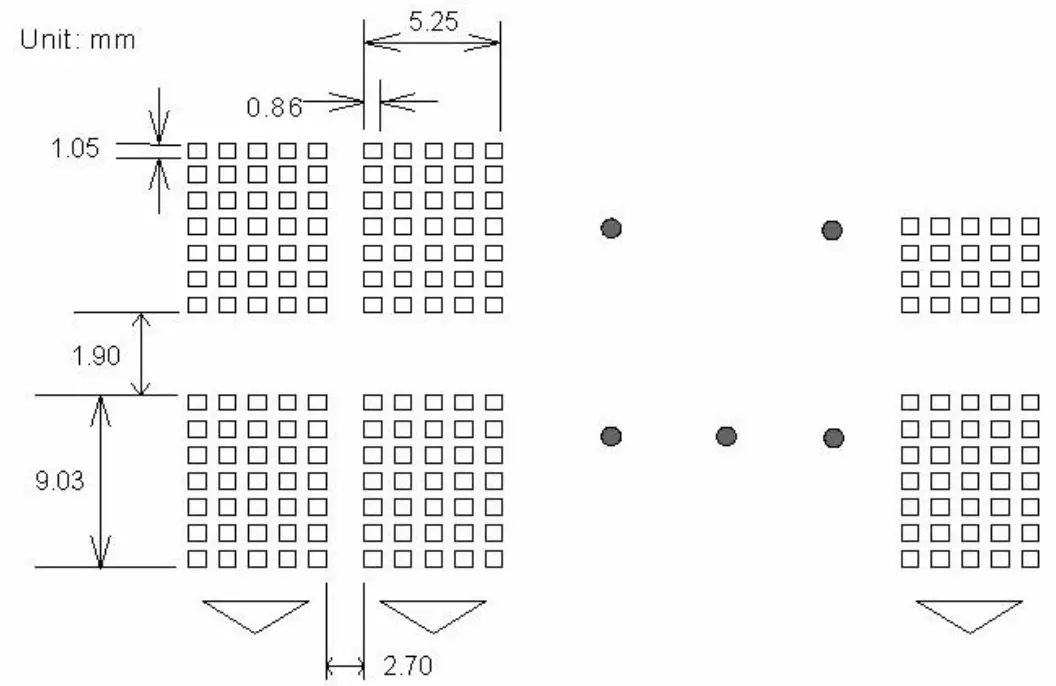
| Character Size | 5.25 mm (W) x 9.03 mm (H) |
| Character Number | 40 (20 columns x 2 lines) |
| Character Pitch | Refer the figure 2.1 |
 Electricity
| Central Control Unit | CPU : STC ROM : 64K ROM RAM : 32K SRAM |
| Speed | CPU : 22 MHz |
| Connector | 4 PIN (Female) USB Connector 9 PIN D-SUB Connector |
| Power Source | ONLY USB DC + 5V |
| Power Consumption | 3 Watts Average (Maximum 15 Watts) |
Overall Dimensions
| Dimension of Panel : | 220(L)* 87(W)* 50(H) mm |
| Dimension of Support One Support Two Support | One Support: 217* 106* 248 mm Two Support: 217* 106* 378 mm |
| Dimension of Base | 217(L)* 106(W)* 33(H) mm |
| Viewing Angle | 0°~60° |
| Horizontal Rotation | 180° |
| Weight | 980g |
Environment
| Operating Temperature | +10℃ to +40℃ |
| Storage Temperature | -10℃ to +50℃ |
| Relative Humidity | 0% to 90% RH |
Driver Interface
Interface: RS232
User Setting
The default protocol is 9600 bps, non-parity, 8 data bits, 1 stop bit and with DTR/DSR control.
 Function Setting
 Function Setting
No switch, all user setting is set up by the default command set or manufacturer
- Baud Rate Select
Function Description Baud Rate (bps) 9600(default) 19200 - Command Type Select(Automatic identification)
Function Description Software Defined Command Type Hex Code LD220 00 EPSON POS D101 01 UTC Standard 02 UTC Enhance 03 AEDEX 04 ADM788 05 DSP800 06 CD5220 07 EMAX 08 LOGIC CONTEOL 09 - International Character Set
| Function Description | |
| International Character Set (Code 20H-7FH) | Code Table (Code 80H-FFH) |
| U.S.A. | PC-437 (USA) (Standard European) |
| FRANCE | PC-850 (Multilingual) |
| GERMANY | PC-850 (Multilingual) |
| U.K. | PC-850 (Multilingual) |
| DENMARK I | PC-850 (Multilingual) |
| SWEDEN | PC-850 (Multilingual) |
| ITALY | PC-850 (Multilingual) |
| SPAIN | PC-850 (Multilingual) |
| JAPAN | Katakana |
| NORWAY | PC-865 (Nordic) |
| DENMARK II | PC-850 (Multilingual) |
| SLAVONIC/RUSSIAN | PC-437 (USA) (Standard European) |
| RUSSIAN | |
| GREEK | |
| CZECH | |
| LATIVAIN | |
Interface
Specifications:
- Data Transmission Method: Asynchronous Serial.
- Handshaking: DTR/DSR Control
- Default Protocol: 9600/19200 bps, non-parity, 8 data bits, 1 stop bit.
Communication Protocol
Receive Data.
The DTR signal is as follows:
- [HIGH] This indicates that the display isn’t ready to receive data. It depend on the following conditions:
- The period from when the power is turned on to when the printer first becomes ready to receive data.
- When the remaining space in the receiving buffer becomes 128 bytes or less.
- When the DTR signal of the printer is HIGH when the printer is selected using the command.
- [LOW] This indicates that the display is ready to receive data. It depends on the following conditions:
- When the printer first becomes ready to receive data after power-on. ‰When the remaining space in the receiving buffer becomes 128
bytes or more. When the DTR signal of the printer is LOW when the printer is selected using the command.
- When the printer first becomes ready to receive data after power-on. ‰When the remaining space in the receiving buffer becomes 128
Transmit Data
After confirming the DSR is LOW, data is transmitted to the printer.
Interface Conversion Adapter
The interface adapter section has connectors for the display panel, the printer, the power supply, and host computer. All the data transmitted from the host computer will be received by the display. If this data is for the display, the data will be processed, and if it is for the printer, it will be transmitted to the printer. Whether the data is for the display or the printer can be switched using the peripheral device selection command.
 Connector for Host Computer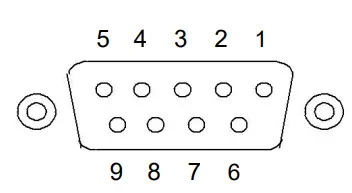
| Pin No. | Signal | I/O | Description |
| 1 | NC | No Connection | |
| 2 | TXD- | OUTPUT | Transmit Data |
| 3 | RXD | INPUT | Receive Data |
| 4 | DSR | INPUT | Data Set Ready |
| 5 | GND | Power GND | |
| 6 | DTR | OUTPUT | Data Terminal Ready |
| 7 | CTS | Clear To Send | |
| 8 | RTS | Request to Send | |
| 9 | By Selection | N.C. or +5V ~ +12V |
Passthru Mode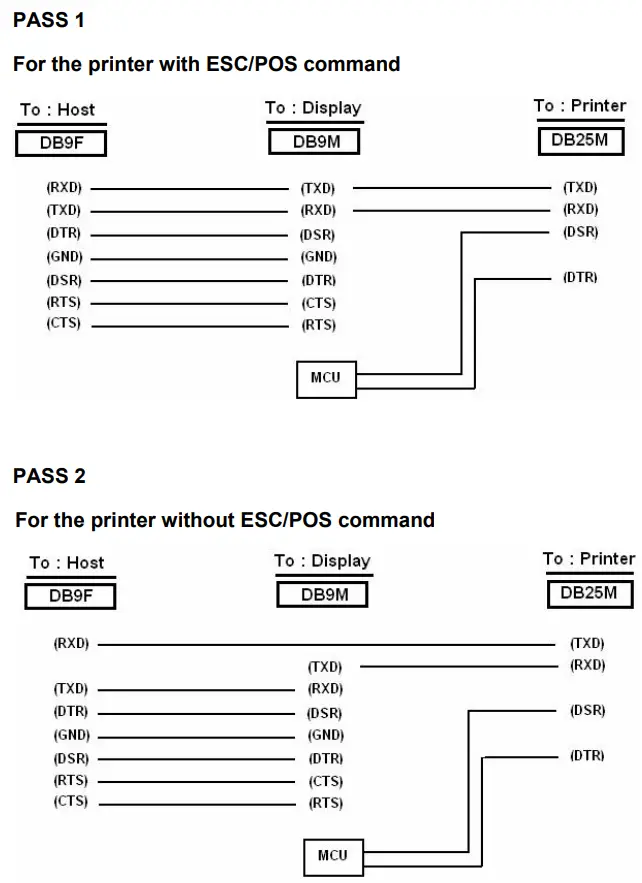
Command Description
Command Set(Automatic identification)
LD220 Command Mode
| Command | Hex | Function Description |
| HT | 09 | Move cursor right (Only valid in overwrite mode) |
| BS | 08 | Move cursor left (Only valid in overwrite mode) |
| CR | 0D | Move cursor to left-most position (Only valid in overwrite mode) |
| ESC @ | 1B 40 | Initialize customer display to initial state, clears display buffer, set display mode to shift and sets current display row to upper row |
| ESC U | 1B 55 | Select upper row as current row (Initial default) |
| ESC D | 1B 44 | Select lower row as current row |
| ESC A n | 1B 41 n | Sets customer display disable or enable n=D, Disable ; n=E, Enable |
| ESC C r c | 1B 43 r c | Move cursor to specified position (Only valid in overwrite mode) r=U, upper row ; r=D, lower row 1≦c≦20 (column number) |
| ESC E r n | 1B 45 r n | Set special effect or display mode of specified row |
| ESC R n | 1B 52 n | Set international font sets ( Please refer International Font Set Table ) |
| ESC = n | 1B 3D n | Select peripheral n=1, printer ; n=2, display ; n=3, printer & display |
| ESC % n | 1B 25 n | Set font pattern n=0, selected ; n=1, canceled |
| ESC & n s [p] | 1B 26 n s data | Define user font pattern n=code for first character s=code for last character data=5 bytes required for each character |
(REMARK)*Using commands “ESC E r n”, the value (Hex) of the parameter
- r 58h=all rows
- 55h=upper row
- 44h=lower row
- n special function, the value is one of
- 30h=shift mode (Default display mode) 31h=rotation mode
- 32h=blink mode
- 33h=clear this row and switch to shift mode 34h=overwrite mode
- 35h=vertical mode
* International Font Set Table
| n (Hex) | International Font Set | n (Hex) | International Font Set |
| 30h 31h | U.S.A GERMANY | 32h 33h | FRANCE JAPAN |
EPSON Command Mode
| Command | Hex | Function Description |
| HT | 09 | Move cursor right |
| BS | 08 | Move cursor left |
| US LF | 1F 0A | Move cursor up |
| LF | 0A | Move cursor down |
| US CR | 1F 0D | Move cursor to right-most position |
| CR | 0D | Move cursor to left-most position |
| HOM | 0B | Move cursor to home position |
| US B | 1F 42 | Move cursor to bottom position |
| US $ x y | 1F 24 x y | Move cursor to specified position 1≦x(column)≦20 ; 1≦y(row)≦2 |
| US C n | 1F 43 n | Select/cancel cursor display n=0, canceled ; n=1, selected |
| CLR | 0C | Clear display screen |
| CAN | 18 | Clear cursor line |
| US X n | 1F 58 n | Brightness adjustment 1≦n≦4 |
| US E n | 1F 45 n | Blink display screen 0≦n≦255 (n*50msec) ON / (n*50msec) OFF n= 0, blinking is canceled n=255, display is turned off |
| ESC @ | 1B 40 | Initialize display |
| ESC t n | 1B 74 n | Select character code table 0≦n≦5 ( Please refer “Chapter 5” ) |
| ESC R n | 1B 52 n | Select international character set ( Please refer International Font Set Table ) |
| US r n | 1F 72 n | Select/cancel reverse character n=0, canceled ; n=1, selected |
| US MD1 | 1F 01 | Specify overwrite mode |
| US MD2 | 1F 02 | Specify vertical scroll mode |
| US MD3 | 1F 03 | Specify horizontal scroll mode |
| US . n | 1F 2E n | Specify period display n= display character code |
| US , n | 1F 2C n | Specify comma display n= display character code |
| US ; n | 1F 3B n | Specify semicolon (period+comma) display n= display character code |
| US # n m | 1F 23 n m | Specify display annunciator,, turn the annunciator at “m” column on or off n=0,1 (Off, On) ; 0≦m≦20 |
| ESC & s n m [a(pl..p5)] (m-n+1) | 1B 26 s n m [a(pl..p5)](m-n+1) | Define download characters s=1 ; 32≦n≦m ≦126 ; a=5 ( p1..p5 = pattern1..pattern5 ) |
| ESC ? n | 1B 3F n | Cancel user-defined characters 32≦n≦126 (n=character code) |
| ESC % n | 1B 25 n | Select/cancel download character set n=0, canceled ; n=1, selected |
| ESC W n s (x1 y1 x2 y2) | 1B 57 n s (x1 y1 x2 y2) | Specify/cancel the window range n=1,2,3,4 (four windows) ; s=0,1 (disable, enable) 1≦x1≦x2≦20 (column) ; 1≦y1≦y2≦2 (row) |
| ESC = n | 1B 3D n | Select peripheral device n=1, printer ; n=2, display ; n=3, printer & display |
| US : | 1F 3A | Set starting/ending position of macro definition |
| US ^ n m | 1F 5E n m | Execute and quit macro 0≦(n,m)≦255 n: specifies the time interval for display of characters in units of [n* 50msec] m: specifies the interval of macro execution every [m*50msec] |
| US @ | 1F 40 | Execute self-test |
| US T h m | 1F 54 h m | Display time :0≦ h≦ 23 ; 0≦ m≦59 |
| US U | 1F 55 | Display of time counter |
* International Font Set Table
| n (Hex) | International Font Set | n (Hex) | International Font Set |
| 00h 01h 02h 03h 04h | U.S.A. FRANCE GERMANY U.K. DENMARK I | 06h 07h 08h 09h 0Ah | ITALY SPAIN JAPAN NORWAY DENMARK II |
| 05h | SWEDEN | SLAVONIC/RUSSIA |
※ Specify decimal point, comma, semicolon, annunciator*
- US . n (Decimal Point) / US , n (Comma) / US ; n (Semicolon):
The displayed character codes are form 32(20h) to 127(7Eh), and 128(80h) to 255(FFh) in the character code table. The period/comma/semicolon displayed only for n. The period is not displayed for the subsequent display characters. - US # n m (annunciator):
[ range ] n = 0(00h) or 1(01h) / m = 0(00h)~20(14h)
[ notes ] When n= 0, the annunciator at column m is turned off.
When n= 1, the annunciator at column m is turned on. ”m” specify column number (the most left column is column 1) at which annunciator to be turned on/off is placed.
When m = 0, all annunciators are turned on or off. Once an annuciator(s) is turned on, it remains on until turned off by this command, the ESC@ or US@ command is executed, or the power is turned OFF.
[example]:- To turn on the annunciator at the third column:[n = 01h ], [ m = 03h ]
- To turn off all the annunciators: [n = 00h ], [ m = 00h ]
Above commands relating decimal point, comma, semicolon, and annunciator may not be available due to hardware limit of display tube.
| ESC % n | 1B 25 n | Select/cancel download character set n=0, canceled ; n=1, selected |
| ESC W n s (x1 y1 x2 y2) | 1B 57 n s (x1 y1 x2 y2) | Specify/cancel the window range n=1,2,3,4 (four windows) ; s=0,1 (disable, enable) 1≦x1 ≦ x2 ≦20 (column) ; 1≦y1 ≦y2 ≦2 (row) |
| ESC = n | 1B 3D n | Select peripheral device n=1, printer ; n=2, display ; n=3, printer & display |
| US : | 1F 3A | Set starting/ending position of macro definition |
| US ^ n m | 1F 5E n m | Execute and quit macro 0≦(n,m)≦255 n: specifies the time interval for display of characters in units of [n* 50msec] m: specifies the interval of macro execution every [m*50msec] |
| US @ | 1F 40 | Execute self-test |
| US T h m | 1F 54 h m | Display time 0≦h≦23 ; 0≦m ≦59 |
| US U | 1F 55 | Display of time counter |
* International Font Set Table
| n (Hex) | International Font Set | n (Hex) | International Font Set |
| 00h 01h 02h 03h 04h | U.S.A. FRANCE GERMANY U.K. DENMARK I | 06h 07h 08h 09h 0Ah | ITALY SPAIN JAPAN NORWAY DENMARK II |
| 05h | SWEDEN | SLAVONIC/RUSSIA |
Specify decimal point, comma, semicolon, annunciator*
- US . n (Decimal Point) / US , n (Comma) / US ; n (Semicolon):
The displayed character codes are form 32(20h) to 127(7Eh), and 128(80h) to 255(FFh) in the character code table. The period/comma/semicolon displayed only for n. The period is not displayed for the subsequent display characters. - US # n m (annunciator):
[ range ] n = 0(00h) or 1(01h) / m = 0(00h)~20(14h)
[ notes ] When n= 0, the annunciator at column m is turned off. - When n= 1, the annunciator at column m is turned on. ”m” specify column number (the most left column is column 1) at which annunciator to be turned on/off is placed.
- When m = 0, all annunciators are turned on or off.
Once an annuciator(s) is turned on, it remains on until turned off by this command, the ESC@ or US@ command is executed, or the power is turned off.
[example]: To turn on the annunciator at the third column:- [n = 01h ], [ m = 03h ]
- To turn off all the annunciators:[n = 00h ], [ m = 00h ]
Above commands relating decimal point, comma, semicolon, and annunciator may not be available due to hardware limit of display tube.
UTC Standard Command Mode
| Command | Hex | Function Description |
| BS | 08 | Back space |
| HT | 09 | Horizontal tab |
| LF | 0A | Line feed |
| CR | 0D | Carriage return |
| DC0 p | 10 p | Move cursor to specified position, 0≦p≦39 (Please refer Row Character Position Chart ) |
| DC1 | 11 | Over write display mode |
| DC2 | 12 | Vertical scroll mode |
| DC3 | 13 | Cursor on |
| DC4 | 14 | Cursor off |
| ESC d | 1B 64 | Change to UTC enhanced mode |
| US | 1F | Clear display |
Row Character Position Chart (Decimal)
| Row1 Row2 | 0 | 1 | 2 | 3 | 4 | 5 | 6 | 7 | 8 | 9 | 10 | 11 | 12 | 13 | 14 | 15 | 16 | 17 | 18 | 19 |
| 20 | 21 | 22 | 23 | 24 | 25 | 26 | 27 | 28 | 29 | 30 | 31 | 32 | 33 | 34 | 35 | 36 | 37 | 38 | 39 |
Row Character Position Chart (Hex)
| Row1 Row2 | 00 | 01 | 02 | 03 | 04 | 05 | 06 | 07 | 08 | 09 | 0A | 0B | 0C | 0D | 0E | 0F | 10 | 11 | 12 | 13 |
| 14 | 15 | 16 | 17 | 18 | 19 | 1A | 1B | 1C | 1D | 1E | 1F | 20 | 21 | 22 | 23 | 24 | 25 | 26 | 27 |
UTC Enhance Command Mode
| Command | Hex | Function Description |
| ESC u A..CR | 1B 75 41 [data x 20] 0D | Upper line display |
| ESC u B..CR | 1B 75 42 [data x 20] 0D | Bottom line display |
| ESC u D..CR | 1B 75 44 [data x 45] 0D | Upper line message scroll continuously |
| ESC u E..CR | 1B 75 45 hh ‘:’ mm 0D | Set and display 24 hour time 0≦h ,m≦9 |
| ESC u F..CR | 1B 75 46 [data x 45] 0D | Upper line message scroll once pass |
| ESC u H..CR | 1B 75 48 n m 0D | Change attention code 32≦n ,m ( Default attention code n=1Bh, m=75h ) |
| ESC u 1..CR | 1B 75 49 [data x 40] 0D | Two line display |
| ESC RS..CR | 1B 0F 0D | Change to UTC standard mode |
AEDEX Command Mode
| Command | Hex | Function Description | ||
| ! | # | 1..CR | 21 23 31 [data x 20] 0D | Upper line display |
| ! | # | 2..CR | 21 23 32 [data x 20] 0D | Bottom line display |
| ! | # | 4..CR | 21 23 34 [data x 45] 0D | Upper line message scroll continuously |
| ! | # | 5..CR | 21 23 35 hh ‘:’ mm 0D | Set and display 24 hour time 0≦h ,m≦9 |
| ! | # | 5 CR | 21 23 35 0D | Display 24 hour time |
| ! | # | 6..CR | 21 23 36 [data x 45] 0D | Upper line message scroll once pass |
| ! | # | 8..CR | 21 23 38 n m 0D | Change attention code 32≦n ,m ( Default attention code n=”!”, m=”#” ) |
| ! | # | 9..CR | 21 23 39 [data x 40] 0D | Two line display |
ADM788 Command Mode
| Command | Hex | Function Description |
| CLR | 0C | Clear display |
| CR | 0D | Carriage return |
| SLE1 | 0E | Clear up line and move cursor to upper line left most end |
| SLE2 | 0F | Clear low line and move cursor to lower line left most end |
| DC0 | 10 n | Set period to upper line last n position 1≦n≦7 |
| DC1 | 11 n | Set line blinking n=1, upper line n=2, lower line |
| DC2 | 12 n | Clear line blinking n=1, upper line n=2, lower line |
| SF1 | 1E | Clear field 1 and move cursor to field 1 fast position |
| SF2 | 1F | Clear field 2 and move cursor to field 2 fast position |
DSP800 Command Mode
| Command | Hex | Function Description |
| EOT SOH I n ETB | 04 01 49 n 17 | Select international character set ( Please refer International Font Set Table ) |
| EOT SOH P n ETB | 04 01 50 n 17 | Move cursor to specified position 49≦n≦88 |
| EOT SOH C n m ETB | 04 01 43 n m 17 | Clear display range from n position to m position and move cursor to n position 49≦ n≦ m≦88 |
| EOT SOH S n ETB | 04 01 53 n 17 | Save the current displaying data (40 characters) to n’th layer for demo display 1≦n≦3 ( n specify the layer 1, 2, or 3 ) |
| EOT SOH D n m ETB | 04 01 44 n m 17 | Display the saved data 1≦n≦3 ( n specify the layer 1, 2, or 3 ) “m” can be ignored |
| EOT SOH A n ETB | 04 01 41 n 17 | Brightness adjustment 1≦n≦4 |
| EOT SOH = n ETB | 04 01 3D n 17 | Select peripheral device n=1, printer ; n=2, display |
| EOT SOH % ETB | 04 01 25 17 | Initialize display |
* International Font Set Table
| n (Hex) | International Font Set |
| 30h 31h 32h 33h 34h 35h 36h 37h 38h 39h 3Ah XXh | U.S.A. FRANCE GERMANY U.K. DENMARK I SWEDEN ITALY SPAIN JAPAN NORWAY DENMARK II SLAVONIC/RUSSIA RUSSIAN GREEK CZECH |
| LATIVAIN |
CD5220 Command Mode
| Command | Hex | Function Description |
| ESC DC1 | 1B 11 | Overwrite mode |
| ESC DC2 | 1B 12 | Vertical scroll mode |
| ESC DC3 | 1B 13 | Horizontal scroll mode |
| ESC Q A CR | 1B 51 41 [N]20 0D | Set string display mode, write string to upper line |
| ESC Q B CR | 1B 51 42 [N]20 0D | Set string display mode, write string to lower line |
| ESC Q D CR | 1B 51 44 [N]m20 0D | Upper line message scroll continuously m<40 |
| ESC [ D | 1B 5B 44 | Move cursor left |
| BS | 08 | Move cursor left |
| ESC [ C | 1B 5B 43 | Move cursor right |
| HT | 09 | Move cursor right |
| ESC [ A | 1B 5B 41 | Move cursor up |
| ESC [ B | 1B 5B 42 | Move cursor down |
| LF | 0A | Move cursor down |
| ESD [ H | 1B 5B 48 | Move cursor to home position |
| HOM | 0B | Move cursor to home position |
| ESC [ L | 1B 5B 4C | Move cursor to left-most position |
| CR | 0D | Move cursor to left-most position |
| ESC [ R | 1B 5B 52 | Move cursor to right-most position |
| ESC [ K | 1B 5B 4B | Move cursor to bottom position |
| ESC l x y | 1B 6C x y | Move cursor to specified position 1≦x≦20 (column) ; y=1,2 (row) |
| ESC @ | 1B 40 | Initialize display |
| ESC W s x1 x2 y | 1B 57 s x1 x2 y | Enable or disable the window range at horizontal scroll mode s=0,1 (disable, enable) 1≦x1≦ x2 ≦20 (column) ; y=1,2 (row) |
| CLR | 0C | Clear display screen, and clear string mode |
| CAN | 18 | Clear cursor line, and clear string mode |
| ESC * n | 1B 2A n | Brightness adjustment 1≦n≦4 |
| ESC & s n m [a(pl..p5)] (m-n+1) | 1B 26 s n m [a(pl..p5)] (m-n+1) | Define download characters s=1 ; 32≦n≦m ≦126 ; a=5 ( p1..p5 = pattern1..pattern5 ) |
| ESC ? n | 1B 3F n | Delete download characters 32≦ n≦126 (n=character code) |
| ESC % n | 1B 25 n | Select / cancel download character set. n=0, canceled ; n=1, selected |
| ESC _ n | 1B 5F n | Set cursor ON/OFF n=0,1 (Off,On) |
| ESC f n | 1B 66 n | Select international fonts set |
| ESC c n | 1B 63 n | Select fonts, ASCII code or JIS code |
| ESC = n | 1B 3D n | Select peripheral device n=1, printer ; n=2, display ; n=3, printer & display |
(REMARK)
* While using command “ESC Q A” or “ESC Q B”, these two commands could be used combining with terminal printer – TP 2688 or TP3688
* If using command “ESC Q A” or “ESC Q B”, others commands can’t be used except using command “CLR” or “CAN” to change operating mode.
* If using command “ESC Q D”, message on upper line will move continuously till receiving a new command, clearing upper line, and moving cursor to most left position on upper line.
* International Font Set Table
| n ( Decimal ) | International Font Set |
| A G I J U F S N W D E L R | U.S.A GERMANY ITALY JAPAN U.K. FRANCE SPAIN NORWAY SWEDEN DENMARK I DENMARK II SLAVONIC RUSSIA |
| Reserved |
* Select Code Table
| n ( Decimal ) | International Code |
| A | compliance with ASCII code |
| J | compliance with JIS code |
| R | compliance with RUSSIA code |
| L | compliance with SLAVONIC code |
EMAX Command Mode
| Command | Hex | Function Description |
| ESC DC1 | 1B 11 | Overwrite mode |
| ESC DC2 | 1B 12 | Vertical mode |
| ESC DC3 | 1B 13 | Horizontal scroll mode |
| ESC [ D | 1B 5B 44 | Move cursor left |
| BS | 08 | Move cursor left |
| ESC [ C | 1B 5B 43 | Move cursor right |
| HT | 09 | Move cursor right |
| ESC [ A | 1B 5B 41 | Move cursor up |
| ESC [ B | 1B 5B 42 | Move cursor down |
| ESC [ H | 1B 5B 48 | Move cursor to home position |
| HOM | 0B | Move cursor to home position |
| ESC [ L | 1B 5B 4C | Move cursor to left-most position |
| CR | 0D | Move cursor to left-most position |
| ESC [ R | 1B 5B 52 | Move cursor to right-most position |
| ESC [ K | 1B 5B 4B | Move cursor to bottom position |
| ESC l x y | 1B 6C x y 1≦x≦20, y =1,2 | Move cursor to specified position |
| ESC @ | 1B 40 | Initialize display |
| CLR | 0C | Clear display screen, and clear string mode |
| CAN | 18 | Clear cursor line, and clear string mode |
| ESC * n | 1B 2A n 1≦ n≦4 | Brightness mode |
| ESC _ n | 1B 5F n n = 0,1 | Set cursor ON/OFF |
| ESC f n | 1B 66 n | Select international fonts |
| ESC c n | 1B 63 n | Select fonts, ASCII code or JIS code |
| ESC = n | 1B 3D | Select peripheral device, display or printer n = 1; enable printer, disable display n = 2; disable printer, enable display n = 3; enable printer, enable display |
LOGIC Command Mode
| Command | Hex | Function Description |
| ^Q | 11 | Overwrite mode |
| ^R | 12 | Vertical mode |
| ^I | 09 | Horizontal tab |
| ^H | 08 | Back space |
| ^J | 0A | Line feed |
| ^M | 0D | Carriage return |
| ^S | 13 | Cursor on |
| ^T | 14 | Cursor off |
| ^P | 10 | Digital select e.g.10 00 MSD of top row 10 13 LSD of top row 10 14 MSD of bottom row 10 27 LSD of bottom row |
| ^_ | 1F | Reset |
| ^D n | 04 n | Brightness mode 04 FF – 100% Brightness mode 04 60 – 60% Brightness mode 04 40 – 40% Brightness mode 04 20 – 20% Brightness mode |
Character Set
U.S.A. / Standard Character Set ( 20h – 7Eh)
| 0 | 1 | 2 | 3 | 4 | 5 | 6 | 7 | 8 | 9 | A | B | C | D | E | F | |
| 20h | ! | “ | # | $ | % | & | ` | ( | ) | * | + | , | – | . | / | |
| 30h | 0 | 1 | 2 | 3 | 4 | 5 | 6 | 7 | 8 | 9 | : | ; | < | = | > | ? |
| 40h | @ | A | B | C | D | E | F | G | H | I | J | K | L | M | N | O |
| 50h | P | Q | R | S | T | U | V | W | X | Y | Z | [ | \ | ] | ^ | _ |
| 60h | ` | a | b | c | d | e | f | g | h | i | j | k | l | m | n | o |
| 70h | p | q | r | s | t | u | v | w | x | y | z | { | | | } | ~ |
International Character Selection
| No. | International | 23 | 24 | 40 | 5B | 5C | 5D | 5E | 60 | 7B | 7C | 7D | 7E |
| U.S.A. | # | $ | @ | [ | \ | ] | ^ | ` | { | | | } | ~ | |
| 1 | FRANCE | # | $ | à | ° | Ç | § | ^ | ` | é | ù | è | ¨ |
| 2 | GERMANY | # | $ | § | Ä | Ö | Ü | ^ | ` | ä | ö | ü | β |
| 3 | U.K. | £ | $ | @ | [ | \ | ] | ^ | ` | { | | | } | ~ |
| 4 | DENMARK I | # | $ | @ | Æ | Φ | Â | ^ | ` | æ | ø | â | ~ |
| 5 | SWEDEN | # | ¤ | É | Ä | Ö | Å | Ü | é | ä | ö | å | ü |
| 6 | ITALY | # | $ | @ | ° | \ | é | ^ | ù | à | ò | è | ì |
| 7 | SPAIN | ℞ | $ | @ | ¡ | Ñ | ¿ | ^ | ` | ¨ | ñ | } | ~ |
| 8 | JAPAN | # | $ | @ | [ | ¥ | ] | ^ | ` | { | | | } | ~ |
| 9 | NORWAY | # | ¤ | É | Æ | Ø | Å | Ü | é | æ | ø | å | ü |
| 10 | DENMARK II | # | $ | É | Æ | Ø | Å | Ü | é | æ | ø | å | ü |
| 11 | SLAVONIC | # | $ | @ | [ | \ | ] | ^ | ` | { | | | } | ~ |
| 12 | RUSSIA | # | $ | @ | [ | \ | ] | ^ | ` | { | | | } | ~ |
Character Code Table Page 0 (PC437: U.S.A., Standard Europe)
| 00h | 10h | 20h | 30h | 40h | 50h | 60h | 70h | |
| 0 | 0 | @ | P | ` | p | |||
| 1 | ! | 1 | A | Q | a | q | ||
| 2 | “ | 2 | B | R | b | r | ||
| 3 | # | 3 | C | S | c | s | ||
| 4 | $ | 4 | D | T | d | t | ||
| 5 | % | 5 | E | U | e | u | ||
| 6 | & | 6 | F | V | f | v | ||
| 7 | ‘ | 7 | G | W | g | w | ||
| 8 | ( | 8 | H | X | h | x | ||
| 9 | ) | 9 | I | Y | i | y | ||
| A | * | : | @ | Z | j | z | ||
| B | + | ; | A | [ | k | { | ||
| C | , | < | B | \ | l | | | ||
| D | – | = | C | ] | m | } | ||
| E | . | > | D | ^ | n | ~ | ||
| F | / | ? | E | _ | o |
| 80h | 90h | A0h | B0h | C0h | D0h | E0h | F0h | |
| 0 | Ç | É | á | ░ | └ | ╨ | α | ≣ |
| 1 | ü | æ | í | ▒ | ┴ | ╤ | ß | ± |
| 2 | é | Æ | ó | ▓ | ┬ | ╥ | Γ | ≥ |
| 3 | â | ô | ú | │ | ├ | ╙ | π | ≤ |
| 4 | ä | ö | ñ | ┤ | ─ | ╘ | Σ | ⌠ |
| 5 | à | ò | Ñ | ╡ | ┼ | ╒ | σ | ⌡ |
| 6 | å | û | ª | ╢ | ╞ | ╓ | µ | ÷ |
| 7 | ç | ù | º | ╖ | ╟ | ╫ | τ | ≈ |
| 8 | ê | ÿ | ¿ | ╕ | ╚ | ╪ | Φ | ° |
| 9 | ë | Ö | ⌐ | ╣ | ╔ | ┘ | Θ | ∙ |
| A | è | Ü | ¬ | ║ | ╩ | ┌ | Ω | · |
| B | ï | ¢ | ½ | ╗ | ╦ | █ | δ | √ |
| C | î | £ | ¼ | ╝ | ╠ | ▄ | ∞ | ⁿ |
| D | ì | ¥ | ¡ | ╜ | ═ | ▌ | φ | ² |
| E | Ä | ₧ | « | ╛ | ╬ | ▐ | ε | ■ |
| F | Å | » | ┐ | ╧ | ▀ | ∩ |
Page 1 (PC863: Canadian-French)
| 80h | 90h | A0h | B0h | C0h | D0h | E0h | F0h | |
| 0 | Ç | É | ¦ | ░ | └ | ╨ | α | ≣ |
| 1 | ü | È | ´ | ▒ | ┴ | ╤ | ß | ± |
| 2 | é | Ê | ó | ▓ | ┬ | ╥ | Γ | ≥ |
| 3 | â | ô | ú | │ | ├ | ╙ | π | ≤ |
| 4 | Â | Ë | ¨ | ┤ | ─ | ╘ | Σ | ⌠ |
| 5 | à | Ï | ¸ | ╡ | ┼ | ╒ | σ | ⌡ |
| 6 | ¶ | û | ³ | ╢ | ╞ | ╓ | µ | ÷ |
| 7 | ç | ù | ¯ | ╖ | ╟ | ╫ | τ | ≈ |
| 8 | ê | ¤ | Î | ╕ | ╚ | ╪ | Φ | ° |
| 9 | ë | Ô | ⌐ | ╣ | ╔ | ┘ | Θ | ∙ |
| A | è | Ü | ¬ | ║ | ╩ | ┌ | Ω | · |
| B | ï | ¢ | ½ | ╗ | ╦ | █ | δ | √ |
| C | î | £ | ¼ | ╝ | ╠ | ▄ | ∞ | ⁿ |
| D | ‗ | Ù | ¾ | ╜ | ═ | ▌ | φ | ² |
| E | À | Û | « | ╛ | ╬ | ▐ | ε | ■ |
| F | § | » | ┐ | ╧ | ▀ | ∩ |
Page 2 (Japanese Katakana)
| 80h | 90h | A0h | B0h | C0h | D0h | E0h | F0h | |
| 0 | ▄ | ▌ | ▂ | タ | ミ | □ | 日 | |
| 1 | ▄ | ▌ | · | ア | チ | ム | ▉ | 月 |
| 2 | ▅ | ▋ | 「 | イ | ツ | メ | ▉ | 火 |
| 3 | ▆ | ▊ | 」 | ウ | テ | モ | 〇 | 水 |
| 4 | ▇ | █ | 、 | エ | ト | ヤ | ● | 木 |
| 5 | ▉ | ░ | · | オ | ナ | ユ | ◇ | 金 |
| 6 | ▄ | ▒ | ヲ | カ | ニ | ヨ | ◆ | 土 |
| 7 | ▅ | → | フ | キ | ヌ | ラ | ◆ | 年 |
| 8 | ▅ | ← | ィ | ク | ネ | リ | ► | 円 |
| 9 | ▆ | ↑ | ゥ | ケ | ノ | ル | ◄ | 分 |
| A | ▇ | ↓ | ェ | コ | ハ | レ | ▲ | 人 |
| B | ▉ | × | ォ | サ | ヒ | ロ | ▼ | 大 |
| C | ▌ | ÷ | ャ | ッ | フ | ワ | 《 | 中 |
| D | ▋ | ± | ュ | ス | ヘ | ン | 》 | 小 |
| E | ▊ | ≤ | ▉ | セ | ホ | “ | ½ | 〒 |
| F | █ | ≥ | ッ | ソ | マ | ° | ¼ | ℃ |
Appearance