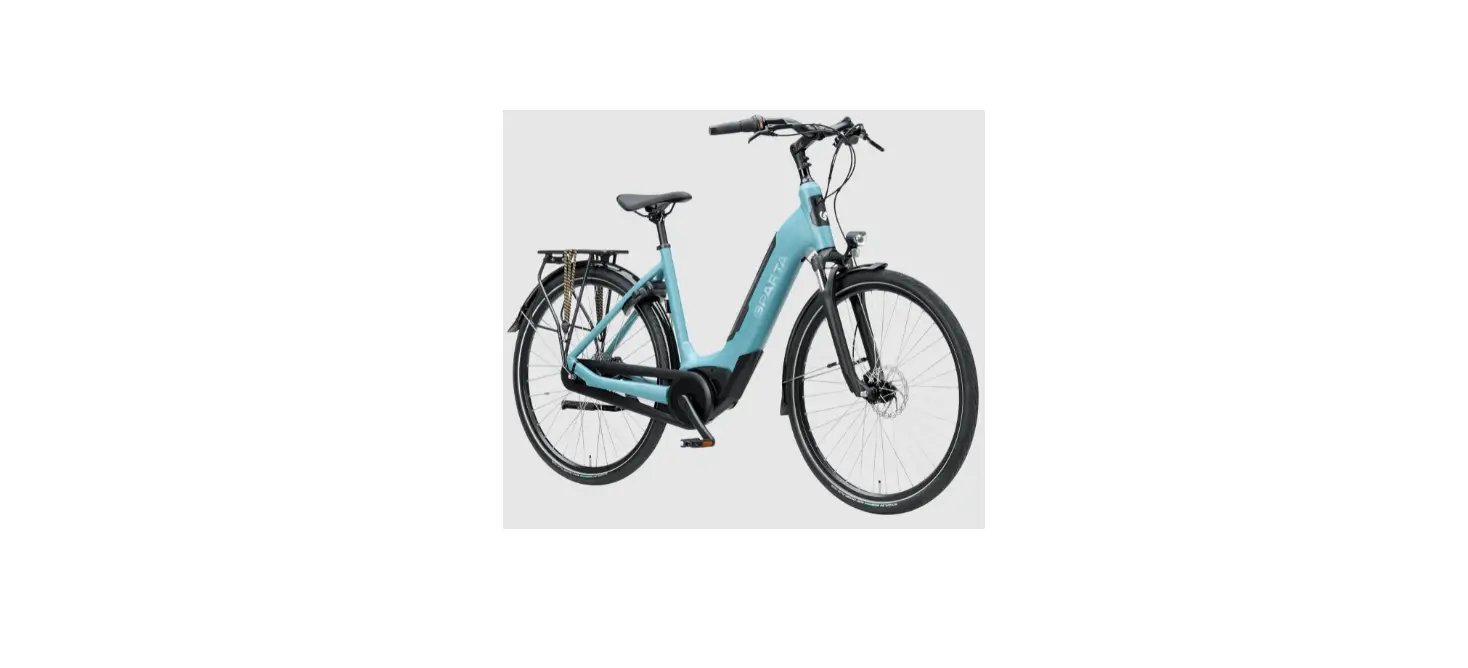

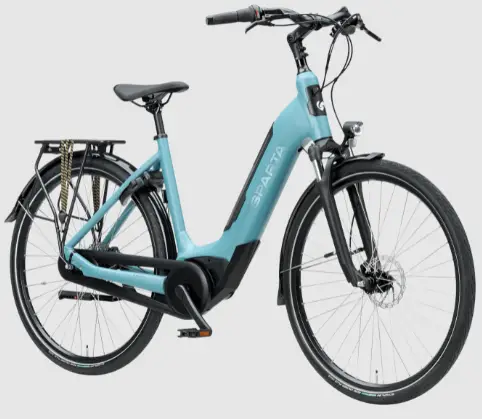
SPARTA MY21 C-GRID Fit
Safety instructions
Read all the safety information and instructions. Failure to obser ve the safety information and follow instructions may result in electric shock, fire and/or serious injury. Save all safety warnings and instructions for future reference. The term battery is used in these instructions to mean all original Bosch eBike rechargeable battery packs.
- Do not allow yourself to be distracted by the on-board computer’s display. If you do not focus exclusively on the traffic, you risk being involved in an accident. If you want to make entries in your on-board computer other nthan switching the assistance level, stop and enter the appropriate data.
- Read and observe the safety warnings and directions contained in all the eBike system operating instructions and in the operating instructions of your eBike.
- Set the display brightness so that you can adequately see important information such as speed and warning symbols. Incorrectly set display brightness may lead to dangerous situations.
Product description and specifications
Intended use
The Purion on-board computer is designed to control Bosch eBike systems and display cycling data. In addition to the functions shown here, changes to software relating to troubleshooting and functional modifications may be introduced at any time.
Product features
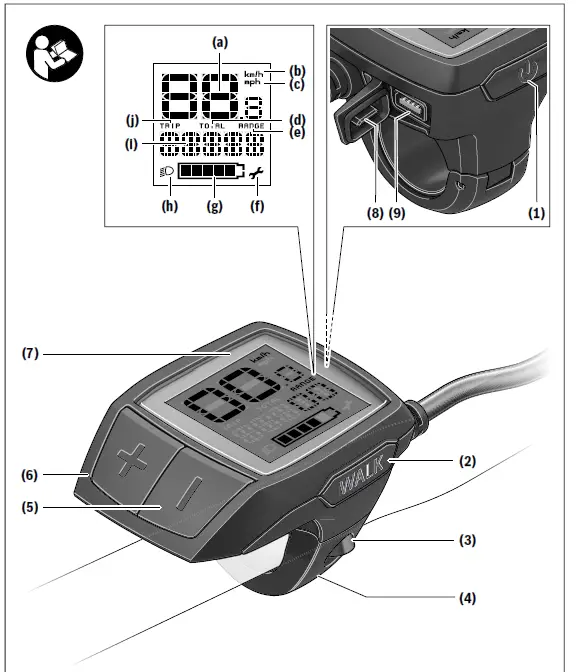
The numbering of the components shown refers to the illustrations on the graphics pages at the beginning of the manual. Individual illustrations in these operating instructions may differ slightly from the actual conditions depending on the
equipment of your eBike.
- On/off button for on-board computer
- Push assistance button WALK
- Fastening screw for on-board computer
- Holder for on-board computer
- Decrease assistance level button –
- Increase assistance level button +
- Display
- Protective cap for USB port
- USB diagnostic port (for servicing purposes only)
- Battery compartment cover

Display elements of on-board computer
- Speedometer
- km/h unit indicator
- mph unit indicator
- Total distance indicator TOTAL
- Range indicator RANGE
- Service indicator
- Battery charge indicator
- Illumination indicator
- Assistance level indicator/value indicator
- Trip distance indicator TRIP
Technical data
| On-board computer Purion | ||
| Product code | BUI215 | |
| Battery A) | 2 × 3 V CR2016 | |
| Operating temperature | °C | –5 to +40 |
| Storage temperature | °C | +10 to +40 |
| Protection rating B) | IP 54 (dust and splash- proof) | |
| Weight, approx. | kg | 0.1 |
- We recommend using the batteries offered by Bosch. You can purchase them from your bicycle dealer (article number: 1 270 016 819).
- When the USB cover is closed The Bosch eBike system uses FreeRTOS (see http://www.freertos.org).
Operation
Symbols and their Meaning
| Symbol Explanation | |
| Short button press (less than 1 second) | |
| Medium button press (between 1 second and 2.5 seconds) | |
| Long button press (longer than 2.5 seconds) | |
Start-up
Prerequisites
The eBike system can only be activated when the following requirements are met:
- A sufficiently charged battery is inserted (see battery op-erating instructions).
- The speed sensor is connected properly (see drive unit operating instructions).
Switching the eBike system on/off
The following options are available for switching on the eBike system:
- Press the on/off button (1) of the on-board computer with the eBike battery inserted.
- Press the on/off button of the eBike battery (see battery operating instructions).
The drive is activated as soon as you start pedalling (except if you are using the push-assistance function or if the assist-ance level is set to OFF). The motor output depends on the settings of the assistance level on the on-board computer. As soon as you stop pedalling when in normal operation, or as soon as you have reached a speed of 25/45 km/h, the eBike drive switches off the assistance. The drive is automat-ically reactivated as soon you start pedalling again and the speed is below 25/45 km/h. The following options are available for switching off the eBike system:
- Press the on/off button (1) of the on-board computer.
- Switch off the eBike battery using its on/off button (bi-cycle manufacturer-specific solutions are possible when there is no access to the battery on/off button; see the bi-cycle manufacturer operating instructions).
The system shuts down after being switched off. This takes approximately 3 seconds. It cannot be switched back on un-til shutdown has been completed.n If the eBike is not moved for approx. 10 min and no button is pressed on the on-board computer, the eBike system switches off automatically in order to save energy.
Note: Always switch off the eBike system when you park the eBike. If the batteries of the on-board computer are empty, you can still switch on your eBike using the bike’s battery. It is, however, recommended that you replace the internal bat-teries as soon as possible in order to avoid damage.
Energy supply of the on-board computer
The on-board computer is supplied with voltage by two CR2016 button cells.
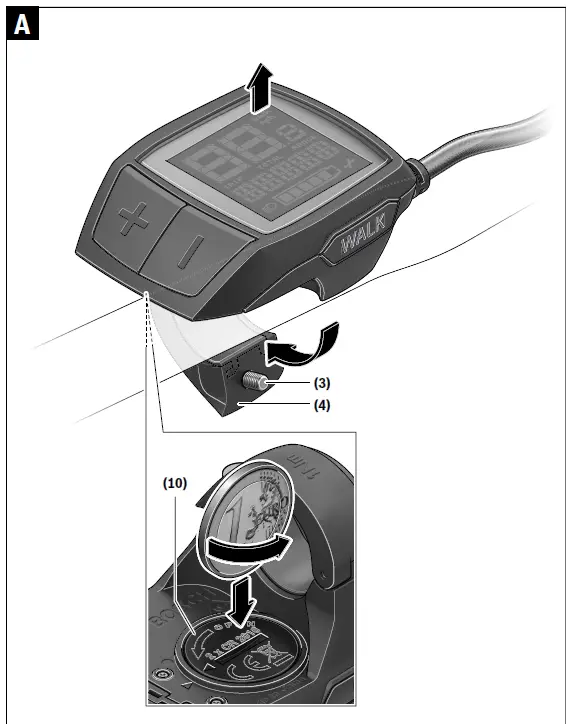
Changing the batteries (see figure A)
If the on-board computer shows LOW BAT on the display, remove the on-board computer from the handlebars by un-screwing the fastening screw (3) of the on-board computer. Open the battery compartment cover (10) using a suitable coin, remove the used batteries and insert new CR2016 bat-teries. You can obtain the batteries recommended by Bosch from your bicycle dealer. When inserting the batteries, ensure that the polarity is cor-rect. Close the battery compartment again and fasten the on-board computer to your eBike’s handlebars using the fasten-ing screw (3).
Switching the push assistance on/off
The push assistance aids you when pushing your eBike. The speed in this function depends on the selected gear and can reach a maximum of 6 km/h. The lower the selected gear, the lower the speed of the push assistance function (at full power).
- The push assistance function must only be used when pushing the eBike. There is a risk of injury if the wheels of the eBike are not in contact with the ground while using the push assistance. To activate the push assistance, briefly press the WALK button on your on-board computer. After activation, press the + button within 3 s and keep it pressed. The eBike drive is switched on.
Note: The push assistance cannot be activated at assistance level OFF. The push assistance is switched off as soon as one of the following occurs:- You release the + button;
- The wheels of the eBike are locked (e.g. by applying the brakes or hitting an obstacle);
- The speed exceeds 6 km/h.
The push assistance function is subject to local regulations; the way it works may therefore differ from the description above, or the function may even be deactivated completely.
Setting the assistance level
You can set the level at which the eBike drive assists you while pedalling on the on-board computer. The assistance level can be changed at any time, even while cycling.
Note: In some models, the assistance level may be preset and cannot be changed. There may also be fewer assistance levels available than stated here.
The following assistance levels are available as a maximum:
- OFF: Motor assistance is switched off. The eBike can just be moved by pedalling, as with a normal bicycle. The push assistance cannot be activated at this assistance level.
- ECO: Effective assistance with maximum efficiency, for maximum range
- TOUR: Steady assistance, long range for touring
- SPORT/eMTB:
- SPORT: Powerful assistance, for mountain biking and cycling in urban traffic
- eMTB: Optimum assistance whatever the terrain, rapid acceleration when starting from a standstill, improved dy-namics and top performance (eMTB only available in combination with the drive units BDU250P CX, BDU365, BDU450 CX and BDU480 CX. A software update may be required.)
- TURBO: Maximum assistance even at high pedalling speeds, for sport cycling
Displays and configurations of the on-board computer
Battery charge indicator
The battery charge indicator (g) displays the eBike battery’s state of charge. The state of charge of the eBike battery can also be checked on the LEDs of the battery itself. In the indicator (g), each bar in the battery symbol repres-ents approximately 20 % capacity:
- The eBike battery is fully charged.
- The eBike battery should be recharged.
- The LEDs of the battery charge indicator on the battery go out. The capacity for assisting the drive has been used up, and assistance is gently switched off. The remaining capacity is made available for the lighting. The indicator flashes.
The capacity of the eBike battery is enough for about two hours of lighting.
Speed and distance indicators
The speedometer (a) always displays the current speed. Indicator (i) always displays the last setting as standard. Re-peated medium-length presses of the button – will display the trip distance TRIP, the total distance TOTAL and the range of the battery RANGE one after the other. (Briefly pressing the button – will decrease the assistance level.) To reset the trip distance TRIP, select the trip distance TRIP and simultaneously press and hold the buttons + and –. The display will initially show RESET. If you continue to press both buttons, the trip distance TRIP will be set to 0. To reset the range of the battery RANGE, select the battery range RANGE and simultaneously press and hold the but-tons + and –. The display will initially show RESET. If you continue to press both buttons, the trip distance TRIP will be set to 0. You can switch the displayed values from kilometres to miles by holding down the button – and briefly pressing the on/off button (1). The versions of the subsystems and their model part num-bers can be displayed for the purposes of servicing, provided the subsystems divulge this information (depend-ent on the subsystem). With the system switched off, simul-taneously press the buttons – and + and then press the on/off button (1). The USB port is reserved for connecting diagnostic systems. The USB port does not have any other function.
The USB connection must always be completely sealed with the protective cap (8).
| Switch on on-board computer | ||
| Switch off on-board computer | ||
| Increase assistance | + |
| Decrease assistance | – | |
| Display TRIP, TOTAL, RANGE, assistance modes | – | |
| Switch on bike lights | + | |
| Switch off bike lights | + | |
| Reset trip distance | – + | |
| Activate push assistance Implement push assistance | WALK + | 1. 2. Any |
| Switch from kilometres to miles | – | 1. Keep pressed 2. |
| Display the versions A)B) | – + | 1. Keep pressed 2. |
| Adjust display brightnessC) | – + – or + | 1. Keep pressed 2. |
- The eBike system must be switched off.
- The information is shown as scrolling text.
- The display must be switched off.
Error code display
The eBike system’s components are continuously and auto-matically monitored. If an error is detected, the correspond-ing error code is displayed on the on-board computer. The drive may be automatically shut down, depending on the type of error. However, if you wish to continue cycling, you
| Code | Cause | Corrective measures |
| 410 | One or more buttons of the on-board com- puter are disabled. | Check whether any buttons are stuck, e.g. as a result of dirt finding its way in. Clean the buttons if need be. |
| 414 | Operating unit connection problem | Have the connections checked |
| 418 | One or more buttons on the operating unit are disabled. | Check whether any buttons are stuck, e.g. as a result of dirt finding its way in. Clean the buttons if need be. |
| 419 | Configuration error | Restart the system. If the problem persists, contact your Bosch eBike dealer. |
| 422 | Drive unit connection problem | Have the connections checked |
| 423 | eBike battery connection problem | Have the connections checked |
| 424 | Communication problem between com- ponents | Have the connections checked |
| 426 | Internal time-out error | Restart the system. If the problem persists, contact your Bosch eBike dealer. With this error, it is not possible to bring up the wheel circumference in the basic settings menu or to adjust it. |
| 430 | Internal battery of the on-board computer is flat (does not apply to BUI350) | Charge the on-board computer (in the holder or via the USB port) |
| 431 | Software version error | Restart the system. If the problem persists, contact your Bosch eBike dealer. |
| 440 | Internal drive unit fault | Restart the system. If the problem persists, contact your Bosch eBike dealer. |
| 450 | Internal software error | Restart the system. If the problem persists, contact your Bosch eBike dealer. |
| 460 | Error at USB port | Remove the cable from the USB port of the on-board computer. If the problem persists, contact your Bosch eBike dealer. |
| 490 | Internal fault of the on-board computer | Have the on-board computer checked |
| 500 | Internal drive unit fault | Restart the system. If the problem persists, contact your Bosch eBike dealer. |
| 502 | Bike light fault | Check the light and the associated wiring. Restart the system. If the problem persists, contact your Bosch eBike dealer. |
| 503 | Speed sensor fault | Restart the system. If the problem persists, contact your Bosch eBike dealer. |
| 504 | Speed signal distortion detected. | Check that the spoke magnet is positioned correctly, and adjust it if necessary. Check that nothing has been tampered with (tuning). Drive assistance is reduced. |
| 510 | Internal sensor fault | Restart the system. If the problem persists, contact your Bosch eBike dealer. |
| 511 | Internal drive unit fault | Restart the system. If the problem persists, contact your Bosch eBike dealer. |
| 530 | Battery fault | Switch off the eBike, remove the eBike battery and reinsert the eBike battery. Restart the system. If the problem persists, contact your Bosch eBike dealer. |
| 531 | Configuration error | Restart the system. If the problem persists, contact your Bosch eBike dealer. |
| English – 6 | ||
| Code | Cause | Corrective measures |
| 540 | Temperature error | The eBike is outside of the permissible temperature range. Switch off the eBike system and allow the drive unit to either cool down or heat up to the permissible temperature range. Restart the system. If the problem persists, contact your Bosch eBike dealer. |
| 550 | An impermissible load has been detected. | Remove the load. Restart the system. If the problem persists, con- tact your Bosch eBike dealer. |
| 580 | Software version error | Restart the system. If the problem persists, contact your Bosch eBike dealer. |
| 591 | Authentication error | Switch off the eBike system. Remove the battery pack and reinsert it. Restart the system. If the problem persists, contact your Bosch eBike dealer. |
| 592 | Incompatible component | Use a compatible display. If the problem persists, contact your Bosch eBike dealer. |
| 593 | Configuration error | Restart the system. If the problem persists, contact your Bosch eBike dealer. |
| 595, 596 | Communication error | Check the wiring to the drive and restart the system. If the problem persists, contact your Bosch eBike dealer. |
| 602 | Internal battery fault | Restart the system. If the problem persists, contact your Bosch eBike dealer. |
| 603 | Internal battery fault | Restart the system. If the problem persists, contact your Bosch eBike dealer. |
| 605 | Battery temperature error | The battery is outside of the permissible temperature range. Switch off the eBike system and allow the battery to either cool down or heat up to the permissible temperature range. Restart the system. If the problem persists, contact your Bosch eBike dealer. |
| 606 | External battery fault | Check the wiring. Restart the system. If the problem persists, con- tact your Bosch eBike dealer. |
| 610 | Battery voltage error | Restart the system. If the problem persists, contact your Bosch eBike dealer. |
| 620 | Charger fault | Replace the charger. Contact your Bosch eBike dealer. |
| 640 | Internal battery fault | Restart the system. If the problem persists, contact your Bosch eBike dealer. |
| 655 | Multiple battery faults | Switch off the eBike system. Remove the battery pack and reinsert it. Restart the system. If the problem persists, contact your Bosch eBike dealer. |
| 656 | Software version error | Contact your Bosch eBike dealer so that they can perform a software update. |
| 7xx | Error relating to third-party components | Observe the information in the operating instructions of the re- spective component manufacturer. |
| 800 | Internal ABS fault | Contact your Bosch eBike dealer. |
| 810 | Implausible signals from the wheel speed sensor | Contact your Bosch eBike dealer. |
| 820 | Fault in the wire to the front wheel speed sensor | Contact your Bosch eBike dealer. |
| 821 to 826 | Implausible signals from the front wheel speed sensor The sensor disc may be missing, defective or fitted incorrectly; there is a significant difference in diameter between the front wheel and the rear wheel; extreme riding | Restart the system and carry out a test ride lasting at least two minutes. The ABS indicator light must go out. If the problem per- sists, contact your Bosch eBike dealer. |
| English – 7 | ||
| Code | Cause | Corrective measures |
| situation, e.g. riding solely on the rear wheel | ||
| 830 | Fault in the wire to the rear wheel speed sensor | Contact your Bosch eBike dealer. |
| 831 833 to 835 | Implausible signals from the rear wheel speed sensor The sensor disc may be missing, defective or fitted incorrectly; there is a significant difference in diameter between the front wheel and the rear wheel; extreme riding situation, e.g. riding solely on the rear wheel | Restart the system and carry out a test ride lasting at least two minutes. The ABS indicator light must go out. If the problem per- sists, contact your Bosch eBike dealer. |
| 840 | Internal ABS fault | Contact your Bosch eBike dealer. |
| 850 | Internal ABS fault | Contact your Bosch eBike dealer. |
| 860, 861 | Fault in the power supply | Restart the system. If the problem persists, contact your Bosch eBike dealer. |
| 870, 871 880 883 to 885 | Communication error | Restart the system. If the problem persists, contact your Bosch eBike dealer. |
| 889 | Internal ABS fault | Contact your Bosch eBike dealer. |
| 890 | ABS indicator light is defective or missing; ABS may not be working. | Contact your Bosch eBike dealer. |
| No display | Internal fault of the on-board computer | Restart your eBike system by switching it off and back on. |
Maintenance and servicing
Maintenance and cleaning
Do not immerse any components, including the drive unit, in water or clean them with pressurised water. Clean your on-board computer using a soft cloth dampened only with water. Do not use any detergents. Have your eBike system checked by an expert at least once a year (including mechanical parts, up-to-dateness of system software). The bicycle manufacturer or dealer can also store a distance travelled for the service date in the system. In this case, the on-board computer will show you that the service date is due by displaying (f) . Please have your eBike serviced and repaired by an author-ised bicycle dealer.
After-sales service and advice on using products
If you have any questions about the eBike system and its components, contact an authorised bicycle dealer. For contact details of authorised bike dealerships, please visit www.bosch-ebike.com.
Disposal
The drive unit, on-board computer incl. operat-ing unit, battery, speed sensor, accessories and packaging should be disposed of in an en-vironmentally correct manner. Do not dispose of eBikes and their components with house-hold waste. In accordance with Directive 2012/19/EU and Directive 2006/66/EC respectively, elec-tronic devices that are no longer usable and de-fective/drained batteries must be collected separately and recycled in an environmentally friendly manner. Please return Bosch eBike components that are no longer usable to an authorised bicycle dealer.
Subject to change without notice.