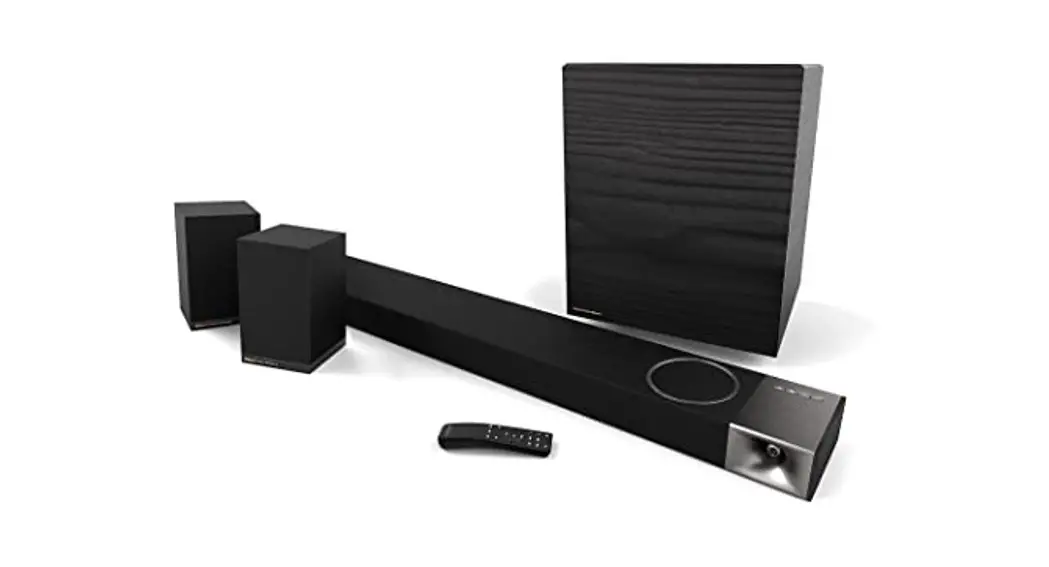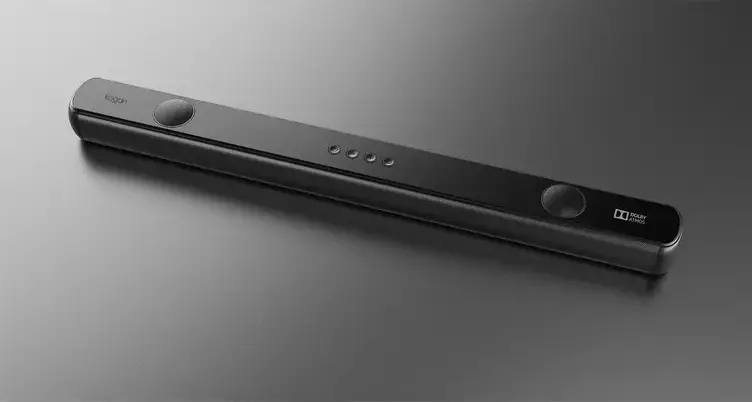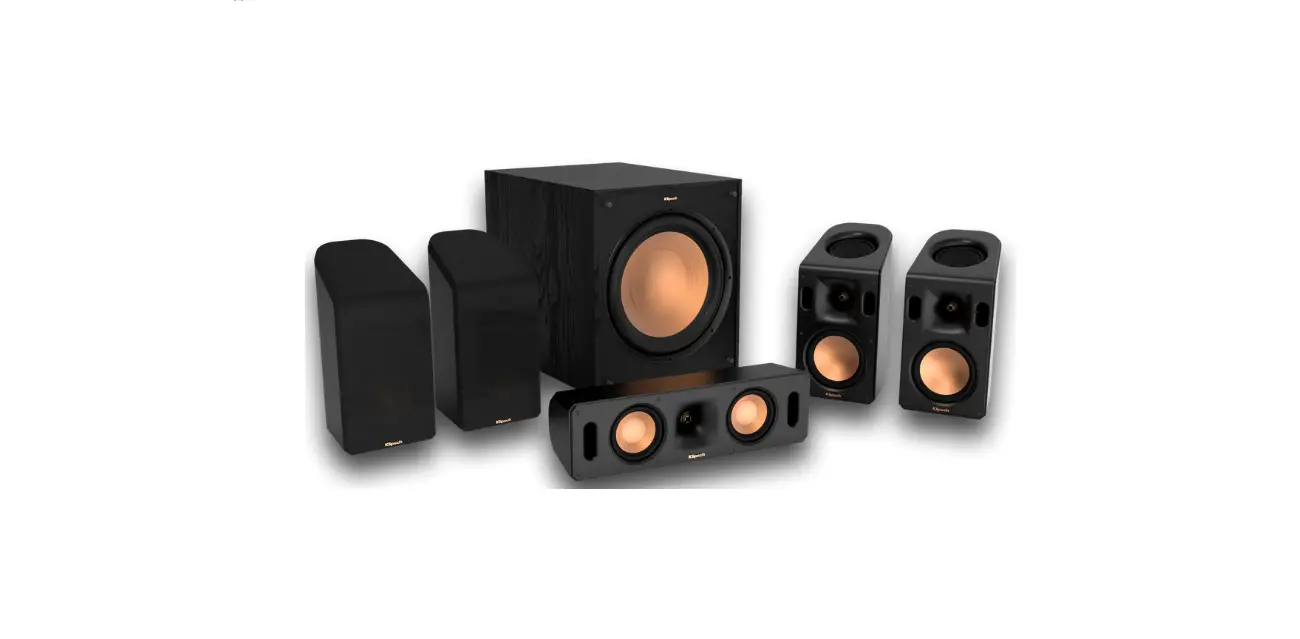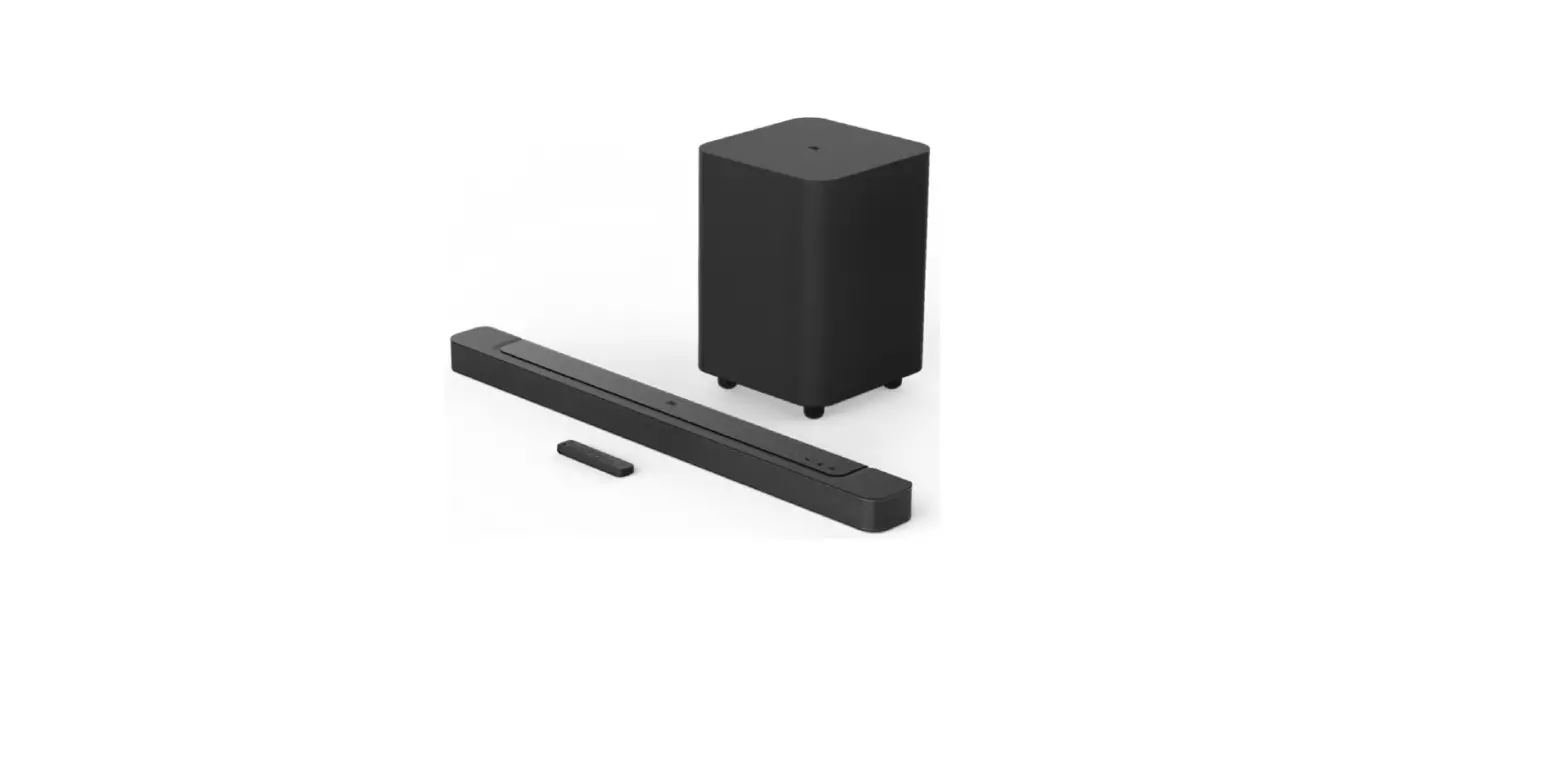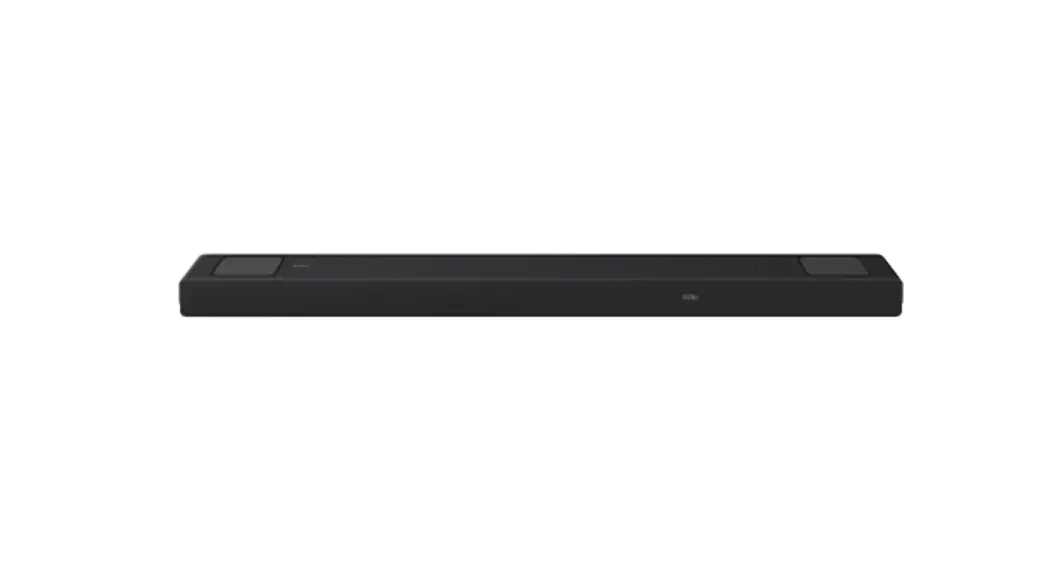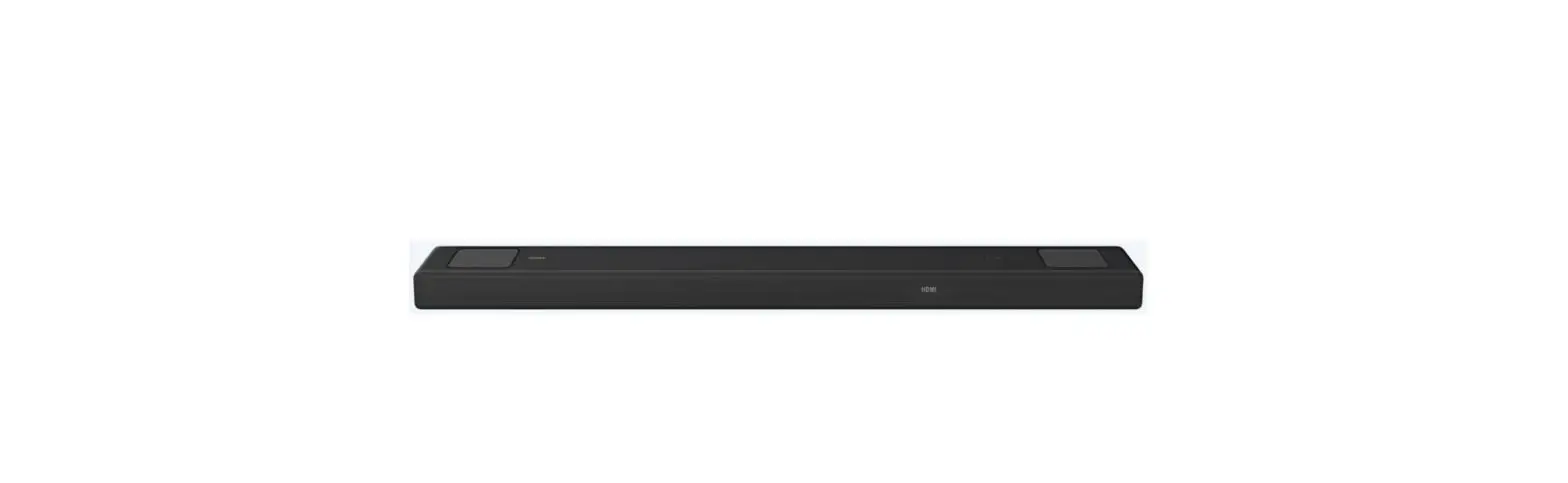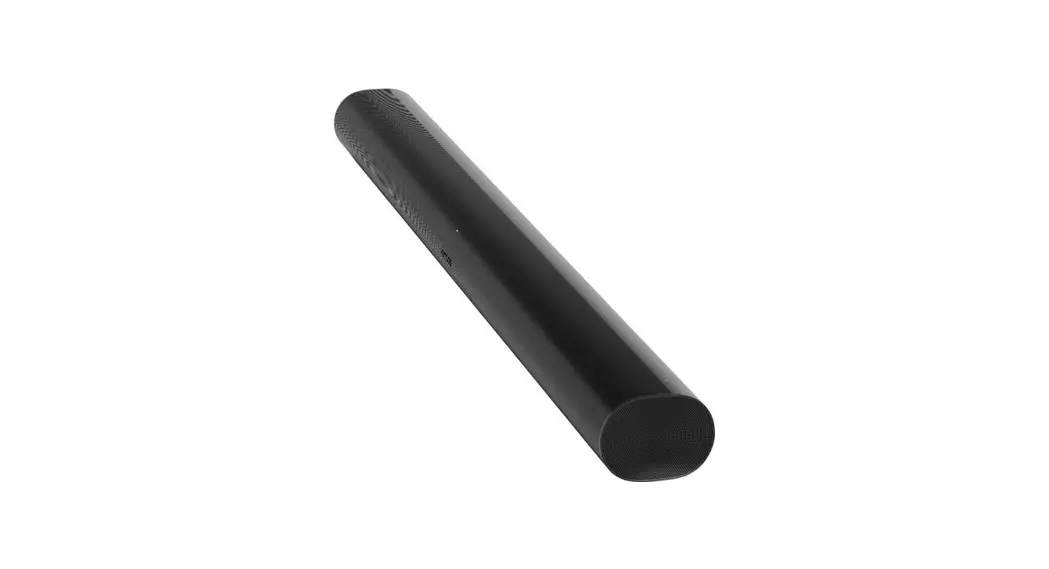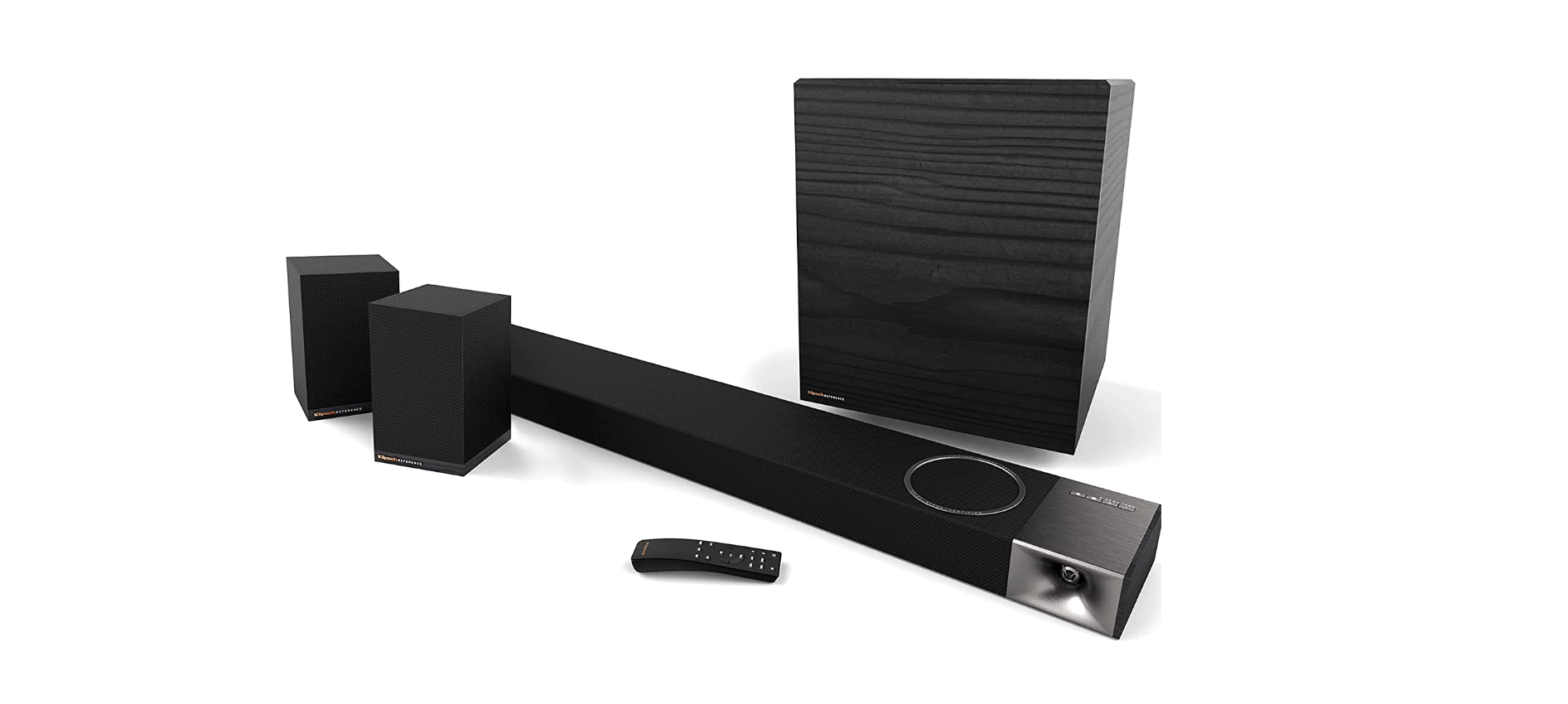

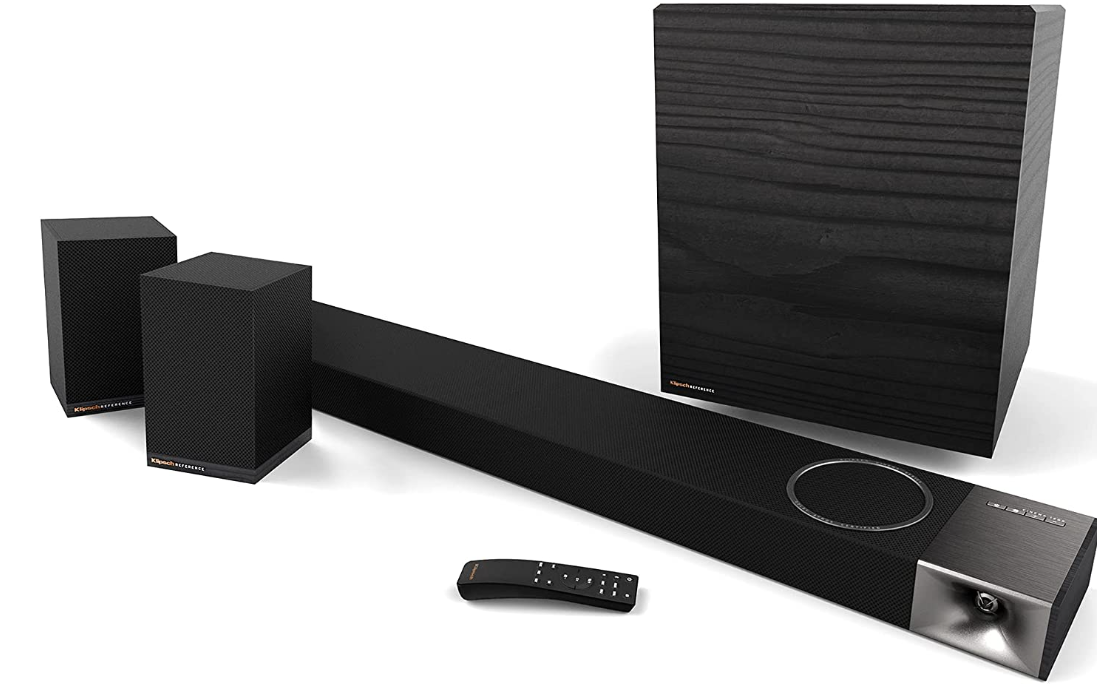
Klipsch 1067536 Cinema 1200 5.1.4 Dolby Atmos Sound Bar
INSIDE

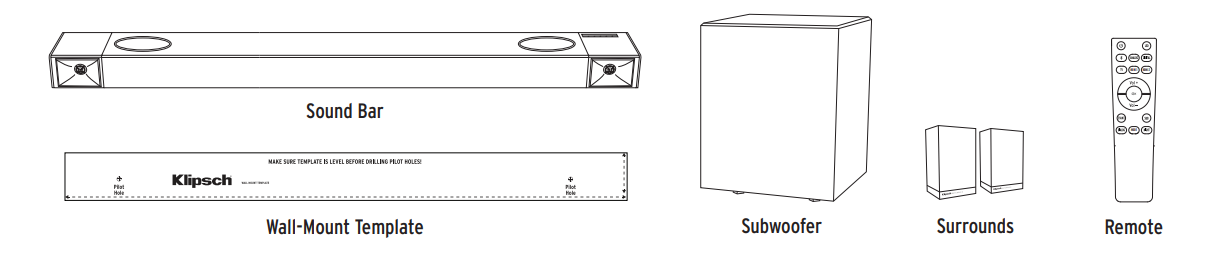
- Sound Bar
- Subwoofer
- Surrounds
- Wall-Mount Template
- Remote
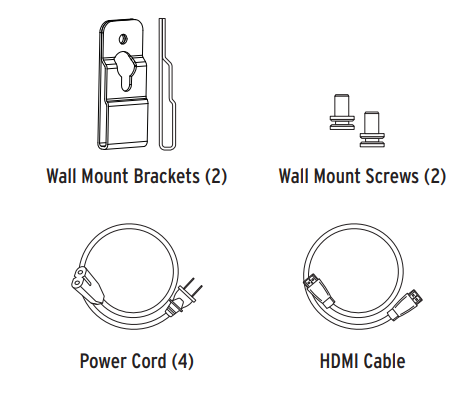
- Wall Mount Brackets
- Wall Mount Screws
- Power Cord
- HDMI Cable
SOUND BAR CONTROLS
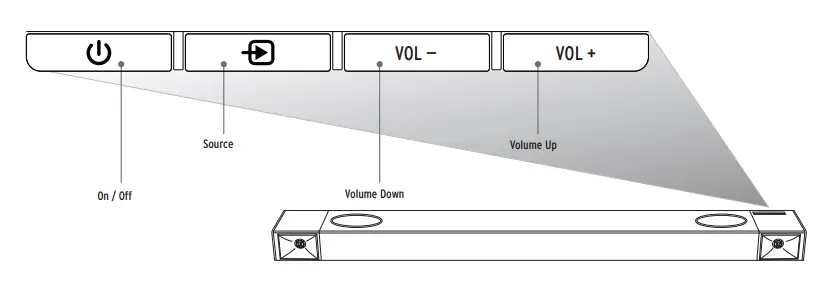
- On / Off
- Source Select (Toggle)
- Volume Down
- Volume Up
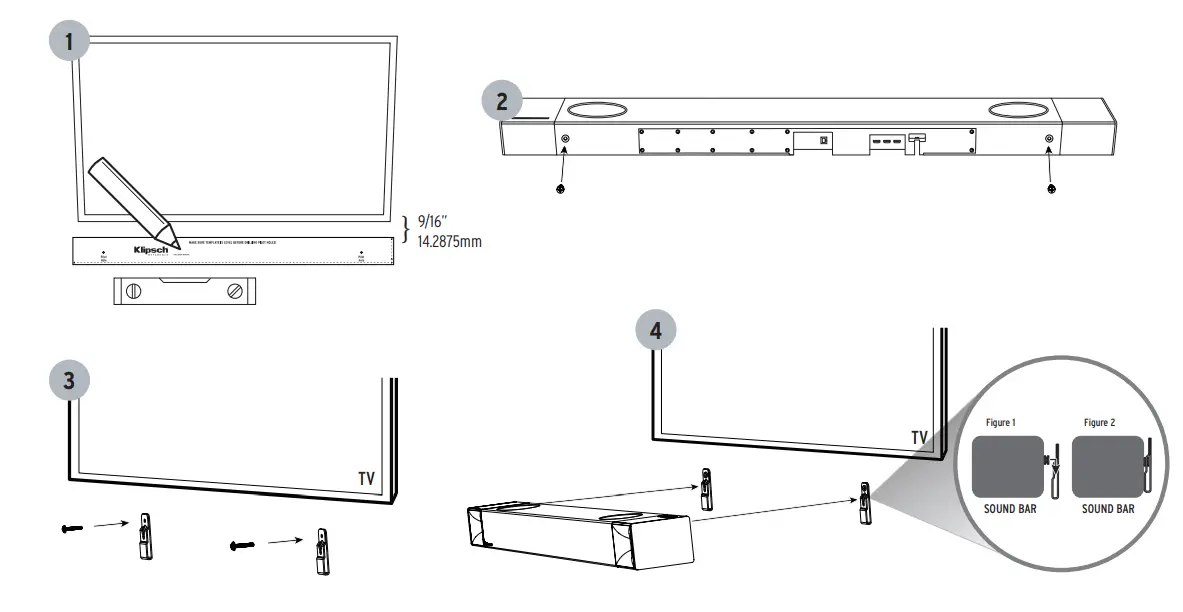
TV MOUNT MOUNTING
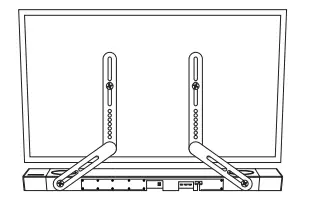
BRACKET NOT INCLUDED
DIRECT WALL MOUNTING  SUBWOOFER PLACEMENT

 SUBWOOFER PLACEMENT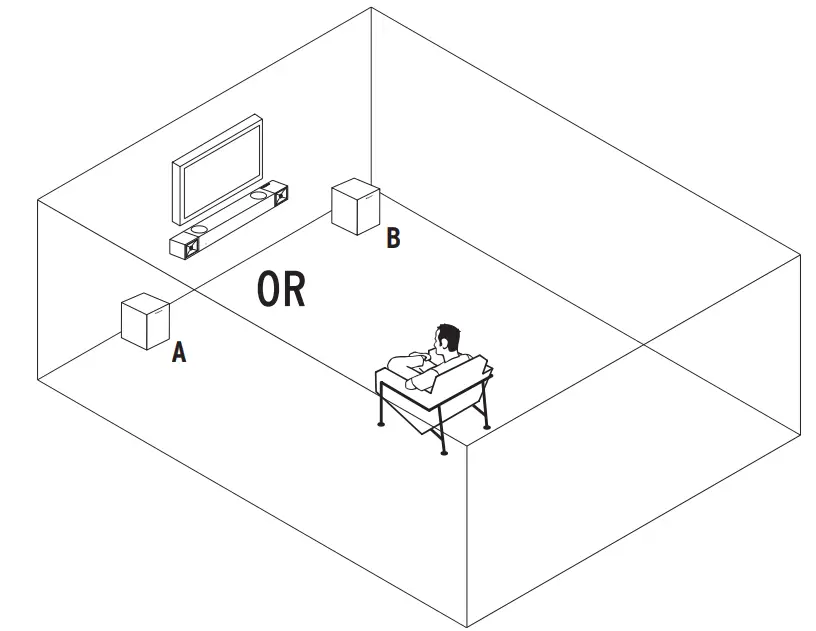
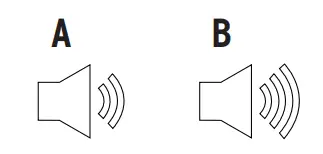
Corner placement will increase the amount of bass output, while placing the subwoofer along the middle of a wall, or out in the room will decrease the amount of bass output.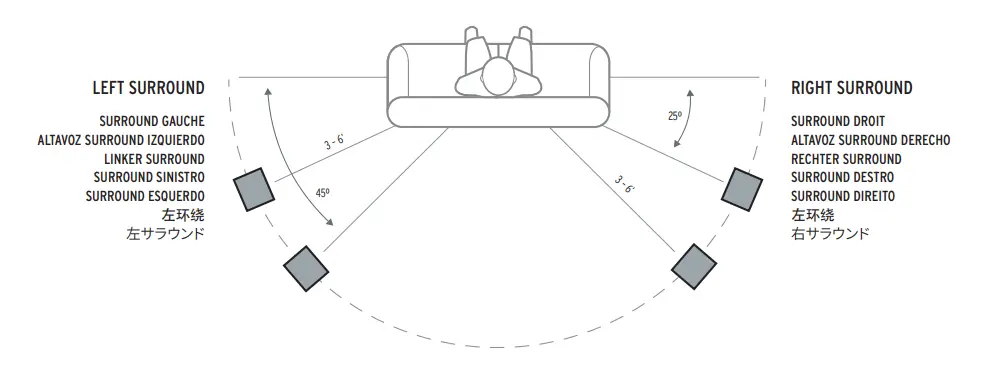
CONNECTING TO POWER
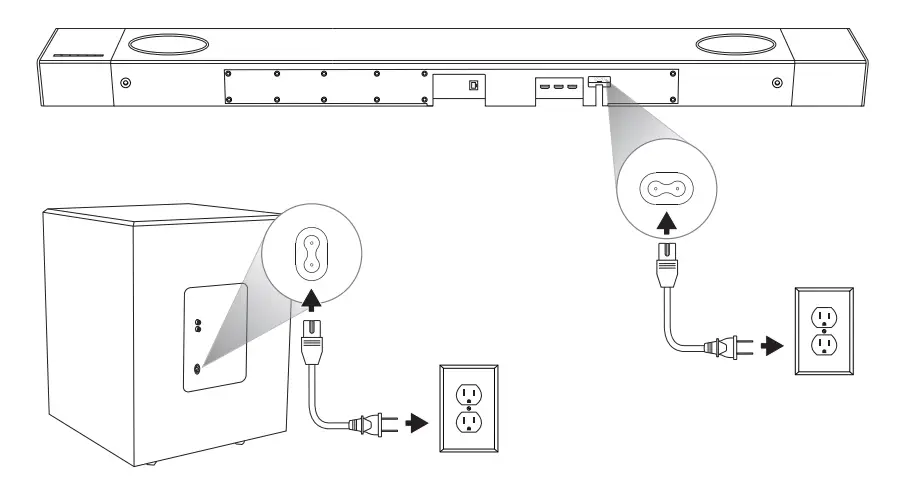
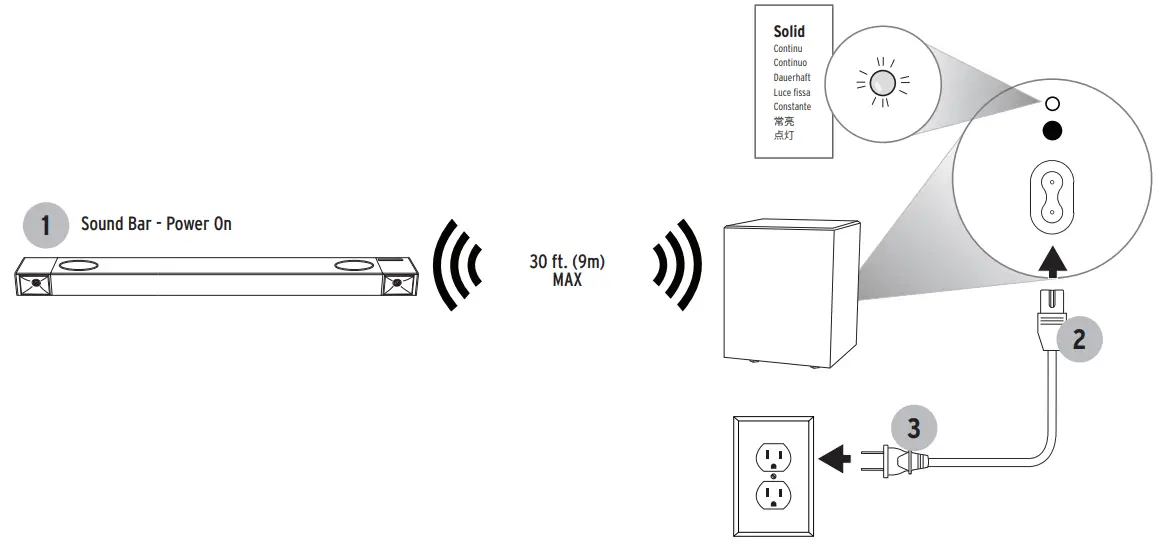
SUBWOOFER WIRELESS CONNECTION
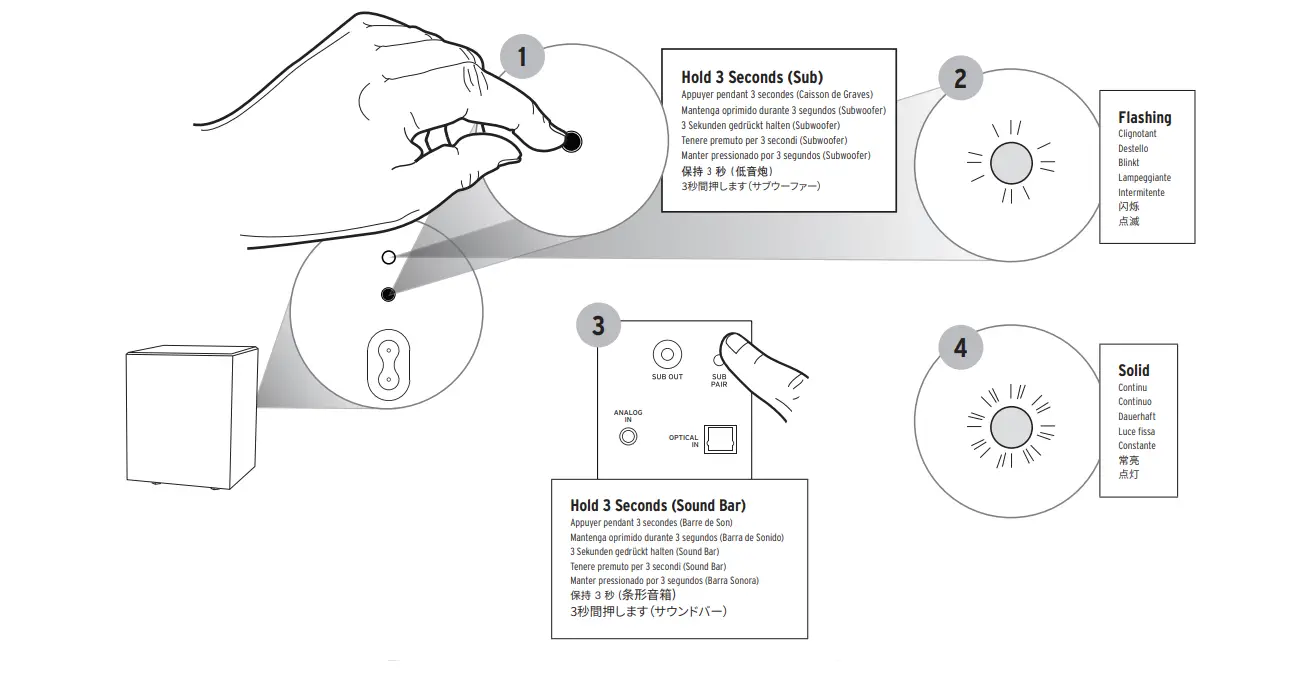
SUBWOOFER RECONNECT
CONNECTING WIRED SUBWOOFER
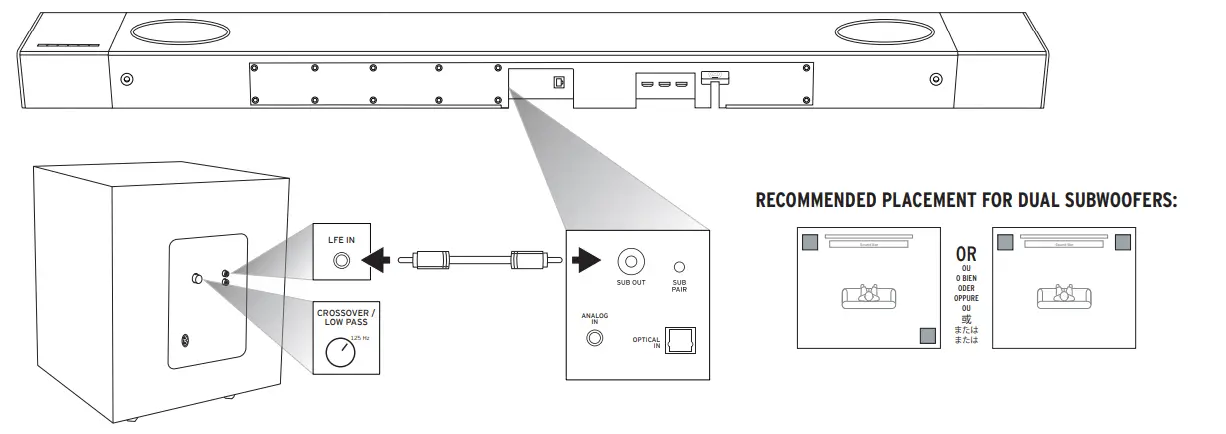
Connecting an additional wired sub to your Cinema 1200 sound bar will NOT mute the included wireless sub if connected. If you wish to replace the included wireless sub with a wired sub, be sure to disconnect the included wireless sub from AC power.
LED ON/OFF
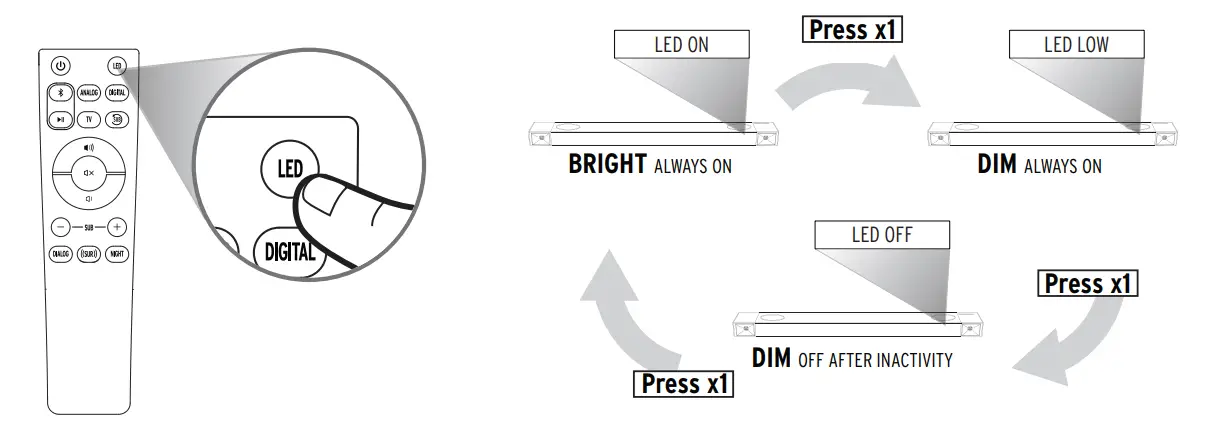
- Press x1
- BRIGHT
- ALWAYS ON
- DIM
- OFF AFTER INACTIVITY
REMOTE

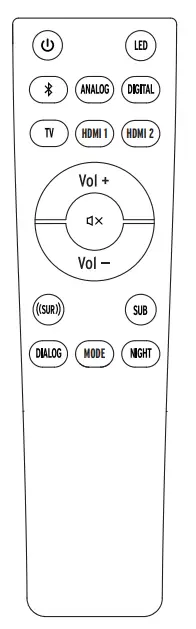
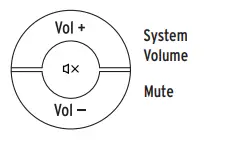
- On/Off
- LEDs DIM/Off (Sound Bar)
- Bluetooth® Source Select Long press to enter Bluetooth pairing mode
- Source SelectSelects Analog (3.5mm) Input
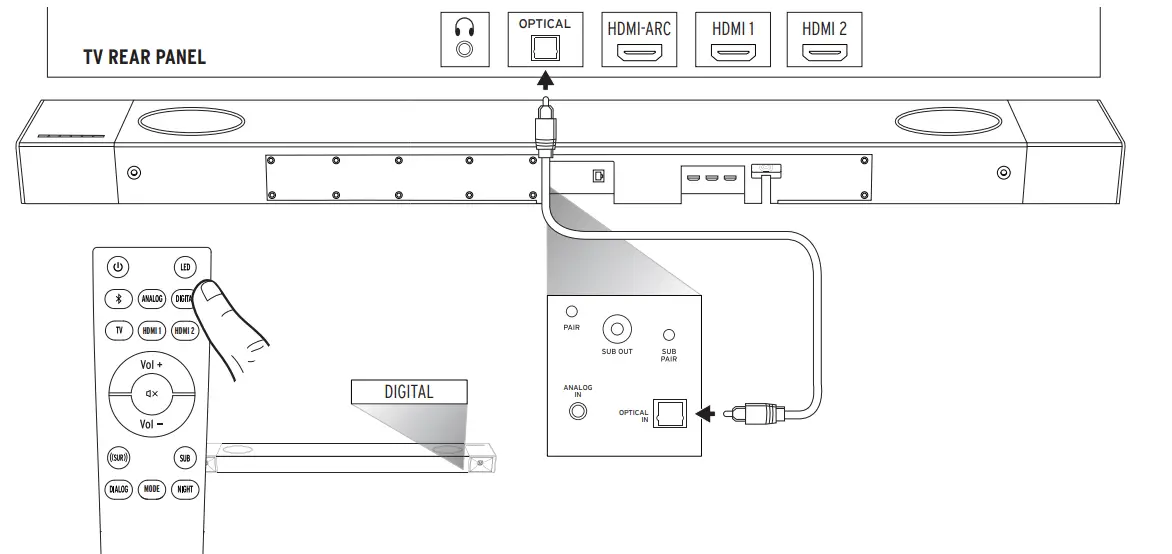
- Source Select Selects Optical Input
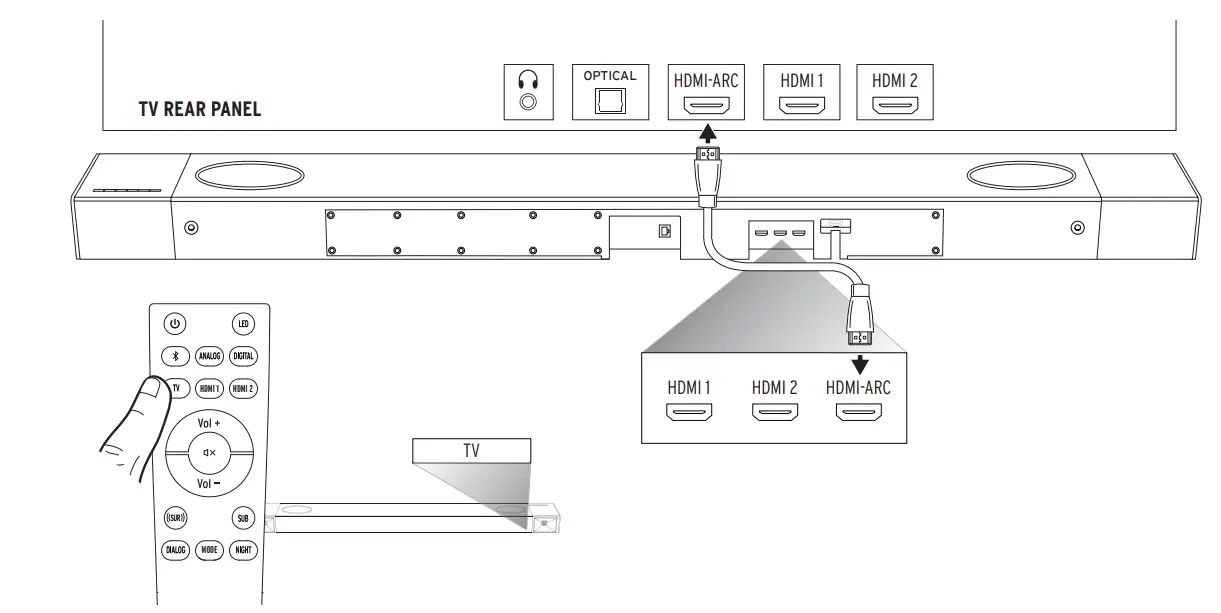
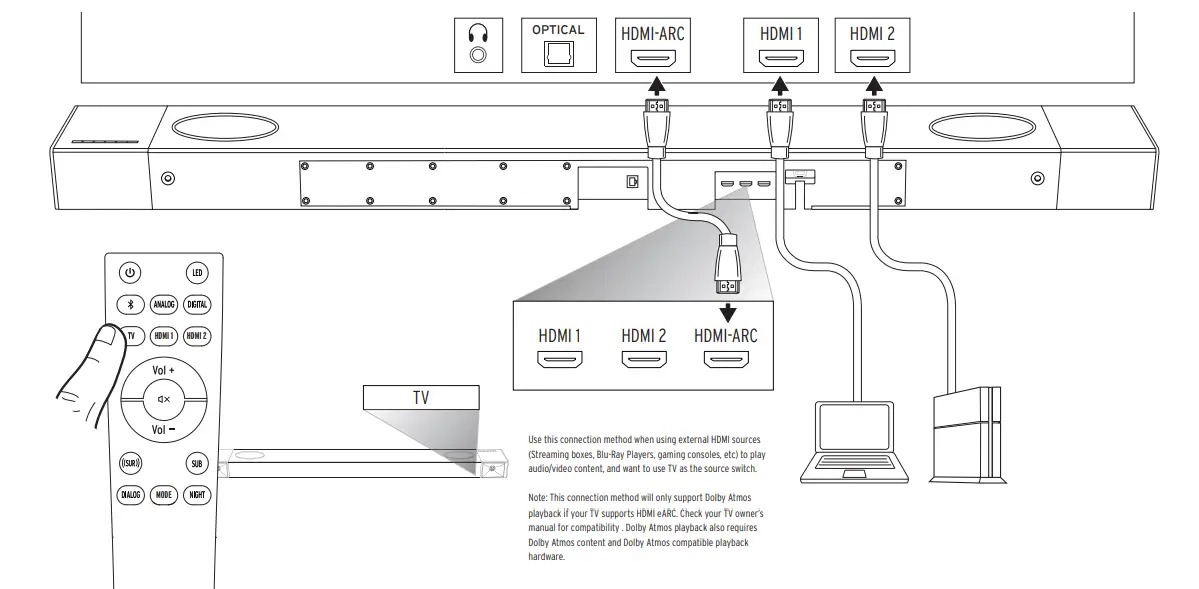
- Source Select Selects HDMI ARC Input
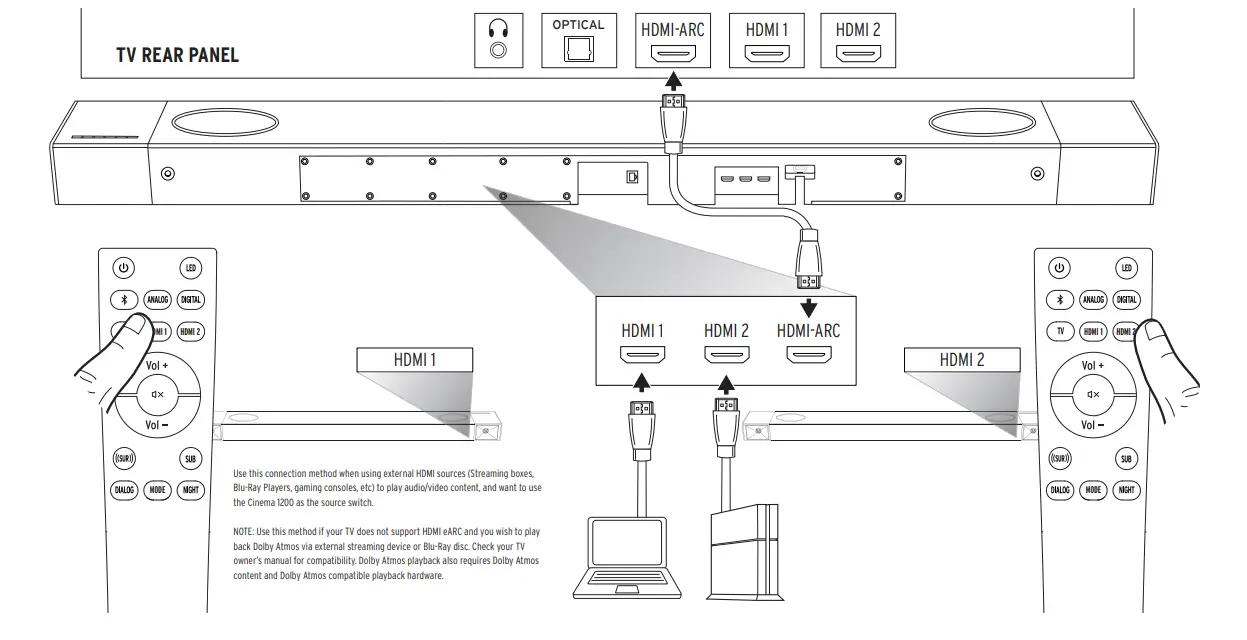
- Source Select Selects HDMI 1 Input
- Source Select Selects HDMI 2 Input
- Subwoofer Level
Adjusts Subwoofer Volume Enters subwoofer level adjust mode. bUse Vol + and Vol – to adjust. Long press to reset sub level to default. - Dialog Enhance Mode
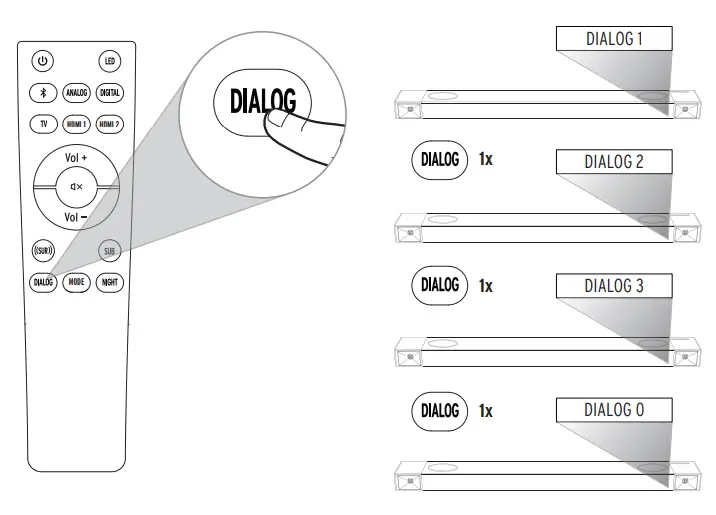
Toggles through Dialog Enhance Mode 1, 2, 3 and OFF
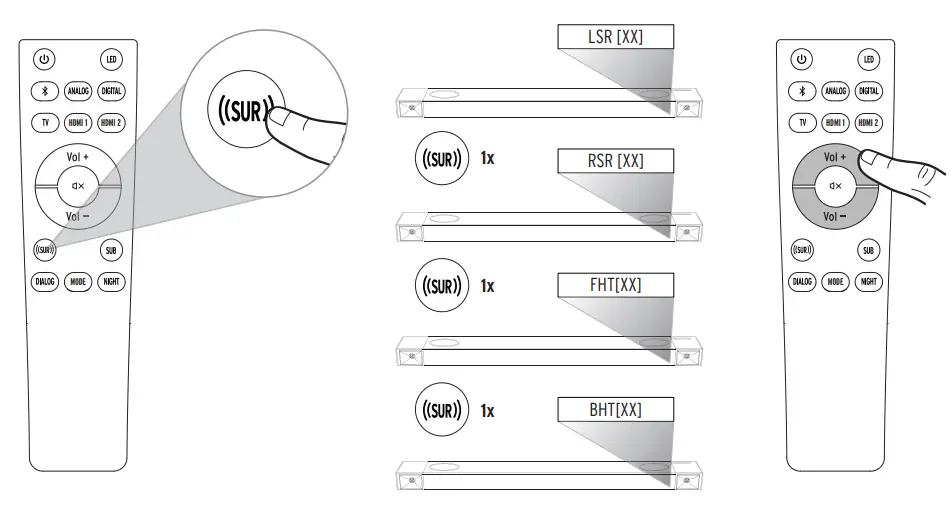
Long press: Resets dialogue mode to default - Surround Level Adjust
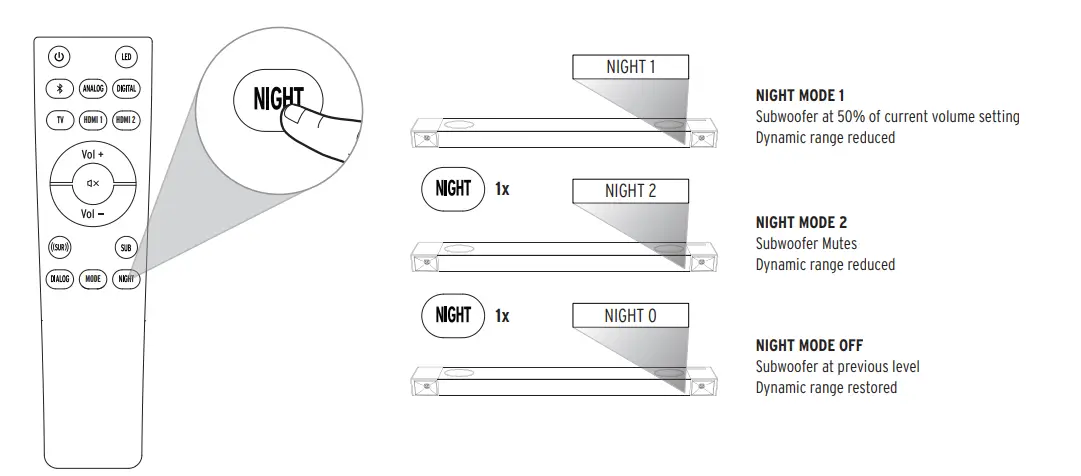
Toggles through Night Modes 1, 2, and OFF. Long press to reset to default. - Night Mode On/Off Toggles through Night Modes 1, 2, and OFF. Long press to reset to default.
CONNECTIONS – HDMI-ARC
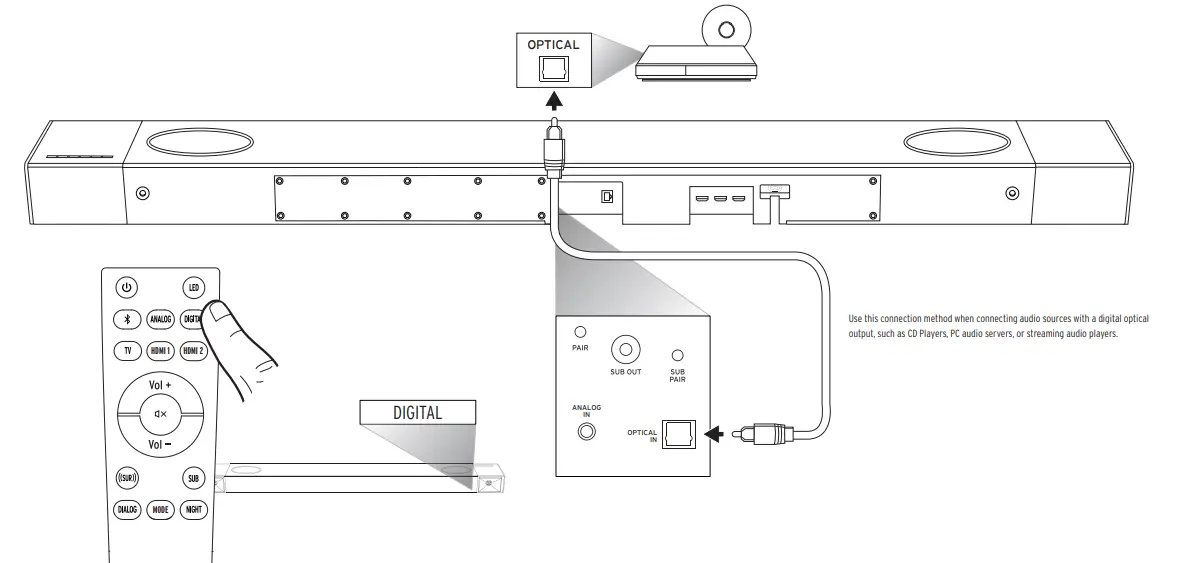
CONNECTIONS – DIGITAL OPTICAL
CONNECTIONS – EXTERNAL HDMI SOURCE
CONNECTIONS – EXTERNAL HDMI SOURCE THROUGH TV
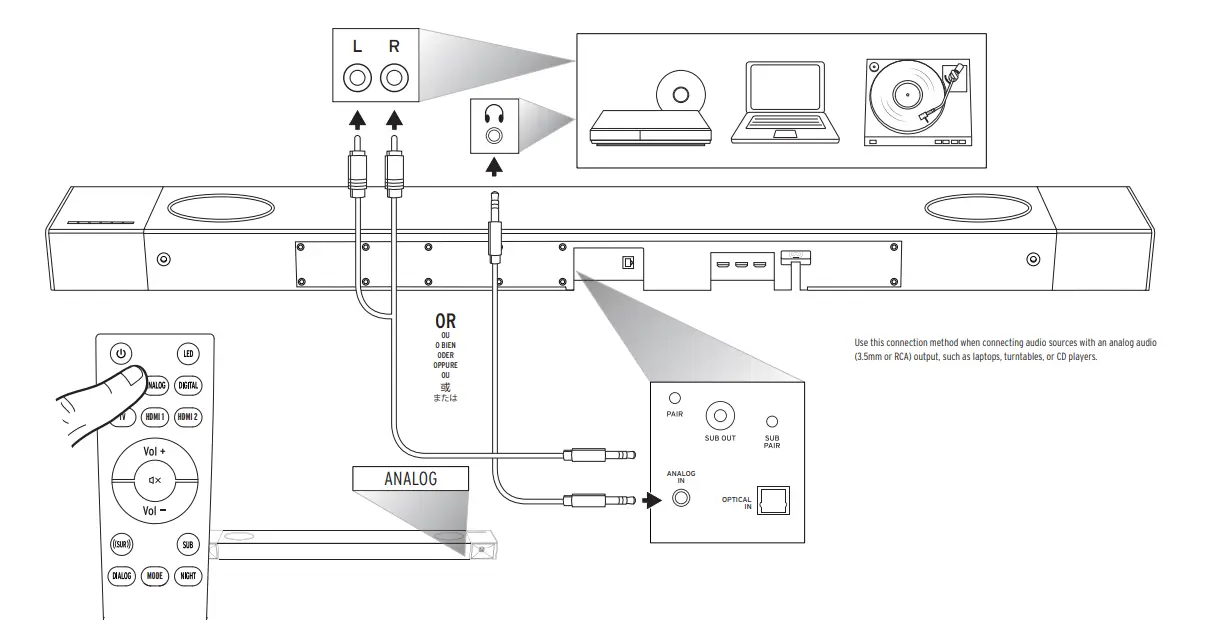
CONNECTIONS – ANALOG
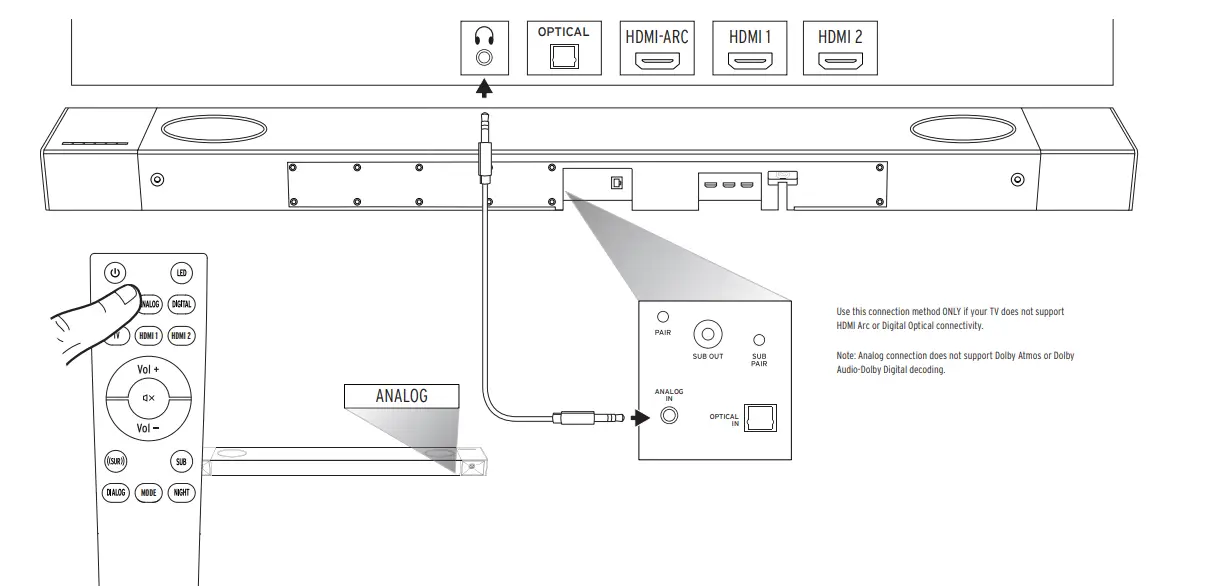
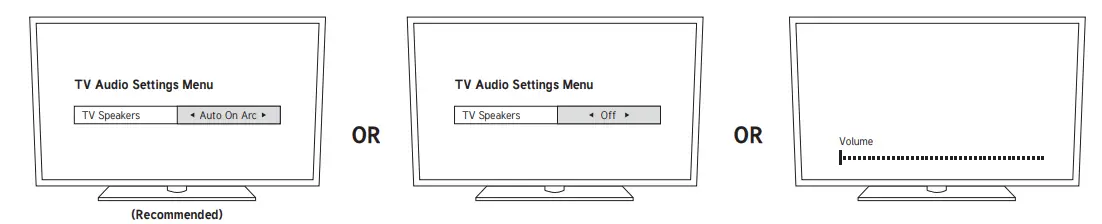
TURN OFF TV SPEAKERS
CONNECTIONS – EXTERNAL AUDIO VIA DIGITAL OPTICAL
CONNECTIONS – EXTERNAL AUDIO VIA ANALOG
CONNECTING TO NETWORK VIA ETHERNET
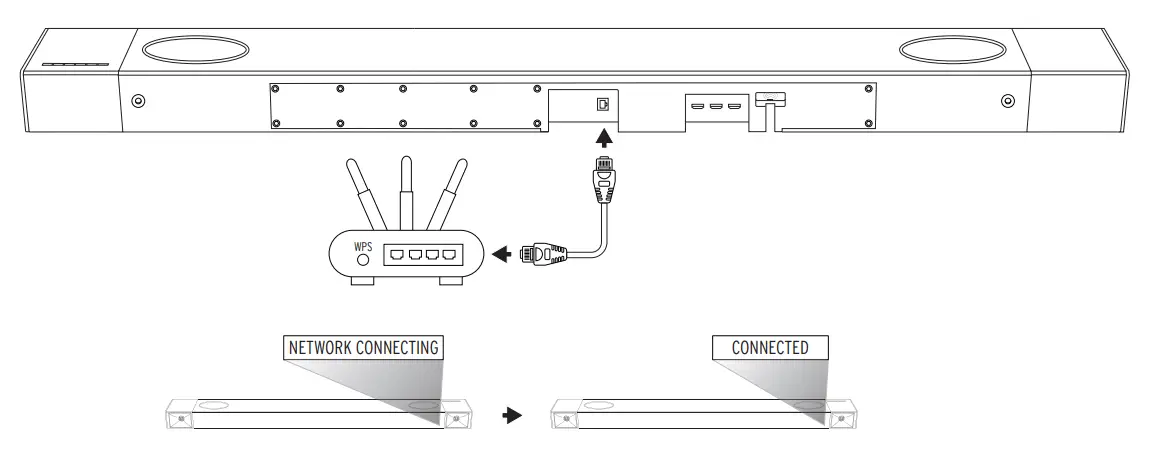
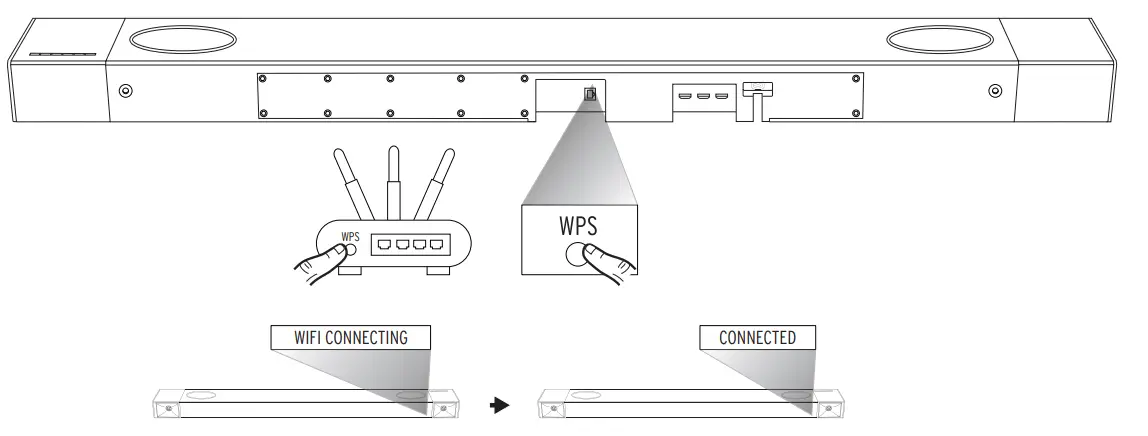
CONNECTING TO NETWORK VIA WIFI (WPS)
KLIPSCH CONNECT APP

- Download the Klipsch Connect app
- Follow the instructions
CONNECTING TO AMAZON ALEXA

- Download the Klipsch Connect app
- Follow the instructions
CONNECTING TO GOOGLE CAST

- Download the Google Home app
- Follow the instructions
DECODING AND PLAYBACK MODES
| INCOMING DIGITAL AUDIO SIGNALS THE CINEMA 1200 WILL DECODE | PCM |
| LPCM Up to 8 Channels | |
| Dolby Audio-Dolby Digital (2.0, 5.1, Etc.) | |
| Dolby Audio-Dolby Digital Plus (2.0, 5.1, 7.1, Etc.) | |
| Dolby TrueHD | |
| Dolby Atmos |
The Cinema 1200 comes equipped with several user selectable playback modes. Depending on which playback mode the user has selected, the Cinema 1200 will decode the surround sound signal. The following chart shows which playback modes will result in which type of surround sound from the Cinema 1200, along with the recommended uses for each mode.
| USER SELECTED INPUT MODE | OUTPUT FORMAT (WITH SURROUND 3 WIRELESS SURROUND SPEAKERS*) | RECOMMENDED FOR: |
| STANDARD | Atmos mixed to 5.1.4 | Everyday listening for music, movies, and TV shows |
| DIRECT | Output format same as source format, up to 5.1.4. Downmix any format more than 5.1.4 down to 5.1.4. | “Artist intent” playback of movies and TV shows, stereo (2-Channel) music playback. |
| MOVIE | Atmos mixed to 5.1.4 | Immersive, optimized listening experience for movies |
| MUSIC | Atmos mixed to 5.1.4 | Immersive, optimized listening experience for music |
| GAME | Atmos mixed to 5.1.4 | Immersive optimized listening experience for gaming |
| PARTY | Mix to All Channel Stereo Left = Left, Right = Right Center = Left + Right
Left Surround = Left, Right Surround = Right Left Front & Rear Height = Left, Right Front & Rear Height = Right | Background/party music from all speakers |
LED DISPLAY
| DISPLAY | BAR STATUS | |
|
INPUTS | BT | Bluetooth Input Selected |
| ANALOG | Analog Input Selected | |
| DIGITAL | Digital (Optical) input Selected | |
| TV | HDMI-eARC input Selected | |
| HDMI 1 | HDMI 1 input Selected | |
| HDMI 2 | HDMI 2 input Selected | |
| Google Chromecast input | ||
| ALEXA | Alexa input | |
| USB | USB Thumb Drive Input | |
|
SOUND MODES | STANDARD | Standard Listening Mode ON |
| DIRECT | Direct Listening Mode ON | |
| MOVIE | Movie Mode ON | |
| MUSIC | Music Mode ON | |
| GAME | Game Mode ON | |
| PARTY | Party Mode ON | |
|
DIALOG MODE | DIALG 0 | Dialog Mode Off |
| DIALG 1 | Dialog 1 Mode ON | |
| DIALG 2 | Dialog 2 Mode ON | |
| DIALG 3 | Dialog 3 Mode ON | |
|
NIGHT MODE | NIGHT 0 | Night Mode OFF |
| NIGHT 1 | Night 1 Mode ON | |
| NIGHT 2 | Night 2 Mode ON |
| DISPLAY | BAR STATUS | |
|
LEVEL ADJUST | VOL [XX] | System Volume Setting [1] – [99] |
| MUTE | System Muted / Volume Set To Minimum | |
| MAX | System Volume Set To Max | |
| SUB [XX] | Subwoofer volume [0] – [10] | |
| LSR [XX] | Left surround volume [0] – [10] | |
| RSR [XX] | Right surround volume [0] – [10] | |
| FHT [XX] | Front height volume [0] – [10] | |
| BHT [XX] | Rear height volume [0] – [10] | |
| CEC TOGGLE | CEC [XXX] | CEC Protocol Turned [On] or [Off] |
|
DECODING |
DOLBY AUDIO | Dolby Audio (supporting Dolby Digital, Dolby Digital Plus, Dolby TrueHD) |
| DOLBY ATMOS | Dolby Atmos Input | |
| MULTI-CHANNEL PCM | PCM or LPCM Input | |
|
OTHER | SURR. PAIRING | Surrounds pairing |
| CONNECTED | Surrounds paired | |
| SUB PAIRING | Subwoofer pairing | |
| CONNECTED | Subwoofer paired | |
| BT PAIRING | Pairing Bluetooth | |
| CONNECTED | Bluetooth Paired | |
| LED HI | LED high brightness | |
| LED LOW | LED low brightness | |
| LED OFF | LED Off (Will display on low for 2 seconds then turn off) |
ADJUSTING SUBWOOFER LEVEL SURROUND LEVEL – QUICK ADJUST
 SURROUND LEVEL ADJUSTMENT
 NIGHT MODE
 DIALOGUE MODE
 SPECIAL OPERATING MODES
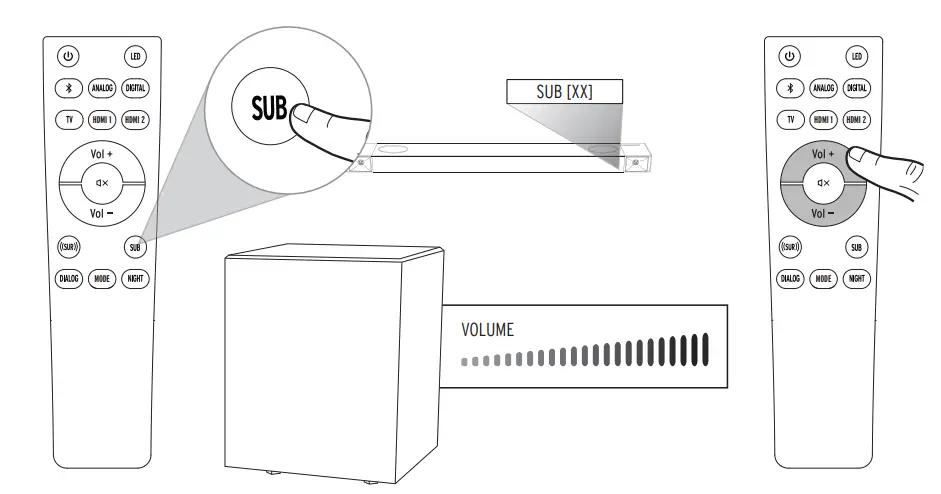 SURROUND LEVEL – QUICK ADJUST
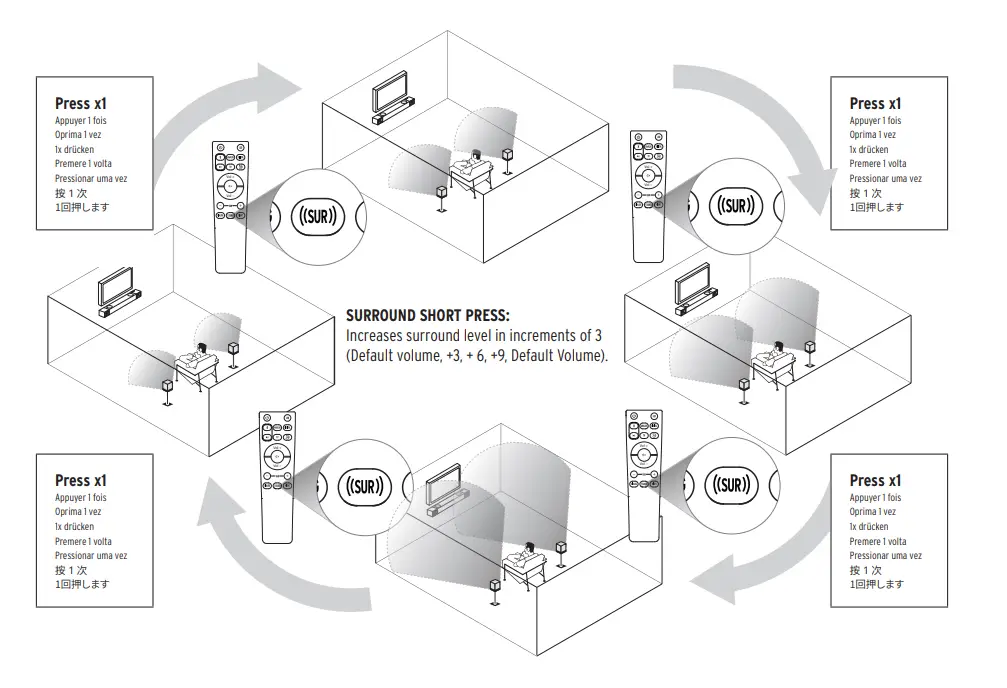 SURROUND LEVEL ADJUSTMENT
 NIGHT MODE
 DIALOGUE MODE
 SPECIAL OPERATING MODES
In addition to the “out-of-box” consumer operating mode (default), the Cinema Series Sound Bars feature special operating modes to optimize the use of the bar for different installation situations. These operating modes and their use cases are outlined below.
DISPLAY MODE
- To be used when the bar is installed in an active retail display where volume is controlled by an external source.
- Source selection is fixed to the Optical input.
- The default volume is fixed to 6dB below the maximum volume setting.
- The subwoofer level is fixed at the default setting.
- Bluetooth and Wi-Fi (or other wireless audio sources) are disabled.
- Product key controls are disabled. Volume controls are also disabled.
RETAIL MODE
- To be used when the bar is installed in a retail situation where volume should controlled directly on the bar.
- Source selection is fixed to the Optical input.
- The default volume is set to ensure a 70dB max SPL, C-weighted, at 36” from the system. The subwoofer level is fixed at the default setting.
- Bluetooth and Wi-Fi (or other wireless audio sources) are disabled.
- Product key controls are disabled, except for “Volume Up” and “Volume Down”.
- IR Remote commands are ignored, except for “Volume Up”, “Volume Down”, “Sub Up”, and “Sub Down”.
- If there is no user interaction via control buttons or IR remote for 90 seconds, the volume and subwoofer level will return to the default levels listed above.
INSTALLER MODE
- The Installer Mode is a special operating mode that allows special functionality for when the Cinema 800 / 1200 is installed by a custom integrator. In Installer Mode:
- Auto-Standby is disabled for all sources except TV (HDMI-ARC). The Cinema 800 / 1200 will still respond to the CEC “Off” command from a TV.
- Auto-On is disabled for all sources except TV source (HDMI-ARC). The Cinema 800 / 1200 will still respond to the CEC “On” command from a TV.
- Turning on and off via CEC commands may be controlled by the user in the TV menu options. This allows the user to decide whether or not to apply CEC commands to the system when the TV source is being used.
- All other functionality is the same as standard DEFAULT MODE.
STREAMER MODE
- The Streamer Mode is a special operating mode that allows the bar to seamlessly accept and interact with the analog output of an audio streaming device or streaming player.
- Whenever there is a signal detected on the Analog input, the Cinema 800 / 1200 will switch to the Analog input.
- The default volume will be set to a fixed level on the sound bar, allowing the user to adjust the volume via the streaming device.
- When the Analog source is selected, the Cinema 800 / 1200 will not respond to “Volume Up” or “Volume Down” commands on the sound bar or remote. The system will still respond normally to volume commands for all other other sources.
- All other functionality is the same as standard DEFAULT MODE.
The operating modes can be accessed and selected in the “Operating Modes Select” menu. To access this menu:
CINEMA 800 / 1200
While holding [SOURCE] + [VOLUME +] buttons on the sound bar, press [MUTE] button on the IR remote (while IR remote is aimed at sound bar IR sensor) to enter ‘Operating Mode Select’ menu.
To SCROLL through operating mode options: Press the [VOLUME +] button on the remote control.
Default → Display → Retail → Installer → Streaming Player The LED display will flash the name of the currently selected operating mode.
To CONFIRM selected operating mode:
Press the [MUTE] button on the remote control, or
OR
Wait 10 seconds without pressing any buttons on the remote or sound bar. The bar will automatically confirm the currently selected operating mode.
To EXIT Operating Modes Select menu:
Press [POWER] button on the sound bar The system shall EXIT the ‘Operating Select Mode’ and return to the prior status.
FACTORY RESET
Clears Bluetooth ® pairing history and user programmed IR commands
Use your phone, tablet or computer as a remote control for Spotify. Go to spotify.com/connect to learn how
“The Bluetooth® word mark and logos are registered trademarks owned by the Bluetooth SIG, Inc. and any use of such marks by Klipsch
Group, Inc. is under license. Other trademarks and trade names are those of their respective owners.”
Dolby, Dolby Audio, Dolby Vision, Dolby Atmos, and the double-D symbol are trademarks of Dolby Laboratories Licensing Corporation.
Manufactured under license from Dolby Laboratories. Confidential unpublished works. Copyright © 1992–2020 Dolby Laboratories. All rights reserved.
HDMI, High-Definition Multimedia Interface, and the HDMI logo are trademarks or registered trademarks of HDMI Licensing,
Administrator in the United Staed and/or other countries.
IMPORTANT SAFETY INSTRUCTIONS!
- READ these instructions.
- KEEP these instructions.
- HEED all warnings.
- FOLLOW all instructions.
- DO NOT use this apparatus near water.
- cLEAN ONLY with dry cloth.
- DO NOT block any ventilation openings. Install in accordance with the manufacturer’s instructions.
- DO NOT install near any heat sources such as radiators, heat registers, stoves, or other apparatus (including amplifiers) that produce heat.
- DO NOT defeat the safety purpose of the polarized or grounding type plug. A polarized plug has two blades with one wider than the other. A grounding type plug has two blades and a third grounding prong. The wider blade or the third prong are provided for your safety.
If the provided plug does not fit into your outlet, consult an electrician for replacement of the obsolete outlet. - PROTECT the power cord from being walked on or pinched, particularly at plugs, convenience receptacles, and the point where they exit from the apparatus.
- ONLY USE attachments/accessories specified by the manufacturer.
- USE ONLY with the cart, stand, tripod, bracket, or table specified by the manufacturer, or sold with the apparatus. When a cart is used, use caution when moving the cart/apparatus combination avoid injury from tip-over.
- UNPLUG this apparatus during lightning storms or when unused for long periods of time.
- REFER all servicing to qualified service personnel. Servicing is required when the apparatus has been damaged in any way, such as power-supply cord or plug is damaged, liquid has been spilled or objects have fallen into the apparatus, the apparatus has been exposed to rain or moisture, does not operate normally, or has been dropped.
- DO NOT expose this apparatus to dripping or splashing and ensure that no objects filled with liquids, such as vases, are placed on the apparatus.
- To completely disconnect this apparatus from the AC Mains, disconnect the power supply cord plug from the AC receptacle.
- The mains plug/appliance coupler is used as disconnect device, the disconnect device shall remain readily operable.
- DO NOT overload wall outlets or extension cords beyond their rated capacity as this can cause electric shock or fire.
- The equipment shall be used at maximum 113˚F / 45˚C ambient temperature.
The exclamation point, within an equilateral triangle, is intended to alert the user to the presence of important operating and maintenance (servicing) instructions in the literature accompanying the product.
The lightning flash with arrowhead symbol within an equilateral triangle is intended to alert the user to the presence of uninsulated “dangerous voltage” within the product’s enclosure that may be of sufficient magnitude to constitute a risk of electrical shock to persons.
WARNING: To reduce the risk of fire or electrical shock, do not expose this apparatus to rain or moisture.
WARNING: To prevent injury, this apparatus must be securely attached to the floor/wall in accordance with the installation instruction.
WARNING: No naked flame sources – such as candles – should be placed on the product.
WARNING: This equipment is a Class II or double insulated electrical appliance. It has been designed in such a way that it does not require a safety connection to electrical earth.
THIS PRODUCT CONTAINS A LITHIUM COIN CELL BATTERY. IF MISUSED OR ABUSED THIS CAN RESULT IN:
- Smoke or gas hazard
- Heat hazard
- Fire hazard
- Explosion hazard
WARNING: Do not place batteries in mouth or ingest. Chemical burn hazard. Keep new and usedbatteries out of reach of children and pets. If swallowed, it can cause severe internal burns in just 2 hours and can lead to death.
If you think batteries might have been swallowed or placed inside any part of the body, seek immediate medical attention.
WARNING: If battery compartment does not close securely, stop using the product and keep it away from children and pets.
WARNING: Do not handle leaking or damaged Lithium batteries.
WARNING: Risk of leakage. Only use the specified type of batteries. Never mix new and used batteries. Observe correct polarity. Remove batteries from products that are not in use for extended periods of time. Store batteries in a dry place.
WARNING: Batteries (battery pack or batteries installed) shall not be exposed to excessive heat such as sunshine, fire or the like.
WARNING: Danger of explosion if battery is incorrectly replaced. Replace only with the same or equivalent type.
WARNING: Do not recharge non-rechargeable batteries.
WARNING: Avoid exposure to extreme heat or cold.
Please dispose of any used batteries properly, following any local regulations. Do not incinerate.
WARNING: Do Not Open! Risk of Electrical Shock. Voltages in this equipment are hazardous to life. No user-serviceable parts inside. Refer all servicing to qualified service personnel. Place the equipment near a main power supply outlet and make sure that you can easily access the power breaker switch.
WARNING: This product is intended to be operated ONLY from the AC Voltages listed on the back
panel or included power supply of the product. Operation from other voltages other than those
indicated may cause irreversible damage to the product and void the products warranty. The use of
AC Plug Adapters is cautioned because it can allow the product to be plugged into voltages in which the product was not designed to operate. If the product is equipped with a detachable power cord, use only the type provided with your product or by your local distributor and/or retailer. If you are unsure of the correct operational voltage, please contact your local distributor and/or retailer.
EU COMPLIANCE INFORMATION
Eligible to bear the CE mark; Conforms to European Union Low Voltage Directive 2014/35/EU;
European Union EMC Directive 2014/30/EU; European Union Restriction of Hazardous Substances Recast (RoHS2) Directive 2011/65/EU; European Union WEEE Directive 2012/19/EU; European Union Eco-Design Directive 2009/125/EC; European Union Registration, Evaluation, Authorization and Restriction of Chemicals (REACH) Directive 2006/121/EC; European Union Radio Equipment Directive (RED) 2014/53/EU.
This product contains batteries that are covered under the 2006/66/EC European Directive, whichcannot be disposed of with normal household waste. Please follow local regulations.
You may obtain a free copy of the Declaration of Conformity by contacting your dealer, distributor,or Klipsch Group, Inc.’s worldwide headquarters. Contact information can be found here: http://www.klipsch.com/Contact-Us
WEEE NOTICE
Note: This mark applies only to countries within the European Union (EU) and Norway. This appliance is labeled in accordance with European Directive 2012/19/EU concerning waste of electrical and electronic equipment (WEEE). This label indicates that this product should not be disposed of with household waste. It should be deposited at an appropriate facility to enable recovery and recycling.
FCC AND CANADA EMC COMPLIANCE INFORMATION
This device complies with Part 15 of the FCC Rules. Operation is subject to the following two conditions:
- This device may not cause harmful interference, and
- This device must accept any interference received, including interference that may cause undesired operation.
NOTE: This equipment has been tested and found to comply with the limits for a Class B digital device, pursuant to part 15 of the FCC Rules. These limits are designed to provide reasonable protection against harmful interference in a residential installation. This equipment generates, uses and can radiate radio frequency energy and, if not installed and used in accordance with the instructions, may cause harmful interference to radio communications. However, there is no guarantee that interference will not occur in a particular installation. If this equipment does cause harmful interference to radio or television reception, which can be determined by turning the equipment off and on, the user is encouraged to try to correct the interference by one or more of the following measures:
- Reorient or relocate the receiving antenna.
- Increase the separation between the equipment and receiver.
- Connect the equipment into an outlet on a circuit different from that to which the receiver is connected.
- consult the dealer or an experienced radio/TV technician for help.
Approved under the verification provision of FCC Part 15 as a Class B Digital Device.
Caution: Changes or modifications not expressly approved by the manufacturer could void the user’s authority to operate this device. Caution: To comply with the limits of the Class B digital device, pursuant to Part 15 of the FCC Rules, this device is to comply with Class B limits. All peripherals must be shielded and grounded. Operation with non-certified peripherals or non-shielded cables my result in interference to radio or reception.
WIRELESS TRANSMITTER COMPLIANCE INFORMATION
Radiation Exposure Statement:
This equipment complies with FCC radiation exposure limits set forth for an uncontrolled environment. This equipment should be installed and operated with minimum distance 20cm between the radiator & your body.
Slave Equipment: (for play-fi module 2.4G and 5GHz dual bands)
This device is slave equipment, the device is not radar detection and not ad-hoc operation in the DFS band.
Industry Canada statement:
This device complies with Industry Canada’s licence-exempt RSSs. Operation is subject to the following two conditions:
- This device may not cause interference; and
- This device must accept any interference, including interference that may cause undesired operation of the device.
Caution:(for play-fi module 2.4G and 5GHz dual bands)
- the device for operation in the band 5150-5250 MHz is only for indoor use to reduce the potential for harmful interference to co-channel mobile satellite systems;
- the maximum antenna gain permitted for devices in the bands 5250-5350 MHz and 5470-5725 MHz shall be such that the equipment still complies with the e.i.r.p. limit;
- the maximum antenna gain permitted for devices in the band 5725-5850 MHz shall be such that the equipment still complies with the e.i.r.p. limits specified for point-to-point and non-point-to-point operation as appropriate; and
- the worst-case tilt angle(s) necessary to remain compliant with the e.i.r.p. elevation mask requirement set forth in Section 6.2.2(3) shall be clearly indicated.
- Users should also be advised that high-power radars are allocated as primary users (i.e. priority users) of the bands 5250-5350 MHz and 5650-5850 MHz and that these radars could cause interference and/or damage to LE-LAN devices.
Radiation Exposure Statement:
This equipment complies with ISED radiation exposure limits set forth for an uncontrolled environment. This equipment should be installed and operated with minimum distance 20cm between the radiator & your body.
RSB-3
- FIRMWARE VERSION 1.4
- Bluetooth Operating Frequency: 2402-2480MHz
- Maximum RF Power: 10 dBm (e.i.r.p)
RSB-6
- Bluetooth Operating Frequency: 2402-2480MHz
- Maximum RF Power: 4 dBm (e.i.r.p)
RSB-8
- Bluetooth Operating Frequency: 2402-2480MHz
- Maximum RF Power: 4 dBm (e.i.r.p)
RSB-11
- Bluetooth Operating Frequency: 2402-2480MHz
- Maximum RF Power: 10 dBm (e.i.r.p)
- Wireless Tx & Rx Operating Frequency: 2405.35-2477.35MHz
- Maximum RF Power: 10 dBm (e.i.r.p)
RSB-14
- Bluetooth Operating Frequency: 2402-2480MHz
- Maximum RF Power: 10 dBm (e.i.r.p)
- Wireless Tx & Rx Operating Frequency: 2405.35-2477.35MHz
- Maximum RF Power: 10 dBm (e.i.r.p)
- Wi-Fi Operating Frequency: 2412-2472 MHz
- Maximum RF Power: 20 dBm (e.i.r.p)
- Wi-Fi Operating Frequency: 5150-5350MHz & 5470-5725MHz
- Maximum RF Power: 20 dBm (e.i.r.p)
SOUND BAR WARRANTY
Klipsch Group, Inc, (KGI) warrants to the original retail purchaser that this product is to be free from defective materials and workmanship for a period of one (1) year on electronics and three (3) years on woofer, cabinet and non-electrical mechanics, from the date of purchase, if it is properly used and maintained. If this product proves defective in either material or workmanship, KGI, at its option, will (a) repair the product, or (b) replace the product, at no charge for parts or labor. If the product model is no longer available and cannot be repaired effectively or replaced with an identical model, KGI at its sole option may replace the unit with a current model of equal or greater value. In some cases, modification to the mounting surface may be required where a new model is substituted. KGI assumes no responsibility or liability for such modification. To obtain a repair or replacement under the terms of this warranty, please return to dealer first, if possible, and the dealer will direct you accordingly for repairs or replacement. You will be required to submit a copy of the original receipt. Return shipping for exchanges/repairs is the sole responsibility of the original retail purchaser.
Limitations:
- This limited warranty does not cover failure of the product resulting from improper installation, misuse, abuse, accident, neglect, mishandling, or wear from ordinary use or environmental deterioration.
- this limited warranty does not cover cosmetic damage, including paint damage, or consequential damage to other components or premises which may result for any reason from the failure of the product. This limited warranty is null and void for products not used in accordance with KGI’s instructions.
- This limited warranty is null and void for products with altered or missing serial numbers and for products not purchased from an authorized dealer.
- This limited warranty terminates if you sell or otherwise transfer this product to another party.
THIS WARRANTY GIVES YOU SPECIFIC LEGAL RIGHTS, AND YOU MAY ALSO HAVE OTHER RIGHTS WHICH VARY FROM STATE TO STATE, JURISDICTION TO JURISDICTION OR COUNTRY TO COUNTRY. KGI’S RESPONSIBILITY FOR MALFUNCTIONS AND DEFECTS IN HARDWARE IS LIMITED TO REPLACEMENT OR REPAIR AS SET FORTH IN THIS WARRANTY STATEMENT. ALL EXPRESS AND IMPLIED WARRANTIES FOR THE PRODUCT, INCLUDING BUT NOT = LIMITED TO ANY IMPLIED WARRANTIES OF MERCHANTABILITY AND FITNESS FOR A PARTICULAR PURPOSE, ARE LIMITED IN TIME TO THE TERM OF THIS WARRANTY. SOME STATES, JURISDICTIONS OR COUNTRIES DO NOT ALLOW THE EXCLUSION OF CERTAIN IMPLIED WARRANTIES OR CONDITIONS, OR LIMITATIONS ON HOW LONG AN IMPLIED WARRANTY OR CONDITION LASTS, SO THIS LIMITATION MAY NOT APPLY TO YOU. KGI DOES NOT ACCEPT LIABILITY FOR SPECIAL, INDIRECT, CONSEQUENTIAL OR INCIDENTAL DAMAGES, INCLUDING WITHOUT LIMITATION, ANY LIABILITY FOR THIRD PARTY CLAIMS AGAINST YOU FOR DAMAGES OR FOR PRODUCTS NOT BEING AVAILABLE FOR USE. THE MAXIMUM LIABILITY FOR WHICH KGI MAY BE RESPONSIBLE WILL BE NO MORE THAN THE AMOUNT YOU PAID FOR THE PRODUCT THAT IS THE SUBJECT OF THE CLAIM. SOME STATES, JURISDICTIONS OR COUNTRIES DO NOT ALLOW THE EXCLUSION OR LIMITATION OF SPECIAL, INDIRECT, INCIDENTAL OR CONSEQUENTIAL DAMAGES, SO THE ABOVE LIMITATION OR EXCLUSION MAY NOT APPLY TO YOU.
WARRANTY OUTSIDE THE U.S.
The Warranty on this product shall comply with applicable law when sold to a consumer outside of the United States. To obtain any applicable warranty service, please contact the dealer from which you purchased this product, or the distributor that supplied this product.
3502 WOODVIEW TRACE, INDIANAPOLIS, IN, USA
KLIPSCH.COM
©2020, Klipsch Group, Inc. Klipsch Group, Inc. is a wholly-owned subsidiary of Voxx International Corporation.
Klipsch and Keepers of the Sound are trademarks of Klipsch Group, Inc., registered in the United States and other countries.
The Bluetooth® word mark is a registered trademark owned by Bluetooth SIG, Inc. and any use of such mark by Klipsch Group, Inc. is under license.
For DTS patents, see http://patents.dts.com. Manufactured under license from DTS, Inc. DTS, the Symbol, DTS and the Symbol together, Virtual:X, and the
DTS Virtual:X logo are registered trademarks or trademarks of DTS, Inc. in the United States and/or other countries. © DTS, Inc. All Rights Reserved.
FAQS
can we connect apple tv 4k?
Klipsch suggest utilizing the HDMI eARC connection for the Cinema 1200! This bar will also feature a Digital Optical
input for a TV connection.
What is the exact distance between the two upward firing speakers on the soundbar?
They are 32″ apart.
Does it support LFE?
Cinema 1200 features an RCA Subwoofer output. Using a male-male RCA subwoofer cable, connect this output into a subwoofer’s Line Input labeled “LFE” for optimal performance of an additional subwoofer.
Does it have any Room Correction features? Such as using a microphone or phone app to adjust sound based on feedback in the room?
The Cinema 1200 does not feature room correction or room calibration. Adjustments to the bar can be made via the Klipsch connect app.
Does it support Dolby TrueHD, DTS-HD ma, and the newer DTS:x?
This system absolutely sucks from a technology standpoint. And Klipsch cannot provide working solutions. They know of the problems. I give this a NEGATIVE 5 stars. I ended up going with an LG sound bar and very pleased.
Is the warranty provided internationally?
2.5 to 3ft
What is the distance between the two up-firing speakers on top of the soundbar?
The Cinema 1200 sound bar will feature a HDMI ARC and a Digital Optical port for connection with a TV. To utilize the Firestick, use a HDMI ARC connection between the bar and the TV. Then connect the Firestick into one of the bar’s HDMI inputs for passthrough functionality.
Will this work with my 2016 Samsung 4K, & fire stick?
The Cinema 1200 sound bar will only be compatible with 1 set of wireless surround speakers.
Can you hook up two more surround speakers?
The Surround 3A dimensions are as follows: 8 13/16″ H x 4 3/4″ W x 4 3/4″ D.
What are the dimensions of the sound at? Height and depth?
The Cinema 1200 sound bar has an approximate height of 7.5cm.
What is the height of the sound bar?
Yes, can be used without the surrounds. Sounds good with or without them. I have a second sub on mine which works and sounds great also.
Can i add 2 more subs to the system?
Aside from the included wireless subwoofer, the Cinema 1200 will feature a RCA subwoofer output to connect an additional wired subwoofer (using a male-male RCA subwoofer cable).
If you buy more than one, for a household, will they interfere with each other?
If two units are in close proximity to each other, wireless interference can occur.
Will this work with any 4K tv n 4K fire stick?
The Cinema 1200 sound bar will feature a HDMI ARC and a Digital Optical port for connection with a TV. To utilize the Firestick, use a HDMI ARC connection between the bar and the TV. Then connect the Firestick into one of the bar’s HDMI inputs for passthrough functionality.
Does it support LFE?
The Cinema 1200 features a RCA Subwoofer output. Using a male-male RCA subwoofer cable, connect this output into a subwoofer’s Line Input labeled “LFE” for optimal performance of an additional subwoofer.
Does it support dolby truehd, dts-hd ma and the newer dts:x ?
The Cinema 1200 sound bar features Dolby Atmos processing to decode up to 7.1.4 content. While the bar will not decode DTS:X, the bar will support Dolby Digital and Dolby Digital Plus for a power cinema experience.
Is the warranty provided internationally ?
This system absolutely sucks from a technology standpoint. And Klipsch cannot provide working solutions. They know of the problems. I give this a NEGATIVE 5 stars. I ended up going with an LG sound bar and very pleased.
Does it have any Room Correction features? Such as using a microphone or phone app to adjust sound based on feedback in the room?
This system absolutely sucks from a technology standpoint. And Klipsch cannot provide working solutions. They know of the problems. I give this a NEGATIVE 5 stars. I ended up going with an LG sound bar and very pleased.