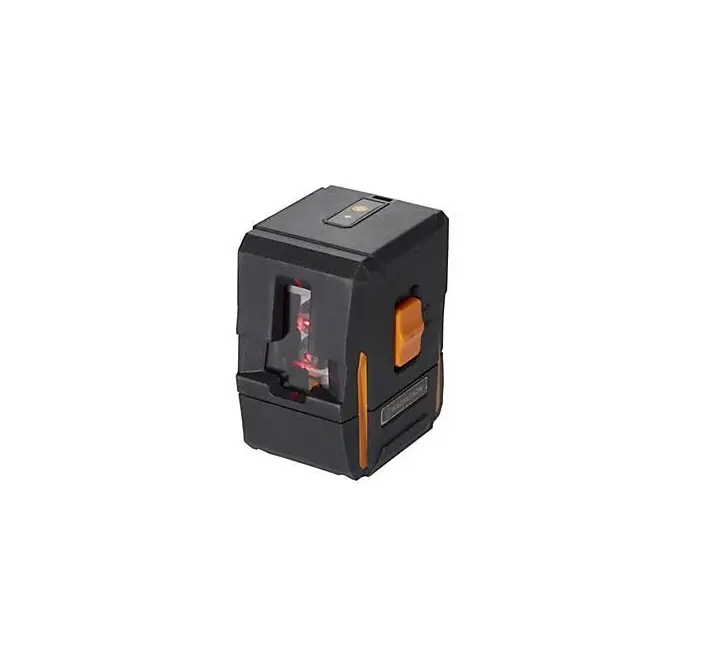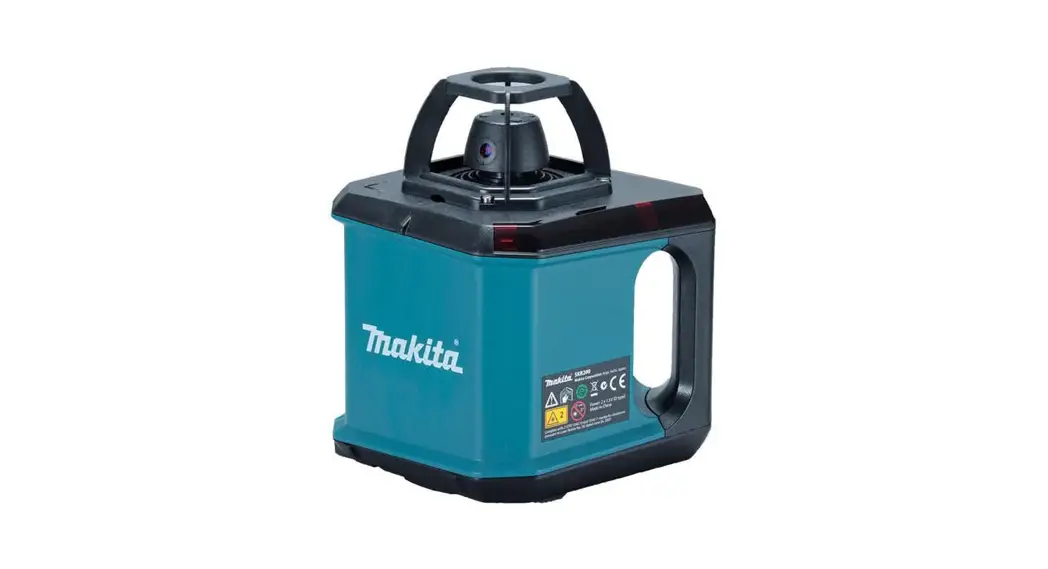

SKR200 Self Leveling Rotation Laser
Instruction Manual
Instrument Set-up Introduction
 The safety instructions and the user manual should be read through carefully before the product is used for the first time.
 The person responsible for the product must ensure that all users understand these directions and adhere to them. The symbols used have the following meanings: WARNING
Indicates a potentially hazardous situation or an unintended use that, if not avoided, will result in death or serious injury. CAUTION
Indicates a potentially hazardous situation or an unintended use which, if not avoided, may result in minor injury and/or appreciable material, financial and environmental damage. Important paragraphs must be adhered to in practice as they enable the product to be used in a technically correct and efficient manner.
Instrument Set-up
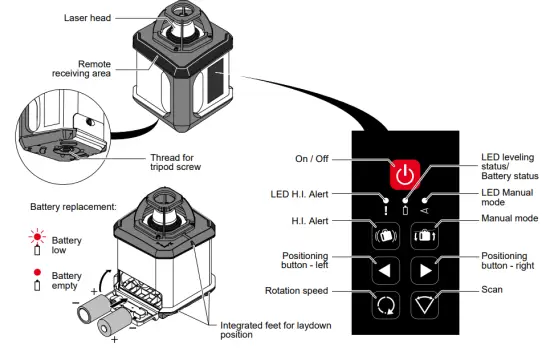
Overview – Laser
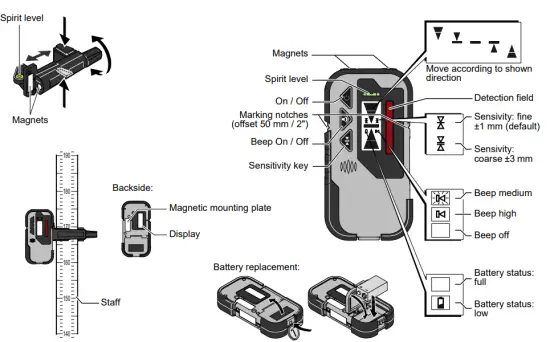
Overview – Receiver Overview – Remote Control
 Overview – Remote Control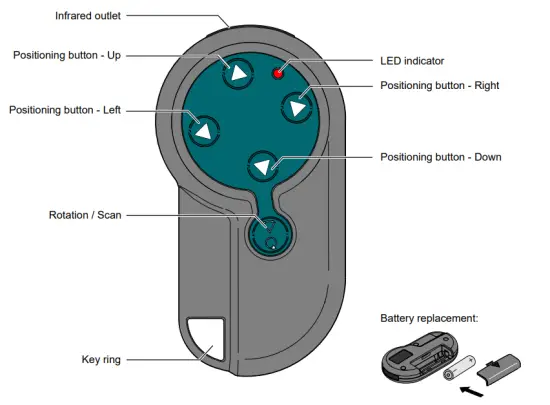
Accessories
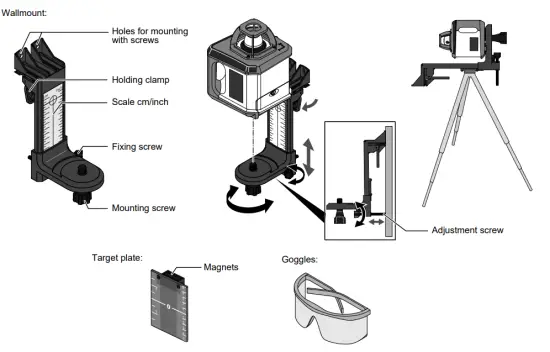
 WARNING!
The goggles do not protect your eyes against the laser beam. It is only used to increase the visibility of the laser beam.
Operations
Typical uses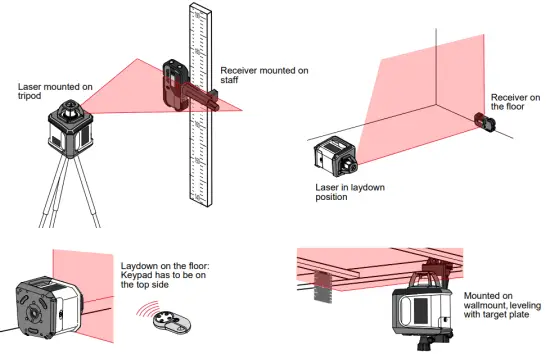
Switching ON / Automatic mode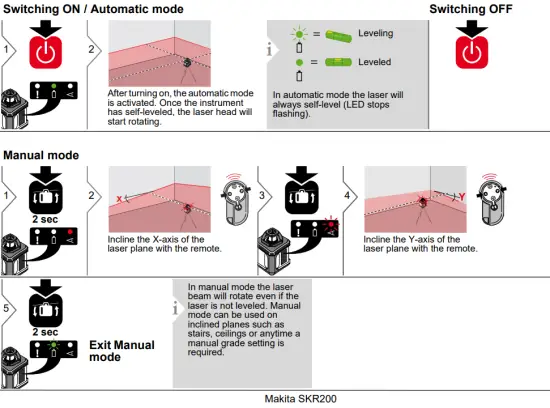
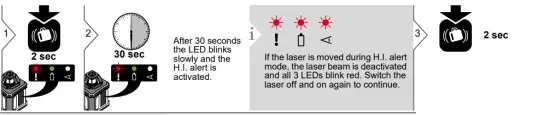
Check and adjust the laser beam to the previous working height. The H.I. alert mode must be reactivated each time the laser is turned on.
The Elevation Alert or Height of The instrument function is designed to prevent incorrect work caused by sudden movement or settling of the tripod that would cause the
laser to level at a lower height.
Applications
Rotating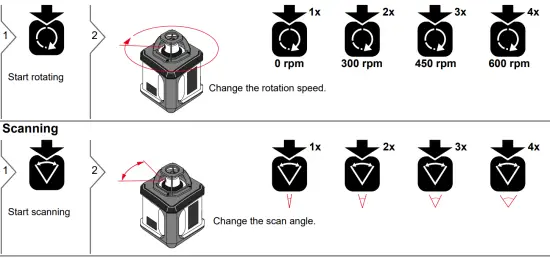
Button Functions – Upright Mode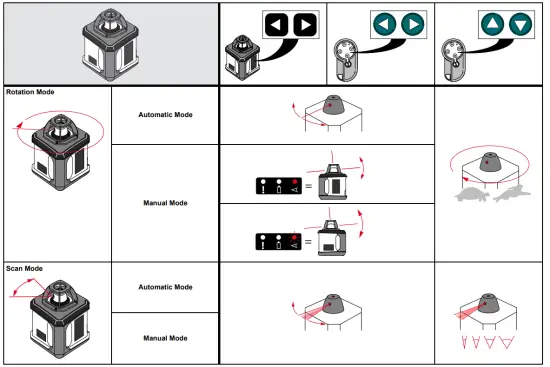
Button Functions – Laydown Mode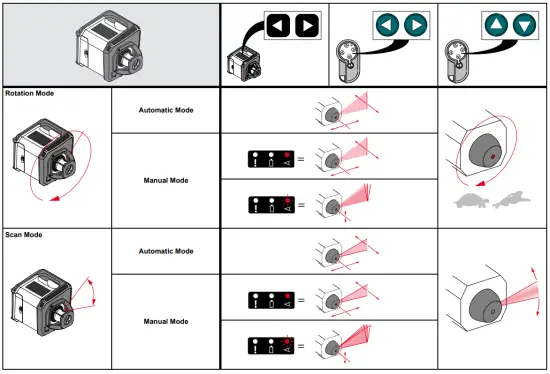
Alignment applications Ceiling work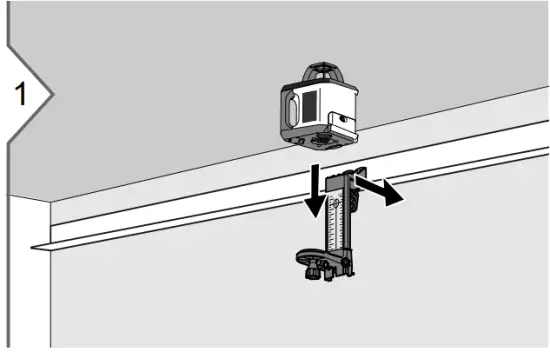
Attach the first ceiling profile. Mount the laser on the wall mount. Fix the wallmount on the ceiling profile. 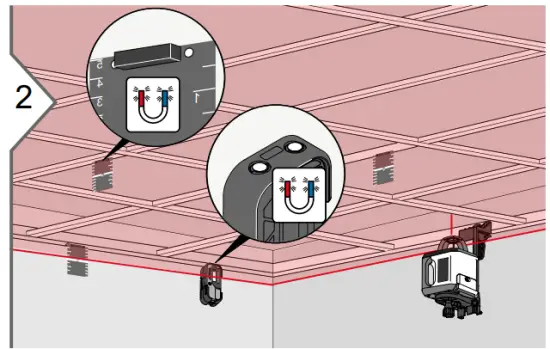
Switch on the laser. Adjust the height of the laser as needed. Use automatic mode or H.I alert mode and allow the laser to self-level. Use the target plate or receiver to level the ceiling grid hangers.
The layout or floor work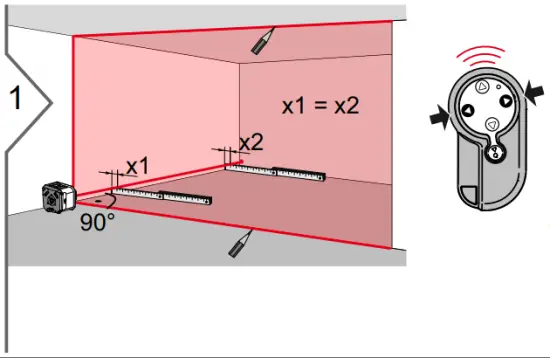
Laydown laser with a keypad on top. Roughly align the laser along the reference wall. Switch on the laser. Use automatic mode or H.I. alert mode and allow the laser to self-level. Use the remote to fine align the plumb laser beam parallel to the wall. Mark laser lines on the ceiling, wall, and floor accordingly. 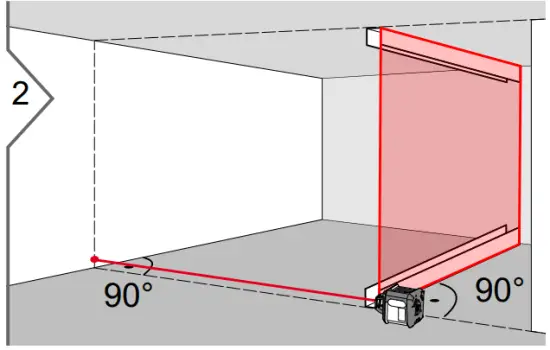
Move the laser to the next section. Repeat step one using existing marks as reference. Fix drywall tracks.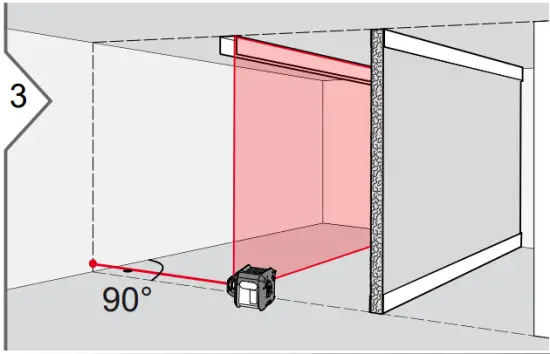
Continue in the same way with the next drywall tracks.
Alignment applications Level fixing points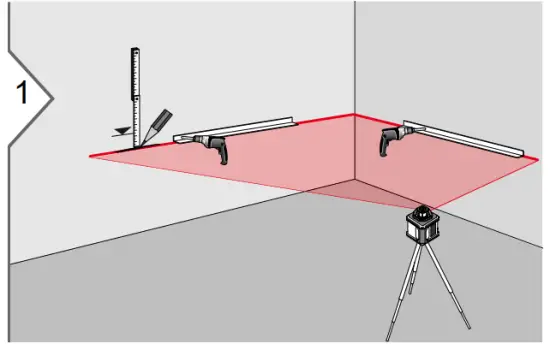
Switch on the laser. Adjust the height of the laser to a known benchmark for the fixing points. Use automatic mode or H.I. alert mode and allow the laser to self-level.
Water pipe assembly
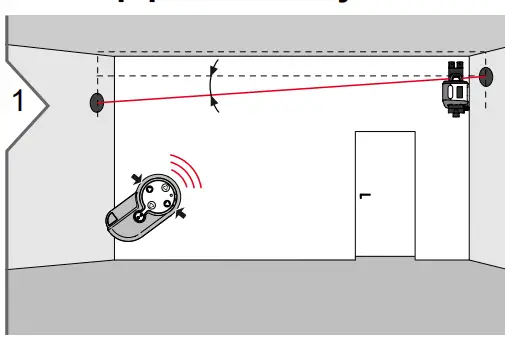
Mount laser with the wall mounts to the wall. Switch to manual mode. Incline the laser beam to the reference.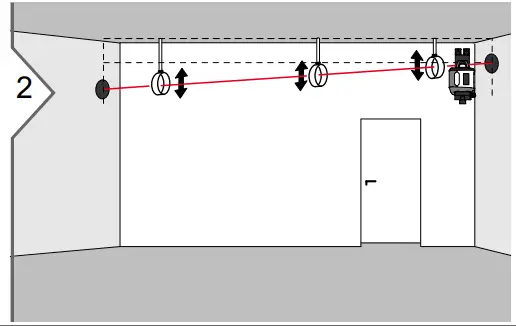
Adjust the tube clamps to the laser beam. 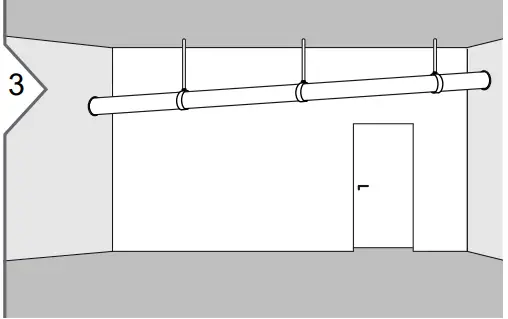
Mount and fix the water pipe.
Alignment applications
Floor leveling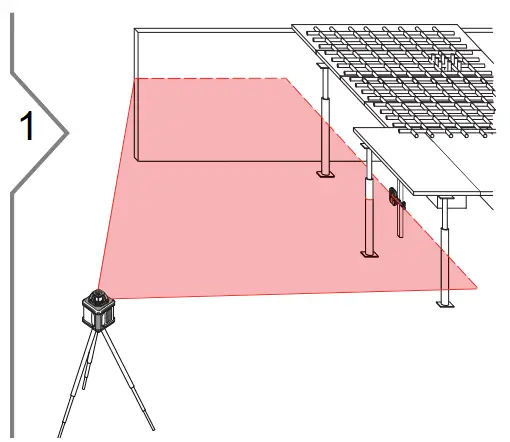
Switch on the laser. Use automatic mode or H.I. alert mode and allow the laser to self-level. Mount receiver with clamp on the staff. Pick up reference height. Adjust height needed for floors. Level supporting poles for floor.
Formwork leveling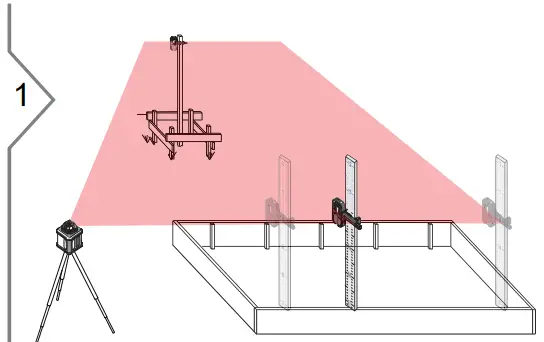
Switch on the laser. Use automatic mode or H.I. alert mode and allow the laser to self-level. Mount receiver with clamp on the staff. Pick up reference height. Adjust height needed for formwork. Level and adjust formwork.
Checking the accuracy
Level accuracy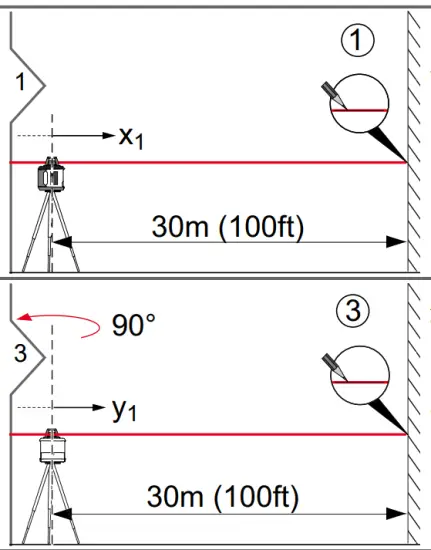
Place laser on a leveled tripod approximately 30 m from a wall. Align the X-axis so that it is square to the wall. Switch on the laser. Use automatic mode and allow the laser to self-level. Mark the position of the beam with the receiver (Position 1).
Align the Y-axis by rotating the laser 90° so that this axis is square to the wall. Allow the laser to self-level completely, and then mark the position of the beam (Position 3).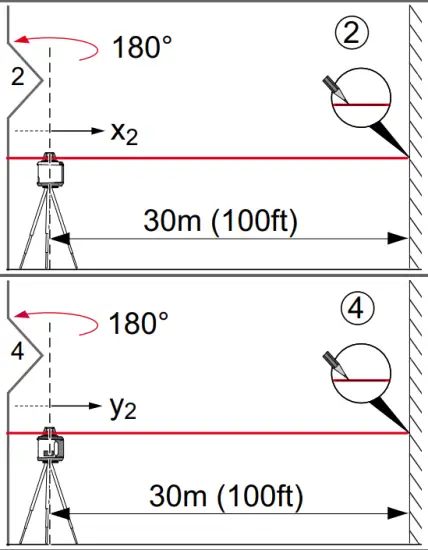
Rotate the laser 180°, allow it to self-level and mark the opposite side of the first axis (Position 2).
Rotate the laser 180°, allow it to self-level, and mark the position of the beam (Position 4). The laser is within its accuracy specification if the four marks are within ±3mm (± 1/8″) from the center.
Vertical accuracy
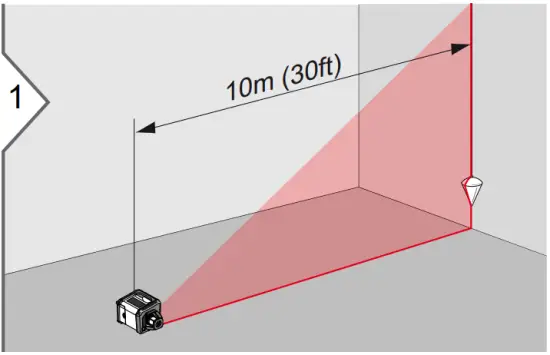
Place laser in lay down position on a flat, level surface, approximately 10 m from a wall. Hang a plumb line on the wall. Switch on the laser. Use automatic mode and allow the laser to self-level. Align the vertical beam to the plumb line. Use scan operation to have the best visibility.
If the vertical beam is not plumb, adjustment is necessary. Should the laser be outside of the specified tolerance, please contact a local dealer.
Technical Data
| Rotary Laser Operating Range (Rotating beam) | 200 m (656 ft) diameter, with a receiver |
| Operating Range (Plumb beam) | up to 30m (100 ft) |
| Self-leveling Accuracy* | ±1 mm at 10 m ±1/16″ at 50 ft |
| Self-leveling range | ±6° |
| Rotation speeds | 0, 300, 450, 600 rpm |
| Scan | yes, 4 steps |
| Laser type | 635 nm (red), < 1 mW |
| Laser class | 2 |
| Dimension (H x W x D) | 156 x 154 x 197 mm 6.1 x 6.1 x 7.8 in |
| Weight (with batteries) | 1.6 kg / 55 oz |
| Batteries | 2x 1.5V LR20 (D)*** |
| Battery durability *” | 60 hours** |
| Temperature range: – Storage – Operation | -20 to 70 °C -4 to 158 °F -10 to 50 °C 14 to 122 °F |
| Protection class | IP54 (dust- and splash water protected) |
| Tripod Thread | 5/8″-11 |
Remote Control
| Range | up to 30m (100 ft) |
| Batteries | 1x AA, 1.5V*** |
| Temperature range: -Storage -Operation | -20 to 70 °C -4 to 158 °F -10 to 50 °C 14 to 122 °F |
| Receiver | |
| Sensitivity (switchable) | ±1 mm / ±3 mm ±0.04 in / ±0.12 in |
| Battery | 1x 6LR61, 9V*** |
| Temperature range: -Storage -Operation | -20 to 70 °C -4 to 158 °F -10 to 50 °C 14 to 122 °F |
| Protection class | IP65 (dust-tight and jet water protected) |
* Accuracy is defined at 25°C
** Battery life is dependent upon environmental conditions
*** Leakage proof alkaline batteries are strongly recommended
Transport
Transport in the field
When transporting the equipment in the field, always make sure that you
- either carry the product in its original transport container
- or carry the tripod with its legs splayed across your shoulder, keeping the attached product upright.
Transport in a road vehicle
Never carry the product lose in a road vehicle, as it can be affected by shock and vibration. Always carry the product in its transport container and secure it.
Shipping
When transporting the product by rail, air or sea, always use the complete original packaging, transport container, and cardboard box, or its equivalent, to protect against shock and vibration. Shipping, transport of batteries When transporting or shipping batteries, the person in charge of the product must ensure that the applicable national and
international rules and regulations are observed. Before transportation or shipping, contact your local passenger or freight transport company.
Storage Product
Respect the temperature limits when storing the equipment, particularly in summer if the equipment is inside a vehicle. Refer to “Technical Data” for information about temperature limits. Alkaline Batteries If the equipment is to be stored for a long time, remove the alkaline batteries from the product in order to avoid the danger of leakage.
Cleaning and Drying
Product and Accessories
- Blow dust off optical parts.
- Never touch the glass with your fingers.
- Use only a clean, soft, lint-free cloth for cleaning.
- Do not use other liquids; these may attack the polymer components.
Damp Products
- Dry the product, the transport container, the foam inserts and the accessories at a temperature not greater than 40°C / 104°F and clean them.
- Do not repack until everything is completely dry.
Safety Instructions
The person responsible for the instrument must ensure that all users understand these directions and adhere to them. Areas of responsibility Responsibilities of the manufacturer of the original equipment: Makita Corporation Anjo, Aichi 446-8502 Japan
Internet: www.makita.com
The company above is responsible for supplying the product, including the User Manual in a completely safe condition. The company above is not responsible for third-party accessories. Responsibilities of the person in charge of the instrument:
- To understand the safety instructions on the product and the instructions in the User Manual.
- To be familiar with local safety regulations relating to accident prevention.
- Always prevent access to the product by unauthorized personnel.
Permitted use
- The instrument casts a horizontal laser plane for the purposes of alignment.
- The unit can be set up on its own base plate, wall mount, or on tripod.
- The laser beam can be detected by means of a laser detector.
- This product is intended for indoor use and applications.
Limits of use
Refer to section “Technical data”.The device is designed for use in areas permanently habitable by humans. Do not use the product in explosion hazardous areas or in aggressive environments.
Prohibited use
- Using the product without instruction
- Use outside of the intended limits.
- Disabling safety systems.
- Removal of hazard notices.
- Opening the product using tools, for example, a screwdriver, unless this is specifically permitted for certain functions.
- Modification or conversion of the product.
- Use after misappropriation.
- Use of products with obviously recognizable damages or defects.
- Use with accessories from other manufacturers without express approval.
- Inadequate safeguards at the worksite, for example, when using on or near roads.
- Deliberate dazzling of third parties.
- Controlling of machines, moving objects, or similar monitoring applications without additional control and safety installations.
Safety Instructions
Noise emissions (laser receiver) CAUTION
The A-weighted sound pressure level of the signal sound is > 80 db(A) at a distance of one meter. Do not hold the laser receiver directly to your ear! Hazards in use WARNING
Watch out for erroneous measurement results if the product has been dropped or has been misused, modified, stored for long periods or transported. Carry out periodic test measurements. Particularly after the instrument has been subject to abnormal use, and before, during, and after important measurements. Refer to section “Checking the Accuracy”. WARNING
Because of the risk of electrocution, it is very dangerous to use grade rods and staffs in the vicinity of electrical installations such as power cables or electrical railways. Precautions:
Keep at a safe distance from electrical installations. If it is essential to work in this environment, first contact the safety authorities responsible for the electrical installations and follow their instructions. WARNING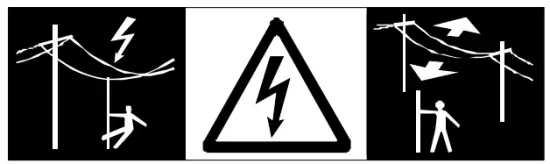 If the product is used with accessories, for example, masts, staffs, poles, you may increase the risk of being struck by lightning.
Precautions:
Do not use the product in a thunderstorm. WARNING
Inadequate securing of the working site can lead to dangerous situations, for example in traffic, on building sites, and at industrial installations.
Precautions: Always ensure that the working site is adequately secured. Adhere to the regulations governing safety and accident prevention and road traffic. WARNING
If the accessories used with the product are not properly secured and the product is subjected to mechanical shock, for example, blows or falls, the product may be damaged or people may sustain injury.
Precautions:
When setting up the product, make sure that the accessories are correctly adapted, fitted, secured, and locked in position. Avoid subjecting the product to mechanical stress. WARNING
Changes or modifications not expressly approved could void the user’s authority to operate the equipment. CAUTION
Never attempt to repair the product yourself. In case of damage, contact a local dealer.
DisposalCAUTION
Flat batteries must not be disposed of with household waste. Care for the environment and take them to the collection points provided in accordance with national or local regulations. The product must not be disposed of with household waste. Dispose of the product appropriately in accordance with the national regulations in force in your country. Adhere to the national and country-specific regulations. Product-specific treatment and waste management can be downloaded from our homepage.
Safety Instructions
Electromagnetic Compatibility (EMC) WARNING
The device conforms to the most stringent requirements of the relevant standards and regulations. Yet, the possibility of causing interference in other devices cannot be totally excluded.
Laser classification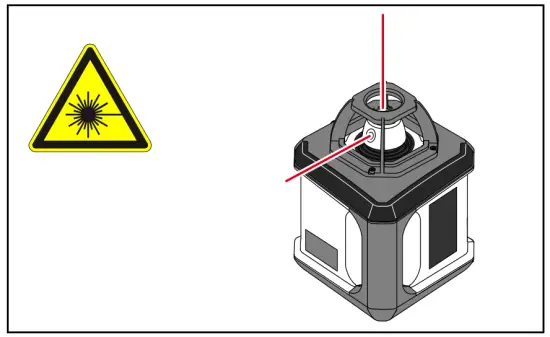
The device produces visible laser beams, which are emitted from the instrument: It is a Class 2 laser product in accordance with:
• IEC60825-1: 2007 „Radiation safety of laser products“
Laser Class 2 products:
Do not stare into the laser beam or direct it toward other people unnecessarily. Eye protection is normally afforded by aversion responses including the blink reflex. WARNING
Looking directly into the beam with optical aids (e.g. binoculars, telescopes) can be hazardous. CAUTION
Looking into the laser beam may be hazardous to the eyes.
Labeling
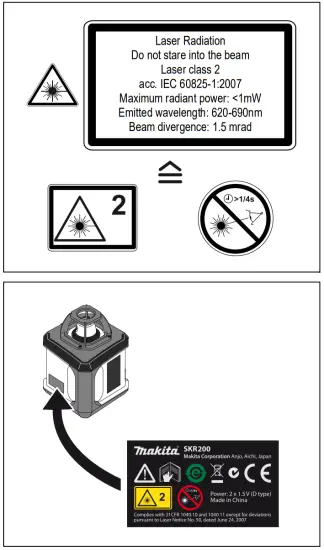 Subject to change (drawings, descriptions and technical data) without prior notice.
 MAKITA Industrial Power Tools - The Leader In Cordless with 18V LXT Lithium-Ion