NationalMi Encompass 2022 Loan Origination System User Manual
NEW Feature… now you can request to activate your National MI coverage from within Encompass.
(MI must be ordered from National MI through Encompass’ MI Services
and have closed in order to successfully activate the MI coverage.)
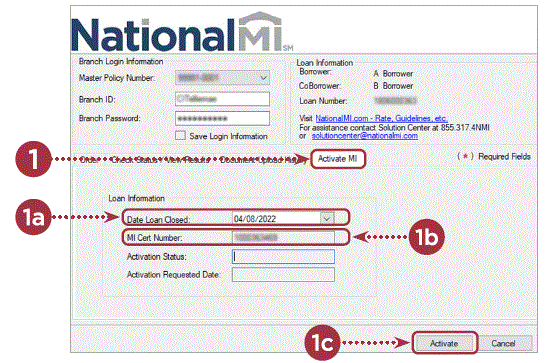
Go to the National MI Request Page within Encompass via Services / Mortgage Insurance:
- Select the Activate MI tab.
- a. Review the Date Loan Closed field to ensure it represents the actual date the loan closed. This must be a present or past date to proceed.
- b. Review the MI Cert Number field for accuracy and completeness.
- c. Select the Activate button.

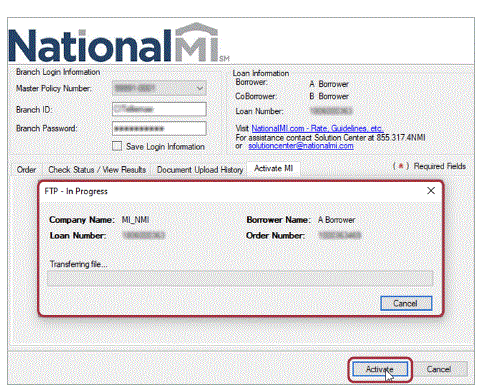
After the Activate button has been selected, Encompass will display the screen below indicating the file data is being submitted to National MI:
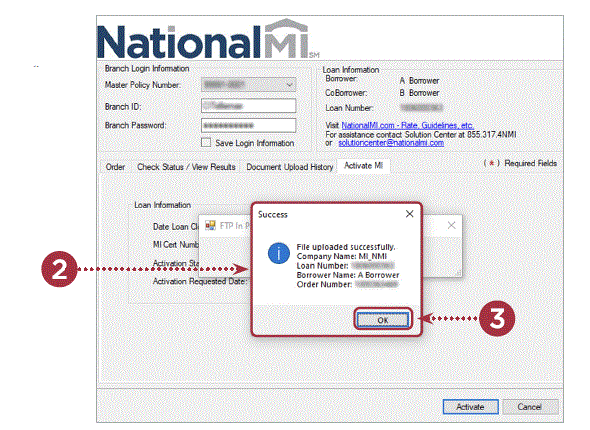
- Confirm that the Activation request submission was successful, which will display similarly to the screenshot below.
- Select OK, once you have confirmed the information on the window.
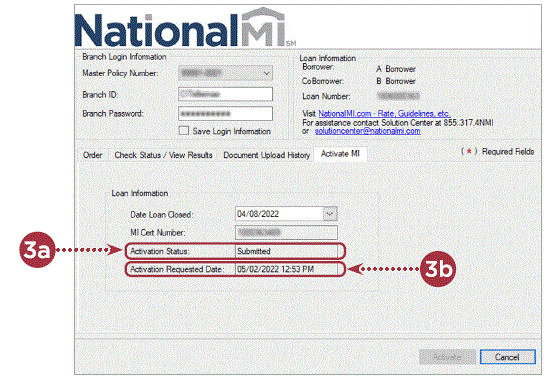
- a. Confirm that the Activation Status field shows a value of Submitted.
- b. The Activation Requested Date field will be populated with the date/time the transaction was successfully submitted.

Activation requests can only be requested one time. Please reach out to National MI’s Solution Center if you need assistance or if you need to edit this data.
Please contact the Solution Center if you have any questions. 855.317.4NMI (4664) [email protected]
Download PDF: NationalMi Encompass 2022 Loan Origination System User Manual