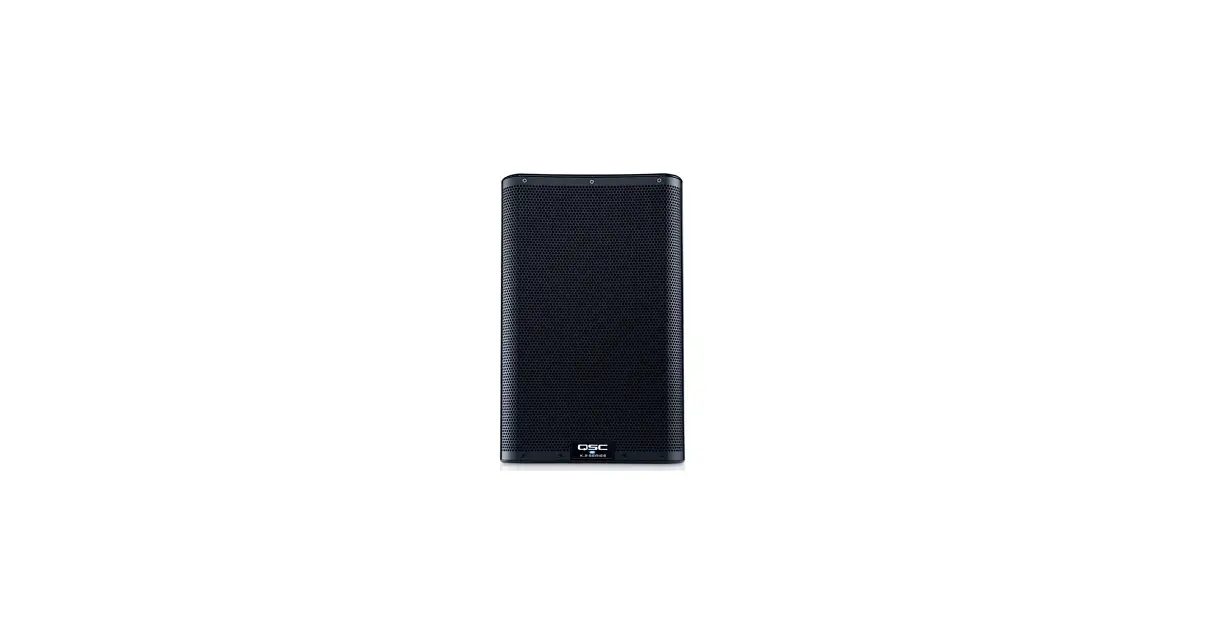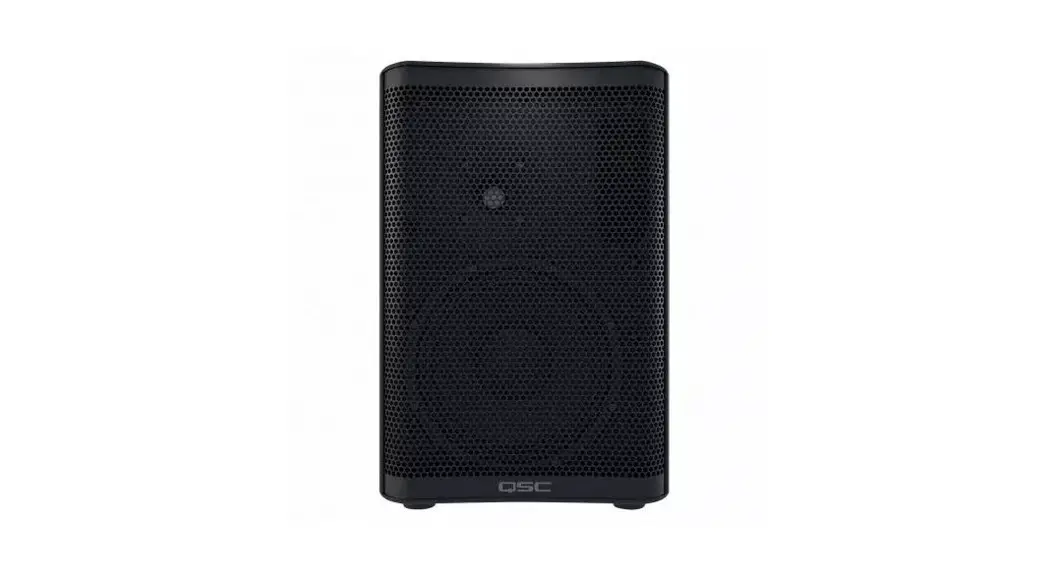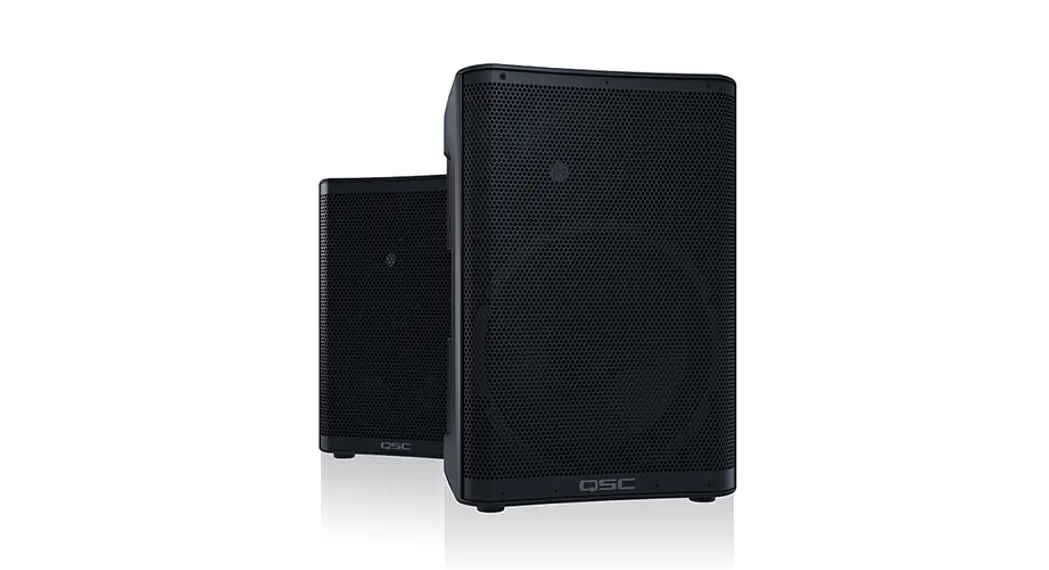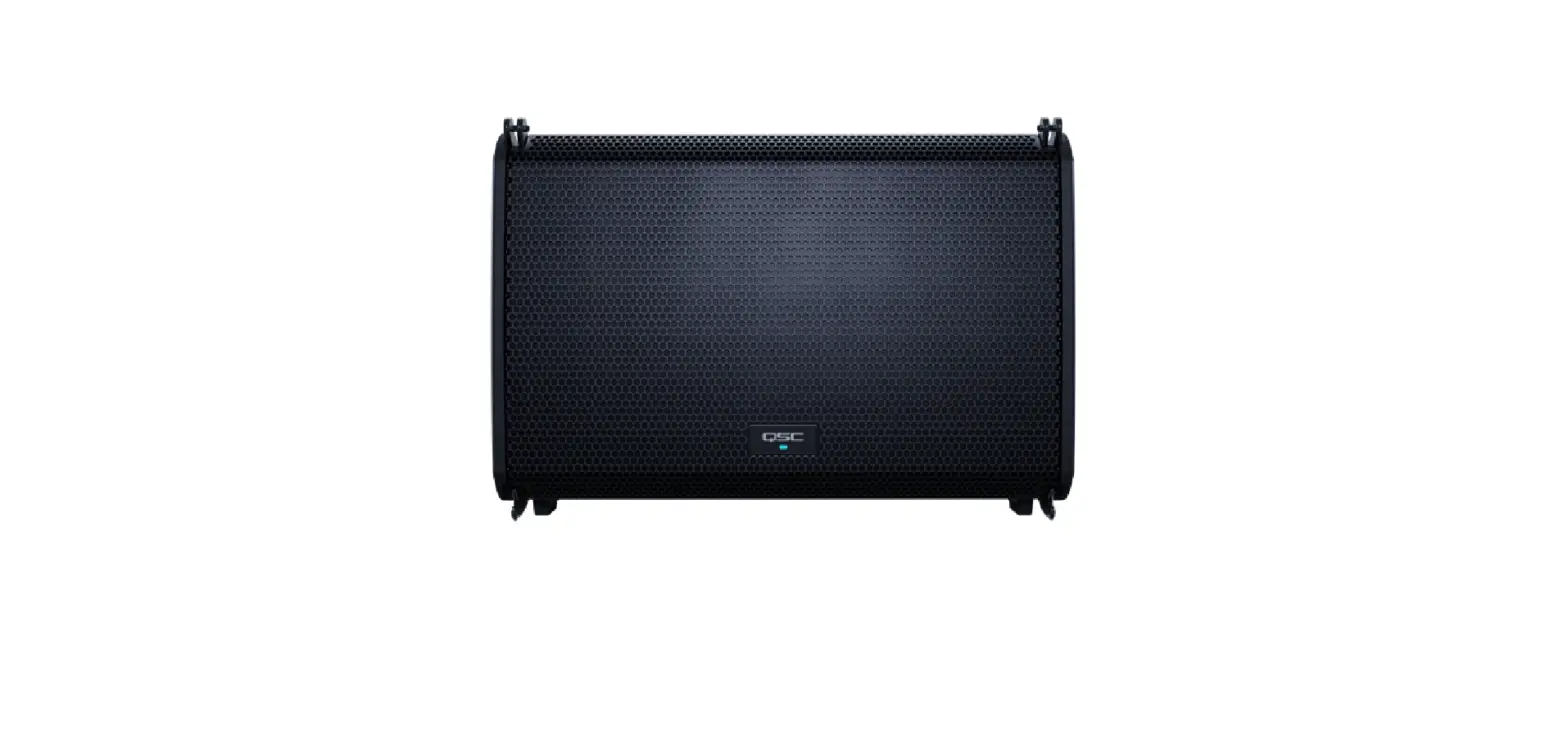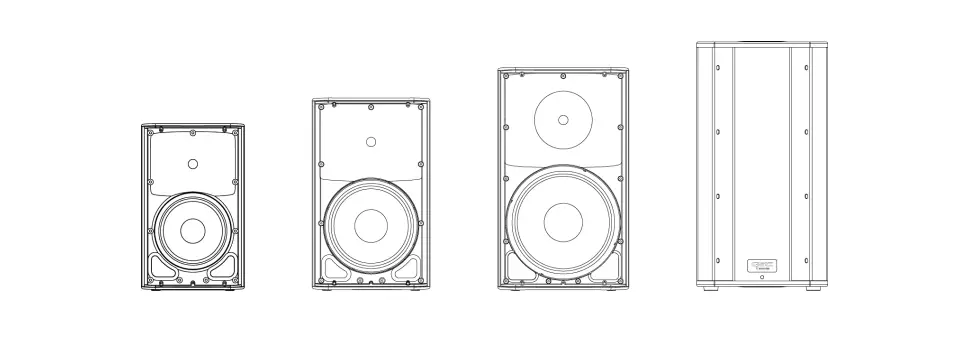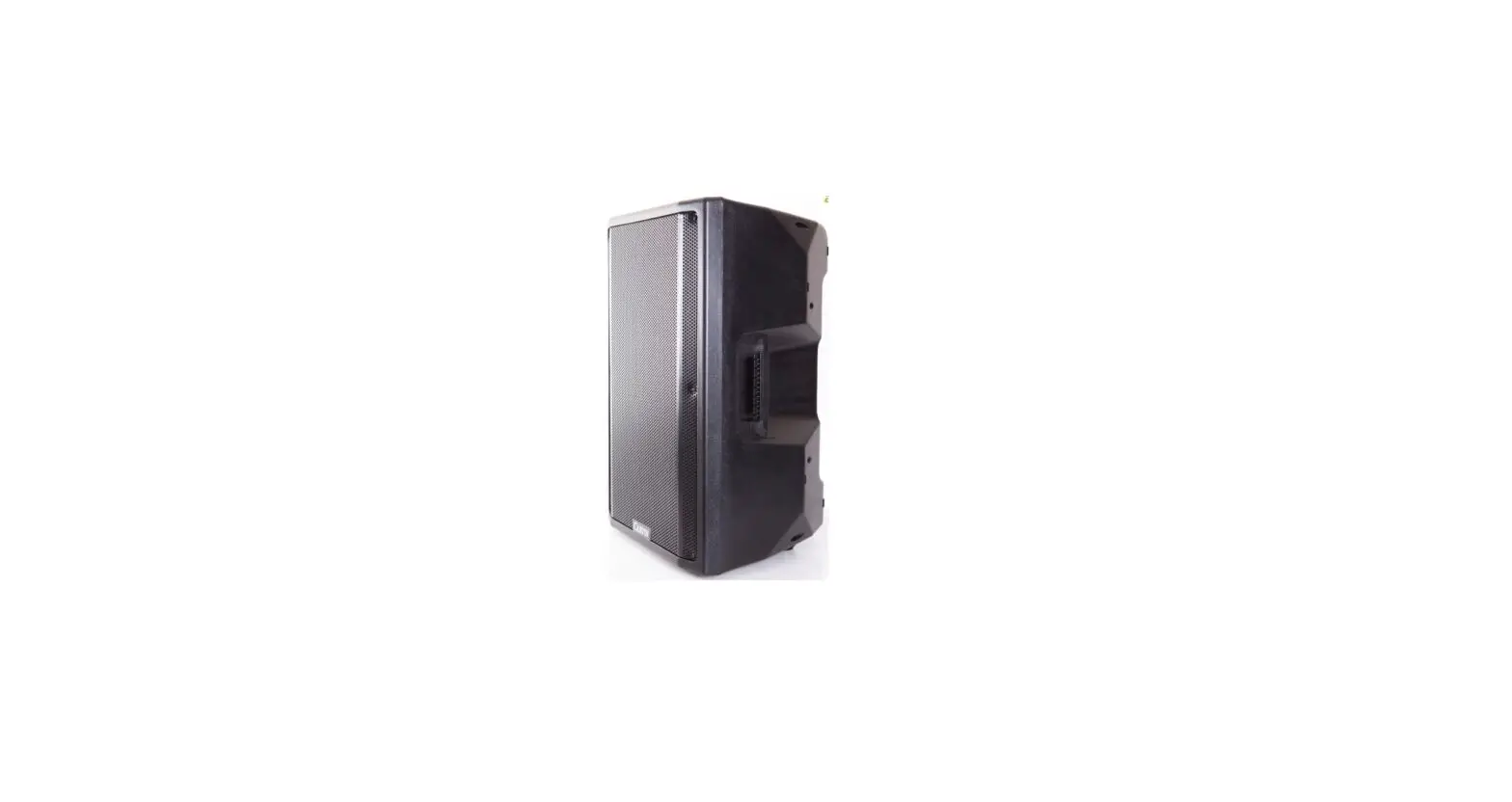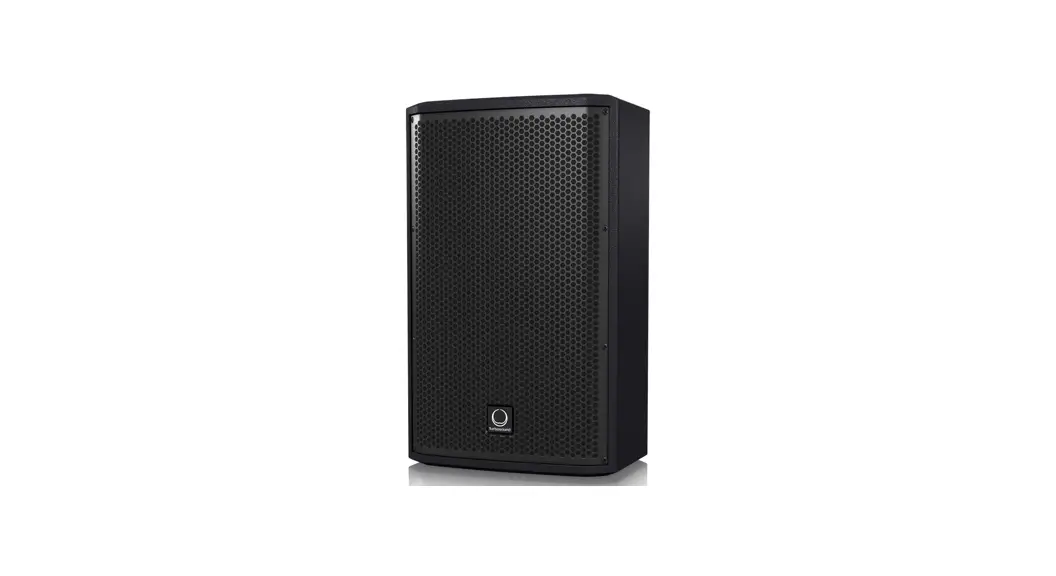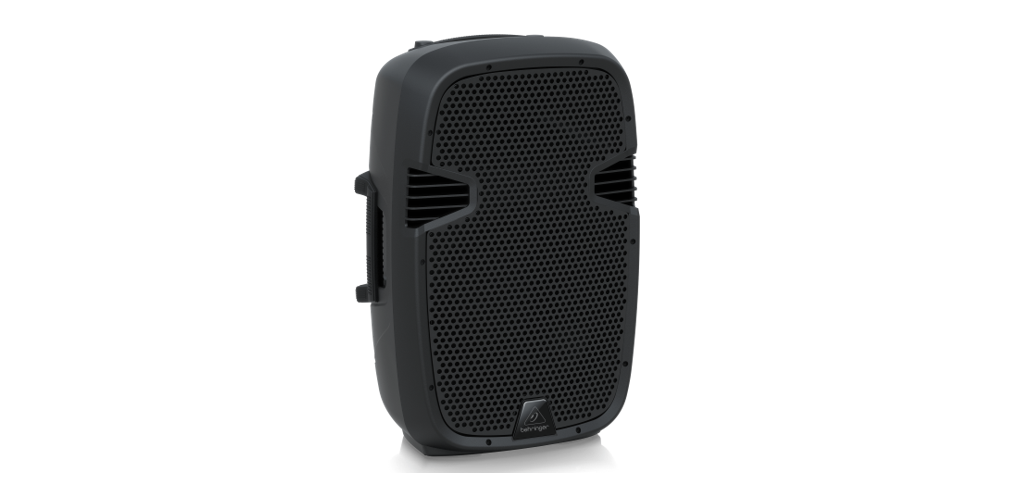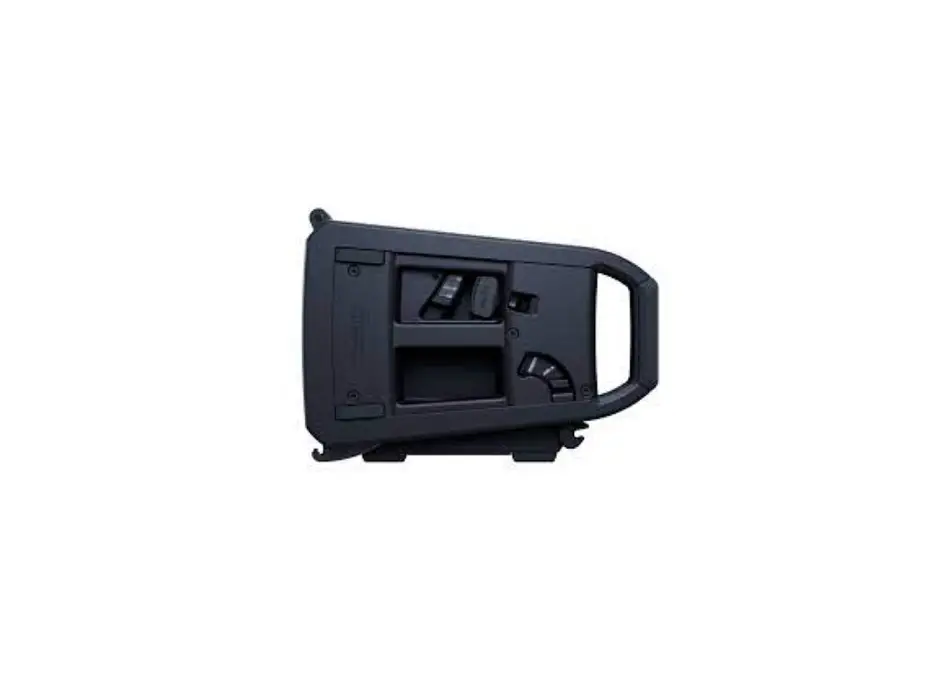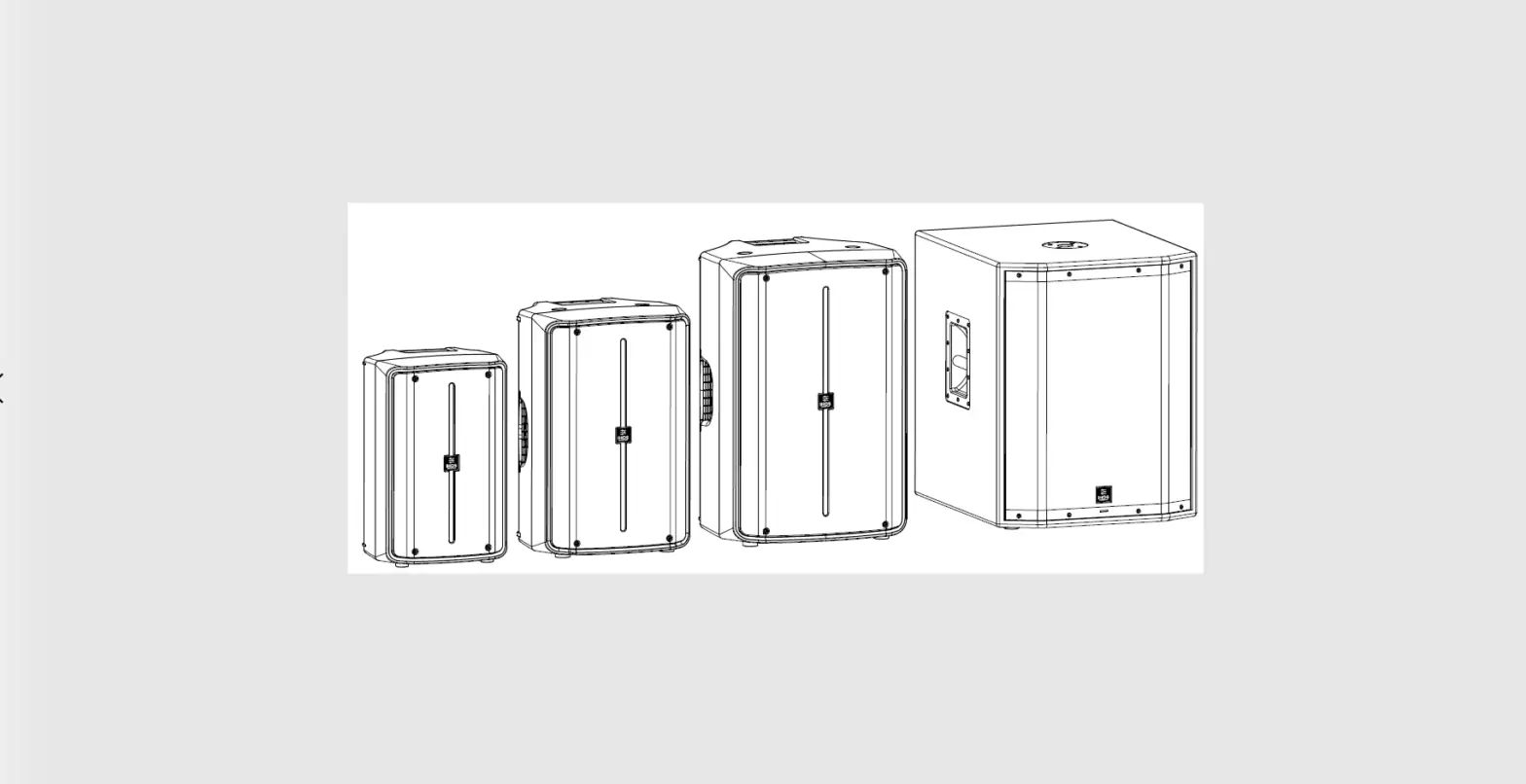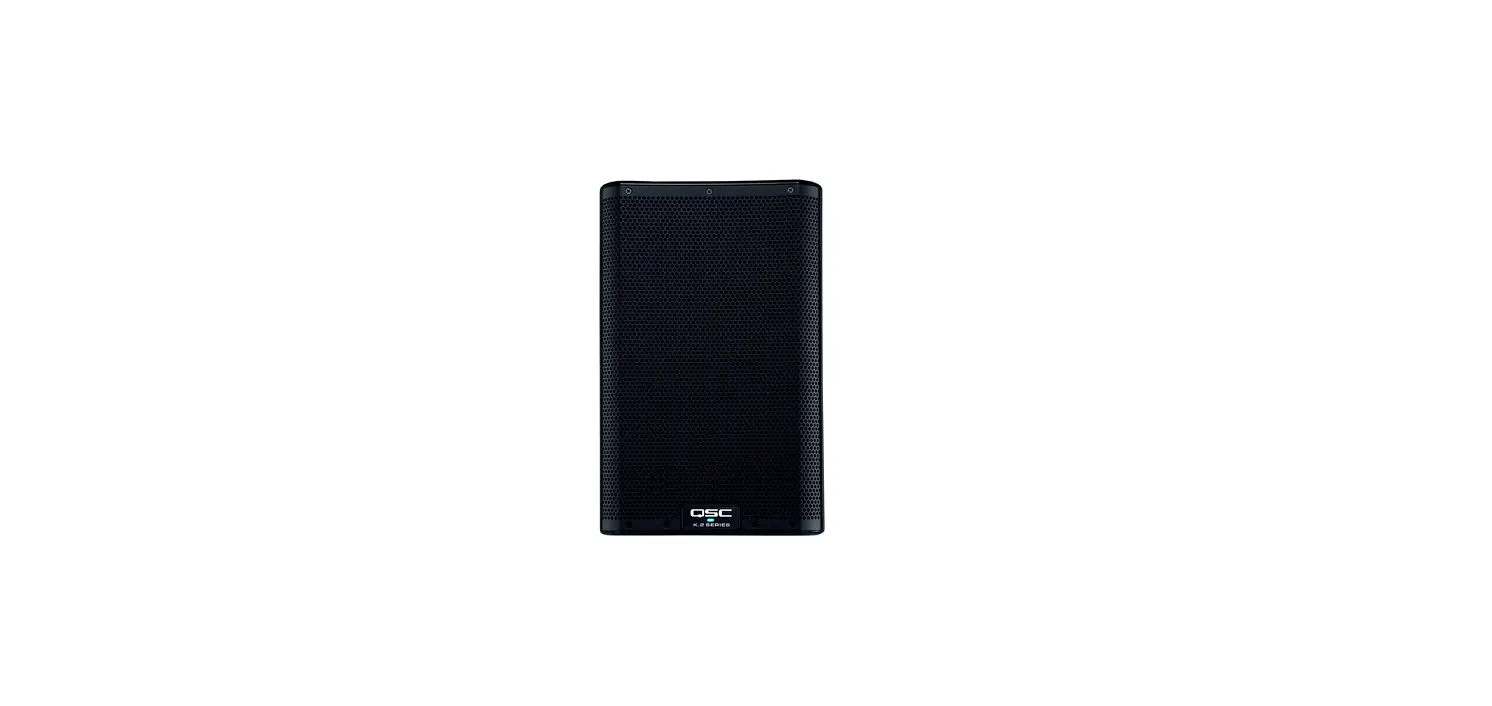

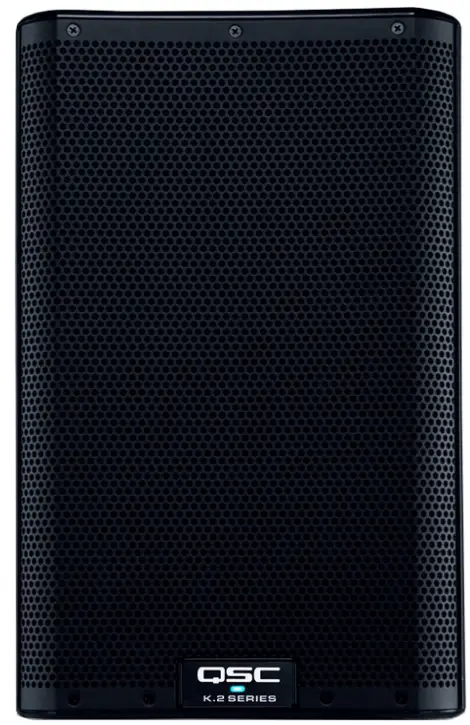
QSC K8.2 Active 8-inches Powered Loudspeaker
EXPLANATION OF SYMBOLS
The term WARNING! indicates instructions regarding personal safety. If the instructions are not followed the result may be bodily injury or death.
The term CAUTION! indicates instructions regarding possible damage to physical equipment. If these instructions are not followed, it may result in damage to the equipment that may not be covered under the warranty.
The term IMPORTANT! indicates instructions or information that are vital to the successful completion of the procedure. The term NOTE is used to indicate additional useful information.
NOTE: The intent of the lightning flash with arrowhead symbol in a triangle is to alert the user to the presence of un-insulated dangerous voltage within the products enclosure that may be of sufficient magnitude to constitute a risk of electric shock to humans.
NOTE: The intent of the exclamation point within an equilateral triangle is to alert the user to the presence of important safety, and operating and maintenance instructions in this manual.
IMPORTANT SAFETY INSTRUCTIONS
WARNING! TO PREVENT FIRE OR ELECTRIC SHOCK, DO NOT EXPOSE THIS EQUIPMENT TO RAIN OR MOISTURE. DO NOT USE THIS APPARATUS NEAR WATER.
- Read these instructions.
- Keep these instructions.
- Heed all warnings.
- Follow all instructions.
- Do not use this apparatus near water.
- Clean only with a dry cloth.
- Do not block any ventilation opening. Install in accordance with the manufacturer’s instructions.
- Do not install near any heat sources such as radiators, heat registers, stoves, or other apparatus (including amplifiers) that produce heat.
- Do not defeat the safety purpose of the polarized or grounding-type plug. A polarized plug has two blades with one wider than the other. A grounding type plug has two blades and a third grounding prong. The wide blade or the third prong are provided for your safety. If the provided plug does not fit into your outlet, consult an electrician for replacement of the obsolete outlet.
- Protect the power cord from being walked on or pinched particularly at plugs, convenience receptacles, and the point where they exit from the apparatus.
- Only use attachments/accessories specified by the manufacturer.
- Unplug this apparatus during lightning storms or when unused for long periods of time.
- Refer all servicing to qualified service personnel. Servicing is required when the apparatus has been damaged in any way, such as power-supply cord or plug is damaged, liquid has been spilled or objects have fallen into the apparatus, the apparatus has been exposed to rain or moisture, does not operate normally, or has been dropped.
- The appliance coupler, or the AC Mains plug, is the AC mains disconnect device and shall remain readily operable after installation.
- Adhere to all applicable, local codes.
- To prevent electrical shock, the power cord shall be connected to a mains socket outlet with a protective earthing connection.
- Consult a licensed, professional engineer when any doubt or questions arise regarding a physical equipment installation.
- Do not use any aerosol spray, cleaner, disinfectant or fumigant on, near or into the apparatus. Clean only with a dry cloth.
- Do not unplug the unit by pulling on the cord, use the plug.
- Do not submerge the apparatus in water or liquids.
- Keep ventilation opening free of dust or other matter.
Warranty
For a copy of the QSC Limited Warranty, visit the QSC website at www.qsc.com
Maintenance and Repair
WARNING! Advanced technology, e.g., the use of modern materials and powerful electronics, requires specially adapted maintenance and repair methods. To avoid a danger of subsequent damage to the apparatus, injuries to persons and/or the creation of additional safety hazards, all maintenance or repair work on the apparatus should be performed only by a QSC authorized service station or an authorized QSC International Distributor. QSC is not responsible for any injury, harm or related damages arising from any failure of the customer, owner or user of the apparatus to facilitate those repairs.
- Life Cycle: 10 years,
- Storage Temperature range: -20C to +70C
- Relative Humidity range: 5 – 85% RH
FCC Statement
NOTE: This equipment has been tested and found to comply with the limits for a Class B digital device, pursuant to Part 15 of the FCC Rules.
These limits are designed to provide reasonable protection against harmful interference in a residential installation. This equipment generates, uses and can radiate radio frequency energy and, if not installed and used in accordance with the instructions, may cause harmful interference to radio communications. However, there is no guarantee that interference will not occur in a particular installation. If this equipment does cause harmful interference to radio or television reception, which can be determined by turning the equipment off and on, the user is encouraged to try to correct the interference by one or more of the following measures:
- Reorient or relocate the receiving antenna.
- Increase the separation between the equipment and receiver.
- Connect the equipment into an outlet on a circuit different from that to which the receiver is connected.
- Consult the dealer or an experienced radio/TV technician for help.
RoHS Statements
These products are in compliance with European Directive 2011/65/EU – Restriction of Hazardous Substances (RoHS). These products are in compliance with “China RoHS” directives per GB/T26572. The following table is provided for product use in China and its territories:
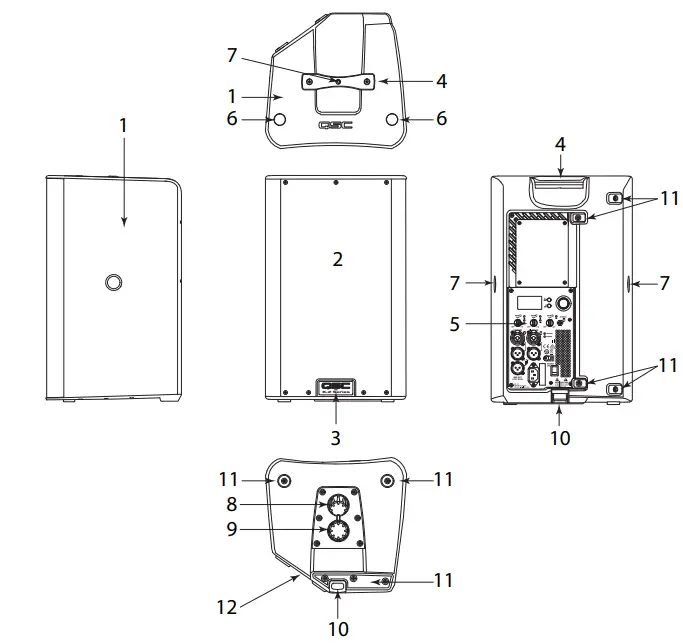
FEATURES
- ABS enclosure
- Steel grille
- Front power LED
- Cast aluminum handle
- Power module
- M10 installation points
- M8 yoke-attachment points
- 5° Downward-tilt pole socket
- Vertical pole socket
- Pull-back ring
- Slip-resistant feet for floor monitor applications
- Angled back for use as a stage monitor
APPLICATIONS
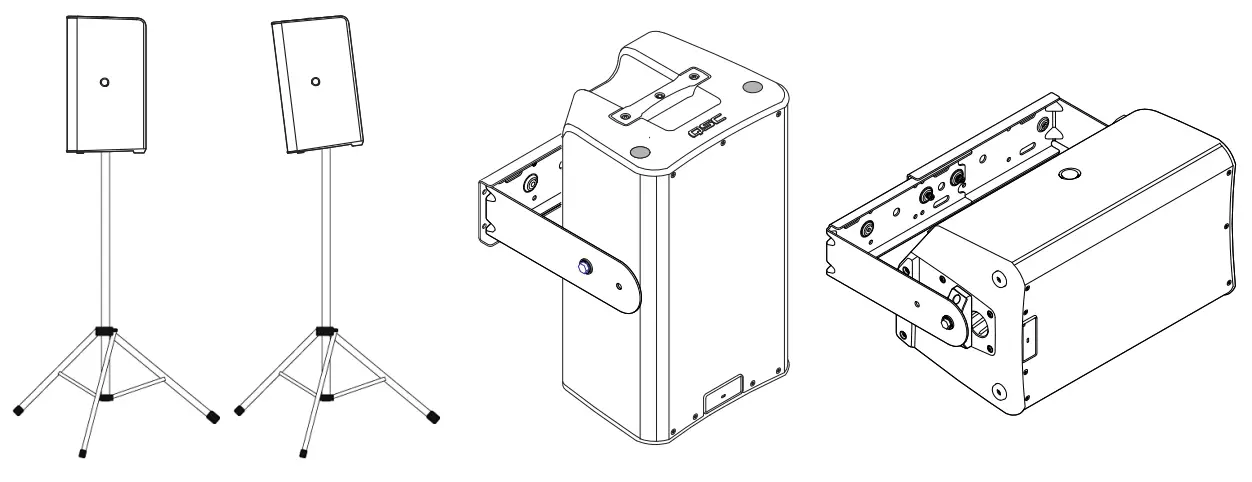
The K.2 Series has been primarily designed for portable audio reinforcement. This includes a variety of uses in reinforcement for entertainers and presenters. All are designed to perform well on their own in full-range audio. They can be used singly, in stereo pairs or in distributed or delayed systems. They perform extraordinarily well as both main reinforcement systems and as floor monitors as shown in Figure 4.

All three models are equipped with two 35 mm pole sockets that allows use on a speaker stand or on a pole over a subwoofer. (The subwoofer must have a 35 mm pole socket capable of supporting the loudspeakers.) One socket is for vertical mounting, the other for tilting the enclosures down 7.5 degrees. (Refer to Figure 5) In addition, the K.2 Series have features designed for various suspension methods. They feature two M10 threaded inserts for suspension with eyebolts and a built-in pull-back ring. There are also yoke accessories (model numbers: K8.2 YOKE) for each model that can mount either to the sides of the cabinet or to the top and bottom. These yokes allow for rigid mounting to structures and rotation of the speaker system. (Refer to Figure 6 and Figure 7)
INSTALLATION
WARNING!
Before placing, installing, rigging, or suspending any speaker product, inspect all hardware, suspension, cabinets, transducers, brackets and associated equipment for damage. Any missing, corroded, deformed, or non-load rated component could significantly reduce the strength of the installation or placement. Any such condition severely reduces the safety of the installation and should be immediately corrected. Use only hardware which is rated for the loading conditions of the installation and any possible short-term, unexpected overloading.
- Never exceed the rating of the hardware or equipment.
- Consult a licensed, professional engineer regarding physical equipment installation. Ensure that all local, state and national regulations regarding the safety and operation of loudspeakers and related equipment are understood and adhered to.
DEPLOYMENT
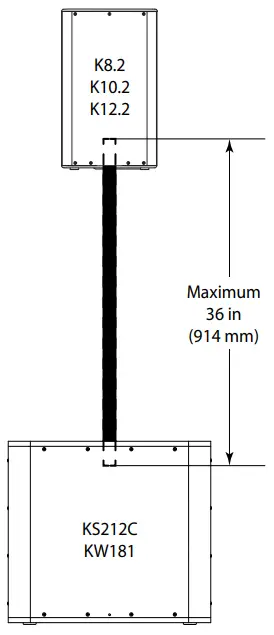
The K.2 Series loudspeakers were designed to sit on the floor, stage, a subwoofer enclosure, be suspended, or be pole mounted on a 35 mm diameter loudspeaker support pole. If you are going to pole-mount on a subwoofer, refer to the chart below for specifics.
WARNING!
Do not use a loudspeaker support pole longer than the lengths specified in the table below when supported by a subwoofer.

Integrated Suspension Points (suspended installations)
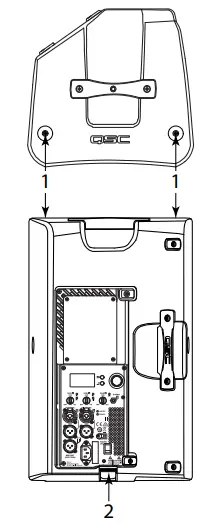
Refer to TD-000289 for M10 eye bolt installation. The K8.2 enclosures each feature two load-rated M10 installation points and a built-in pull-back ring. As shipped from the factory, each pick point has a adhesive cover installed to retain the sleek look of the enclosure. These installation points are designed for use with the eyebolts included in the available accessory kit, model number M10 Kit-C. The installation points may also be used with any forged shoulder eyebolt with an M10 thread, provided the length of the thread is no more than 0.8Â inch (20 mm).
WARNING!
Make sure all suspension-point fasteners are installed and correctly tightened in order to maintain enclosure’s rated strength. Consult a licensed, professional engineer when any doubt or questions arise regarding a physical equipment installation.
The K.2 Series loudspeakers each have two M10 suspension points, and one pull-back ring.
- M10 suspension points
- Pull-back ring
Cooling
This is a powered loudspeaker containing an internal power amplifier that produces heat. Allow a minimum of 6″ (152 mm) clearance at cabinet back for convection cooling. Keep anything that might restrict airflow away from the rear of the enclosure (i.e draperies, walls, etc.)
CAUTION!
Do not install enclosures with their rear panels exposed to direct sunlight. Direct sunlight will heat the amplifier module and reduce its ability to produce full output. Install sunshades if needed. Maximum ambient temperature for full performance to specification is 50° C (122° F). Do not install enclosures where exposed to rain or other water sources. The enclosure is not weatherproof. Outdoor installations must provide protection from the elements.
AC Mains
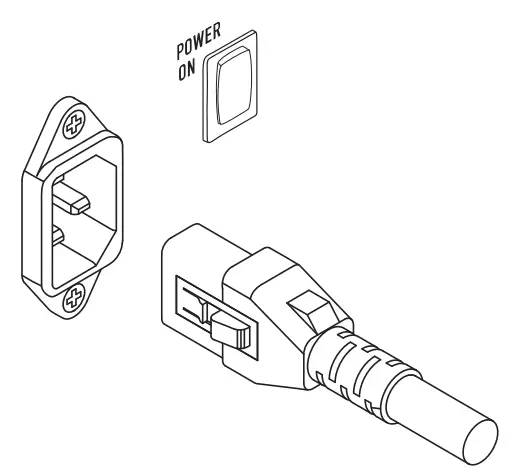
Connect the AC power cord to the IEC socket on the back of the amplifier. Make sure the plug is fully inserted into the IEC socket on the power amplifier module.
NOTE: Make sure that the AC power switch is in the OFF position before connecting AC power cord to the AC source.
Connect the AC Power cord to the facility AC outlet.
The V-LOCK power cord has a special latching feature to prevent the power cord from being unintentionally removed. The IEC plug and socket are both blue in color so the power cord can be identified as a K.2 Series loudspeaker cord. If the QSC- supplied cord is lost or damaged, a standard 18-gauge IEC power cord may be used. However, the latching system works only with a V-LOCK power cord. Available from QSC. The K.2 Series loudspeakers are equipped with a universal power supply that can use input AC power voltages ranging from 100 – 240 VAC at 50 – 60 Hz.
WARNING! Use only the power cable that is correct for your location.
AC Mains Disconnection
Push in on the bottom of the rocker switch to turn the powered loudspeaker off. Unplug the AC cable from the power source. To remove the AC mains cord from the amplifier, grasp the IEC connector’s plastic body, press the yellow latch release button and pull.
Power Switch
Push in on the top of the rocker switch to apply AC mains power to the amplifier. When power is applied to the amplifier, the blue POWER indicator LED illuminates.
Rear LED POWER Indicator
The blue LED POWER indicator on the rear panel will illuminate when the AC Power is applied. The rear LED POWER indicator will extinguish when the AC Power has been removed.
If the rear LED POWER indicator does not illuminate within the first 3 minutes after power is applied, verify the AC mains line cord is properly attached to the loudspeaker and plugged into the AC outlet. Verify the outlet is functioning properly.
NOTE: If the AC mains cord is usable and the AC mains outlet is operating properly, but the unit fails to operate, the loudspeaker may require servicing. Contact QSC’s Technical Services department.
System Power Sequencing
Proper power turn on/turn off sequencing can help to prevent unexpected sounds from being produced by the system (pops, clicks, thumps). Always follow the rule that speakers are last on, first off.
Power On Sequence
Bring the output level control of the mixer (or other audio source) feeding your speakers to its minimum position. Turn on all source devices (CD players, mixers, instruments), turn on subwoofer, then turn on the top-boxes (K8.2). The level controls on your mixer may now be brought up.
Power Off Sequence: Turn off top boxes, turn off subwoofer, then turn off all source devices.
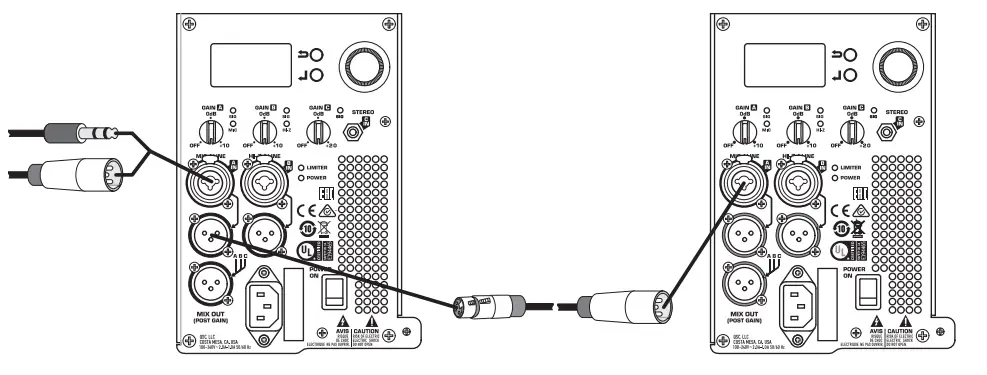
If a K.2 Series speaker is being driven from the output of another K.2 Series unit, it should be turned on after the unit feeding it signal, and turned off before the unit feeding it signal.
Block Diagram
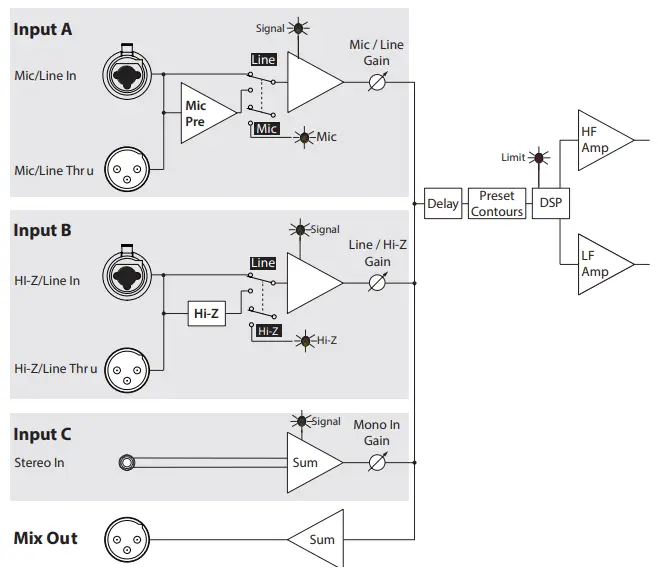
Inputs
The K.2 Series amplifier has three separate inputs; two combination XLR/1/4 Phone Jack (Inputs A and B) and one 1/8 (3.5 mm) TRS jack (Input C).
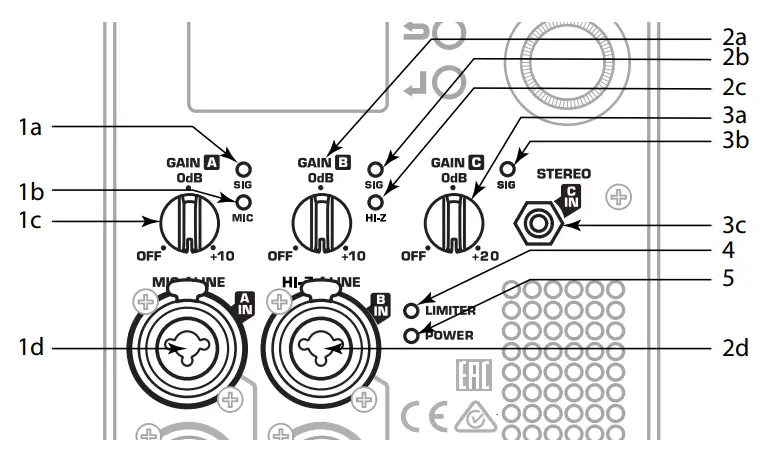
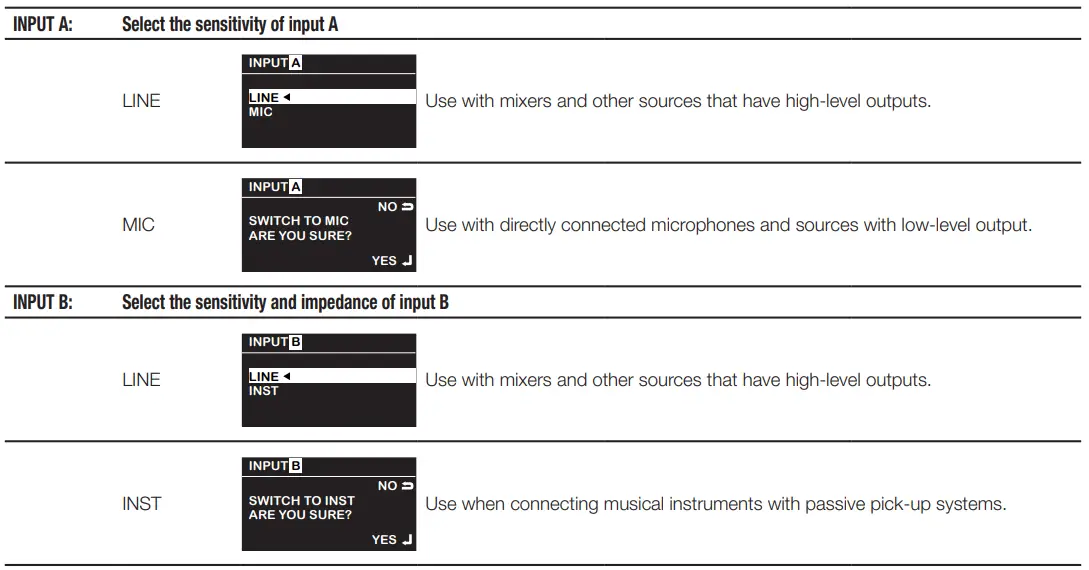
Input A
- A. SIG LED – When illuminated (green), it indicates a signal is present. If this LED is not illuminated, the input signal is missing or too low to detect.
- B. MIC LED – When illuminated (yellow) it indicates the input is configured to accept a microphone input. When not illuminated, it indicates the input is configured for a line-level input. You can change the setting through the Menu. When MIC is selected, the MIC Pre-amp is activated, and the yellow MIC level LED illuminates. The MIC setting should only be used if a microphone is connected directly to the MIC/LINE input. Note that the input does not provide phantom power.
- C. GAIN knob – Sets the sensitivity of Input A which controls the signal level sent to the amplifier and the MIX OUT (POST GAIN) output.
- D. Combination XLR – 1/4” Phone Jack connector. Balanced XLR and 1/4” input. Accepts line-level or MIC-level inputs. Select MIC or Line through the Menu.
CAUTION!
The MIC setting should only be used if a microphone is connected directly to the MIC/LINE input. Using the MIC setting for line-level may introduce distortion. Use caution when changing to the MIC selection in the Menu as the output level increases significantly when MIC is selected.
Input B
- GAIN knob – Sets the sensitivity of Input B which controls the signal level sent to the amplifier and the MIX OUT (POST GAIN) output.
- SIG LED – When illuminated (green), it indicates a signal is present. If this LED is not illuminated, the input signal is missing or too low to detect.
- HI-Z LED – When illuminated (yellow) it indicates the input is configured to accept a high impedance input, typically a musical instrument. When not illuminated, it indicates the input is configured for a line-level input. You can change the setting through the Menu.
- Combination XLR – 1/4” Phone Jack connector. Balanced XLR and 1/4” input. Accepts line-level and high Impedance inputs. Select line level or high impedance through the Menu.
Input C
- GAIN knob – Sets the sensitivity of Input B which controls the signal level sent to the amplifier and the MIX OUT (POST GAIN) output.
- SIG LED – When illuminated (green), it indicates a signal is present. If this LED is not illuminated, the input signal is missing or too low to detect.
- Stereo 1/8” (3.5 mm) TRS connector – Accepts line-level stereo input. Stereo input received at Input C is summed to mono.
LIMITER LED – Illuminates (red) when the built-in limiter is activated to protect and avoid damage to the amplifier or loudspeaker. If the signal level at any frequency is too high, or the amplifier is too hot, the limiter is activated and the LED is illuminated.
POWER LED – Illuminates (blue) when power is applied to the unit and the ON/OFF switch is in the ON position.
NOTE: Unless the gain controls of all active inputs are set to 0 dB, the output signal from the MIX OUT (POST GAIN) will not be at the same level as the input signal. If a “slave” speaker is intended to playback at the same level as the “master” speaker, the gain control on the “slave” speaker should be set to 0 dB.
Balanced Inputs
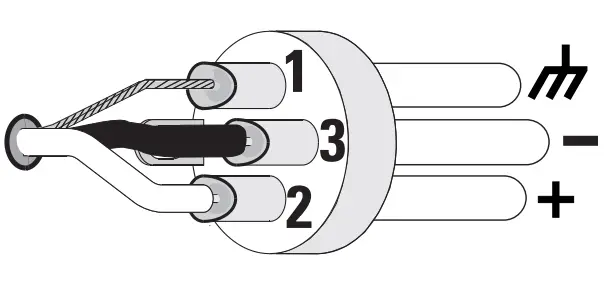
Connect the XLR plug as shown in Figure 13.
- Shield (ground)
- + Positive
- – Negative
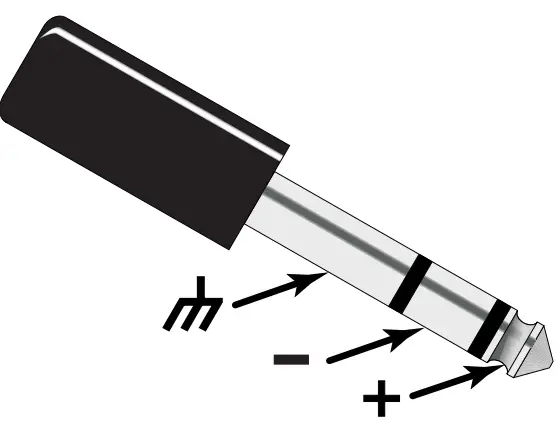
Connect the TRS plug as shown in Figure 14. Do not use a TS 1/4” jack for balanced input.
- Shield (ground)
- – Negative
- + Positive
Unbalanced Inputs
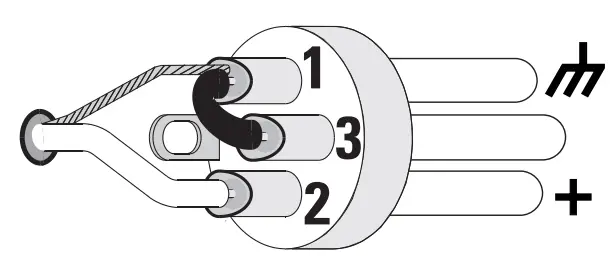
Connect the XLR plug as shown in Figure 15. (Jumper pins 1 and 3.)
- Shield (ground)
- + Positive
- – Negative
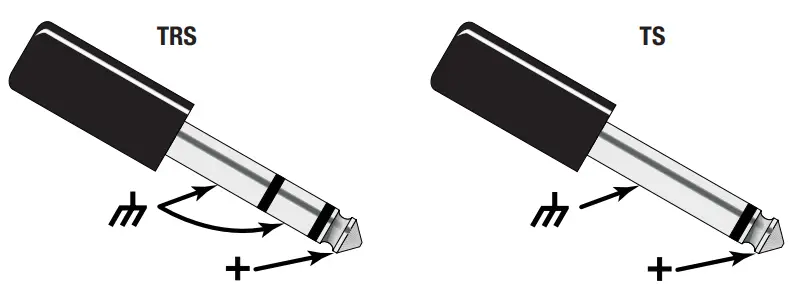
Connect the TRS or TS plug as shown in Figure 16.
- Shield (ground)
- – Negative
- + Positive
Outputs
- Channel B pass-through output connector. The signal here is the same as the input signal on Channel B. Use this to daisy-chain loudspeakers or to provide the signal to other audio equipment.
- Channel A pass-through output connector. The signal here is the same as the input signal on Channel A. Use this to daisy-chain loudspeakers or to provide the signal to other audio equipment.
- MIX OUT (Post Gain) output XLR is a mix of Channels A, B, and C. The line-level output signal is Post Gain. Any adjustments made to the gain of any of the three channels affects this output signal. This output does not contain any DSP processing.
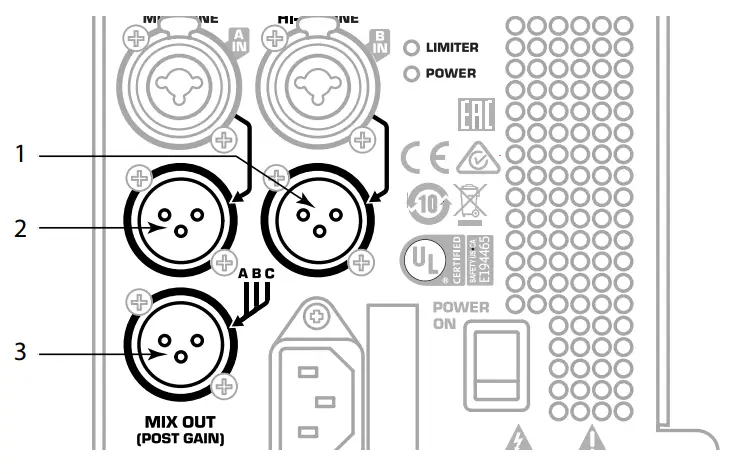
CAUTION!
Do not connect the MIX OUT (Post Gain) of a K.2 Series loudspeaker to any INPUT of the same unit. This output is designed to send the mixed signal to OTHER K.2 Series units or to other audio equipment.
K.2 Series Menu
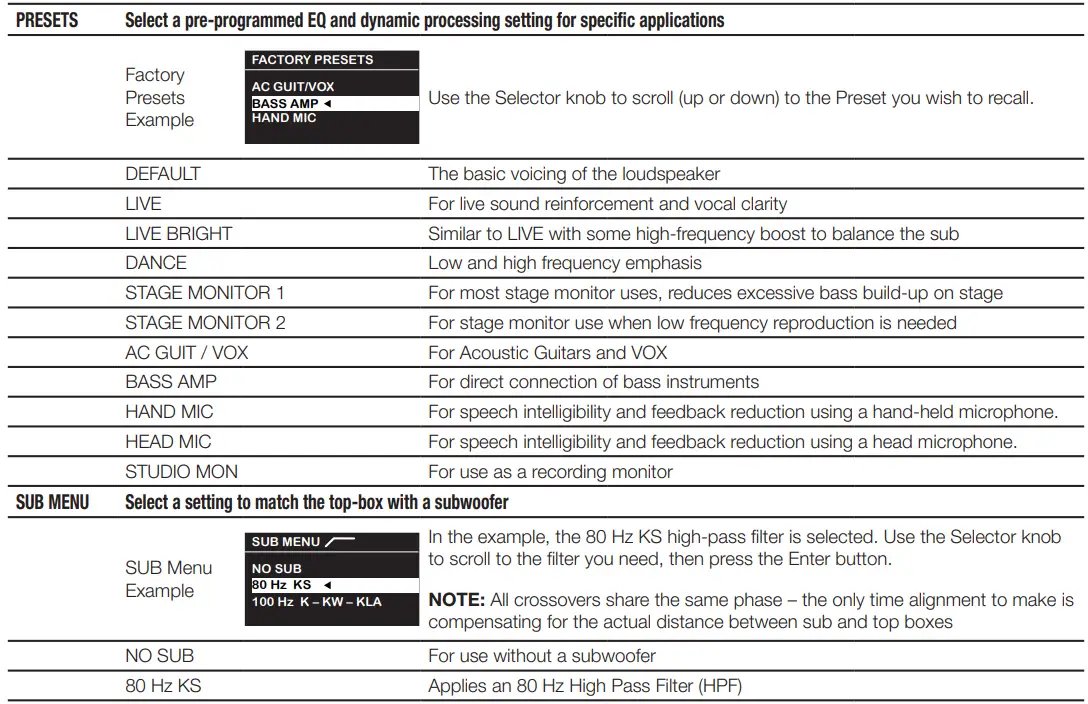
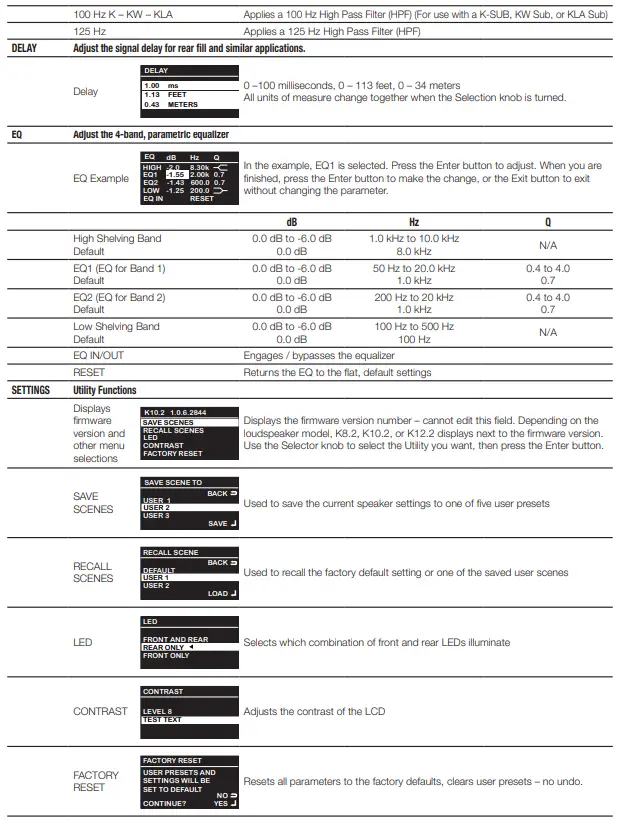
The K.2 Series loudspeakers provide a multi-function digital display for control and selection of loudspeaker functions including presets, scenes, cross-over, EQ, delay and frequency contour.
Display Introduction
- Home Screen: Displays input types (MIC, Line, HI-Z) for channels A and B, and main functionality headings. Light background with black text indicates the item is selected.
- Exit: or go back button – press to return to the previous screen or menu level.
- Enter: button – confirm a selected parameter or open the selected menu item.
- Selector: knob – move to another menu item, or change a selected parameter.
- Left side: Home screen displays the parameter name.
- Right side: Home screen displays the current state of the parameter.
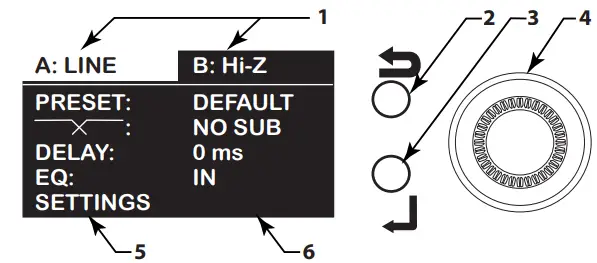
To select a Preset:
- Turn the Selector knob (4) clockwise to highlight the PRESET line.
- Press the Enter button (3) to access the PRESET submenu.
- Turn the Selector knob (4) clockwise or counterclockwise as needed to highlight the PRESET you wish to recall.
- Press the Enter button (3) to recall the PRESET. A small triangle displays next to the recalled (active) PRESET.
- Press the Exit button (2) to return to the Home screen.
Menu Map
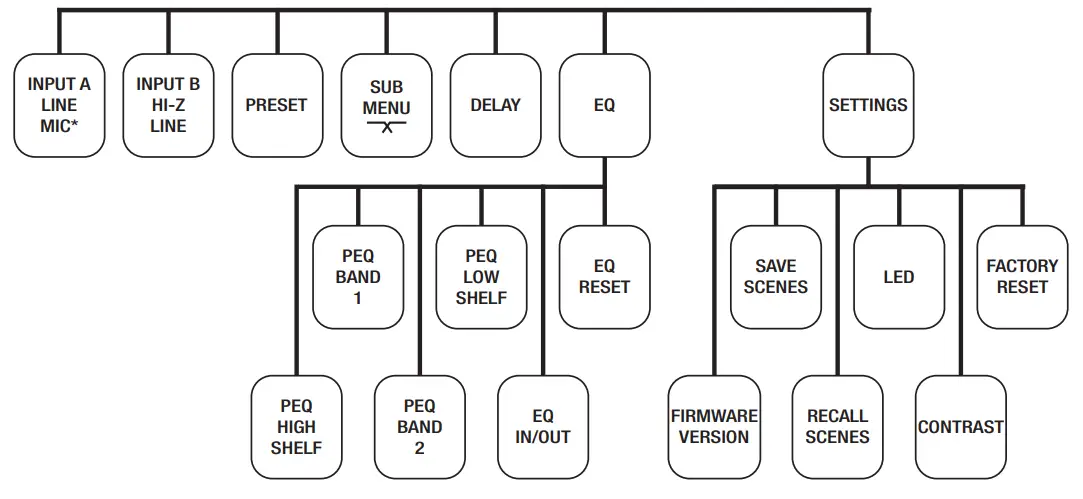
Menu Listing
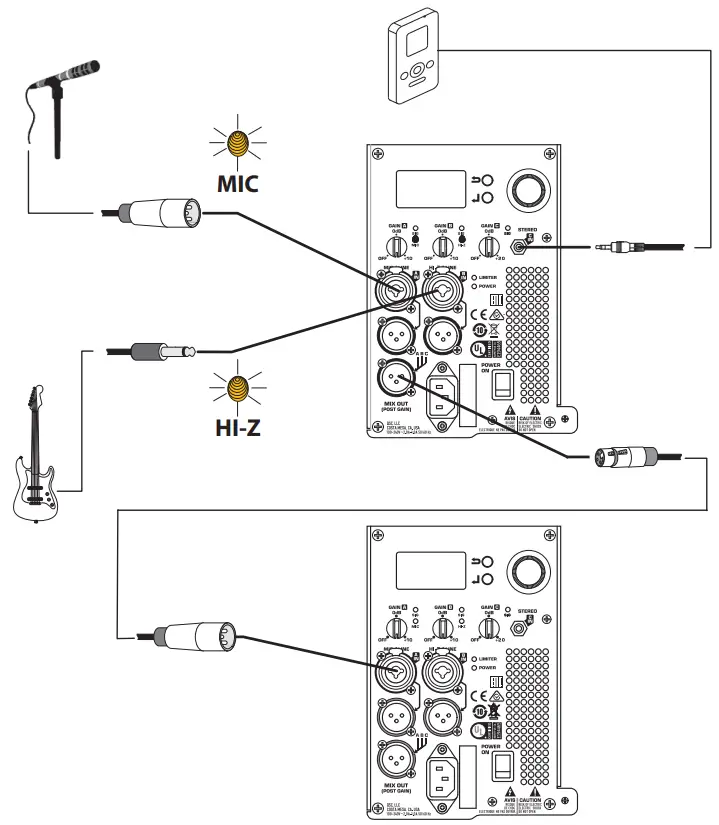
Two Loudspeakers Daisy-chained
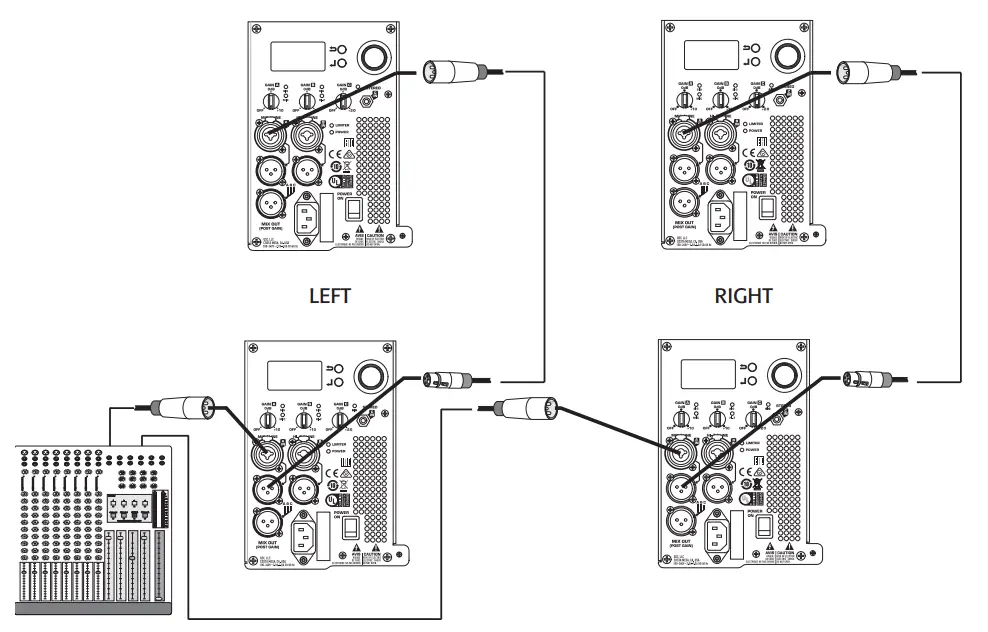
Typical Stereo System
Standalone System
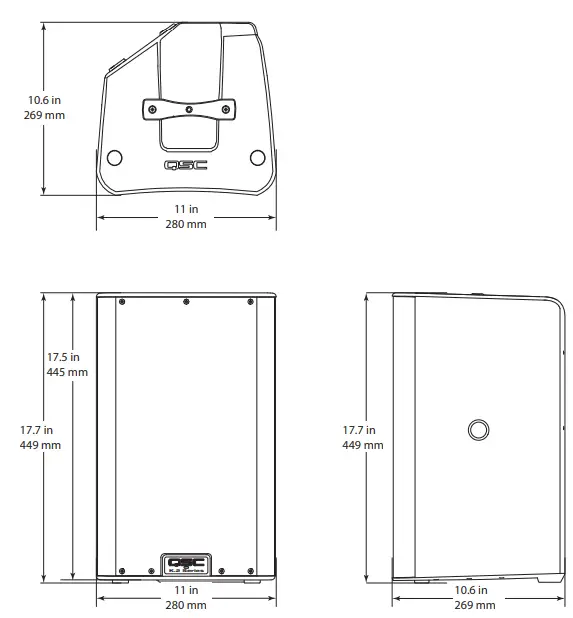
Dimensions
K8.2 Loudspeaker
SPECIFICATION
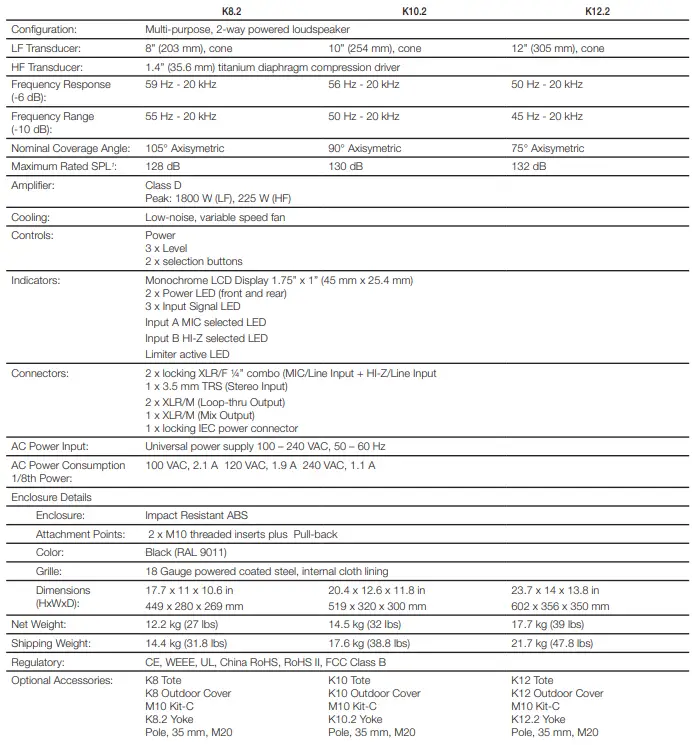
NOTE: Specifications subject to change without notice.
FEATURES
- Best in class audio performance
- 2000 Watt Class-D amplifier module
- Factory Presets and savable/recallable Scenes for commonly-used applications
- Multi-function digital display for control and selection of loudspeaker functions including cross-over, EQ, delay and frequency contour
- Intrinsic Correction™ tuning and loudspeaker management
- DMT™ (Directivity Matched Transition) design provides excellent power response and consistent performance across the listening area
- Refined, professional appearance looks great in any application
- Rugged ABS enclosure for long life and lasting durability
- Deployment in either main PA or floor monitor position
- Dual pole cup mounts (standard and 7.5 degree down-tilt)
- M10 fittings for flown applications
- Optional security panel prevents unauthorized tampering of controls
- Complete EASE and CAD information available online
- 6-Year Warranty
Advanced Power and DSP:
The 2000 Watt power module delivers ample burst and continuous power for the loudspeaker’s premium drivers. It has been designed with very low-noise fan cooling, enabling the enclosures to be used in settings where background noise must be kept to a minimum. Carefully tailored, subtle and sophisticated dynamics processing is used to protect the drivers from damage and the performance from distortion.
Presets:
The user may select from an extensive list of factory preset EQ contours including Live, Dance, Monitor, and many more.
Scenes:
Savable and recallable Scenes can store information like user EQ, Delay, and input configuration settings.
Inputs:
A pair of balanced combo XLR/F plus 1/4″ TRS connectors with independent gain control are provided. The first is equipped with selectable MIC/LINE (Microphone or Line) level input while the second offers selectable HI-Z/LINE (High Impedance or Line) level input, specifically for musical instruments. Both inputs are connected directly to a pair of XLR/M throughput connectors so that the signals may be “daisy-chained” to another audio device. A 3.5 mm TRS input jack with independent gain control is also provided for connection of sources such as smart phones, computers, and MP3 players.
Outputs:
In addition to the two throughput XLRs, a line-level output with the mixed signal from all inputs is also provided. (An optional security cover (K-LOC) may be installed to prevent unauthorized tampering of settings)
Coverage:
DMT™ (Directivity Matched Transition) design matches the coverage angle of the woofer at the cross-over frequency with the horn pattern to ensure uniform response across the coverage area. Intrinsic Correction™ techniques are also employed ensuring smooth power response from the loudspeaker. The result is an extremely accurate loudspeaker that behaves well in a wide range of acoustic spaces with little or no equalization.
Flexible Design:
Each model is housed in a rugged ABS enclosure with a professional yet unobtrusive appearance that is at home in any application. Each model can be utilized in either main PA or floor monitor applications, while ergonomic handles and a heavy-duty steel grille with fabric lining further enhance overall appearance and functionality. The dual pole cups allow a zero or 7.5 degree downward tilt when deployed on a pole. This allows for more even coverage across the listening area and less problems due to rear wall reflections. For suspended applications, integrated M10 fittings with a single pullback are included to accommodate M10 eyebolts. An optional yoke mount accessory is also available for permanent installation to walls and ceilings or for temporary attachment to truss (requires 3rd party hardware). 6-Year Warranty: Robust QSC reliability backed by a global 6-Year Warranty
QSC Self Help Portal
Read knowledge base articles and discussions, download software and firmware, view product documents and training videos, and create support cases. https://qscprod.force.com/selfhelpportal/s/
Customer Support
Refer to the Contact Us page on the QSC website for Technical Support and Customer Care, including their phone numbers and hours of operation. https://www.qsc.com/contact-us/
Trademark
© Copyright 2017-2021, QSC, LLC, QSC™ is a registered trademark of QSC, LLC, “QSC” and the QSC logo are registered with the U.S. Patent and Trademark Office. All trademarks are the property of their respective owners. http://patents.qsc.com.
FAQs
Package of 2 K2 SeriesTwo-Way Powered Speakers, Rechargeable Bluetooth Audio Receiver, and Speaker Tote Bag.
The Duck Amp and the Quilter Sound Thing were a couple of the names of the earliest guitar amplifiers. The business chose the name Quilter Sound Company, which was later abbreviated to “QSC” and was also known as QSC Audio Products, Inc. for a number of years.
When it comes to speakers, QSC is among the most reputable brand names. QSC consistently has a speaker choice that is near the top of the list when looking at rankings for the best speakers at various pricing points.
The 1-3/8″-1-1/2″ dia. speaker stand, which I’m using, should work.
We offer the most recent K8 model that QSC produced in 2018.
Yes. 2000 watts is the amount of power the built-in amp produces, not the amount of power needed. These are meant to be used with a powered mixer, similar as the earlier 1000-W K speakers (or for unpowered outputs on a powered mixer.)
A loudspeaker’s job is to convert electrical signals into sound waves with the highest degree of accuracy possible given the constraints of its construction. Obviously, there is a huge range in the calibre of loudspeakers. Numerous other elements, including cost and size, affect overall quality..
By forcing a thin diaphragm to vibrate and alter the air pressure around it in the form of the desired sound wave, loudspeakers generate sound waves. The speaker diaphragm is vibrated by an amplified audio signal (alternating current) that has the same waveform as the sound wave.
The loudspeaker culture is bad for your health, your education, your relationships with others, and your spiritual growth. Noise induces mental stress, which has a detrimental effect on mental health and can cause sadness and anxiety.
In the past, loudspeaker specifications have detailed the physical qualities and properties of loudspeakers, such as frequency response, cabinet size and volume, driver diameter, impedance, total harmonic distortion, sensitivity, etc.
In industrial regions, the permitted level for daytime noise is 75 decibels, while the permissible maximum for nighttime noise is 70 decibels. The allowable limit for business areas has been set at 65 decibels during the day and 55 dB at night. In contrast, the acceptable level is 45 dB at night and 55 decibels in residential zones.
Traditional loudspeakers, in-wall/ceiling speakers, soundbars, and subwoofers are the four basic speaker kinds now available in homes. Each variety of speaker has a distinct function and is advantageous in certain contexts.
The primary causes of noise pollution include honking, the whirring of automobile engines, and the usage of loudspeakers at high decibel levels.
This indicates that the loudspeaker produces a sound pressure level of 95 dB at a distance of 1 metre using 1 watt of power.