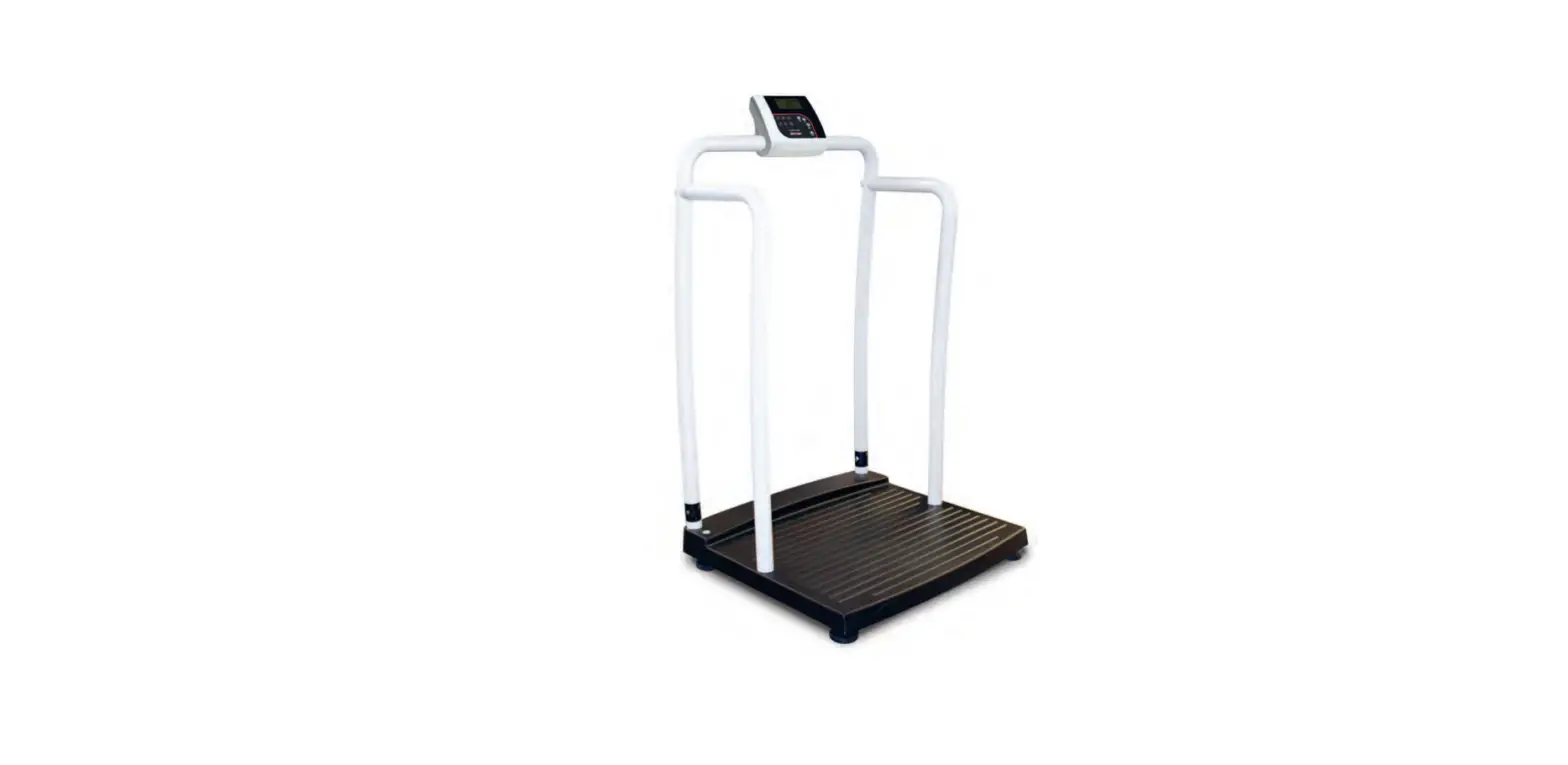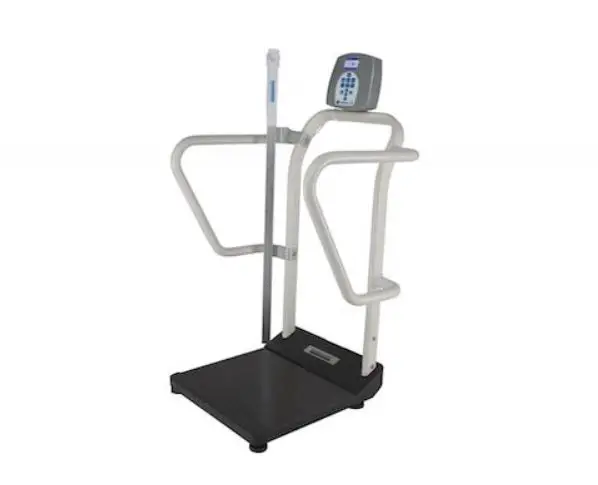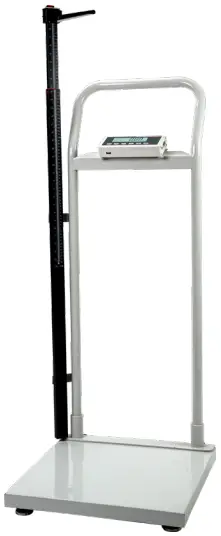
Digital handrail scale with height rod
6831
Operating Instructions
Thank you for choosing this Soehnle Professional product.
Soehnle Professional is a brand of Soehnle Industrial Solutions GmbH.
This product is equipped with all features of the latest technology.
If you have any questions or if you have problems with your device that are not covered in the operating instructions, please contact your Soehnle Industrial Solutions service centre or our customer service.
Telephone: +49 7191 3453-220
Fax: +49 7191 3453-211
E-Mail: [email protected]
For further information and documentation please refer to: https://www.soehnle-professional.com/en/site/documents
This manual has been written for the following models: Digital handrail scale with height rod 6831.01.001
1. Scope of delivery
Terminal  Platform Power supply User manual
2. Warnings

Risk of electric shock: Disconnect all power sources before connecting cables to the scale. Only for use in dry environments. The platform of the floor scale is very heavy, so that it needs a lot of space when moving and lifting. The scale must be installed on a foundation that safely supports the weight of the digtial handrail scale with height rod and the weight of the maximum load. Do not operate in explosion-hazardous areas. Read and understand all operating instructions before using this product and keep this manual for future reference. Record the weight shortly after placing a load on the platform. After a long period of time, the output signal from the load cell may result in inaccurate readings. Avoid prolonged exposure to extreme heat or cold. Optimum operation takes place at normal room temperature. See operating temperature range in the specification table. Allow the scale to acclimatize to room temperature before use. Allow sufficient warm-up time. Turn the unit on and wait up to 2 minutes for the internal components to stabilize. Electronic scales are precision instruments. Do not operate the device near mobile phones, radios, computers or other electronic devices that emit radio frequencies that may cause unstable readings. Avoid use with strong vibrations or strong air currents.
3. General information
3.1 Introduction
The 6831 scale is a digital handrail scale with Body Mass Index (BMI) readout. It is designed with handrail and two wheels, offering the flexibility to move around. Also, it is equipped with a height rod for height measurement. It is designed to measure the weight of a person and compute the BMI index once the known height of a person is entered via the Indicator
3.2 Technical data
| Model | Digital handrail scale with height rod 6831 |
| Max. capacity | 300 kg / 600 lb |
| Min. capacity | 2 kg / 4 lb |
| Division | 0.1 kg / 0.2 lb |
| Display | 6 digits, 25 mm high, 7 segments, LCD display with backlight |
| Height rod range | 60 – 212 cm |
| Weighing units | kg / lb |
| Interfaces | RS232, USB |
| Platform size | 520 x 520 mm |
| Overall dimensions (when feet are adjusted to the lowest range) | 520 x 520 x 1260 mm |
| Working temperature | +5°C to +40°C |
| Humidity | < 85 % RH |
| Power supply | 4x AA batteries (not included) or AC adapter 9V DC / 600 mA with central positive (included) |
| Feet | 4x fixed bolt design adjustable height |
4. Installation
4.1 Unpacking and installation
1. Scale body
Take all scale parts out of the carton and put them on a flat and hard surface.
Follow below procedures in order to fulfill the installation.

P1-1
- scale body
2. Pull the leading wire preset inside the handrail and connect the socket with the plug located at the scale body (P1-2).

P1-2
- handle
- socket
- plug
3. Place the indicator bracket and fix it with screws as per P2-1.

P2-1
- indicator
- bolt
4. After fixation, pull the cable socket through the indicator bracket and connect it with the indicator plug, then locate backside of the indicator bracket and fix it by screws (P2-2).
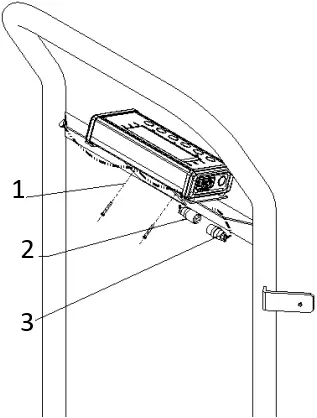
P2-2
- bolt
- plug
- socket
5. Height rod fixation
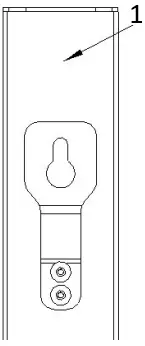
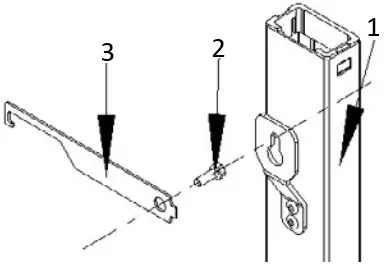
- Height rod
- Bolt
- Wrench
6. Adjust the level bubble until it is centered in order to finish the installation.

- indicator
- height rod
- handle
- scale body
5. Controls and functions
5.1 Display descriptions

| Name | Description |
 | Status indicator for the current battery charge level. When this symbol appears, the scale is in battery operation mode or will be charged. |
 | The scale is within the zero level. |
 | The scale is at standstill, meaning the weight is stable and no movement is on the platform. This is a mandatory precondition for functions such as resetting, printing and taring. In case that the LCD is not displayed, the scale is not at standstill. |
 | Displayed when the hold function is activated. |
 | Displayed when the weighing unit is displayed in pounds. |
 | Displayed when the weight is displayed in kilograms |
5.2 Key descriptions
| Key | Description |
| HOLD | Activates the Hold-Function |
| Output data to serial communication port | |
| BMI | Enter to proceed with the BMI mode |
| UNIT | Switch button between primary unit kg and secondary unit lb |
| TARE PRESET | Activates the tare function and the preset tare function |
| ZERO ON/OFF | Switch the scale on/off and zero function |
| ← | During key operation in order to switch between the units |
| → | During key operation in order to switch between the units |
| ↓ | During key operation in order to switch between numbers |
| ↑ | During key operation in order to switch between numbers |
| ↵ | Enter button to confirm the value |
5.3 Display character definitions
| ASCII | LCD/LED Show | ASCII | LCD/LED Show | ASCII | LCD/LED Show |
| 0 |  | A |  | N |  |
| 1 |  | B |  | O |  |
| 2 |  | C |  | P |  |
| 3 |  | D |  | Q |  |
| 4 |  | E |  | R |  |
| 5 |  | F |  | S |  |
| 6 |  | G |  | T |  |
| 7 |  | H |  | U |  |
| 8 |  | I |  | V |  |
| 9 |  | J |  | W |  |
| K |  | X |  | ||
| L |  | Y |  | ||
| M |  | Z |  |
6. Operations
6.1 Correct weighing
Press the start key [ON/OFF/ZERO] to enter the normal operating mode of the scale with no load on the platform. An automatic function test will be performed as well as the zero setting of the scale. When `0.0´ appears, it means you are in the weighing mode. Additionally the display shows the symbol to confirm stability of the zero setting. The scale is now ready to be used. Place the patient on the scale and ensure that he is not moving. After the weight is being displayed and the symbol appears the utmost accuracy has been achieved. To turn off the scale press [ON/OFF/ZERO] for a period of minimum 3 seconds.
6.2 How to change the unit
The scale offers the possibility to select between the weighing mode kg and lb. To change into another mode, press the [UNIT] key.
Please check weighing mode after switching on to get proper result.
6.3 Tare function
The tare function allows ignoring a fixed weight that will be deducted after each weighing procedure.
Proceed as follows:
Press [ON/OFF/ZERO] with no load on the scale. Place the additional weight of the object(s), which needs to be ignored, on the scale and store the result by pressing the [TARE/PRESET] key. The display is being reset to zero. The scale is now in NET weighing mode which is also indicated on the display. Remove the objects from the platform. The ignored weight is being displayed with a minus. Place the Patient and the additional weight (e.g. in the wheelchair) on the scale. The scale determines the weight of the patient without the additional weight.
You may now use the scale for as many weighing procedures and the stored value will always be deducted as long as the scale is not turned off. When there is no any weight on the platform, enter the [TARE/PRESET] button again to get of the tare mode. The tare value is likewise erased by the scale until pressing the [TARE/PRESET] button when no weight on the platform or being switched off.
6.4 Weighing with preset tare values
Press [ON/OFF/ZERO] with no load on the scale. Press and hold the [TARE/PRESET] key until the NET indicator flashes and “Pr.Tare” shows up in the display. Input the tare weight using the arrow keys
(already known the weight of the wheelchair). After inputting the tare weight, press the [TARE/PRESET] key to confirm.
The NET indicator will be lit on the display.
Note: Tare weight must be greater than zero and less than the scale’s maximum capacity. Put the patient and the additional weight (e.g. in the wheelchair) to be weighed onto the scale platform. The net weight will be displayed. To exit preset tare mode, remove all weight from the scale. The display will show a negative weight. Press the [TARE/PRESET] key to return the display to zero, eliminating the weight of the container.
Note: The indicator can only save one tare weight. Entering a new tare weight will automatically replace the old one.
6.5 Hold function
The Hold function is being used if you like to hold the results at the display after the weight/load has been removed from the scale. Use this button to take care of the patient first and then note the weight.
Press [HOLD/SETUP] while scale is under load. “HOLD” is being displayed at the screen. The weight remains saved in the display after unloading the scale. For deactivation of the Hold function press again the HOLD/SETUP key.
6.6 BMI function
The Body Mass Index is the ratio between body height and weight squared. The BMI is helping to evaluate the state of nutrition and with that value also the state of health of a person. The result is a tolerance value.
Start the scale by entering the [ON/OFF/ZERO] button. The scale is automatically being set to zero.
Step on the scale or helping the patient to get into the wheelchair and on the platform
Wait until the weight is being displayed in a stable condition and appears on the screen.
Press the BMI key shortly.
The scale starts automatically with the last input. Use the [Arrow] buttons to enter the height of the patient, and confirm the height with the [Enter] button
The BMI is now being displayed at the indicator.
To correct the given height press the [BMI] button once again and the display returns to the height mode.
To get back into normal weighing mode and leave the BMI modus, press the [TARE] button.
Evaluation of the Body Mass Index
Compare the determined value which corresponds to those being used by the WHO.
BMI below 18,5
The patient is under the regular standard and does not got enough weight. An increase of weight is recommended. Please consult a professional.
BMI between 18,5 and 24,9
The patient got a normal weight. If he feels well there is no need for a change.
BMI between 25 and 30
The patient is slightly overweighed to pre-obese. A reduction of weight is indicated or, is necessary if the state of health is already affected (e.g. diabetes, high end blood pressure, heart diseases).
BMI over 30
Reduction of weight is imperative. To visit a doctor is highly recommended.
6.7 Connecting additional devices
Connection of printer, PC or remote display will be done with serial ports. For connection of additional devices kindly ask the manufacturer for further instructions.
6.8 Record printout
The scales must be at standstill. The standstill status symbol must appear on the screen.
Press the [PRINT] key to send data to the serial interface.
Note: Printing is not possible if the net weight is 0. The print function only produces one print-out. A repeated weighing process is required to print out another copy.
7. Troubleshooting
| Display / Indices | Probable causes | Remedy |
 | Load cell wires to indicator are incorrectly connected, or shorted, or opened; or | Make sure wires are ok and correctly connected. Replace load cell or |
 | Analog-Digital-Converter (ADC), load cell are damaged | Analog-Digital-Converter (ADC) chip. Service required. |
 | Weight reading exceeds Power On Zero limit. | Make sure scale platform is empty. Perform zero calibration. |
 | Weight reading below Power On Zero limit. | Zero limit. Install platform on scale. Perform zero calibration. |
 | Weight reading exceeds overload limit, or The weight value cannot be displayed in the current unit of measure because it exceeds 6 digits | Reduce load on scale until weight value can be displayed. Use a more appropriate unit of measure. Contact your local dealer or supplier for a new set up |
| Weight reading below under load limit. | Install platform on scale. Perform zero calibration |
 | CONFIG or CAL parameters are not correctly set | Contact your local dealer or supplier for a new set up |
 | USER parameter is not correctly set | Contact your local dealer or supplier for a new set up |
 | Capacity parameters are not correct | Contact your local dealer or supplier for a new set up |
 | Calibration error, maybe input data or loaded weight is too small, too big, unstable, un-linear | Input correct data, load correct weight onto platform, Service required |
| Scale does not turn on | Power cord not plugged in or properly connected. Power outlet not supplying electricity. Battery discharged. Other failure | Check power cord connections. Make sure power cord is plugged into the power outlet. Check power source. Replace batteries. Service required. |
| Scale can‘t set to zero or won‘t zero when turned on | Load on scale exceeds allowable limits. Load on scale is not stable. Load cell damage | Remove load on scale. Wait for load to become stable. Service required. |
Empty battery“ symbol / | Batteries are discharged. | Charge batteries. |
Soehnle Industrial Solutions GmbH
Gaildorfer Straße 6
71522 Backnang
Telefon +49 7191 / 3453 220
E-Mail [email protected]
470.065.313 | V. 1.1 | 02/22
 Soehnle Industrial Solutions