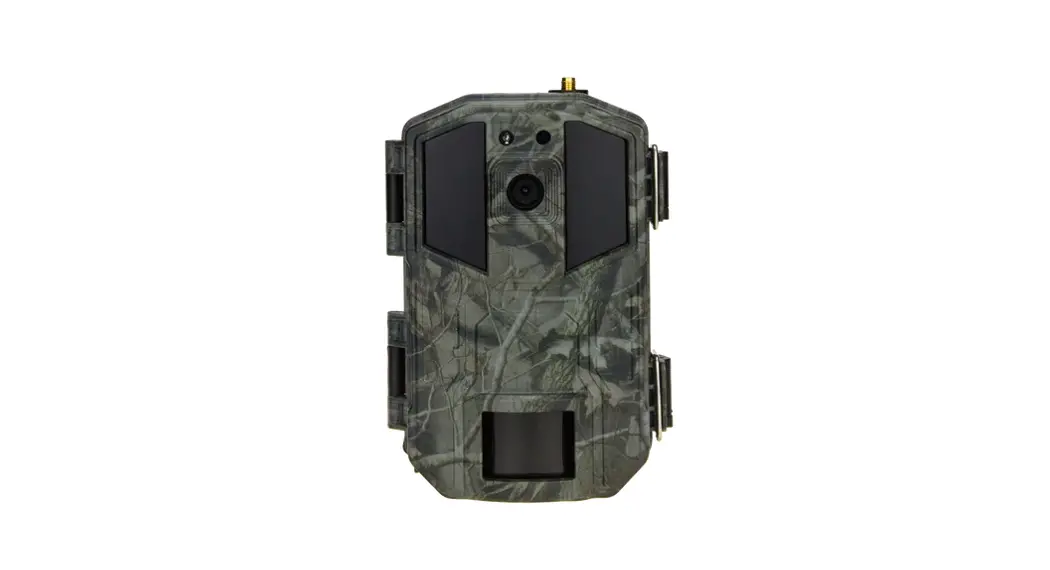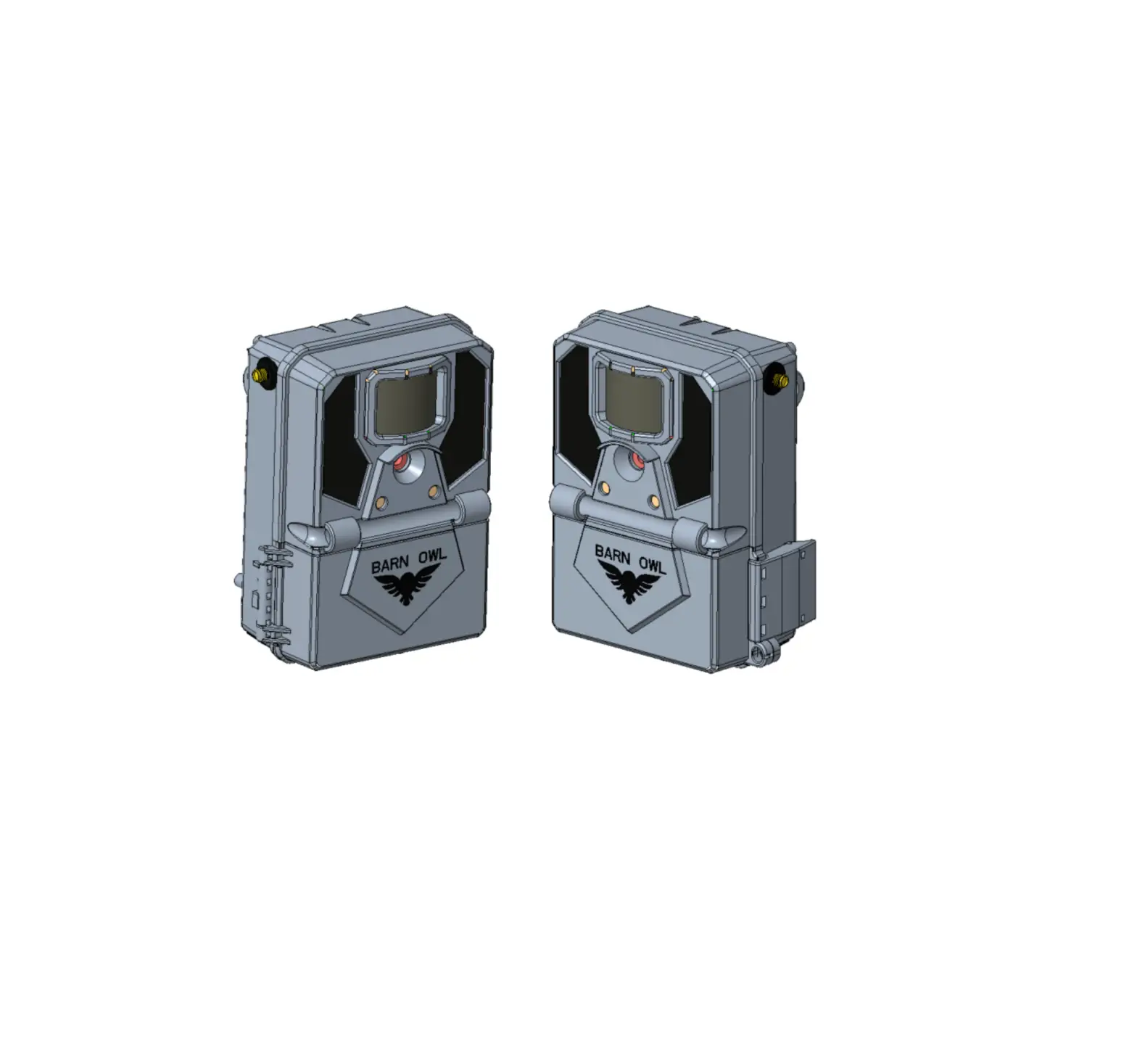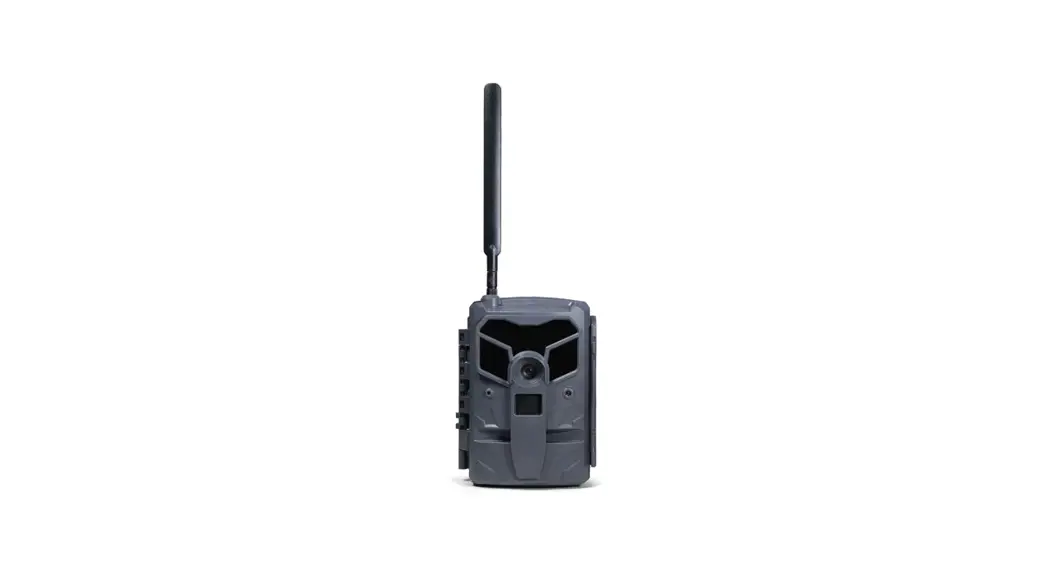

Shenzhen Fowke Innovation Technology E20G 4G-LTE Hunting Camera User Manual
Safety and warning
Incorrect use of the camera and accessories may damage, destroy the camera or cause serious accident . Please be sure to read and observe the following security warnings.
Hazards to people who are unable to use cameras
- Children or incompetent persons are not allowed to use the camera. Only normal adults should use the camera.
Hazard of electric shock, fire or explosion
- If the camera is damaged or invaded by foreign matter, please turn it off immediately, otherwise there is a risk of fire or explosion.
- Use of external power sources may cause electric shock or fire. Please keep the camera and the power supply dry and ventilated. Do not cover the camera with any objects.
- Do not use external power during thunder or lightning, otherwise it may cause electric shock or other accidents.
Safety use warnings
- Do not fall, hit or puncture the camera.
- Do not use any corrosive cleaners to clean the camera.
- Keep away from high temperature or flammable materials, and do not put the battery into a fire, which may cause a fire or explosion.
- Disassembling or self-repairing the camera is prohibited. If necessary, please contact a professional or dealer.
LCD screen
- Do not squeeze or tap the LCD screen.
- If the screen cracks and accidentally touches the liquid, please rinse with clean water. If any liquid gets into eyes or is swallowed accidentally, rinse eyes or gargle with water immediately, drink plenty of water and seek medical advice immediately.
Use, protection and storage
- The camera must be mounted in a secure place in case of accidents.
- Do not use the camera upside down. Do not dip the camera in water.
- All locks and plugs must be fastened before work.
- If you are not using the camera, you must remove the battery and store it in a dry place
- Impingement, fall and other man-made damage is not covered by the warranty, need to pay for repair.
Proper disposal of waste
- Do not dispose of the camera and accessories as household garbage. Do not discard them at will.
- Please deal with the classification according to local law requirements. Please consult local authorities for details.
About this manual
- This manual is used as a general guide for the use of the camera. The pictures are for reference only.
- We try to keep the content right. If the manual is not consistent with the camera due to the update or software upgrade, please refer to the material object without prior notice.
Copyright and trademark information
We reserve the copyright and interpretation right of this manual. No unit or individual shall reproduce and disseminate in any form without written consent.
Microsoft and Windows are registered trademarks of Microsoft Corporation. Pentium is a registered trademark of Intel Corporation.
Macintosh and IOS is a trademark of Apple Computer Inc.
Other names and products may be trademarks or trademarks registered by the relevant owners.
About the camera
Thank you for buying this HD camera! If you have any problems in using it, please contact us in time.
Main features
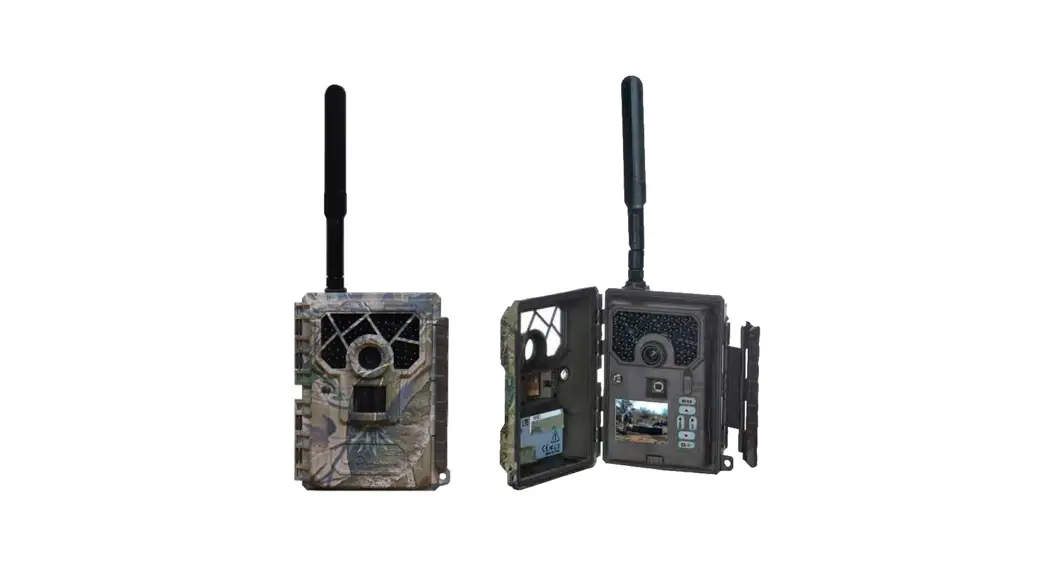
It’s a 4G camera that works automatically to capture moving people or animals and is suitable for a wide range of animal shooting, hunting, home security and other applications. It has the following characteristics:
| ◆ 2.7K HD video | ◆ 14.0 MP photos | ◆ 0.5s trigger time | |
| ◆ Ultra-long standby time | ◆ Support 4G network | ◆ Support real-time remote access | |
| ◆ Support sending original image or VGA optional ◆Two-way awaken | |||
| ◆ All-weather automatic operation | ◆ IP66 | ◆ Hidden appearance | |
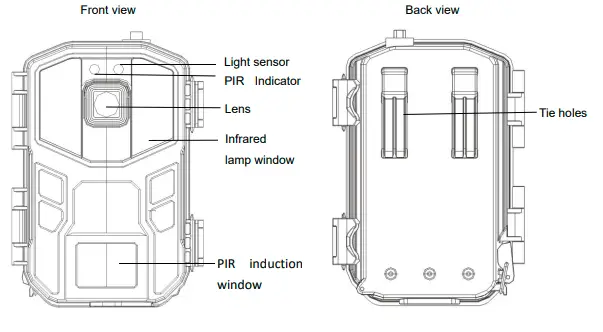
| 1.2Picture Presentations | |||
| Front view | Back view | ||
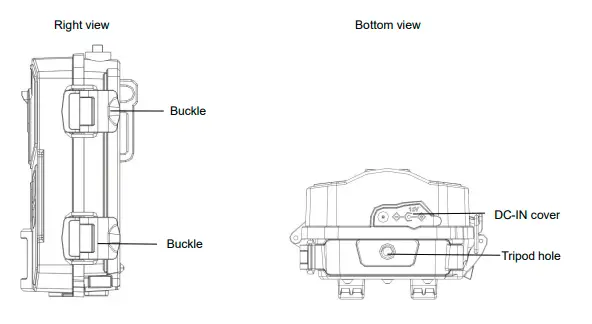
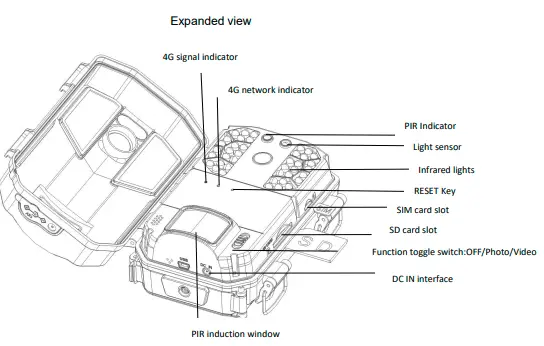
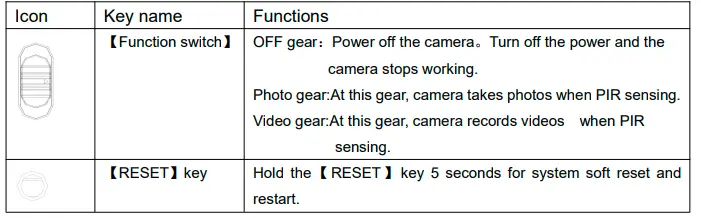
Functions of keys
Start to use
Installation of the SIM card and SD card
- The camera must be loaded with the SIM and SD cards to work properly. Before using it, please format the SD card with your mobile phone APP
- Open the buckles, open the face cover, insert the SIM card with the angular end facing the camera and the metal contact surface facing down.
- Insert the SD card with the metal contact surface facing down into the slot, and push inside until a “click” is heard.
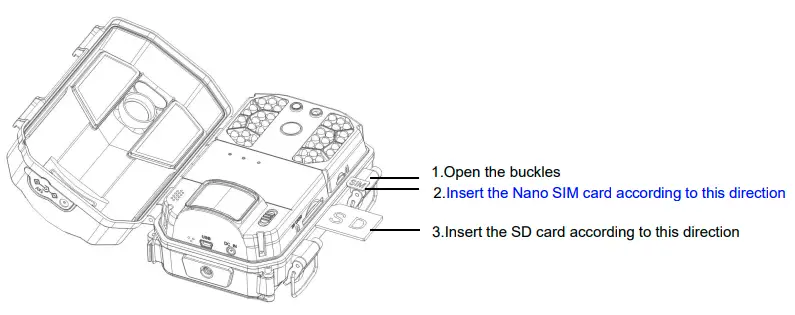
Notice:
Do not unplug the Nano SIM and SD cards while the camera is working, otherwise, the Nano SIM and SD cards will be damaged. Please use a qualified class 10 or above SD card. Poor-quality memory cards can cause the camera to be unrecognizable or inactive
Installation of battery
The camera is powered by 8pcs regular AA batteries, and the installation method is as follows:
- As the picture shown, remove the compartment latch and open the battery compartment cover. 2.2.2 Install 8pcs batteries according to the icon on the machine.
- Keeping the battery compartment clean, covering the battery cover and lock the latches.
- Toggle the【Function switch】to “Photo” or “Video” gear, if the networking indicator is on, it indicates the battery is installed correctly.
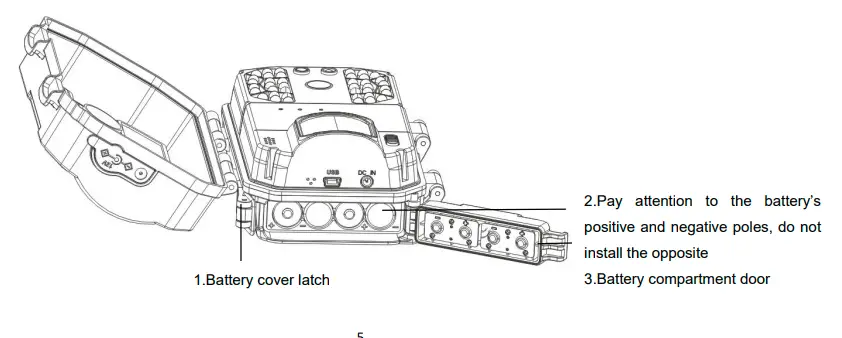
Notice:
Install the battery according to the specified direction, and do not mix old and new batteries.
Incorrect installation of the battery will not power on the camera and may damage the camera or risk. After installation, the latch must be fastened, otherwise water or dust will damage the camera.
Using external power supply
The camera can be powered by an external power supplies.
- Install the batteries, toggle the【Function switch】to the appropriate gear, close the face cover, and hold the latch tight.
- Remove the waterproof glue plug from the camera DC IN interface and plug the external power supply into the camera DC IN interface.
- Access the power source, the camera will automatically switch to the external power source after detecting the external power source.
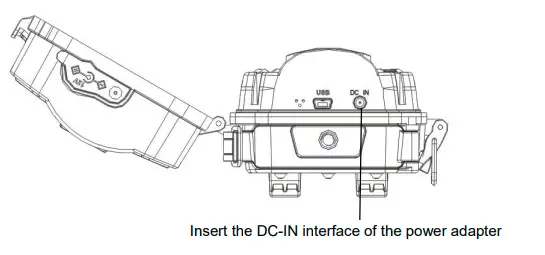
Insert the DC-IN interface of the power adapter
Notice:
Please make sure to use the standard external power supply with specification: output DC12V/2.0A. Cover the waterproof adhesive plug without using the external power supply.
Installation and fixation of camera
To ensure the camera works safely, install the camera in a firm place,users can secure the camera by using a strap or bracket.
Installation with a strap
Use the strap through the back hanging hole of the camera, and then fasten the strap to a tree or other firm object, adjust the shooting angle of the camera and tie the strap. The figure is shown below: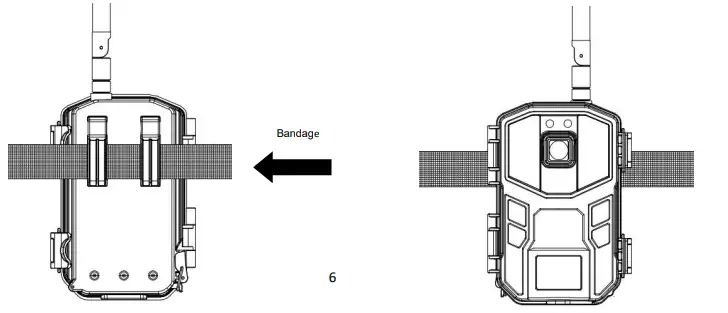
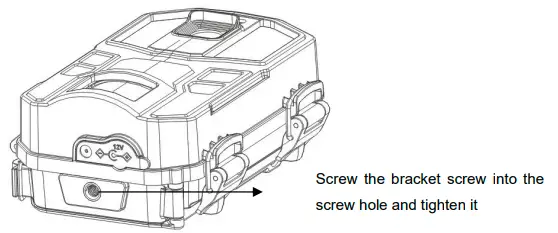
Fixation with the brackets
Install mounting bracket reliably on fixed object (e.g. on the wall or on the tree), screw the bracket screw into the screw hole at the bottom of the camera and tighten it. Adjust the camera shooting angle and tighten all the screws. Below is the figure:
Notice:
If the camera is installed close to the ground, ensure that the bottom of the camera is more than 20CM from ground.
Power on the camera
Toggle the【Function switch】to “Photo”or “Video”gear, the 4G signal lights and network indicators will light up, indicating the camera is on. 4G signal lights share three states: red/emerald green/blue, which represents 4G signal in turn: weak/medium/strong;The networking indicator has two states: red/blue. If red is always displayed, it means that the network fails. If blue is always bright, it means the networking is successful.
Mode switching between video and photo
When the【Function switch】is in the “Photo” or “Video” position, push this key to switch between photo mode and video mode.
- When the【Function switch】is in the “Photo”position, the camera will automatically default to “Photo Mode”;
- When the【Function switch】is in the “Video”position, the camera will automatically default to “Video Mode”;
Power off the camera
Push the【Function switch】to “OFF” gear,the camera will be completely shut down. After the camera is off, it only can be turned on again after waiting 3 seconds.
Notice:
The camera will automatically save the file if the【Function switch】is pushed while the camera is working.
User guide of the camera
Monitor shooting
Install the camera into the shooting area and adjust the camera direction to ensure the lens is aligned to the shooting area. Insert the SIM card and SD card, and toggle the【Function switch】to the “Photo” or “Video” gear. At this time, open the mobile APP UCON, log in and set relevant parameters, the camera will enter the monitoring and shooting state. At the moment, it can automatically monitor and take photos of animals or people in the range of vision, and view the picture in real time.
Notice:
- When using the camera, the lens should aim at the shooting range.
- Battery life can vary in different modes or environments.
Setting and usage of UCON APP
Download and install APP
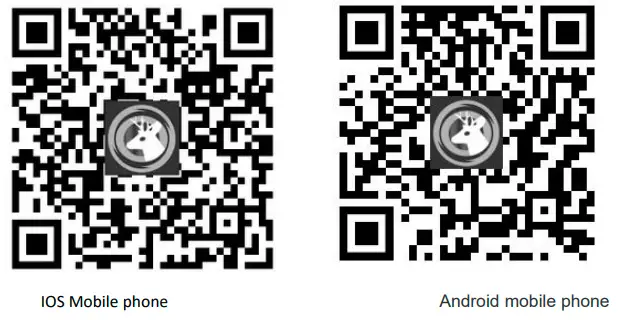
Scan the QR code below and click “Install” or open the App Store/Google Store and search for Ucon to download and install.
Register and login account
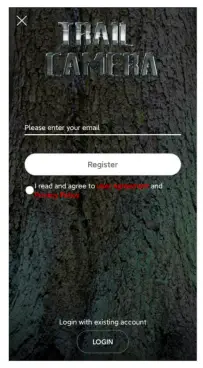
Open the APP and click to register an account, enter your phone number or email address, tick “I read and agree the User Agreement and Privacy Policy”, and click “Register”;
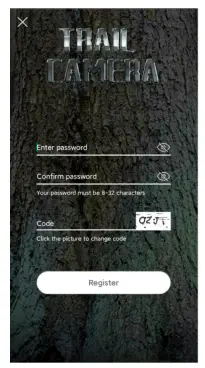
 Set the login password, enter the verification code, and click “Register”;
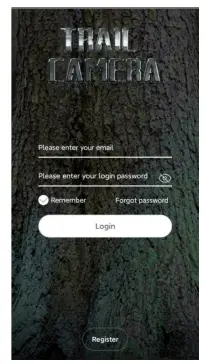
  After successful registration, enter the account, password, and click “Login”.
  Install and add devices
Click “Add a device” and select “Setup WiFi Device”. 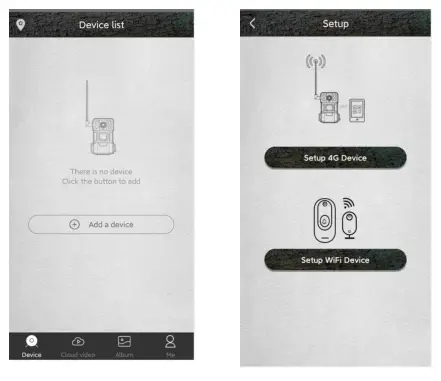
When the blue indicator light is always on, use your mobile phone to scan the QR code on the device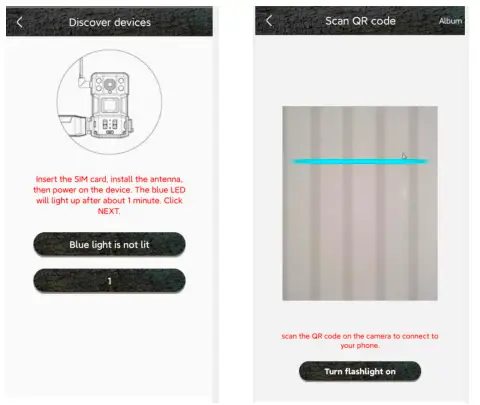 After a successful scan, wait for the connection. Enter the device name and address after the connection is successful, and click “Next” to complete the addition of the device.
 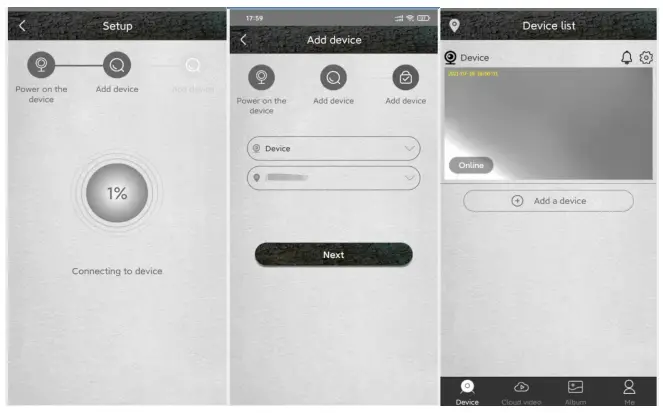 Operation instructions of device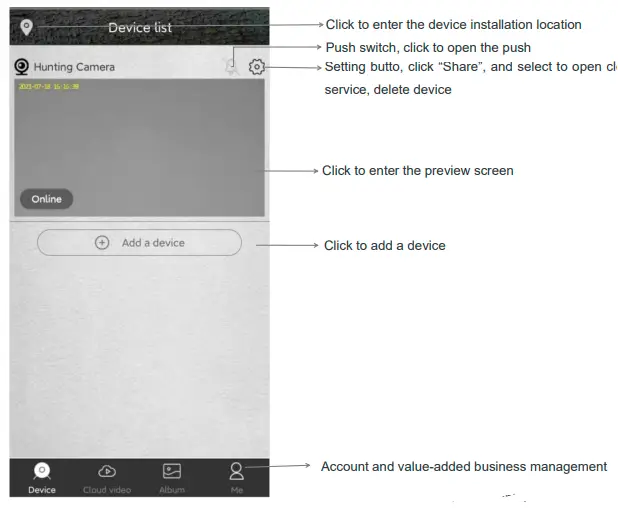
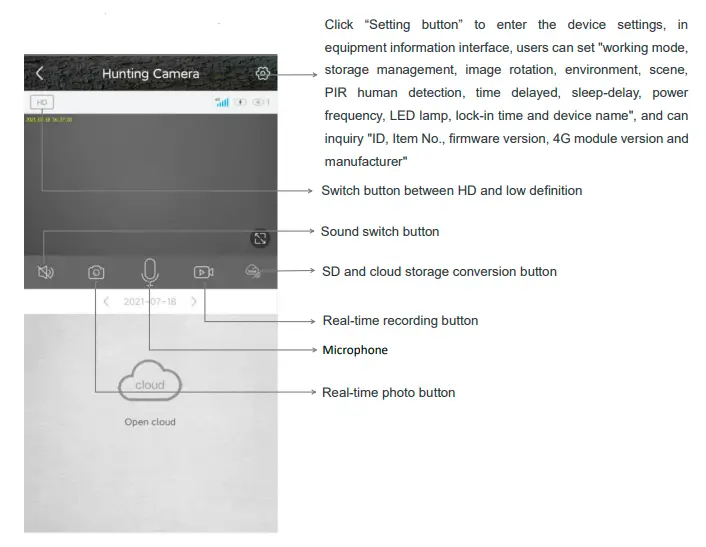
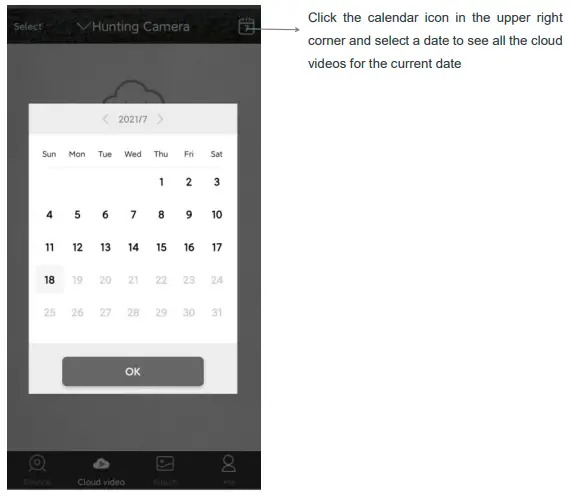
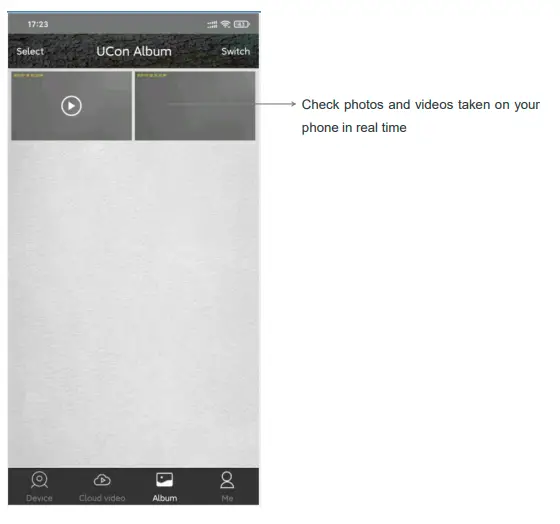
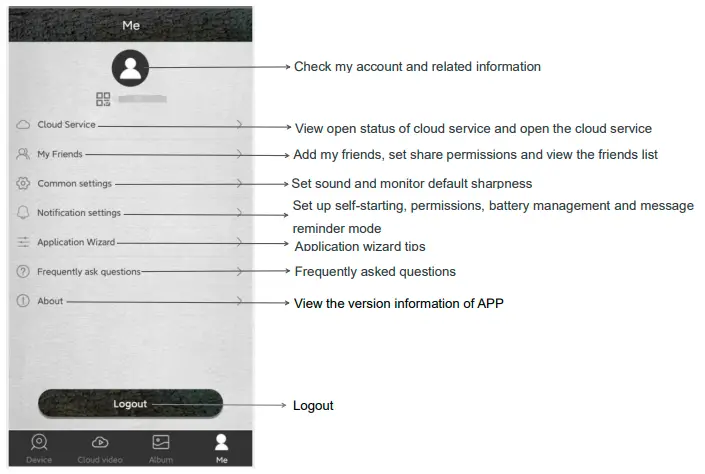
Precautions for equipment use
- This device is powered by AA batteries, battery life is affected by how long the device wakes up and how often it wakes up, Therefore, it is recommended to set the device as low sensitivity when it is used in an environment with more people or animals, in order to reduce equipment arousal and call times to extend battery life, when the battery voltage is low, the APP will prompt you. Please replace the battery in time after receiving the prompt.
- Please make sure the network is working in the installation environment during installation, especially if the installation is outdoors/outside the door. It is necessary to check the signal quality of the operator. If the signal is weak, it is necessary to adjust the installation position of the equipment
- This device has two working modes: bidirectional mode and unidirectional mode; The bidirectional mode is mainly used for remote real-time preview and setting operations; Bidirectional mode consumes a lot of power and is only suitable for setting options. After the setting, change the mode to unidirectional mode. In unidirectional mode, the device automatically enters the PIR induction capture, which is the main working mode of the device.
- If a device has been added to the APP, hold down the reset button for 5S to reset the device, and then delete the device in the APP at first, and add the device again before continuing to use and operate the device.
- This device is a low-power intelligent product, which can support APP remote wake-up and PIR human body detection wake-up. After each awaking, camera’s work will automatically enter the sleep state after a short time. The working time of the device can be set in the APP menu.
- This device provides free cloud video service for one month. If you need to continue to use the value-added service after the trial period, you need to purchase it from the APP.
Appendix
Problems and solutions
| Problem | Potential cause | Solution |
|
Can’t be powered up | Low battery or wrong battery model | Replace the correct type of battery with a full charge. |
| Incorrect battery installation | Refer to the instruction manual to install the battery correctly. | |
| There is a foreign body in the battery
compartment | Check the battery compartment for foreign matter and clean it. | |
| Incorrect specification or connection of
external power supply | Use a suitable external power supply and connect it properly. | |
| Operating temperature is too high or too low | Use it where the temperature is right. | |
| The camera suddenly shuts down |
The battery is low. |
Replace a fully charged battery or use an external power source. |
| Photography is normal during the day, but it is dark at night. | Low power or insufficient external power supply current, the infrared lamp does not work properly |
Replace a fully charged battery or use an external power source. |
|
Do not read cards or save files | Power failure before file storage | Replace a fully charged battery or use an external power source. |
| Memory card speed is too slow | Replace memory cards with write speed of CALSS4 or above. | |
| Memory card is damaged or not up to
specification | Replace a qualified memory card and format it with your camera. | |
|
The camera crashed while working | Low battery power or external power supply
does not meet the requirements | Switch to a new battery or an external power supply that meets the
requirements. |
| Memory card is damaged or poor quality | Replace qualified memory card, format the memory card with the camera,
restore the camera to its default settings, and restart the camera. | |
|
Cameras consume a lot of power | The camera setting of PIR interval time is too
short | The PIR interval can be adjusted properly to extend the battery life. |
| The camera setting of PIR sensitivity is too
high | The sensitivity of the PIR is appropriately lowered to extend the endurance. | |
| The camera setting of infrared light
brightness is too high | Turn down the brightness of the infrared light, you can extend the battery
life. | |
| There are more photos and videos taken at
night | Infrared light at night consumes a lot of power. If you take more photos or
videos at night, it is recommended to use external power supply. | |
| The above parameters are the balance between camera performance and battery life. Users can make reasonable
adjustments according to the instructions and personal needs in order to obtain reasonable results and battery life. | ||
|
The camera leaks or fogs up | Waterproof ring falls off or there is a foreign
body on the waterproof ring | Check the waterproof ring, keep the waterproof ring clean, waterproof ring
can not pop up, warping. |
| Failure to fasten the latch properly or plug the waterproof rubber stoppers for external power supply | Before the camera works properly, all locks must be fastened, waterproof rubber stoppers must be plugged, and carefully checked. | |
| Improper use, such as putting the camera in
water | The camera are rainproof, but absolutely do not put into the water | |
| Install or place the camera incorrectly, such
as upside down | Install and position the camera properly. The head of the camera must be
up and mounted as vertically as possible. | |
| When mounted close to the ground, make sure the bottom of the camera is
at least 20CM from the ground. | ||
| The camera can work well when raining. If the camera fogs or gets water but works properly, shut it off immediately and remove the battery. Wipe off any water or fog with a dry towel, then open the cover of the camera and place it upright in a ventilated area to dry completely before using. | ||
| Not working properly when using external power supply | Poor power contact | Check each interface to ensure that they are firmly connected. |
|
External power supply error | Replace the qualified external power supply. Requirements: Output voltage DC 12V(+ 5% or-5%), output current ≥ 2.0A. If the voltage is too low,the camera cannot work, if the voltage is too high voltage the camera will be damaged. | |
|
Other questions |
The camera can be turned on, but there are other abnormal problems | Try the following way:
1. Replace a fully charged battery.
2. Replace a qualified memory card and format it with the camera.
3. Return the camera to the default settings and restart. |
| If the above method cannot solve the problem, the camera may be damaged, please contact the dealer. | ||
Specification
| Network | LTE/HSPA/GSM 4G/3G/2G network |
| Sensor | CMOS sensor ,Max 14MP(interpolation) |
| Lens | F=2.5 f=8.7mm , view angle:50° |
| Storage medium | Support SD card, Max to 128GB |
| PIR trigger time | 0.5s |
| IR spec. & qty | 940nm/40pcs,The brightness is adjustable |
| PIR sensitivity | Adjustable |
| PIR sensitive distance | 0~18m |
| PIR angle | 90° |
| PIR delay | 10s~5min |
| Working Mode | Photo mode/Video mode |
| Photo resolution | JPEG 14M |
| Video resolution | Format:MP4,support H.265 resolution:2.7K |
| Video Length | 5s |
| Language | Automatic switching with mobile phone |
| Microphone | Yes, Built-in |
| Speaker | Yes, Built-in |
| Working voltage | DC 12V |
| Battery | 8pcs AA battery |
| External power supply | DC 12V/1.5A |
| Stand-by time | About 150days(8pcs AA batteries) |
| Waterproof level | IP66 |
| Dimensions | 149(L)×104(W)×69(H)mm |
| Weight | Approx 280±5g(battery excluded) |
FCC Warning
This device complies with part 15 of the FCC Rules. Operation is subject to the following two conditions: (1) This device may not cause harmful interference, and (2) this device must accept any interference received, including interference that may cause undesired operation. Any Changes or modifications not expressly approved by the party responsible for compliance could void the user’s authority to operate the equipment.
Note:
This equipment has been tested and found to comply with the limits for a Class B digital device, pursuant to part 15 of the FCC Rules. These limits are designed to provide reasonable protection against harmful interference in a residential installation. This equipment generates uses and can radiate radio frequency energy and, if not installed and used in accordance with the instructions, may cause harmful interference to radio communications.
However, there is no guarantee that interference will not occur in a particular installation. If this equipment does cause harmful interference to radio or television reception, which can be determined by turning the equipment off and on, the user is encouraged to try to correct the interference by one or more of the following measures:
- Reorient or relocate the receiving antenna.
- Increase the separation between the equipment and receiver.
- Connect the equipment into an outlet on a circuit different from that to which the receiver is connected.
- Consult the dealer or an experienced radio/TV technician for help.
This equipment complies with FCC radiation exposure limits set forth for an uncontrolled environment. This equipment should be installed and operated with minimum distance 20cm between the radiator & your body.