
Operation Manual
VK63, VK67, VK68, VK83, VK73
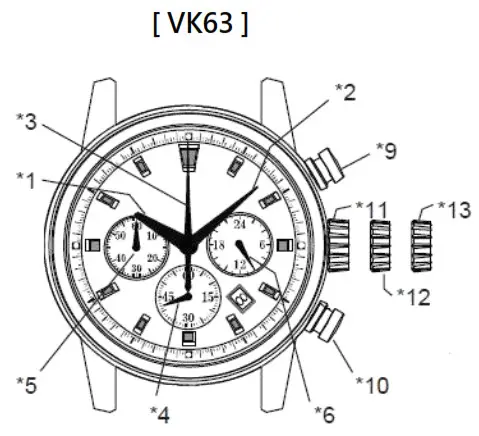
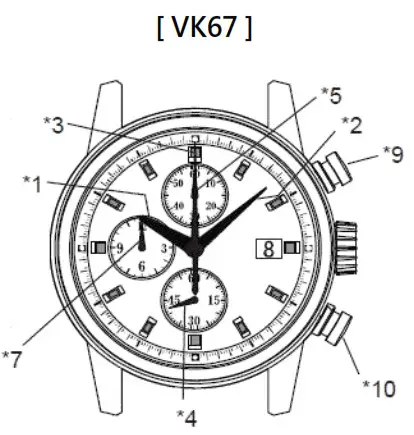
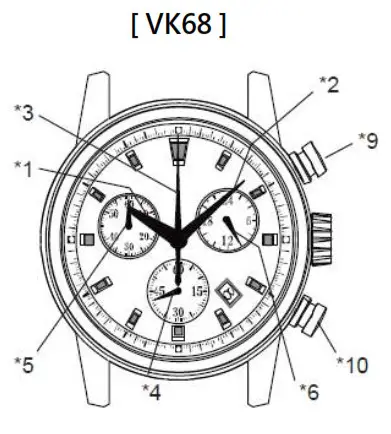
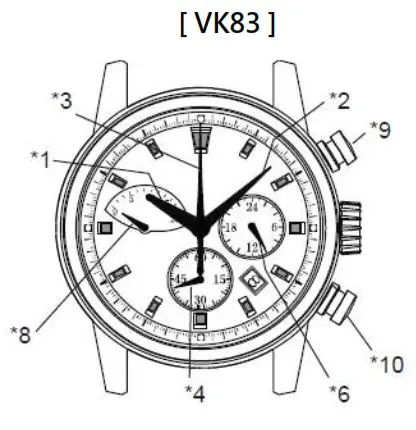
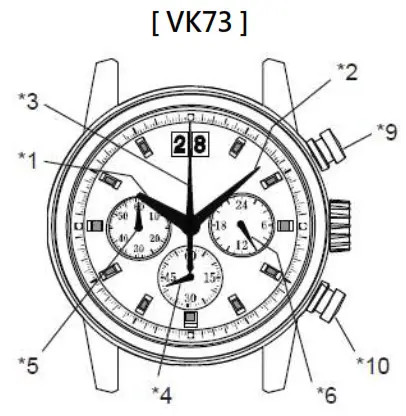
| VK63 | VK67 | VK68 | VK83 | VK73 | |
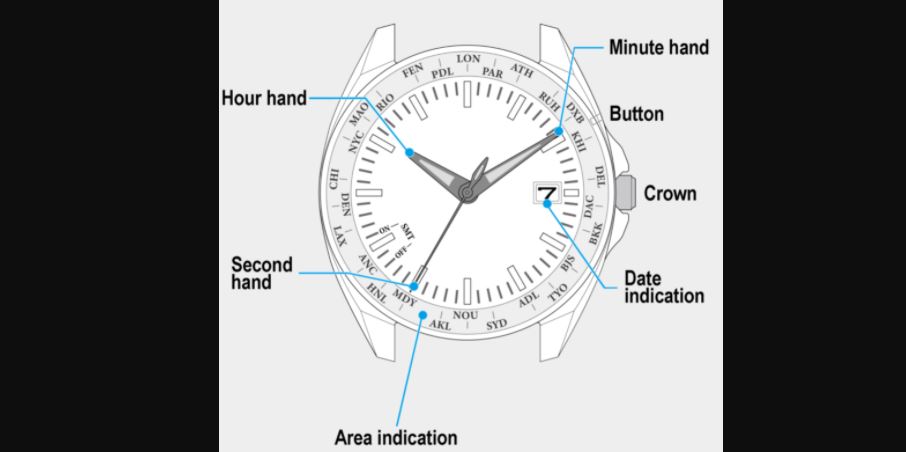
| *1: Hour hand | O | O | O | O | O |
| *2: Minute hand | O | O | O | O | O |
| *3: Center 1/5 chronograph second hand | O | O | O | O | O |
| *4: Small second hand | O (6H) | O (6H) | O (6H) | O (6H) | O (6H) |
| *5: Chronograph minute hand (60 minutes) | O (9H) | O (12H) | O (10H) | X | O (9H) |
| *6: 24-hour hand | O (3H) | X | O (2H) | O (3H) | O (3H) |
| *7: Chronograph hour hand (12 hours) | X | O (9H) | X | X | X |
| *8: Chronograph minute hand (20 minutes) | X | X | X | O (9H) | X |
| *9: Button A (START/ STOP) | O | O | O | O | O |
| *10: Button B (RESET) | O | O | O | O | O |
| *11: Crown at the normal position | O | O | O | O | O |
| *12: Crown at the first position (Date setting) | O | O | O | O | O |
| *13: Crown at the second position (Time setting) | O | O | O | O | O |
TIME SETTING
Set the time
- Pull out the crown to the second click position.
- Turn the crown to set hour and minute hand (Check that AM / PM is set correctly)
- Push the crown back into the normal position.
* If the crown is pulled to the second position while the chronograph is started, the chronograph hands will continue to move. This is not a malfunction.
Set the date
- Pull out the crown to the first click position.
- Turn the crown clockwise for date setting
* Do not set the date between 9:00 PM and 3:00 AM, otherwise, the day may not change properly. If it is
necessary to set the date during that time period, first change the time to any time outside it, set the date, and then reset the correct time. - Push the crown back into the normal position.
HOW TO RESET (AFTER BATTERY CHANGE)
Method 1
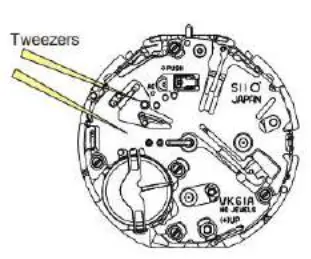
- Set the crown to the normal position
- Touch the AC terminal of the circuit block and the switch spring with conductive tweezers to reset the circuit.
- The small second hand will move at two-second intervals for 10 seconds as a demonstration.
Method 2
- Pull out the crown to the second click position.
- Press button B for two seconds and release the button.
- Push the crown back to the normal position.
- The small second hand will move at two-second intervals for 10 seconds as a demonstration.
* If the crown is operated within 10 seconds, the two-second interval movement will not be activated
* It is not necessary to set the chronograph hands after the battery is exchanged. If the chronograph hand positions are incorrect, follow the below procedure all the chronograph hands will be reset to the “0” position.

HOW TO USE THE CHRONOGRAPH
[ Standard measurement : e.g. 100m race ]
Press the buttons in the following order :
A AB
AB
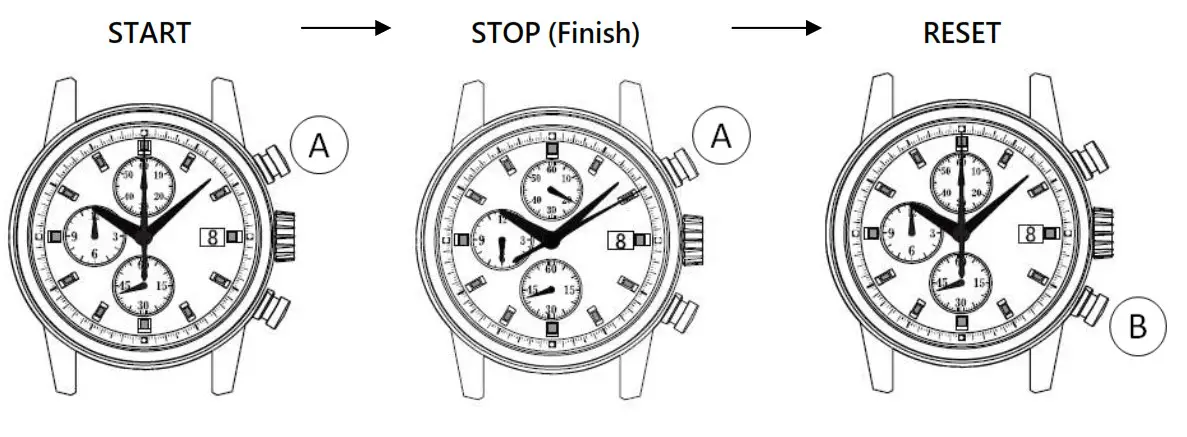
* Press button A to start the chronograph. The chronograph hands will start moving.
(6 hours 20 minutes 10 seconds) * Press button A again to stop the chronograph. The chronograph hands stop to indicate the elapsed time.
* Press button B to reset the chronograph. All the chronograph hands will be reset to the “0” position.
| * The chronograph can measure up to |  VK63, VK68, VK73: 60 minutes VK67: 12 hours VK83: 20 minutes VK63, VK68, VK73: 60 minutes VK67: 12 hours VK83: 20 minutes |
| and chronograph stops after measurement for | VK63, VK68, VK73: 60 minutes VK67: 12 hour VK83: 20 minutes |
* After the maximum measurement time is finished, restart the chronograph function :
VK63, VK67, VK68, VK73 : Press button A
VK83: Press button B (to reset the chronograph minute hand to “0” position) then press button A
* During the chronograph operation, button B (reset) can be pushed. It will not cause any problems.
[ Accumulated elapsed time measurement: e.g. basketball game ]
Press the buttons in the following order: AA/AAB
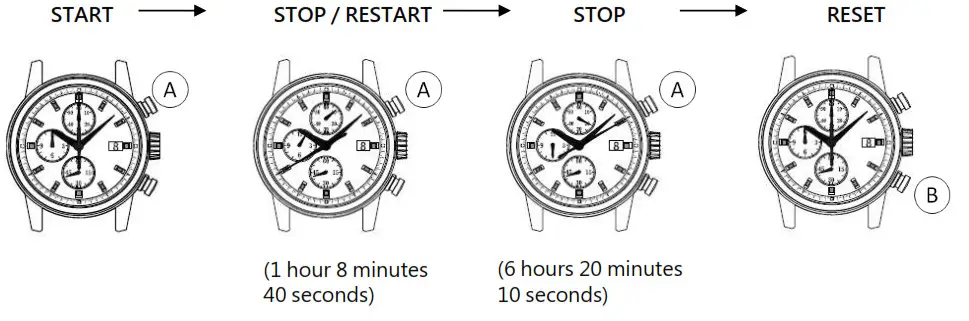
* Restart and stop of the chronograph can be repeated as many times as necessary by pressing button A.