R7306SB FASSTest-2.4GHz System Transmitter
Product Information
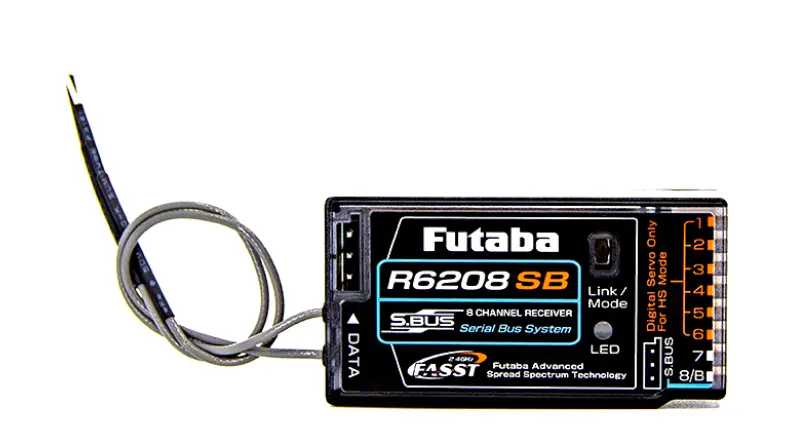
The Futaba R7306SB is a FASSTest-2.4GHz compatible receiver
designed for use with Futaba FASSTest-2.4GHz system transmitters.
It features bi-directional communication with the transmitter using
the S.BUS2 port, allowing for the use of various telemetry sensors.
The receiver has both standard PWM output ports (1-6ch) and S.BUS
output ports. Additionally, it can be switched to the Dual Rx Link
System, which allows for the mounting of two FASSTest receivers on
a single aircraft for increased safety.
Features:
- Compatible with Futaba FASSTest-2.4GHz system transmitters
- Bi-directional communication with the transmitter using the
S.BUS2 port - Supports telemetry sensors
- Standard PWM output ports (1-6ch)
- S.BUS output ports
- Dual Rx Link System for mounting two receivers on one
aircraft
Warnings:
- Changes or modifications not approved by the responsible party
may void the user’s authority to operate the equipment. - The receiver should be protected from vibration using foam
rubber, Velcro, or similar mounting methods. - Avoid exposing the receiver to moisture.
- Keep the receiver away from conductive materials to prevent
short circuits. - Do not cut or bundle the receiver antenna wire.
Product Usage Instructions
Telemetry OFF Mode Activation:
- Turn on the receiver (the transmitter should be off).
- Press and hold the SW (switch) for 5 seconds or more.
- The switch will start blinking in the following sequence: RED,
ORANGE, GREEN, ORANGE slow blink. - Release the switch when it blinks ORANGE once.
Dual Rx Link:
- Install two receivers on the aircraft according to the
connection example provided. - Link the two receivers using the dual receiver feature of the
transmitter. If your system does not have dual receiver capability,
link each receiver separately. - For FASSTest 16ch, select dual mode and link the primary
receiver following the procedure in the receiver manual. - Turn on the main receiver and link the transmitter in link
mode. - For FASSTest 16ch, select dual mode and link the secondary
receiver.
Telemetry ON Mode Activation:
- Press the switch once.
- The switch will blink ORANGE twice.
- Press and hold the SW.
- The switch will blink ORANGE.
Note: The above steps assume FASSTest12CH mode is being
used. For telemetry in this mode, link R7306SB in telemetry OFF
mode first, and then link the receiver you want telemetry to. The
transmitter will display the telemetry of the last linked
transmitter.
Turning Off the Receiver Power:
- Turn off the receiver power.
- After restarting, the LINK LED will light up.
FASSTest12CH(Telemetry OFFmode
This mode is forcibly turning off telemetry transmission to prevent collision of telemetry signals from the receiver to the transmitter when using dual RX link mode in FASSTest12ch mode.
1 Turn on the receiver. [Transmitter is always OFF] 2 Press and hold the SW for 5 seconds or more.
Blinking switches every 5 seconds as follows.
RED ORANGE GREEN ORANGE slow blink
FASSTest12CH(Telemetry OFFmode : OFF
3 Release the
switch here Blinks ORANGE once
How to Dual Rx Link 1 Install two receivers on the aircraft as shown in the
connection example.
2 Link the two receivers using the dual receiver
feature of the transmitter. For systems without dual receiver capability, link each receiver in turn.
Transmitter in link mode
For FASSTest 16ch Select dual mode and link primary
*Follow the link procedure for each receiver manual.
Turn on the main receiver and link Transmitter in link mode
For FASSTest 16ch Select dual mode and link secondary
Press SW once more to return to flashing orange once
FASSTest12CH(Telemetry OFFmode : ON
4 Press switch
Blinks ORANGE twice
5 Press and hold the SW
Blinks ORANGE
About telemetry system
Turn on the sub receiver and link
When using the dual receiver function
The telemetry function of the main receiver can be used Sub-receiver telemetry function is not available
Telemetry for FASSTest12CH
In FASSTest12CH mode, after linking R7306SB in telemetry
OFF mode, link the receiver you want telemetry to. (The
transmitter will show the telemetry of the last linked transmitter.)
1
First Link
Telemetry OFF mode
2
Second Link
Telemetry
2
Display
Change to this mode when using FASSTest12CH in dual RX link mode.
6 Release SW
Solid ORANGE
1
First Link
2
Second Link
Telemetry OFF mode
e.g.
FASSTest receiver
Telemetry
2
Display
7 Turn off the receiver power
After restarting, the LINK LED lights up.
In FASSTest12CH Telemetry OFF Mode
Status
LINK LED
Start
Orange Solid
2 Telemetry display of second-linked receiver. 1 Telemetry OFF first-Linked receiver.
Compliance Information Statement (for U.S.A.) This device, trade name Futaba Corporation, model number R7306SB, complies with part15 of the FCC Rules. Operation is subject to the following two conditions: (1) This device may not cause harmful interference, and (2) This device must accept any interference received, including interference that may cause undesired operation. CAUTION: To assure continued FCC compliance 1. Any changes or modifications not expressly approved by the grantee of this device could void the user’s authority to operate the equipment. 2. This equipment complies with FCC radiation exposure limits set forth for an uncontrolled environment. This equipment should be installed and operated with minimum distance 20cm between the radiator & your body. The responsible party of this device compliance is: FUTABA Corporation of America 2681 Wall Triana Hwy Huntsville, AL 35824, U.S.A. Phone:1-256-461-9399 FAX:1-256-461-1059 E-mail: [email protected]
FUTABA CORPORATION Hobby Radio Control Business Center Sales & Marketing Department 1080 Yabutsuka, Chosei-mura, Chosei-gun, Chiba-ken, 299-4395, Japan TEL: +81-475-32-6051, FAX: +81-475-32-2915 ©FUTABA CORPORATION 2023, 5 (1)
1M23N36210
R7306SB
FASSTest-2.4GHz Bidirectional Communication System Dual Rx Link System Equipment S.BUS2 / S.BUS Port and 6 Channels for Conventional System
Receiver
Applicable systems: Futaba FASSTest-2.4GHz system transmitter
Thank you for purchasing a Futaba R7306SB FASSTest-2.4GHz compatible receiver. The R7306SB receiver features bi-directional communication with a FASSTest Futaba transmitter using the S.BUS2 port. Using the S.BUS2 port an impressive array of telemetry sensors may be utilized. It also includes both standard PWM output ports (1-6ch) and S.BUS output ports. The R7306SB can also be switched to the Dual Rx Link System. This system can ensure safety by mounting two FASSTest receivers on one aircraft.
Usage precaution · Analog servos cannot be used with the R7306SB in the FASSTest 12CH
mode.
WARNING
Changes or modification not approved by the party responsible for compliance could void the user’s authority to operate the equipment.
The R7306SB receiver should be protected from vibration by foam rubber, Velcro, or similar mounting methods. Protect from moisture.
Keep away from conductive materials to avoid short circuits. Antenna installation precaution
Do not cut or bundle the receiver antenna wire.
The antennas must be mounted in such a way to assure they are strain relieved.
Keep the antenna as far away from the motor, ESC and other noise sources as you possibly can.
Do not touch the antenna to metal, carbon, or other conductive material.
Be sure that the two antennas are placed at 90 degrees to each other. The R7306SB has two antennas. In order to maximize signal reception and promote safe modeling Futaba has adopted a diversity antenna system. This allows the receiver to obtain RF signals on both antennas and fly problem-free.
Antenna installation for carbon fuselage
You must leave 30 mm at the tip of the antenna fully exposed. The exposed antenna should be secured so that it cannot move around or back inside of your aircraft.
Be careful of connector insertion
Don’t connect an S.BUS servo / gyro to S.BUS2 connector.
Link precaution
Do not perform the linking procedure while the motor’s main power is connected or the engine is operating as it may result in serious injury.
When the linking is complete, please cycle the receiver power and ensure the receiver is properly linked to the transmitter.
Power on the system in this order: Transmitter first, followed by the receiver.
If the R7306SB receiver was previously linked to another transmitter, make sure that transmitter is not operating while linking the receiver to the new transmitter.
Connector precaution
Don’t connect a connector, as shown in this figure. It will short-circuit, if it connected in this way. A short circuit across the battery terminals may cause abnormal heating, fire and burns.
DANGER Receiver
Do not insert either a switch or battery in this manner.
When all ports are used.
(Typical installation)
HUB
Battery 3.7 7.4 V
Link LED SW
(It is not used for a link.)
Switch
A battery is connectable also with which port.
Mode LED
Servo for conventional system
S.BUS2 Servo S.BUS2 Gyro
(CH1 5
HUB
Antenna R7306SB
RX/SB2/6
There is a port change function. The figure is an example of default setting mode B. Refer separate table.
R7306SB Specifications
FASSTest-2.4 GHz system(18 ch/12 ch mode)
S.BUS2 and S.BUS port and 6 Channels for conventional system receiver · Dual antenna diversity · Size: 0.89 x 1.5 x 0.48 in. (22.5×38.3×12.2 mm) · Weight: 0.38 oz. (10.7 g) · Power requirement: 3.7 V to 7.4 V(Voltage range: 3.5 V to 8.4 V) · Battery F/S Voltage: FASSTest—It sets up with a transmitter
FASST—3.8 V
*Be sure that when using ESCs regulated output the capacity of the ESC must meet your usage condition. *Never use dry batteries for the power supply of the R7306SB as they may cause difficulties.
Percentage of Waste Paper pulp 80%
HUB
Telemetry Sensor Telemetry Sensor S.BUS2 Tool
LED Indication Status
No signal reception Receiving signals
Waiting for link
Unrecoverable error (EEPROM, etc.)
LINK LED
Red Solid Green Solid Start 2second later Red Blink 3 second Red Green Alternate blink
In Dual RX Link Mode
Status
MODE LED
External receiver is receiving error or not connected. S.BUS signal not received
S.BUS signal reception from external receiver (also received by external receiver)
Red Solid Green Solid
In FASSTest12CH Telemetry OFF Mode
Status
Start
LINK LED
Orange Solid
Link
FASSTest is a bidirectional communication system
between the R7306SB receiver and FASSTest capable
transmitters. Multiple optional telemetry sensors may be
connected to the S.BUS2 on the receiver and that data is in
turn displayed on the transmitter.
Link to the transmitter
1 Bring the transmitter and the receiver close to
each other, within 20 inches (half meter).
2 Turn on the transmitter. Place the transmitter into
the receiver linking mode.
3 Turn on the receiver. 4 The receiver will wait for the linking process to
begin for 2 seconds. Following that it will return to the normal operation mode.
5 When the LED of the receiver changes from
blinking red to solid green, linking is complete. (A link waiting state is ended in 3 second.) · Refer to the transmitter’s operation manual for complete details on how to place the transmitter into the linking mode.
· If there are many FASSTest systems turned on in close proximity, your receiver might have difficulty establishing a link to your transmitter. This is a rare occurrence. However, should another FASSTest transmitter/receiver be linking at the same time, your receiver could link to the wrong transmitter. This is very dangerous if not noticed. To avoid the problem, we strongly recommend that you double check whether your receiver is really under control by your transmitter.
· If the System Type of the transmitter is changed, the receiver will need to be re-linked to the transmitter.
S.BUS2 S.BUS2 extends S.BUS and supports bidirectional communication. Sensors are connected to the S.BUS2 port.
Compliance Information Statement (for Canada) This device complies with Industry Canada license-exempt RSS standard(s). Operation is subject to the following two conditions: (1) this device may not cause interference, and (2) this device must accept any
interference, including interference that may cause undesired operation of the device. This equipment complies with IC radiation exposure limits set forth for an uncontrolled environment. This equipment should be installed and operated with minimum distance 20cm between the radiator & your body.
French: Cet appareil radio est conforme au CNR-210 d’Industrie Canada. L’utilisation de ce dispositifest autorisée seulement aux deux conditions suivantes : (1) il ne doit pas produire de brouillage, et (2) l’utilisateur du dispositif doit être prêt à accepter tout brouillage radioélectrique reçu, même sice brouillage est susceptible de compromettre le fonctionnement du dispositif. Cet équipement est conforme aux limites d’exposition aux rayonnements IC établies pour un environnement non contrôlé. Cet équipement est conforme aux limites d’exposition aux rayonnements IC établies pour un environnement non contrôlé. Cet équipement doit être installé et utilisé avec un minimum de 20 cm de distance entre la source de rayonnement et votre corps.
Do not bend the antenna part
Fix the sleeve to the model
Gently bend the coaxial cable part.
Antenna installation
90°
Coaxial cable
Sleeve
Channel Modes
The R7306SB is capable of changing its channel allocations as described in the table below. This is especially important when using the receiver in a dual receiver mode. See your transmitter operation manual for complete details on operating in the dual receiver mode.
R7306SB CH Mode table
Output connector Mode A
Mode B
Mode C
Channel Mode D Mode E
Mode F
Mode G
Mode H
SB2 / 1 1
1
1 S.BUS2 7
7
7
13
SB2 / 2 2
2
2 S.BUS2 8
8
8
14
33
3
3
3
9
9
9
15
SB2 / 4 4
4
4 S.BUS2 10
10
10
16
SB / 5 5
5 S.BUS S.BUS 11
11 S.BUS S.BUS
RX/SB2/6 6 S.BUS2 S.BUS2 S.BUS2 12 S.BUS2 S.BUS2 S.BUS2
LED blink
RED 1
RED 2
RED 3
RED 4
RED 5
GREEN GREEN GREEN
1
2
3
Default
1 Turn on the receiver. [Transmitter is always OFF] 2 Press and hold the SW for 5 seconds to 10 seconds.
3 When the LED of the receiver changes from blinking
red to blinking orange, SW is released.
4 The LED should now blink red two times in the
patterns described in the chart below.
5 Each press of the SW advances the receiver to the
next mode.
6 When you reach the mode that you wish to operate
in, press and hold the SW for more than 2 seconds. When LED blinks in orange, it is the completion of a mode change, SW is released.
7 Cycle the receiver power off and back on again after
changing the Channel mode.
1 Turn on the receiver. [Transmitter is
always OFF]
LINK LED
Red Solid
2 Receiver enters link waiting state
Start 2second later Red Blink
3 second
3 The LED will flash for the current CH Current CH mode
output mode.
display
Dual Rx Link System
By installing two receivers in one aircraft, if one receiver becomes unable to communicate, the other receiver can be operated.
How to change to Dual RX Link mode
1 Turn on the receiver. [Transmitter is always OFF] 2 Press and hold the SW for 5 seconds or more.
Receiver : A
Receiver : B Communicate with two receivers
Even if there is a problem with the B receiver, communication will be performed with the A receiver.
Blinking switches every 5 seconds as follows.
RED ORANGE GREEN ORANGE slow blink
Link LED
3 Release the
switch here Blinks GREEN once
If it is passed, turn off the power and restart
Dual RX Link mode : OFF
Press SW once more to return to flashing green once
4 Press switch
Even if there is a problem with the A receiver, communication will be performed with the B receiver.
In Dual RX link mode, the SB2/RX port is for reception only, so use CH mode B, C, D, F, G, H mode for S.BUS output and S.BUS2 input/output.
Connection example
Blinks GREEN twice Dual RX Link mode
: ON
5 Press and hold the SW
R7306SB
Blinks ORANGE
FASSTest Receiver S.BUS2
ESC When using ESC
Declaration of Conformity (for EU) Hereby, Futaba Corporation declares that the radio equipment type is R7306SB in compliance with Directive 2014/53/EU. The full text of the EU declaration of conformity is available at the following internet address: https://www.rc.futaba.co.jp/support/manual/
6 Release SW
Solid ORANGE
7 Turn off the receiver power
After restarting, the MODE LED lights up.
Status
External receiver is receiving error or not connected. S.BUS signal not received
S.BUS signal reception from external receiver (also received by external receiver)
MODE LED
Red Solid
Green Solid
 サポート 取扱説明書ダウンロード | 双葉電子工業株式会社 ラジオコントロール