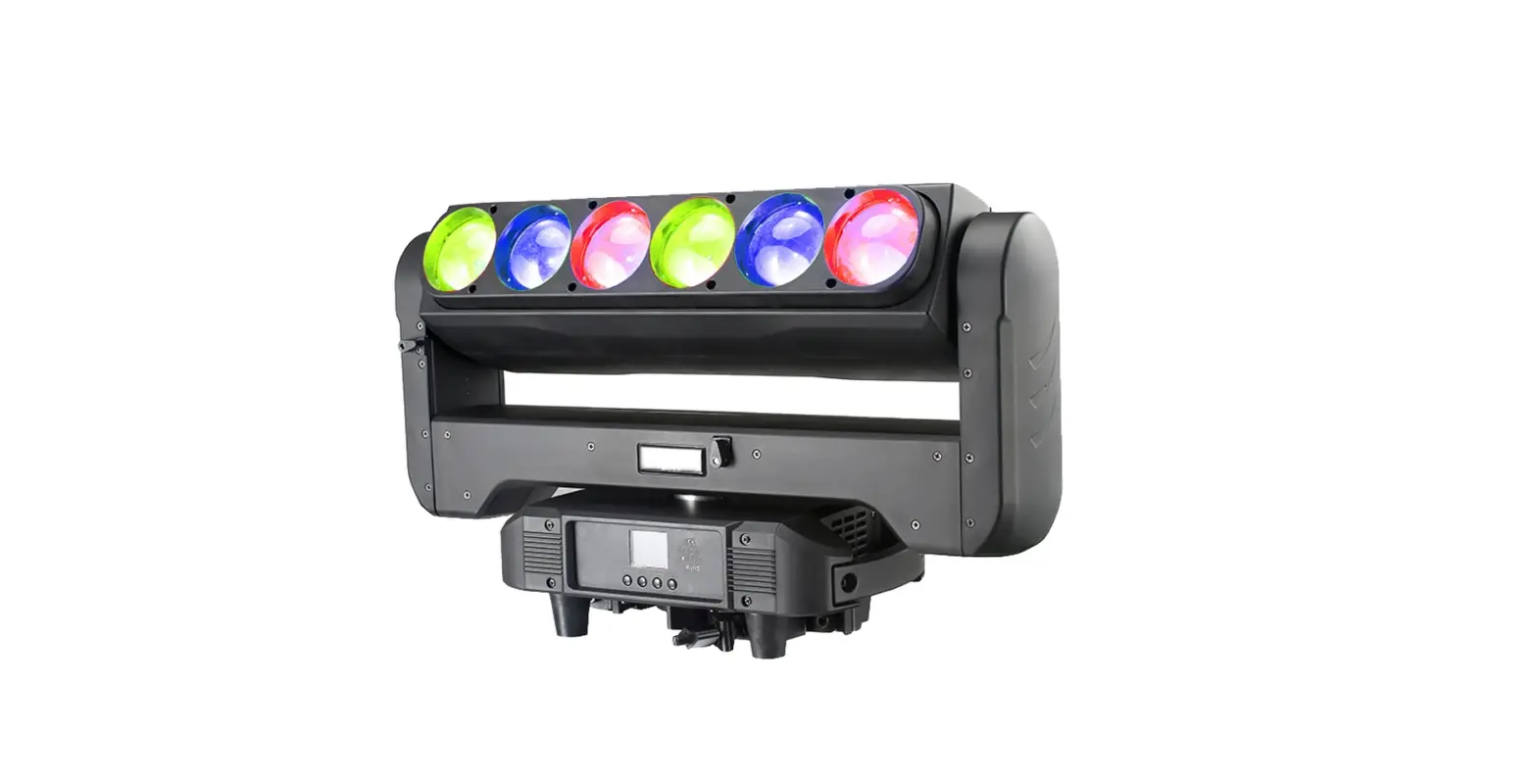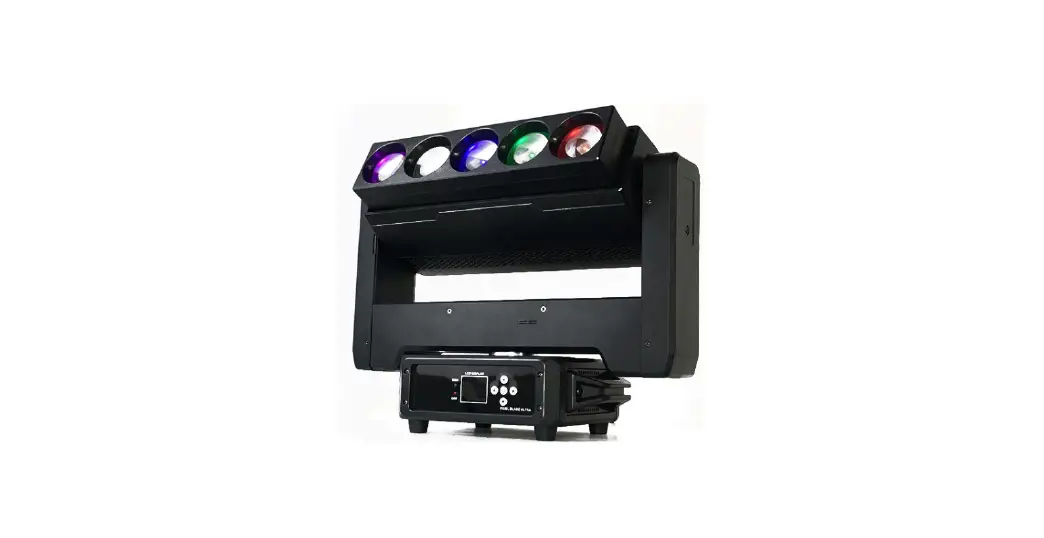

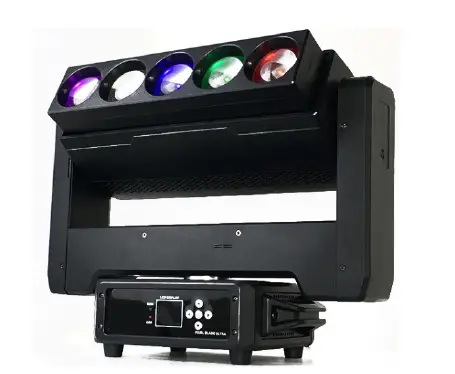
FOS Pixel Blade Ultra
This manual contains important information. Please read before operating the fixture.
SECURITY TIPS
WARNING
To reduce the risk of fire, electric shock, or injury to persons, follow these important safety instructions:
- non-professionals, not to disassemble the light arbitrarily and lighting accessories inside.
- rated voltage range: AC110V-120V/60Hz or AC200V-240V / 50HZ (to be selected).
- not beam irradiate the flammable materials, flammable materials and the lamp should be maintained at least 1M over the distance.
- lamps used in ambient temperature: -15 ℃ -40 ℃, the highest temperature of the surface of the lamp: 60 ℃.
- to keep away from the liquid substance and humid environment.
- before using the lights must ensure the good grounding, cannot install charging and remove any parts.
- the installation of lamps, must be fixed screw fasteners with additional security cable and regular inspection.
- lamps consecutive working hours is not recommended more than 10 hours.
- should stop using the lights in time when happens unusual conditions during the process
- lamp parts of the rotation, external accessories and paste parts should be regular inspected, such as the emergence of loose and rock, should be reinforced in a timely manner to prevent the accident.
- lamps adopt strong winds to refrigerate, it is easy to accumulate the dust, so you must clean it weekly especially the cooling air opening, otherwise the dust will plug leading to poor light
TECHNOLOGY REFERENCE
- Input voltage range: 100-240 V, 50/60 Hz
- Power consumption: 500W
- LED Source: Front: 5x 60W RGBW 4in1 LED;
- Back :42x 3W White LED + 84x 0.3W RGB 3in1 LED LED Control Feature:
- Front side: 5pcs RGBW LED each Pixel control;
- Back side: 14 sections pixel control, each section 9pcs led. Zoom: 3.8°- 50°
- Channel: 24CH/29CH/105CH
- LED life: 50.000 hours
- Beam, Wash, Strobe Multiple Effect, Pan Tilt infinite rotating Electronic strobe effect with variable speed up to 20 Hz High resolution electronic dimming: 0 – 100%
- Pan/Tilt movement: 360 degree infinite rotating
- Power connector: Powercon in/out
- DMX connector: 3-pin XLR in/out
- Net weight: 13kg
BOARD INSTRUCTION
| ADDRESS | 001-512 |
| RUN | DMX512 |
| Auto | |
| DMX MODE | 24CH |
| 29CH | |
| 105CH |
| TEST | ALL | |
|
SET | Display | Yes |
| No | ||
| Signal Keep | Yes | |
| No | ||
| Slave | Yes | |
| No | ||
| English | Yes | |
| 否 | ||
| INFO | Version | V1.11 |
|
MANUAL | Pan | 000-255 |
| Tilt | 000-255 | |
| …… | …… | |
| …… | …… | |
| Strobe | 000-255 | |
| RESET | Yes | |
| No | ||
DMX CHANNEL SHEET
| 24CH | |||
| CH | Function | DMX value | Describe |
| 1 | Pan | 0-255 | Pan movement |
| 2 | Pan fine | 0-255 | Pan fine |
| 3 | Tilt | 0-255 | Tilt movement |
| 4 | Tilt fine | 0-255 | Tilt fine |
| 5 | Zoom | 0-255 | Zoom |
| 6 | Pan infinite rotation | 0-255 | Pan infinite rotation |
| 7 | Tilt infinite rotation | 0-255 | Tilt infinite rotation |
| 8 | Total dimmer | 0-255 | Total dimmer from dark to bright |
| 24CH | |||
| CH | Function | DMX value | Describe |
| 9 | Strobe | 0-19 | No function |
| 20-255 | Strobe from slow to fast | ||
| 10 | Red | 0-255 | Red color 0-100% |
| 11 | Green | 0-255 | Green color 0-100% |
| 12 | Blue | 0-255 | Blue color 0-100% |
| 13 | White | 0-255 | White color 0-100% |
| 14 | Background Color | 0-10 | No Function |
| 11-255 | Background color select | ||
| 15 | Background color dimmer | 0-255 | Background color dimmer from dark to bright |
|
16 |
Show | 0-10 | No Function |
| 11-20 | Show 1 | ||
| …… | …… | ||
| 241-250 | Show 24 | ||
| 251-255 | Show 1-24 | ||
| 17 | Show Speed | 0-255 | Show speed from fast to slow |
| 18 | Back side strobe | 0-19 | No function |
| 20-255 | Back side strobe from slow to fast | ||
|
19 |
Back side Color select | 0-10 | No Function |
| 11-25 | Red | ||
| 26-40 | Green | ||
| 41-55 | Blue | ||
| 56-70 | White | ||
| 71-85 | Red+Green | ||
| 86-100 | Red+Blue | ||
| 101-115 | Green+Blue | ||
| 116-130 | Red+White | ||
| 131-145 | Green+White | ||
| 146-160 | Blue+White | ||
| 24CH | |||
| CH | Function | DMX value | Describe |
| 161-175 | Red+Green+White | ||
| 176-190 | Red+Blue+White | ||
| 191-205 | Green+Blue+White | ||
| 206-255 | Red+Green+Blue+White | ||
| 20 | Back side Background color select | 0-10 | No function |
| 11-255 | Background color select | ||
| 21 | Back side Background color Dimmer | 0-255 | Back side Background color Dimmer from dark to bright |
|
22 |
Back side Show | 0-10 | No function |
| 11-20 | Show 1 | ||
| …… | …… | ||
| 241-250 | Show 24 | ||
| 251-255 | Show 1-24 | ||
| 23 | Back side show speed | 0-255 | Back side show speed from fast to slow |
| 24 | Reset | 0-244 | No function |
| 245-255 | Reset | ||
| 29CH | |||
| CH | Function | DMX value | Describe |
| 1 | Pan | 0-255 | Pan movement |
| 2 | Pan fine | 0-255 | Pan fine |
| 3 | Tilt | 0-255 | Tilt movement |
| 4 | Tilt fine | 0-255 | Tilt fine |
| 5 | Pan Tilt Speed | 0-255 | Pan Tilt speed from fast to slow |
| 6 | Zoom | 0-255 | Zoom |
| 7 | Pan infinite rotation | 0-255 | Pan infinite rotation |
| 29CH | |||
| CH | Function | DMX value | Describe |
| 8 | Tilt infinite rotation | 0-255 | Tilt infinite rotation |
| 9 | Total dimmer | 0-255 | Total dimmer from dark to bright |
| 10 | Strobe | 0-19 | No function |
| 20-255 | Strobe from slow to fast | ||
| 11 | Red | 0-255 | Red color 0-100% |
| 12 | Green | 0-255 | Green color 0-100% |
| 13 | Blue | 0-255 | Blue color 0-100% |
| 14 | White | 0-255 | White color 0-100% |
| 15 | Background Color | 0-10 | No Function |
| 11-255 | Background color select | ||
| 16 | Background color dimmer | 0-255 | Background color dimmer from dark to bright |
|
17 |
Show | 0-10 | No Function |
| 11-20 | Show 1 | ||
| …… | …… | ||
| 241-250 | Show 24 | ||
| 251-255 | Show 1-24 | ||
| 18 | Show Speed | 0-255 | Show speed from fast to slow |
| 19 | Back side Total dimmer | 0-255 | Back side Total dimmer from dark to bright |
| 20 | Back side strobe | 0-19 | No function |
| 20-255 | Back side strobe from slow to fast | ||
| 21 | Back side Red | 0-255 | Back side Red color 0-100% |
| 22 | Back side Green | 0-255 | Back side Green color 0-100% |
| 23 | Back side Blue | 0-255 | Back side Blue color 0-100% |
| 24 | Back side White | 0-255 | Back side White color 0-100% |
| 25 | Back side Background color select | 0-10 | No function |
| 11-255 | Background color select | ||
| 29CH | |||
| CH | Function | DMX value | Describe |
| 26 | Back side Background color Dimmer | 0-255 | Back side Background color Dimmer from dark to bright |
|
27 |
Back side Show | 0-10 | No function |
| 11-20 | Show 1 | ||
| …… | …… | ||
| 241-250 | Show 24 | ||
| 251-255 | Show 1-24 | ||
| 28 | Back side show speed | 0-255 | Back side show speed from fast to slow |
| 29 | Reset | 0-244 | No function |
| 245-255 | Reset | ||
| 105CH | |||
| CH | Function | DMX value | Describe |
| 1 | Pan | 0-255 | Pan movement |
| 2 | Pan fine | 0-255 | Pan fine |
| 3 | Tilt | 0-255 | Tilt movement |
| 4 | Tilt fine | 0-255 | Tilt fine |
| 5 | Pan Tilt Speed | 0-255 | Pan Tilt speed from fast to slow |
| 6 | Zoom | 0-255 | Zoom |
| 7 | Pan infinite rotation | 0-255 | Pan infinite rotation |
| 8 | Tilt infinite rotation | 0-255 | Tilt infinite rotation |
| 9 | Total dimmer | 0-255 | Total dimmer from dark to bright |
| 10 | Strobe | 0-19 | No function |
| 20-255 | Strobe from slow to fast | ||
| 11 | Red | 0-255 | Red color 0-100% |
| 12 | Green | 0-255 | Green color 0-100% |
| 105CH | |||
| CH | Function | DMX value | Describe |
| 13 | Blue | 0-255 | Blue color 0-100% |
| 14 | White | 0-255 | White color 0-100% |
| 15 | Background Color | 0-10 | No Function |
| 11-255 | Background color select | ||
| 16 | Background color dimmer | 0-255 | Background color dimmer from dark to bright |
|
17 |
Show | 0-10 | No Function |
| 11-20 | Show 1 | ||
| …… | …… | ||
| 241-250 | Show 24 | ||
| 251-255 | Show 1-24 | ||
| 18 | Show Speed | 0-255 | Show speed from fast to slow |
| 19 | Back side Total dimmer | 0-255 | Back side Total dimmer from dark to bright |
| 20 | Back side strobe | 0-19 | No function |
| 20-255 | Back side strobe from slow to fast | ||
| 21 | Back side Red | 0-255 | Back side Red color 0-100% |
| 22 | Back side Green | 0-255 | Back side Green color 0-100% |
| 23 | Back side Blue | 0-255 | Back side Blue color 0-100% |
| 24 | Back side White | 0-255 | Back side White color 0-100% |
| 25 | Back side Background color select | 0-10 | No function |
| 11-255 | Background color select | ||
| 26 | Back side Background color Dimmer | 0-255 | Back side Background color Dimmer from dark to bright |
| 27 | Back side Show | 0-10 | No function |
| 11-20 | Show 1 | ||
| …… | …… | ||
| 105CH | |||
| CH | Function | DMX value | Describe |
| 241-250 | Show 24 | ||
| 251-255 | Show 1-24 | ||
| 28 | Back side show speed | 0-255 | Back side show speed from fast to slow |
| 29 | Reset | 0-244 | No function |
| 245-255 | Reset | ||
| 30 | Red 1 | 0-255 | Red 1 color 0-100% |
| 31 | Green1 | 0-255 | Green 1 color 0-100% |
| …… | …… | …… | …… |
| 48 | Blue 5 | 0-255 | Blue 5 color 0-100% |
| 49 | White 5 | 0-255 | White 5 color 0-100% |
| 50 | Back side Section 1 Red | 0-255 | Back side Section 1 Red color 0-100% |
| 51 | Back side Section 1 Green | 0-255 | Back side Section 1 Green color 0-100% |
| …… | …… | …… | …… |
| 104 | Back side Section 14 Blue | 0-255 | Back side Section 14 Blue color 0-100% |
| 105 | Back side Section 14 White | 0-255 | Back side Section 14 White color 0-100% |
FIXED EQUIPMENT
Please fasten the fixture clamp before hanging. The clamp can be fastened by the little hole in the middle of the bracket, then tie with a safety belt. The loading capacity of the safety belt should be 10 times than the weight of the fixture itself.
CONNECTION OF DMX-512 AND CONNECTION WITH THE LIGHT EQUIPMENT
Please connect the XLR-XLR control wire with every light from the output of DMX.
XLR connection: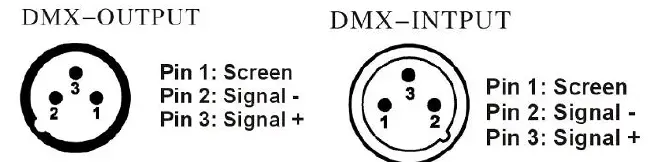
ATTENTION:
Please do remember to connect one circle circuit plug on the output signal of last equipment. And this circle circuit plug was connected a 120ohm resistance between terminals 2 and 3 of the CANON plug, connect this circle circuit plug can avoid the signal flash phenomena of signal DMX512 during the transmission.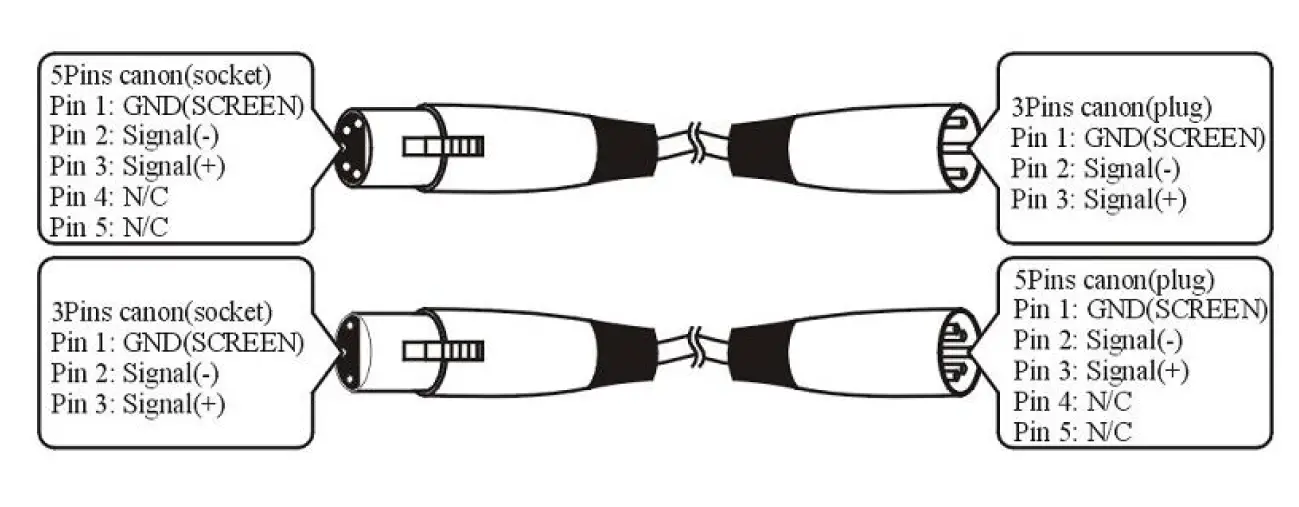
Maintenance
| Problems | Check list | Trouble Shooting |
| The fixture does not work | 1. If your power as same as the input of the machine. 2. If the fuse was broken. | 1. Make sure the voltage. 2. Replace the same fuse. |
| LED dimmed | If your power us same as the input of the machine | Make sure the voltage input. |
| No DMX input | 1. If the polarity is opposite in the DMX controller. 2. If it is in DMX mode. 3. If there are 2 Master in a loop. | 1. Correct the DMX polarity. 2. Change to the DMX mode. 3. Set one piece into Slave mode. |
| Par Light Set works abnormality | 1. Check if the serial is correct on the Par Light display | 1. Set the right serial No on the single Par Light |
AFTER SERVICE
- Our company offer technical consultation to customers for ever.
- If the machine is wrong and need repairmen, please truthfully fill in the related content and feedback us the problems timely, as well as we must improve the product.
- In addition to the lamp, also matching accessories are as follows:accessories: Power line 1-piece Optional parts: (customers)
Description:
These must be truthfully filled, seal by the end-user and point-of-sale, or else the warranty will not work (warranty period and terms, see the following)
warranty period:
one year since purchase warranty terms:1、If fail when using the product in normal state, you can made under the provisions of the warranty, show the warranty card and purchase bills(copy), and enjoy free maintenance service in a specific service center or the manufacturer. The following will be the implementation of paid service:
- Without the effective warranty card
- There’s blank, alter and no point-of-sale name
- Fail caused by unresistance
- Fail caused by transportation or unloading
- Fail caused by not operate by manual
- ail caused by disassembling without unauthorized
- Fail caused by using the unauthorized control system
Note:
Based on our company continue to improve the product, the statement containing data may have changed, and will not notice the change anymore. Company retains its right to change specifications related when the product is improved. Thanks for your understanding.