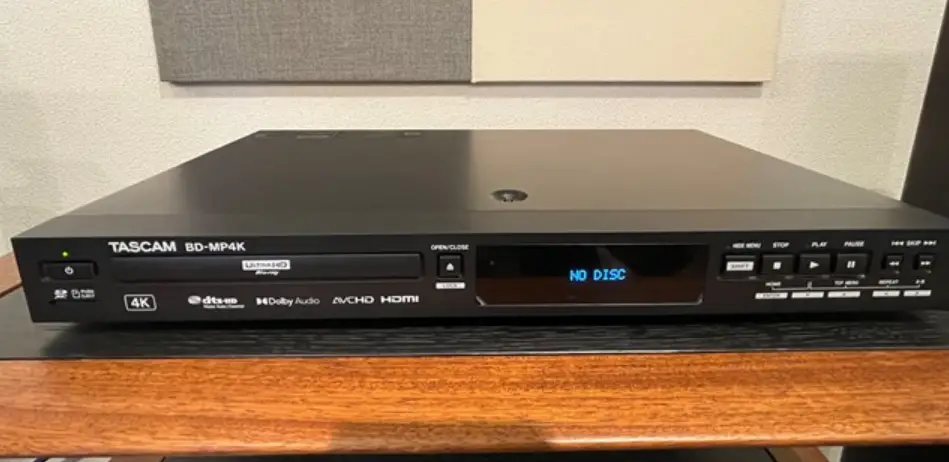

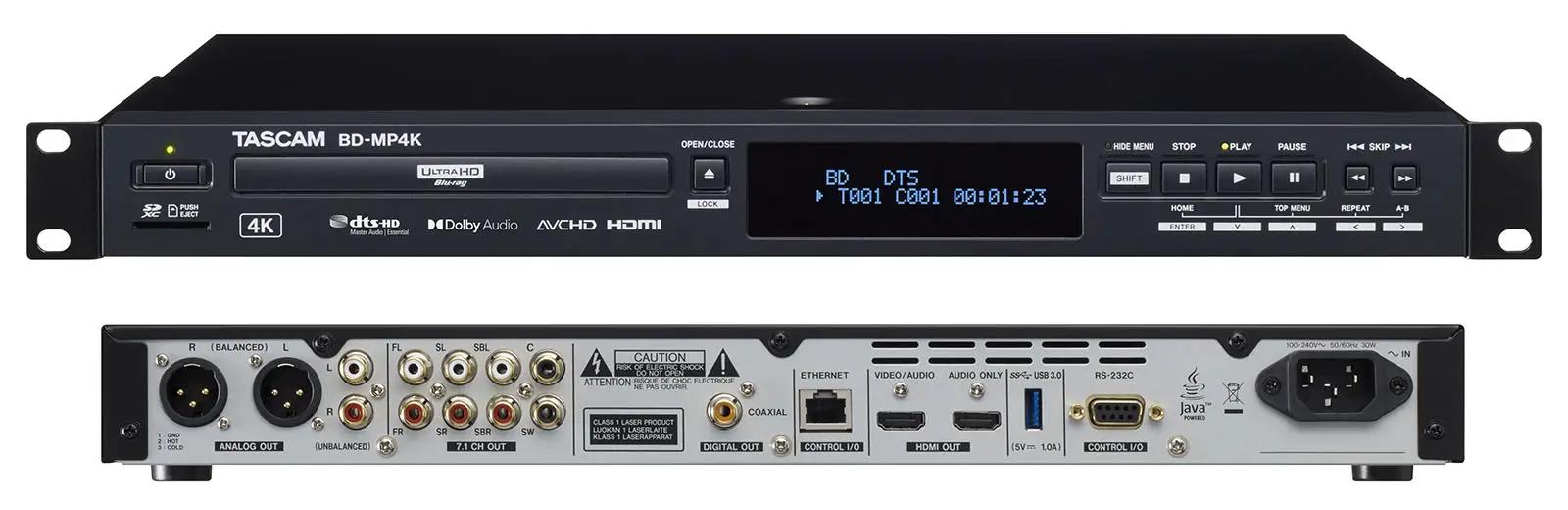
TASCAM BD-MP4K Control I-O Terminals
CAUTION
TEAC Corporation (hereafter, “TEAC”) permits the use of the protocol described in this specification document with the prerequisite that the customer consents to the following protocol use agreement conditions.
If you do not consent to the following conditions in the protocol use agreement, you may not use this protocol and should return this document to TEAC. Moreover, be aware that violations of any of the following items in the protocol use agreement is an infringement on the rights of TEAC and could result in the termination of further use and be subject to restitution claims, for example.
Protocol use agreement
- This agreement comes into effect from the time the customer starts use of this protocol.
- TEAC grants a nonexclusive and nontransferable “usage” right to the customer in order to develop devices (including software) that are compatible with the covered TASCAM products.
- The acquisition of this document by the customer does not mean that the customer has acquired any rights, titles or interests in this protocol other than what is specified in this use agreement. The customer should recognize that as a written work belonging to TEAC, this document is protected based on the copyright laws of the signatory nations of the Universal Copyright Convention and the Berne Convention for the Protection of Literary and Artistic Works. Without exception, the intellectual property in this protocol belongs to TEAC or a source that provides it to TEAC.
- The customer may not make copies of this specifications document.
- The customer may not transfer this specifications document to a third party without obtaining prior permission from TEAC.
- Since confidential information that belongs to TEAC is contained in this specifications document, the customer may not disclose it to a third party without obtaining prior permission from TEAC.
- This specifications document and this protocol are provided as is. TEAC does not provide any guarantee whatsoever that the contents of this specifications document and the protocol are suitable for the specific purpose of the customer or that they are free of error.
- TEAC cannot respond to customer inquiries about the contents of this specifications document.
- TEAC will bear no responsibility for any damages (including business losses, business interruption, loss of business data or other financial damages) arising from the use or inability to use this specifications document or this protocol. This applies even if TEAC is informed about the potential for such damage in advance.
Overview
The BD-MP4K (“controlled device”) can be controlled from an external device (“external controller”), such as a computer, through a serial RS-232C and ETHERNET connection.
Specifications
- Serial RS-232C
- Electrical specifications
Standard: JIS X-5101 (equivalent to the former JIS-C-6361 and EIA RS-232C standards)
Note that this is not compatible with the RS-422 used in professional VTRs.
Impedance at receiver: When measured with an applied voltage between -3 V and +3 V or between -15 V and +15 V, the DC resistance is between 3k ohms and 7k ohms.
Total load capacitance is 2500 pF or less. Open circuit voltage at transmitter: 25V or less
Open circuit voltage at receiver: 2V or less When the open circuit voltage at the receiver is 0 V, the signal voltage is between
Signal voltage: -5 V and +5 V or between -15 V and +15V against a load impedance between 3k ohms and 7k ohms.
Signal discrimination: Logic “1”: -3V or less Logic “0”: +3V or more - Communication format
Circuit type Asynchronous / Full-duplex Transmission type Digital binary serial
Data signal rate (baud rate)
115200, 57600 or 38400 bits/sec
During standby, 57600 bits/sec is only available.
Data bits 8 bits
Parity bits None
Stop bits 1 bit
Maximum data length 600 byte (Start character to End character is included.)
*Data bits, Parity bits, and Stop bits are fixed. - Connector pin-out
Connecter D-sub 9pin female (Inch screw thread) Terminal pin-out and input/output signals
Pin No. In/Out Signal name Description 1 – GND Ground pin 2 Out TxD Data transmitted from this pin 3 In RxD Data received at this pin 4 – NC Not connected 5 – S.GND Signal ground pin 6 – NC Not connected 7 – +5V Power Can use 5V/500mA power supply 8 – NC Not connected 9 – NC Not connected Note: Pin 7 is the output terminal of the 5V power supply, so be careful when wiring the cable.

- Electrical specifications
- IP Control (Ethernet)
Transmission type Full duplex
Transfer speed 10 / 100 / 1000 Mbps
TCP port No. 9030
Maximum data length 600 Bytes ( Start character to End character is included. - Protocol Overview
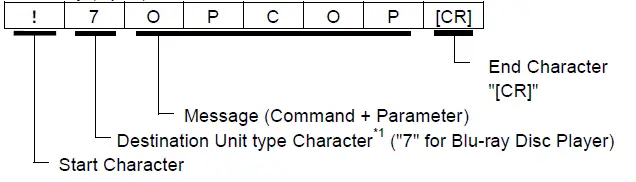
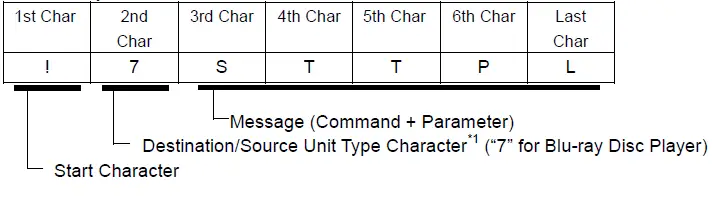
The Serial Control Protocol consists of three command characters and parameter characters of variable length.
C ha racters are the ASCII Code.
- RS 232C Protocol
Controller –> Device Message Example
Disc Tray (Open) Special Character
[CR] Carriage Return ASCII Code 0x0D
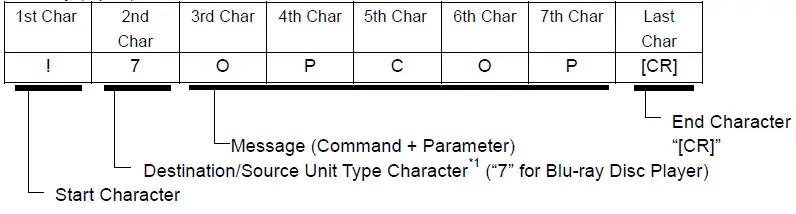
Device–> Controller Message Example
Status = Play - ETHERNET Protocol
Protocol is TCP. (Transmission Control Protocol)
Destination Port Number is 9030. fixed)
Controller –> Device Message Example
Disc Tray (Open)
Special Character
[CR] Carriage Return ASCII Code 0x0D
Device –> Controller Message Example
Status = Play
1 Unit Type is the model category ID. The Blu ray player is “7”.
Note: The connection between server and client should be held open continuously. If the connection is closed, the client will not be able to see Status notification messages from the server. Only one client connection at a time can be made.
- RS 232C Protocol
- Communication Protocol
- Message Structure
There are three kinds of message, “COMMAND”, “REQUEST”, and “ANSWER /NOTIFICATION”. - ACK (Acknowledge) and NACK (Not
- ACK
It is an affirmative reply sent to a controller from a device. When data transfer completes properly, a device notify of that to a controller. - NACK
It is a negative reply sent to a controller from a device. When data transfer does not complete properly, a device notify of that to a controller.Name Value(HEX) Transmission Requirement ACK ‘ack’ (0x61/0x63/0x6B) The device acknowledged that the command was received normally from the controller. NACK ‘nack’ (0x6E/0x61/0x63/0x6B) - The device received the End Character ‘CR(0x0D)’ before receiving the Start Character ‘!(0x21)’.
- The device does not receive ID’7(0x37)’just after Start Character’!(0x21)’.
- The device receives an unknown character just after ’!7’.
- The device receives an unknown command just after ’!7’.
- Parameter is out of range.
- The size of data is abnormal.
- 5msec passed before the device receives the next code necessary to complete the command.
- ACK
- Communication Rules
- Initiative of Communication
In the communication between a controller and a device, the controller must have the initiative. However, the Status Information notification automatically from the device is an exception.
When the device receives a command from the host, the device returns the following.- When receiving the command which doesn’t require a status information ACK (‘ack’)
- When receiving the command which require a status information
ACK (‘ack’)+(‘+’) Status information (ANSWER) - For the communication failure or an unknown commands etc. NACK (‘nack’)
- Communication Sequence
The host must not send any new command after the previous command before the host receives ACK or NACK, or the timeout (see ”4.3.3. Timeout”) has expired. - Timeout
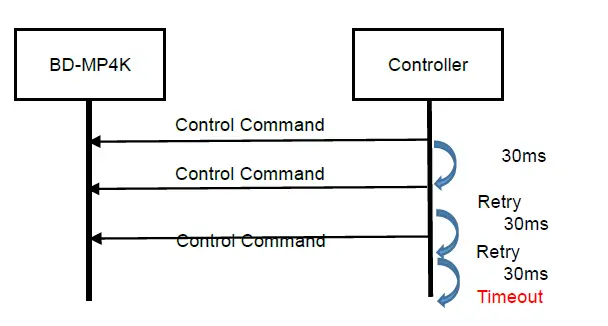
After a controller sends a message to a device, the host waits for a reply from the device for 30 ms (IP Control) / 300 ms (RS-232C). When the controller does not receive a reply over 30 ms (IP Control) / 300ms (RS-232C) from the device, the controller sends the same message to the device. However, when the controller does not receive a reply from the device after sending the same message 3 times (that means Tim Out), the controller sends End character ‘CR’ (0x0D) to the device. After that, the controller should execute the recovery process such as retry.
- ACK
Refer to “4.2.1. ACK”. - NACK
The device returns a NACK immediately after detecting a failure in the communication with the controller (see ”4.2.2. NACK”). If the host receives a NACK, it must stop sending the current remaining command immediately and execute the recovery process such as retry. - Command Interval time
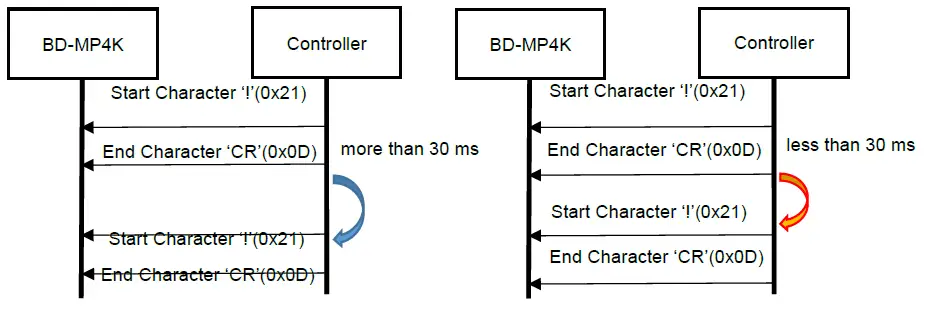
- Interval time between Characters from a controller must be less than 5ms. The device sends NACK when 5msec passed before the device receives the next character code.
- Interval time between Commands is more than 30 ms.
In case of less than 30 ms as interval time between commands,- Executing the subsequent command is not guaranteed.
- When there are buffer spaces of a device for a command, the device will execute the command.
- When there is no buffer space of a device for a command, the device does not execute the command, and will send Busy (@0BDERBUSY) to the host instead.

- Initiative of Communication
- Basic Control Flow
- Device Control Flow
The device sends the controller an ACK (Acknowledgement) and executes that command when the device receives a Control command from the controller. The list of the Control command is shown in “ 5. Command Table If the device receives an unknown command or an End Character ‘CR’ (0x0D) without a Start Character ‘!’, it causes transmission failure and the device returns a NACK. Refer to ” 4.2.2. NACK ” about NACK transmission condition.
 - Status Request Flow
The device returns an ACK and the ANSWER requested by the controller when the device receives the Status Request from the controller. The list of the Status Request and the corresponding answer is shown in 5.3. Current Status Request When a device receives Status Request from a controller, the device sends an ACK to the controller. After that, the device gets the current status, and then sends it to the controller. If the device receives an unknown command or an End Character ‘CR ’ (0x0D) without a Start Character ‘!’, it causes transmission failure and the device returns a NACK. Refer to 4.2.2. NACK ” about NACK transmission condition.
 - Status Notification Flow
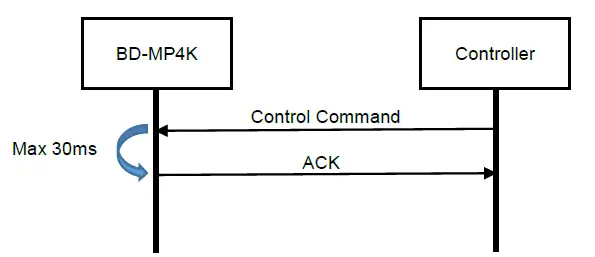
A device notifies of Status Information listed in “ 5.3. Current Status Request ” whenever the status of the device is changed, such as the transport status, the current track, the storage media status, and other status. A device sends Status Notification to a controller. The controller replies ACK to the device. The device waits for the ACK for Max 30ms. When the device does not receive the ACK from the host, the device sends the same Status Notification to the host again. After that, the device does not send the same Status Notification even if it does not receive an ACK from the host.
The Status Information is same as the answer for the Status Request listed in “5.3. Current Status Request”.
- Device Control Flow
- Message Structure
- Command Table
NOTE Italic characters of command mean parameter. (Ex: Hide MENU “!7OSDXX” -> Parameter: XX) “Track” means “Chapter” (during the DVD or BD playback) and “File” (USB and other playback). “Group” means “Title” (DVD or BD playback) and “Track” (Audio CD playback- Key Control
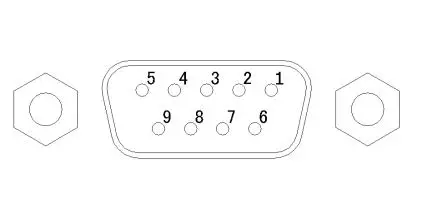 Terminal pin-out and input/output signals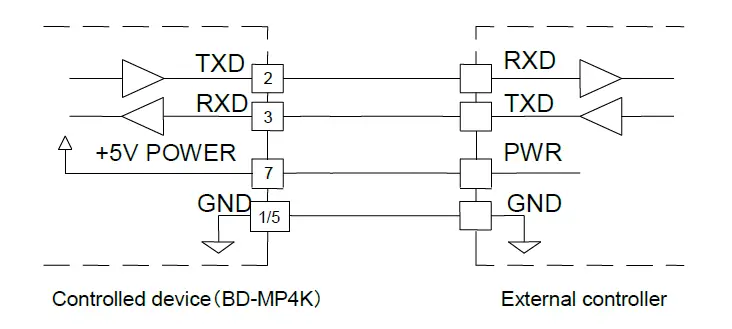

 If the device receives an unknown command or an End Character ‘CR’ (0x0D) without a Start Character ‘!’, it causes transmission failure and the device returns a NACK. Refer to ” 4.2.2. NACK ” about NACK transmission condition.
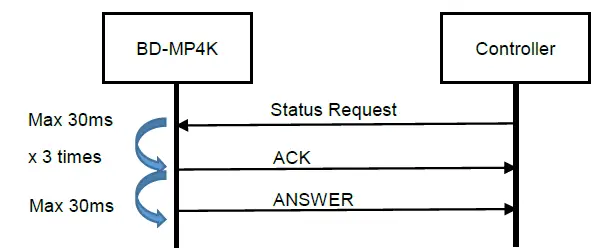 When a device receives Status Request from a controller, the device sends an ACK to the controller. After that, the device gets the current status, and then sends it to the controller. If the device receives an unknown command or an End Character ‘CR ’ (0x0D) without a Start Character ‘!’, it causes transmission failure and the device returns a NACK. Refer to 4.2.2. NACK ” about NACK transmission condition.
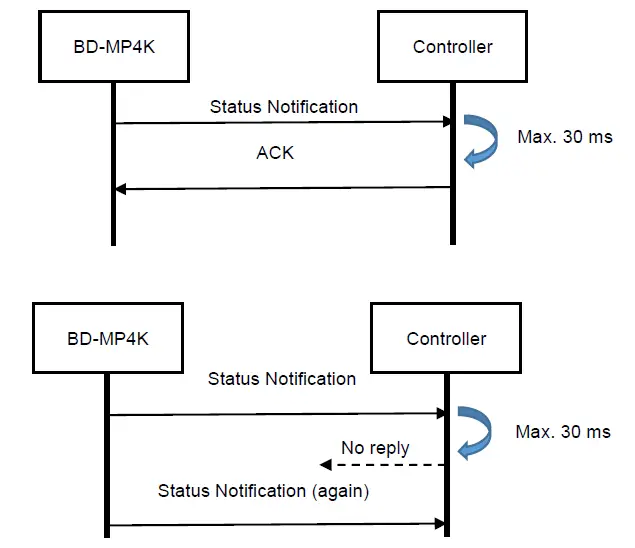 A device sends Status Notification to a controller. The controller replies ACK to the device. The device waits for the ACK for Max 30ms. When the device does not receive the ACK from the host, the device sends the same Status Notification to the host again. After that, the device does not send the same Status Notification even if it does not receive an ACK from the host.
| # | Function | Command/Response | Status Request | Description |
| 1 | Power On | !7PWR01 | – | Power On *For Ethernet, the command is invalid. Please use WoL function. This command should be sent in the transfer speed of 57600 bits/sec. |
| 2 | Power Off | !7PWR00 | – | Power Off (Standby) |
| 3 | Stop | !7STP | – | Stop |
| 4 | Play | !7PLY | – | Play |
| 5 | Play Pause | !7PAS | – | Playback is Paused |
| 6 | Track (Chapter/File) Skip | !7SKPnnnn | – | DVD/BD: Search for a chapter by specifying the number. File: Search for a file in the current folder by specifying the number. nnnn: Chapter or file number (‘0001’-‘2000’) |
| 7 | Track (Chapter/File) Skip Next | !7SKPNX | – | DVD/BD: Skip to the next chapter, File: Skip to the next file. |
| 8 | Track (Chapter/File) Skip Prev. | !7SKPPV | – | DVD/BD: Skip to the previous chapter, File: Skip to the next file. |
| 9 | Group (Title/CD-track) Skip | !7GSKnnnn | – | DVD/BD: Search for a file by specifying the track number. CD: Search for a track by specifying the track number.nnnn: Title or track number (‘0001’-‘2000’) |
| 10 | Group (Title/CD-track) Skip Next | !7GSKNX | – | DVD/BD: Skip to the next title, CD: Skip to the next track |
| 11 | Group (Title/CD-track) Skip Prev. | !7GSKPV | – | DVD/BD: Skip to the previous title, CD: Skip to the previous track. |
| 12 | Time Display Mode | !7TMDXX | !7?TMD | XX: Time Display Mode ‘TL’: Title/Disc/File Elapsed, ‘TR’: Title/Disc/File Remain, ‘EL’: Chapter/Track/File Elapsed, ‘RM’: Chapter/Track/File Remain |
| 13 | Hide MENU | 7OSDXX |
!7?OSD | Hides the menu on the home screen and transport icons (7, 9, and so on) displayed on the screen. XX: On/Off ‘00’: Hide Menu – On (Hidden) ‘01’: Hide Menu – Off (Displayed) |
| 14 | Setup Menu | !7SMN | – | Opens the Setup Menu. |
| 15 | Top Menu (Disc Menu) | !7TMN | – | (During playback of a video disc) Shows the top menu screen |
| 16 | Option Menu | !7OMN | – | When playing back or paused, opens the Option Menu screen. |
| 17 | Pop Up Menu | !7PMN | – | Shows Pop Up Menu in the disc. |
| 18 | Return | !7RET | – | Return to the previous setup menu screen in the BD/DVD disc. |
| 19 | Audio Dialog | 7ADGX |
– | Change dialog to the next one in the BD/DVD disc. X: Audio stream code ‘+’: Primary ‘-’: Secondary |
| 20 | Subtitle | !7SBT1 | – | Change to the next subtitle language in the BD/DVD disc. |
| 21 | Enter | !7ENT | – | Decides selected item in the setup menu screen, etc. in the BD/DVD disc. |
| 22 | Disc Tray (Open/Close) | !7OPCXX | – | Controls Disc Tray. XX: Disc Tray Open/Close ‘OP’: Open ‘CL’: Close |
| 23 | Video Resolution (Specified resolution) | 7RSCX | !7?RSC | Changes the resolution of HDMI X: Resolution ‘1‘: Auto, ‘2’: 480/576i, ‘3’: 480/576P, ‘4’: 720P ‘5’: 1080i, ‘6’: 1080P, ‘7’: 2160P |
| 24 | Display/Info | !7DSP | – | Shows information on screen display. (IR remote ON SCREEN button) |
| 25 | Function/Color | !7CBCX | – | Carries out a function peculiar to a disc. X: Color ‘1‘:Red, ‘2’:Green, ‘3’:Blue, ‘4’:Yellow |
| 26 | Home | !7HOM | – | Shows HOME menu screen of the unit. |
| 27 | Ten Key | 7NUMX | – | Inputs 0-9 X: Number ‘1‘: 1, ‘2‘: 2, ‘3‘: 3, ‘4‘: 4, ‘5‘: 5, ‘6‘: 6, ‘7‘: 7, ‘8‘: 8, ‘9‘: 9, ‘0‘: 0 |
| 28 | Slow/Search | 7SCNds | 7?SCN | d: Direction ‘F’ : Forward, ‘R’ :Reverse s: Search Speed ‘f’ : fast (cyclic 1,2,3,4,5,normal) ‘s’ : slow (cyclic 1/16x,1/8x,1/4x,1/2x,1x) Note: ‘Rs’ (Reverse & slow) is not supported. |
| 29 | MUTE | 7MUTXX | !7?MUT | XX: On/Off ‘00’: Mute on ‘01’: Mute off |
| 30 | Cursor | 7OSDX | – | X: Direction of cursor movement ‘1‘:Left, ‘2’:Right, ‘3’:Up, ‘4’:Down |
| 31 | Clear | 7CLR | – | This clears the value in the field being input. In the bookmark list, this deletes the selected bookmark. |
Menu Setting
| # | Function | Command | Status Request | Response | Description |
| 1 | Disc Auto Playback | !7APL00 | !7?APL | !7APL00 | On(repeat off) |
| !7APL01 | !7APL01 | Off | |||
| !7APL02 | !7APL02 | On(repeat on) | |||
| 2 | PIP Mark | !7PMK00 | !7?PMK | !7PMK00 | On |
| !7PMK01 | !7PMK01 | Off | |||
| 3 | HDMI 3D | !73DOAT | !7?3DO | !73DOAT | Auto |
| !73DO01 | !73DO01 | Off | |||
|
4 | TV Screen (TV Aspect Ratio) | !7ASC9W |
!7?ASC | !7ASC9W | 16:9 Wide (16:9 Full) |
| !7ASC9A | !7ASC9A | 16:9 Wide/Auto (16:9 Normal) | |||
| !7ASC3P | !7ASC3P | 4:3 pan & scan | |||
| !7ASC3L | !7ASC3L | 4:3 letterbox | |||
| 5 | TV System | !7TVSNT | !7?TVS | !7TVSNT | NTSC |
| !7TVSPL | !7TVSPL | PAL | |||
| !7TVSMS | !7TVSMS | Multi-system | |||
| 6 | HDMI 1080p 24Hz | !7R1K00 | !7?R1K | !7R1K00 | On |
| !7R1K01 | !7R1K01 | Off | |||
|
7 |
HDMI Color Space | !7CLSRV |
!7?CLS | !7CLSRV | RGB Video Level (RGB) |
| !7CLSRP | !7CLSRP | RGB PC Level (Full RGB) | |||
| !7CLSY4 | !7CLSY4 | YCbCr 4:4:4 (YCbCr) | |||
| !7CLSY2 | !7CLSY2 | YCbCr 4:2:2 (YCbCr422) | |||
|
8 |
HDMI Deep Color | !7DPC48 |
!7?DPC | !7DPC48 | 48 Bits |
| !7DPC36 | !7DPC36 | 36 Bits | |||
| !7DPC30 | !7DPC30 | 30 Bits | |||
| !7DPCOF | !7DPCOF | Off | |||
| 9 | Secondary Audio Mark | !7SCA00 | !7?SCA | !7SCA00 | On |
| !7SCA01 | !7SCA01 | Off | |||
| 10 | Audio Output – Fs Setting | !7COO48 | !7?COO | !7COO48 | 48k LPCM |
| !7COO96 | !7COO96 | 96k LPCM | |||
| !7COO19 | !7COO19 | 192k LPCM | |||
| 11 | Speaker Settings – Configuration Down Mix Mode | 7SPCXX | !7?SPC | 7SPCXX | XX: Speaker /Woofer Number (Woofer Number is fixed to 1.) ‘21’: 2.1Ch, ‘31’: 3.1Ch ‘41’: 4.1Ch, ‘51’: 5.1Ch ‘61’: 6.1Ch, ‘71’: 7.1Ch |
| 12 | Speaker Settings – Configuration Speaker Setting | 7SPSdsvvvdddd | d:Type ‘C’: center ‘L’: L, ‘R’: R ‘l’: Ls (Lss), ‘r’: Rs (Rss) ‘B’: Lsr, ‘b’: Rsr ‘S’: SW1 s:Size ‘0’:Large, ‘1’:Small vvvv: Level (Trim) [unit: dB] ‘-100’ – ‘+000’ – ‘+100’ (Both +000 and -000 are acceptable) ex) ‘-010’: -1dB, ‘+100’: +10dB If the 4th character is between 0 and 4, it becomes 0. If it is between 5 and 9, it becomes 5. dddd: Delay [unit: cm] ‘0000’ – ‘1000’, step 5 ex) ‘0005’: 5 cm If the 4th character is between 0 and 4, it becomes 0. If it is between 5 and 9, it becomes 5. If the value is greater than 1000, it becomes 1000. | ||
| 13 | Firmware Upgrade | !7FWUUS | – | !7FWUUS | Via USB Storage |
| !7FWUDS | !7FWUDS | Via Disc | |||
| 14 | HDMI CEC | !7CCRH1 | !7?CCR | !7CCRH1 | HDMI1 on |
| !7CCRH2 | !7CCRH2 | HDMI2 on | |||
| !7CCROF | !7CCROF | Off | |||
| 15 | Reset Factory Defaults | !7INI | – | !7INI | Load Default |
| 16 | BD-Live Connection | !7LNA00 | !7?LNA | !7LNA00 | On (Permitted) |
| !7LNALT | !7LNALT | Limited (Partially Permitted) | |||
| !7LNA01 | !7LNA01 | Off (Prohibited) | |||
| 17 | HDR Setting | !7HDRAT | !7?HDR | !7HDRAT | Auto |
| !7HDRHD | !7HDRHD | HDR | |||
| !7HDRSD | !7HDRSD | SDR | |||
| 18 | Dolby vision Mode | !7DBVAT |
!7?DBV | !7DBVAT | Auto |
| !7DBVLO | !7DBVLO | Low Latency | |||
| !7DBVLR | !7DBVLR | LL RGB | |||
| !7DBVOF | !7DBVOF | Off | |||
| 19 | Motion Video Process Video Mode | !7MVMbbbssshhhcccst | !7?MVM | 7MVMCU | Custom bbb: Brightness: ‘-10’ ~ ‘+10’ sss: Saturation: ‘-10’ ~ ‘+10’ hhh: Hue: ‘-10’ ~ ‘+10’ ccc: Contrast: ‘-10’ ~ ‘+10’ s: Sharpness: ‘0’ ~ ‘5’ t: CTI: ‘0’ ~ ‘3’ |
| !7MVMST | !7MVMST | Standard | |||
| !7MVMVI | !7MVMVI | Vivid | |||
| !7MVMCI | !7MVMCI | Cinema | |||
| 20 | Motion Video Process Color Adjust | !7MVCcbbbssshhh | !7?MVCc | !7MVCcbbbssshhh | x: color ‘R’: Red, ‘G’: Green, ‘B’: Blue, ‘Y’: Yellow, ‘C’: Cyan, ‘M’: Magenta bbb: Brightness: ‘-10’ ~ ‘+10’ sss: Saturation: ‘-10’ ~ ‘+10’ hhh: Hue: ‘-10’ ~ ‘+10’ |
| 21 | Motion Video Process Noise Reduction | !7MVNx | !7?MVN | !7MVNx | x: Noise reduction level ‘0’ ~ ‘3’ |
| 22 | Audio Post Process EQ | !7PEQOF |
!7?PEQ | !7PEQOF | Off |
| !7PEQRO | !7PEQRO | Rock | |||
| !7PEQPO | !7PEQPO | Pop | |||
| !7PEQLI | !7PEQLI | Live | |||
| !7PEQDA | !7PEQDA | Dance | |||
| !7PEQCL | !7PEQCL | Classical | |||
| !7PEQSO | !7PEQSO | Soft | |||
| 23 | Audio Post Process DOWNMIX | !7DMXOF |
!7?DNM | !7DMXOF | Off |
| !7DMXDH | !7DMXDH | DH | |||
| !7DMXDV | !7DMXDV | DVS | |||
| !7DMXMV | !7DMXMV | MVS |
Current Status Request
| # | Function | Command | Response | Description |
| 1 | Power Status | !7?PWR | ACK | See “Key Control” |
| No response | ||||
| 2 | Disc Status | !7?MST | !7MSTNC | There is not disc media |
| !7MSTCI | There is disc media. | |||
| !7MSTUF | Mounted media is unformatted. (unknown disc) | |||
| !7MSTTO | Disc tray is opening or open | |||
| !7MSTTC | Disc tray is closing or closed | |||
| !7MSTTE | Disc tray error | |||
| 3 | Status | !7?SST | !7SSTPL | Play |
| !7SSTPP | Pause | |||
| !7SSTDVSX | Slow play X: Direction ‘R’ : Reverse, ‘F’: Forward | |||
| !7SSTDVFX | Search play X: Direction ‘R’ : Reverse, ‘F’: Forward | |||
| !7SSTDVSU | Setup mode. | |||
| !7SSTDVMC | Media mode (Media Center) | |||
| !7SSTDVTR | Track Menu (Root Menu) playback in process. | |||
| !7SSTDVHM | Home menu mode. | |||
| 4 | Total Chapter Number | !7?STT | !7TTNXXXX | XXXX: Total Chapter number (BD/DVD) or file number in the folder (file) ‘0000’ to ‘9999’ ‘UNKN’: Unknown |
| 5 | Current Chapter Number | !7?STC | !7TNMXXXX | XXXX: Chapter number (BD/DVD) or file number in the folder (file) ‘0000’ to ‘9999’ ‘UNKN’: Unknown |
| 6 | Total Title Number | !7?STG | !7TGNXXXX | XXXX: Total title number (BD/DVD) or track number (CD) ‘0000’ to ‘9999’ ‘UNKN’: Unknown |
| 7 | Current Title Number | !7?SGN | !7GNMXXXX | XXXX: Title number (BD/DVD) or track number (CD) ‘0000’ to ‘9999’ ‘UNKN’: Unknown |
| 8 | Elapse Time | !7?SET | !7SEThhhmmss | hhhmmss: Time; hhh: hours (3 digits), mm; minutes (2 digits), ss: seconds (2 digits) |
| 9 | Remain Time | !7?SRT | !7SRThhhmmss | hhhmmss: Time; hhh: hours (3 digits), mm; minutes (2 digits), ss: seconds (2 digits) |
Note-1
The acceptable character set is ISO/IEC8859-1.
| x0 | x1 | x2 | x3 | x4 | x5 | x6 | x7 | x8 | x9 | xA | xB | xC | xD | xE | xF | |
| 0x | ||||||||||||||||
| 1x | ||||||||||||||||
| 2x | SP | ! | “ | # | $ | % | & | ( | ) | * | + | , | – | . | / | |
| 3x | 0 | 1 | 2 | 3 | 4 | 5 | 6 | 7 | 8 | 9 | : | ; | < | = | > | ? |
| 4x | @ | A | B | C | D | E | F | G | H | I | J | K | L | M | N | O |
| 5x | P | Q | R | S | T | U | V | W | X | Y | Z | [ | ¥ | ] | ^ | _ |
| 6x | ` | a | b | c | d | e | f | g | h | i | j | k | l | m | n | o |
| 7x | p | q | r | s | t | u | v | w | x | y | z | { | | | } | ~ | |
| 8x | ||||||||||||||||
| 9x | ||||||||||||||||
| Ax | NBSP | ¡ | ¢ | £ | ¤ | ¥ | ¦ | § | ¨ | © | ª | « | ¬ | ® | ¯ | |
| Bx | ° | ± | ² | ³ | ´ | µ | ¶ | · | ¸ | ¹ | º | » | ¼ | ½ | ¾ | ¿ |
| Cx | À | Á | Â | Ã | Ä | Å | Æ | Ç | È | É | Ê | Ë | Ì | Í | Î | Ï |
| Dx | Ð | Ñ | Ò | Ó | Ô | Õ | Ö | × | Ø | Ù | Ú | Û | Ü | Ý | Þ | ß |
| Ex | à | á | â | ã | Ä | å | æ | ç | è | É | ê | ë | ì | í | î | ï |
| Fx | ð | ñ | ò | ó | Ô | õ | ö | ÷ | ø | Ù | ú | û | ü | ý | þ | ÿ |
Revisions
Ver. 1.00 Initial issue
Ver. 1.01 3. Protocol Overview: “CR” is deleted in the case of “Device -> Controller Message Example”