RHT02-NIST Hygro-Thermometer Pen
Product Information
Description
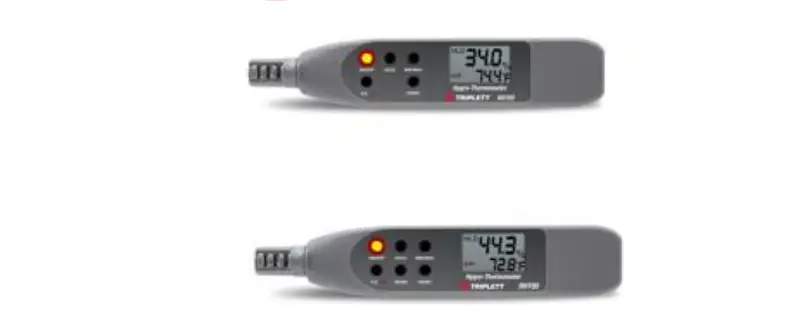
The RHT02 Hygro-Thermometer Pen and RHT05 Hygro-Thermometer Pen
with Wet Bulb and Dew Point Functions are advanced measuring
devices that can measure Relative Humidity (RH) from 10% to 90% and
Temperature from -4 to 140°F (-20 to 60°C). The RHT05 model also
includes Wet Bulb (Wb) and Dew Point (DP) calculated
measurements.
Features
The key features of the RHT02/RHT05 Hygro-Thermometer Pens
include:
- MIN/MAX Memory
- Push-button Calibration
- Display Hold
- Automatic Power Off
Operation
To power on the meter, press the ON/OFF button. The full display
will appear on the screen for one second. The meter will then start
measuring the temperature and humidity and display both readings
simultaneously.
Note: Make sure you have rotated the sensor cap for ready to
measure.
The default setting of temperature display can be in °F or °C.
You can press the F/C button to change the temperature display.
To view the minimum and maximum humidity and temperature
readings stored in memory, press the MIN/MAX button. The LCD screen
will show the minimum readings. Press the MIN/MAX button again to
show the maximum readings. Press the MIN/MAX button once more to
return to normal measurement mode.
To clear the current minimum and maximum readings from memory,
press and hold the RESET button. The meter reading will return to
normal mode and the data in memory will be cleared.
To hold the current reading, press the HOLD button until “HLD”
appears on the display. The reading will be held and will not
change until the HOLD function is released. This function can be
used for both humidity and temperature readings.
The unit has an automatic power-off function that turns off the
meter after 20 minutes of inactivity (sleep mode). To override this
function and keep the unit on for long-time operation, press the
ON/OFF and HOLD keys simultaneously before powering on. The display
will show “n” to indicate non-sleep mode. Release the ON/OFF button
when “n” appears.
RH Calibration
The RHT02/RHT05 models can be self-calibrated at 33% and 75%
following the procedure below:
- Turn off the meter and plug the meter probe into a 32.8% salt
bottle. - Press and hold the ON/OFF and F/C buttons simultaneously for
more than one second to turn on the meter and enter Calibration
mode. - The LCD will display “3x.x%” for calibration at 33%. After 60
minutes, it will automatically switch to calibration at 75% and
display “7x.x%”. - Flashing on the screen will stop after 60 minutes, indicating
that the calibration is completed.
Note: You can exit calibration without saving by pressing any
other button.
Battery Replacement
- Turn off the meter and use a coin to open the battery
cover. - Insert a CR2032 battery with the positive (+) side facing out
into the battery compartment. - Close the battery cover and lock it with a coin.
User Manual
RHT02 Hygro-Thermometer Pen RHT05 Hygro-Thermometer Pen with Wet
Bulb and Dew Point Functions
Introduction
Thanks for purchasing the Triplett RHT02/RHT05 Hygro-Thermometer Pen The models RHT02/RHT05 can measure Relative Humidity from 10% to 90% and Temperature from -4 to 140oF (-20 to 60oC). Advanced features include MIN/MAX Memory, Push-button Calibration, Display Hold, and Automatic Power Off. The model RHT05 adds Wet Bulb (Wb) and Dew Point (DP) calculated measurements.
1.888.610.7664
15
10
20
5
25
0
30
www.calcert.com
Features
°F/°C switchable Data Hold freezes the reading on the display Min/Max records the highest and lowest readings Auto power off with disable Built-in Humidity calibration using optional calibration solutions Includes CR2032 battery 1-year warranty
Description
METER DESCRIPTION
1. RH and Temperature Sensor
2. Function Button Area
3. LCD Display
FUNCTION BUTTONS
RHT02 LCD DISPAY
RHT05
1.888.610.7664
15
10
20
5
25
0
30
www.calcert.com
Operation
Power on the meter by pressing ON/OFF button. You will see a full display on the screen (though you might have seen “DP”,”WB” shown on the screen, however these icons are only available for RHT05 model) for one second, now the meter will start measuring the temperature and humidity and display both readings at the same time.
Note: Make sure you have rotated the sensor cap for ready to measure.
AIR
-ment temperature and humidity.
The default setting of temperature display can be in oF or oC. You
can press F/C button to change the temperature display
Press MIN/MAX button , MIN appears on
display.
The LCD screen is now showing the minimum humidity and tem-perature readings in memory. Press MIN/MAX button again, MAX will show on the LCD screen. Press MIN/MAX button once again, it backs to the normal measurement.
1.888.610.7664
15
10
20
5
25
0
30
www.calcert.com
To clear current MIN and MAX readings from memory, press and hold RESET button, now the meter reading turns to the normal mode and data in memory is clear now.
Press the hold button until “HLD” appears in display. The
current reading is now being held and will not change until
Hold function
HOLD
function. Hold function can be used for Humidity and
Temperature
Unit will turn itself off after 20 min. (Sleep mode).To override Auto Power Off function (Non-Sleep Mode), press ON/OFF ,HOLD keys simultaneously before powering on. Now the display shows “n” on the screen. When “n” appears then release ON/OFF button. Unit will now be in Non-sleep mode for long time operation purposes
1.888.610.7664
15
10
20
5
25
0
30
www.calcert.com
RH Calibration
the models RHT02/RHT05 can be self-calibrated at 33% and 75% following the procedure below**
1. Turn off the meter, plug the meter probe into 32.8% salt bottle and ON/OFF+F/C more than one second to turn on the
meter and enter Calibration mode.
2. You will see 3x.x% display on the LCD, after 60 minutes the 3x.x%
saving)
3.
one second to enter 7x.x% calibration.
4.
7x.x%
MN/MX ey more than
5. Flashing will stop after 60 minutes, it means the whole calibration is completed
NOTES:
You can exit calibration without saving by
ON/OFF Auto power off is disabled in calibration mode. For best accuracy results the calibration should be done in an environments temperature of 23+2°C If the reading difference is not within 0.3% after calibration , it means the calibration is failed RH Calibration solution lookup table —
1.888.610.7664
15
10
20
5
25
0
30
www.calcert.com
BATTERY REPLACEMENT
1. Turn off the meter and use a coin to open the battery cover.
2. Put the battery (CR2032) whose “+” faces out into the battery compartment and place the battery cover back and lock it with a coin
Troubleshooting Tips
POWER ON BUT NO DISPLAY
– Make sure the time of pressing ON/ OFF – Check the battery is in place and make sure good contact and correct
polarity. – Replace a new battery and try again. – Remove the battery. Press
try again.
DISPLAY DISAPPEARS
– Check whether the low battery indicator is displayed on before display
off , if yes , please replace with a new battery.
–
ON/ OFF+HOLD
isable Auto
Power Off function for a long time using.
CALIBRATION FAILURE – Check whether the low battery icon is displayed on before cabliration , if yes, please replace with a new battery and try again. – Make sure the good sealing when the meter probe plug into the salt bottle. – Make sure the free air temperature is within 23+2 oC when calibration.
1.888.610.7664
15
10
20
5
25
0
30
www.calcert.com
Specifications
Air Temperature Accuracy Relative Humidity Accuracy Wet Bulb Dew Point Resolution Power
Dimensions Weight
RHT02 -4 to 140°F (-20
to 60°C)
±1.8°F/1°C
RHT05 -4 to 140°F (-20 to
60°C)
±1.8°F/1°C
0 to 100%RH ±3RH (10 to 95%)
0.1°F/°C; 0.1%RH 1 CR2032 Battery
6.9 x 1.7 x 0.6″ (175 x 42 x 16mm) 1.9oz (55g)
0 to 100%RH ±3RH (10 to 95%)
calculated calculated 0.1°F/°C; 0.1%RH 1 CR2032 Battery
6.9 x 1.7 x 0.6″ (175 x 42 x 16mm) 1.9oz (55g)
Warranty
Triplett / Jewell Instruments extends the following warranty to the original purchaser of these goods for use. Triplett warrants to the original purchaser for use that the products sold by it will be free from defects in workmanship and material for a period of (1) one year from the date of purchase. This warranty does not apply to any of our products which have been repaired or altered by unauthorized persons in any way or purchased from unauthorized distributors so as, in our sole judgment, to injure their stability or reliability, or which have been subject to misuse, abuse, misapplication, negligence, accident or which have had the serial numbers altered, defaced, or removed. Accessories, including batteries are not covered by this warranty
Copyright © 2021 Triplett
1.888.610.7664
15
10
20
5
25
0
30
www.calcert.com
 Calcert