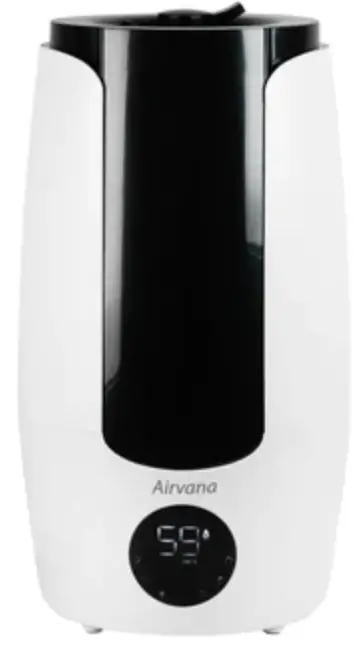
AV200HUM Ultrasonic Cool Mist Humidifier
Product Information
Product Name: Ultrasonic Humidifier
Owner’s Manual: Included
Language: English
Models:
- AV200HUM
- AV200HUM-SG
- AV200HUM-B
- AV200HUM-W
- AV200HUM-G
Product Usage Instructions
Initial Set Up
- Place the humidifier on a firm, level, and water-resistant
surface. - Ensure that the humidifier is at least six inches away from
walls, heat sources, and electrical appliances. - Choose an area that is out of reach of children.
- Inspect the cord for any signs of damage. Do not use the
product if the cord is damaged. - If the plug does not fit fully into the outlet, reverse the
plug. If it still does not fit, contact a qualified electrician. Do
not attempt to override this safety feature.
Operation
- Follow the initial setup instructions.
- Plug the humidifier into a wall outlet.
- Press the power switch on the humidifier to turn it on. The
humidifier will beep and light up to indicate that it is working.
The current humidity level will automatically display.
Power Off
- Press the power switch on the humidifier to turn it off. The
humidifier will beep as an indication. - Empty the water tank.
Refilling the Water Tank
Refer to the initial setup instructions for detailed
instructions on refilling the water tank.
Auto Shut-Off
When the humidifier is empty, the unit will automatically shut
off.
Note: Please refer to the user manual for additional information
on control panel, remote control, extension wand installation,
dual-port nozzle installation, daily maintenance, cleaning the
unit, cleaning the purifying cartridge, cleaning the aroma port,
end of season storage, troubleshooting, technical support, and
warranty details.
Ultrasonic Humidifier
Owner’s Manual
English
Form #AV200HUM 20220422 ©2022 Registered Trademark/TM Trademark of Airvana Manufactured exclusively for Airvana All rights reserved
Models:
AV200HUM AV200HUM-SG AV200HUM-B AV200HUM-W AV200HUM-G
Table of Contents
At A Glance
Safety Warnings……………………………… 1
Using Your Humidifier
Initial Set Up……………………………………. 2 Operation………………………………………. 3 Control Panel…………………………………. 4 Remote Control……………………………… 5 Extension Wand Installation…………….. 7 Dual-Port Nozzle Installation…………….. 8
Maintenance
Daily Maintenance…………………………. 9 Cleaning the Unit……………………………. 9 Cleaning the Purifying Cartridge…….. 10 Cleaning the Aroma Port………………… 11 End of Season Storage……………………. 11
Humidifier Assistance
Troubleshooting………………………………. 12 Technical Support…………………………… 13
Warranty
1-Year Guarantee………………………….. 14
Safety Warnings
READ AND SAVE THESE INSTRUCTIONS!
Important Safety Instructions: Read all instructions before using this humidifier.
This humidifier may not work properly on an uneven surface. ALWAYS place this humidifier on a firm, level, and water resistant surface.
ALWAYS place the humidifier at least six inches away from walls, heat sources, and electrical appliances such as stoves, radiators, or heaters.
ALWAYS place the humidifier in an area that is out of the reach of children.
Before using the humidifier, extend the cord and inspect for any signs of damage. DO NOT use the product if the cord has been damaged.
This product has a polarized plug (one blade is wider than the other) as a safety feature. This plug will fit into a polarized outlet only one way. If the plug does not fit fully into the outlet, reverse the plug. If it still does not fit, contact a qualified electrician. DO NOT attempt to defeat or override this safety feature.
ALWAYS UNPLUG AND EMPTY the humidifier when it is not in operation or while it is being cleaned.
Use only fresh, clean tap water when filling the tank. DO NOT use hot water.
You should never leave the humidifier unattended in a closed room. Always leave a door partially open.
This device complies with part 18 of the FCC Rules. DO NOT add detergents, chemical solutions or medications. DO NOT touch water in water tank or components in water
when unit is turned on. DO NOT turn on without water in water tank. ALWAYS lift the humidifier by the base, DO NOT lift by the tank. DO NOT clean with detergents or chemical solutions. For indoor use only. Keep away from children under the age of 8 unless
supervised by an adult.
1
Operation
Power ON: Follow the initial setup instructions. Plug humidifier
into wall outlet. On humidifier, press power switch to ON. Humidifier will beep and light up as indication that it is working. Current humidity will automatically display.
Power OFF: On humidifier, press power switch to OFF. Humidifier
will beep as indication. Empty water tank.
Refill Water Tank: See initial setup for instructions on refilling
water tank.
Auto Shut-Off: When humidifier is empty, unit will automatically
shut off and a light will flash 3 times and light up red, indicating humidifier needs to be refilled. Turn off and unplug humidifier before refilling tank. See initial setup for instructions on refilling water tank.
Essential Oil Tray: We recommend
adding a few drops of your favorite essential oil to the tray for an aromatherapy experience.
Extension Wand: Amplify your
humidifier’s reach and capabilities with the extension wand and dual-port nozzle. See Extension Wand Installation for instructions on how to use the extender.
3
Sleep Mode: Press once to turn off
j)
the display lights and run the humidifier on low mist. Press again to
turn off sleep mode.
Humidity Level: Humidity can be
0
ad justed between 40%-80% RH
(relative humd id ity). d To set esire
(9
humid ity level, press the button.
0 Humid ity level will increase by 5% each Digital Touch Panel time button is pressed . For continuous
humid ity, press the button until “CO” appears. Once
d esired humid ity level d isplays, the humid ity will blink four
times to signal humidity level is set. If desired humidity is less
than current humid ity, humidifier will go into sleep mod e. If
d esired humid ity is higher than current humid ity, humidify
function will work.
Accent Light: Press once to turn on the accent light. There
are five colors to choose from. Press through the options to turn off the accent light.
Timer: Press button to set timer. By default timer will start at
“CO” for continuous. Timer will then increase by one hour
(9 each time button is pressed, up to 12 hours. Once desired timer displays, the timer will blink four times to signal timer is set. Unit will automatically shut off after time runs out.
a:II, Mist Output: Unit will start running on low speed, press once for medium speed, twice for high speed and a third time to return to low speed.
C) Power Button: Press button to power humidifier on or off.
e
6
Out of Woter: Fil the tank with water to continue use.
Using the Remote:
Your remote comes with a battery installed and
-r
@
@–)”
does not need to be programmed. Before using
your remote for the first time, you must take out the pull tab. To use remote, make sure to point it at the front of the unit. The remote will not work when pointed to the backside of the unit.
rn G
— ®_..,
@
Sleep Mode: Press once to turn off the
J) display lights and run the humidifier on low
mist. Press again to turn off sleep mode.
..
Humidity Level: Humidity can be adjusted between 40%-80% RH (relative humidity). Press the+ to increase the
0 desired humidity by 5% each time button is pressed. Press the – to decrease the desired humidity by 5% each time button is pressed. Once desired humidity level displays, the humidity will blink four times to signal humidity level is set.
Accent Light: Press once to turn on the accent light. There are five colors to choose from. Press through the options to turn off the accent light.
Timer: Timer can be set between 1 – 12 hours. Press the+ to increase the timer by 1 hour each time button is pressed. Press the – to decrease the timer by 1 hour each time button is pressed. By default timer will start at “CO” for continuous. Once desired timer displays, the timer will blink four times to signal timer is set.
Mist Output: Unit will start running on low speed, press once for medium speed, twice for high speed and a third time to return to low speed.
Power Button: Press button to power humidifier on o
.
Remote Control
Replacing the Remote Battery:
It is recommended to replace the battery when 1
the product takes a long time to respond or stops responding when the buttons are pressed.
A
1. Turn over remote control. Press tab A toward the right and pull.
2. Pull out battery holder B and replace the
2
battery. Only use the specified battery type
B
(Lithium Button Cell Battery CR2025). The battery
must be installed with the positive side facing up.
3. Insert battery holder B back into remote.
3
Note: Do not apply excessive force to battery holder. Remove battery when not using for an extended period of time. When disposing of used battery, please use the correct method of disposal.
Battery : Lithium Button Cell Battery (CR2025)
WARNING
Keep the lithium battery out of reach of small children.
Small children may accidentally swallow it. If swallowed, call your doctor immediately.
6
Extension Wand
Extension Wand Installation:
Amplify your humidifier’s reach and capabilities with the optional extension wand and dual-port nozzle. Follow these steps to use the extension wand correctly:
1.
Turn off humidifier and unplug from wall outlet.
2.
Take the daul-port nozzle and attach it to the upper part
of the extension tube. STEP A
3.
Turn the upper tube clockwise to connect it to the bottom
portion of the extension tube. STEP B
4.
Press the extension tube to the top cover of the humidifier
to establish the extension wand. STEP C
5.
Make sure the extension wand is securly attached to the
humidifier. STEP D/FIGURE 2
STEP A
STEP B
STEP C STEP D
FIGURE 2
7
Dual-Port Nozzle
Dual-Port Nozzle Installation:
For a closer mist, your humidifier can run with only the dual-port
nozzle. Follow these steps to use the dual-port nozzle correctly:
1.
Turn off humidifier and unplug from wall outlet.
2.
Take the dual-port nozzle and attach it to the top cover of
the humidifier. STEP A
3.
Place the cover on top of the humidifier. STEP B/FIGURE 3
STEP A
STEP B
FIGURE 3
8
Maintenance
Note: ALWAYS unplug the humidifier from electrical outlet before cleaning. NEVER allow water to sit in water tank when not in use. Note: Hard water can cause calcium and magnesium to build up in a “white powder” on base of unit, transducer and inner surface of water tank. Overtime, this can cause humidifier to stop working properly. Note: It is recommended to clean the humidifier daily, and clean the water purifying cartridge every 1-3 months, depending on water hardness. Note: Humidifier should be emptied and cleaned before storage.
Daily Maintenance:
It is recommended to refill humidifier with water every day to
avoid odor from sitting water and hard water build up.
1.
Turn off humidifier and unplug from wall outlet.
2.
Remove top cover.
3.
Grab handle and lift water tank out of the unit. Drain any
water into a sink or tub. Shake water tank gently to remove
any remaining water.
4.
Rinse water tank thoroughly with water, empty, and wipe
with a dry, soft cloth.
5.
Wipe humidifier base with a dry cloth if necessary.
6.
Refill water tank as directed under initial setup and resume
use.
Cleaning the Unit:
Hard water can cause calcium and magnesium to build up on base of unit in the form of white powder. Clean as often as needed.
1.
Wipe off surface and base of humidifier. For best results,
use a microfiber cloth.
2.
Rinse surface and base with clean water.
9
Maintenance
Cleaning the Water Purifying Cartridge:
It is recommended to clean the water purifying cartridge every 1-3
months, depending on the water hardness.
1.
Turn off humidifier and unplug from wall outlet.
2.
Remove top cover.
3.
Grab handle and lift water tank out of the unit and empty.
4.
Unscrew the water purifying cartridge from the tank (FIGURE 4)
5.
Submerge cartridge in white vinegar for 10 minutes.
6.
Remove cartridge from white vinegar. Shake several times to
remove any remaining solution. Rinse with clean water.
7.
Wipe off remaining water with a dry, clean cloth.
8.
Screw the cartridge back into place, refill water tank as
directed under initial setup and resume use. (FIGURE 4)
FIGURE 4
10
Maintenance
Cleaning the Aroma Port:
It is recommended to clean the aroma port and pad after every
essential oil use.
1.
Turn off humidifier and unplug from wall outlet.
2.
Press in on aroma port to release the tray. (FIGURE 5)
3.
Remove the aroma pad, rinse it out or replace with a new one.
4.
Use a damp, soft cloth to clean the inside of the tray.
5.
Allow both the tray and the pad to air dry.
6.
Insert pad into tray, laying flat, and return tray to humidifier.
FIGURE 5
End of Season Storage:
When putting humidifier in storage at the end of the season, it is important to thoroughly clean and dry unit to avoid odor and calcium and magnesium build up.
1.
Follow the instructions for cleaning filter, transducer and unit
before storing humidifier at the end of the season.
2.
Ensure all parts are completely dry before storing
humidifier.
3.
Store humidifier in a cool, dry place.
4.
Never store the humidifier with water in the tank.
11
Troubleshooting
Problem: Excessive noise
Solution:
1.
The water tank is not attached correctly. Properly secure
water tank to base of unit.
2.
The humidifier is on an unstable surface. Place humidifier
on a sturdy, flat surface.
3.
The water tank does not have enough water. Fill water
tank with water. See initial setup.
Problem: Humidifier not working
Solution:
1.
The humidifier is not connected to power. Plug humidifier
into a wall outlet and press the power button.
2.
The water tank does not have enough water. Fill water
tank with water. See initial setup.
3.
The water tank has too much water. Remove excess
water from tank.
Problem: Abnormal mist smell
Solution:
1.
The unit is new. Remove tank cover and let water tank air
out for 12 hours in a dry, cool space.
2.
The water is dirty or has been sitting in unit too long. Clean
water tank and add fresh, clean water. See maintenance
instructions.
Problem: Not enough mist coming from humidifier
Solution:
1.
There is too much calcium and magnesium build-up.
Clean the water purifying cartridge and unit. See
maintenance instructions.
2.
Water is dirty or has been sitting in unit too long. Clean
water tank and add fresh, clean water. See initial setup.
12
Customer Support
If you need any assistance with setup, operation, or parts for your new Airvana® Humidifier, please call us. Our technical
support staff is ready to help!
USA/Canada: 888-704-2112 Email: [email protected]
Hours of operation are from 8:00 AM to 6:00 PM EST. You may also contact us online at:
www.airvanaair.com
13
Warranty
Airvana® makes the following warranty to the original residential user or consumer purchaser of the ultrasonic humidifier: If any part of The ultrasonic humidifier fails during the first (1) year from the date of purchase due to a defect in material or workmanship, we will provide a replacement part free of charge. If no replacement part can be provided, we will replace your humidifier.
IF THE ORIGINAL RESIDENTIAL USER OR CONSUMER PURCHASER CEASES TO OWN THE ULTRASONIC HUMIDIFIER, THIS WARRANTY AND ANY IMPLIED WARRANTY WHICH THEN REMAINS IN EFFECT, INCLUDING BUT NOT LIMITED TO ANY IMPLIED WARRANTY OF MERCHANTABILITY OR FITNESS FOR A PARTICULAR PURPOSE, ARE VOIDED. THIS WARRANTY IS IN LIEU OF ALL OTHER EXPRESS WARRANTIES. THE DURATION OF ANY IMPLIED WARRANTY, INCLUDING BUT NOT LIMITED TO ANY IMPLIED WARRANTY OF MERCHANTABILITY OR FITNESS FOR A PARTICULAR PURPOSE IS EXPRESSLY LIMITED TO THE PERIOD OF THE EXPRESS WARRANTY SET FORTH ABOVE.
This warranty is voided if your ultrasonic humidifier is not purchased and used in the USA or Canada. This warranty excludes and does not cover defects, malfunctions, or failures of the humidifier which were caused by repairs by persons not authorized by us, use of parts, or accessories not authorized by us, mishandling, modifications, or damage to the humidifier while in your possession, or unreasonable use, including failure to provide reasonable and necessary maintenance. This warranty does not cover humidifiers used in commercial applications. There are no express or implied warranties as to commercial purchasers or users.
14
Warranty
IN NO EVENT SHALL AIRVANA COMPANY BE LIABLE FOR DIRECT, INDIRECT, SPECIAL, CONSEQUENTIAL OR INCIDENTAL DAMAGES IN EXCESS OF THE PURCHASE PRICE OF THE HUMIDIFIER. YOUR SOLE REMEDY WILL BE REPAIR OR REPLACEMENT AS PROVIDED ABOVE. SOME AMERICAN STATES AND CANADIAN PROVINCES DO NOT ALLOW: LIMITATIONS ON HOW LONG AN IMPLIED WARRANTY LASTS; THE EXCLUSION OR LIMITATION OF DIRECT, INDIRECT, SPECIAL, INCIDENTAL OR CONSEQUENTIAL DAMAGES; THE EXCLUSION OR INVALIDITY OF EXPRESS OR IMPLIED WARRANTIES IF THE USER CEASES TO OWN THE HUMIDIFIER; THE LIMITATION OF THE REMEDIES AND RECOURSES AVAILABLE TO THE PURCHASER; OR THE INVALIDITY OF AN EXPRESS WARRANTY WHEN A PRODUCT IDENTIFIED BY BRAND NAME IS NOT USED (UNLESS SPECIFIC CONDITIONS ARE FULFILLED); SO THE ABOVE LIMITATIONS OR EXCLUSIONS MAY NOT APPLY TO YOU. THIS WARRANTY GIVES YOU SPECIFIC LEGAL RIGHTS AND YOU MAY ALSO HAVE OTHER RIGHTS WHICH VARY FROM STATE TO STATE OR PROVINCE TO PROVINCE.
15
 Airvana - Home Environment & Lifestyle Products – airvana-air