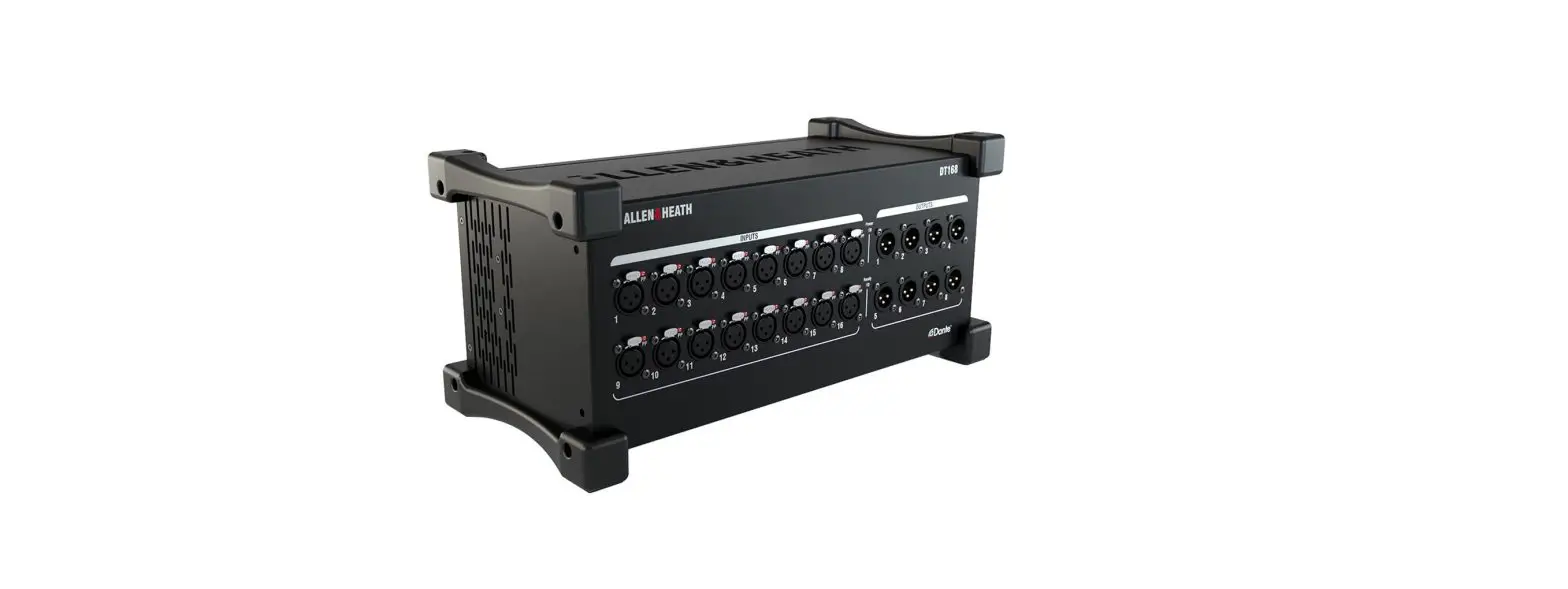
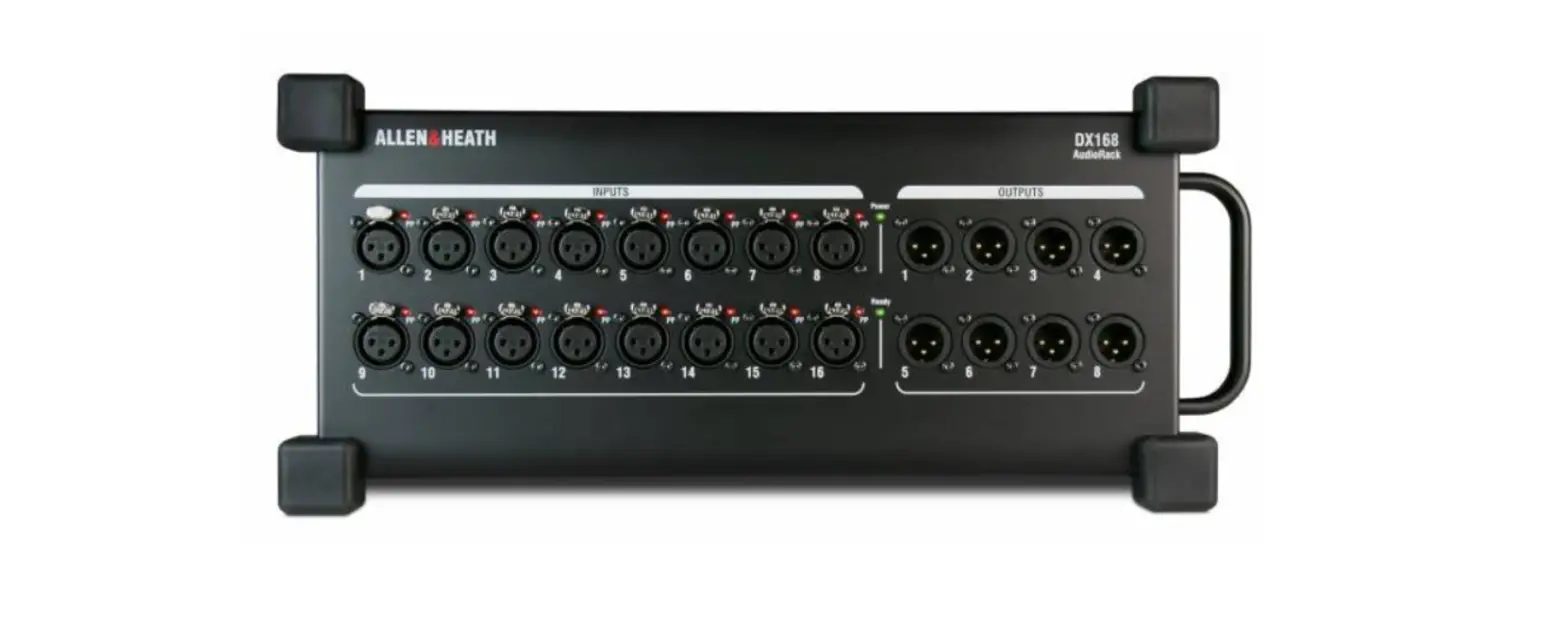
DT168 Stage Box Dlive 96kHz Dante Mic Preamps Expander
Product Information: DT168
The DT168 is a portable and rugged Dante I/O unit designed to
complement Allen & Heath digital mixing systems on a Dante
network. It features 16 remote controlled mic/line preamps and 8
XLR line outputs. The unit can be connected to the Dante network
using a single Cat5e cable or two cables for redundancy. It can be
operated horizontally or vertically, and can also be mounted in a
19-inch rack or flight case using the optional AB1608-RK19 kit. A
padded polyester carry case (A&H part number AP9932) is
available for added protection.
The DT168 requires specific software and firmware for control
and compatibility with different mixers. Preamp control by an SQ
mixer requires SQ firmware V1.4 or higher and SQ Dante card
firmware V1.0.5+. Preamp control by a dLive mixer requires dLive
firmware V1.8 or higher and a dLive M-DL-Dante 64×64 or 128×128
card. The use of the iLive/GLD M-Dante card is not supported. For
the latest firmware updates and instructions, visit the Allen &
Heath website.
Front Panel Features:
- Input Sockets: Balanced XLR mic/line inputs with +48V Phantom
Power indicator. The preamps are built into the DT168, and their
Gain, Pad, and +48V can be controlled from the network. - Output Sockets: Balanced XLR outputs operating at nominal +4dBu
level.
Side Panel Features:
- Dante Primary: EtherCon port for connection to the Dante
network. The cable carries audio signals as well as preamp control
data. - Dante Secondary: Can be set to Redundant mode or Switched mode
for connection to multiple devices, such as two mixing consoles.
The port mode can be set in Dante Controller. - Reset Network Settings: Hold down the recessed switch for 10
seconds to reset the network settings for the DT168. This will
delete any static IP address and revert to factory default (DHCP /
zero-conf). - Mains Power Input: IEC connector and fuse for the built-in
universal voltage PSU. It accepts voltages from 100 to 240V AC
50/60Hz. Secure the cable to the plastic P-clip using a T20
screwdriver. - Vents: Ensure good ventilation at the sides and back of the
unit. Avoid obstruction of vents while operating and prevent dirt
or liquid ingress.
Connection:
The DT168 can be connected to the Dante network using the
primary and secondary ports. The primary port is used for
connection to the Dante network, carrying audio signals and preamp
control data. The secondary port can be set to Redundant mode or
Switched mode for connection to multiple devices, such as mixing
consoles or monitor mixers. The port mode can be set in Dante
Controller.
Setting Clock and Patching Signals:
Use Dante Controller’s Routing tab to patch signals between
Dante devices. When a valid DT168 socket is routed to a dLive/SQ
Dante card and patched to an input channel, the dLive/SQ mixer will
present preamp gain, +48V, and Pad controls for that socket.
Use Dante Controller’s Clock Status tab to select the Dante
network leader. The DT168 should always be a clock follower on the
Dante network, with the mixer typically set to Preferred Leader and
Enable Sync To External.
DT168
Getting Started Guide
The DT168 is a portable, rugged Dante I/O unit. It can be used to complement Allen & Heath digital mixing systems on a Dante network. It provides 16 remote controlled mic/line preamps and 8 XLR line outputs. It connects to the Dante network over a single Cat5e cable, or two cables for redundancy.
The DT168 can be operated horizontally with the connectors facing upward or sideward, or vertically to save space on stage. It can also be mounted in a 19″ rack or flight case using the optional AB1608-RK19 kit. A hard-wearing padded polyester carry case is also available, A&H part number AP9932.
Software and firmware
Visit the Audinate website to learn more about Dante, and download Dante Controller to route audio and configure devices on a Dante network: https://www.audinate.com/
Preamp control of the DT168 by an SQ mixer requires SQ firmware V1.4 or higher and SQ Dante card firmware V1.0.5+.
Preamp control of the DT168 by a dLive mixer requires dLive firmware V1.8 or higher and a dLive M-DL-Dante 64×64 or 128×128 card. Use of the iLive/GLD M-Dante card is not supported.
Check www.allen-heath.com for the latest DT168 firmware and instructions on how to update it.
Front panel
DT168 Getting Started Guide
AP11788 Issue 4
Input sockets Balanced XLR mic/line inputs with +48V Phantom Power
indicator. The preamps are built into the DT168 and their Gain, Pad and +48V are controlled from the network.
The +48V indicator detects voltage at the socket whether supplied by the DT168 or received from an external source.
Output sockets Balanced XLR outputs operating at nominal +4dBu
level.
Side panel
Dante Primary EtherCon port for connection to the Dante network. The
cable carries the audio signals as well as preamp control data.
Dante Secondary
Can be set to Redundant mode or to Switched
mode for connection to multiple devices, for example two mixing consoles. Set
the port mode in Dante Controller.
Reset Network settings
Hold down the recessed switch for 10
seconds to reset the network settings for the DT168. This will delete any static
IP address and revert to factory default (DHCP / zero-conf).
Mains power input IEC connector and fuse for the built-in universal
voltage PSU. This accepts voltages from 100 to 240V AC 50/60Hz. Secure the cable to the plastic P-clip using a T20 screwdriver.
DT168 Getting Started Guide
AP11788 Issue 4
Vents Ensure good ventilation at the sides and back of the unit. Avoid
obstruction of vents while operating. Avoid dirt or liquid ingress.
Connection
Dante Primary network Dante Secondary network
Primary
Secondary Redundant mode
Mixing system
Primary Secondary
Switched mode (daisy chain example)
Monitor mixer
Primary Secondary
FoH mixer Switched mode (digital split example)
DT168 Getting Started Guide
AP11788 Issue 4
Setting clock and patching signals
Use Dante Controller’s Routing tab to patch signals between Dante devices. When a valid DT168 socket is routed to a dLive / SQ Dante card, and patched to an Input channel, the dLive / SQ will present preamp gain, +48V and Pad controls for the socket.
Use Dante Controller’s Clock Status tab to select the Dante network leader. The DT168 should always be a clock follower on the Dante network, with the mixer typically set to “Preferred Leader” and “Enable Sync To External”.
Specification
Mic/Line XLR Inputs Mic/Line Preamp Input Sensitivity Analogue Gain Pad Maximum Input Level Input Impedance Mic EIN
Analogue XLR Outputs Output Impedance Nominal Output Maximum Output Level Residual Output Noise
Dante
Power and Temperature Mains Voltage Operating Range Mains Power Consumption Operating Temperature Range
Dimensions and Weight DT168
Balanced XLR, +48V phantom power Fully recallable -60 to +15dBu +5 to +60dB, 1dB steps -20dB Active PAD +30dBu (PAD in) >4k (Pad out), >10k (Pad in) -127dB with 150 source
Balanced, Relay protected <75 +4dBu = 0dB meter reading +22dBu -92dBu (muted, 20-20kHz)
Switched or Redundant mode, 48kHz/96kHz
100-240V AC, 50/60Hz 40W max 0°C to 40°C (32°F to 104°F)
Width x Depth x Height x Weight 410 x 190 x 185 mm x 4.6kg (16.1″ x 7.5″ x 7.3″ x 10.1lbs)
Read the Safety Instructions Sheet included with the product and the information printed on the panel before operating. A limited one year manufacturer’s warranty applies to this product, the conditions of which can be found at: www.allen-heath.com/legal By using this Allen & Heath product and the software within it you agree to be bound by the terms of the relevant End User Licence Agreement (EULA), a copy of which can be found at: www.allen-heath.com/legal Register your product with Allen & Heath online at: http://www.allen-heath.com/support/register-product/
Check the Allen & Heath website for the latest documentation and software updates.
ALLEN&HEATH
Copyright © 2022 Allen & Heath. All rights reserved
 Allen & Heath | World-Class Mixing
 Audinate - Maker of Dante, Pro AV's Leading Networking Technology