
Standard Pairing Process for iOS
lTo cris_ro c Erncor posting process, trio SJto you -owtoiloMng thing; rzec•o.
 | Your Cents *ail,’ CS cs L.- |  | kirtng Codas -cord o– tx tAnS Eta/ Z.;_ce vete. EJX•Of o• ‘can |
| 2A Gilt WI Ts Nitwit E Verna aa no title will •o–o4ect | Please A Roo* utter U-acr; a*, Kovnio pot ether Ire ocioatzt |
Download and Open the Nanoleaf App
the PTI: “Rs C.164:101 Pltntoleall Semi tvt Serairy Ay+, toll-no? pp Slu v. t4u *Lite thy lutist
Pair Your Lines
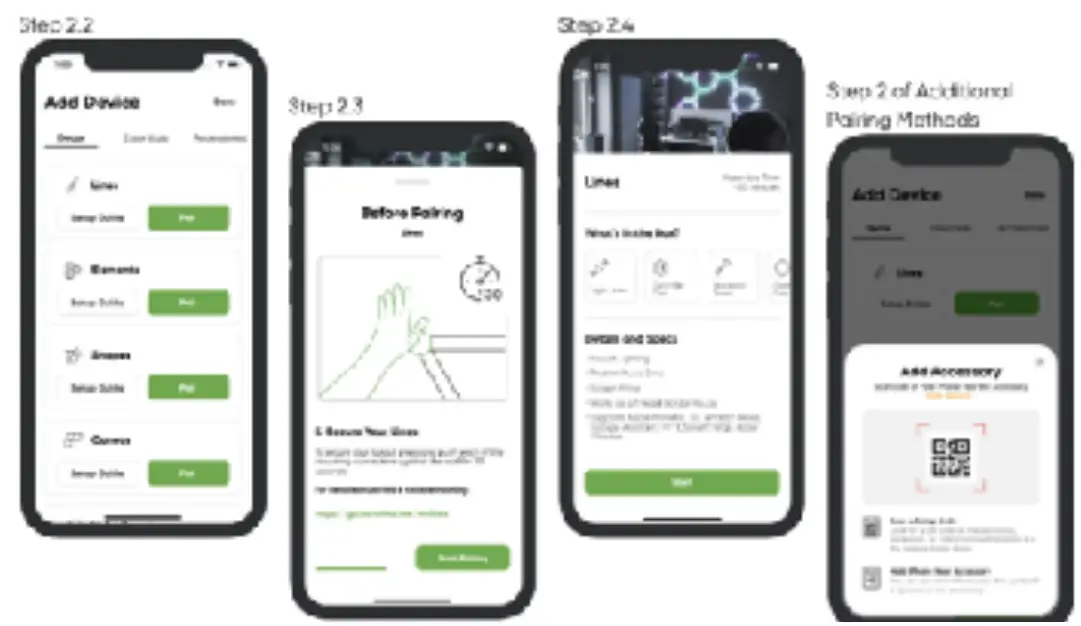
- 21 &tied the MORE tab.
- 2.2 Seism:: MY CEs Ca aril: la a?..ci a cevsce.
- 2.3 ::;e4ect I.nai as •–3-t D’Od1Ct arc! START PAIRING.
- 2. a Me Gomm vo I ostler cutomotsccly
- 23 for the Marne Kit:cif nil code b post
- i.t• Iva Naro4of _11103 Paula now be connected one. ready to go.
iOS Additional Pairing Method
U1′ I Jt4 It; – wit o I.. lap
- Ata Step 2 4 in the Surds J Poilnc PieciaA, hA: us 01‘, Chief CGVICG: poet the 2–iccesso
- ea-J.1r rettievt *Peat( ha eatteirreiren By *en% Ansel r9 year tinn amI no retest
OPTION ft Pair into Maul’ Input
- =elect I Caret toe c Cccc cr Cleat ken
- Pear rya ft memoir Into rasa {tin a Stunt em this: laic* Sen•,’: AMP rci r ri• Desettnaint:
How can one setup be controlled by multiple
IOS users?”
This is accosrplithed ►t•i the Apple l ion* Aop Ord tie Nanolear Apo
Primary User
1.1 Open e NCtutu’ App.
1.2 Select the MORE tub.
ta Select USERS.
1.4 Irvtts Joe wt:ot Ctrs trine with lieet Ciotti Atxnunt
Secondary User
23 4 • lag. at.; was. ACLS rn venticrroft
2.2 In nel-OThe &CC, title;t home cat r the toi.,
2.3 Sella HOW 140S. 3 lett at Contus upccc.t.
2.1 A0280t the ^ ore mat hos teen 5.14:116C1 Vvr, you 114 S cone y2s. CalttC1 4r tow Lres riel OS 01y cthe Flizmel(–. advisor. r the sc cre hr.
Pairing Your Lines Android
Pairing Your Lines – Android
atotsics Poe –sis Picks% for a saL
Tn poss.’s* n strict mutiny rrnrer.c, panma tnrins auto yr)! I T1141 no nnpr-rriri–p thIrrt tr-arly
| Your Deltic* isciircs twa•ea | | Polling Code* =coo: Do- ma Coo, Scat G4.1:0, frame Sum car WaS111 |
| 2.4 Selz W-FI Network 5 Gilt noodles:ra not c arpoltala wth 14:moim• lint. | Process/or Is ready ‘tug _no; is no,/ so par when the rotator hi ..1 In Ky., tia I yid ile. |
Download and Open the Nanoleaf App
vit that • c Cul a biostatics; if Son:s•Ilst Smarm* f 311.41,‘FI Py I -•km; J11114!PI is In vector.
Pair Your Lines
Les-le )Cur iZalt011 rags de ttnetied VI you, awiet
2; the MO:”.1 roll • •
2,3 Set.:._ I MY DIViC IS it • to toc/J a claviers
2,4 Solicit lines es ‘, our products 3t chzioso ore on t–o to bah cognitions Iu ao 4: 00110N A; Pair with c OR Cr®
sttn• this Gil:: net, t^, Ad le the::to’t’s !-Pits: Itrot I Wert: f rat y n • I homer OPTION it Pairs with NFC roc 1. F’a.iraltctM s
OPTION Br Pair with NIG Top
- &nag that t4 s onatiaci.
- Hold the to 51 rots ammo* war the:r.:CtISSet to
OPTION C: Pair with t4ogirol input
II ye, haul or la 1 hotel Cino. wt -4 I hat c.–near tow. to you ration*, soled -he Anne-I find gars to idarrifs• Vie chorion calcium (it wl men croon’.
dantted TAP TO PAIR.
1 Envoi the 8-digit puking oche (hand at’ Ow .3ukii. &art Gocke, Power Supply ca)