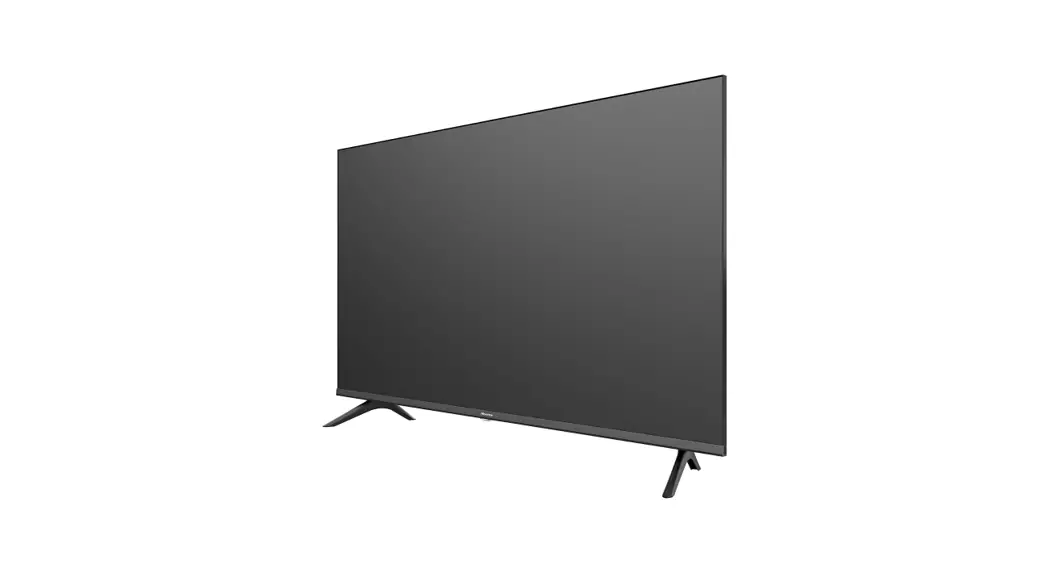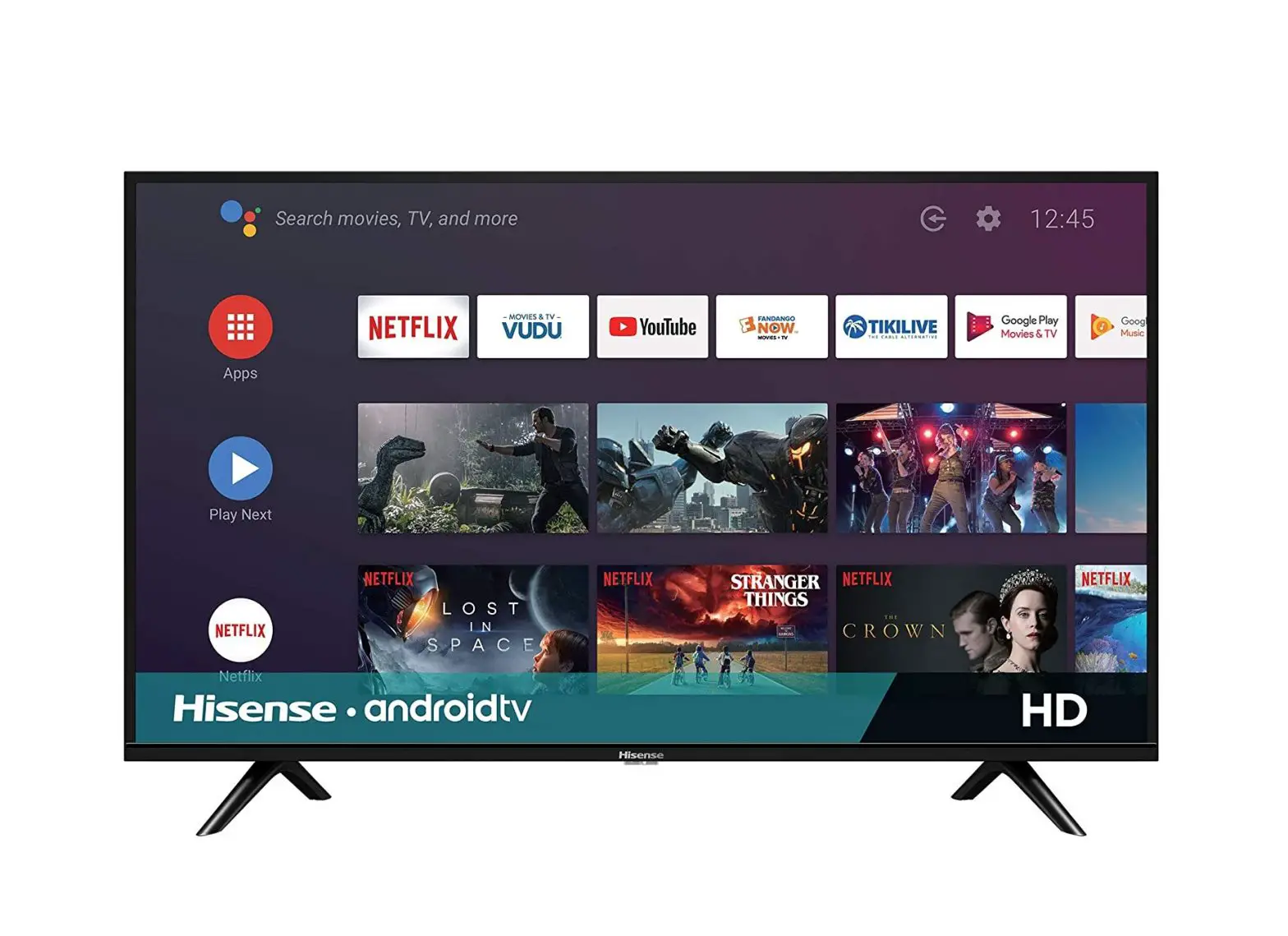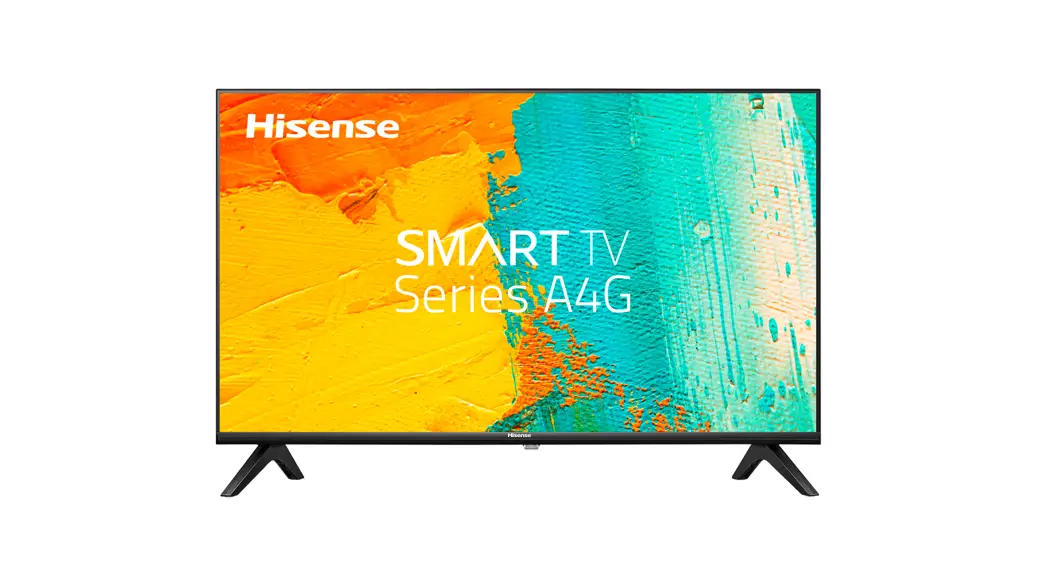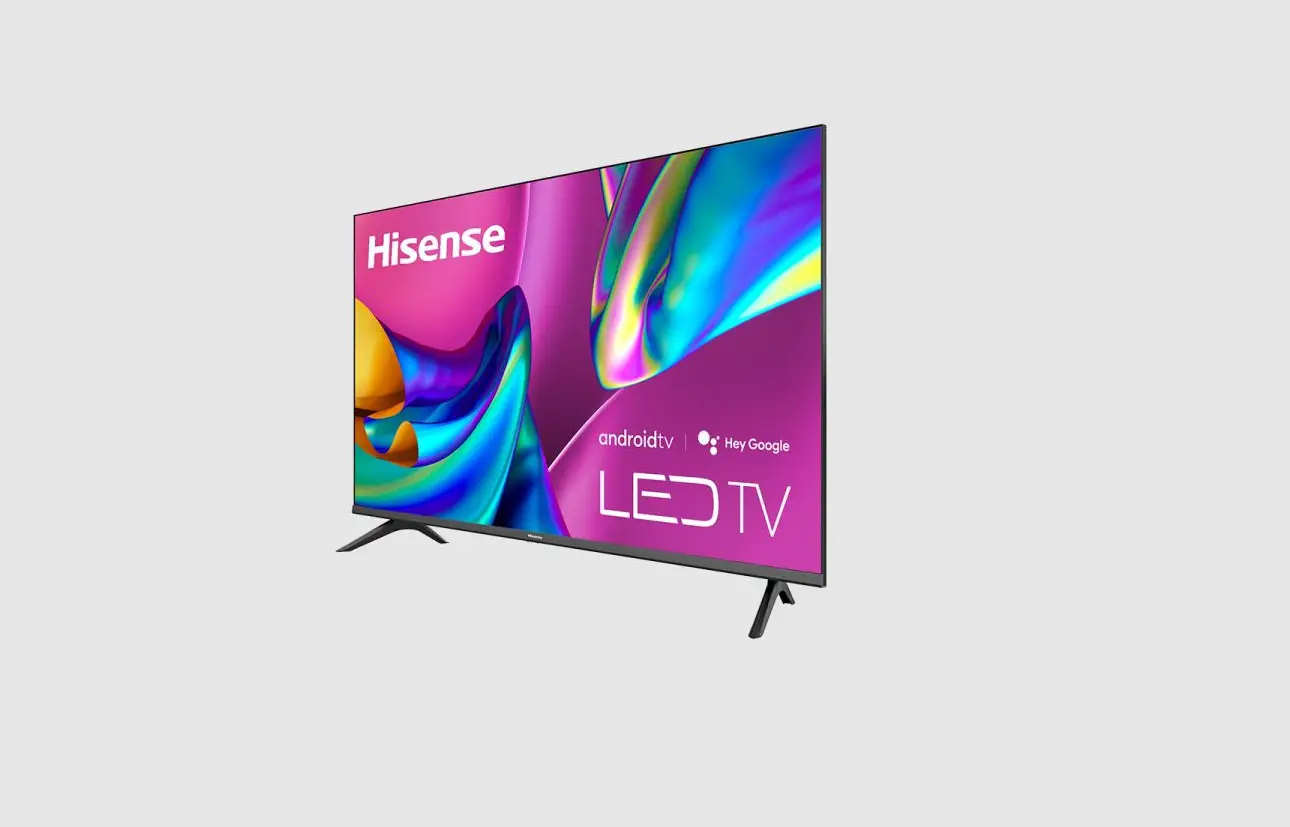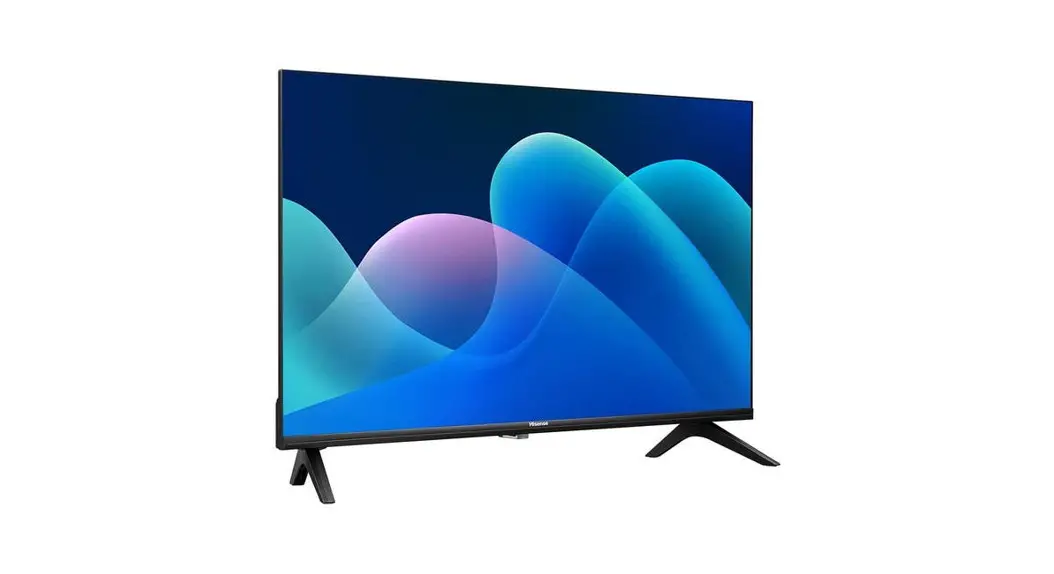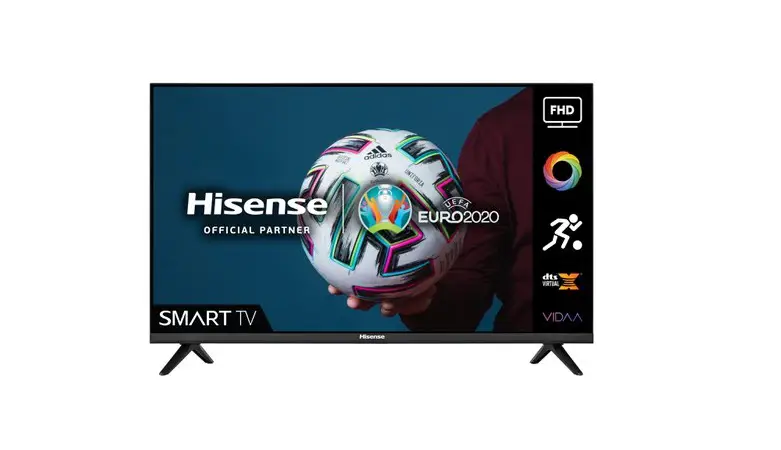
Hisense 32A4GTUK 32 Inch Full HD WIFI Smart TV User Manual
Important Safety Instructions
Important Notice
Paragraphs beginning with the symbol  indicate important instructions, tips or conditions for the following settings.
For your own safety and the optimal performance of your TV, ensure to read the safety instructions before performing any installation.
Compatibility with 3rd party products, software and services are not guaranteed.
We cannot be held liable for any damage or loss suffered whilst operating, using or connecting to incompatible devices or apps.
The recording and playback of content on this or any other device may require permission from the owner of the copyright or other such rights in that content. It is your responsibility to ensure that your use of this or any other device complies with applicable copyright legislation in your country. Please refer to that legislation for more information on the relevant laws and regulations involved or contact the owner of the rights of the content you wish to record or playback.
Read these instructions
Follow all instructions
Heed all warnings
Keep these instructions
All rights reserved.
Safety Instructions
To ensure safe and correct use of this product, always comply with the following precautions to avoid dangerous situations and damage to your unit:
 Caution
Risk Of electric shock
Do not Open
Caution
To Reduce The risk of electric shock do not remove cover or back no user serviceable parts inside Refer servicing to qualified service personnel.
The lightning flash with arrowhead symbol, within an equilateral triangle is intended to alert the user to the presence of uninsulated dangerous voltage within the product’s enclosure that may be of sufficient magnitude to constitute a risk of electric shock.
The exclamation point within an equilateral triangle is intended to alert the user to the presence of important operating and maintenance (servicing) instructions in the literature accompanying the appliance.
 AC voltage: This symbol indicates that the rated voltage marked with the symbol is AC voltage.
 Class II product: This symbol indicates that it does not require a safety connection of protective earthling (ground).
The intended use and ambient conditions for this TV
This TV is intended for the rendering of video and audio signals, on a table-top or wall mounted, in a home or office environment. It must not be used in rooms with a high level of humidity or dust concentration. The warranty is only valid if used as intended by the manufacturer.
WARNING
High humidity and dust concentration may lead to current leaks in the device. To reduce the risk of fire or electrical shock:
- Do not expose this unit to rain, moisture, dripping or splashing water, and do not place objects filled with liquids, such as vases, cups, etc. on or over the unit.
- Do not touch the TV with wet hands.
- Do not expose to direct air-conditioning and keep candles or other naked flames away from the TV at all times.
If the TV is moved from a cold environment to a hot environment, leave it switched off for at least an hour to avoid condensation. If used outside, make sure it is protected from moisture.
If you notice anything unusual, immediately remove the power plug. In case of fire, use preferably a CO2 gas or powder fire extinguisher. If such extinguishers are not accessible, try to isolate the electrical supply before using a water fire extinguisher.
WARNING
Never place a television set in an unstable location. A television set may fall, causing serious personal injury or death. Many injuries, particularly to children, can be avoided by taking simple precautions such as:
- Using cabinets or stands recommended by the manufacturer of the television set.
- Only using furniture that can safely support the television set.
- Ensuring the television set is not overhanging the edge of the supporting furniture.
- Not placing the television set on tall furniture (for example, cupboards or bookcases) without anchoring both the furniture and television set to a suitable support.
- Not placing the television set on cloth or other materials that may be located between the television set and supporting furniture.
- Educating children about the dangers of climbing on furniture to reach the television set or its controls.
If your existing television set is being retained and relocated, the same considerations as above should be applied.
Moving/Transportation
Before moving this TV, disconnect all cables and move in the vertical position only. Grasp the device on the upper and lower edges of the frame.
- Do not press or put stress on the front panel of the TV. It may take two or more people to carry larger TVs.
If you have to briefly lay down the TV, place the unit with its entire front surface lying flat on soft material.
The LED screen is made of glass and can break if is not handled properly. Always wear rubber gloves to carry the unit. If the LED screen is damaged, liquid crystal might leak out. In case of skin contact, immediately rinse thoroughly with water.
Power Supply
Incorrect voltages can damage the TV. Only connect this unit to a power supply with the correct voltage and frequency noted on the type plate, using the supplied power cable.
The power plug must be easily accessible so that the device can be disconnected at all time. The unit is live, even if in standby mode, as long as the unit is connected to a power outlet.
It is recommended that this unit is placed on a dedicated circuit.
- Do not overload the power outlets by connect too many appliances to the same outlet. Overloaded wall outlets, extension cords, etc. are dangerous and can result in electric shock and fire.
After power off, don’t turn it on again in 5 seconds. Frequent switching power supply in a short period of time can cause abnormal TV.
Power plug and power cable
- Do not touch the power plug with wet hands.
- Do not place heavy objects on the power cable. Route the cable so that it is not kinked or laid over sharp edges, walked on or exposed to chemicals. A power cable with damaged insulation can cause electric shock and fire.
- Pull the power plug, NOT on the cable when disconnecting. The cable can become damaged and cause a short circuit if pulled on.
- Do not place the power cable near a high temperature object.
- Do not move the TV with the power cable plugged into a socket.
- Do not use a damaged or loose power cable, or a damaged socket outlet.
- Do not use any power cords other than the one supplied with this unit.
Set-up
Check that the location is suitable to bear the load of the TV. Place on a level, sturdy and horizontal base. Ensure that the unit does not hang over the edge of the base when placed in or on furniture. If placed on a cart, use caution when moving to avoid the unit from tipping over.
- Place the unit in a normal upright horizontal position. It must never be operated vertically, lying flat or hanging overhead from the ceiling.
- Place the unit where it is not exposed to direct sunlight or other sources of heat.
When mounting the TV on a wall, follow the instructions supplied with the wall mount, make sure not to install the TV by hanging the power and signal cables on the back of the TV.
Air ventilation and high temperatures
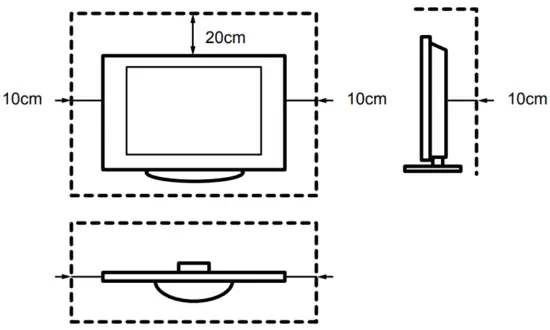
Install your TV only where there is proper ventilation, and ensure that there is at least 10 cm free space on the sides and 20 cm above the unit for air circulation. Excessive heat and obstruction of ventilation could lead to fire or early failure of some electric components.
- Do not block any ventilation openings with newspapers, tablecloths, curtains, etc.
- Do not dry clothing etc. on top of the unit.
- Take care not to touch the ventilation openings since they may become hot.
- Do not insert foreign objects into the TV through the vents.
The Stand
- Do not use any stand other than the one supplied with this unit.
- Do not modify or use the stand if it becomes warped of physically damaged.
- During setup, make sure that all the screws are securely tightened.
- Ensure that the TV does not suffer any impact during the attachment of the stand.
- Ensure that children do not climb onto the stand.
- Attach or remove the stand with at least two people.

Prevent small items from getting into the interior of the device through the ventilation slots. Such objects may cause short circuits, which may cause fire.
If something should get inside the unit, immediately unplug the power plug of the device and contact service support.
he LED screen
Despite thorough care when manufacturing this display, it cannot be 100% guaranteed that no sub-pixel defects will occur due to technical reasons. These cannot be considered as a device defect in terms of the guarantee. They will not affect the performance and reliability of the TV.
To prevent “image burn”, avoid displaying still images for long periods of time, there is a possibility that a copy of the image may remain. If the aspect ratio is set to 4:3 for a long period of time, image burn may occur on the black areas. Image burn is not covered by the warranty.
- Do not apply strong force or impact on the display panel. Avoid touching the LED screen or touching it for long periods of time. Doing so may produce some temporary distortion effects on the screen.
Radio waves
- Do not use the TV in any medical institutions or locations with medical equipment. Radio waves may interfere with medical equipment and cause malfunction.
- Do not use the TV near any automatic control equipment such as automatic doors or fire alarms. Radio waves may interfere with automatic control equipment and cause malfunction.
If you have a cardiac pacemaker, keep a distance of at least 22 cm from the TV. Radio waves may interfere with the operation of a pacemaker.
Built-in wireless LAN
- Do not connect to wireless networks that you do not have the usage rights for. Data transmitted and received over radio waves may be intercepted and monitored.
The built-in wireless LAN uses 2.4 GHz frequency band. To avoid malfunctions or slow response caused by radio wave interference, keep the TV away from devices such as other wireless LAN devices, microwaves, mobile phones, and other devices that use 2.4 GHz signal.
Warning about off-gassing
New furniture, carpet, paint, building materials and electronics can release chemicals into the air through evaporation. After you set your TV up and turn it on for the first time, you may notice a slight smell within a couple of hours. This is because some components of TV are heating up for the first time. The materials that we use fully meet the environmental requirements and regulations. Your TV is working just fine and the fumes from the off-gassing will diminish eventually.
Supervision
- Do not let children play unsupervised close to the TV. It could tip over, be pushed off or pulled down from the stand surface and injure someone.
- Do not allow a switched-on TV to run unattended.
Volume
Loud music and noises can lead to irreversible damage to your ears. Avoid extreme volume, especially over long periods and when using headphones. If you hear a drumming noise in your ears, turn down the volume or temporarily stop using headphones.
Thunder Storms
Pull out the power plug and all connected antenna cables from the TV during a thunderstorm. Overvoltage caused by lightning strikes can damage the TV via the antenna system, as well as the wall socket.
Long periods of absence
As long as the power plug is connected to a live socket outlet, the TV will consume power even in standby mode. The power plug and all connected antenna cables should be disconnected out during long periods of absence.
Cleaning and care
 CAUTION:
Unplug the power cord prior to cleaning the TV.
Clean the TV, the screen, and the remote control with a soft, moist, clean and color-natural cloth only. Do not use any chemicals.
- Do not subject the surfaces to insect repellent, solvent, thinner or other volatile substances. This may degrade the surface quality.
- Do not spray water or other liquids directly on the TV. Liquid inside the TV could lead to product failure.
- The surface of the display panel is treated and may be easily damaged. Take care not to scratch it with fingernails or other hard objects.
- Also wipe the power plug with a dry cloth at regular intervals.
Service/Repair
Never remove the cover/back of the TV; there are no user serviceable parts inside. Refer all service to qualified service personnel.
Packaging
Keep the anti-moisture materials and plastic bags out of reach of children. Plastic bags can cause suffocation and the anti-moisture material is harmful if swallowed. If swallowed by mistake, force the patient to vomit and visit the nearest hospital.
Modification
Do not attempt to modify this product in any way. Unauthorized modification could void the warranty of this unit, cause electric shock and fires.
Remote Control batteries
- Incorrect installation may cause battery leakage, corrosion and explosion.
- Replace only with the same or equivalent type.
- Do not mix old and new batteries.
- Do not mix different battery types.
- Do no use rechargeable batteries.
- Do not burn or break up batteries.
- Be sure to dispose of batteries correctly.
- Do not expose batteries to excessive heat such as sunshine, fire or the like.
Outdoor Antenna Grounding
If an outdoor antenna used, be sure the antenna system is protected against voltage surges and built-up static charges.
Disposal
Refer to the recycling section of this manual.
Accessories List
The following accessories are included with TV:
- User Manual × 1
- Screw × 4
- Base Stand × 2
- AAA Battery × 2
- Remote Control × 1
- RCA jack to AV Cable × 1
- Warranty Card × 1
NOTE
The accessories may be different from the list above due to different models, countries / regions. Please refer to the actual accessory bag.
SIMPLIFIED EU DECLARATION OF CONFORMITY
Hereby, Hisense Visual Technology Co., Ltd. declares that the radio equipment type [32A4G / 32A40G / 32A41G / 32A42G / 32A41GCH / 32A42GCH / 32A48GNE / 32A46G / 32A47G / 32A48G / 32A49G / 32A48GCH / 32A49GCH / 32A49GNE / 32A4GTUK / 32A40GTUK / 32A41GTUK / 32A42GTUK / 32A46GTUK / 32A47GTUK / 40A4G / 40A40G / 40A41G / 40A42G / 40A41GCH / 40A42GCH / 40A48GNE / 40A46G / 40A47G / 40A48G / 40A49G / 40A48GCH / 40A49GCH / 40A49GNE / 40A4GTUK / 40A40GTUK / 40A41GTUK / 40A42GTUK / 40A46GTUK / 40A47GTUK] is in compliance with Directive 2014/53/EU. The full text of the EU declaration of conformity is available at the following internet address: http://global.hisense.com/downloads.
Installing the Stand or Wall mount bracket
CAUTION
- Be sure to disconnect the AC power cord before installing a stand or wall mount brackets.
- The display on your TV is fragile. Make sure the TV screen is not scratched or damaged by hard objects or from pressure.
- After the installation is completed, make sure the TV is steady on a table or firmly attached to a wall mount, before removing all protective film, if any.
Installing the stand
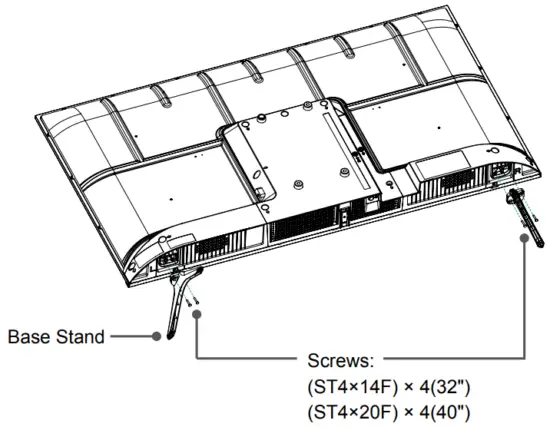
Follow the illustrations and textual instructions below to complete the installation steps:
- Carefully place your TV face-down on a soft, flat surface to prevent damage to the TV or scratching to the screen.
- Remove the 2 stands from the accessory bag and then insert the stands into the bottom slots of the TV.
- Secure the stands to the TV with the 4 screws in accessory tightly.

installing the wall mount bracket
Before mounting the TV, remove the TV stand if you have already attached it, and make sure the wall mount bracket supports the weight of your TV.
CAUTION
When mounting the TV on a wall, follow instructions provided with the wall mount bracket. If it is not correctly mounted, the TV may fall and cause property damage or personal injury.
- Place spacers between the TV and bracket.
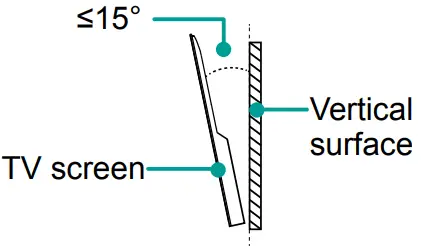
- Make sure the tilt angle between the TV screen and the vertical surface is no more than 15 degrees.
- Standard dimensions are shown below.

Wall mount hole pattern (mm) 100 × 200
Wall mount screw size M6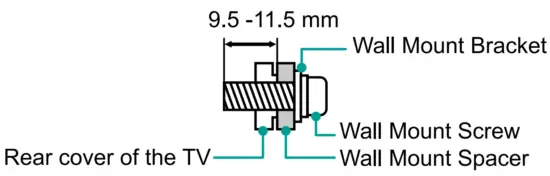
NOTES
- The diameter and length of the screws differ depending on the wall mount bracket model.
- Wall mount bracket is optional. Your TV may not have wall mount bracket. Please refer to the actual accessories.
TV Front
TV Front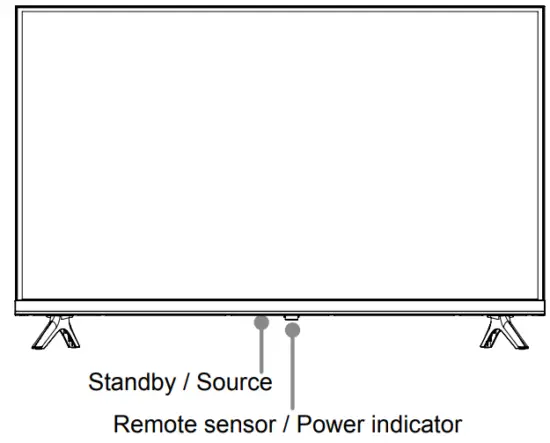
Item | Description |
Remote sensor | Receive remote signals from the remote control. Do not put anything near the sensor, as its function may be affected. |
Power indicator | The light is red in standby mode. |
| Press the single button when in standby mode, and the TV will be turned on. Press the single button to call up the menu. When the focus is on “Power Off”, wait for 3 seconds, and then the TV will go into standby mode automatically. Press the single button to call up the menu, and then select among the different input signal sources. |
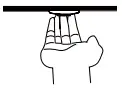 Standby / Source
NOTES
- The Picture is Only for Reference.
- Powering on the TV requires several seconds to load programmed. Do not rapidly turn the TV off as it may cause the TV work abnormally.
TV Rear
32″ 40″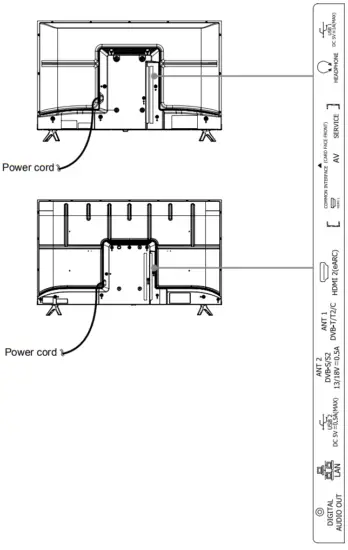
NOTES
- ANT2 Jack supports power supply for satellite antenna (13/18V, 0.5A max.)
- Check the jacks for position and type before making any connections. Loose connections can result in image or color problems. Make sure that all connections are tight and secure.
- Not all A/V devices have the ability to connect to a TV, please refer to the user’s manual of your A/V device for compatibility and connections procedure.
- Before connecting external equipment, remove the mains plug from the wall socket. Otherwise, it may cause electric shock.
- Service jack is not available for you to connect an external device. It can only be used by our factory for testing purposes.
Making Connections
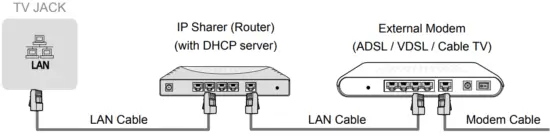
LAN (Wired setup)
Connect your TV to your network by connecting the LAN port on the back of your TV to an external modem or router using a LAN (Ethernet/Cat 5) cable. See the illustration below.
- It is recommended to use a modem or router that supports Dynamic Host Configuration Protocol (DHCP). Modems and routers that support DHCP automatically provide the IP address, subnet mask, gateway, and DNS, so you don’t have to enter them manually. Most home networks already have DHCP.

Wireless setup
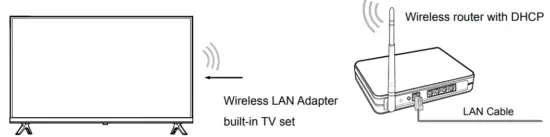
To connect your TV to your network wirelessly, you need a wireless router or modem. See the illustration below.
- The built-in Wireless LAN Adapter supports the IEEE 802.11b/g/n communication protocols. It is recommended to use IEEE 802.11n router. Low transfer rates for b/g may have the influence on the quality of streamed videos and other media.

NOTES
- You must use the built-in Wireless LAN Adapter to use a wireless network because the set doesn’t support external USB network adapters.
- If the wireless router supports DHCP, your TV can connect more easily to the wireless network.
- If you apply a security system other than the systems listed below, it will not work with the TV.
Security system: WPA, WEP, WPA2. - In order to guarantee smooth network, the distance between router and TV should be less than 10 meters.
| ANT | 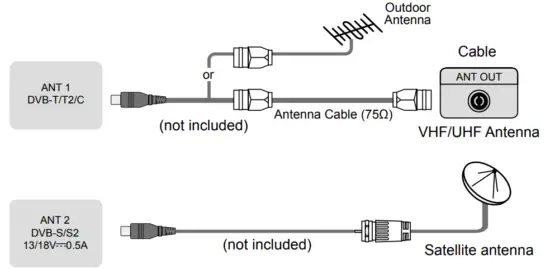 | |
| DIGITAL AUDIO OUT |  | |
| HDMI | HDMI (eARC) | |
| HDMI |  | |
| AV | 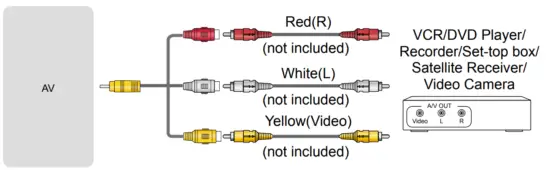 | |
| HEADPHONE |  NOTE Excessive sound pressure from earphones and headphones can cause hearing loss. | |
| COMMON INTERFAC |  NOTES Before you insert/remove the CI+ module, ensure that the TV is switched off. Then insert the CI card into the CI+ module in accordance with the Service Provider’s instructions. Do not repeatedly insert or remove the Common Access Module as this may damage the interface and cause a malfunction. You must obtain a CI+ module and card from the service provider of the channels you want to watch. Insert the CI+ module with the Smart Card in the direction marked on the module and Smart Card. CI+ is not supported in some countries and regions; check with your authorized dealer. | |
| USB |  NOTES The USB port supports a voltage of 5V. | |
Remote Control
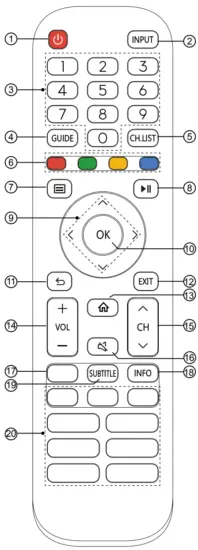
- POWER: Switch the TV on or into standby mode
- INPUT: Select input sources
- Number button: Direct channel selection or numbers input
- GUIDE: Display the Electronic Program Guide (DTV mode)
- CH List: Display the Channel List on the screen
- Special function buttons
- Display the Quick setup menu
- Media content control function buttons
- ∧/ ∨/ < / >: Allows you to navigate the on-screen menus and adjust the system settings to your preference
- OK: Confirm the selection in the on-screen menus
- BACK: Return to previous menu
- EXIT: Exit the menu
- HOME: Enter the Smart
- VOL + /-: Adjust the volume
- CH ∧/ ∨ : Switch channel
- MUTE: Mute or restore the TV sound
- TXT/TEXT: Turn on/off the teletext function
TV: Enter the Live TV screen - INFO: Display the present program information
- SUBTITLE: Activate or deactivate the subtitle mode
- APP: Quick access buttons to apps MEDIA: Enter the media mode
 : All Apps
BROWSER: Enter into BROWSER : Custom button to launch input or apps quickly
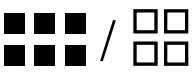 : All Apps
 : Custom button to launch input or apps quickly
NOTE: The included remote control will vary depending on model, country. Check information according to the actual remote control in the accessory bag.
Installing Batteries in the Remote Control
 Slide the back cover to open the battery compartment of the remote control.
 Insert two AAA size batteries. Make sure to match the (+) and ( – ) ends of the batteries with the (+) and ( – ) ends indicated in the battery compartment.
 Close the battery compartment with the cover.
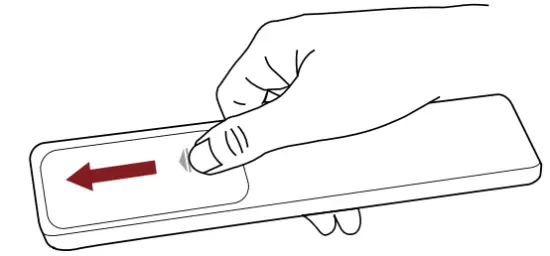 Slide the back cover to open the battery compartment of the remote control.
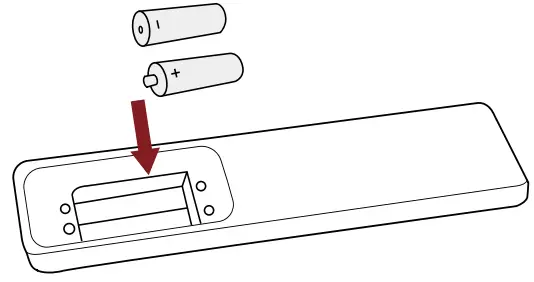 Insert two AAA size batteries. Make sure to match the (+) and ( – ) ends of the batteries with the (+) and ( – ) ends indicated in the battery compartment.
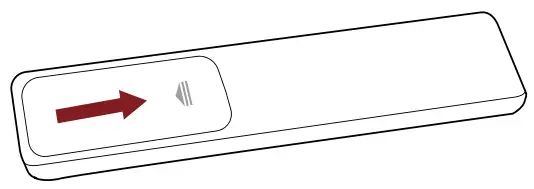 Close the battery compartment with the cover.
NOTES
- Product image is only for reference, actual product may vary in appearance.
Handling the Batteries - Incorrect use of batteries may cause corrosion or battery leakage, which could cause fire, personal injury or damage to property.
- Only use the battery type indicated in this manual.
- Do not mix old and new batteries or different types of batteries.
- Do not dispose of used batteries as domestic waste. Dispose of them in accordance with local regulations.
Remote Control Operation Range
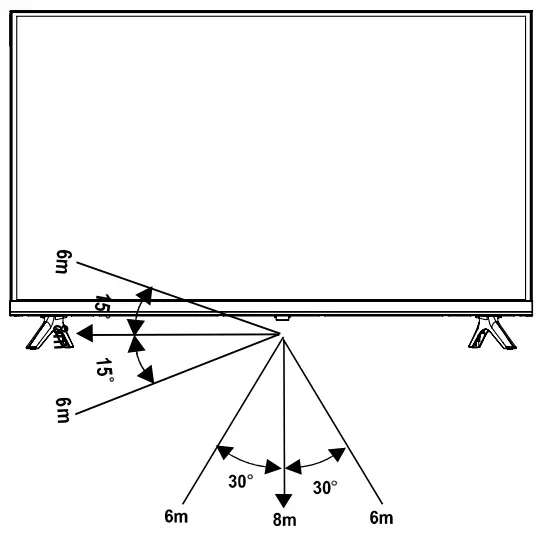
- The remote control can work at a distance of up to 8 meters in front of the TV set.
- The remote control angle: taking the remote sensor as an apex, 6 meters away, its controlled horizontal angle is within ±30°, while the vertical angle is within ±15°.
- The operating distance may vary depending on the brightness of the room.
Disposal of this unit
Product should not be damaged, dismantled or thrown in municipal waste. It should be packed and handed over to authorised re-cycler.
Turning the TV on for the First Time
Turning the TV on for the First Time
- Connect the mains cable to the mains socket after you have completed all the connections.
- The first time you turn the TV on, it will go straight into the Installation Guide.
- Press the [ ∧/∨ / < / > ] buttons to navigate the menu and change the settings. Press the [OK] button to confirm.
| Select your Language | Select your desired language to be displayed on the menu. Press menu button to set up your TV for store mode. |
| Connect to the Internet | If your TV does not automatically detect an Ethernet connection, then use a wireless network, select your network from the list that displays, also you can add a hidden network. |
| Select your country | Select the Country where you will operate the TV. |
| Terms & Conditions, Privacy Policy | Your use of this device is subject to the End User License Agreement, and lack of your acceptance of the End User License Agreement will turn off all smart features of this device. Please read the details carefully before you choose. |
| Enhanced Viewing | Enhanced viewing can automatically adjust the picture mode and sound mode so as to match with the current content displayed on this device in case it is recognized by the automatic content recognition service. |
| Sign in your VIDAA Account | Link your TV with VIDAA account. |
| Name Your TV | Give your TV a name. |
| Select your Voice Assistant | Select your voice assistant you want to use on the TV. |
NOTE: The Guide above is for referencing purpose and may differ depending on models/ countries/regions.
Specifications
Features, appearance and specifications are subject to change without notice.
Item | 32″ | 40” | |
| Dimension (W × H × D) | Without Stand | 28.2 × 16.9 × 3.4 inches (717× 428 × 86 mm) | 35.2 × 20.2 × 3.4 inches (893 × 513 × 86 mm) |
| With Stand | 28.2 × 18.5 × 6.3 inches (717 × 469 × 160 mm) | 35.2 × 22.0 × 7.2 inches (893 × 559 × 182 mm) | |
| Weight | Without Stand | 8.4 lbs (3.8 kg) | 11.9 lbs (5.4 kg) |
| With Stand | 8.6 lbs (3.9 kg) | 12.1 lbs (5.5 kg) | |
| Active Screen Size (Diagonal) | 80 cm | 100 cm | |
| Screen resolution | 1366 × 768 | 1920 × 1080 | |
| Audio power | 6W + 6W | 7W + 7W | |
| Operating mode power density | 0.022 Watts/cm² | 0.018 Watts/cm² | |
| Power consumption when turned off | < 0.5 W | < 0.5 W | |
| Power consumption in standby mode | 0.5 W | 0.5 W | |
| Power consumption | Please refer to the rating label. | ||
| Power supply | Please refer to the rating label. | ||
| Receiving systems | Analog | PAL-D/K, B/G, I, SECAM-D/K, B/G | |
| Digital | DVB-T/T2, DVB-C, DVB-S/S2 | ||
| Wireless LAN Module specifications | Model | WF-M603-USB1 | |
| Frequency Range | 2.4-2.4835GHz | ||
| Output Power (Max.) | 2.4-2.4835GHz 16dBm | ||
| Environmental conditions | Temperature: 41°F – 95°F (5°C – 35°C) Humidity: 20% – 80% RH Atmospheric pressure: 86 kPa – 106 kPa | ||
| HDMI Input | RGB / 60Hz (640×480, 800×600, 1024×768) YUV / 60Hz (480i, 480p, 720p, 1080i, 1080p) YUV / 50Hz (576i, 576p, 720p, 1080i, 1080p) | ||
Other Information
Recycling/Licenses
WEEE (Waste Electronic Electric Equipment)
European Directive 2012/19/EU
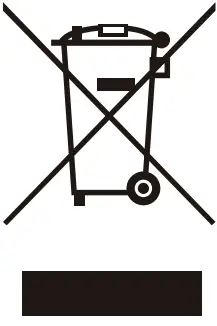 This symbol on the product or on its packaging indicates that this product must not be disposed of with your household waste. Instead, it is your responsibility to dispose of your waste equipment by handing it over to a designated collection point for the recycling of waste electrical and electronic equipment. The separate collection and recycling of your waste equipment at the time of disposal will help to conserve natural resources and ensure that it is recycled in a manner that protects human health and the environment. For more information about where you can drop off your waste equipment for recycling, please contact your local city office, your household waste disposal service or the shop where you purchased the product.
Batteries
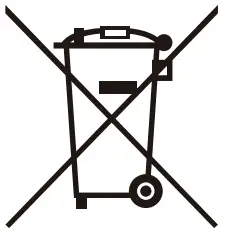 In accordance with the Battery Directive, used batteries should not be disposed of in the domestic waste. Dispose your batteries in the collection containers specific for this purpose in retail stores.
ROHS (Restriction of Hazardous Substance)
European Directive 2011/65/EU
 This European directive limits the use of dangerous and hazardous substances which are difficult to recycle. This allows recycling easily the EEE and contributes to the safeguard of the environment. Substances included in this product match to the RoHS directive.
 The terms HDMI and HDMI High-Definition Multimedia Interface, and the HDMI Logo are trademarks or registered trademarks of HDMI Licensing Administrator, Inc. in the United States and other countries.
 Manufactured under license from Dolby Laboratories. Dolby, Dolby Audio, and the double-D symbol are trademarks of Dolby Laboratories Licensing Corporation.
 For DTS patents, see http://patents.dts.com. Manufactured under license from DTS, Inc. (for companies headquartered in the U.S./Japan/Taiwan) or under license from DTS Licensing Limited (for all other companies). DTS, DTS-HD Master Audio, DTS-HD, Virtual:X, and the DTS-HD logo are registered trademarks or trademarks of DTS, Inc. in the United States and other countries. © 2020 DTS, Inc. ALL RIGHTS RESERVED.
EPREL Registration Information
| Model identifier | Eprel registration numbe | Model identifier | Eprel registration number |
| 32A4G | 428583 | 40A4G | 429505 |
| 32A40G | 430043 | 40A40G | 429511 |
| 32A41G | 430044 | 40A41G | 429512 |
| 32A42G | 430046 | 40A42G | 429514 |
| 32A41GCH | 430047 | 40A41GCH | 429515 |
| 32A42GCH | 430048 | 40A42GCH | 429517 |
| 32A48GNE | 430050 | 40A48GNE | 429518 |
| 32A46G | 430051 | 40A46G | 429519 |
| 32A47G | 430052 | 40A47G | 429520 |
| 32A48G | 430053 | 40A48G | 429521 |
| 32A49G | 430054 | 40A49G | 429522 |
| 32A48GCH | 430055 | 40A48GCH | 429524 |
| 32A49GCH | 430057 | 40A49GCH | 429525 |
| 32A49GNE | 430058 | 40A49GNE | 429526 |
| 32A4GTUK | 430059 | 40A4GTUK | 429527 |
| 32A40GTUK | 430060 | 40A40GTUK | 429529 |
| 32A41GTUK | 430061 | 40A41GTUK | 429530 |
| 32A42GTUK | 430063 | 40A42GTUK | 429531 |
| 32A46GTUK | 430064 | 40A46GTUK | 429532 |
| 32A47GTUK | 430065 | 40A47GTUK | 429533 |
 Hisense Global Website - Hisense Global
 Patents - DTS