Performance Products Wireless Transceiver
Tiger Wireless Transceiver – Product Information
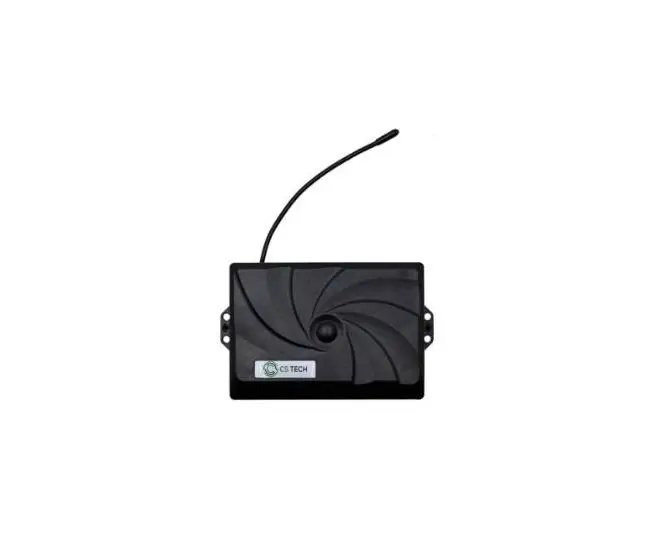
The Tiger Wireless Transceiver is a communication device
designed for aviation and marine safety. Its case is made of
extruded aluminum, providing EMI/RFI protection, and meets IP66
standards. The transceiver has LED lights on the front panel for
radio connection, wireless headset pairing, stereo audio in
connection, intercom connection, and power status. Additionally,
there is a rear panel antenna installation option available.
Tiger Wireless Transceiver – Usage Instructions
- Front Panel Antenna Installation:
- Connect the antenna to the designated port on the front
panel.
- Connect the antenna to the designated port on the front
- Radio Connection:
- Connect the transceiver to the radio using a compatible
cable. - The Radio LED on the front panel will light up blue when
connected to a radio.
- Connect the transceiver to the radio using a compatible
- Wireless Headset Pairing:
- Pair any wireless headset to the transceiver by following the
headset’s pairing instructions. - The Headset LED on the front panel will light up green when any
wireless headset is paired to the transceiver.
- Pair any wireless headset to the transceiver by following the
- Stereo Audio In Connection:
- Connect the stereo audio source to the designated Line-In port
on the front panel. - The Line, Stereo Audio In LED on the front panel will light up
green when connected.
- Connect the stereo audio source to the designated Line-In port
- Intercom Connection:
- Connect the transceiver to an intercom system using a
compatible cable. - The Intercom LED on the front panel will light up yellow when
connected to the intercom. - The LED will go off when the radio PTT (Push-To-Talk) button is
pushed.
- Connect the transceiver to an intercom system using a
- Power Status:
- Turn on the transceiver using the designated power button.
- The Power LED on the front panel will light up green when the
device is on. - The Power LED will light up red when the battery is low and
needs to be charged or replaced.
- Rear Panel Antenna Installation:
- If preferred, connect the antenna to the designated port on the
rear panel.
- If preferred, connect the antenna to the designated port on the
For more information and support, visit the Tiger Performance
Products, Inc. website at www.tigerperformance.com.
TIGER PERFORMANCE PRODUCTS, INC.
Aviation & Marine Safety & Communications
TIGER WIRELESS TRASCEIVER USER- INSTALLATION MANUAL
The Tiger Wireless Transceiver case is made off extruded aluminum, providing EMI/RFI protection and meets IP66
Front Panel Antenna Installation
Radio LED- Lights Blue when connected to a radio
Headset LED- Lights Green When any wireless headset is paired to transceiver
Line, Stereo Audio In, Lights Green when connected
Intercom LED- Lights Yellow when Connected to intercom. Led goes off when radio PTT is pushed
Power- Lights Green when On
Power-Lights Red when On
2437 Berg Road · West Seneca, New York 14218 · U.S.A. 1-716-674-8545 · Fax: 1-716-674-7497 Email: [email protected]
Web: www.tigerperformance.com
TIGER PERFORMANCE PRODUCTS, INC.
Aviation & Marine Safety & Communications
Rear Panel Antenna Installation
Notes: · All rear panel connectors are positive locking waterproof and shielded mini XLR to protect against EMI/RFI interference. · The end user may choose an active front or rear panel antenna. Both front and rear antenna jacks cannot be both active at the same time. The end user must choose which location is to be active at time of purchase.
2437 Berg Road · West Seneca, New York 14218 · U.S.A. 1-716-674-8545 · Fax: 1-716-674-7497 Email: [email protected] Web: www.tigerperformance.com
TIGER PERFORMANCE PRODUCTS, INC.
Aviation & Marine Safety & Communications
BULK HEAD MOUNTING INSTRUCTIONS. 1.With the mounting brackets installed as shown. Locate where the transceiver is to be mounted. 2.Using either (2) or (4) mounting bracket, using a 1/8″ drill bit, drill the mounting holes. 3. Securely fasten the transceiver to the bulkhead. 4.Insert the (4) Transceiver into the hole. 5.Slide the mounting brackets into the side slots as shown slide the (4) brackets firmly against the back side of the panel while firmly holding the front panel against the panel and firmly tighten the (4) bracket screws. 6.Re-install the back panel. 7.Plug in the power cable into the rear panel and connect the other end to switched 12-36 volt power. 8.If applicable, plug the accessory radio cable into the rear panel. Plug the other end into the radio accessory jack on the radio. 9.If applicable, plug the accessory intercom cable into the rear panel. Plug the other end into any intercom headset/helmet jack 10.If Applicable, plug the accessory mono or stereo audio in adapter cable into the rear panel. Connect the mono or stereo RCA cable into the adapter. Plug the other end of the RCA cable into the audio source.
2437 Berg Road · West Seneca, New York 14218 · U.S.A. 1-716-674-8545 · Fax: 1-716-674-7497 Email: [email protected] Web: www.tigerperformance.com
TIGER PERFORMANCE PRODUCTS, INC.
Aviation & Marine Safety & Communications
FLUSH PANEL MOUNT INSTALLATION INSTRUCTIONS 1.Using the provide panel cutout template, cut out the panel to match the panel 2.Remove the (4) rear panel screws. 3.Carefully detach the rear panel and rotate it inside the case. 4.Insert the (4) Transceiver into the hole. 5.Slide the mounting brackets into the side slots as shown slide the (4) brackets firmly against the back side of the panel while firmly holding the front panel against the panel and firmly tighten the (4) bracket screws. 6.Re-install the back panel. 7.Plug in the power cable into the rear panel and connect the other end to switched 12-36 volt power. 8.If applicable, plug the accessory radio cable into the rear panel. Plug the other end into the radio accessory jack on the radio. 9.If applicable, plug the accessory intercom cable into the rear panel. Plug the other end into any intercom headset/helmet jack 10.If Applicable, plug the accessory mono or stereo audio in adapter cable into the rear panel. Connect the mono or stereo RCA cable into the adapter. Plug the other end of the RCA cable into the audio source.
2437 Berg Road · West Seneca, New York 14218 · U.S.A. 1-716-674-8545 · Fax: 1-716-674-7497 Email: [email protected] Web: www.tigerperformance.com
 MSA Gallet Flight Helmets | Helicopter Helmets