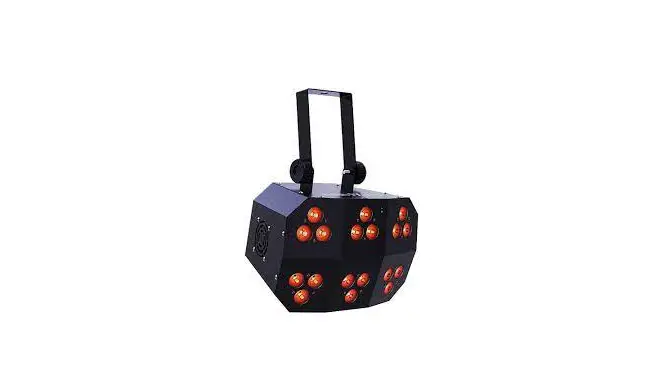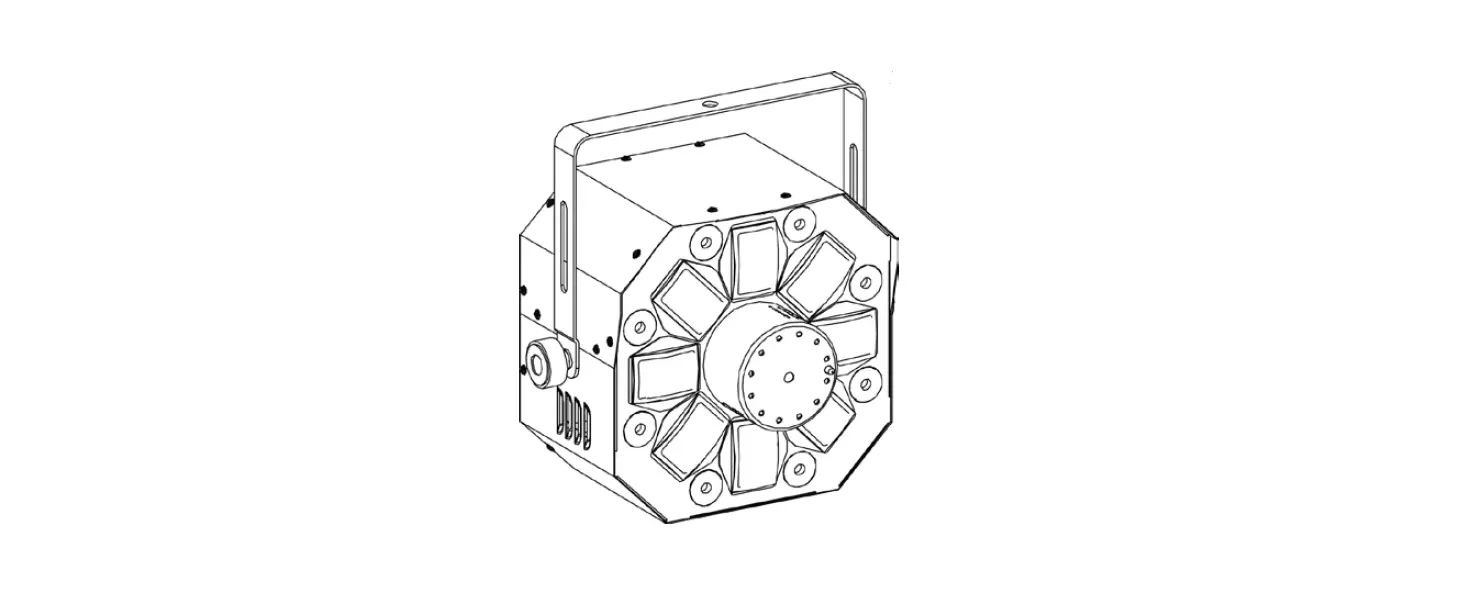

CHAUVET DJ Swarm Wash FX
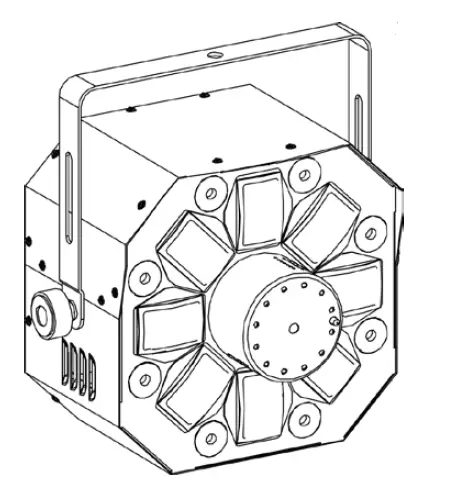
LASER LIGHT AVOID DIRECT EYE EXPOSURECLASS 3R LASER PRODUCT CLASSIFIED PER EN/IEC 60825-1:2007 Complies with FDA performance standards for laser products except for deviations pursuant to Laser Notice No. 50, dated June 24, 2007.
BEFORE YOU BEGIN
What Is Included
- Swarm Wash FX
- External power cord
- Warranty card
- User Manual
Unpacking Instructions
Carefully unpack the product immediately and check the box to make sure all the parts are in the package and are in good condition.
Claim
If the box or the contents (the product and included accessories) appear damaged from shipping or show signs of mishandling, notify the carrier immediately, not Chauvet. Failure to do so in a timely manner may invalidate your claim with the carrier. In addition, keep the container and all the packing material for inspection. For other issues, such as missing components or parts, damage not related to shipping, or concealed damage, file a claim with Chauvet within 7 days of delivery.
Manual Conventions
| Convention | Meaning |
| 1–512 | A range of values |
| 50/60 | A set of values of which only one can be chosen |
| Settings | A menu option not to be modified |
| Menu > Settings | A sequence of menu options to be followed |
| <ENTER> | A key to be pressed on the product’s control panel |
| ON | A value to be entered or selected |
Symbols
| Meaning |
| Critical installation, configuration, or operation information. Ignoring this information can cause the product to not work, damage it, or cause harm to the operator. |
| Important installation or configuration information. The product may not function correctly if this information is not used. |
| Useful information. |
Disclaimer
Chauvet believes that the information contained in this manual is accurate in all respects. However, Chauvet assumes no responsibility and specifically disclaims any and all liability to any party for any loss, damage or disruption caused by any errors or omissions in this document, whether such errors or omissions result from negligence, accident or any other cause. Chauvet reserves the right to revise the content of this document without any obligation to notify any person or company of such revision, however, Chauvet has no obligation to make, and does not commit to make, any such revisions. Download the latest version from www.chauvetlighting.com.
The works of authorship contained in this manual, including, but not limited to, all design, text and images are owned by Chauvet. © Copyright 2016 Chauvet & Sons, LLC. All rights reserved. Electronically published by Chauvet in the United States of America. CHAUVET, the Chauvet logo and “Swarm Wash FX” are registered trademarks or trademarks of Chauvet & Sons, LLC. (d/b/a Chauvet and Chauvet Lighting) in the United States and other countries. Other company and product names and logos referred to herein may be trademarks of their respective companies.
Safety Notes
The Safety Notes include important laser system safety information. Read and understand all instructions before powering on the laser for the first time. Knowing these safety instructions is crucial to avoiding laser eye injury and breaking the law. Keep this User Manual in a safe place for future reference.
STOP AND READ ALL LASER SAFETY DATA
- Lasers can be hazardous and have unique safety considerations. Permanent eye injury and blindness are possible if lasers are used incorrectly. Pay close attention to each safety REMARK and WARNING statement in this User Manual. Read all instructions carefully BEFORE operating this device.
- Always connect the product to a grounded circuit to avoid the risk of electrocution.
- Always disconnect the product from the power source before cleaning.
- Avoid direct eye exposure to the light source while the product is on.
- Make sure the power cord is not crimped or damaged.
- Never disconnect the product from power by pulling or tugging on the cord.
- If mounting the product overhead, always secure to a fastening device using a safety cable.
- Make sure there are no flammable materials close to the product when operating.
- Do not touch the product’s housing when operating because it may be very hot.
- This product is not intended for permanent installation.
- Always make sure that the voltage of the outlet to which you are connecting the product is within the range stated on the decal or rear panel of the product.
- The product is for indoor use only! (IP20) To prevent risk of fire or shock, do not expose the product to rain or moisture.
- Always install the product in a location with adequate ventilation, at least 20 in (50 cm) from adjacent surfaces.
- Be sure that no ventilation slots on the product’s housing are blocked.
- Never connect the product to a dimmer.
- Always use the mounting bracket to carry the product.
- Do not switch the product on/off in short intervals. This will reduce the laser diode life.
- Do not shake this product. Avoid brute force when mounting or operating this product.
- ALWAYS use a safety cable when mounting the product overhead.
- The ambient operating temperature for the laser is 59 °F to 95 °F (15 °C to 35 °C). Do not operate this product outside this range.
- In the event of a serious operating problem, stop using the product immediately.
- Never try to repair the product. Repairs carried out by unskilled people can lead to damage or malfunction. Contact the nearest authorized technical assistance center.
- Avoid direct eye contact with laser light. Never intentionally expose your eyes or others to direct laser light.
- This laser product can potentially cause instant eye injury or blindness if laser light directly strikes the eyes.
- It is illegal and dangerous to shine this laser into audience areas, where the audience or other personnel could get direct laser beams or bright reflections into their eyes.
- It is a U.S. federal offense to shine any laser at aircraft.
- Use of controls, adjustments, or procedures other than those specified in this User Manual may result in hazardous radiation exposure.
- To eliminate wear and improve its lifespan, during periods of non-use completely disconnect from power via breaker or by unplugging it.
- DO NOT attempt any repairs. Repairs and servicing must be carried out by a certified technician. Unauthorized modifications are forbidden for safety reasons!
- Keep this User Manual for future consultation. If transferring ownership of the product to another user, be sure this document is kept with the laser.
Non-Interlocked Housing Warning
- This unit contains high power laser devices internally.
- Do not open the laser housing, due to potential exposure to unsafe levels of laser radiation.
- The laser power levels, accessible if the unit is opened, can cause instant blindness, skin burns, and fires.
Laser Safety Notes
STOP AND READ ALL THE LASER SAFETY NOTES BELOW Laser light is different from any other light. Laser light can cause eye injury if the product is not set up and used properly. Laser light is a thousand times more concentrated than any other kind of light. This concentration can cause instant eye injuries by burning the retina (the light-sensitive portion at the back of the eye). The heat from a laser light cannot be felt, but it can still injure or blind product operators and the audience. Even very small amounts of laser light at long distances are are potentially hazardous.
DO NOT assume that exposure to an individual laser beam is safe, even a tiny beam split off from a larger beam. This laser product uses dozens of milliwatts of laser power—Class 3B levels internally—and splits them into multiple beams—Class 3R levels. The individual Class 3R level beams are potentially hazardous to the eyes. DO NOT assume that a moving laser light is safe. Laser light is never without risk. Since eye injuries can occur instantly, it is critical to prevent the possibility of ANY direct eye exposure. According to laser safety regulations, it is not legal to aim Class 3R lasers into areas where people can be exposed, even if the laser is aimed below people’s faces, such as at a dance floor.
- Do not operate the laser without first reading and understanding all the safety and technical data in this manual.
- ALWAYS set up and install all laser effects so that any laser light is at least 3 meters (9.8 feet) above the floor on which people are standing. See the Proper Usage section of this manual.
- After setup, and prior to public use, test the lasers to ensure they are functioning properly. Do not use the product if any defect is detected.
- DO NOT use laser if it is emitting only one or two beams, rather than dozens/hundreds, as this indicates damage to the diffraction grating optic, and allows emission of laser levels higher than Class 3R.
- DO NOT point lasers at people or animals.
- DO NOT look into the laser aperture or laser beams.
- DO NOT point lasers into areas where people could be exposed to them..
- DO NOT point lasers at highly reflective surfaces such as windows, mirrors, and shiny metal. Even laser reflections can be hazardous.
- Never point a laser at aircraft; this is a U.S. federal offense.
- Never point un-terminated laser beams into the sky.
- Do not expose the output optic (aperture) to harsh cleaning chemicals.
- Do not use the laser if the housing is damaged, open, or if the optics appear damaged in any way.
- Never open the laser housing. The high laser power levels inside of the protective housing can start fires or burn skin, and will cause instant eye injury.
- Never leave this product running unattended.
- The operation of a Class 3R laser show is allowed only if the lasers are operated by a skilled and well-trained professional, who is familiar with the data included in this manual.
- The legal requirements for using laser entertainment products vary from country to country. The user is responsible for the legal requirements in the location/country of use.
CAUTION! Do not operate this device in ways not specified in this User Manual. Failure to follow the instructions will void the warranty, may damage the product, or injure the user or the audience.
CAUTION! This product cannot be discarded with household waste. Contact your local waste management service for electronic disposal regulations in your area.
Laser Safety Label Reproduction
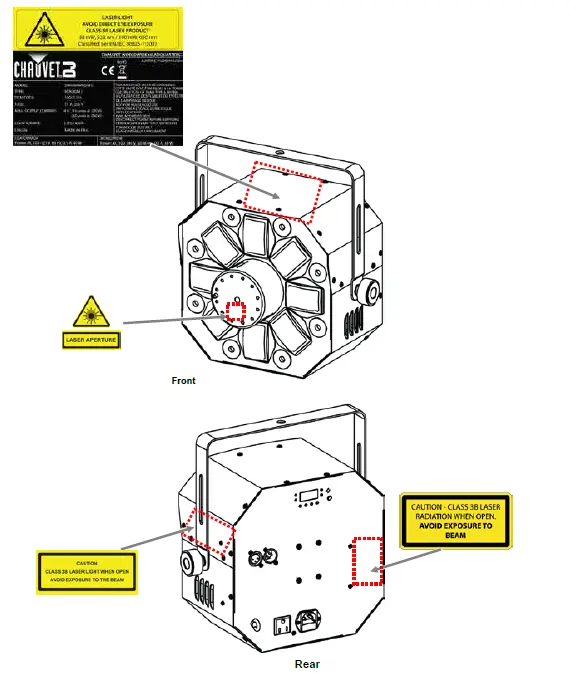
Laser Exposure Warning
LASER LIGHT AVOID DIRECT EYE EXPOSURE Further guidelines and safety programs for safe use of lasers can be found in the ANSI Z136.1 Standard “For Safe Use of Lasers,” available from the Laser Institute of America: www.laserinstitute.org. Many local governments, corporations, agencies, military, and others, require all lasers to be used under the guidelines of ANSI Z136.1. Laser Display guidance can be obtained via the International Laser Display Association: www.laserist.org.
Laser Emission Data
As measured under IEC measurement conditions for classification.
| Laser Classification | Class 3R |
| Green Laser Medium | DPSS Nd:YVO4, 532 nm/30 mW |
| Red Laser Medium | LD GaAIAs, 650 nm/100 mW |
| Beam Diameter | <5 mm at aperture |
| Pulse Data | All pulses < 4 Hz (>0.25 sec) |
| Divergence (each beam) | <2 mrad |
| Divergence (total light) | <160 degrees |
| Laser Power of Each Beam from Aperture* | <5 mW |
Laser Compliance Statement
This laser product complies with EN/IEC 60825-1 Ed 2, 2007-03, and U.S. FDA/CDRH FLPPS via the terms of Laser Notice No. 50 dated June 24, 2007. This laser device is classified 3R. (Class 3R is the international equivalent of U.S. Class IIIa.) No maintenance is required to keep this product in compliance with laser performance standards.
INTRODUCTION
Overview
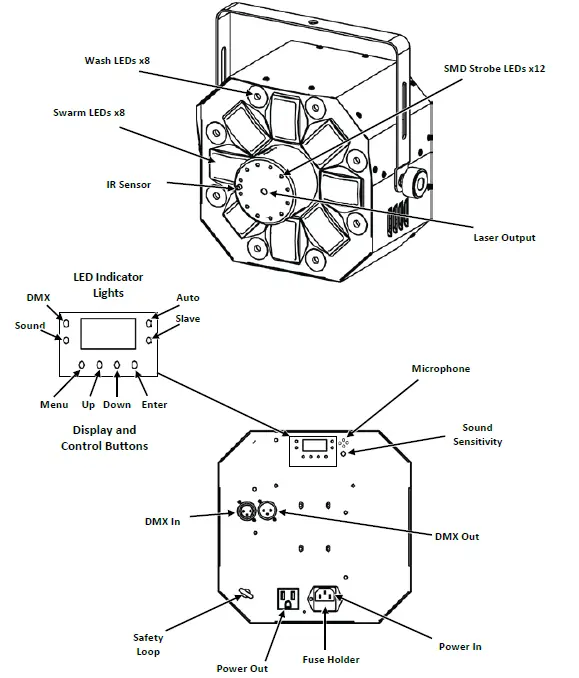
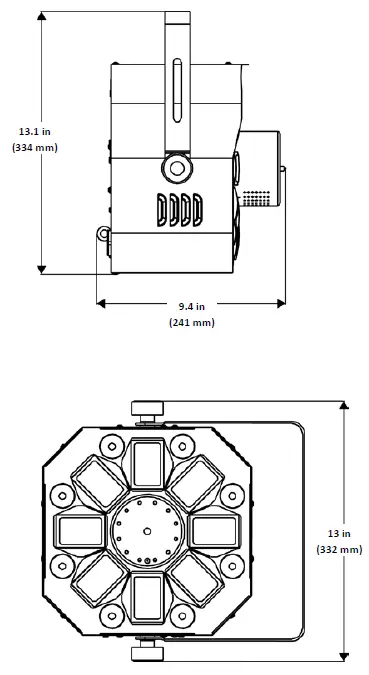
Dimensions
SETUP
AC Power
The Swarm Wash FX has an internal auto-ranging power supply and it can work with an input voltage range of 100 to 240 VAC, 50/60 Hz. To determine the product’s power requirements (circuit breaker, power outlet, and wiring), use the current value listed on the label affixed to the product’s back panel, or refer to 6. Technical Specifications in this manual. The listed current rating indicates the product’s average current draw under normal conditions.
- Always connect the product to a protected circuit (circuit breaker or fuse). Make sure the product has an appropriate electrical ground to avoid the risk of electrocution or fire.
- To eliminate wear and improve its lifespan, during periods of non-use completely disconnect from power via breaker or by unplugging it.
Never connect the product to a rheostat (variable resistor) or dimmer circuit, even if the rheostat or dimmer channel serves only as a 0 to 100% switch.
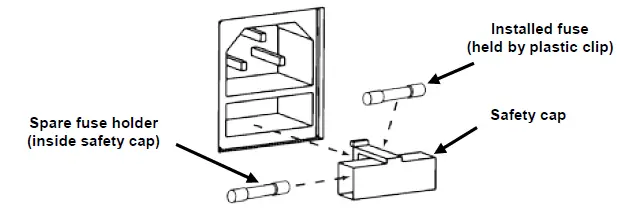
Fuse Replacement
- Disconnect the product from power.
- Wedge the tip of a flat-head screwdriver into the slot of the fuse holder.
- Pry the fuse holder out of the housing.
- Remove the blown fuse from the holder.
- Replace with a fuse of the exact same type and rating.
- Insert the fuse holder back in place and reconnect power.
Disconnect the product from power before replacing the fuse.
 Power Linking
Power linking is when products are daisy chained together through the power in and power out plugs, allowing many products to be powered from one wall outlet. Up to 15 Swarm Wash FX products can be power linked at 120 V, and up to 26 Swarm Wash FX products can be power linked at 230 V. The diagram below illustrates the power linking process.
Power Linking Diagram
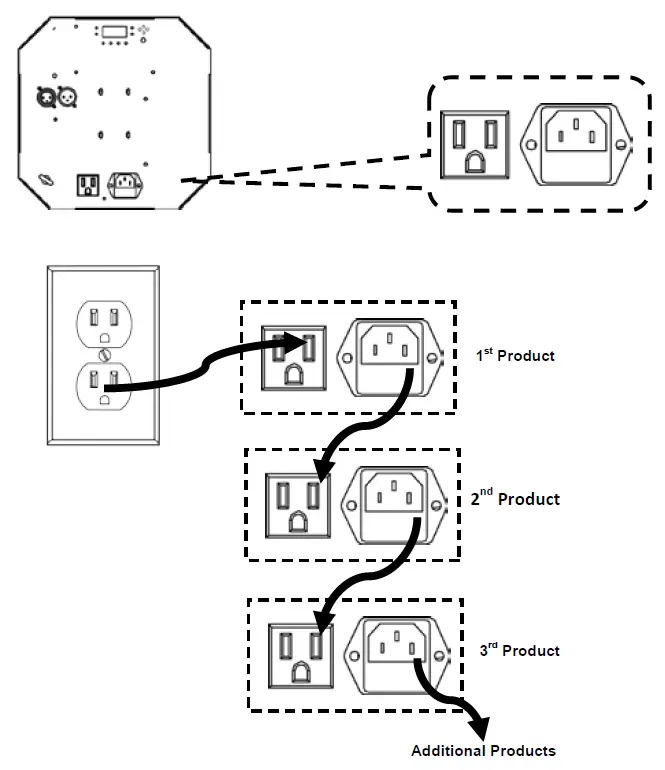
- Do not power link more than 15 Swarm Wash FX on 120 V.
- Do not power link more than 26 Swarm Wash FX on 230 V.
The power linking diagram above shows the North American version of the product only! Power linking connectors and requirements differ from country to country, and region to region. If using this product anywhere other than North America, consult with the local Chauvet distributor.
Mounting
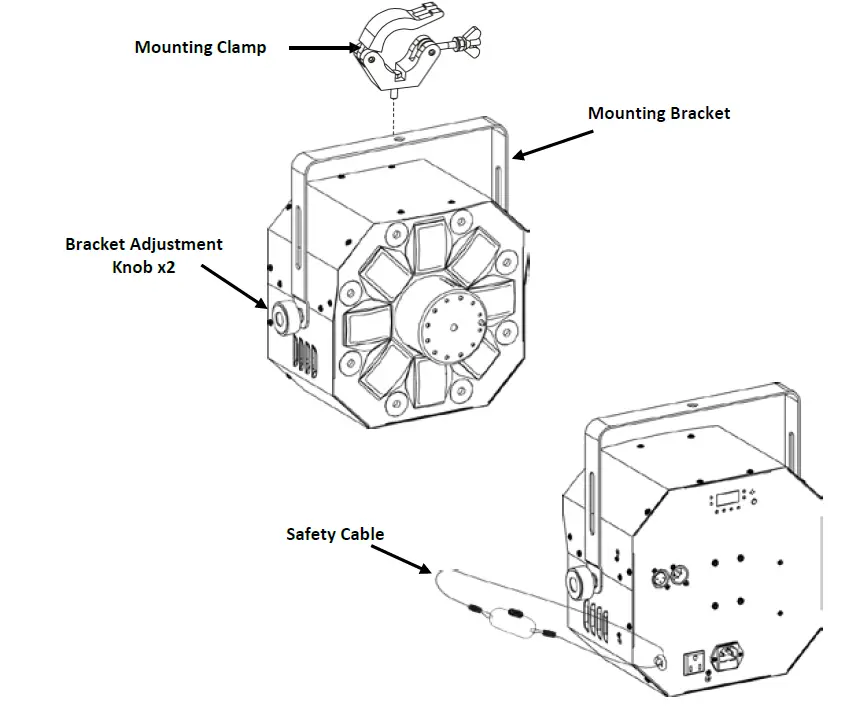
Before mounting the product, read and follow the safety recommendations indicated in the Safety Notes. Use at least one mounting point per product. Make sure the mounting clamp (such as CLP-15 from Chauvet) is capable of supporting the weight of the product. For our Chauvet line of mounting clamps, go to www.chauvetlighting.com/cables-clamps-main.html.
Orientation
The Swarm Wash FX must be mounted in a position that includes planning for safe laser usage. In addition, make sure adequate ventilation is provided around the product.
Rigging
- Before deciding on a location for the product, always make sure there is easy access to the product for maintenance and programming.
- Make sure that the structure or surface onto which you are mounting the product can support the product’s weight (see Technical Specifications).
- When mounting the product overhead, always use a safety cable (such as CH-05 from Chauvet). Mount the product securely to a rigging point, such as an elevated platform or a truss.
- When rigging the product onto a truss, you should use a mounting clamp of appropriate weight capacity. The bracketed has a 13-mm hole, which is appropriate for this purpose.
- The bracket adjustment knobs allow for directional adjustment when aiming the product to the desired angle. Only loosen or tighten the bracket knobs manually. Using tools could damage the knobs.
Mounting Diagram
Proper Usage
This product is for overhead mounting only. For safety purposes, Chauvet recommends mounting lighting effect products on steady elevated platforms or sturdy overhead supports using suitable hanging clamps. In all cases, use safety cables. Obtain appropriate mounting hardware from your lighting vendor. International laser safety regulations require that laser products must be operated in the fashion illustrated below, with a minimum of 3 meters (9.8 ft) of vertical separation between the floor and the lowest laser light. Additionally, 3 meters of horizontal separation is required between laser light and audience or other public spaces.
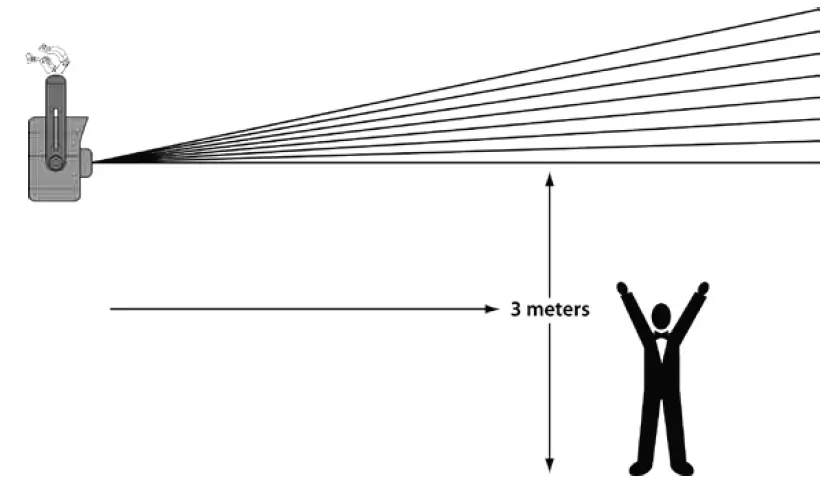
CAUTION! Use of controls, adjustments, or procedures other than THOSE specified IN THIS USER MANUAL may result in hazardous radiation exposure.
OPERATION
This product is not designed for continual use. Make sure there are regular breaks during operation to maximize the life of your laser. Always disconnect the Swarm Wash FX from power when not in use.
Control Panel Operation
To access the control panel functions, use the four buttons located underneath the display. When the product is on, the LED monitor on the rear panel will show the current operating mode (Standalone or DMX). The product will retain the last saved settings when powered off.
| Button | Function |
| <MENU> | Selects an operation mode or backs out of the current menu option |
| <UP> | Scrolls up the list of options or selects a higher value |
| <DOWN> | Scrolls down the list of options or selects a lower value |
| <ENTER> | Activates a menu option or a selected value |
Menu Map
| Mode | Programming Steps | Description | |
| DMX | 2-CH | d001–d511 | Sets DMX address and personality |
| 18CH | d001–d495 | ||
| Auto | P-– | P 1-15 | Selects Auto Program Effect and speed (slow to fast) |
| Speed | S-– | S.01–S.99 | Speed for Sound Mode and Auto Programs |
| Sound | SND | SN 1-15 | Selects Sound Active Mode Program Effects |
| IR Function | SET | ON | On/Off IR functions |
| OFF | |||
Auto and Sound Modes Defined
| Program | Effect |
| 1 | All Effects- Derby, Laser, Strobes and Wash |
| 2 | Wash Only |
| 3 | Laser Only |
| 4 | Derby Only |
| 5 | Strobes Only |
| 6 | Wash, Laser and Derby |
| 7 | Wash, Laser and Strobes |
| 8 | Wash, Derby and Strobes |
| 9 | Laser, Derby and Strobes |
| 10 | Wash and Laser |
| 11 | Wash and Derby |
| 12 | Wash and Strobes |
| 13 | Laser and Derby |
| 14 | Laser and Strobes |
| 15 | Derby and Strobes |
Configuration (DMX)
Set the product in DMX mode to control with a DMX controller. The product uses 3-pin DMX cable.
- Connect the product to a suitable power outlet.
- Connect a DMX cable from the DMX output of the DMX controller to the DMX input socket on the product.
Starting Address
When selecting a DMX starting address, always consider the number of DMX channels used by the fixture. If you choose a starting address that is too high, you could restrict the access to some of the product’s channels. The Swarm Wash FX uses 2 or 18 DMX channels, which means the highest DMX address you can use in 18 Channel mode, is 495. If you are not familiar with the DMX protocol, download the DMX Primer from http://www.chauvetlighting.com. To select the starting DMX address, do the following:
- Press <MENU> repeatedly until 02CH or 18CH blinks on the display and the DMX light come on.
- Press <ENTER> and d001–d495 will appear on the screen.
- Use <UP> or <DOWN> to select the starting address.
- Press <ENTER> to put the fixture in DMX mode. The display will continue to blink.
The display will continue to blink until the fixture receives a DMX signal.
DMX Channel Assignments and Values
| Channel | Function | Value | Setting |
|
1 |
Auto Programs | 000 ó 015 | Blackout |
| 016 ó 030 | Wash Only | ||
| 031 ó 045 | Lasers Only | ||
| 046 ó 060 | Derby Only | ||
| 061 ó 075 | Strobes Only | ||
| 076 ó 090 | Wash, Laser and Derby | ||
| 091 ó 105 | Wash, Laser and Strobes | ||
| 106 ó 120 | Wash, Derby and Strobes | ||
| 121 ó 135 | Laser, Derby and Strobes | ||
| 136 ó 150 | Wash and Laser | ||
| 151 ó 165 | Wash and Derby | ||
| 166 ó 180 | Wash and Strobes | ||
| 181 ó 195 | Laser and Derby | ||
| 196 ó 210 | Laser and Strobes | ||
| 211 ó 225 | Derby and Strobes | ||
| 226 ó 255 | All effects | ||
| 2 | Auto Program Speed | 000 ó 200 | Selects speed, (slow to fast) |
| Sound Active Mode | 201 ó 255 | Sound Active mode – all effects | |
|
3–10 |
Wash Group 1–8 | 001 ó 051 | Blackout |
| 052 ó 102 | Red | ||
| 103 ó 153 | Green | ||
| 154 ó 204 | Blue | ||
| 205 ó 255 | UV | ||
| 11 | Wash Strobe | 000 ó 255 | Strobe Speed (slow to fast) |
| Channel | Function | Value | Setting |
|
12 |
Derby | 000 ó 009 | Blackout |
| 010 ó 014 | Red | ||
| 015 ó 019 | Green | ||
| 020 ó 024 | Blue | ||
| 025 ó 029 | Amber | ||
| 030 ó 034 | White | ||
| 035 ó 039 | White + Red | ||
| 040 ó 044 | Red + Green | ||
| 045 ó 049 | Green + Blue | ||
| 050 ó 054 | Blue + Amber | ||
| 055 ó 059 | Amber + White | ||
| 060 ó 064 | White + Green | ||
| 065 ó 069 | Green + Amber | ||
| 070 ó 074 | Amber + Red | ||
| 075 ó 079 | Red + Blue | ||
| 080 ó 084 | Blue + White | ||
| 085 ó 089 | Red + Green + Blue | ||
| 090 ó 094 | Red + Green + Amber | ||
| 095 ó 099 | Red + Green + White | ||
| 100 ó 104 | Red + Amber + Blue | ||
| 105 ó 109 | Red + White + Blue | ||
| 110 ó 114 | Red + Amber + White | ||
| 115 ó 119 | Amber + Green + Blue | ||
| 120 ó 124 | Blue + Green + White | ||
| 125 ó 129 | Amber + Green + White | ||
| 130 ó 134 | Amber + White + Blue | ||
| 135 ó 139 | Red + Green + Blue + Amber | ||
| 140 ó 144 | Red + Green + Blue + White | ||
| 145 ó 149 | Green + Blue + Amber + White | ||
| 150 ó 154 | Red + Green + Amber + White | ||
| 155 ó 159 | Red + Blue + Amber + White | ||
| 160 ó 164 | Red + Green + Blue + Amber + White | ||
| 165 ó 209 | Automatic (single colors only) | ||
| 210 ó 222 | Automatic (two colors at a time) | ||
| 223 ó 255 | Automatic Sound |
| Channel | Function | Value | Setting |
| 13 | Derby Strobe | 000 ó 004 | No Function |
| 005 ó 200 | Strobe speed (fast to slow) | ||
| 201 ó 255 | Sound Active Mode | ||
|
14 |
Derby Speed | 000 ó 004 | Stop |
| 005 ó 127 | Rotate right (slow to fast) | ||
| 128 ó 133 | Stop | ||
| 134 ó 255 | Rotate left (slow to fast) | ||
|
15 |
SMD Strobe | 000 ó 009 | Blackout |
| 010 ó 019 | Auto Program 1 (fast to slow) | ||
| 020 ó 029 | Auto Program 2 (fast to slow) | ||
| 030 ó 039 | Auto Program 3 (fast to slow) | ||
| 040 ó 049 | Auto Program 4 (fast to slow) | ||
| 050 ó 059 | Auto Program 5 (fast to slow) | ||
| 060 ó 069 | Auto Program 6 (fast to slow) | ||
| 070 ó 079 | Auto Programs 7 (fast to slow) | ||
| 080 ó 089 | Auto Programs 8 (fast to slow) | ||
| 090 ó 099 | Auto Programs 9 (fast to slow) | ||
| 100 ó 109 | Auto Programs 10 (fast to slow) | ||
| 110 ó 119 | Auto Programs 11 (fast to slow) | ||
| 120 ó 200 | Full on | ||
| 201 ó 255 | Sound- Active strobe | ||
|
16 |
Lasers | 000 ó 009 | Blackout |
| 010 ó 049 | Red on | ||
| 050 ó 089 | Green on | ||
| 090 ó 129 | Green and red, alternating strobe | ||
| 130 ó 169 | Red on and green strobe | ||
| 170 ó 209 | Green on and red strobe | ||
| 210 ó 255 | Red and Green Strobe | ||
| 17 | Laser Strobe | 000 ó 004 | No function |
| 005 ó 254 | Strobe (fast to slow) | ||
| 255 | Sound- Active strobe | ||
|
18 |
Motor LED | 000 ó 004 | Stop |
| 005 ó 127 | Rotate right (slow to fast) | ||
| 128 ó 133 | Stop | ||
| 134 ó 255 | Rotate left (slow to fast) |
| Channel | Function | Value | Setting |
|
1 |
Auto Programs | 000 ó 015 | Blackout |
| 016 ó 030 | Wash Only | ||
| 031 ó 045 | Lasers Only | ||
| 046 ó 060 | Derby Only | ||
| 061 ó 075 | Strobes Only | ||
| 076 ó 090 | Wash, Laser and Derby | ||
| 091 ó 105 | Wash, Laser and Strobes | ||
| 106 ó 120 | Wash, Derby and Strobes | ||
| 121 ó 135 | Laser, Derby and Strobes | ||
| 136 ó 150 | Wash and Laser | ||
| 151 ó 165 | Wash and Derby | ||
| 166 ó 180 | Wash and Strobes | ||
| 181 ó 195 | Laser and Derby | ||
| 196 ó 210 | Laser and Strobes | ||
| 211 ó 225 | Derby and Strobes | ||
| 226 ó 255 | All effects | ||
| 2 | Auto Program Speed | 000 ó 200 | Selects speed, (slow to fast) |
| Sound Active Mode | 201 ó 255 | Sound Active mode – all effects |
For manual operation of LEDs and lasers using DMX control, be sure Channel 1 is set to the appropriate DMX address..
IRC-6 Infrared Remote Control
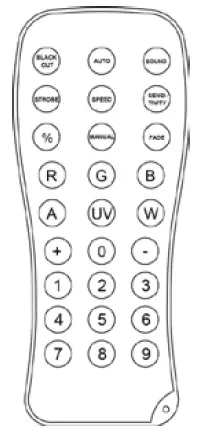
The Swarm Wash FX is compatible with the IRC-6 infrared remote control from Chauvet. To activate IR mode, press any button on the IRC-6. Be sure the IRC-6 remote is pointing directly at the product and there is nothing in between the remote and the product.
IRC-6 Operation
Auto Mode
To run the product in an auto program: Press <AUTO> on the IRC-6.
Sound-Active Mode
To run the product in a Sound-Active program: Press <SOUND> on the IRC-6.
Speed Adjust
To adjust the speed of the auto program
- Press <SPEED>
- Use <+> or <-> to increase or decrease the program speed.
To modify Auto and Sound-Active Mode effects with IRC-6 Buttons:
| Auto Mode / Sound-Active Mode |
| <1> – Turn On/Off wash effect |
| <2> – Turn On/Off derby effect |
| <3> – Turn On/Off laser effect |
| <4> – Turn On/Off strobe effect |
Black Out
To black out the light: Press <BLACK OUT> on the IRC-6. This will turn off the light until the button is pressed again.
NOTE: The IRC will not respond to any inputs when Black Out is activated. If the remote does not respond when a button is pressed, try pressing <BLACK OUT>. You may have inadvertently activated Black Out. All other buttons on the IRC-6 infrared remote control have no function with this product
Configuration (Standalone)
Set the product in one of the Standalone modes to control without a DMX controller. Connect the product to a suitable power outlet. Never connect a product that is operating in any Standalone mode (Static, Automatic, or Sound) to a DMX string connected to a DMX controller. Products in Standalone mode may transmit DMX signals that could interfere with the DMX signals from the controller.
Sound-Active Mode
To enable the Sound-Active mode, do the following:
- Press <MENU> repeatedly until SND blinks on the display.
- SN1—SN15 blinks on the display and the Sound light comes on.
- Use <UP> or <DOWN> to select the desired Sound-Active program.
- Press <ENTER> to put the fixture into the selected Sound-Active mode.
- Turn the music on and adjust the sound sensitivity knob until the product starts responding to the beat of the music.
The product will only respond to low frequencies of music (bass and drums). The laser will blackout when in Sound-Active mode after 3 seconds of silence or noise below the sensitivity setting.
Automatic Mode To enable the Automatic mode, follow the instructions below:
- Press <MENU> repeatedly until P– blinks on the display.
- P 1–P15 blinks on the display and the Auto light comes on.
- Use <UP> or <DOWN> to select the desired Automatic mode.
- Press <ENTER>.
Speed Adjustment
To change the speed of Auto or Sound-Active mode, follow the instructions below:
- Press <MENU> repeatedly until S– shows on the display.
- Press <ENTER> and S.01–S.99 will show on the display.
- Use <UP> or <DOWN> to adjust the program speed.
- Press <ENTER>.
Master/Slave Mode
The Master/Slave mode allows a single Swarm Wash FX product (the master) to control the actions of one or more Swarm Wash FX products (the slaves) without the need of a DMX controller. The master will be set to operate in either Automatic or Sound-Active mode, while the slaves will be set to operate in Slave mode. Once set and connected, the slave units will operate in unison with the master. Configure the products as indicated below.
For every slave:
Set the product’s DMX address to d001.
- Configure all the slave units before connecting the master to the DMX daisy chain.
- The display on the slaves will continue to blink until the slaves are receiving a DMX signal from the master.
For the master:
- Connect the DMX output of the master to the DMX input of the first slave unit.
- Set the master unit to operate in either Automatic or Sound-Active mode
- Make sure the master is the first unit in the DMX chain.
- Never connect a DMX controller to a DMX chain configured for Master/Slave operation because the controller may interfere with the signals from the master.
- Do not connect more than 31 slaves to the master.
TECHNICAL INFORMATION
Product Maintenance
Dust build-up reduces light output performance and can cause overheating. To maintain optimum performance, clean the product at least twice a month. However, usage and environmental conditions contribute to increasing the cleaning frequency. To clean the product, follow the instructions below:
- Unplug the product from power.
- Wait until the product is at room temperature.
- Use a vacuum (or dry compressed air) and a soft brush to remove dust collected on the external surfaces and fan vents.
- Clean the optical panel (laser aperture) with a mild solution of optical cleaner or isopropyl alcohol.
- Apply the solution directly to a soft, lint-free cotton cloth or a lens cleaning tissue.
- Softly wipe any dirt or grime to the outside edges of the optical.
- Gently polish the optical surface until they are free of haze and lint.
Always dry the glass surfaces carefully after cleaning them.
TECHNICAL SPECIFICATIONS
| Dimensions and Weight | Length | Width | Height | Weight |
| 13.1 in (335 mm) | 13 in (332 mm) | 9.4 in (241 mm) | 9.2 lb (4.2 kg) | |
| Note: Dimensions in inches rounded to the nearest decimal digit. | ||||
| Power | Input Voltage | Range | Voltage Selection | |
| Switching (internal) | 100–240 VAC, 50/60 Hz | Auto-ranging | ||
| Parameter | 120 V, 60 Hz | 230 V, 50 Hz | ||
| Consumption Operating current Power linking current (units) Fuse | 40 W 0.5 A 8 A (15 units) T 1.6 A, 250 V | 38 W 0.3 A 8 A (26 units) T 1.6 A, 250 V | ||
| Power I/O | US/Worldwide | UK/Europe | ||
| Power input connector | IEC | IEC | ||
| Power output connector | Edison | IEC | ||
| Power cord plug | Edison (US) | Local plug | ||
| Light Source | ||||
| Laser | Type | Power | Wavelength | |
| Laser (green) | 30 mW | 532 nm | ||
| Laser (red) | 100 mW | 650 nm | ||
| Wash LED | Type | Power | Lifespan | |
| LED | 1.5 W | 50,000 hours | ||
| Color | Quantity | Current | ||
| Quad-Color RGB+UV | 8 | 600 mA | ||
| Swarm LED | Type | Power | Lifespan | |
| LED | 3 W | 50,000 hours | ||
| Color | Quantity | Current | ||
| Red | 1 | 500 mA | ||
| Green | 1 | 500 mA | ||
| Blue | 1 | 500 mA | ||
| Amber | 1 | 500 mA | ||
| White | 1 | 500 mA | ||
| Strobe | Type | Power | Lifespan | |
| LED | 1 W | 50,000 hours | ||
| Color | Quantity | Current | ||
| White | 12 | 300 mA | ||
| Photometrics | Parameter | |||
| Coverage angle (laser) | 82° | |||
| Coverage angle (Swarm) | 65° | |||
| Coverage angle (SMD strobe) | 71° | |||
| Coverage angle (Wash) | 46° | |||
| Strobe rate | 0–20 Hz | |||
| Illuminance @ 2 m (strobe) | 823 lux | |||
| Thermal | Laser Maximum External Temp | Cooling System | ||
| 95 °F (35 °C) | Convection | |||
| DMX | I/O Connectors | Connector Type | Channel Range | |
| 3-pin XLR | Sockets | 18 or 2 | ||
| Ordering | Product Name | Item Code | UPC Code | |
| Swarm Wash FX | 10051155 | 781462215033 | ||
RETURNS
In case you need to get support or return a product:
- If you are located in the U.S., contact Chauvet World Headquarters (see Contact Us).
- If you are located in the UK or Ireland, contact Chauvet Europe Ltd. (see Contact Us).
- If you are located in Mexico, contact Chauvet Mexico (see Contact Us).
- If you are located in Benelux, contact Chauvet Europe BVBA (see Contact Us).
- If you are located in any other country, DO NOT contact Chauvet. Instead, contact your local distributor. See www.chauvetlighting.com for distributors outside the U.S., UK, Ireland, Mexico, or Benelux.
If you are located outside the U.S., UK, Ireland, Mexico, or Benelux, contact your distributor of record and follow their instructions on how to return CHAUVET® products to them. Visit our website www.chauvetlighting.com for contact details. Call the corresponding Chauvet Technical Support office and request a Return Merchandise Authorization (RMA) number before shipping the product. Be prepared to provide the model number, serial number, and a brief description of the cause for the return. Send the merchandise prepaid, in its original box, and with its original packing and accessories. Chauvet will not issue call tags. Clearly label the package with the RMA number. Chauvet will refuse any product returned without an RMA number. Write the RMA number on a properly affixed label. DO NOT write the RMA number directly on the box. Before sending the product, clearly write the following information on a piece of paper and place it inside the box:
- Your name
- Your address
- Your phone number
- RMA number
- A brief description of the problem
Be sure to pack the product properly. Any shipping damage resulting from inadequate packaging will be your responsibility. FedEx packing or double-boxing are recommended. Chauvet reserves the right to use its own discretion to repair or replace returned product(s).
 CHAUVET Lighting, leading the entertainment lighting market.
 Home
Home