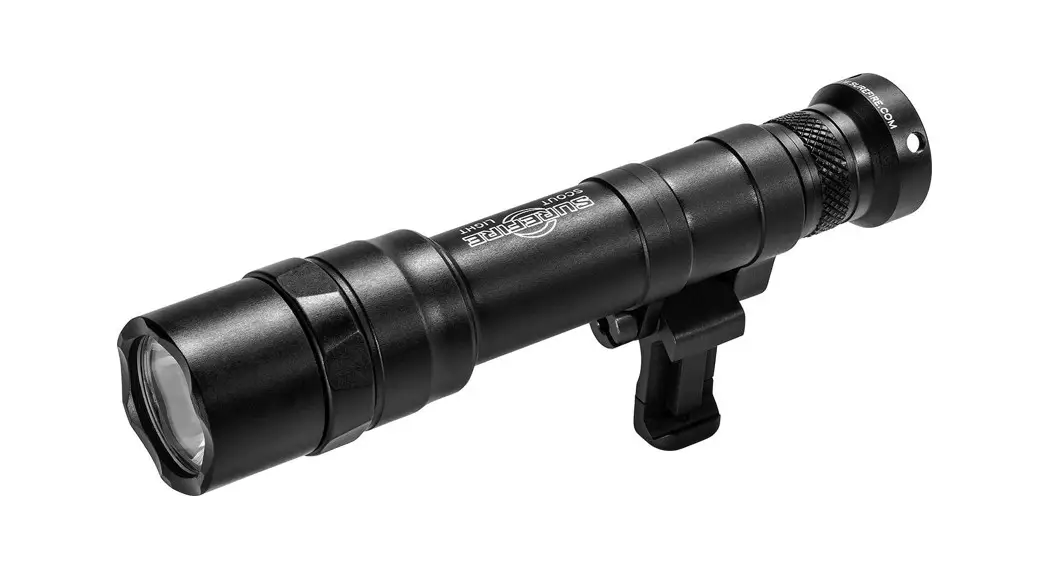
P1RZ Series Dual Fuel LED Combat Flashlight
Product Information
The SureFire No-Hassle Guarantee ensures that the company will
repair or replace any defective products in material and
workmanship during your lifetime. The warranty does not cover
consumables or normal wear-and-tear, abuse, alterations,
unauthorized repairs, or use contrary to SureFire’s user manuals.
The company reserves the right to replace an obsolete product with
a current production, like model. If any issue with a SureFire
product is not covered under this warranty, the company can arrange
to have the product repaired for a reasonable fee.
The P1RZ Series flashlight comes in two models: P1RZ-B-DFT and
P1RZ-IB-DF. Both models have a click tailcap switch and are
constructed of hard-anodized aluminum. The flashlight can be
powered by one SF18650B lithium-ion rechargeable battery (included)
or two 123A lithium batteries (not included). The P1RZ-IB-DF model
has an Intellibeam mode that automatically adjusts the brightness
based on surrounding light conditions.
The P1RZ-B-DFT model has a maximum output of 1,500 lumens with a
runtime of up to 40 hours using an SF18650B battery. The peak beam
intensity is 25,200 candela, and the beam distance is 315 meters.
The flashlight weighs 6.5 oz (184 g) with batteries, is 5.6 in
(14.2cm) long, and has a bezel diameter of 1.39 in (3.5cm).
The P1RZ-IB-DF model has a maximum output of 1,500 lumens with
an SF18650B battery and 1,100 lumens with two 123A lithium
batteries. The peak beam intensity is 16,700 candela, and the beam
distance is 255 meters. The flashlight weighs 6.5 oz (184 g) with
batteries, is 5.6 in (14.2cm) long, and has a bezel diameter of
1.39 in (3.5cm).
Product Usage Instructions
Lockout Tailcap: To enable the lockout tailcap,
rotate it clockwise until tight. To disable the lockout tailcap,
rotate it counterclockwise until the light will not activate when
the pushbutton is pressed.
Light Operation:
- P1RZ-B-DFT: Press or click the tailcap switch
to activate. - P1RZ-IB-DF: Press or click the tailcap switch
for Intellibeam mode. Return to off and press or click within two
seconds for high-output only.
Battery Replacement:
- Unscrew the tailcap counterclockwise and remove it.
- Remove old batteries and dispose of them properly.
- Insert two new 123A lithium batteries or one 18650 battery with
the positive (+) terminal(s) oriented forward. - Replace the tailcap by screwing it on clockwise. Press the
pushbutton (with tailcap enabled) to test.
Battery Information & Warnings: For
complete battery information and warnings, reference the enclosed
BATTERY INFORMATION / WARNING insert in your illumination tool’s
original packaging or visit www.surefire.com/batteries.
THE SUREFIRE NO-HASSLE GUARANTEE
We’ll do what it takes to keep your SureFire gear running smoothly. SureFire warrants that if you — our customer — purchase one of our products, and we determine that it is defective in material and/or workmanship during your lifetime, we will repair or replace it — no hassle!
Our warranty does not cover consumables or normal wear-and-tear — things like batteries draining, headbands and headpads wearing out, ink cartridges running out, and switches wearing out — or damage resulting from abuse, alterations, unauthorized repairs, or use contrary to SureFire’s user manuals.
Should you need a replacement product, SureFire reserves the right to replace an obsolete product with a current production, like model. In the event that any issue with a SureFire product is not covered under this warranty SureFire can arrange to have the product repaired for a reasonable fee.
STANDARD DISCLAIMER
Except as specified above or prohibited by applicable law: all express or implied conditions and warranties, including, without limitation, any implied warranty or condition of merchantability or fitness for a particular purpose, or accuracy of any informational content, are hereby excluded and disclaimed by SureFire; and in no event will SureFire be liable for any special, direct, indirect, consequential, incidental or punitive damages howsoever arising and regardless of the theory of liability, even if advised of the possibility of such damages. Products, prices, availability, specifications, and offers are subject to change or cancellation at any time without notice.
WARRANTY CLAIMS
For claims, contact Customer Service at 714-545-9444 to obtain a Return Merchandise Authorization number (RMA#). Then package the unit carefully and send to (no CODs):
SureFire, LLC. Repairs Department, RMA#____ 17680 Newhope Street, Suite B
Fountain Valley, CA 92708
SureFire will pay any reasonable shipping costs to return the unit to you.
18300 MT. BALDY CIRCLE FOUNTAIN VALLEY, CA 92708-6122 WWW.SUREFIRE.COM
Patent: 8,222,138
Revision A 2-2022 71-01-1142
P1RZ-IB-DF P1RZ-B-DFT
P1RZ SERiES
P1RZ-B-DFT
P1RZ-IB-DF
OUTPUT
P1RZ-IB-DF
SF18650B: 15-1,500 123A: 15-1,100 lumens
P1RZ-B-DFT
SF18650B: 1,500 123A: 1,100 lumens
RUNTIME
Up to 40 hours*
SF18650B: 1.5 123A: 1.25 hours
PEAK BEAM INTENSITY
SF18650B: 25,200 123A: 16,700 candela
BEAM DISTANCE
SF18650B: 315 123A: 255 meters
CONSTRUCTION FINISH WEIGHT (w/batteries) LENGTH BEZEL DIAMETER
Aluminum Hard Anodized (MIL-A-8625 Type III, Class 2)
6.5 oz (184 g) 5.6 in (14.2cm) 1.39 in (3.5cm)
BATTERIES
One SF18650B lithium-ion rechargeable (incl) or Two 123A lithium (not incl)
SWITCHING
Click tailcap
All performance claims tested to ANSI/NEMA FL1-2019 Standard. *SF18650B battery required
USER MANUAL
P1RZ SERiES
LOCKOUT TAILCAP (US PAT. RE40125)
To enable, rotate tailcap clockwise until tight.
ENABLE
DISABLE
To lock out tailcap, rotate counterclockwise until light will not activate when pushbutton is pressed.
LIGHT OPERATION
P1RZ-B-DFT: Press or click tailcap switch to activate. P1RZ-IB-DF: Press or click tailcap switch for Intellibeam mode, return to off and press or click within two seconds for high-output only.
LIGHT OPERATION
P1RZ-IB-DF: Press or click for Intellibeam mode, return to off and press or click within two seconds for high-output only.
NOTE: In order for the Intellibeam sensor to work properly, keep then lens clean of finger prints and other debris
BATTERY REPLACEMENT
1. Unscrew tailcap counterclockwise and remove. 2. Remove old batteries and dispose of properly.
3. Insert two new 123A lithium batteries or one 18650 battery with the positive (+) terminal(s) oriented forward.
4. Replace tailcap by screwing on clockwise. Press pushbutton (with tailcap enabled) to test.
BATTERY INFORMATION & WARNINGS
For complete battery information and warnings, reference the enclosed BATTERY INFORMATION / WARNING insert in your illumination tool’s original packaging or visit www.surefire.com/batteries.
SAFETY
The internal protection circuit integrated within the battery assembly provides protection against over-charge, over-discharge, short circuit, under-voltage, over-voltage.
SPECIFICATIONS
VOLTAGE CAPACITY CHARGE END VOLTAGE DISCHARGE END VOLTAGE STANDARD CHARGE RATE RAPID CHARGE RATE DISCHARGE RATE USB CHARGE VOLTAGE USB CHARGE CURRENT
SF18650B 3.6 V 3.5 Ahr 4.20 V 2.50 V 0.5C at 2.5-3 hours 1.0C at 1.5-2 hours 8-10 A 5.0 V ± 0.2 V 600 mA ± 100 mA
GET THE BEST FROM THE BEST
The SF18650B is a Lithium Ion protected 18650 battery with micro USB charge capability. This allows the user to conveniently charge the battery using any USB power source such as a USB wall charger, computer/laptop, power bank, or automotive USB port. Additionally, an external 18650 compatible CC-CV cradle charger can be used to charge the battery; possibly at a faster rate if so equipped.
OPERATION
The SF18650B can be used as a standard protected 18650 in many applications with one advantage; the battery can be charged directly through the micro USB port, requiring no external charge cradle. The SF18650B comes with a 6 inch USB type A plug to micro USB type B plug, with the micro USB plug being the end inserted into the battery. The battery side includes a micro USB type B receptacle. Once the cable is plugged into the battery and a power source, the 2 LED indicators display the current charge state: RED for charging and GREEN for fully charged. The battery can be left connected to the charge source indefinitely as the internal charge algorithm will restart the charge cycle once the cell voltage drops below 4-5% of the float voltage. The typical charge time for charging via the micro USB port for fully depleted battery can be over 5 hours. The user has an option of charging the battery with an external charger to shorten the total charge time.
The quiescent drain on the battery from the protection circuit is 40uA, which in addition to the cell self-discharge, allows a fully charged battery to be stored for 2-3 years and still maintain usable capacity
ENVIRONMENTAL
Charging: 0°C-45°C, 65%±25%RH Discharging: -20°C-+60°C, 65%±25%RH Storage Temperature Range: 0-35°C. 60±25% RH
Note: The battery’s metal button top also functions as a heatsink during USB charging, which may result in it being very warm to the touch during the high charge rate period.
 SureFire