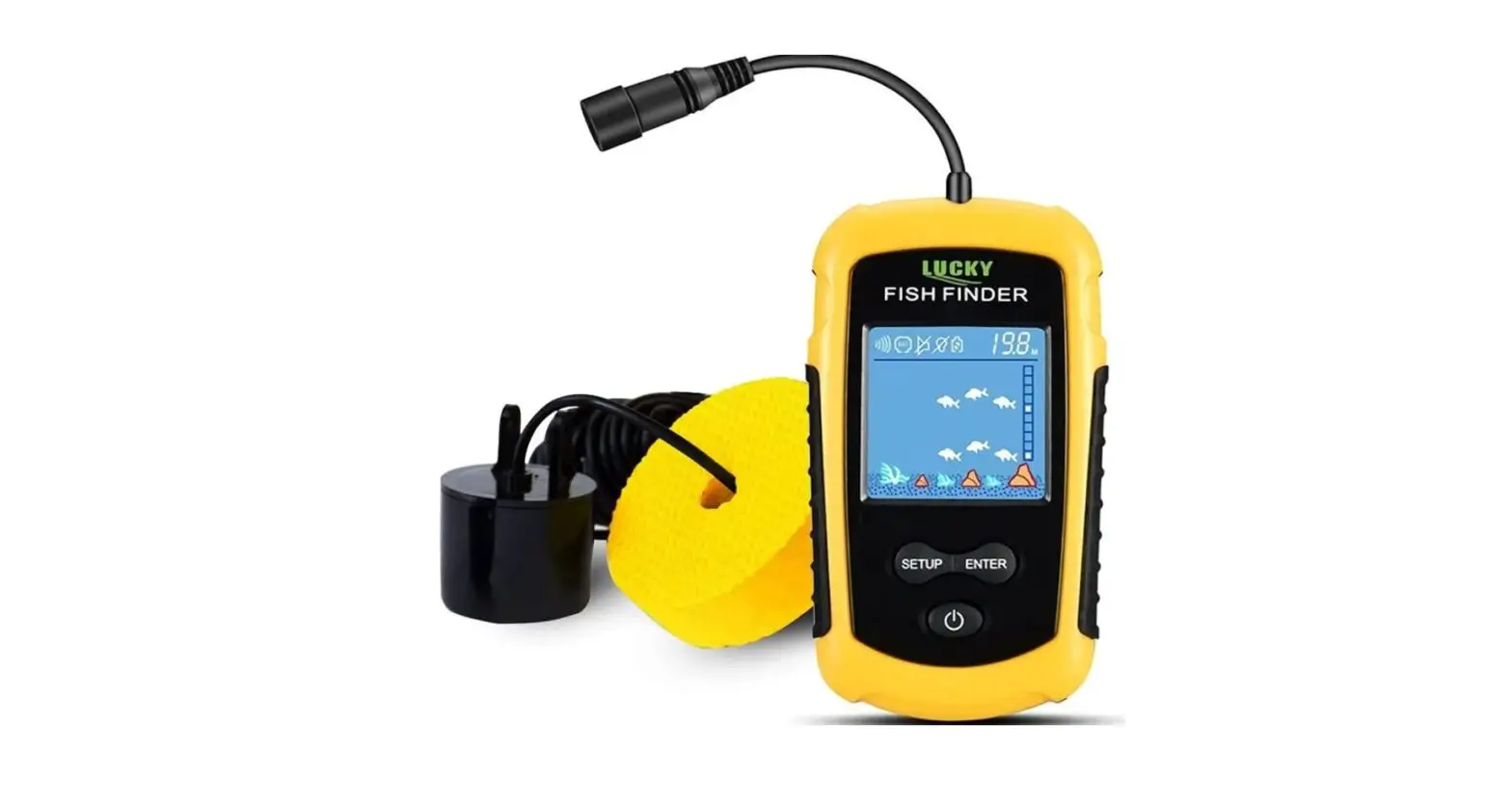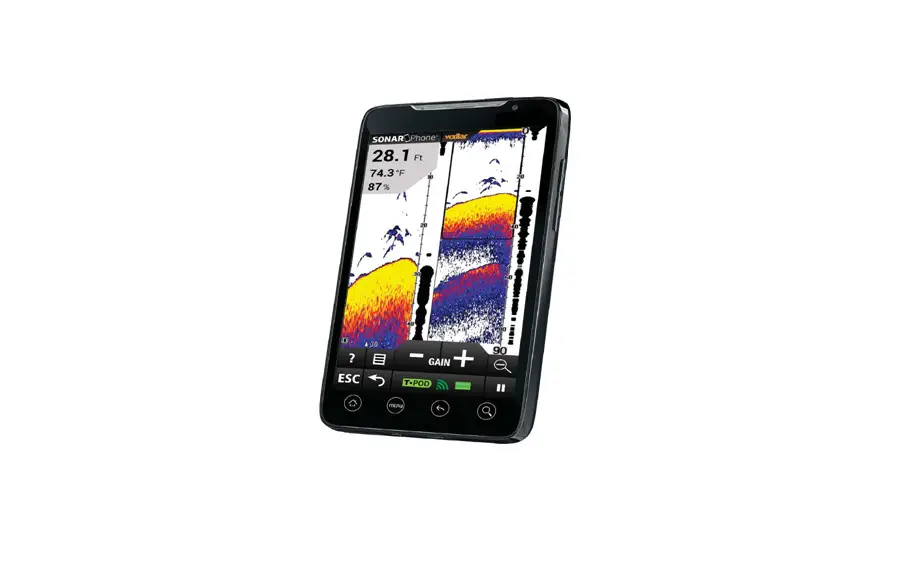

Hawkeye FishPod® 5x Bluetooth Fish Finder
INTRODUCTION TO FISHTRAX™ INTELLIGENT SONAR
FishTrax™ Intelligent Sonar uses SONAR sound waves to detect depth, locate fish, and define bottom contour, composition and structure. Using specialized microprocessors, these sound waves are generated by the FishTrax™ display and sent to the FishTrax™ sonar sensor. The sonar sensor, acting first as a “speaker”, emits these sound waves as a series of pulses. Then, microseconds later, the sonar sensor switches to a “microphone” and listens for the return of the pulses as they bounce off of objects in the water column (sometimes referred to as “echoes”). The “echoes” are sent back to the display where, using proprietary algorithms in the FishTrax™ software, they are analyzed for location, size, and composition of the objects. These signal are then arranged by FishTrax’s™ Human Interface Software and displayed in an easy to understand manner on the VirtuView™ ICON display.
Scan This QR Code With Your Phone To View Our Product Orientation Video
Don’t have a QR Code Reader? No Problem! Download One Today For Free In Your Phone’s App Store.
SAFETY INFORMATION
- Periodically wipe the face with a dry cloth. Do not use abrasives or solvents on this device.
- Only qualified personnel should perform repairs or servicing not covered in this manual.
- The LCD used in the product is made of glass. Therefore, it can break when the product is dropped or impacted.
- Keep this product away from heat sources such as radiators, heaters, stoves and other heat generating sources. Do not store in extreme temperatures above 150° F (65° C).
- Shade the LCD during storage. Do not expose LCD to direct sunlight for extended periods of time.
NOTES, NOTICES, AND CAUTIONS
- WARNING: Indicates a potential for property damage, personal injury or death.
- IMPORTANT: Indicates potential damage to the device and tells you how to avoid it.
- NOTICE: Indicates important information that helps you make better use of the device and tells you how to correct a performance problem.
- INFORMATION: Indicates resources to obtain the proper information to help you make the most of your device.
INFORMATION:
Read this manual completely before attempting to use or install your device. Visit our Customer Service Center on our website for advanced troubleshooting and technical support.
WARNING:
This fish finder should not be used as a navigational aid to prevent grounding, boat damage, or personal injury. Always operate the boat at slow speeds in unfamiliar water, or if you suspect shallow water or submerged objects.
INFORMATION:
If you have questions about this device please visit our Customer Service Center on our website or call us toll free at 888-766-7276. Warranty Details • Warranty Registration Troubleshooting • Product Knowledgebase Product Specifications • Parts & Accessories www.hawkeyeelectronics.com
PARTS SUPPLIED IN PACKAGING
The following parts should be included with the display:
- Fish Finder Display
- Sonar Sensor (Transducer) with Integrated Harness and Strap
- Sonar Sensor Float with Rubber Stopper
If any items are missing or damaged, please contact our customer service department.
FISHING PLATFORM CONFIGURATION
NOTICE:
The HawkEye® FishTrax™ 1’s built-in expandability allows addition of accessories to adapt the fish finder to any fishing platform. Visit our website to see a complete listing of FishTrax™ accessories.
Boat, Kayak, Canoe, Float Tube, Bank, Dock, Ice, etc. You choose the platform, then visit our website at www.hawkeyeelectronics.com and select the accessories to adapt your HawkEye® FishTrax™ Fish Finder to your fishing needs.
INITIAL SETUP
IMPORTANT
- If you are going to be using the Fish Finder in Temperatures Below 20º F (-7 ºC) you must use Lithium ‘AAA’ Batteries. Cold temperatures significantly reduce the power output of Alkaline batteries, which will inhibit the performance of the Fish Finder.
- To ensure your FISHTRAX™ 1 remains water tight, coat the battery cover seal with petroleum jelly (Vaseline) or silicon grease (available at any dive shop) each time you replace the batteries.
WARNING:
Never mix different brands of batteries. Never mix new and used batteries (alkaline, lithium, argon zinc, & rechargeable). Never use damaged batteries. REMOVE BATTERIES DURING STORAGE. REMOVE DEAD BATTERIES IMMEDIATELY.
Installing the Batteries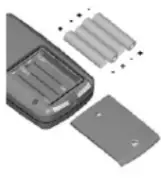
- Using a flat head screw driver, turn the screws on the battery cover counter clockwise to loosen.
- Lift the battery door off the display housing.
- Install 4 “AAA” batteries. Be certain to align the batteries as per the diagram within the battery compartment.
- Reinstall the battery cover completely by reversing Step 1.
Connecting the Sonar Sensor Cable: 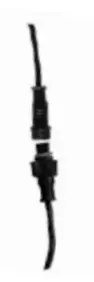
- Align the pins on the sonar sensor cable plug with the plug on the display.
- Firmlly press the two plugs together until the red o-ring on the display connector is squashed between the plugs.
- Tighten the locking nut on the display plug until it is snug by turning it clockwise. Finger tighten only, do not use tools.
GETTING TO KNOW YOUR HAWKEYE® FISH FINDER
UNDERSTANDING THE VIRTUVIEW™ ICON DISPLAY 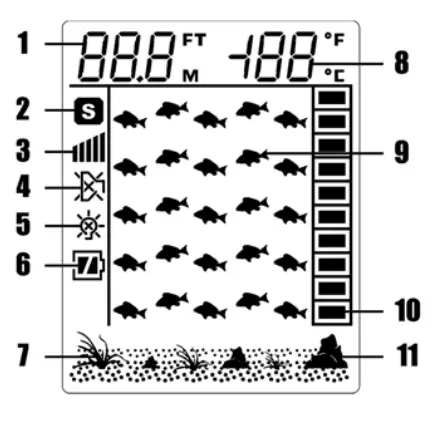
- Depth Readout
- Simulator Indicator
- Sensitivity Indicator
- Fish Alarm ON/OFF
- Backlight ON/OFF
- Battery Strength Indicator
- Weed Indicator
- Water Temperature
- Fish Icon
- Fish Depth
- Rock Indicator
UNDERSTANDING THE BUTTONS 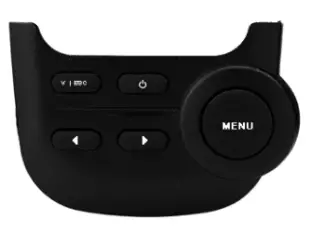
- ESC: Exit Out of Setup
- Power ON or Off, Simulator Mode
- Feature Adjustment
- Feature Adjustment
- MENU: Access Feature Setup
TURNING THE FISH FINDER ON/OFF
- To turn the fish finder ON, press and release the
 button.
 - To turn the fish finder OFF, Press and Hold the button for 3 seconds.
 button.
PLACING THE FISH FINDER IN SIMULATION MODE
- To enter the Simulation Mode, while the fish finder is off, hold the button for 3 seconds until the fish finder beeps, release the button.
- The fish finder is now in Simulation Mode and the Simulator icon
 will now be illuminated.
 - The fish finder must be turned OFF and back ON again to access normal operation mode.
 will now be illuminated.
NOTICE:
The fish finder has an automatic “power-off” feature to prevent battery drain if you accidentally leave the Fish Finder on. When the depth display reads “—” continuously for 5 minutes, the display will shut off automatically.
ACCESSING AND ADJUSTING THE FEATURES
To simpify the operation of the FishTrax™ 1 many of the complex features such as gain (power), interference (noise rejection), and depth range are adjusted automatically. However there are 4 features that can be manually adjusted.
- Sensitivity
- Audible Fish Alarm
- Display Backlight
- Fish Finders of Measure
SENSITIVITY
There are 5 user selectable sensitivity settings to choose from. 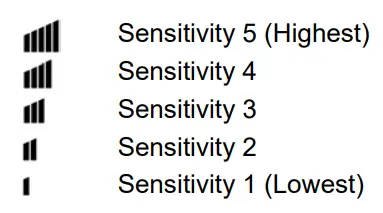
INFORMATION:
Which setting is the right setting? It greatly depends on the clarity and/or depth of the water. Very clear water allows for a moderate sensitivity setting. Conversely, dirty water requires a higher sensitivity setting to target detail but will increase the irritating false readings. Targeting deep water fish generally requires greater sensitivity, especially in stained or dirty water. Salt and brackish water also require a comparatively higher sensitivity setting. While this analysis may seem confusing, the concept is simple. As the Fish Finder’s sensitivity is elevated, a broader view and smaller details show on the screen. But, with a broader and stronger view comes more clutter and debris. The clearer the water, the less sensitivity needed to get accurate details and vice-versa.
To Turn the Sensitivity UP or Down:
- Press and release the MENU button.
- The Sensitivity Indicator
 will blink.
 - To increase the sensivity press the
 button.
 - To decrease the sensitivty press the
 button.
 - Press V|ESC to exit the setup menu.
 will blink.
 button.
 button.
AUDIBLE NOTIFICATION OF THE PRESENCE OF FISH
You can set the FishTrax™ 1 to sound an audible alarm when a group of fish are detected. It will NOT sound if just one fish is detected.
To Turn the Fish Alarm ON or OFF:
- Press and release the MENU button 2 times.
- The display will flash the Fish Alarm Icon
 .
. - Press either the
 buttons to toggle the Alarm ON or OFF
 = Fish Alarm is ON
 = Fish Alarm is OFF
- Press the ESC button to exit the setup menu.
 .
. buttons to toggle the Alarm ON or OFF
 = Fish Alarm is ON
 = Fish Alarm is OFF
INFORMATION:
Leave the alarm on if you are using a crank bait so that you do not have to steadily watch for fish on the screen. If you hear the alarm, gently toss your bait at least 20 feet beyond the sonar sensor, allow the bait to drop to the depth of the fish alarm, and retrieve as recommended for the targeted species.
DISPLAY BACKLIGHT
Turning the backlight feature ON will keep the screen illuminated all the time. This feature will greatly reduce the battery life of the Fish Finder, so it should only be used during low light conditions.
To Adjust Backlight Setting:
- Press and release the MENU button 2 times.
- The display will flash the Fish Alarm Icon .
- Press either the buttons to toggle the Alarm ON or OFF
- = Fish Alarm is ON
- = Fish Alarm is OFF
- Press the ESC button to exit the setup menu
CHANGING THE DISPLAY UNITS
The FishTrax™ 1 can display readings in English (Ft/F) or Metric (M/C). To Adjust the Display Units:
- Press and release the MENU button 4 times The display will flash the current Fish Finder’s setting next to the depth and temperature readout.
- Press either the buttons to toggle the Fish Finder of measure (Ft = Feet or M = Meters). The selected Fish Finder of measure will blink.
- Press the ESC button to exit the menu.
ADJUSTING THE SONAR SENSOR FLOAT
The Sonar Sensor float must be adjusted so that it is a minimum of 6 inches away from the sensor (it can be further depending upon water conditions, see Note below).
- Pull out the rubber stopper.
- Adjust float so that it is 6 to 10 inches from the sensor, or at your desired depth.
- Replace the rubber stopper by pressing it firmly into the float.

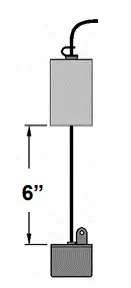
NOTICE:
In calm water, the sonar sensor can be set at a level which will provide the maximum amount of sonar coverage. In rougher water, the sonar sensor may need to be lowered into the water further to provide stabilized readings.
USING THE SONAR SENSOR WITH THE FLOAT
Toss the sonar sensor and float assembly into the water at your desired fishing location. 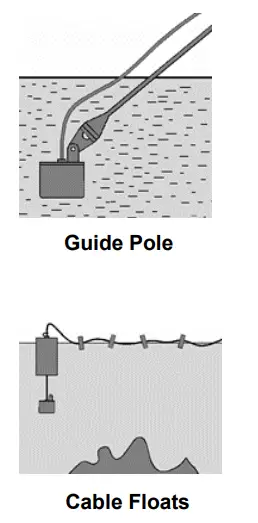
- To toss, place the sonar sensor and float in your hand, and pitch underhand. Do not throw the sensor by the cable as this will cause unrepairable damage. Before tossing, be certain that the cable is free from tangles and is not wrapped around anything.
- Use a pole to guide the sonar sensor to a desirable position or add a float kit (available on our website) on the cable to allow the cable to float on top of the water.
- To retrieve the sonar sensor and float, simply pull in the cable being certain to neatly wind up the excess cable.
IMPORTANT:
Do not allow the cable to sink to the bottom as it may become entangled in debris.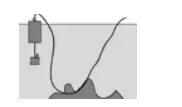
REMOVING THE SONAR SENSOR FLOAT
If you find that you do not have a need for the sonar sensor float, it can be removed as follows:
- Remove the rubber stopper from the cable by sliding the safety strap toward the headphone-style plug and gently working it over plug.
- Slide the cable through the center of the float toward the plug and gently work the plug through the center of the float in a rocking motion.
USING THE SONAR SENSOR FROM A BOAT, KAYAK, CANOE OR FLOAT TUBE
NOTICE:
The FishTrax™ 1’s built-in expandability allows the addition of accessories to adapt the fish finder to any fishing platform. Visit our website to see a complete listing of FishTrax™ accessories.
There are five methods that can be employed to use the fish finder from a boat.
- Toss the sensor and float into the water as per the previous instructions.
- “Shoot-Thru” the hull as per the instructions in the next section.
- Attach the Sonar Sensor to the Side-Scan Adapter (optional) and use a pole or broom stick handle to scan for fish as per the fishing tip below.
- Attach the Sonar Sensor to the Transom Mount Bracket (optional) and mount to the transom of the vessel’s hull.
- Attach the Sonar Sensor to the Transducer Arm Bracket (optional) and suspend from the transducer from the side of the vessel.
INFORMATION:
By attaching the optional Side-Scan Adapter to an ordinary broom stick or paint roller handle purchased from a local hardware store, you can scan for fish suspended in the water column within 240 ft (75 m) of your location. Attach the sensor to a handle, lower the sensor into the water, and slowly move the sensor in a manner that will allow the signal to search the desired location (a sweeping motion similar to using a flashlight is most effective). Keep in mind the sonar signal is emitted from the base of the sensor. Scan down, sideways, or any combination of the two. Remember, to get depth and bottom contour and composition readings you will have to aim the signal at a solid object within 240 ft (75 m), however FISH readings will be accurate, even if the depth reading is “—â€.
USING THE FISH FINDER THROUGH A BOAT HULL
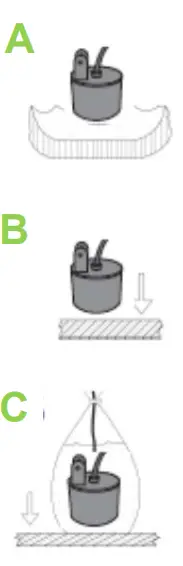
The FishTrax™ 1’s advanced sonar capabilities allow it to “Shoot-Thru” the bottom of a boat, kayak or canoe. The hull must be made out of solid fiberglass, or a maximum of 1/8” aluminum, and be in direct contact with the water, with no air pockets. The FishTrax™ 1 will not work through wood, plastic, or any composite material.
To “Shoot-Thru” the hull of a boat, do one of the following:
- Place the sonar sensor in .5 inches of water against the hull bottom.
- Coat the face of the sonar sensor with petroleum jelly and press it against the hull bottom with a twisting motion.
- Place the sonar sensor in a plastic bag that is full of water and place against the hull bottom.
NOTICE:
If depth readings appear as “—” while using one of these methods, place the sonar sensor directly in the water to verify that the fish finder is operating properly. If it operates properly while directly in the water, reposition the sensor in a new location in the hull, and repeat methods A, B, or C. These methods DO NOT work on all hulls and you may have to place the sensor directly in the water for proper operation.
USING THE FISH FINDER FOR ICE FISHING
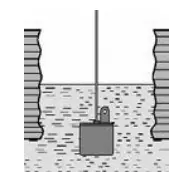
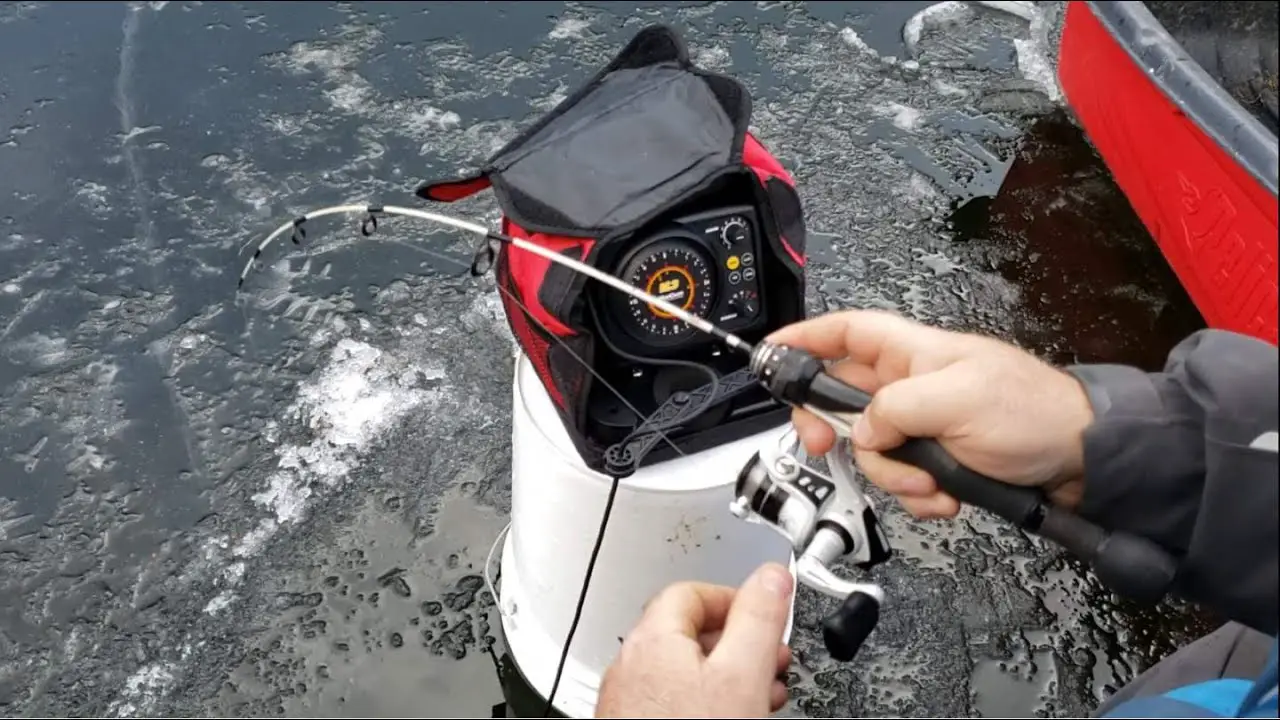
To achieve the best performance for ice fishing, you should cut a hole through the ice and place the sonar sensor directly in the water like the illustration to the right.
If you would like to check the area for depth or fish before cutting the hole, please follow steps 1 – 4 precisely.
NOTICE:
To use this method, the ice MUST be clear (usually referred to as black ice), free from air bubbles, voids, cracks, etc.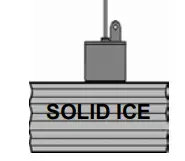
- Clear away snow to expose the ice surface.
- Place a small amount of liquid water on the ice and set the sonar sensor on the water allowing the Fish Finder to freeze to the ice.
- If there are any air pockets between the sonar sensor SOLID ICE and ice, or the water below the ice, the Fish Finder
will not work properly and will require you to try another spot, or cut a hole in the ice to use. You can also use the instructions in the “To Shoot-Thru the Hull of a Boat†section. Be certain not to allow the water to freeze around the sensor if you use the method. - To remove the sonar sensor from the frozen ice, gently tap the sonar sensor at the base with your hand. If it will not come loose, spray a small amount of water on the ice surface around the base and repeat step 4 until the sonar sensor is easily removed.
IMPORTANT
Never use a blunt object to strike the sonar sensor as this may cause damage to the sensitive internal electronics.
INFORMATION: 
By attaching the optional Side-Scan Adapter to an ordinary broom stick or paint roller handle purchased from a local hardware store, you can scan for fish suspended in the water column within 240 ft (75 m) of your location. Attach the sensor to a handle, lower the sensor into the water, and slowly move the sensor in a manner that will allow the signal to search the desired location (a sweeping motion similar to using a flashlight is most effective). Keep in mind the sonar signal is emitted from the base of the sensor. Scan down, sideways, or any combination of the two. Remember, to get depth and bottom contour and composition readings you will have to aim the signal at a solid object within 240 ft (75 m), however FISH readings will be accurate, even if the depth reading is.
UNDERSTANDING HOW THE FISH FINDER FINDS DEPTH, FISH, DEBRIS, BOTTOM CONTOUR/COMPOSITION, ETC.
Greatly simplified, this fish finder is just a combination of a speaker, microphone and stopwatch. It transmits a sound pulse from the sonar sensor, and then measures the time it takes for the “echoes” to return to the sonar sensor (The fish finder “knows” that the speed of sound through water is about 4800 feet per second).
Fish, rocks, logs, weed, debris, the bottom, etc all “echo” the pulse at a different intensity. A built-in computer then organizes all of this information and shows it on a display screen in a manner that is easy for the user to understand.Depth Readout
The depth readout on the upper left corner will appear after the power is turned ON and the sonar sensor is placed in water between 2 feet and 240 feet (.5 to 75 meters). If the depth exceeds these parameters, the depth meter will indicate “—”. This reading may also occur in water that is extremely dirty, or where there are heavy silt or mud bottoms. Sonar is a sound signal that travels through water. Sonar will not travel through air. Keep this in mind when using the fish finder, as the smallest air bubble between the sonar sensor and the water will cause the Fish Finder to not operate correctly.
Fish Indicators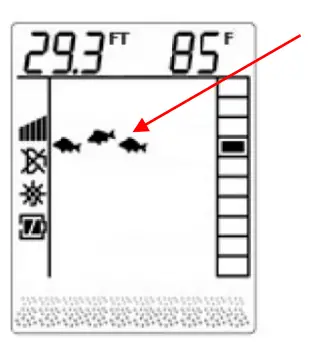
If the fish finder determines that sonar has detected a fish, the display will show a fish shaped icon. The first column of fish indicators on the right of the display shows the most current information. This column is then moved to the left as a new reading is displayed. That is, fish indicators away from the right to the left at a constant speed. This motion in no way reflects actual movement of the fish.
Fish Depth Indicator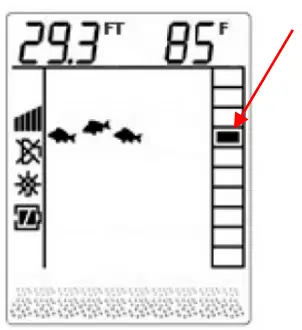
Use the Fish Depth Indicator to measure the fish’s depth from the Sonar Sensor. This can be done by dividing the depth reading by 10. This number represents the value of each box.
(Example: The depth is 29.3 feet, the fish symbol appears in the 4th box from the top. This means the fish is 7 to 8 feet from the surface)
INFORMATION:
If the prey that you are targeting prefers a weed habitat you should try to fish your bait as close to the top of the weeds as possible (installing a weed guard on your hook will prevent accidental snagging of the weed).
TARGETING PREY IN THE WEEDS
The WeedID® feature incorporated into the fish finder depicts the amount of weed at the bottom of the water body.
- The display indicates the presence of short weeds by turning on the smallest WeedID® indicator (right).
- Moderately tall weeds are depicted by turning on the medium WeedID® indicator (center).
- Tall weeds are depicted by turning on the big WeedID® indicator (left).

INFORMATION:
Experienced fisherman will tell you that many fish choose to hide along the bottom and ambush their prey as it swims by. Logs, tree stumps, rocks, ledges, etc. all provide excellent ambush locations. Uncovering these hiding places will prove invaluable to your fishing trips. Remember to keep an eye on the depth of your bait while fishing bottom structure as you do not want to snag it on the structure.
UNCOVERING THE BEST HIDING PLACES
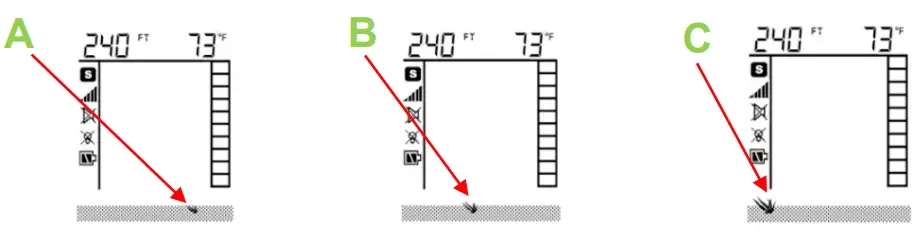
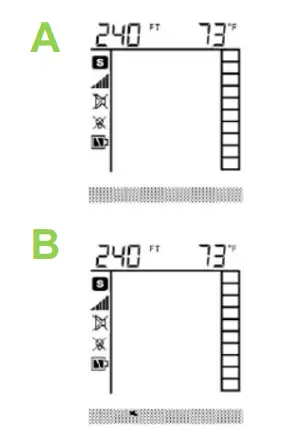
The VirtuViewâ„¢ display on your Fish Finder depicts bottom structure with a series of rock indicators. If the species that you are targeting prefers to ambush prey as per the above Fishing Tip, pay close attention to the bottom structure indicators when searching for fish.
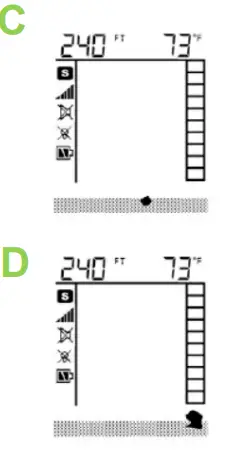
- No rock indicators identify a structureless bottom. This depicts a bottom that is most likely sandy or muddy with no debris or contour. A good habitat for some fish, but not very desirable for ambush feeders.

- One Rock Indicator identifies limited structure. You would most likely find a small rock, a small pile of rocks, or uneven bottom contour. This is not a bad place for hiding fish, but due to the limited amount of structure, there may not be a lot.
- Two Rock Indicators identifies a considerable amount of bottom structure, but scattered. A considerable amount of time needs to be spent fishing this area as each piece of structure could be hiding a prize catch.

- Three Rock Indicators indicates a large amount of bottom structure in a confined area. This bottom may consist of a large rock(s), stump(s), tree(s), or a ledge(s). Read the following tip to protect this spot.
INFORMATION
If you re targeting fish that prefer weed or structure, try this: If youâre fishing from a boat establish accurate readings by using the techniques in this manual. Next, slowly move the boat around the fishing area while paying close attention to the bottom structure and WeedID. Do not begin fishing until you discover the optimal spot for fishing (using your knowledge about the desired prey’s feeding habitat and the fish finder readings). This may take a considerable amount of time, but if you find a secret spot it will be well worth it. This can also be done from shore by walking along the bank and tossing and retrieving the sensor out into the water in 5 foot intervals. IMPORTANT: When you find that secret spot, keep it to yourself. There is nothing that ruins a secret spot quicker than word of mouth.
CARE OF YOUR FISH FINDER
- Clean the sonar sensor and cable with fresh water and dry off before storing. Do not submerge and/or spray the fish finder screen/housing with water or use chemicals to clean. If necessary, wipe with a damp cloth.
- Remove the batteries from the fish finder to prevent battery leakage and corrosion.
- Store the fish finder in the storage bag in a cool, dry place. Never leave it in temperatures over 120° Fahrenheit (49° Celsius)as the extreme temperatures can damage the electronic components.
IMPORTANT:
Cold weather is extremely hard on the electrical components within the display housing. It is suggested that you keep the Fish Finder in temperatures above 0° Fahrenheit (-17° Celsius) during operation. The sonar sensor cable also becomes very stiff under cold conditions. Excessive winding or unwinding under these conditions may cause irreparable damage. DO NOT WIND OR UNWIND THE CABLE IN TEMPERATURES BELOW 32º F (0º C).
TROUBLESHOOTING AND FREQUENTLY ASKED QUESTIONS
24-Hour Technical Support is available online at hawkeyeelectronics.com. Search our online Knowledgebase for the latest troubleshooting and FAQ’s, or post your own question for our support staff. For one-on-one support please email [email protected].
- Sonar Cross Talk
If you experience incorrect depth readings on your Digital Depth Sounder display, but nothing on another fish finder screen on the same boat (or vice versa) then you are experiencing sonar cross-talk interference. The only real solution is to move the transducers further away from each other. This can help keep the transducer cones from intersecting, but because cones get wider as the depth increases, the problem can not usually be completely solved by position only. Changing one of the sounders to another model that runs on a different frequency will solve the problem. - Nothing Happens When I Turn the Power On
Make sure that you have installed a good set of batteries and aligned them as per the diagram within the battery compartment. You may also need to test the batteries in another device to ensure they are charged. If in doubt, replace the batteries with a set from a newly opened package. - The Depth Reading Is “—”
First verify that the sonar sensor is plugged into the display housing properly by turning the display on and listening for a ticking sound from the sonar sensor.
Make sure that you are operating the Fish Finder in depths between 2 and 240 ft (.5 to 75 m). Be aware that the depth is measured from the sonar sensor, not the float.
Also make sure that the water is not overly choppy, causing the sonar sensor to move around significantly. The sonar sensor must remain relatively stable to achieve optimal readings. When necessary, lower the sonar sensor to hang further from the surface of the water, providing more stability in rougher water. - I See Fish Under the Sonar sensor, but Nothing Appears on the Display
As with the depth reading, the fish finder will not detect any objects that are closer than 2 ft from the sonar sensor. If you’re fishing in water that is less than 3 feet deep, it is recommended to discontinue use of the fish finder. - The Depth Reading is Incorrect
Make sure that you are pointing the sonar sensor perpendicular to the water when trying to obtain depth readings.
Extremely heavy vegetation may confuse the sonar of the fish finder causing it to misinterpret the depth. If you are certain that the readings are incorrect under these conditions, discontinue use. - I’m Not Getting a Reading While Trying to Shoot Through My Boat Hull or Ice
Shooting through the hull of a boat/canoe or ice can be difficult, as hidden air pockets will prevent you from obtaining a reading. Make certain that the hull or ice is solid from the surface to the water with no air bubbles and/or gaps. Shooting through composite hulls (plastic) or cloudy ice is not possible as tiny air bubbles are usually present in these situations. - I’m Getting False Fish Indications
The most common cause of false fish indications is extremely tall weed growth. If weeds grow taller than 50% of the total water depth in a particular area, the sonar will mistake it for fish. Trash & debris may also give false readings. Adjusting the sensitivity setting to the lowest level may reduce these false readings, but if they do not go away, it is suggested that you discontinue use of the fish finder under these conditions. - I’m Using the Fish Finder in a Swimming Pool and it’s Not Working
Because of interference caused by “sonar bouncing”, the fish finder will NOT function properly in a swimming pool, bath tub, bucket, barrel, garbage can, or any body of water that has hard sides. It must be used in an open body of water to function properly.
REPLACEMENT PARTS
Please check our website for replacement parts and accessories. If you need replacement parts that are not listed, please email our Customer Service Department at [email protected].
WARRANTY
This device is covered by a 2 Year Limited Warranty. To be eligible for warranty coverage, you must register your product within 15 days of purchase. Visit our website for warranty details and to register.
To Activate Your Warranty:
- Read and print out a copy of the warranty details for your records.
- Complete the registration form on our website.
- Make a copy of your original purchase receipt and staple it to this manual. You will need to present it in the rare occurrence that you need to send your product in for service.
- Complete the information below and store this manual in a safe place.
INFORMATION:
To aid in maintenance and service, record the following:
Date of Purchase: ___________________
Place of Purchase: _____________________________________
Date of Online Warranty Registration: _____________________
Production Date Code : ________ (4 digit code located on the device housing)
You can print additional copies of this manual from our website
Made in China under the strict specifications Tested to comply with FCC, CE & ROSH standards if applicable. Visit our website for compliance and warranty information. All Specifications and Prices Subject to Change Without Notice.
NorCross Marine Products, Inc
(P) 888-7NorCross (888-766-7276),
(F) 407-370-6880,
(E) [email protected]
(I) www.norcrossmarine.com
WARNING:
© 2015 NorCross Marine Products Inc., All Rights Reserved. ALL unauthorized copying of the content of this document without the expressed written consent of NorCross Marine Products, Inc is strictly forbidden.
FAQS
using the transducer with the float, can you being moving/underway with it? would it still be affective paddling a kayak and having it trail behind u?
While paddling a kayak I am able to see fish and structure using the transducer with the float.
How long is the cord?
The transducer cord is roughly 14 ft 6 in long.
Is there a manual with this?
yes very helpful
What are the screen dimensions?
Small screens but you get the idea
How deep in depth can the finder go?
Hawkeye claims a max depth of 240 feet. But, that would depend on the sensitivity setting and water clarity.
What is the diameter of the round transducer part?
Approximately 1 3/4″
Is it waterproof?
As the online specifications say- Yes it’s waterproof, it’s a wonderful device- helped me catch many fish!!
This coming in spanish languaje and other more
The manual is in English. The menu does support 16 languages and one of them is espanol! Si!
Does this have a GPS for marking spots?
No it does not have GPS.
What are correct Dimensions on this fish finder?
It’s a little bigger than my IPhone 12
Does this unit have the upgraded thumbscrews, or the standard screws for the battery cover?
As of today, this unit has the standard battery cover. Upgraded fish finders with the quick-change battery cover will begin shipping in October 2020.